The beauty supply chain is not slowing down. McKinsey’s 2026 State of Beauty analysis expects the global beauty market to grow about 5% annually through 2030 and reach $590 billion. Circana also reported that U.S. prestige beauty reached $36 billion in 2025 while mass beauty reached $72.7 billion. For distributors, that growth creates daily pressure around stock accuracy, batch expiry, retailer credit, supplier payable tracking, invoice follow-up, and field order management.Beauty Products Distributor Management System Web App
The Beauty Products Distributor Management System Web App is built for that exact operating reality. It gives beauty and cosmetics distributors a Google Apps Script and Google Sheets based workspace for managing products, brands, suppliers, retailers, purchase stock-in, sales invoices, pre-sales orders, payments, inventory alerts, reports, users, settings, and audit history from one browser-based system.
View the Beauty Products Distributor Management System Web App on NextGenTemplates.
🚀 Try the Live Demo Before You Buy
We have deployed this web app in our own Google account so you can test every page, every role — with real sample data — before purchasing. No signup, no email required.
🔑 Test Login Credentials
Sign in as admin to explore all modules plus Settings, User Management, List Management, Audit Log, and Database Archive — or as rahul / sneha to experience daily operations: billing, orders, payments received, inventory view, purchases, and reports (no admin modules).
💡 What you get after purchase: The full source code (Code.gs + Index.html) plus a step-by-step deployment guide so you can deploy your own private instance in your own Google account in under 15 minutes.
Key Features of Beauty Products Distributor Management System Web App
- Distributor dashboard: Track today’s sales, monthly sales, receivables, supplier payables, low-stock items, near-expiry products, pending orders, active retailers, and sales by month.
- Product master: Manage product names, categories, brands, unit values, pricing, stock quantity, product status, and low-stock alerts.
- Supplier and brand management: Monitor supplier purchase totals, payable values, payment terms, supplier status, and contact details.
- Retailer network: Maintain shop-level retailer records, credit limits, retailer type, route coverage, area mapping, and account status.
- Purchase and stock-in workflow: Record purchase totals, tax amounts, supplier invoices, stock-in dates, purchase status, and returns.
- Sales and billing: Manage invoices, paid amounts, balance amounts, payment status, and sales returns by invoice record.
- Pre-sales order tracking: Track order amount, expected delivery, order status, conversion to invoice, and approval actions.
- Payments and receipts: Record retailer payments, payment modes, amounts received by invoice, supplier payments, and receipt printing.
- Inventory control: Review on-hand stock, stock value, reorder levels, alerts, batch and expiry tracking, and stock adjustments.
- Governance: Use role-based user management, list settings, business settings, and audit logs to keep activity traceable.Beauty Products Distributor Management System Web App
The app follows familiar web app patterns and can be deployed through Google Apps Script. For technical context, Google explains the deployment model in its official Apps Script web app documentation.Beauty Products Distributor Management System Web App
Dashboard Pages Explanation
1. Login Page
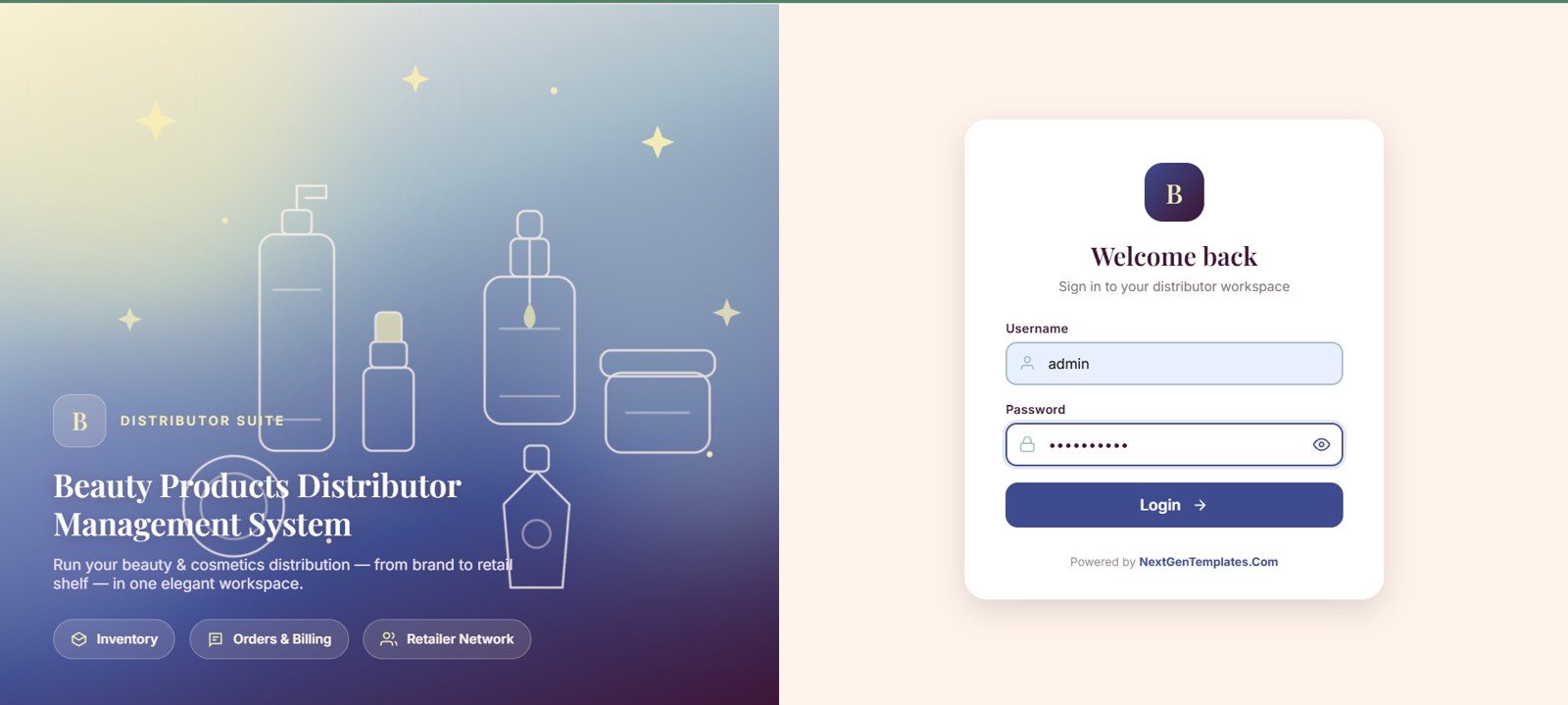
The login page introduces the distributor suite, highlights inventory, orders and billing, and retailer network modules, and provides username and password access control for returning users.
2. Dashboard
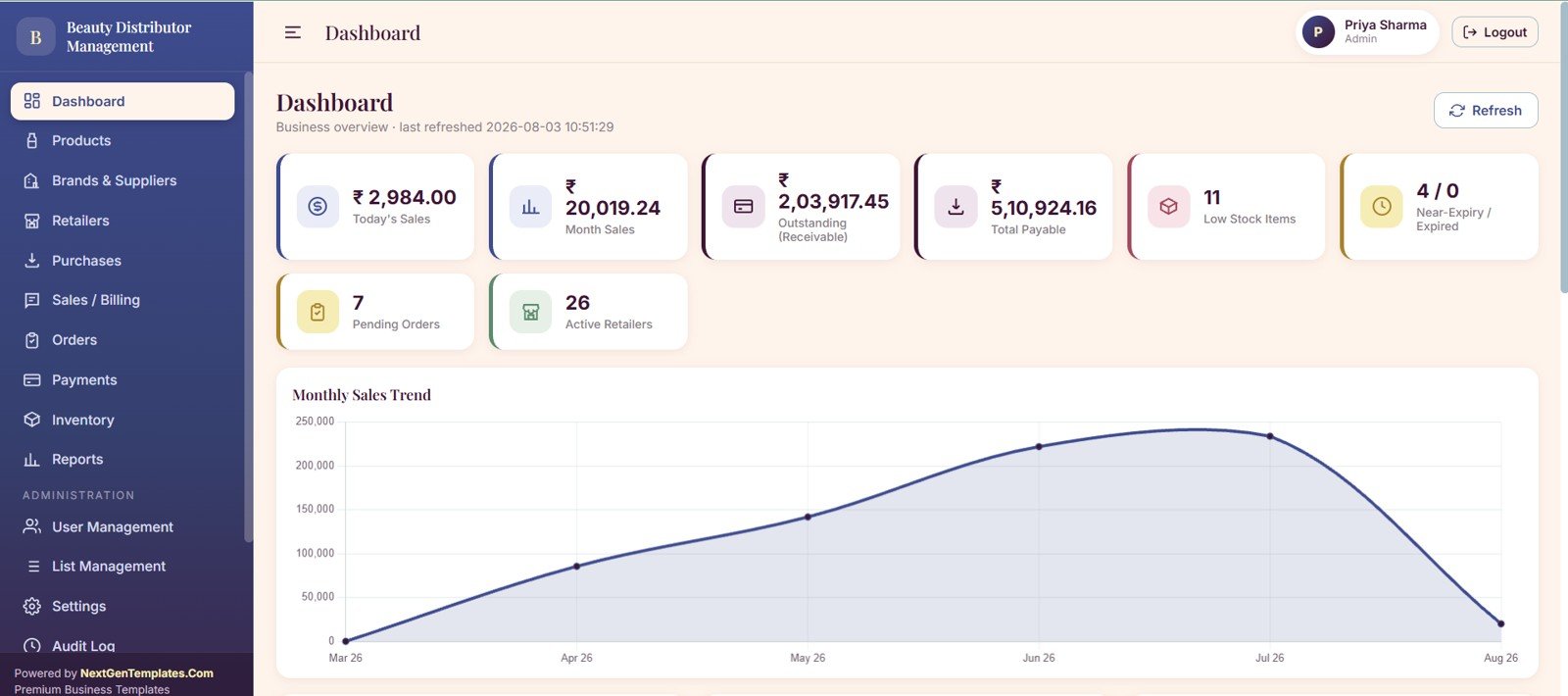
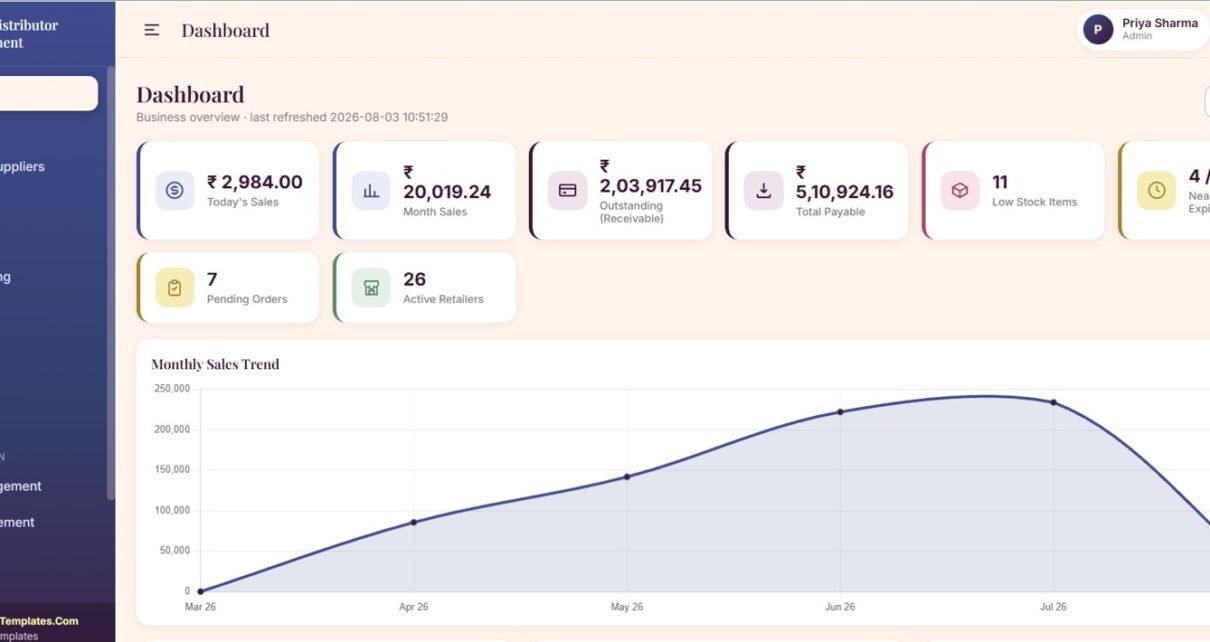
The dashboard gives owners and managers a daily command center with cards for today’s sales, month sales, outstanding receivables, supplier payables, low-stock items, near-expiry products, pending orders, active retailers, and monthly sales trends.
3. Products
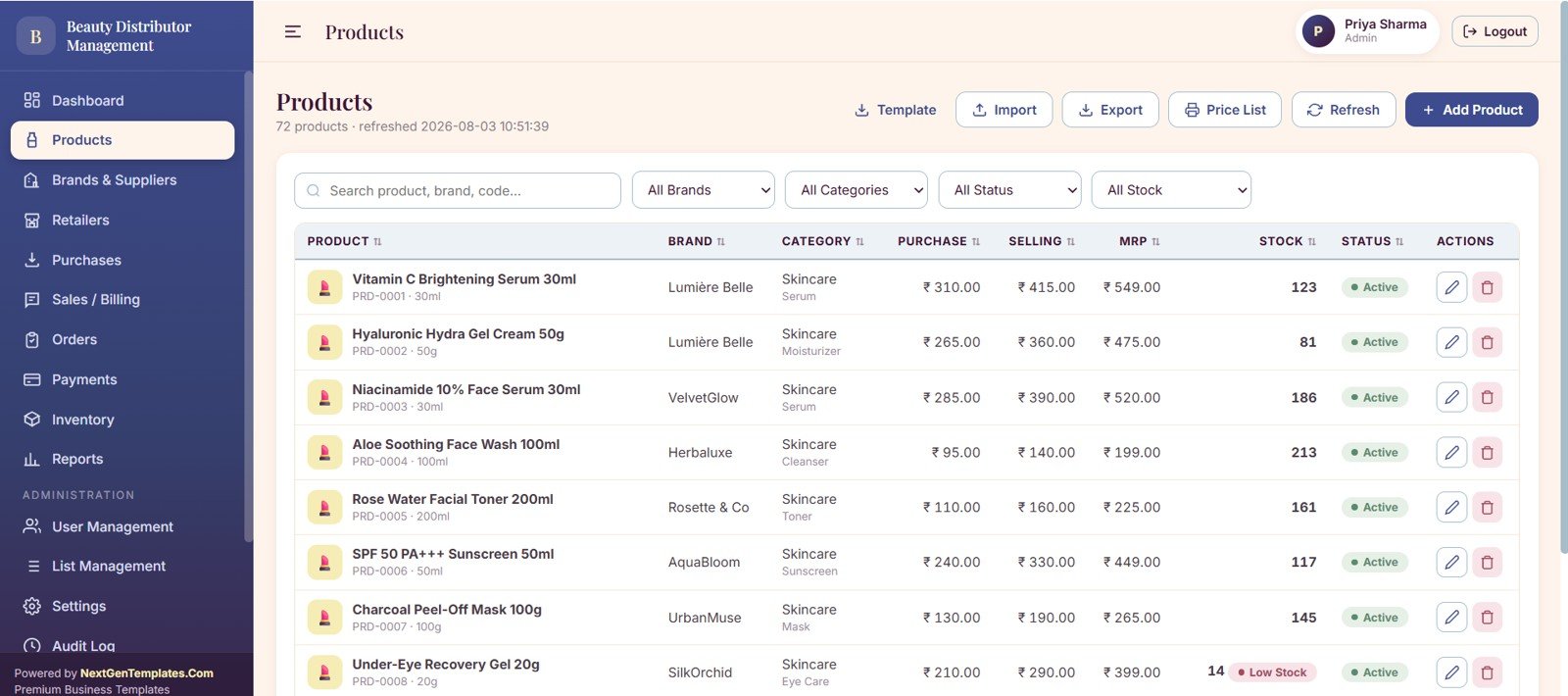
The products page centralizes product pricing, stock quantity, product status, brand details, category assignment, and low-stock alerts so beauty SKUs can be managed with fewer disconnected sheets.
4. Brands and Suppliers
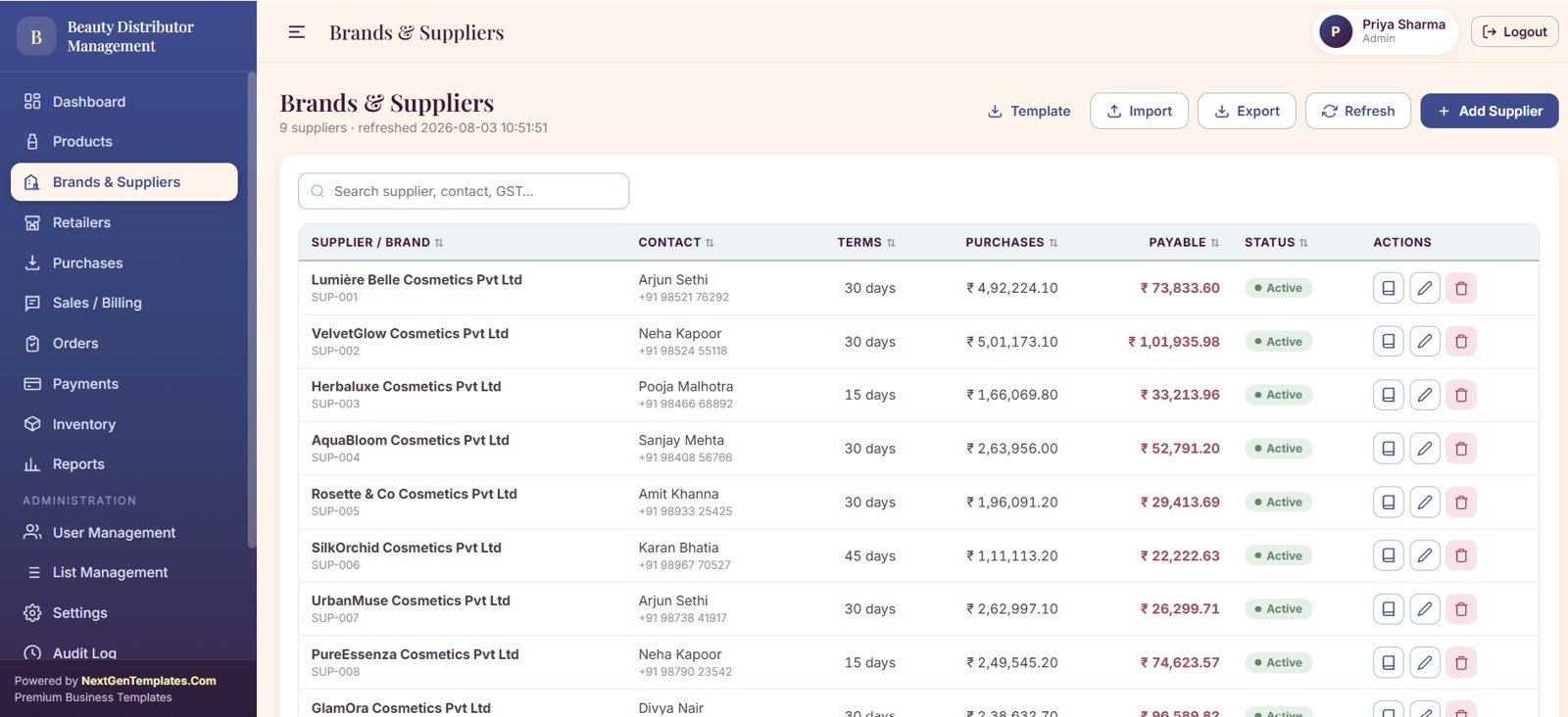
This area tracks supplier purchases, supplier payables by brand, payment terms, supplier status, and contact details. It is useful for distributors balancing fast-moving retail demand with supplier settlement schedules.
5. Retailers
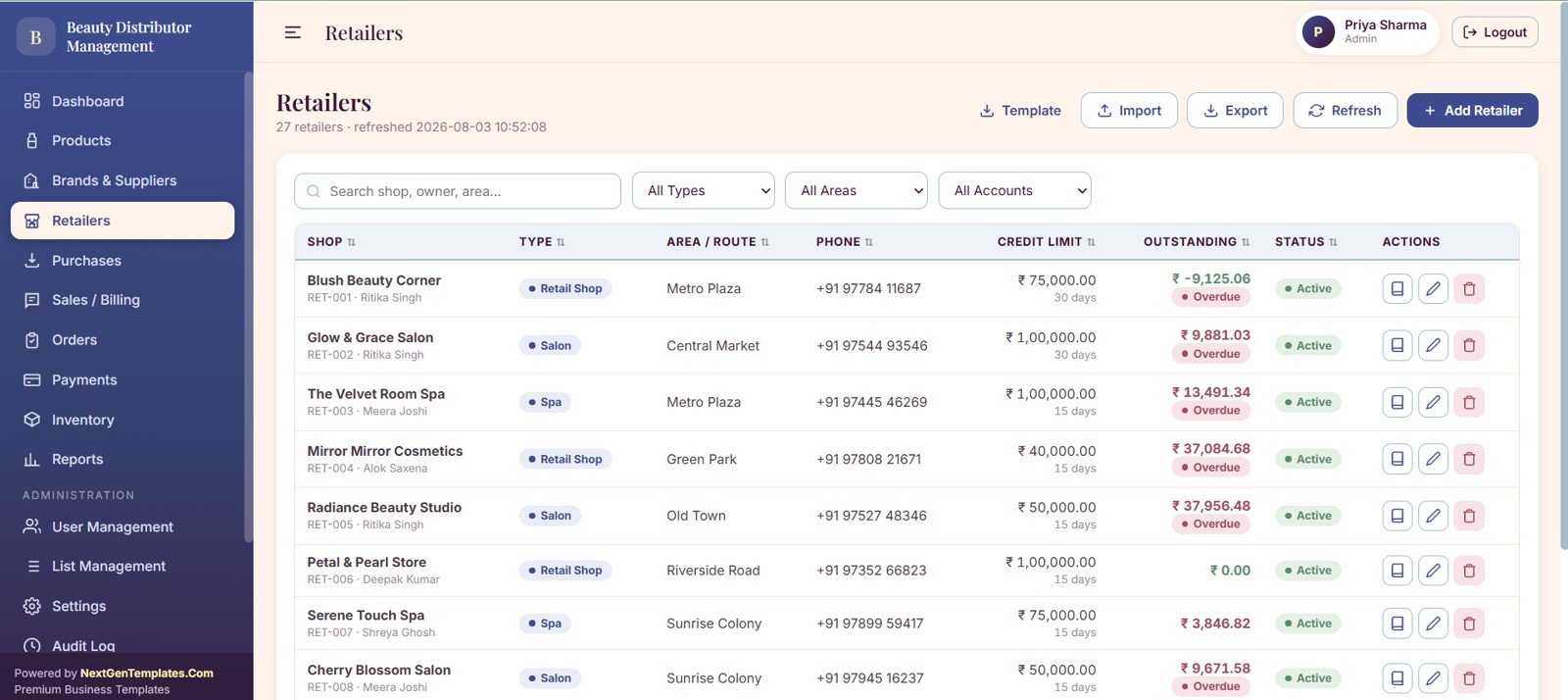
The retailers page manages outstanding balances by shop, credit limits, retailer type, route coverage, area values, and account status. This helps teams know which retailers are active, overdue, or ready for reorder follow-up.
6. Purchases Stock In
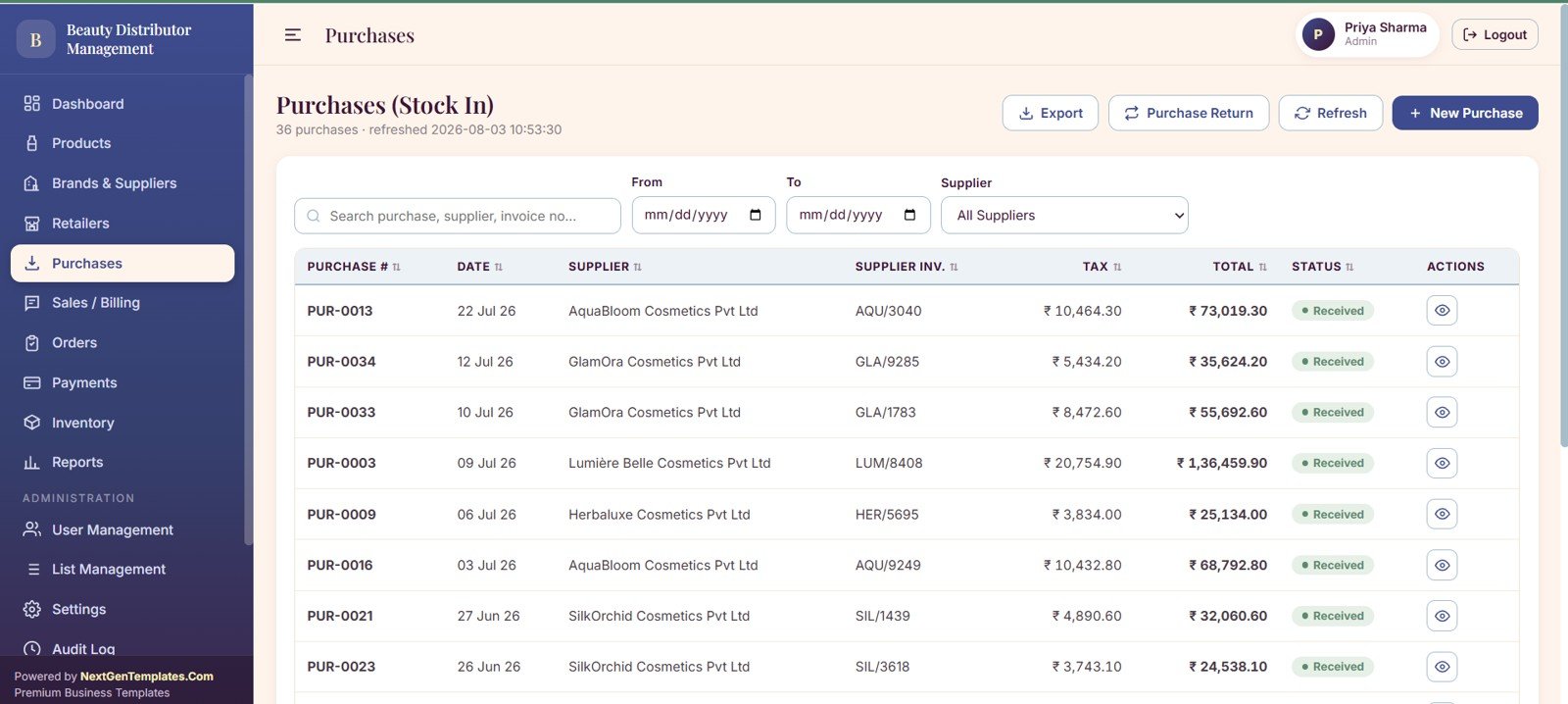
Purchase records include supplier totals, tax values, stock-in dates, supplier invoice references, purchase status, and return tracking. This connects supplier procurement to inventory availability.
7. Sales and Billing
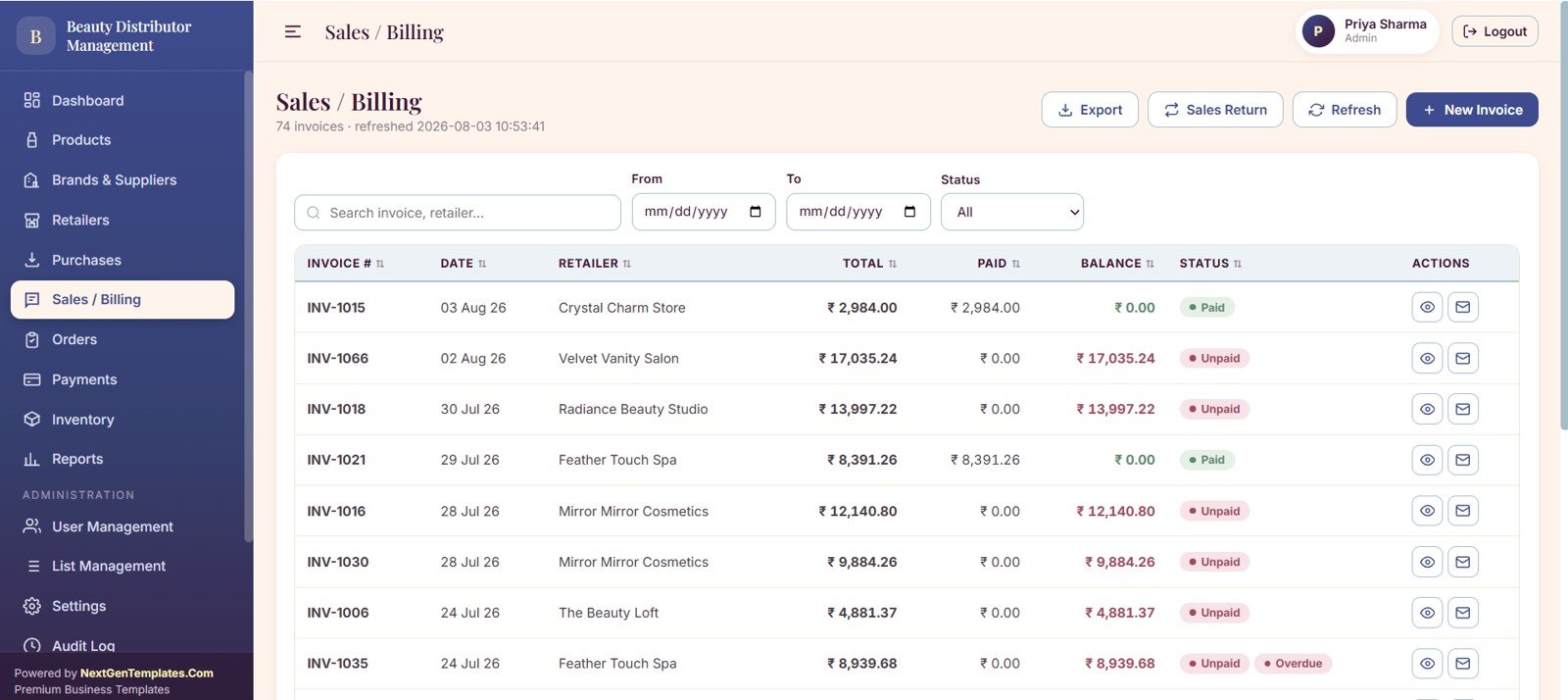
The sales and billing page tracks invoice totals, amounts paid, balances by retailer, payment status, and sales returns. It is designed for the daily rhythm of billing beauty shops, salons, boutiques, and local retailers.
8. Orders Pre-Sales
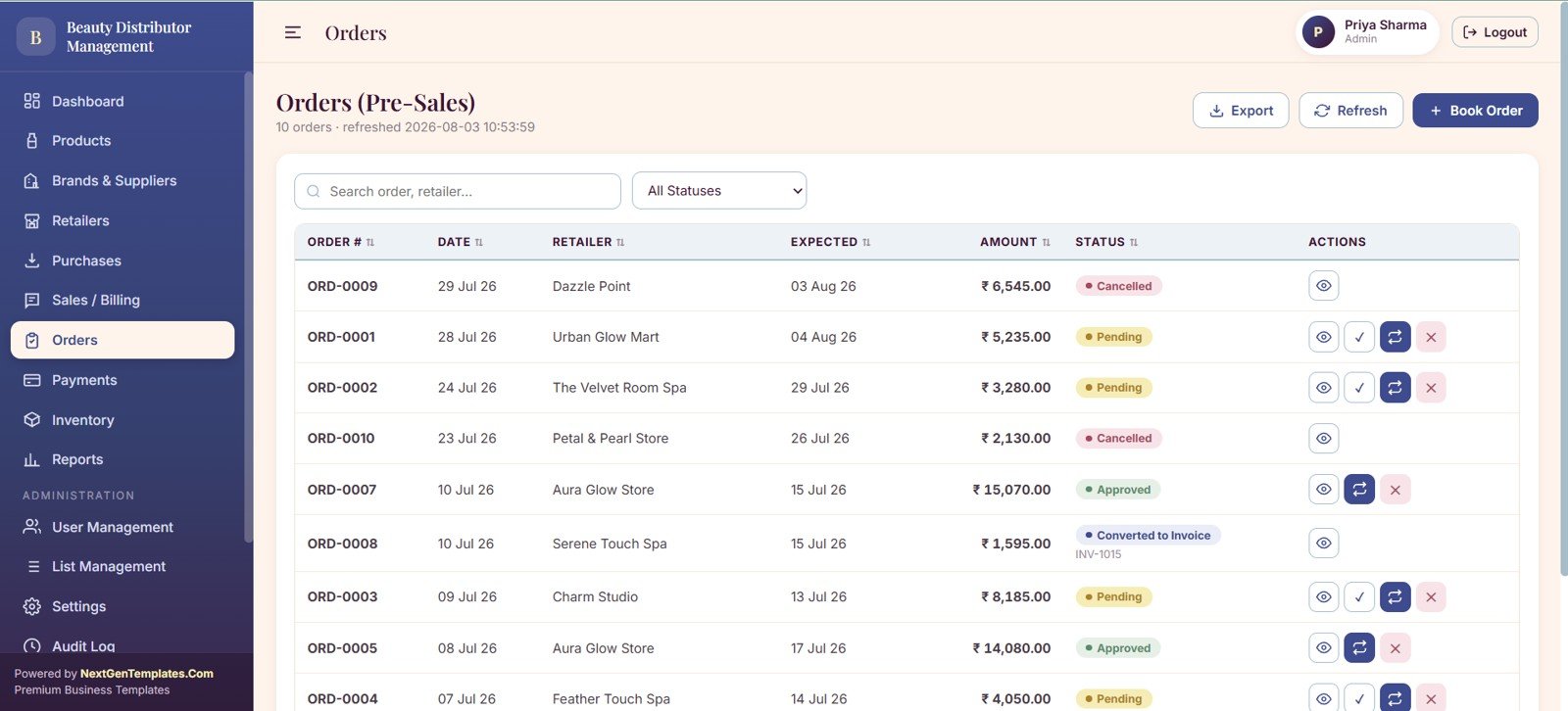
The pre-sales page gives sales teams a structured place to capture retailer orders, expected delivery dates, order status, invoice conversion, and approval actions before billing is completed.
9. Payments
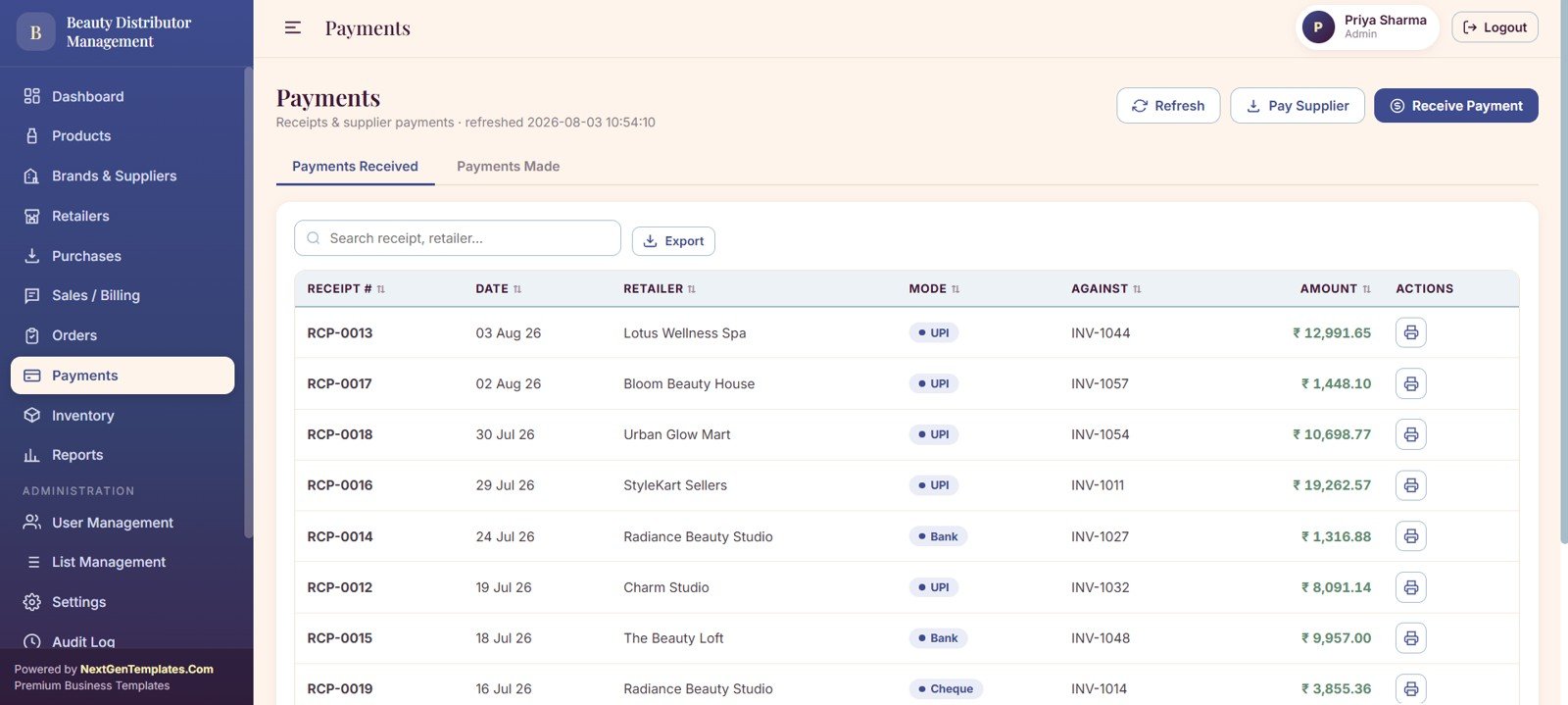
The payments page captures money received from retailers, receipt payment modes, invoice-level amounts, supplier payments, and receipt printing for clean follow-up and reconciliation.
10. Inventory
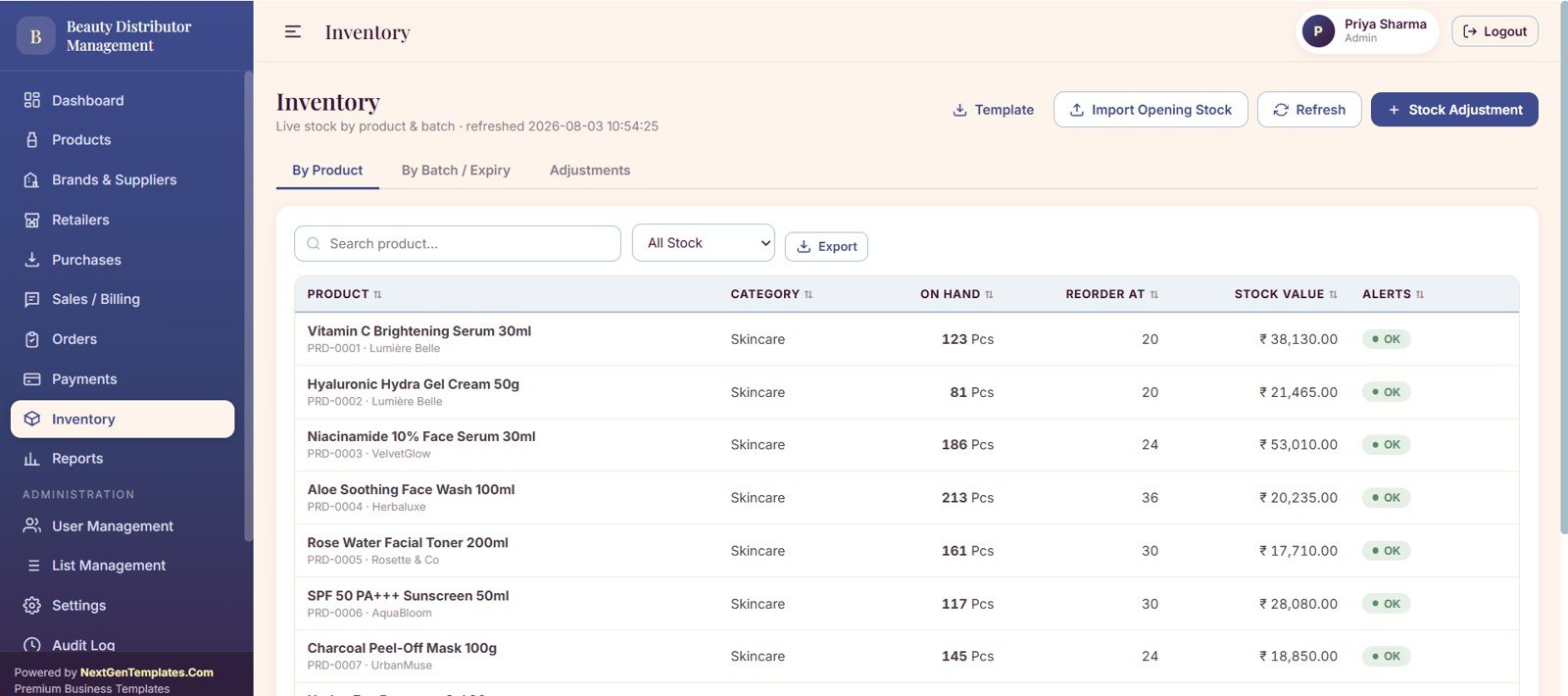
The inventory page focuses on on-hand quantity, stock value, reorder levels, alert status, batch and expiry tracking, and stock adjustments. This is especially useful for beauty products with shelf-life sensitivity.
11. Reports
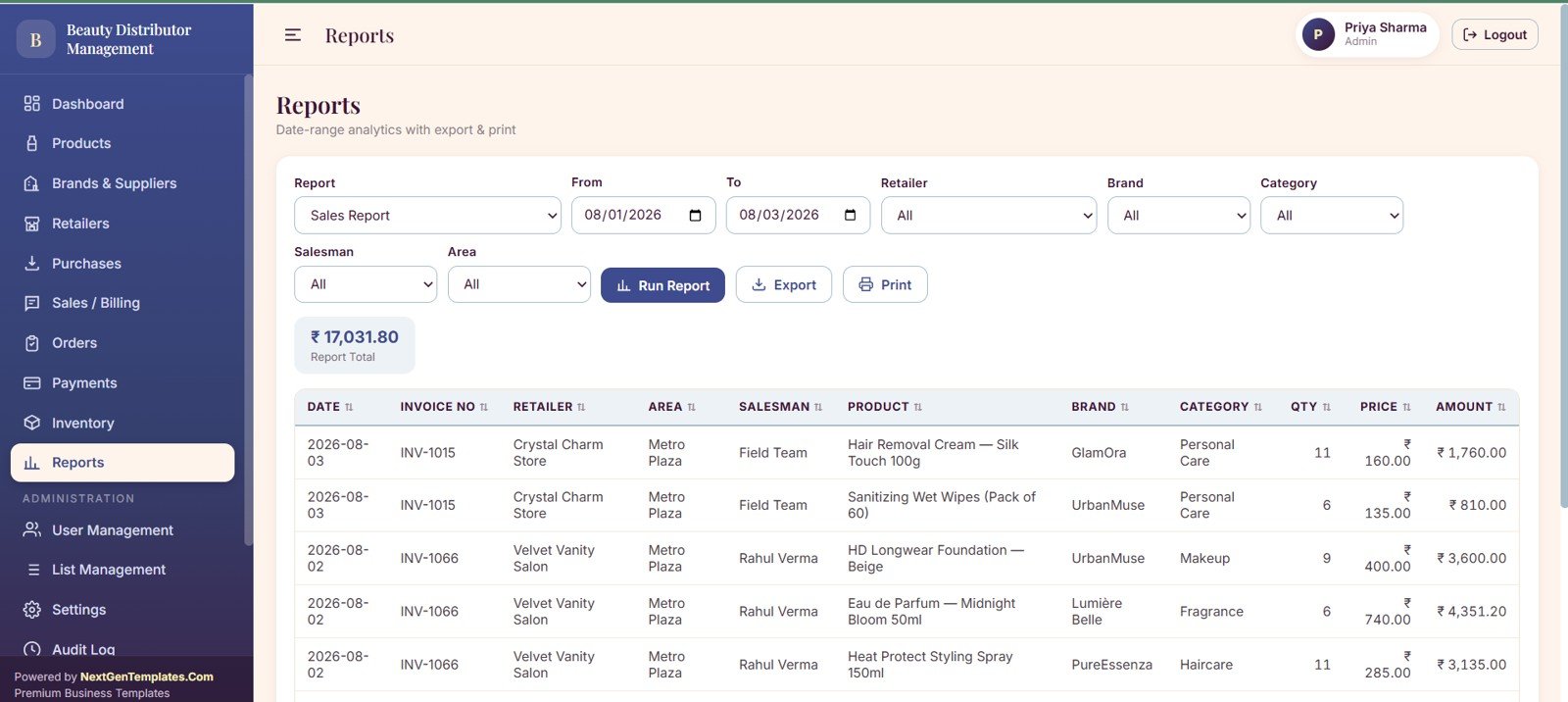
The reports page supports sales analysis by date range, retailer, product, brand, category, salesman, and area. It helps owners move from raw invoices to practical distributor performance views.
12. User Management
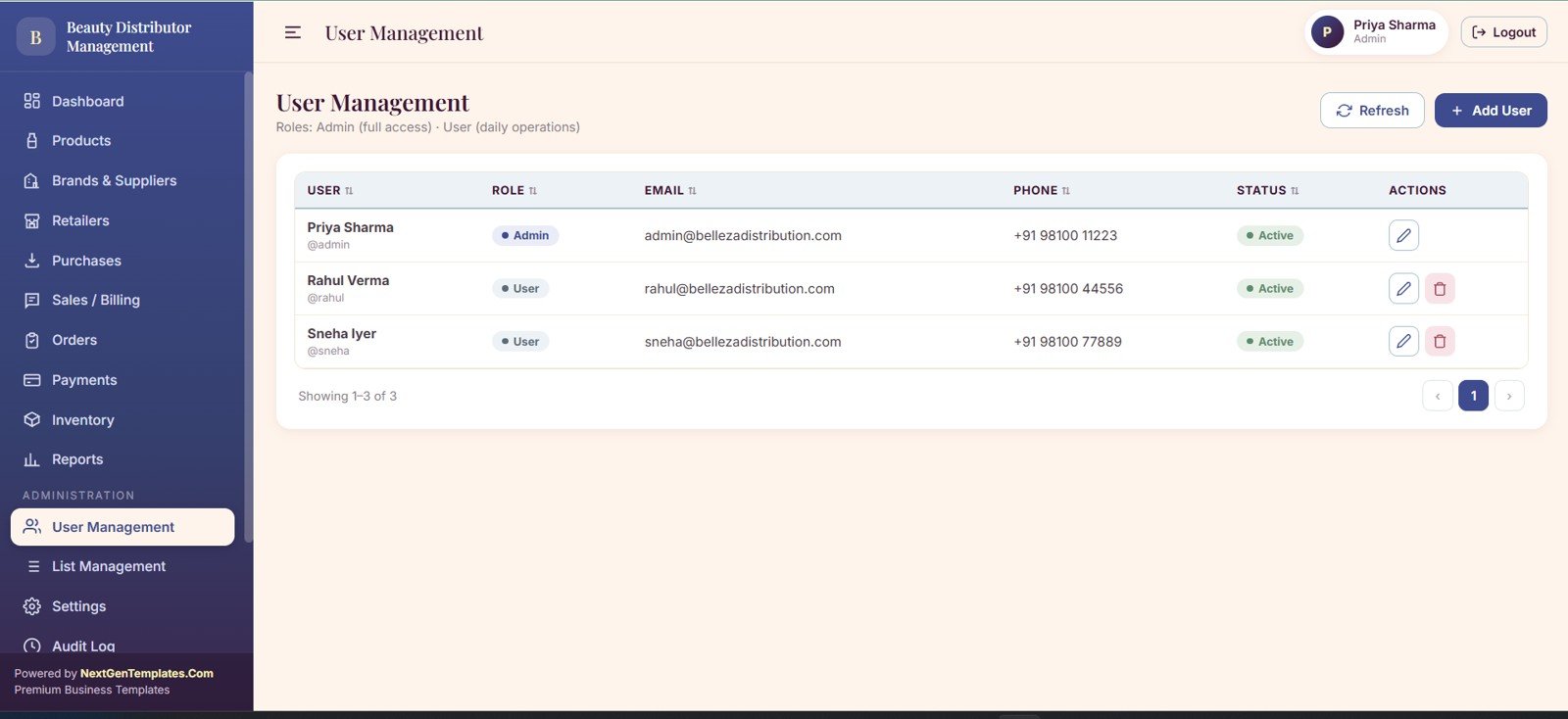
User management handles user roles, access status, contact fields, and role permissions for admin and user accounts.
13. List Management
View the Beauty Products Distributor Management System Web App
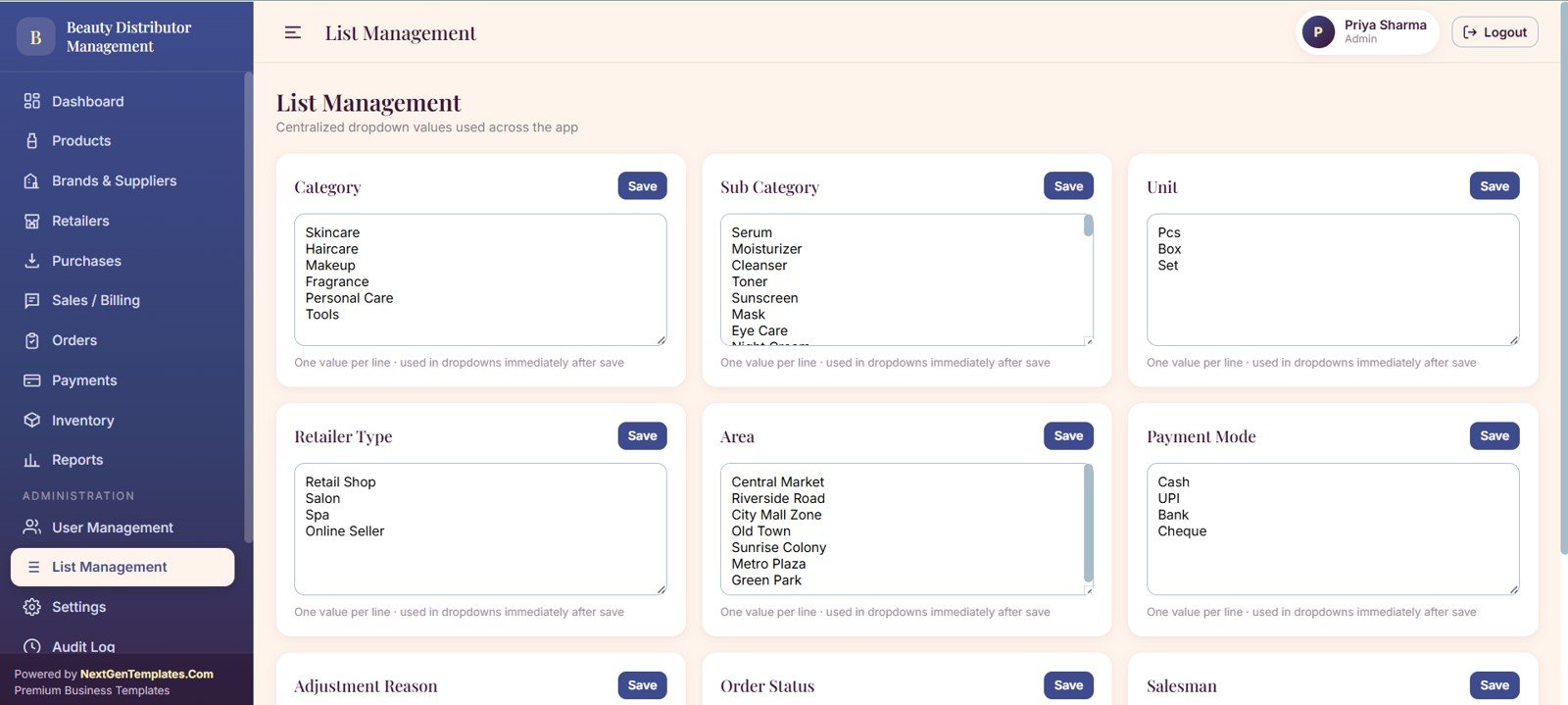
List management keeps dropdown values consistent across categories, subcategories, units, retailer types, areas, payment modes, and sales staff records.
14. Settings
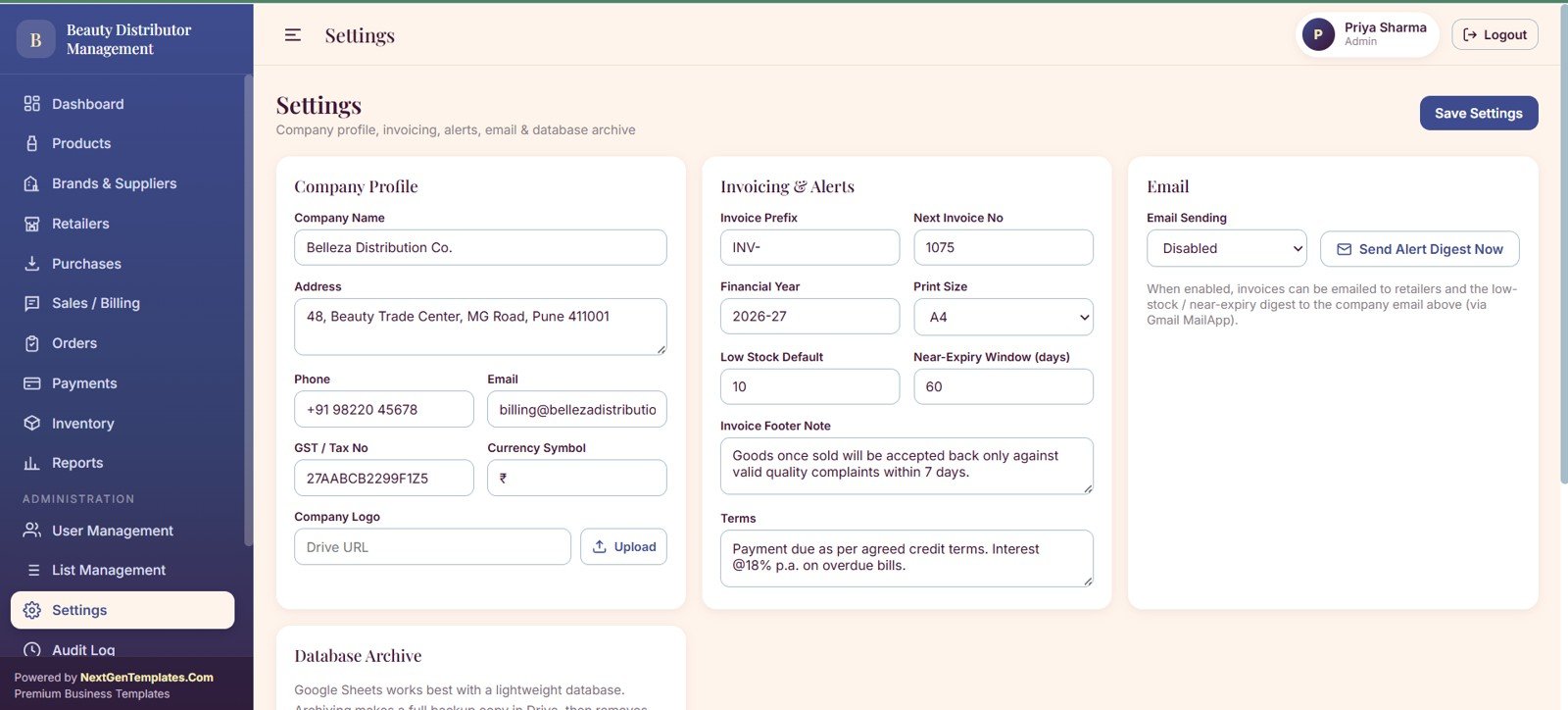
The settings area stores company profile details, invoice settings, financial year values, low-stock defaults, near-expiry alert days, email alert digest settings, and database archive options.
15. Audit Log
View the Beauty Products Distributor Management System Web App
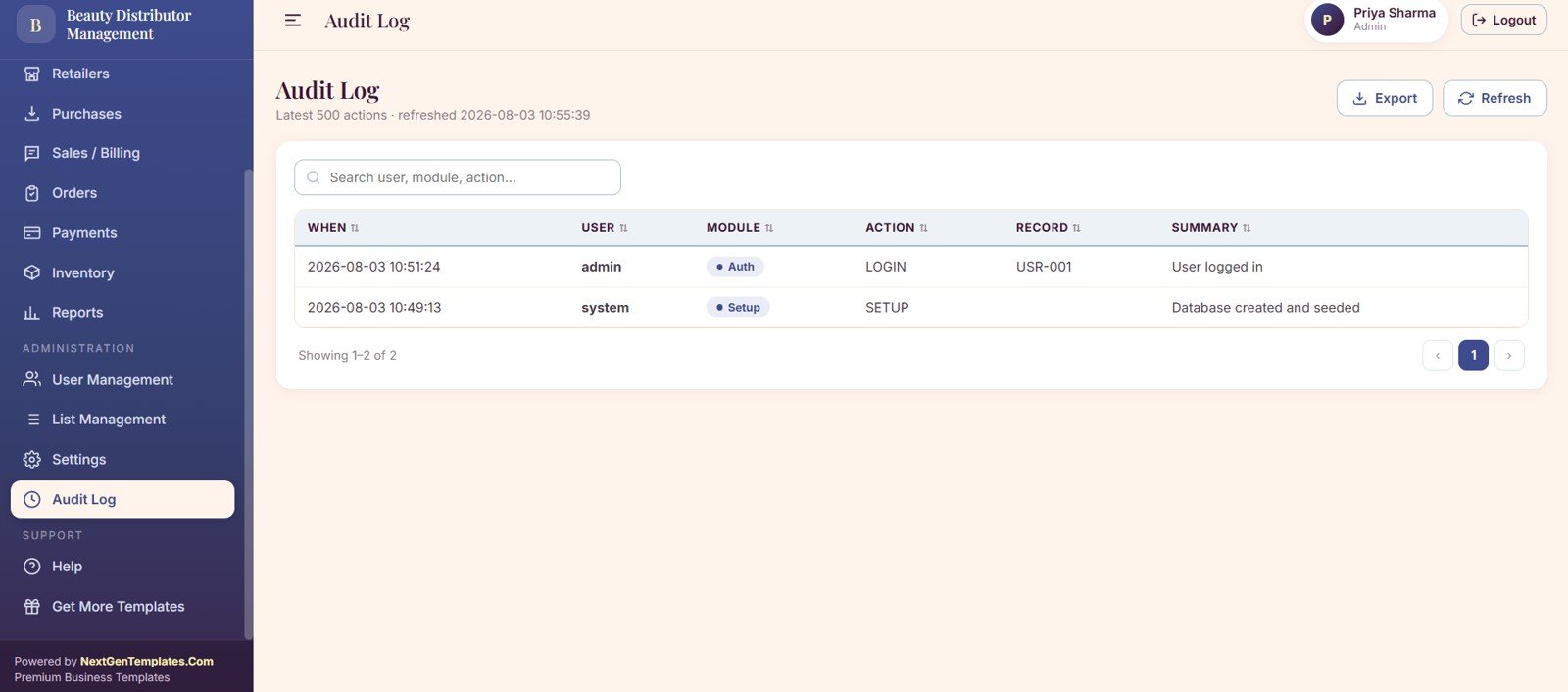
The audit log records user actions, module activity, login history, setup history, and searchable activity filters by user, module, and action.
Beauty Products Distributor Management System Web App vs. Microsoft Excel Dashboard vs. Paid CRM/SaaS – Feature Comparison
| Criteria | This template | Microsoft Excel dashboard | Paid CRM/SaaS alternative |
|---|---|---|---|
| Cost | One-time template purchase | Requires workbook setup and maintenance | Monthly or annual subscription |
| Platform | Google Sheets plus Apps Script web app | Excel workbook or shared file | Cloud CRM, ERP, or inventory SaaS |
| Setup time | Designed for quick template deployment | Depends on formula and layout buildout | Often requires onboarding and configuration |
| Real-time team collaboration | Works with Google Workspace sharing | Best with Microsoft 365 workflows | Usually built in |
| Mobile access | Browser-based access after deployment | Workbook access varies by device | Usually available through app or browser |
| Customizable fields | Editable through Sheets and script files | Highly editable but less app-like | Editable within vendor limits |
| Share with link | Supported through Apps Script deployment | Supported through cloud storage permissions | Supported through SaaS users and roles |
| Year-1 cost at 5 users | Template price plus existing Google Workspace costs | Microsoft 365 costs plus build time | Can scale quickly with per-user pricing |
| Beauty-specific inventory | Includes batch, expiry, stock value, reorder, and product status views | Must be designed manually | Depends on selected SaaS plan |
| Retailer and route tracking | Includes retailer type, area, route, credit limit, and outstanding balance views | Requires custom workbook design | May require CRM and inventory modules |
Who Should Use This Template
This template is a strong fit for beauty product distributors, cosmetics wholesalers, salon product suppliers, skincare and haircare sub-distributors, regional sales teams, boutique supplier networks, and small retail distribution businesses that want a browser-based management system without committing to a full ERP rollout.
It is not meant to replace a large enterprise ERP with warehouse automation, barcode hardware integrations, route optimization engines, or multi-country tax configuration. Larger teams can still use it as a workflow prototype, internal tracker, or bridge system before moving into a larger implementation.
Real-World Use Cases
Regional cosmetics distributor
A regional distributor can track retailer orders, convert approved pre-sales orders into invoices, monitor balances, and follow up on payments without juggling separate product, invoice, and retailer sheets.
Salon and spa supplier
A salon supplier can monitor stock of fast-moving haircare, skincare, and treatment products, flag low quantities, and manage supplier payables when replenishment purchases are recorded.
Beauty brand sub-distributor
A sub-distributor can use retailer routes, area mapping, sales reports, brand-level performance, and audit logs to manage field sales with clearer accountability.
Advantages of Beauty Products Distributor Management System Web App
View the Beauty Products Distributor Management System Web App
- It creates a single operating layer for sales, purchasing, inventory, and payments.
- It uses Google Sheets as the data backbone, which makes exports and customization easier for spreadsheet-friendly teams.
- It includes page-level workflows instead of only static dashboard charts.
- It supports management visibility across receivables, payables, orders, stock levels, expiry alerts, and retailer activity.
- It provides a useful starting point for businesses that want a web app experience without starting from a blank script project.
Opportunities for Improvement
Like any template-based system, the best results come after adapting the columns, dropdown values, tax settings, invoice language, and access rules to your actual distributor process. Businesses with barcode scanners, accounting software sync, route optimization, or automated payment gateway needs may want to extend the Apps Script project or connect this workflow to additional tools.
Before rolling it out to a live team, test sample purchases, sample invoices, returns, payment receipts, role permissions, archive behavior, and near-expiry alerts with realistic distributor data.Beauty Products Distributor Management System Web App
Best Practices
- Start by cleaning your product master: brand, category, unit, price, reorder level, and expiry-related fields should be consistent.
- Use retailer credit limits and outstanding balance views during every billing cycle.
- Review low-stock and near-expiry alerts weekly, especially for seasonal beauty products.
- Keep supplier payment terms updated so payable reports stay useful.
- Limit admin permissions to trusted users and review the audit log regularly.
- Create a backup copy before major customization or bulk data imports.
Explore Relevant Templates
- Baby Products Store Management System Web App
- General Store POS Web App
- Pharmacy POS Web App
- Auto Parts Inventory Management System Web App
- Browse more Web Apps on NextGenTemplates
Frequently Asked Questions
What is the Beauty Products Distributor Management System Web App?
It is a Google Apps Script and Google Sheets based web app template for managing beauty product distribution workflows including products, suppliers, retailers, purchases, sales invoices, payments, inventory, reports, users, settings, and audit logs.
Does it work for cosmetics, skincare, and haircare distributors?
Yes. The structure is suitable for cosmetics, skincare, haircare, salon supplies, and related beauty product distribution businesses. You can adjust product categories and dropdown values to match your catalog.
Can I customize the fields?
Yes. Since the app uses Google Sheets and Apps Script, spreadsheet fields, dropdown lists, page labels, and script behavior can be customized by a user comfortable editing Sheets and Apps Script.
Does it include inventory expiry tracking?
Yes. The inventory workflow includes batch and expiry tracking, near-expiry alerts, reorder levels, stock value, and stock adjustment views.
Is this a monthly subscription?
No. It is sold as a downloadable template. Any Google Workspace, hosting, or customization cost is separate from the template purchase.
Is this suitable for a large enterprise distributor?
It can support smaller and mid-sized workflows, but large enterprise distributors may need ERP integrations, barcode hardware, warehouse automation, route optimization, and advanced accounting sync.
About the Author
Built by PK – Microsoft Certified Professional with 15+ years of Excel, Google Sheets, and Power BI experience. Founder of NextGenTemplates, reaching 300K+ subscribers across YouTube channels. Every template is hand-built and tested before release.
Conclusion
The Beauty Products Distributor Management System Web App gives beauty distributors a practical way to bring products, retailers, suppliers, purchases, sales, payments, inventory alerts, reports, users, settings, and audit history into one app-style workflow. It is especially useful for teams that already trust Google Sheets but need a cleaner interface for daily distributor operations.
View the Beauty Products Distributor Management System Web App
For more template walkthroughs, visit NeoTech Navigators on YouTube.