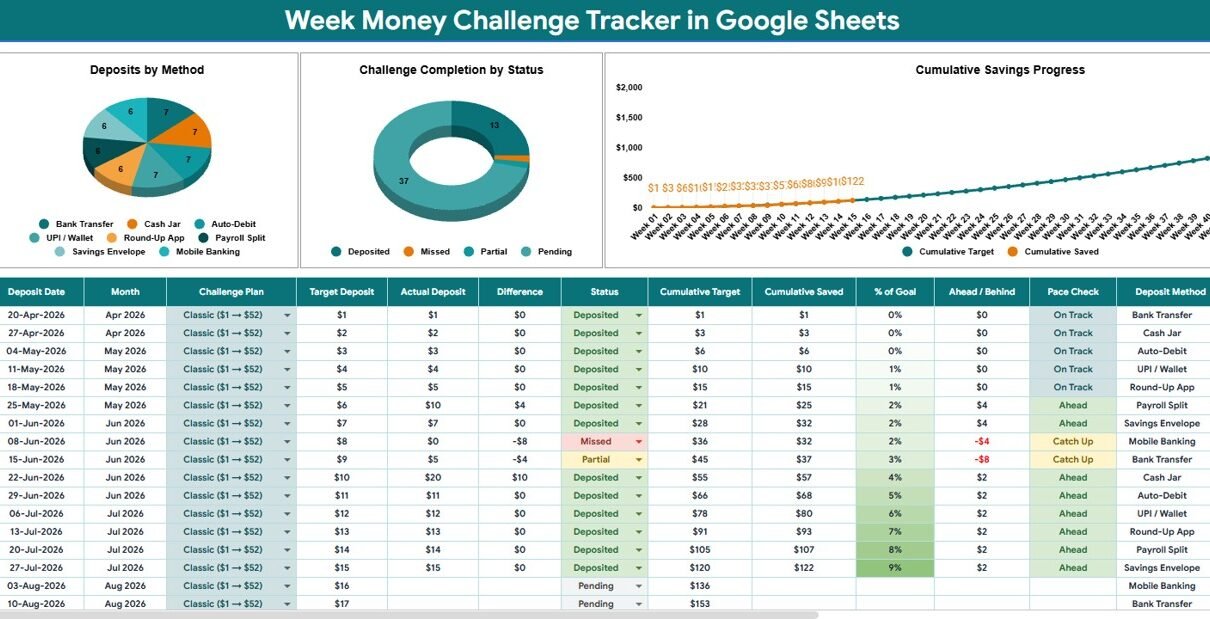
Week Money Challenge Tracker in Google Sheets is built for people who want a simple way to turn weekly saving into a visible habit. According to the Federal Reserve 2025 Survey of Household Economics and Decisionmaking, 63% of adults could cover a $400 emergency expense using cash or its equivalent. That leaves plenty of room for better weekly savings routines, especially when goals are small enough to repeat and clear enough to measure.Week Money Challenge Tracker in Google Sheets
This tracker gives you a focused Google Sheets setup for challenge plans, weekly deposits, deposit methods, completion status, cumulative targets, and actual saved progress. Instead of guessing whether the challenge is working, you can review the dashboard, filter the records, and compare your target path with your saved amount. You can get the editable template from NextGenTemplates.
Key Features of Week Money Challenge Tracker in Google Sheets
- Total Saved So Far card: A headline card shows the current saved amount, so you do not need to scan every weekly row.
- Deposits by Method chart: See how much is being saved through each method, such as cash, bank transfer, wallet, UPI, or another custom method.
- Challenge Completion by Status chart: Review completed, pending, planned, skipped, or custom deposit statuses.
- Cumulative Target by Week chart: Track the planned savings path week by week.
- Cumulative Saved by Week chart: Compare actual saved progress against the target path.
- Multiple slicers: Filter dashboard views quickly while keeping the source data intact.
- Dropdown Options Sheet: Maintain plan type, deposit status, and deposit method values in one place.Week Money Challenge Tracker in Google Sheets
Dashboard Pages Explanation
This dashboard is showing multiple types of pages. The Overview Page is for analysis and weekly review. The Dropdown Options Sheet is for controlled list values that keep the tracker consistent.Week Money Challenge Tracker in Google Sheets
Overview Page
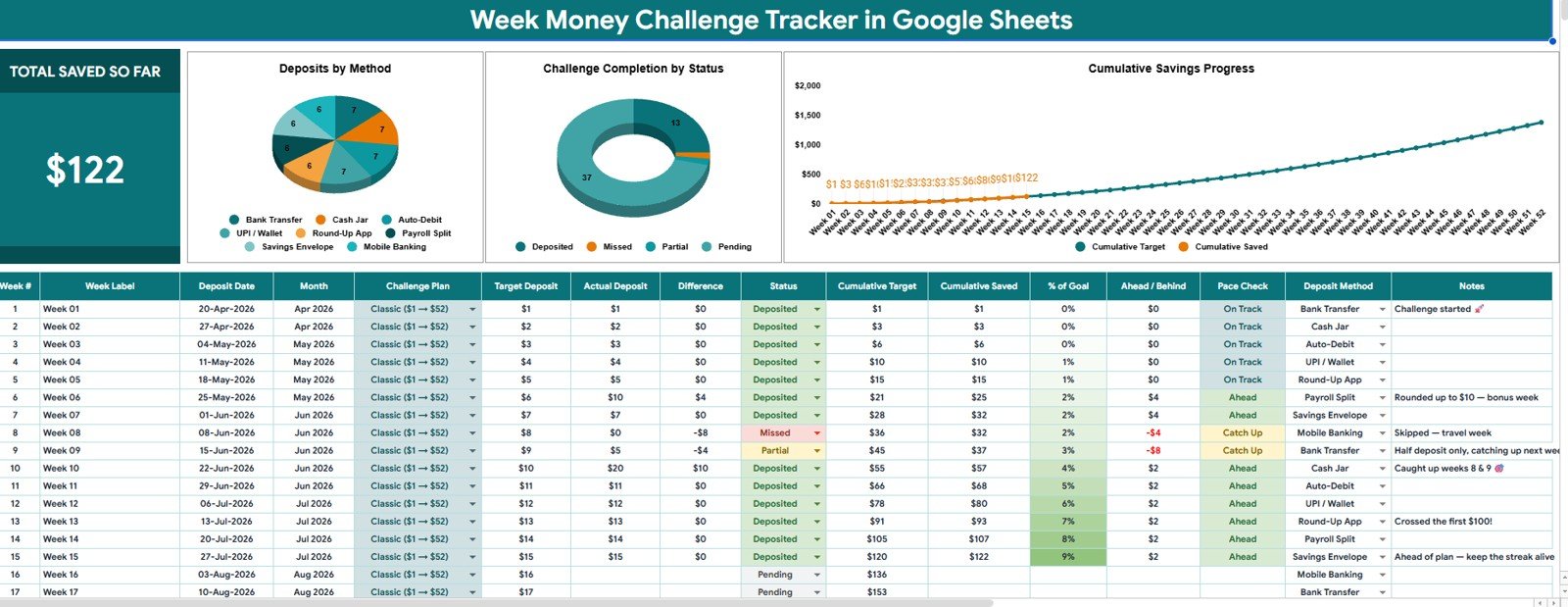
The Overview Page is the main dashboard page. At the top, the Total Saved So Far card shows the high-level amount saved across the selected challenge records.
Deposits by Method: This chart compares deposits by method so you can see whether savings are coming from cash, bank transfer, wallet, or another source.
It is helpful when you want to understand which method is easiest to repeat every week.
Challenge Completion by Status: This chart groups challenge records by completion status, such as completed, pending, planned, or skipped.
It helps you identify whether the challenge is on track or if specific weeks still need catch-up deposits.
Cumulative Target by Week: This chart plots the running target amount across the challenge weeks.
It gives a benchmark for the amount you expected to save at each stage of the challenge.Week Money Challenge Tracker in Google Sheets
Cumulative Saved by Week: This chart plots the running saved amount across the challenge weeks.Week Money Challenge Tracker in Google Sheets
It helps you compare actual progress with the target plan and see whether the gap is closing or widening.
Dropdown Options Sheet
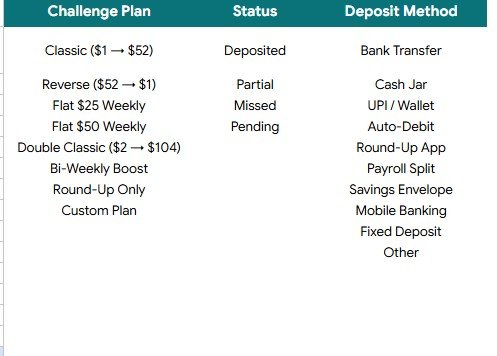
The Dropdown Options Sheet stores the values used in the tracker. Clean dropdown lists help the dashboard stay readable because the same plan, status, or payment method is not typed in multiple ways.Week Money Challenge Tracker in Google Sheets
- Challenge Plan Options by Plan Type: Use this list to define the weekly challenge structures you want to track.
- Status Options by Deposit Status: Use this list to standardize completed, pending, skipped, planned, or custom statuses.
- Deposit Method Options by Payment Method: Use this list to maintain method names such as cash, bank transfer, UPI, wallet, or savings account.
Week Money Challenge Tracker in Google Sheets vs. Microsoft Excel vs. Paid Finance Apps – Feature Comparison
| Feature | This Google Sheets tracker | Microsoft Excel tracker | Paid finance app |
|---|---|---|---|
| Cost | One-time template purchase | Template cost plus possible Microsoft license | Usually recurring monthly or annual fee |
| Platform | Google Sheets in Drive | Excel desktop or web | Vendor web or mobile app |
| Setup time | Copy file, edit options, enter weeks | Download and customize workbook | Create account and configure categories |
| Real-time team collaboration | Built into Google Drive sharing | Works best with OneDrive or SharePoint | Depends on plan and permissions |
| Mobile access | Google Sheets app or browser | Excel app or browser | Usually included |
| Customizable fields | Edit plan, status, method, and labels | Editable if workbook is unlocked | Often limited by app settings |
| Share with link | Yes, through Drive permissions | Yes, through Microsoft sharing | Usually account based |
| Year-1 cost at 5 users | One purchase before any Google Workspace cost | Template plus license cost | Can increase with seats or premium features |
| Weekly target visibility | Cumulative target and saved charts included | Must be built or customized | Depends on app design |
| Bank connection | Not required | Not required | Often encouraged for automation |
Who Should Use This Template
This template is a good fit for anyone who wants a weekly money challenge without building formulas from scratch. Individuals can use it to build a small savings habit. Couples can use it for a vacation, emergency fund, home deposit, or shared goal. Students can use it to practice saving in small weekly amounts. Finance coaches and creators can also use it as a visual teaching tool when explaining target-based saving.Week Money Challenge Tracker in Google Sheets
It is also helpful for people who prefer manual tracking. Manual entry is not a weakness here; it can make the habit more intentional because each deposit is a conscious action.Week Money Challenge Tracker in Google Sheets
Real-World Use Cases
Weekly savings reset: Use the tracker for a 12-week, 26-week, or custom challenge and review the Total Saved So Far card each week.
Vacation fund planning: Set weekly targets and compare cumulative target against cumulative saved progress before booking travel.
Family challenge: Share a Google Sheets copy with a partner or family member and use slicers to filter by plan type or deposit status.
Finance coaching: Use the Overview Page during coaching sessions to discuss missed weeks, deposit methods, and progress gaps.
Advantages of Week Money Challenge Tracker in Google Sheets
Google Sheets is flexible, familiar, and easy to share. Once the tracker is copied to Google Drive, you can adjust list values, update weekly entries, and use the file from a browser or phone. If you are learning dashboard filters, Google also provides documentation for filtering charts and tables with slicers.
The biggest advantage is ownership. You are not locked into a paid personal finance platform just to track a weekly challenge. You control the spreadsheet, the categories, the methods, and the challenge rules.
Opportunities for Improvement
This template is intentionally focused, but you can expand it for your own workflow. You might add notes for why a week was skipped, add a separate column for planned versus unexpected savings, or add a second challenge plan for a partner. Advanced users could also connect Google Forms for entry collection or add Apps Script reminders.
The main limitation is that it does not import transactions automatically. That is useful for privacy and simplicity, but it means the tracker works best when you update it consistently.
Best Practices
- Choose the challenge rules first: Decide how many weeks, what deposit pattern, and what counts as completed.
- Update the tracker weekly: Regular updates keep the cumulative charts useful.
- Use consistent method names: Edit the Dropdown Options Sheet before entering records.
- Review status honestly: A skipped or pending week is useful information, not a failure.
- Compare target and saved progress: Look at both cumulative charts together during review.
- Keep a backup copy: Duplicate the file before major changes to formulas or chart ranges.
Explore Relevant Templates
If you are building a broader personal finance workflow, these related templates can work well with a weekly money challenge:
- No Spend Challenge Tracker in Google Sheets
- Savings Goal Tracker in Google Sheets
- Personal Finance Net Worth Tracker in Google Sheets
- Shared Expense Splitter Tracker in Google Sheets
- Stock Portfolio Tracker in Google Sheets
Frequently Asked Questions
What is the Week Money Challenge Tracker in Google Sheets?
It is an editable Google Sheets template for tracking weekly savings targets, deposits, deposit methods, completion status, cumulative target, and cumulative saved progress.
What pages are included?
The template includes an Overview Page for dashboard analysis and a Dropdown Options Sheet for plan type, deposit status, and deposit method values.
What charts are included on the Overview Page?
The Overview Page includes Deposits by Method, Challenge Completion by Status, Cumulative Target by Week, and Cumulative Saved by Week.
Can I customize the dropdown lists?
Yes. You can update challenge plan options, status options, and deposit method options to match your own savings challenge.Week Money Challenge Tracker in Google Sheets
Does this tracker sync with bank accounts?
No. It is a manual-entry tracker. That keeps the workflow simple and avoids requiring bank-login access.Week Money Challenge Tracker in Google Sheets
Can I use it for different challenge lengths?
Yes. You can adapt the rows and plan options for a short challenge, a 52-week challenge, or another weekly savings plan.
About the Author
Built by PK – Microsoft Certified Professional with 15+ years of Excel, Google Sheets, and Power BI experience. Founder of NextGenTemplates, reaching 300K+ subscribers across YouTube channels. Every template is hand-built and tested before release.
Conclusion
The Week Money Challenge Tracker in Google Sheets gives your weekly savings plan structure, visibility, and accountability. With a Total Saved So Far card, four dashboard charts, slicers, and controlled dropdown options, it helps you see whether your challenge is moving as planned.Week Money Challenge Tracker in Google Sheets
Get the editable template here: Week Money Challenge Tracker in Google Sheets.
Visit our YouTube channel for step-by-step Google Sheets and dashboard tutorials: Youtube.com/@NeoTechNavigators.