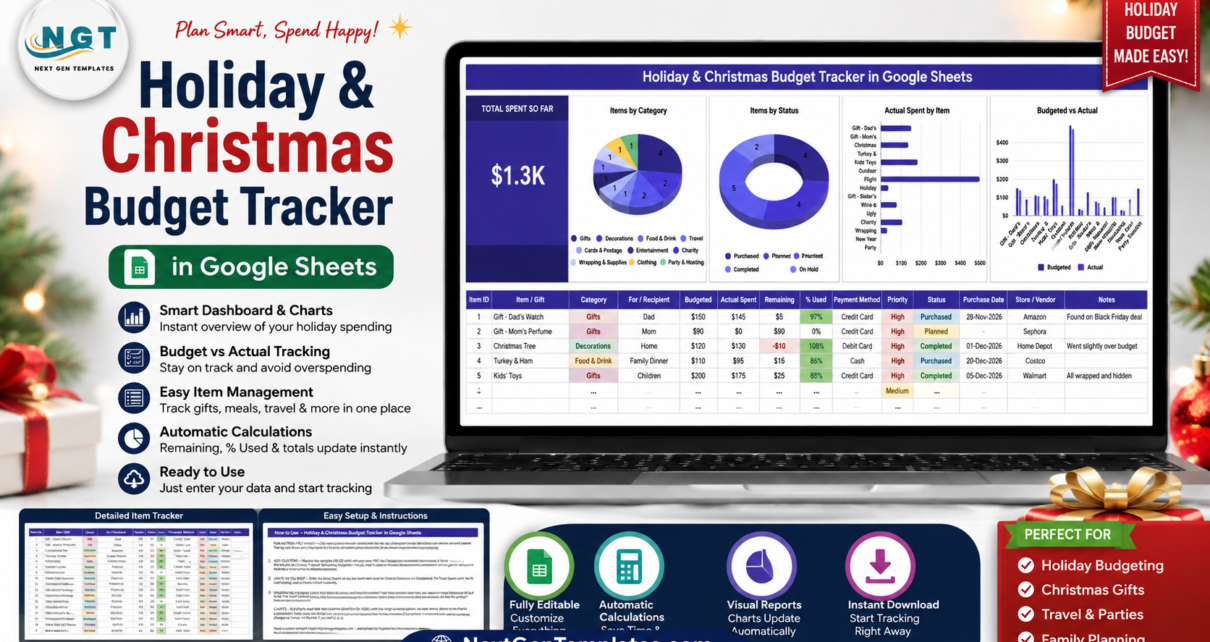
The Holiday & Christmas Budget Tracker in Google Sheets records every gift, meal, decoration and trip across 14 columns, 10 spending categories and 4 live charts on a single scrollable page. It ships with 15 realistic sample rows, a Total Spent So Far card that reads $1.3K out of the box, and dropdowns that pull from a List tab covering rows 2-500 — so the whole thing is ready to use in under 10 minutes.
Holiday spending is the one budget almost nobody keeps. Gifts get bought across five stores and three weeks, the food shop doubles in December, flights were booked back in November, and by January the card statement is a single unexplainable number. This template fixes that by making every intended purchase a row with a budget attached before you spend, then letting you log the real amount as you go.
Get the Holiday & Christmas Budget Tracker in Google Sheets
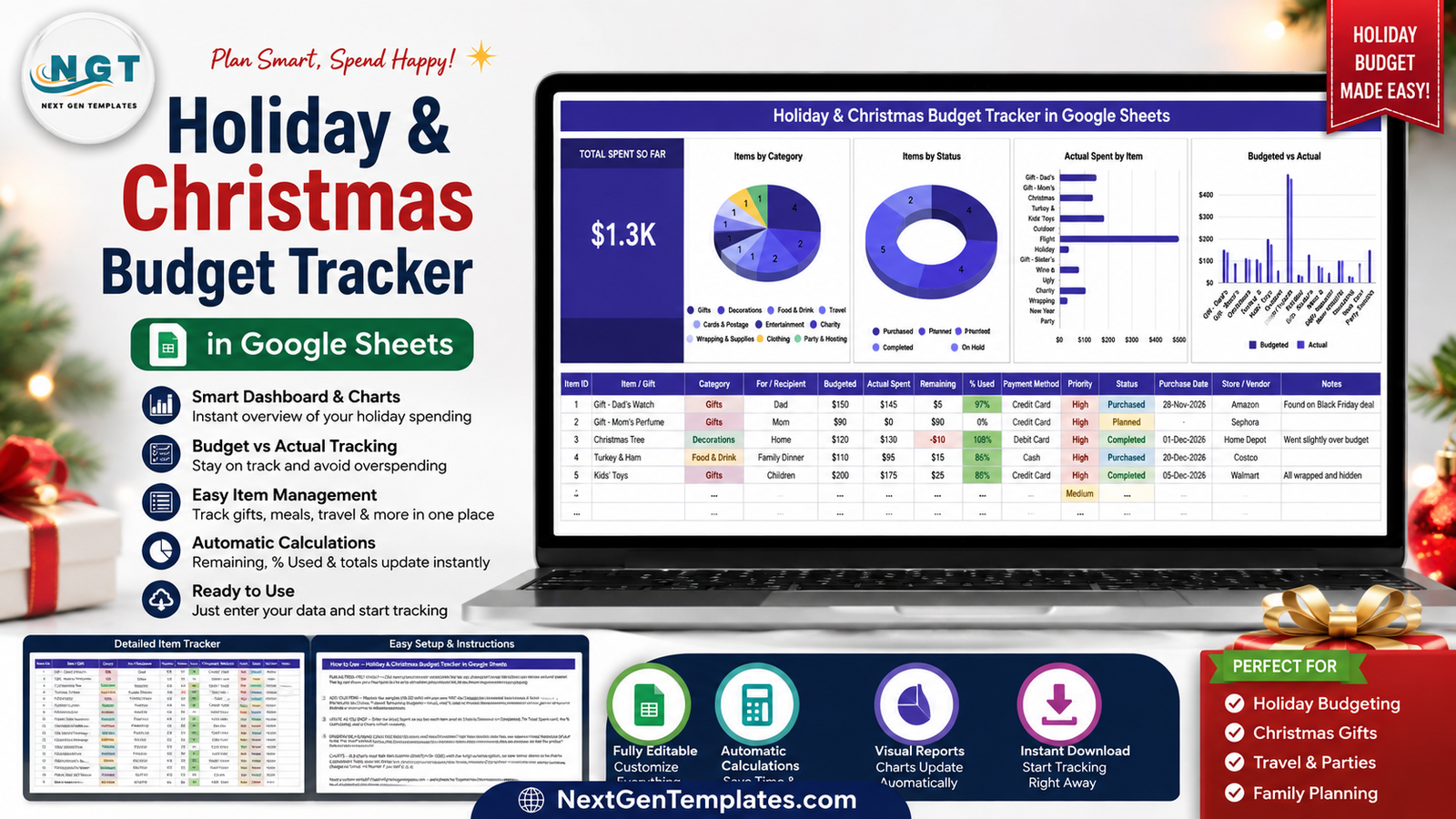
Key Features of the Holiday & Christmas Budget Tracker
Everything lives on one page. There is no navigation to learn and no hidden calculation sheet to protect.
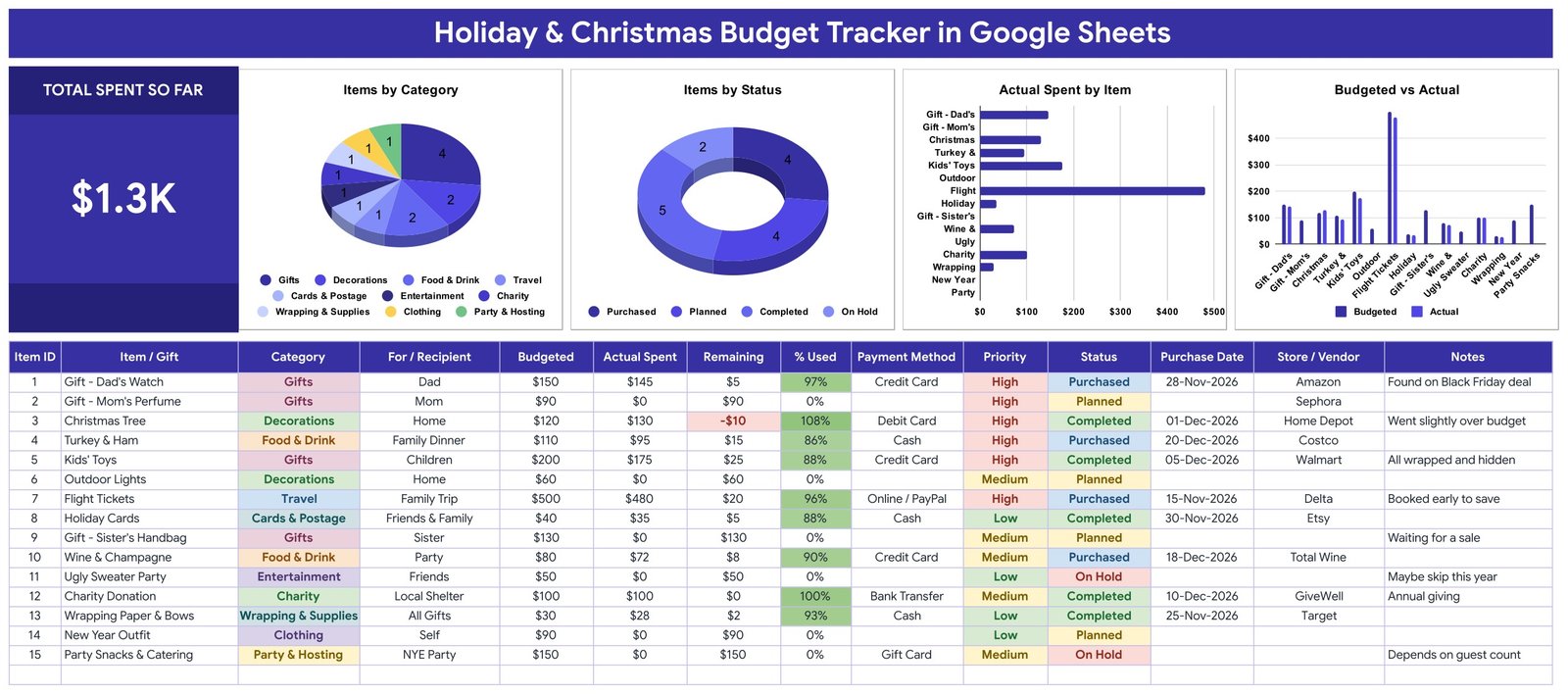
- 14 columns per item — Item ID, Item / Gift, Category, For / Recipient, Budgeted, Actual Spent, Remaining, % Used, Payment Method, Priority, Status, Purchase Date, Store / Vendor and Notes.
- A Total Spent So Far KPI card that sums the Actual Spent column live, so the running total is always the first thing you see.
- Three automatic columns — Item ID, Remaining (Budgeted minus Actual Spent) and % Used are formulas. You only ever type the two money figures.
- Colour-coded overspend warnings — Remaining turns red the moment it goes negative, and % Used shades green as an item approaches its limit.
- 10 spending categories — Gifts, Decorations, Food & Drink, Travel, Cards & Postage, Entertainment, Charity, Wrapping & Supplies, Clothing and Party & Hosting.
- 4 status values — Planned, Purchased, Completed and On Hold, plus High / Medium / Low priority and six payment methods.
- Self-expanding dropdowns — all four dropdown columns read the List tab across rows 2-500, so a new value added there appears everywhere without re-running Google Sheets data validation.
- Charts that never need re-ranging — each chart reads the data columns from rows 16 to 1000 using the built-in Aggregate option, with no helper tables anywhere in the file.
Sheets Explanation
Page 1: Holiday & Christmas Budget Tracker
The working page. The Total Spent So Far card sits on the left, followed by four charts — Items by Category, Items by Status, Actual Spent by Item, and Budgeted vs Actual — with the 14-column entry table filling the rest of the page. The sample data covers a family Christmas: Dad’s watch, Mom’s perfume, the tree, turkey and ham, kids’ toys, outdoor lights, flight tickets, holiday cards, wine, an ugly sweater party, a charity donation, wrapping paper, a New Year outfit and party catering.
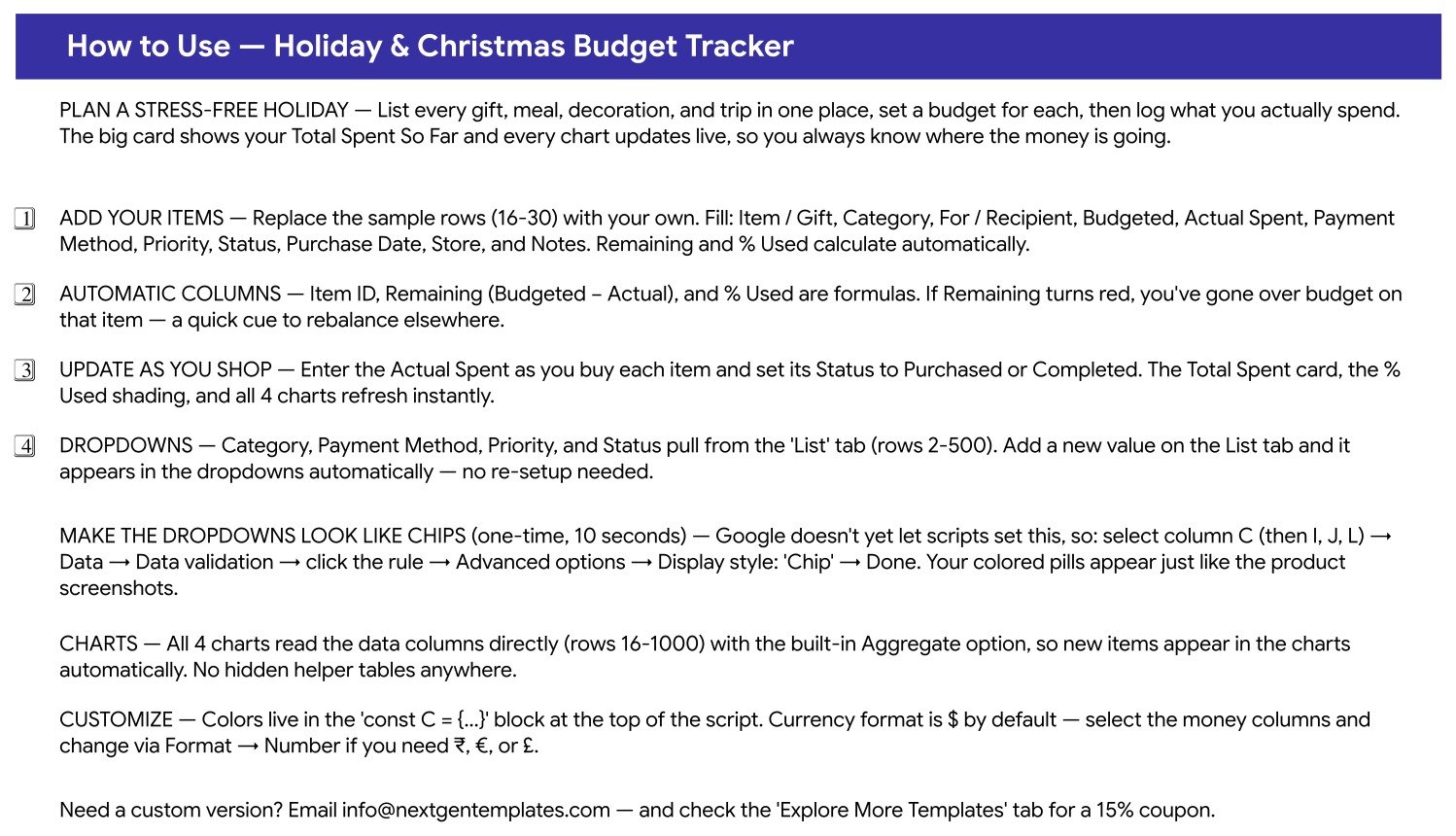
Page 2: How to Use
A four-step in-file guide: replace the sample rows, leave the formula columns alone, update Actual Spent and Status as you shop, and manage dropdown values from the List tab. It also documents the optional 10-second step for turning the dropdowns into coloured chips — select the column, then Data → Data validation → Advanced options → Display style: Chip — plus how to switch the currency format and where the theme colours live.
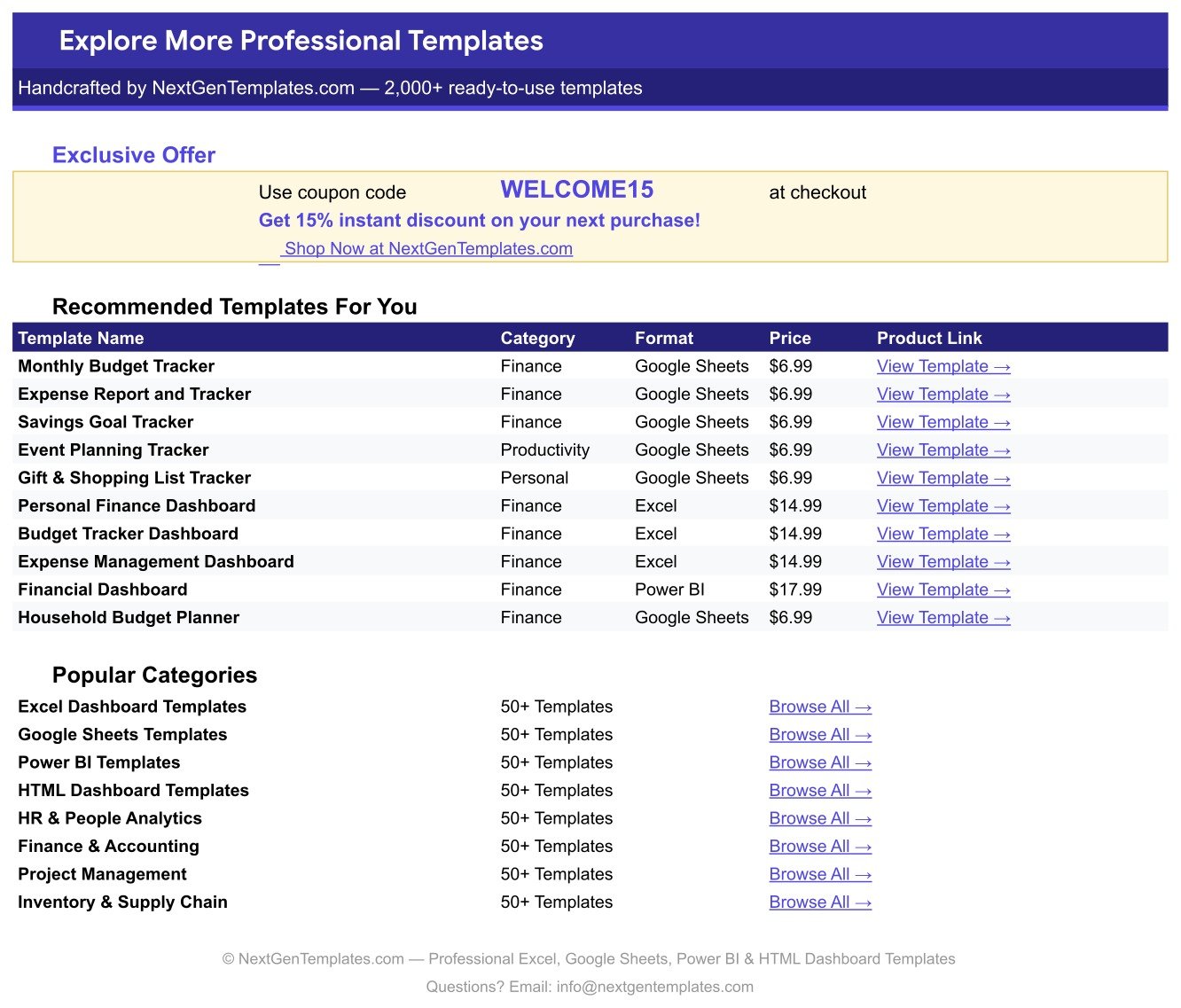
Page 3: Explore More Templates
A built-in index of related NextGenTemplates products with prices and direct links, shortcuts to popular categories, and a WELCOME15 coupon worth 15% off the next purchase.
The List Tab
A plain lookup tab holding the master values for Category, Payment Method, Priority and Status in rows 2-500. It is the only place you ever edit dropdown options.
Holiday & Christmas Budget Tracker vs. Excel Budget Template vs. YNAB / Quicken — Feature Comparison
| Feature | Holiday & Christmas Budget Tracker | Excel Budget Template | YNAB / Quicken |
|---|---|---|---|
| Cost | $6.99 one-time ✅ | $0-25 one-time | $109-155 per year |
| Platform | Google Sheets — browser, no install ✅ | Microsoft Excel (licence needed) | Proprietary app + mobile |
| Setup time | Under 10 minutes ✅ | 15-30 minutes | 30-60 minutes plus bank linking |
| Real-time family collaboration | Yes — share the link, edit together ✅ | Only via OneDrive co-authoring | Extra seat or shared login |
| Mobile access | Google Sheets app, free ✅ | Excel mobile, limited editing | Yes |
| Customisable fields | Add any column or category ✅ | Yes | Fixed schema |
| Share with a link | Yes ✅ | File attachment or cloud link | Invite-only |
| Bank account linking | No — manual entry | No | Yes ✅ |
| Year-1 cost at 5 users | $6.99 total ✅ | $0-25 plus Office licences | $545-775 |
For families that want the whole Christmas list visible in one shared tab without paying an annual subscription, the Holiday & Christmas Budget Tracker sits in the sweet spot.
Who Should Use This Template
Perfect for:
- Families running a $500-$5,000 holiday season across gifts, food, travel and decorations
- Couples sharing one list so the same present never gets bought twice
- Anyone who overspent last December and wants a per-item budget this year
- Office managers running a Christmas party, Secret Santa or team gifting round
- People already working in Google Drive who do not want another app or login
Not a fit if:
- You want automatic bank or card feeds — every amount here is entered by hand
- You need year-round household budgeting across income, bills and savings goals
- You are tracking retail inventory or resale margins rather than personal spending
- Your purchases need approval workflows or an audit trail
Real-World Use Cases
Maria hosts Christmas for eleven people. In early November she lists the tree, the turkey and ham, the wine, and every gift, giving each a budget. As receipts come in she logs the Actual Spent. By mid-December the Budgeted vs Actual chart shows her the flight tickets and the tree have eaten the slack, so she scales back the party catering — a decision she used to make in January, after the fact.
Dev and Priya split the shopping. They work from one shared copy, filter by For / Recipient, and flip Status to Purchased as items land. Because both phones see the same sheet, the sister’s handbag sitting at On Hold while they wait for a sale never gets bought twice.
Sam runs a 40-person office Secret Santa. Every participant is a row with a $25 budget. The Payment Method column records who was reimbursed from petty cash, and the Items by Status donut gives leadership an instant count of gifts still outstanding a week before the party.
Advantages of the Holiday & Christmas Budget Tracker
It costs $6.99 once. Five family members using YNAB or Quicken for a year runs to $545-775. This is a one-time purchase with lifetime access and no per-user fee.
It catches overspend while you can still act. The red Remaining value and the shaded % Used column are per-item signals, not a month-end summary. The sample Christmas Tree row showing -$10 at 108% used is exactly the moment you want to trim somewhere else.
It never needs maintenance. Because the charts use the built-in Aggregate option over the raw data columns, adding row 200 requires no range edits, no pivot refresh and no formula changes. There are no hidden helper tables to accidentally delete.
It is genuinely shareable. A Google Sheets link with edit access gives the whole household live access on any device, which an emailed Excel file cannot match.
Opportunities for Improvement
Being honest about the limits: this is a manual-entry tracker. There is no bank or card integration, so a purchase only appears once someone types it in. If nobody logs the Boxing Day sales, the Total Spent card will quietly understate reality.
It is also single-season by design. There is no year-over-year comparison view, no per-recipient budget cap, and no savings-goal page that tells you how much to set aside monthly for next December. Pairing it with a savings tracker covers that gap.
Finally, the coloured chip styling on the dropdowns has to be applied once by hand — Google Apps Script cannot yet set that display style, which is why the How to Use page walks through the ten-second manual step.
Best Practices
- Enter every intended purchase before December starts, even at a rough budget. The tracker only works as a control if the list is complete before the spending begins.
- Set Priority honestly. When the total runs over, the Low priority rows are the ones you cut — that decision is much easier when you made it in November.
- Log the Actual Spent the same day. A tracker updated weekly is a historical record; one updated daily is a budget.
- Use the Notes column for context — “found on Black Friday deal”, “waiting for a sale”, “depends on guest count”. Next year that column is worth more than the numbers.
- Add your own categories on the List tab rather than forcing purchases into the ten defaults. Read the Google Sheets charts documentation if you also want to add a chart of your own.
- Duplicate the sheet each year and keep the old copy. Last year’s Actual Spent column is the best possible starting budget for this year.
Explore Relevant Templates
- Gift Card and Store Credit Tracker in Google Sheets — the natural companion: log the gift cards you receive so none expire unused.
- Bank Account Balance Tracker in Google Sheets — know what is actually available before the December spend.
- Week Money Challenge Tracker in Google Sheets — build next year’s holiday fund one week at a time.
- Charitable Giving and Tithe Tracker in Google Sheets — keep holiday giving and year-round donations in one record.
- Insurance Policy and Premium Tracker in Google Sheets — for the other recurring costs that catch households out.
Related reading on this blog: Gift Card and Store Credit Tracker, Bank Account Balance Tracker and Charitable Giving and Tithe Tracker.
If you would like to learn how to build a tracker like this yourself, the NextGenTemplates Academy learning paths take you through it step by step with practice files.
Get the Holiday & Christmas Budget Tracker in Google Sheets
Frequently Asked Questions
What does the Holiday & Christmas Budget Tracker track?
The Holiday & Christmas Budget Tracker records 14 fields per item, including Budgeted, Actual Spent, Remaining, % Used, Payment Method, Priority, Status, Purchase Date and Store / Vendor, across 10 spending categories from Gifts through to Party & Hosting.
How long does setup take?
Under 10 minutes. Open the PDF, click the copy link, delete the 15 sample rows and type your own list. The Holiday & Christmas Budget Tracker calculates Remaining and % Used automatically and all four charts pick up new rows on their own.
How does this compare to YNAB or Quicken?
YNAB and Quicken cost $109-155 a year and manage your entire financial life. The Holiday & Christmas Budget Tracker is a $6.99 one-time purchase focused on a single season, giving you per-gift budgeting and a shared family list without a subscription or bank linking.
Do the charts update when I add rows?
Yes. Every chart in the Holiday & Christmas Budget Tracker reads the data columns from rows 16 to 1000 with the built-in Aggregate option, so Items by Category, Items by Status, Actual Spent by Item and Budgeted vs Actual all refresh with no range editing.
Can I add my own categories or payment methods?
Yes. Add the value anywhere in rows 2-500 of the List tab. Every dropdown in the Holiday & Christmas Budget Tracker reads that tab, so the new option appears on existing and future rows immediately.
Does it work in currencies other than dollars?
Yes. The Holiday & Christmas Budget Tracker ships formatted in $. Select the money columns and use Format → Number to switch to ₹, € or £. No formulas need to change.
Can my whole family edit it at once?
Yes. It is a native Google Sheet, so sharing the link with edit access lets everyone see the same Status and Actual Spent values in real time, with no per-user charges.
About the Author
Built by PK — Microsoft Certified Professional with 15+ years of Excel, Google Sheets, and Power BI experience. Founder of NextGenTemplates, reaching 300K+ subscribers across YouTube channels. Every template is hand-built and tested before release.
Conclusion
The Holiday & Christmas Budget Tracker in Google Sheets turns the vaguest budget of the year into 15 rows you can actually manage. One page, 14 columns, a live Total Spent card and four charts that maintain themselves — enough structure to catch an overspend in week two rather than in the January statement.
Instant download · One-time payment · No subscription · Lifetime access
Last updated: August 2026