Most CrossFit boxes are run on four things that never talk to each other: a membership spreadsheet, a whiteboard, a WhatsApp group and a cash drawer. The CrossFit Box Management System Web App replaces all four with one Google Apps Script web app that lives in your own Google account – 30 screens, 5 server-enforced roles, 33 database tables and 21 owner reports. The demo box it ships with carries a full year of realistic data: 150 members, 187 memberships, 614 scheduled classes, 4,366 bookings, 3,300 check-ins, 120 programmed WODs, 1,084 logged scores, 551 personal records, 540 invoices and 228 expense bills – about 14,800 rows in total – so nothing you open is an empty shell.
🚀 Try the Live Demo Before You Buy
We have deployed this web app in our own Google account so you can test every page, every role, every report and the retail counter – with real sample data – before purchasing. No signup, no email required.
🔑 Test Login Credentials
Sign in as admin to see everything including Users, Settings and the Database Archive, then sign out and come back as coach.vikram to see how little a coach can reach. The role separation is the product, so it is worth signing in twice.
💡 These are the public seeded logins of a shared demo instance that resets – not a customer’s live box. Anything you type there is visible to everyone else trying the demo. What you get after purchase: the full source code (Code.gs + Index.html) plus a deployment guide, so your own private instance is running in under 15 minutes.
Key Features of the CrossFit Box Management System Web App
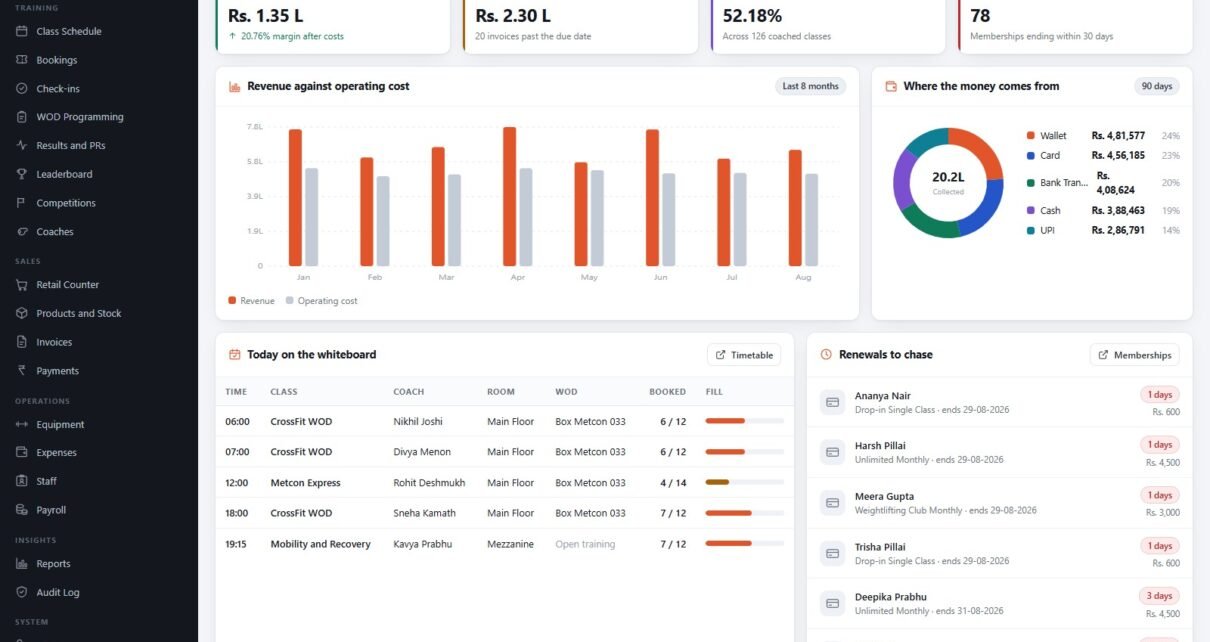
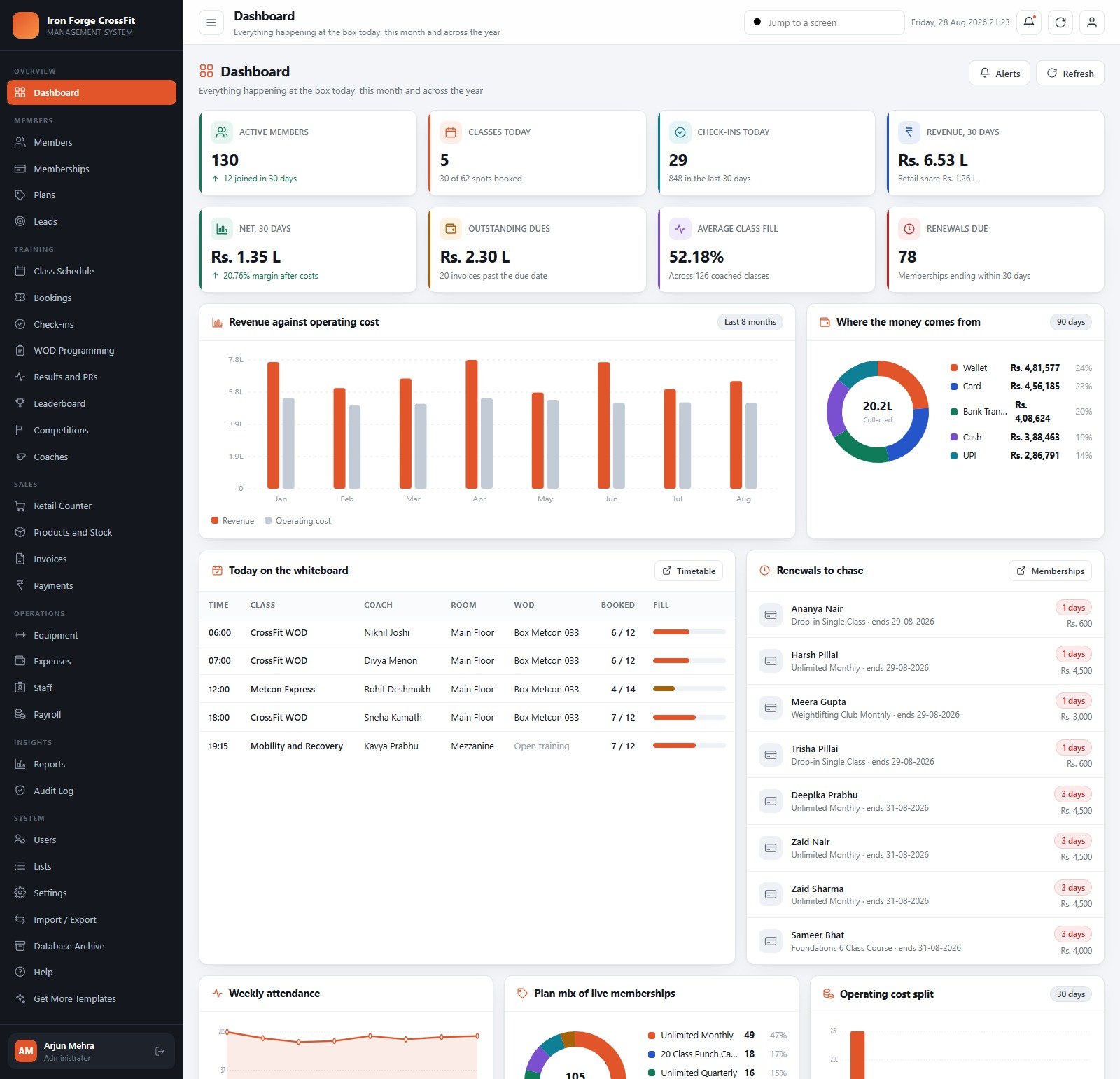
- A dashboard built for a box, not a generic gym. Active members, classes today with spots booked, check-ins today, 30-day revenue split by retail share, net after operating cost, outstanding dues, average class fill and renewals due in 30 days – plus a revenue-against-operating-cost bar chart, a payment-mode donut, today’s whiteboard and a renewals-to-chase list you can work through before the 6 a.m. class.
- Member register with training detail on the row. Level (Beginner, Scaled, RX, RX+, Masters), current plan and expiry date, 30-day visits, lifetime visits, dues and waiver status.
- 14 plan shapes. Drop-in, 10 and 20 class punch cards, unlimited monthly / quarterly / half-yearly / annual, student, corporate, masters, open gym, a Foundations 6-class on-ramp, a personal-training 10-pack and a barbell club add-on – each with its own validity window, session count and joining fee.
- Memberships with the awkward cases handled. Renewals, freezes and holds, sessions consumed against punch cards, live contract value, a 14-day expiry list and an expired-membership view.
- Leads that get chased. Enquiries by source – walk-in, Instagram, Google, referral, event, corporate tie-up – with trial dates, follow-up dates that turn red when overdue, and a conversion rate.
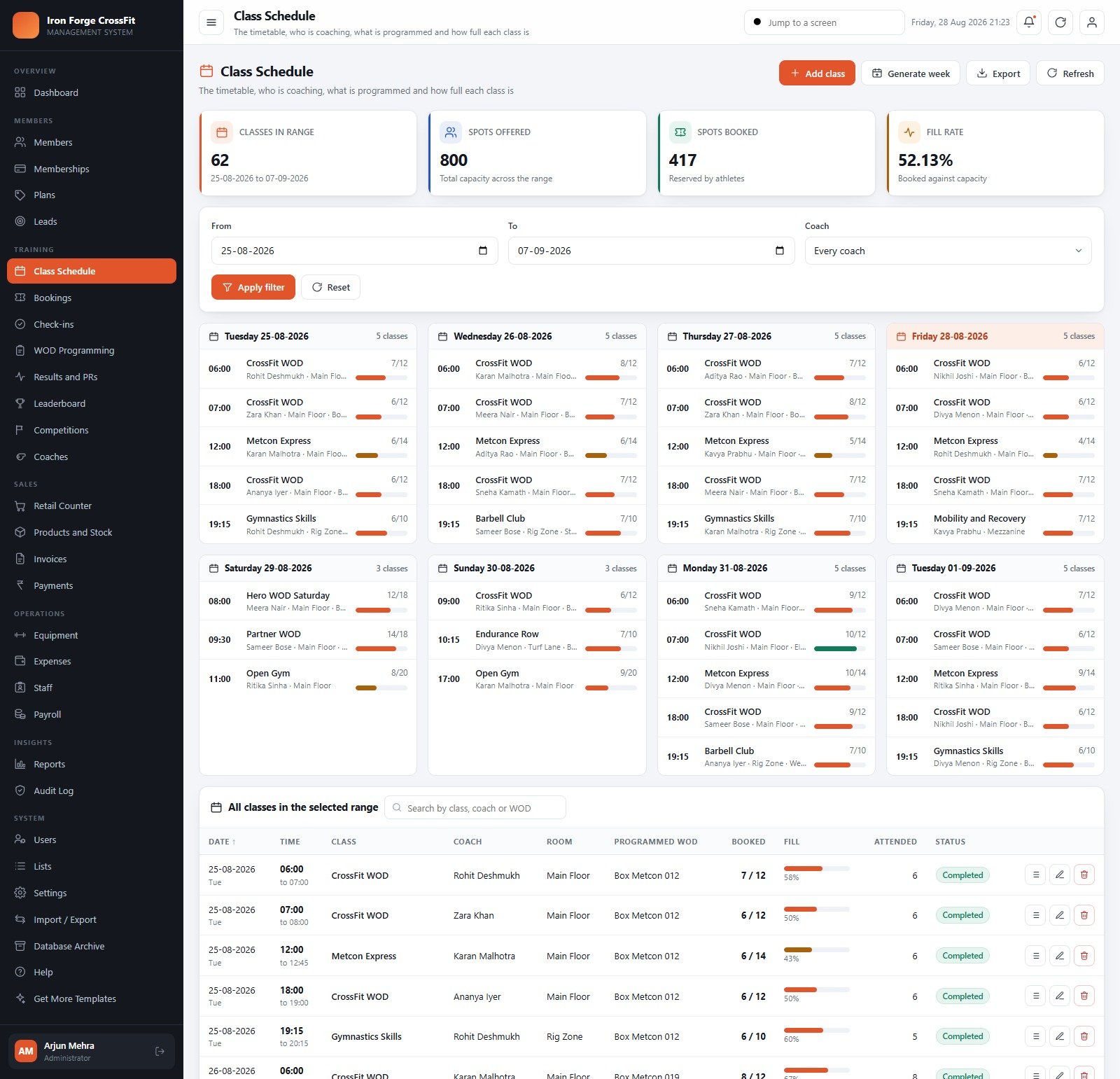
- Timetable, bookings, waitlists, check-ins. Generate a week in one click, see spots booked against capacity with a fill-rate percentage per class, and record entry from a door kiosk, the front-desk tablet or a coach tablet.
- WOD programming that looks like a real whiteboard. A 120-workout library with 25 benchmark Girls and 20 Hero workouts, 64 catalogued movements with scaling options and RX loads, and the week ahead laid out class by class.
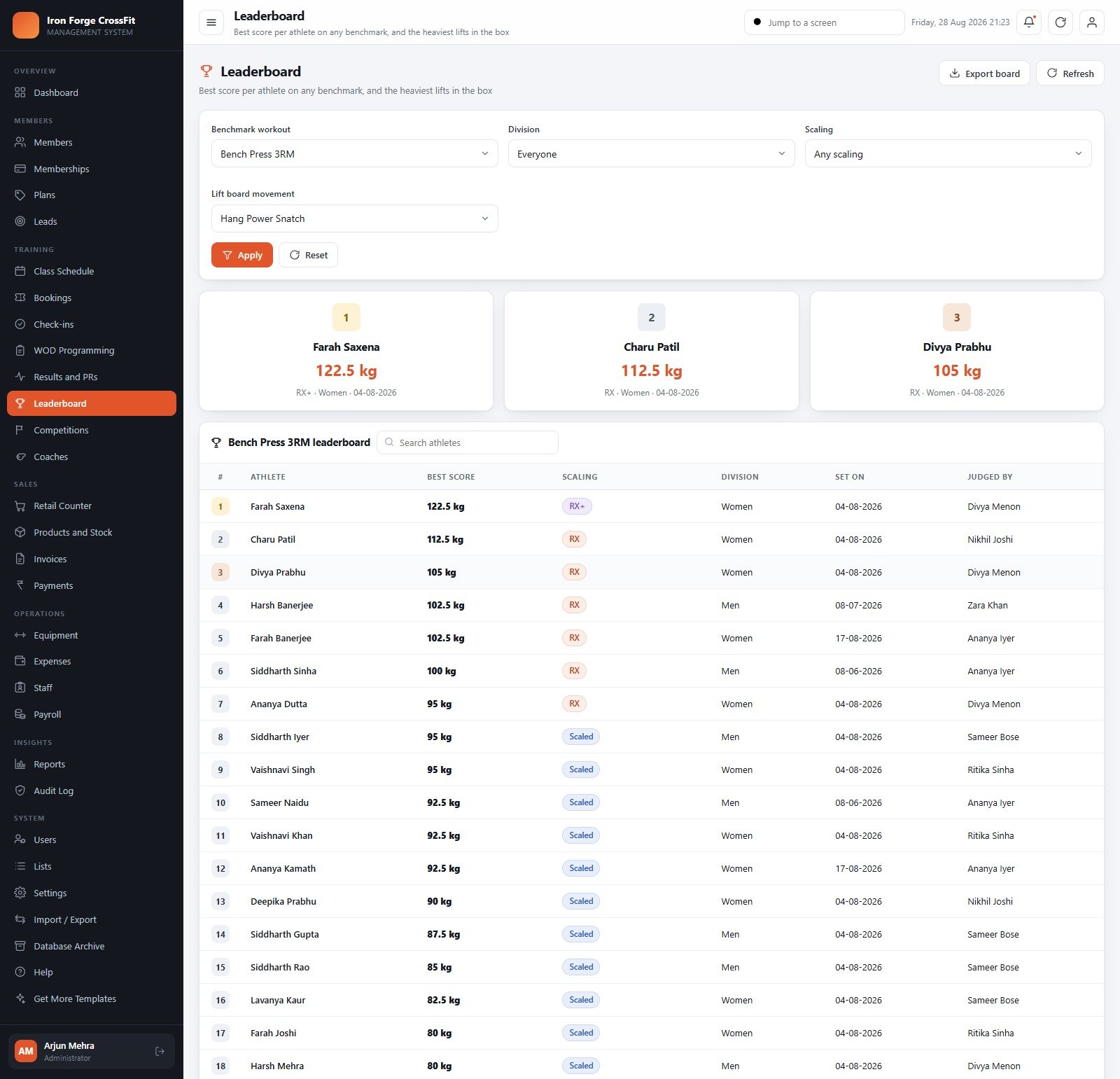
- Scores, PRs and leaderboards. Log For Time, EMOM or Rounds + Reps, at RX+, RX, Scaled or Foundations, by division, with a judged-by field, a podium and a lift board per movement.
- Competitions. In-house throwdowns, Open events and external comps with divisions, entry fees, registered-against-capacity counts and money collected.
- Retail counter and stock control. A 70-line shelf across supplements, apparel, beverages, recovery, equipment and drop-in passes, with basket, bill discount, payment mode, reference number and a printed receipt – then cost, price, stock value, reorder point, expiry date and supplier on the stock screen.
- Money end to end. Invoices with ageing and part payments, receipts by mode with printable slips, an expense ledger with bill upload and approval, an equipment asset register with next-service dates and overdue flags, staff records, and a payroll run with basic, class payout, allowances, deductions and printable payslips.
- 21 reports, 5 roles, one audit log. Finance, Members, Training, Retail and Operations reports, all CSV-exportable and A4-printable; Administrator, Manager, Front Desk, Accountant and Coach roles carrying 50, 46, 28, 21 and 19 permissions respectively; and an audit trail of who did what, on which record, when.
The Screens, Group by Group
The sidebar is organised the way a box actually runs, and the permission map decides which of these a signed-in user can even see.
Overview is the Dashboard – eight KPI cards, four charts and two live worklists. Members holds the register, Memberships (renew, freeze, cancel on every row), Plans (the price list) and Leads (enquiry to trial to conversion). Training is the biggest group: Class Schedule as day cards plus a filterable table, Bookings, the door log in Check-ins, WOD Programming, Results and PRs, Leaderboard, Competitions, and Coaches with certifications, specialities, class rate and average member rating.
Sales covers the Retail Counter, Products and Stock, Invoices and Payments; Operations covers Equipment, Expenses, Staff and Payroll; Insights is Reports and the Audit Log. System holds Users, Lists (24 master lists, 150 dropdown values), Settings (54 of them), Import / Export (31 tables with CSV templates and a validation preview) and the Database Archive.
CrossFit Box Management System vs. a Spreadsheet vs. Paid Gym SaaS – Feature Comparison
| This web app | Google Sheets / Excel workbook | Paid gym SaaS | |
|---|---|---|---|
| Cost | One-off purchase | One-off, cheap | Monthly, usually scaling with member count |
| Platform | Apps Script web app on a Sheets database, in your own Google account | A file | Vendor-hosted |
| Setup time | Under 15 minutes | Minutes, then weeks of formula work | Days, plus migration and onboarding |
| Real-time team collaboration | Yes – desk, coaches and accountant in one live database | Fragile | Yes |
| Mobile access | Responsive browser UI, works on a kiosk tablet | Poor | Yes, native apps |
| Role-based permissions | 5 roles enforced server-side on every write | Sheet protection at best | Yes |
| Own the source code | Yes | Yes | No |
| WOD library, PRs, leaderboards | 120 WODs, 64 movements, lift board per movement | Manual | Yes |
| Member app and card processing | No – staff-side only | No | Yes |
Who Should Use This Template
It fits an owner-operated CrossFit box, strength gym, barbell club or small functional-fitness studio, roughly 50 to 400 members, with a front desk and a handful of coaches. It fits especially well if you already pay an affiliate fee and do not want a second recurring software bill, or if you want your member data sitting in your own Google Drive rather than a vendor’s database.
It is not the right tool if you need athletes to book and pay themselves from a phone app, if you need card processing or auto-debit mandates, or if you are running several locations from one console. And nothing here replaces a signed waiver or an insurance policy – the waiver tracker tells you who has not signed, it does not create legal cover.
Real-World Use Cases
The 6 a.m. owner check. Rahul opens the Dashboard on his phone: 5 classes today with 30 of 62 spots booked, 78 renewals due inside 30 days, and 20 invoices past their due date. He forwards the renewals list to the front desk before he has finished his coffee.
The front-desk hour. Neha lives on three screens – Check-ins for the door, Retail Counter for protein bars and tape, and Memberships to renew someone on the spot and print the invoice. Payroll and the audit log are simply not in her sidebar.
The coach’s class. Ananya opens the timetable on the rig tablet, takes the roster, logs a dozen scores against the day’s metcon and watches three come back flagged as PRs. She can read the member register but cannot touch a price or a payment.
The month end. Sanjay, the accountant, runs Revenue vs Expense, Outstanding Dues and Ageing, Payroll Summary and Expense Summary by Category, exports all four to CSV and closes the month without asking anyone for a number.
Advantages of the CrossFit Box Management System Web App
- No subscription and no per-seat cost. Add every coach and both front-desk staff without a pricing conversation.
- Your data stays yours. The database is a Google Sheets workbook in your Drive, next to a folder tree for waivers, member photos, bills, backups, archives, exports and competition media.
- Genuinely CrossFit-shaped. Scaling levels, benchmark and Hero workouts, RX loads, divisions and lift boards are first-class, not bolted on.
- Setup that cannot half-fail. Building the database is staged and resumable, so Apps Script’s six-minute execution limit cannot leave you with half a database, and running setup twice never duplicates rows.
- It ages well. The Database Archive copies the whole workbook into Drive before moving closed rows out, so the live book stays fast in year three.
- You can change it. You own Code.gs and Index.html – rebrand it, add a module, rewrite a report.
Opportunities for Improvement
Being honest about the edges is more useful than a feature list. There is no member-facing portal or mobile app – bookings are taken by staff. There is no payment gateway; the system raises the invoice and records what you collected, it does not charge a card. Email is optional and simple – you switch it on in Settings and send a test, but there is no drip campaign builder. It is single-location. And because the database is Google Sheets, a very large box with several years of history will want to run the archive on schedule rather than never.
Best Practices
- Try the demo first. Before anything else, open the live demo above and sign in as at least two roles. Ten minutes there answers more questions than any feature list.
- Change every seeded password on day one. The demo credentials are public; your instance should share none of them.
- Do Settings before data. Currency, date format, timezone, tax percent, invoice terms, print sizes and class rules first – they are stamped onto every document you print afterwards.
- Replace the price list before you import members. Memberships point at plans, so getting Plans right first saves rework.
- Import, do not retype. Download the Members CSV template, paste your register in, read the validation preview, then confirm. Leave the ID column out – the system allocates record numbers.
- Publish a new deployment version after any code change. Saving the editor does not update the live web app – this trips up more first-time Apps Script users than anything else.
- Back up before you archive. Use Backup now in Settings, then run the archive with a preview.
Explore Relevant Templates
- Gym and Fitness Center Membership Management System Web App – the general-gym sibling, for a floor of machines rather than a whiteboard. We covered it in this walkthrough.
- CrossFit Gym KPI Dashboard in Google Sheets – reporting only, if you already have an operating system and just want the numbers. See the dashboard tour.
- Gym Personal Records (PR) Tracker in Google Sheets – a lightweight PR board for a single coach.
- Gym Membership Tracker in Google Sheets – renewals and dues only.
- Adventure Sports Booking Management System Web App – the same architecture applied to sessions, guides and gear.
Watch the Deployment Walkthrough
The same deployment steps apply to every NextGenTemplates Apps Script system:
Want to build skills like this step by step? The NextGenTemplates Academy learning paths walk you through spreadsheet systems with practice files.
Frequently Asked Questions
Can I try it before buying?
Yes. The green box near the top of this post links to a fully deployed instance carrying a year of sample data, and every seeded login is published there. They are public credentials on a shared demo that resets, so do not put anything real into it. Sign in as two different roles – the permission model is the part screenshots cannot show you.
Do I need to know how to code?
No. You copy two text files into a new Apps Script project, deploy once and press a button. You need a Google account and about fifteen minutes.
Where is the data stored?
In a Google Sheets workbook the system creates in your own Google Drive, with a folder tree beside it for waivers, member photos, bills, backups, archives, exports and competition media.
Does it process card payments?
No. It raises invoices and records the payment you took – cash, card, UPI, bank transfer or wallet – and reconciles the collection against what was billed.
How many staff accounts can I create?
As many as you want. There is no per-seat charge; the demo simply ships with 10 accounts across the 5 roles.
What happens when the database gets big?
The Database Archive screen moves closed transactions into dated Drive copies after copying the whole workbook first. Master data and anything still open always stays live.
Can I use a currency other than the rupee?
Yes – Settings > Regional carries the currency code and symbol, date format, timezone, week start and financial-year start month. The seeded data is in INR because the demo box is in Bengaluru.
About the Author
Built by PK – Microsoft Certified Professional with 15+ years of Excel, Google Sheets, and Power BI experience. Founder of NextGenTemplates, reaching 300K+ subscribers across YouTube channels. Every template is hand-built and tested before release.
Conclusion
A CrossFit box is a small business with an unusually complicated product: memberships that freeze, punch cards that run out, classes that fill, workouts that need scaling, athletes who care about a number on a board, and a shelf of supplements in the corner. A spreadsheet handles about a third of that. The CrossFit Box Management System Web App handles all of it in 30 screens, keeps your data in your own Google account and costs one payment rather than a monthly line item.
The honest way to evaluate it is not to read this post twice – it is to open the live demo, sign in as admin, then sign in again as coach.vikram, and see whether the shape of it matches the shape of your box. If it does, you can get the CrossFit Box Management System Web App here and be running your own private copy this afternoon.