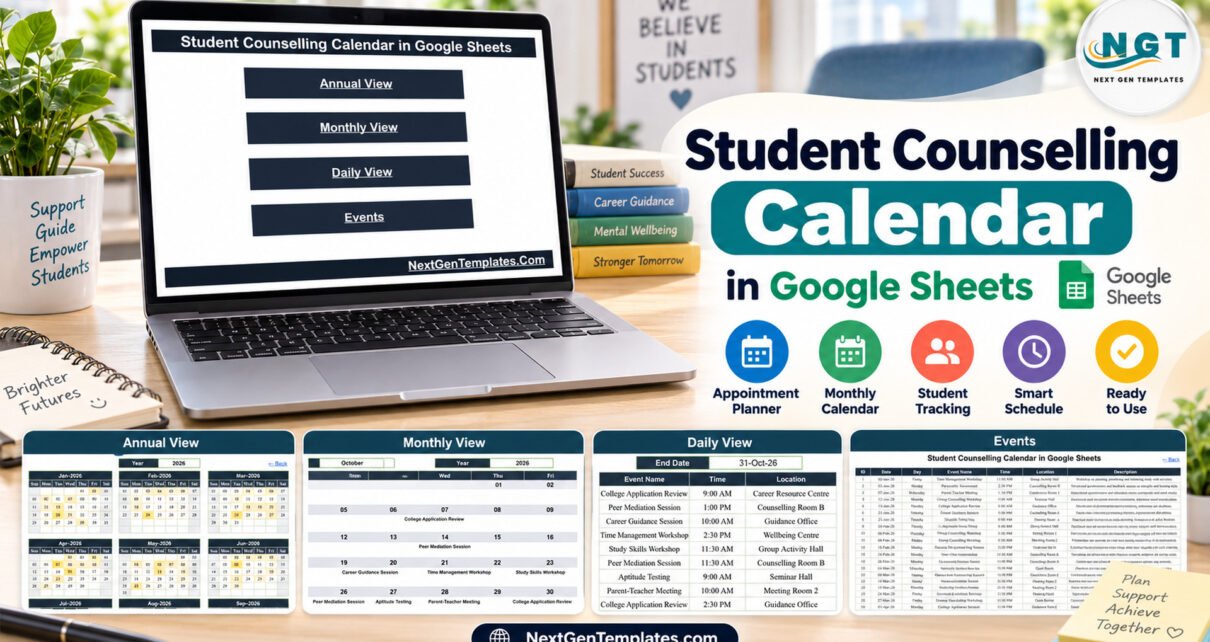
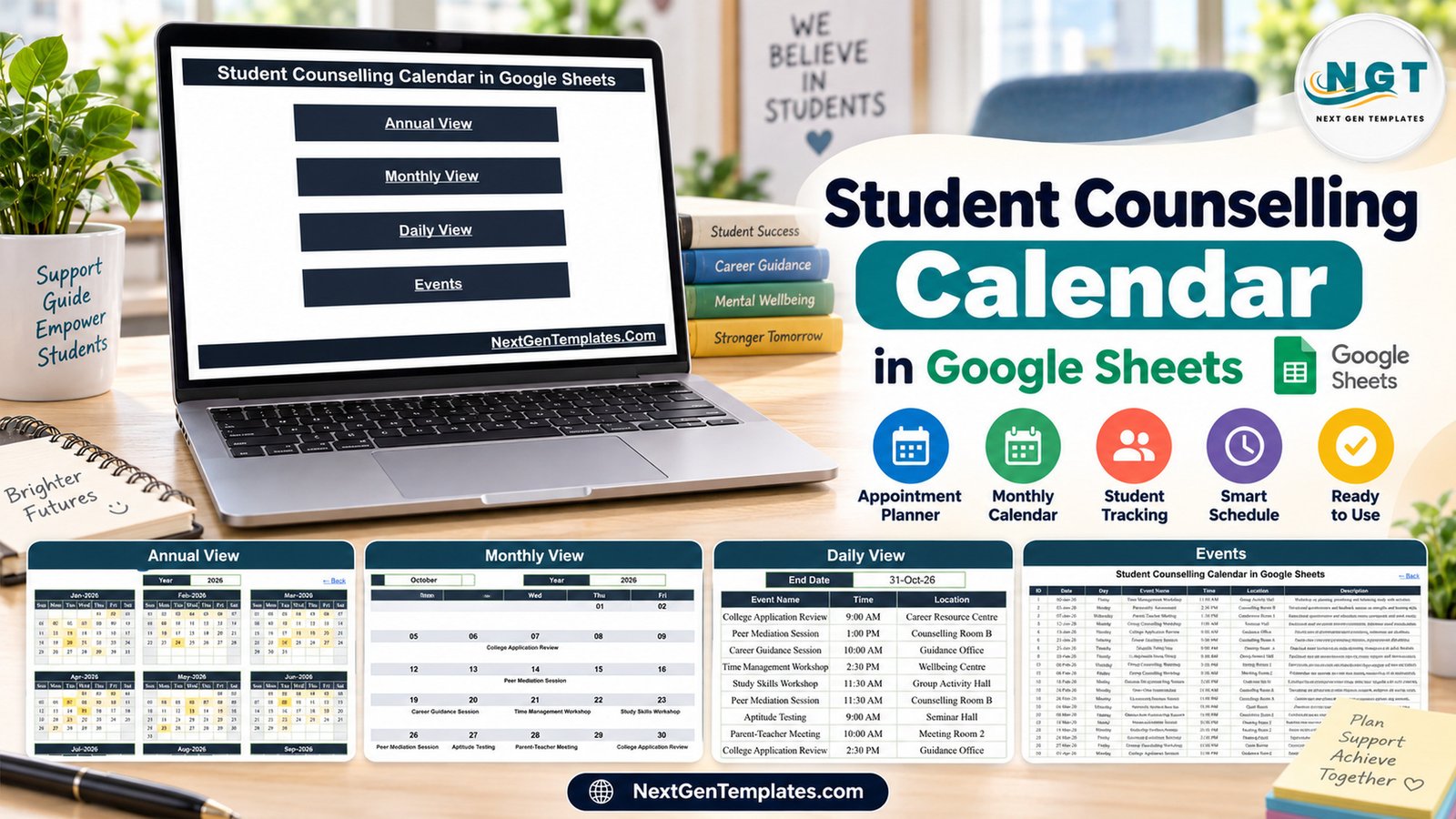
The Student Counselling Calendar in Google Sheets gives a counselling team five linked tabs, 100 sample events across 2026 and three ways to read them: a 12-month Annual View, a Monthly View with event names on each date, and a Daily View that lists every session between two dates. The sample year covers 16 session types, from One-on-One Counselling Sessions to Exam Stress Clinics and Parent-Teacher Meetings, held in 11 rooms and venues.
Counselling offices juggle individual appointments, group workshops, career guidance and parent meetings, often across several staff and rooms. When that schedule lives in inboxes and paper diaries, clashes and forgotten workshops follow. This school counselling schedule template puts the whole schedule in one shared Google Sheet that every counsellor can open in a browser, and it does so without storing anything about individual students.
Key Features of the Student Counselling Calendar
- Annual View: twelve monthly grids for the year typed into the Year box, with every date that holds a session highlighted. The sample year is 2026.
- Monthly View: Month and Year selectors drive a Sunday-to-Saturday grid that prints the event name under each date.
- Daily View: a Start Date and End Date pair lists every matching session with ID, date, day, event name, time, location and description.
- Events register: one seven-column table feeds all three views. The 100 sample rows fall on weekdays only, and every Day label matches its date.
- Privacy by omission: the Events table has no student name, roll number, email or phone column, and no sample row names a student.
- Browser-based: no macros, no installation. Share it with colleagues through normal Google Drive sharing.
The counselling session calendar is the core idea here: schedule the meeting, the room and the purpose, and keep case notes somewhere built for them.
Template Structure: The Five Tabs
1. Home
The landing tab has four buttons: Annual View, Monthly View, Daily View and Events. Every working tab carries a Back link, so new staff can find their way around without a walkthrough.

2. Annual View
All twelve months of 2026 sit on one screen, with highlighted cells on every date that has a counselling event. It is the quickest way to see that March and October are busy while late December is light, and to plan room bookings a term ahead.

3. Monthly View
Choose October and 2026 and the grid shows College Application Review on Tuesday the 6th, Peer Mediation Session on Thursday the 15th, Career Guidance Session on the 20th, a Time Management Workshop and a Study Skills Workshop on the 22nd and 23rd, then Aptitude Testing and a Parent-Teacher Meeting in the last week.

4. Daily View
Set 01-Oct-26 to 31-Oct-26 and the tab lists nine sessions, IDs 76 to 84, with times such as 9:00 AM and 2:30 PM and rooms including Career Resource Centre, Counselling Room B, Guidance Office, Wellbeing Centre and Seminar Hall. Narrow the range to one week for a staff briefing sheet.

5. Events
The source table with ID, Date, Day, Event Name, Time, Location and Description. Sample session types include Group Counselling Workshop, Exam Stress Clinic, Mental Health Check-In, Wellbeing Drop-In, University Selection Session, Scholarship Guidance Session, Academic Advising Meeting and Personality Assessment. Replace them with your own and the three views follow.

Google Sheets vs. Excel vs. Counselling Software: Feature Comparison
| Factor | This Google Sheets calendar | Excel edition | Paid student-services or case-management software |
|---|---|---|---|
| Cost | One-time purchase | One-time purchase | Usually a recurring subscription |
| Platform | Any browser with a Google account | Excel for Windows desktop, macros | Vendor web app |
| Setup time | Make a copy, replace sample rows | Unzip and enable macros | Configure users, forms and policies |
| Real-time team editing | Yes, via Google sharing | Single file | Yes |
| Mobile access | Google Sheets app | Limited | Usually |
| Customizable fields | Edit any value | Yes | Within vendor limits |
| Year-1 cost at 5 users | One template purchase | One template purchase | Per-user or per-student fees |
| Case notes and referrals | Not designed for them | Not designed for them | Typically the core purpose |
| Reminders and booking links | No | No | Usually |
For a counselling office that wants one shared session calendar without paying per user for case-management software, the Google Sheets edition sits in the sweet spot. The Student Counselling Calendar in Excel is a separate build with its own sheets and sample events, adding a This Month summary and an event form for desktop Excel users.
Who Should Use This Template
Perfect for:
- School counsellors and pastoral leads planning sessions, workshops and parent meetings across a year
- College and university wellbeing, careers and student-services teams who share rooms and staff
- Guidance departments already using Google Workspace
Not a fit if:
- You need case notes, referrals, consent records or clinical assessments
- You need automatic reminders, online booking or clash detection
- Your policy requires a system with audited access controls for counselling data
Real-World Use Cases
Amina, counsellor at a secondary school, books exam stress clinics before mocks, time management workshops in the first week of term and a parent-teacher meeting each month. Every Monday she sets Daily View to the next five days and shares the tab with the year leads.
A university careers and wellbeing office places college application reviews, university selection sessions and scholarship guidance slots in the Seminar Hall and Career Resource Centre. Annual View shows which months are crowded before rooms are requested. Teams handling deadlines can pair it with the Scholarship Deadline Calendar and the Admission Season Calendar.
Daniel, a student-services coordinator, shares one copy with three colleagues so everyone sees the same drop-in and group workshop plan. Case notes stay in the institution’s approved record system; the calendar only says when and where.
Advantages of the Student Counselling Calendar
- One Events list drives three views, so nobody maintains two schedules.
- Browser access means counsellors on different campuses see the same plan.
- A one-time purchase replaces a per-user subscription for teams that only need scheduling.
- The event types and rooms are plain text, so you can rename them to match your school.
Opportunities for Improvement
- There are no reminders, calendar invites or booking links; staff check the sheet themselves.
- Nothing stops two sessions being entered for the same room and time.
- Two sample dates, 16-Feb-26 and 29-Dec-26, hold two sessions each. Monthly View is built for a quick glance, so use Daily View or Events for full detail on busy days.
- When you edit a date, check that the Day value beside it still matches.
- The sample description “Confidential individual session” names a type of meeting only; the sheet adds no confidentiality protection, and it makes no safeguarding or compliance claims.
Best Practices
- Do not type student names. If a session must reference a student, use an anonymous code such as S-014 and keep the key elsewhere.
- Share the copy only with staff who need it, and review access each term using Google’s file-sharing guide.
- Keep one row per session, with a consistent room name, so Daily View stays easy to read.
- Keep an untouched copy of the original file before you replace the sample data.
Explore Relevant Templates
If you plan other parts of the school year in Sheets, the Parent-Teacher Meeting Calendar, Class Timetable Calendar and Mental Health Session Calendar posts cover templates built on the same five-tab layout.
- Placement Drive Calendar in Google Sheets for campus recruitment events
- Scholarship Deadline Calendar in Google Sheets for funding deadlines
- Parent-Teacher Meeting Calendar in Google Sheets for meeting days
- Every Google Sheets calendar template in the store
Frequently Asked Questions
What is the Student Counselling Calendar in Google Sheets?
It is a five-tab Google Sheets template for scheduling counselling sessions, workshops and parent meetings. An Events table feeds an Annual View, a Monthly View and a date-range Daily View, and it ships with 100 sample events across 2026.
Should I enter student names?
No. The sample data holds no student names or identifiers, and the sheet is protected only by Google’s sharing settings. Use anonymous codes such as S-014 if you must reference a student, and keep the key in your institution’s approved record system.
Is it a case-management or clinical record?
No. The Student Counselling Calendar schedules when and where sessions happen. It does not store case notes, referrals, consent or assessments, and makes no clinical, safeguarding or regulatory-compliance claims.
How long does setup take?
Making a copy takes a minute. Most of the effort is typing your own sessions over the 100 sample rows; the three calendar views read them from the Events tab automatically.
How does it compare to paid counselling software?
Paid platforms add case records, reminders and online booking for a recurring fee. This template covers the shared schedule only, for a one-time purchase, which suits offices that already keep records in an approved system.
Can I change the year?
Yes. Type a new year into Annual View, pick a month and year on Monthly View, and set any Start and End Date on Daily View.
About the Author
Built by PK – Microsoft Certified Professional with 15+ years of Excel, Google Sheets, and Power BI experience, and founder of NextGenTemplates. Every template is hand-built and tested before release.
Conclusion
The Student Counselling Calendar in Google Sheets keeps a counselling team’s sessions, workshops and parent meetings in one shared, browser-based calendar with annual, monthly and daily views, while leaving student records where they belong. Replace the sample events, use anonymous codes, and share it with the staff who plan with you.
Click here to Purchase the Student Counselling Calendar in Google Sheets
✅ Instant download · One-time payment · No subscription
🎥 Watch more Google Sheets tutorials: Youtube.com/@NeoTechNavigators
Last updated: September 2026