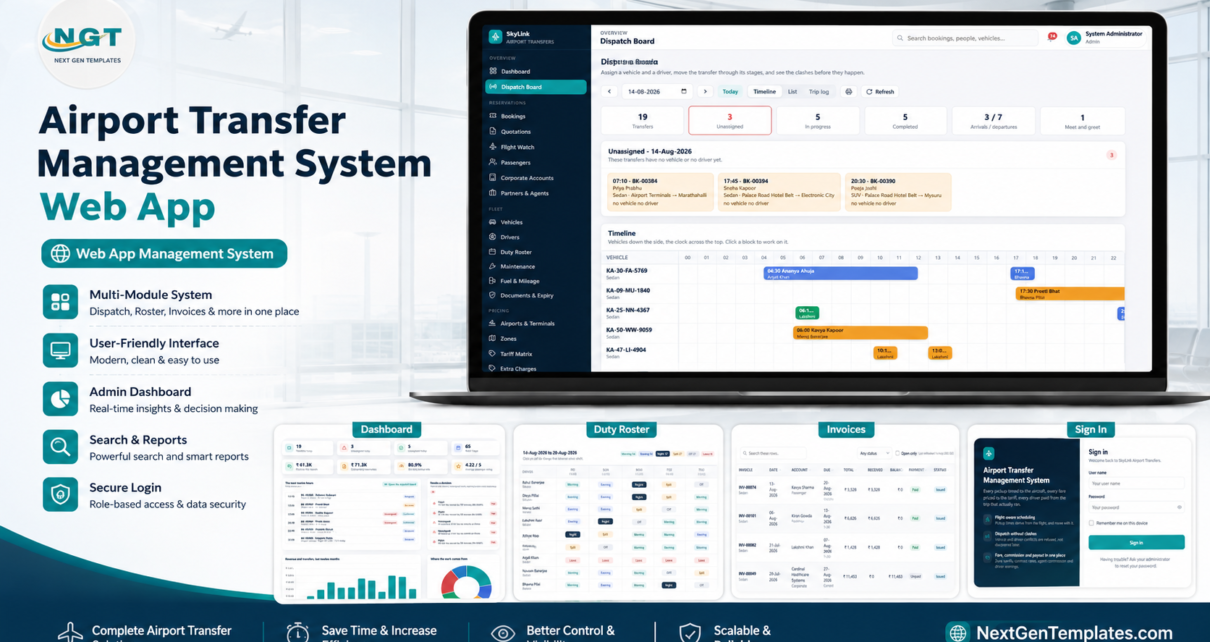
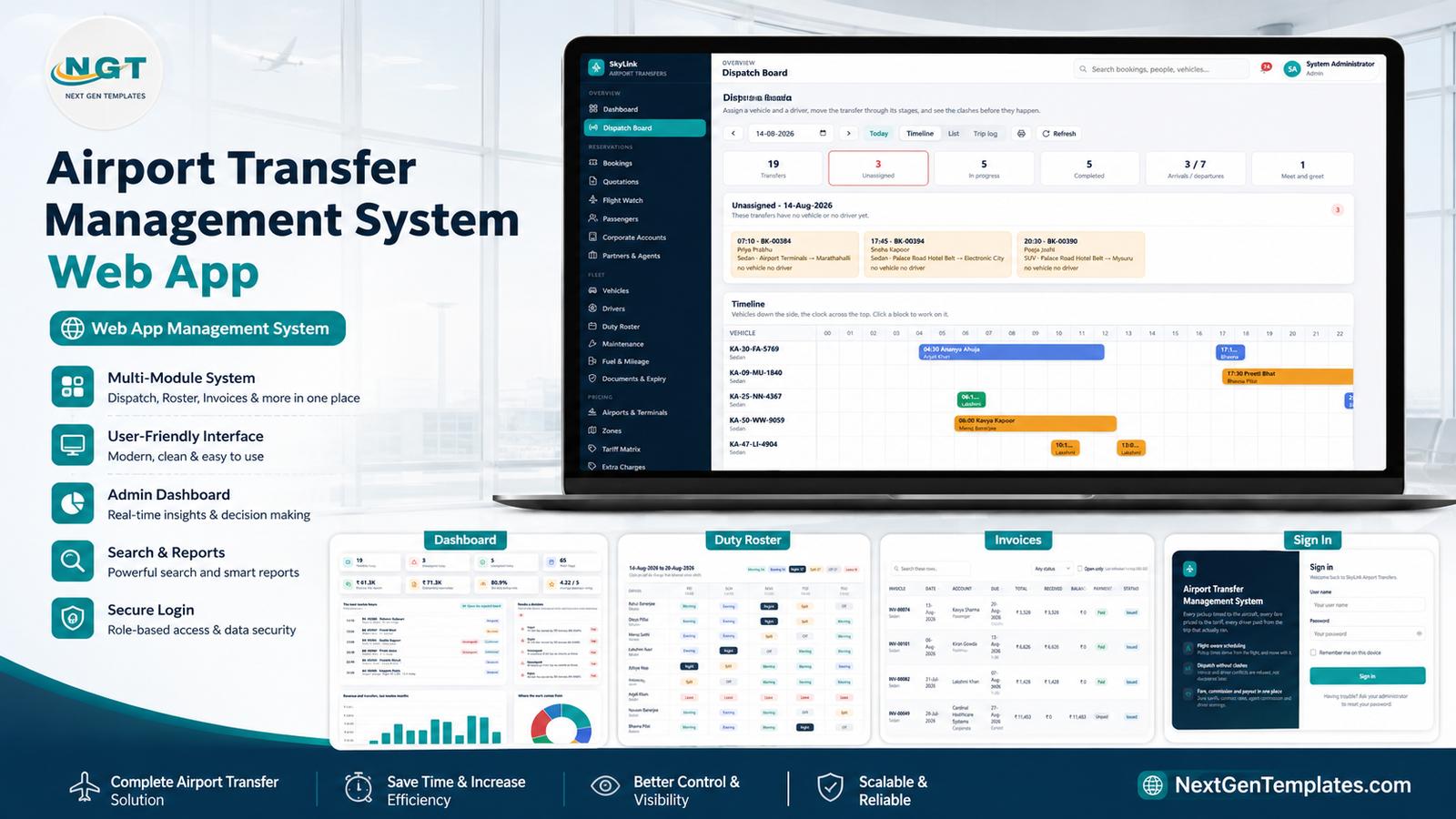
An airport transfer is the one job in ground transport where being ten minutes out is not a scheduling inconvenience – it is a passenger standing on a kerb, or a driver parked for ninety minutes because the aircraft moved. The Airport Transfer Management System Web App is built around that single fact: every pickup time is derived from the flight, and when the flight moves, the pickup moves with it.
It is a Google Apps Script web app backed by Google Sheets – 34 in-app pages, 37 database tables, 7 sign-in roles, a tariff matrix of 160 rate rows across 8 vehicle classes, 14 configurable extra charges and 22 operating reports. The download ships with a demo database of 5,983 seeded records – 520 bookings, roughly 380 flights, 26 vehicles, 30 drivers, 60 passengers, 12 corporate accounts and 10 partner agencies – so every screen and every chart is populated before you type anything. It runs entirely inside your own Google account: no server to rent, no per-seat licence, and the database is a spreadsheet you own.
Get the Airport Transfer Management System Web App
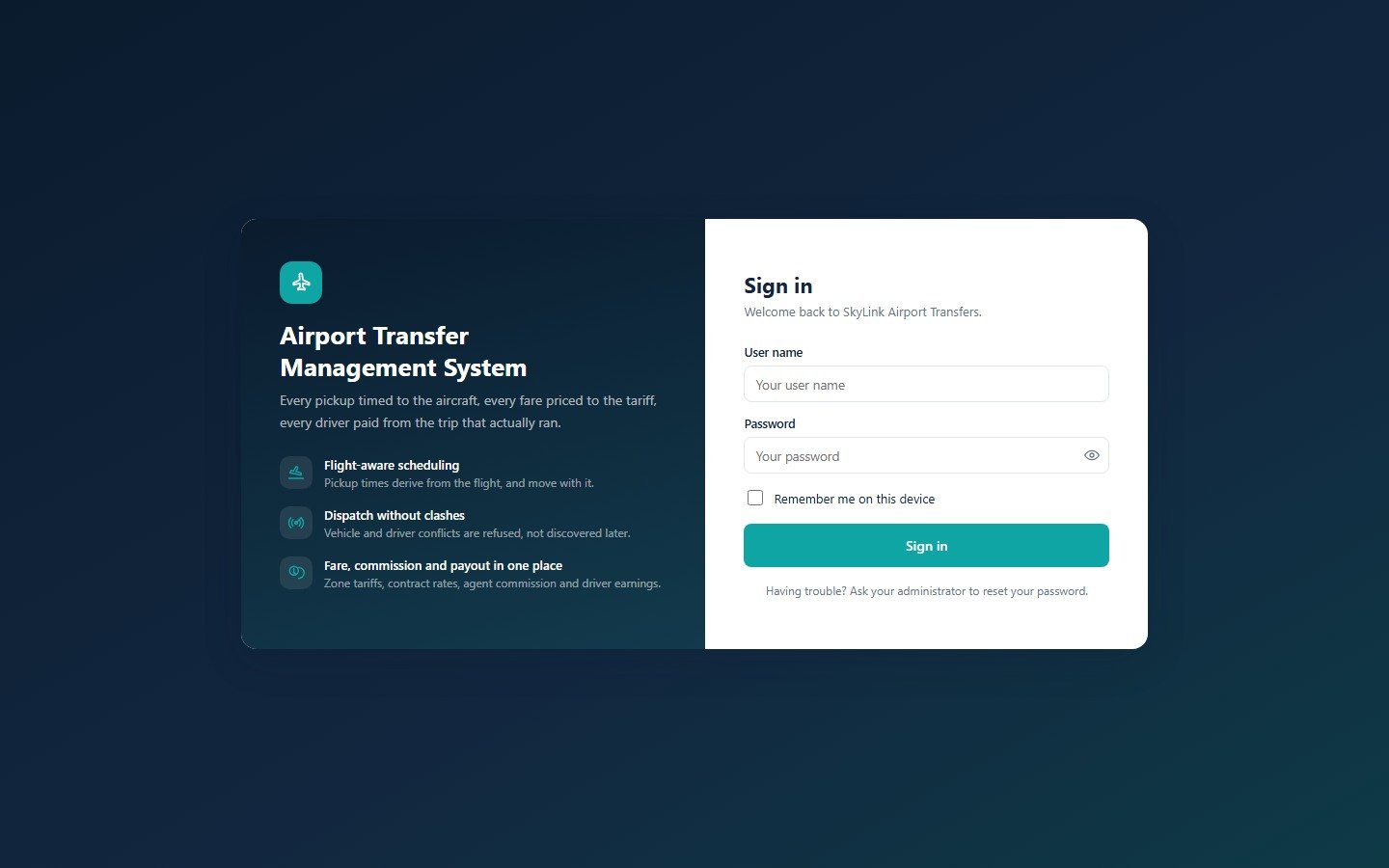
The sign-in screen
Seven seeded accounts sign in here, and none of them are shown on the screen. The menu that loads afterwards contains only the modules that role may open – and the server checks the permission again before it touches any data, so hiding a menu item is not the security model.
🚀 Try the Live Demo Before You Buy
We have deployed this web app in our own Google account so you can test every page, every role and every report – with the full seeded demo dataset – before purchasing. No signup, no email required.
🔑 Test Login Credentials
Sign in as admin to see everything, including Users, Settings and the archive. Then sign out and come back as dispatch or finance – the menu is visibly shorter, and that is the whole point of the product. All seven roles are below.
💡 These are public demo logins on a shared instance that is periodically reset. They are not a customer deployment and they are not the system you are buying access to – anything you type there may be wiped or seen by the next visitor, so please do not enter real passenger or business data. After purchase you get the full source code (Code.gs + Index.html) and a deployment guide, and you stand up your own private copy, with your own passwords, in your own Google account.
Key Features of the Airport Transfer Management System Web App
- Flight-derived pickup times. Each airport carries four buffers – domestic and international arrival clearance, domestic and international check-in lead. Change a flight’s estimated time and every linked pickup is re-derived, with a preview of the impact before you apply it.
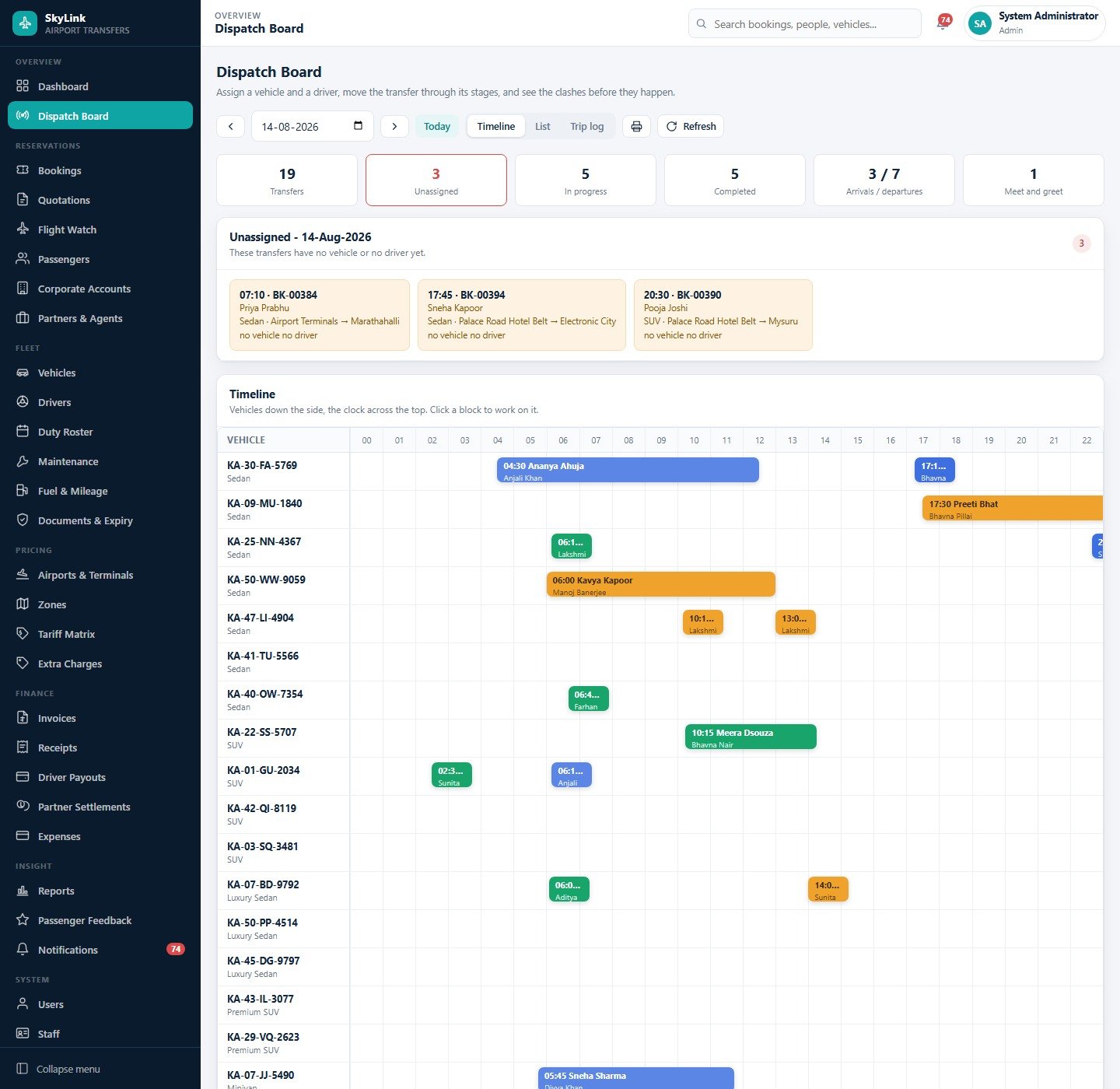
- A dispatch board built around clashes. Vehicles down the side, the clock across the top, an unassigned strip at the head of the day and six counters: transfers, unassigned, in progress, completed, arrivals versus departures, and meet-and-greet jobs.
- A 160-row tariff matrix. One rate per zone pair per vehicle class across eight classes, edited as a grid or a list, with a bulk percentage change that previews every affected row first.
- Fares that stay put. A booking stores the fare it was priced at, so re-pricing a route next quarter never rewrites what you already invoiced.
- Four driver payout models. Fixed per trip, per kilometre, percentage of fare, or monthly salary – with allowances and deductions, built from the trips that actually ran.
- Partner and agent commission. Flat per trip, percentage of net, or a net-rate card, settled per period into a printable statement.
- Corporate credit control. Contract rates, a credit limit, terms in days, and a weekly, fortnightly or monthly consolidated invoice per account.
- A single document expiry register. Insurance, permits, fitness certificates, driving licences and airport badges, with the dates you enter, a days-left column and an optional morning digest email.
- 22 reports over one dataset, each filterable, chartable, printable and exportable to CSV.
- Everything in your own Google account. Apps Script and Google Sheets – the standard Apps Script web app model, deployed by you, owned by you.
Template Structure – Page by Page
Thirty-four in-app pages sit behind the sign-in screen, grouped into Overview, Reservations, Fleet, Pricing, Finance, Insight, System and Support. Every screenshot below was taken from the shipped build running on its seeded demo database.
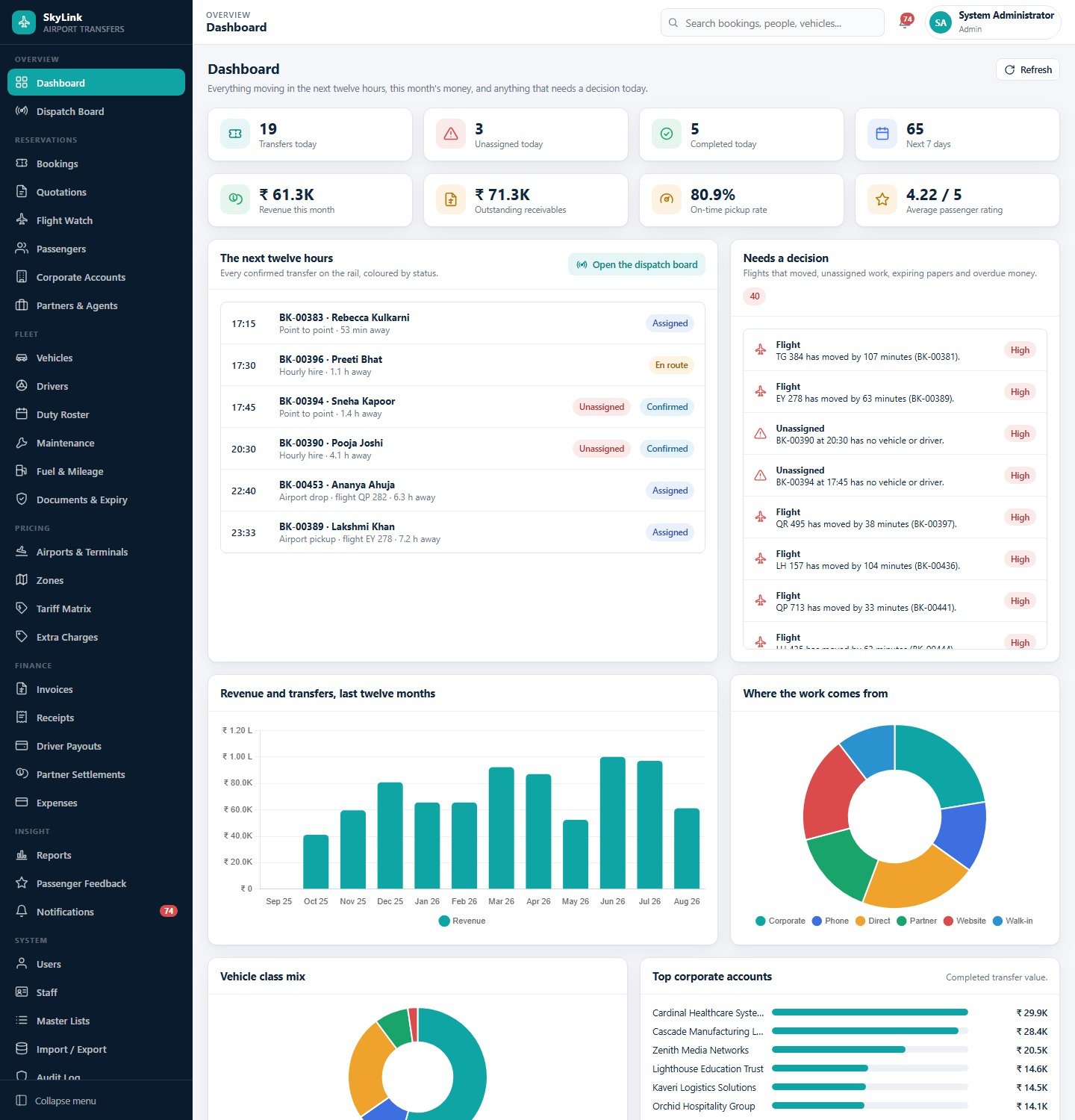
Dashboard
Eight cards – transfers today, unassigned today, completed today, the next seven days, revenue this month, outstanding receivables, on-time pickup rate and average passenger rating. Below them, a twelve-hour rail of every confirmed transfer coloured by status, and a “needs a decision” queue that collects moved flights, unassigned work, expiring papers and overdue money into one list. Then twelve months of revenue, a booking-source donut, the vehicle class mix, and top corporate accounts by completed transfer value.
Dispatch Board
The screen the operations team lives in. Pick a date, clear the unassigned strip, then move each transfer along its stages – notified, en route, at pickup, on board, completed – and close it with the real odometer and waiting minutes so both the fare and the driver earning are right. Timeline, list and trip-log views, plus a print button for the day’s sheet.
Bookings
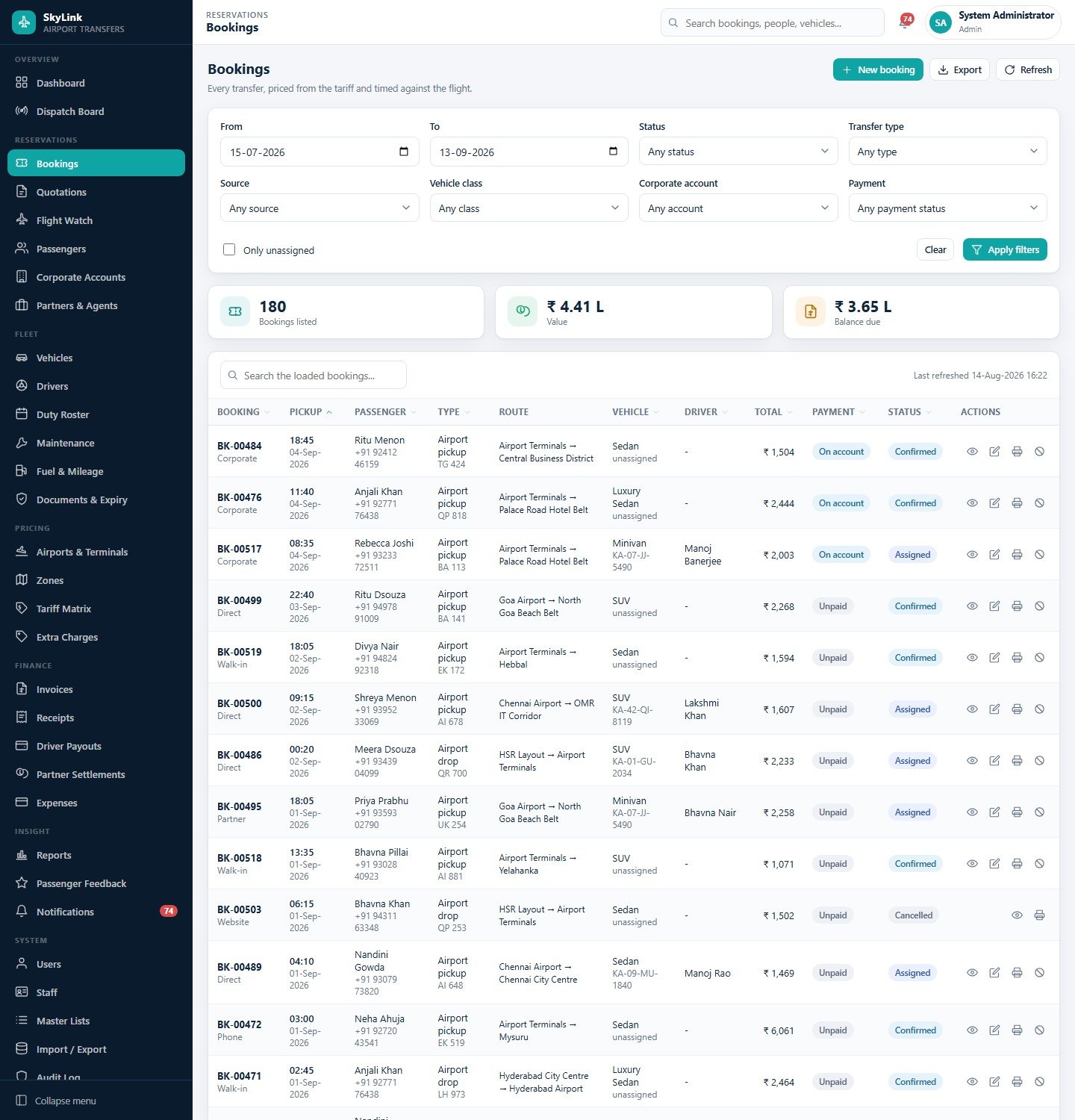
Every transfer, priced from the tariff and timed against the flight. Eight filters – date range, status, transfer type, source, vehicle class, corporate account, payment status and an unassigned-only switch – drive three live totals: bookings listed, value, and balance due. Each row can be viewed, edited, printed as a job sheet or cancelled against the configured cancellation bands.
Flight Watch
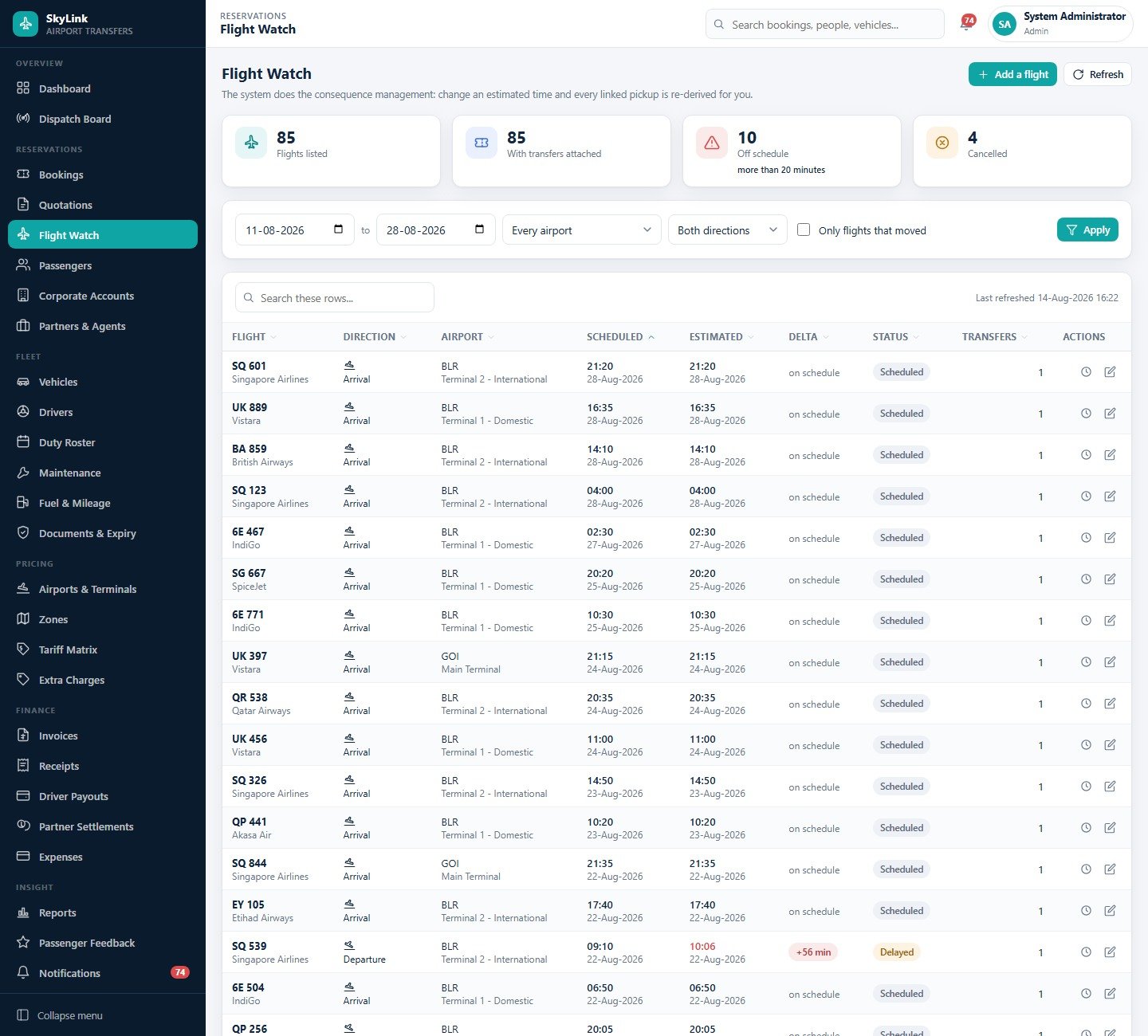
Every flight your transfers are attached to, with scheduled time, estimated time, the delta in minutes and a status. Filter to a date range, a single airport, arrivals or departures, or only the flights that moved – then apply the new time and let the pickups re-derive. In the seeded data, 10 of 85 flights are more than twenty minutes off schedule, which is roughly what a real morning looks like.
Vehicles
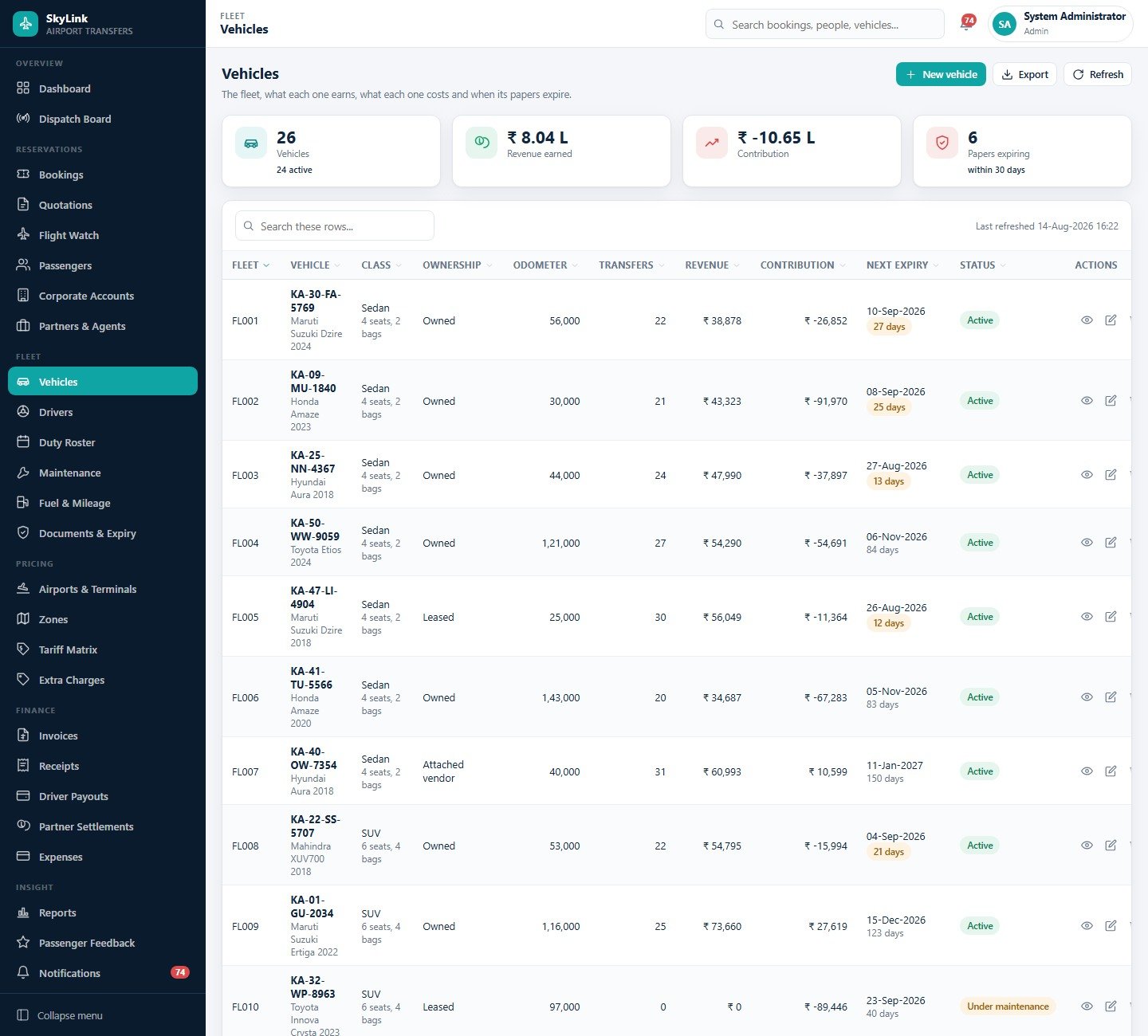
The fleet, what each one earns and what each one costs. Class, ownership – owned, leased or attached vendor – seat and bag capacity, current odometer, transfers carried, revenue, contribution after its own fuel and maintenance, and the next document expiry with a countdown in days.
Tariff Matrix
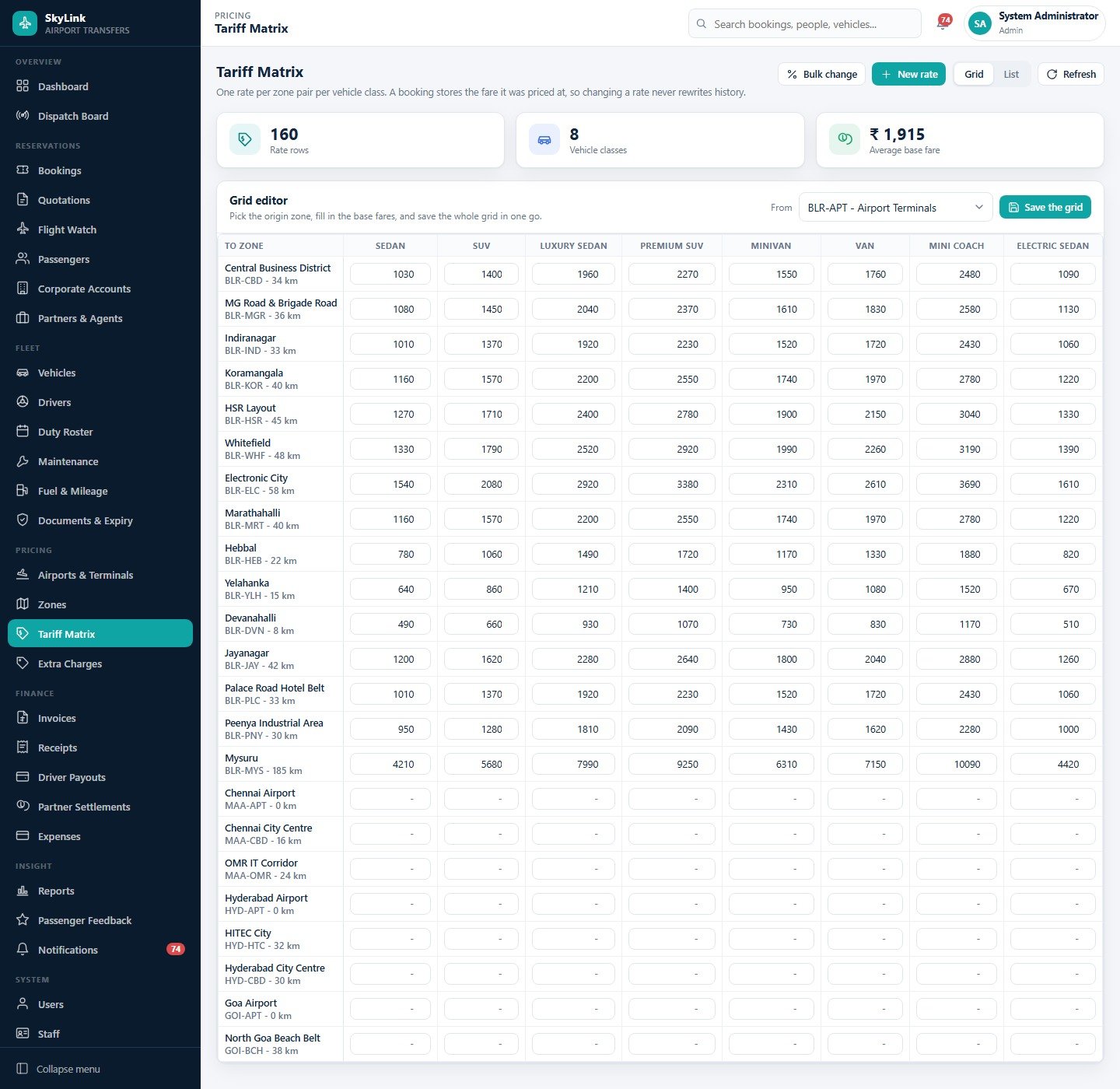
The grid editor is the fastest part of the whole build: choose an origin zone, type a base fare for every destination zone and vehicle class, and save the whole grid in one action. 160 rate rows, 8 vehicle classes, and a bulk percentage change with a preview when fuel moves.
Invoices
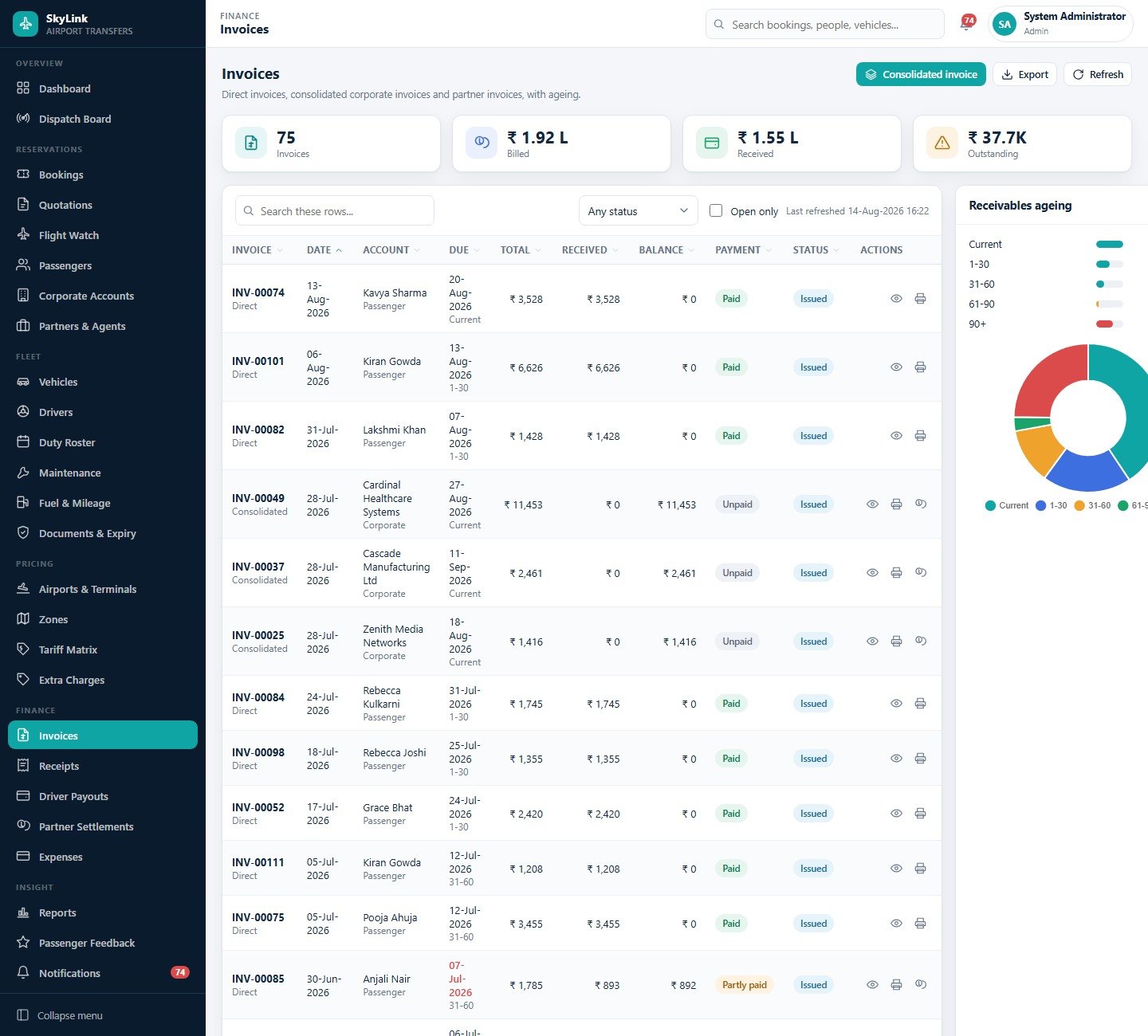
Direct passenger invoices, consolidated corporate invoices and partner invoices in one register, with billed, received and outstanding totals and a receivables ageing donut on the right – current, 1-30, 31-60, 61-90 and 90-plus days.
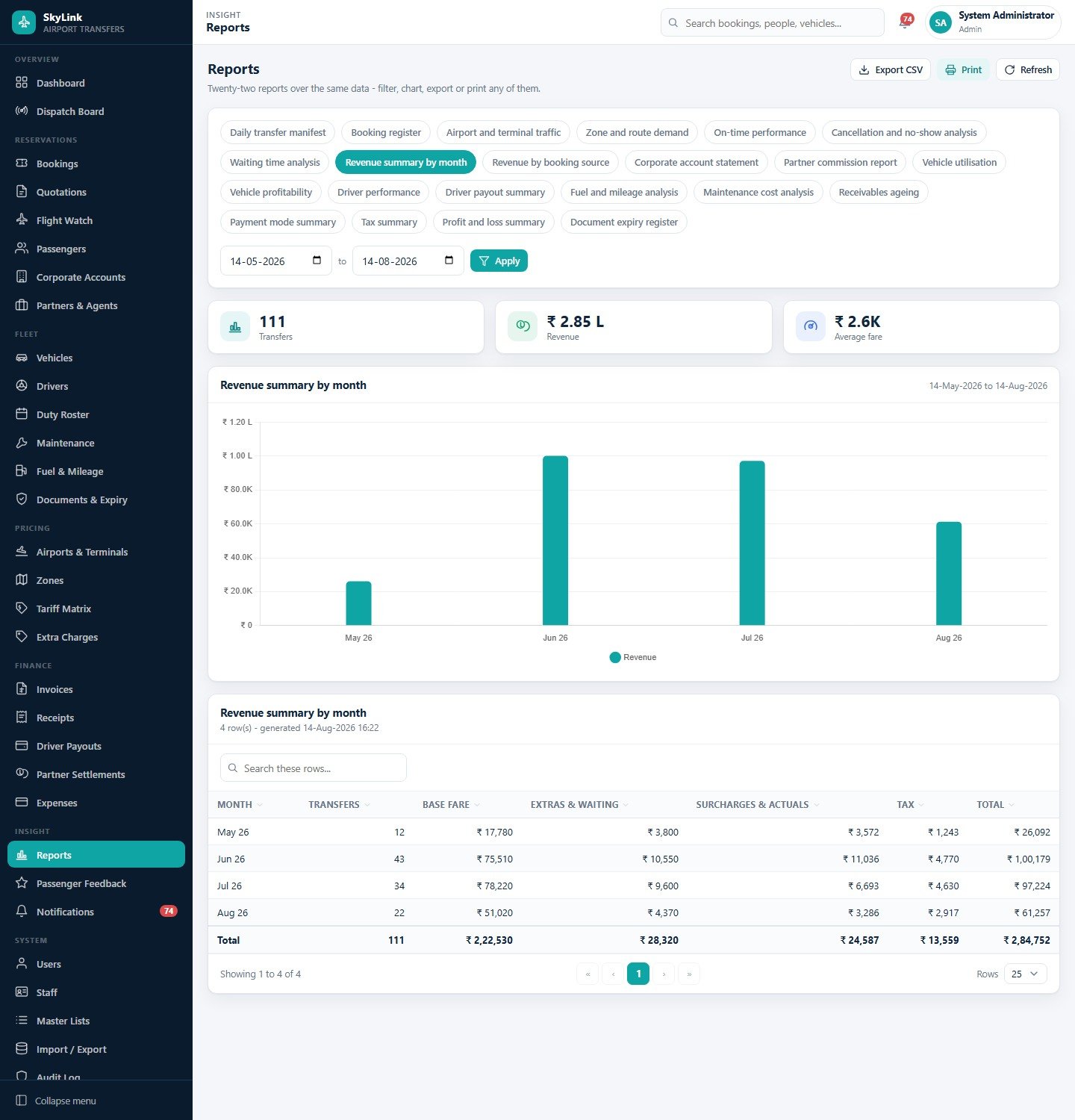
Reports
Twenty-two reports over the same data, chosen as chips and filtered by date range: daily transfer manifest, booking register, airport and terminal traffic, zone and route demand, on-time performance, cancellation and no-show analysis, waiting time analysis, revenue summary by month, revenue by booking source, corporate account statement, partner commission, vehicle utilisation, vehicle profitability, driver performance, driver payout summary, fuel and mileage, maintenance cost, receivables ageing, payment mode summary, tax summary, profit and loss summary, and the document expiry register.
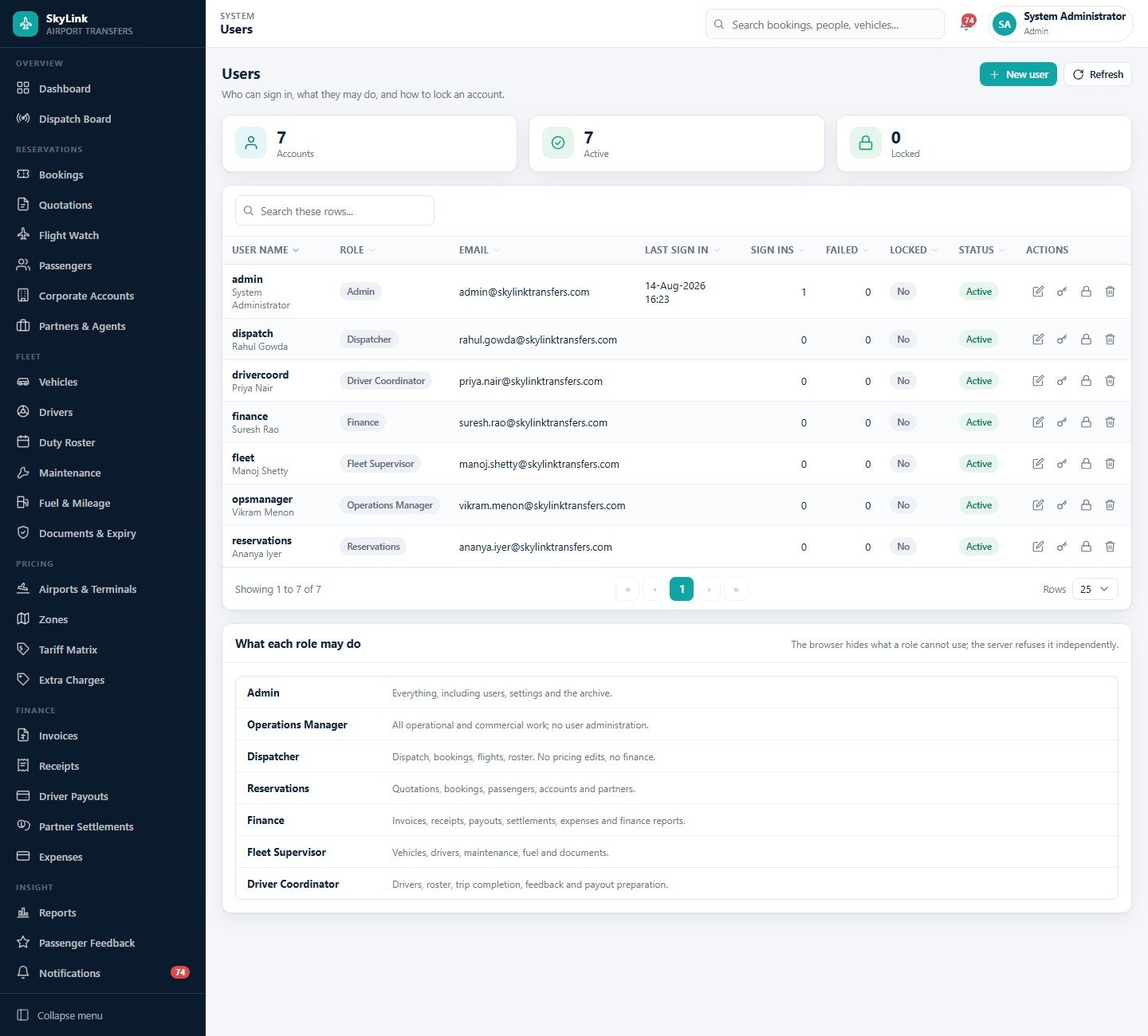
Users and the permission matrix
Seven accounts with role, last sign-in, failed-attempt counter and a lock switch – and underneath, a plain-English table of what each role may do. It doubles as the handover document when a new dispatcher starts.
The pages not pictured here
Reservations: Quotations price an enquiry with the same engine that prices a booking and convert the winner in one click; Passengers keeps preferences, history and lifetime value; Corporate Accounts holds contract rates and credit limits; Partners & Agents carries the sell rate, the net rate and what you owe.
Fleet: Drivers with payout model, on-time percentage and rating; Duty Roster as a week grid of morning, evening, night, split, off and leave with an “apply a pattern” helper the dispatch board reads; Maintenance with service due by date or odometer, whichever comes first; Fuel & Mileage with per-fill efficiency; Documents & Expiry as the one dated register.
Pricing and Finance: Airports & Terminals with entry fees, meeting points and the four buffers; Zones with distance, drive time and surcharge; Extra Charges as flat, per-unit and per-hour add-ons; Receipts across six payment modes; Driver Payouts; Partner Settlements; Expenses with categories, tax and an approval step.
Insight, System and Support: Passenger Feedback with driver, vehicle and punctuality scores and a complaint workflow; Notifications for moved flights, unassigned work, expiring papers, overdue money and low ratings; Staff; 28 editable Master Lists behind every dropdown; CSV Import/Export with a validated preview; a full Audit Log; an eleven-tab Settings screen; and a nine-chapter Help & Guide inside the app itself.
How the Pickup Time and the Fare Are Worked Out
Two derivations do most of the work. The pickup time starts from the flight: for an arrival, the estimated landing time plus that airport’s clearance buffer for a domestic or international sector; for a departure, the scheduled time minus the check-in lead, minus the drive time recorded on the destination zone. Change the estimate and the whole chain recalculates.
The fare starts from the tariff row for that zone pair and vehicle class, then adds the ticked extra charges, the zone surcharge if the zone carries one, waiting time beyond the included minutes, a night surcharge inside the configured window, the airport entry fee, and finally tax at the configured percent – with a minimum fare floor. Because the total is stored on the booking when it is priced, an invoice raised in March still shows March’s fare after you re-price in April.
Airport Transfer Management System Web App vs. a Google Sheets Tracker vs. Paid Dispatch SaaS – Feature Comparison
| This web app | A Google Sheets tracker | Paid transfer / dispatch SaaS | |
|---|---|---|---|
| Cost | One payment, no renewal | Free or a few dollars | Typically monthly, per user or per vehicle |
| Platform | Apps Script + Sheets, in your account | Google Sheets | Vendor-hosted |
| Setup time | Under 15 minutes to deploy, a day to load your own data | Immediate | Onboarding call, then configuration |
| Real-time team collaboration | Yes, with seven roles and server-side permission checks | Yes, but everyone can edit everything | Yes |
| Mobile access | Any browser | Awkward on a phone | Usually a dedicated driver app |
| Customisable fields | 28 master lists, plus the source code is yours | Fully | Only what the vendor exposes |
| Share with a link | Yes – one web app URL | Yes | Login required |
| Year-1 cost at 5 users | The purchase price, once | 0 | Recurring, and it repeats every year |
| Flight-derived pickup times | Yes, four buffers per airport | Manual | Usually, often with a paid data feed |
| Where your data lives | Your Google Drive | Your Google Drive | The vendor’s database |
Who Should Use This Template
It suits an airport transfer or chauffeur company running roughly 5 to 60 vehicles that has outgrown a WhatsApp group and a spreadsheet; a hotel or travel desk arranging transfers that needs commission and settlement in one place; a ground-mobility operator billing corporate accounts monthly; and anyone who would rather keep the records in a Google Sheet they own than in a vendor’s database.
It is a record-keeping and scheduling tool that works on the data you enter. It does not verify driver licences or vetting, does not assess or guarantee passenger safety, does not provide or check insurance, and makes no claim to satisfy aviation, transport-licensing, tax or payment-card requirements in your jurisdiction. The expiry register tracks the dates you type in; keeping the underlying documents valid remains your job.
Real-World Use Cases
A 22-car transfer fleet at a metro airport. The operations manager opens the dispatch board, clears the unassigned strip, checks Flight Watch for anything more than twenty minutes off schedule, applies the new times, and watches the pickups re-derive. Four phone calls become one screen.
A hotel travel desk. Reservations raises a quotation for three corporate pickups, prices it with the same engine that prices bookings, emails it, and converts the accepted quote into bookings without retyping a single field.
Month-end at a small operator. Finance generates one consolidated invoice per corporate account, prepares driver payouts from the trips that actually ran, settles ten agents on their own commission models, and prints the profit and loss summary and receivables ageing for the owner.
Advantages of the Airport Transfer Management System Web App
- One payment instead of a per-vehicle subscription that grows with your fleet.
- The database is a Google Sheet in your Drive – exportable, backup-able, and yours if you ever stop using the app.
- Role separation is enforced server-side, not just by hiding menu items.
- Every screen arrives populated, so you can evaluate the system properly instead of staring at empty tables.
- The source code ships with the product, so any field, report or document layout can be changed.
- Nothing to install: the whole system is one URL, on any device with a browser.
Opportunities for Improvement
- No live vehicle tracking. Trip stages are moved by a person, not by GPS. If you need a map with moving dots, this is not it.
- No native driver app. Drivers can open the web app in a browser, but there are no push notifications.
- Flight times are entered or imported, not fed live. The system does the consequence management well; it does not subscribe to an airline schedule feed.
- No passenger-facing booking page or online card payment. Payments are recorded, not taken.
- Sheets-scale, not warehouse-scale. A few hundred thousand rows is comfortable; tens of thousands of bookings a month is not what this design is for. The built-in archive helps, but it is not a substitute for a database.
- A demo-data quirk worth knowing. A couple of rows in the seeded fuel log carry a negative odometer reading – an artefact of the sample data generator rather than of the form. It disappears the moment you clear the demo rows and enter your own fills.
Best Practices
- Change all seven passwords before you share the URL. They are published in the manual, so anyone who reads it can sign in until you do.
- Get the four airport buffers right first. Every derived pickup time depends on them, and they are the one setting worth arguing about with your dispatchers.
- Build zones before tariffs. Distance and drive time on the zone feed both the fare and the departure calculation, so a lazy zone makes every downstream number lazy too.
- Close transfers with the real odometer and waiting minutes. That is what makes the fare, the driver payout and the vehicle contribution honest.
- Clear the seeded transactional rows before you go live – bookings, trips, invoices, receipts – or keep them in a separate copy as a training sandbox.
- Take a backup from Settings > Database before any bulk import, and use the import preview rather than pasting into the sheet directly.
Explore Relevant Templates
- Car Rental Management System Web App – the nearest neighbour, built around rentals rather than transfers.
- Bike and Two-Wheeler Rental Management System Web App
- Ambulance Fleet and Dispatch Management System Web App – dispatch and duty roster for emergency ground fleets.
- Auto Garage Job Card Management System Web App – useful alongside this if you service your own vehicles.
- Adventure Sports Booking Management System Web App – the same booking and commission engine for activity operators.
- Hospital Management System Web App
- Browse every Mini Web App
Want to build skills like this step by step? The NextGenTemplates Academy learning paths cover the spreadsheet skills behind management systems like this one, with practice files.
Get the Airport Transfer Management System Web App
Frequently Asked Questions
Can I try it before buying?
Yes – the green box near the top of this post holds a live, fully seeded deployment plus the sign-in details for all seven roles. Click through every page and run the reports before you spend anything. Those credentials are public and belong to a shared demo instance that resets periodically; they are not a customer deployment, so please do not enter real data.
What do I actually download?
A ZIP containing Code.cs.txt (the Apps Script server code), Index.txt (the single-page front end) and a PDF user manual covering every module, the roles, the fare engine and the deployment steps.
Do I need to know how to code?
No. Deployment is copy, paste and press Deploy, with the exact menu names in the manual. You only open the code if you want to change something.
Where is my data stored?
In a Google Sheet named “Airport Transfer Management System – Database” created in your own Google Drive, alongside a folder tree for booking documents, invoices, expenses and backups. Nothing is sent to us or to any third party.
Can more than one person use it at the same time?
Yes. Each person signs in with their own account and gets their own role. Create as many users as you need under System > Users.
Does this make my operation compliant?
No. It reports on the data you enter. It does not verify licences, insurance or vetting, does not assess passenger safety, and makes no claim about aviation, transport-licensing, tax or payment-card requirements. Those remain your responsibility.
Can I change the fields, reports or printed documents?
Yes – you own the source. 28 master lists already control every dropdown without touching code. For anything larger, email info@NextGenTemplates.Com and we will quote it.
About the Author
Built by PK – Microsoft Certified Professional with 15+ years of Excel, Google Sheets, and Power BI experience. Founder of NextGenTemplates, reaching 300K+ subscribers across YouTube channels. Every template is hand-built and tested before release.
Conclusion
If your transfer desk currently runs on a spreadsheet, a WhatsApp group and somebody’s memory of which flight moved, the Airport Transfer Management System Web App replaces all three with one URL that derives pickup times from the flight, prices every fare from a tariff you control, and pays drivers and agents from the trips that actually ran.
The best way to judge it is not to read about it. Open the live demo, sign in as admin, then sign in again as dispatch and see how differently the same system behaves for a different role. It takes ten minutes and costs nothing.
✅ Instant download · One-time payment · No subscription · Lifetime access
Deployment walkthrough on video: youtu.be/D26WifFCMm8.