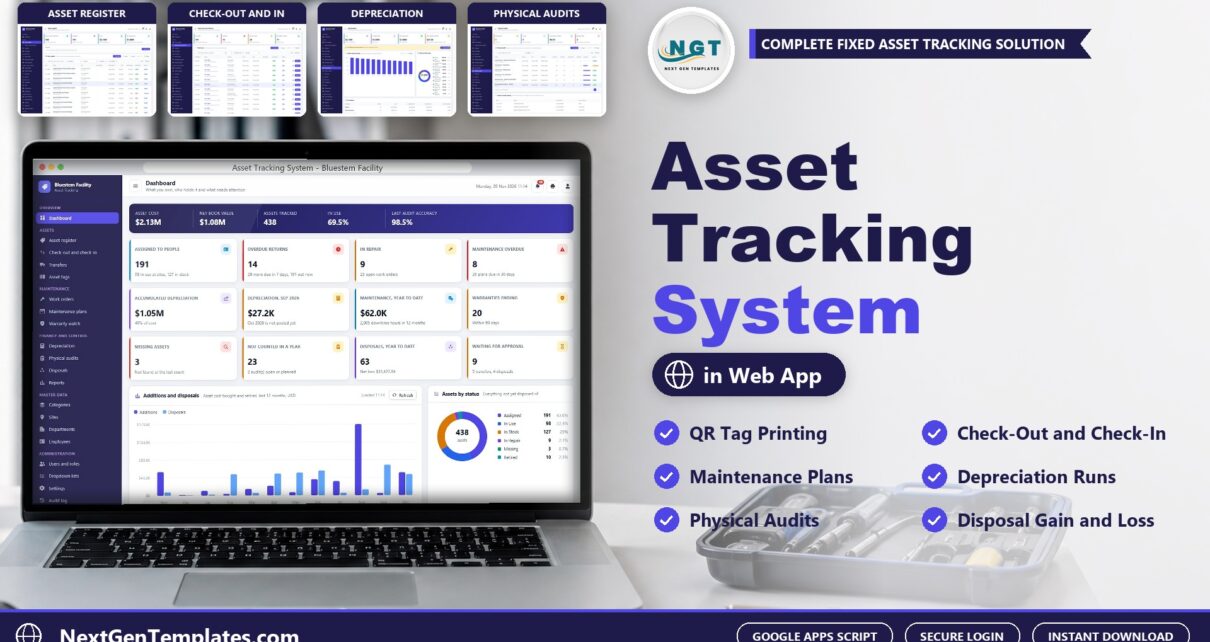
An asset tracking system should tell you, at any moment, what you own, where it is, who holds it, what state it is in and what it is worth. The Asset Tracking System Web App from NextGenTemplates does that on Google Apps Script: an asset register with QR code tags, check-out and check-in, transfers, work orders, maintenance plans, depreciation, physical audits and disposals, with 7 role-based logins and the data in a Google Sheet you own.
In this post you will see every main screen, the login details for the live demo, how the roles divide the work, how depreciation and physical audits work, and how it compares with spreadsheets and paid asset tracking software.
Watch the Asset Tracking System Web App walkthrough
🚀 Try the Live Demo: Login Details
Open the working Asset Tracking System in your browser right now: no download, no sign-up, nothing to install. Sign in as any role below and see exactly which screens that person can and cannot reach.
Demo sign-in details: all 7 roles
| Role | Username | Password | What this role can reach |
|---|---|---|---|
| Administrator | admin |
Admin@123 |
Everything, including users and roles, settings, the audit log, the database archive and backups |
| Asset Manager | assetmgr |
Asset@123 |
The register, check-outs, transfers (approve), work orders, audits, disposals (approve), tags, master data, reports and lists |
| Storeroom Clerk | storeroom |
Store@123 |
Adds assets, checks out and in, requests transfers and disposals, counts in audits and prints tags; does not see cost or book value |
| Maintenance Technician | tech |
Tech@123 |
Work orders and maintenance plans; does not see cost or book value |
| Finance Accountant | finance |
Finance@123 |
Posts depreciation, approves disposals, reads the register with values, reports and the audit log |
| Auditor | auditor |
Audit@123 |
Creates, counts and closes physical audits; reads the register with values, reports and the audit log |
| Department Manager | manager |
Manager@123 |
Reads the register and custody and requests transfers and disposals; does not see cost or book value |
These credentials are public on purpose. The demo is a shared instance seeded with a fictional company (Bluestem Facility Services, a commercial HVAC and facility services contractor in the Midwest) and it may be reset at any time. It is not anybody’s live asset data. Your own copy gets its own database, its own users and its own passwords, and the setup notes ask you to change every seeded password before anyone else signs in.
What Is the Asset Tracking System?
It is a complete fixed asset register and equipment tracking application for a business that owns tools, vehicles, devices and equipment. Each asset is added with a tag and a QR label, handed to a person or a site, returned with its condition noted, serviced on a plan, depreciated every month, counted in a physical audit and finally disposed of with a certificate. It is asset management software built as a web app with its own sign-in, roles, audit log and reports rather than a single worksheet.
🔑 Key Features of the Asset Tracking System
🏷️ Asset register and Quick find. Tag, site, custodian, cost, book value, condition and status for every asset, and a Quick find box that takes a scanned QR code, a tag or a serial number.
🔁 Check-out and check-in. Due dates, condition in and out, overdue flags, email reminders and a custody receipt at 3 inch, 4 inch or A4.
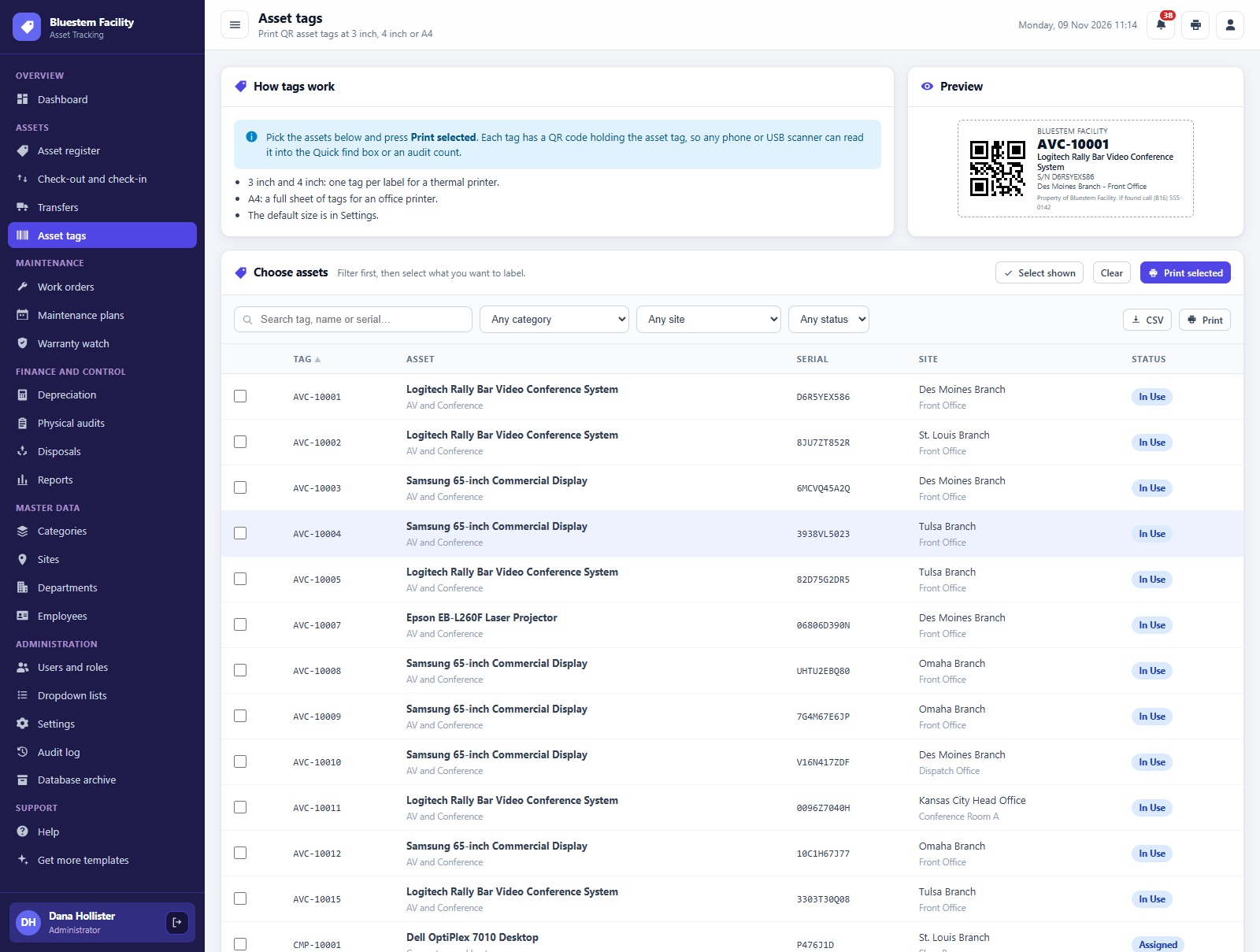
🖨️ QR code asset tags. Print QR code asset tags at 3 inch, 4 inch or A4 with a label preview.
🛠️ Work orders and maintenance plans. Preventive, corrective, inspection and calibration work with labor, parts and downtime. Completing a work order moves the next due date forward.
💰 Depreciation. Straight line and double declining, salvage value, a monthly posting run with a journal reference and a twelve month forecast.
✅ Physical audits. Generate the count sheet by site, count by scan or by hand and mark each line Verified, Wrong Location or Missing.
📊 Dashboard and 17 reports. Twelve KPI cards, charts for additions, disposals and status, and 17 reports with date range, site filter, print and CSV export.
The Main Screens, One by One
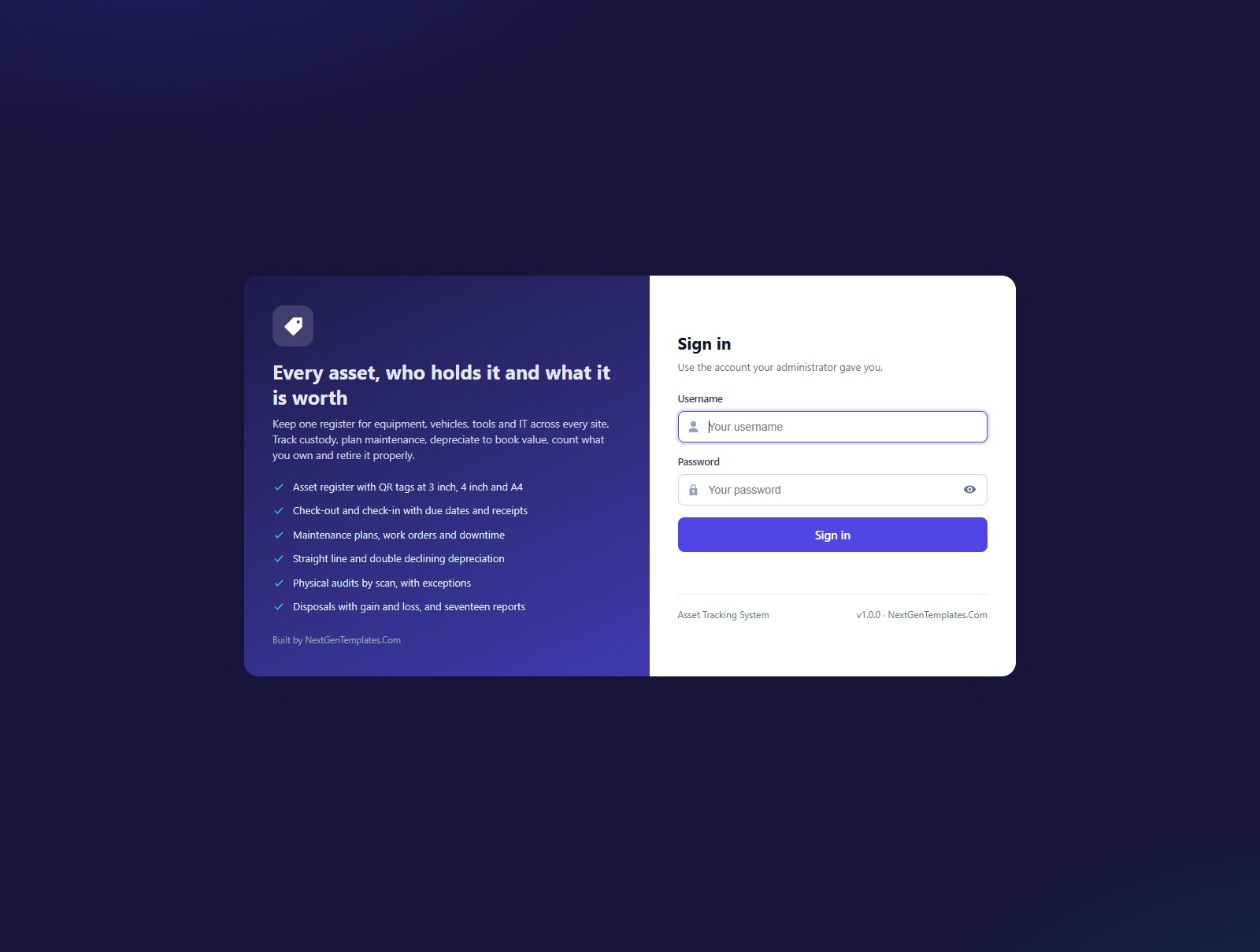
Sign-in page
Every user has their own login and a role. Default credentials are never printed on the sign-in screen.
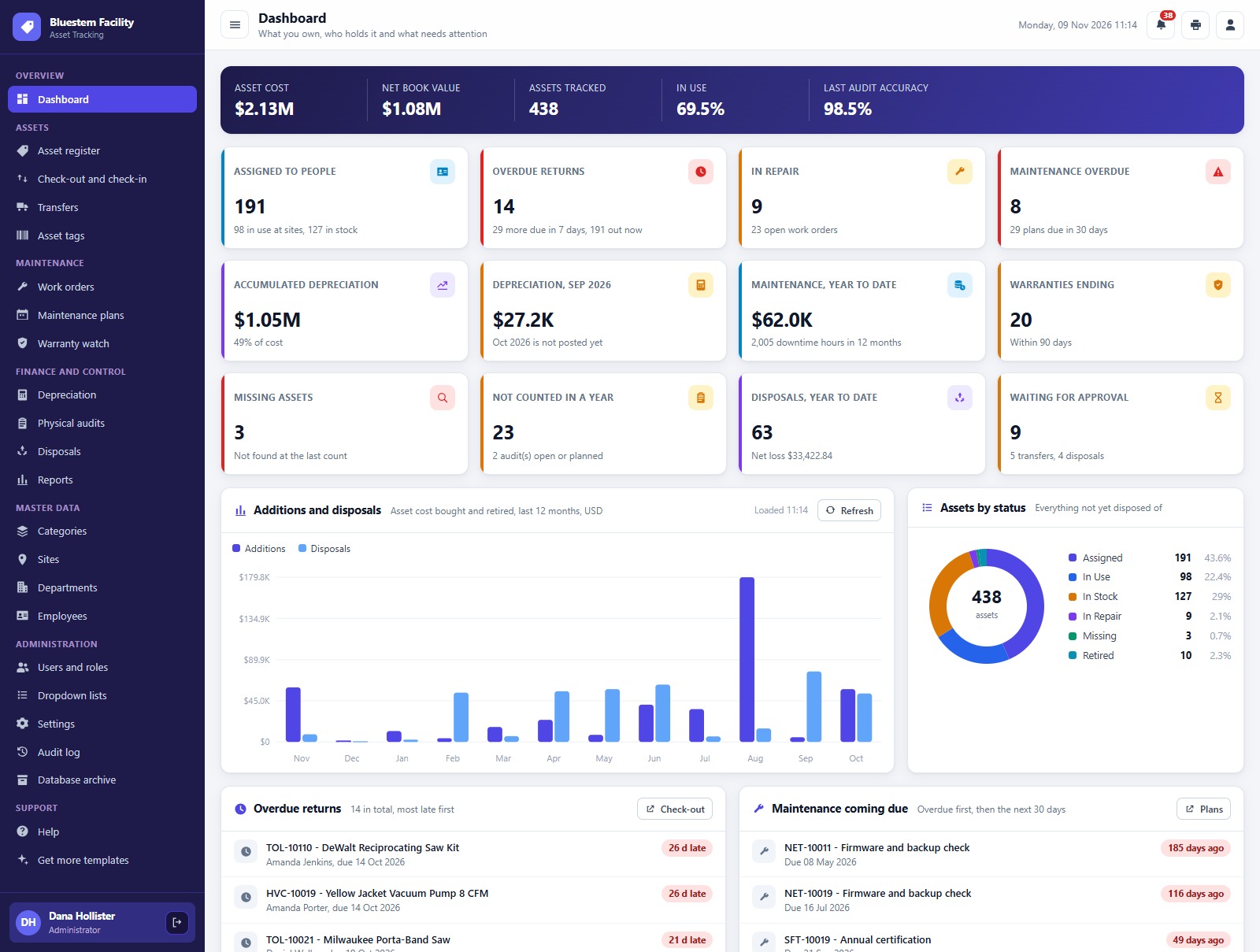
Dashboard
Asset cost, net book value, assets tracked, in use share and last audit accuracy, then twelve KPI cards and the additions against disposals chart for the last 12 months.
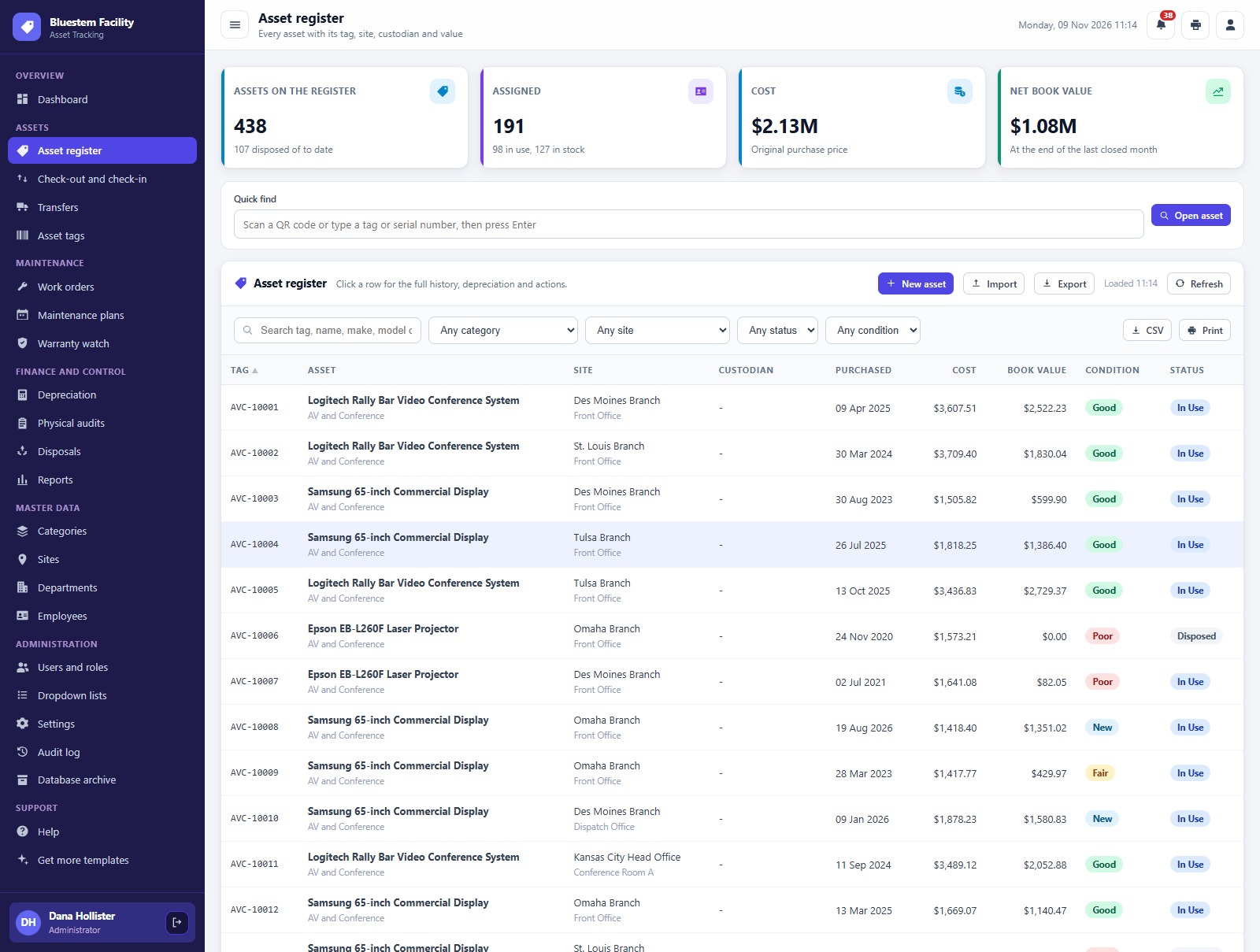
Asset register
Every asset with tag, site, custodian, cost, book value, condition and status.
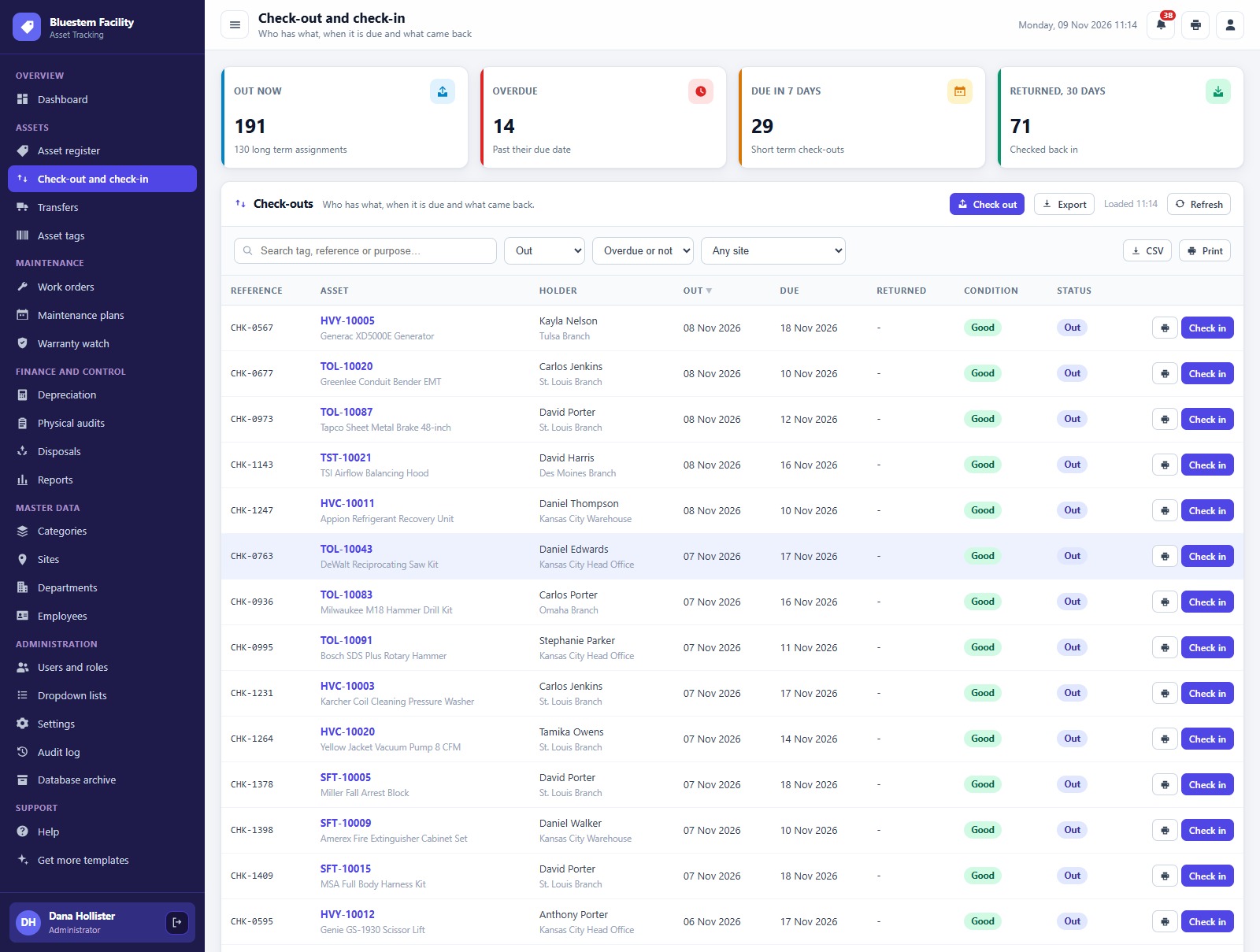
Check-out and check-in
What is out now, what is overdue and what is due soon, with a custody receipt for every loan.
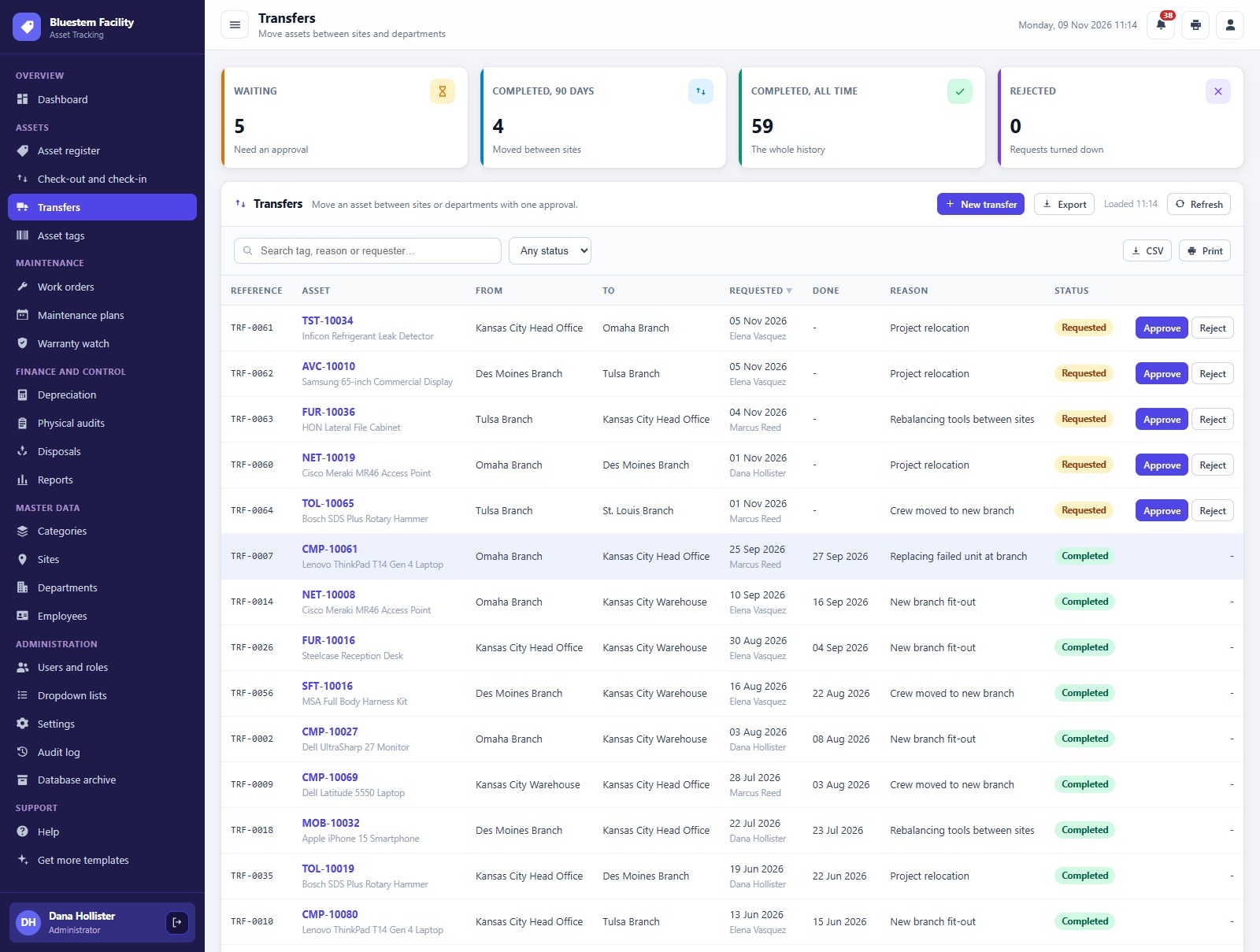
Transfers
Requests to move an asset between sites and departments, with the approval step.
Asset tags
Select the assets and print the QR code labels.
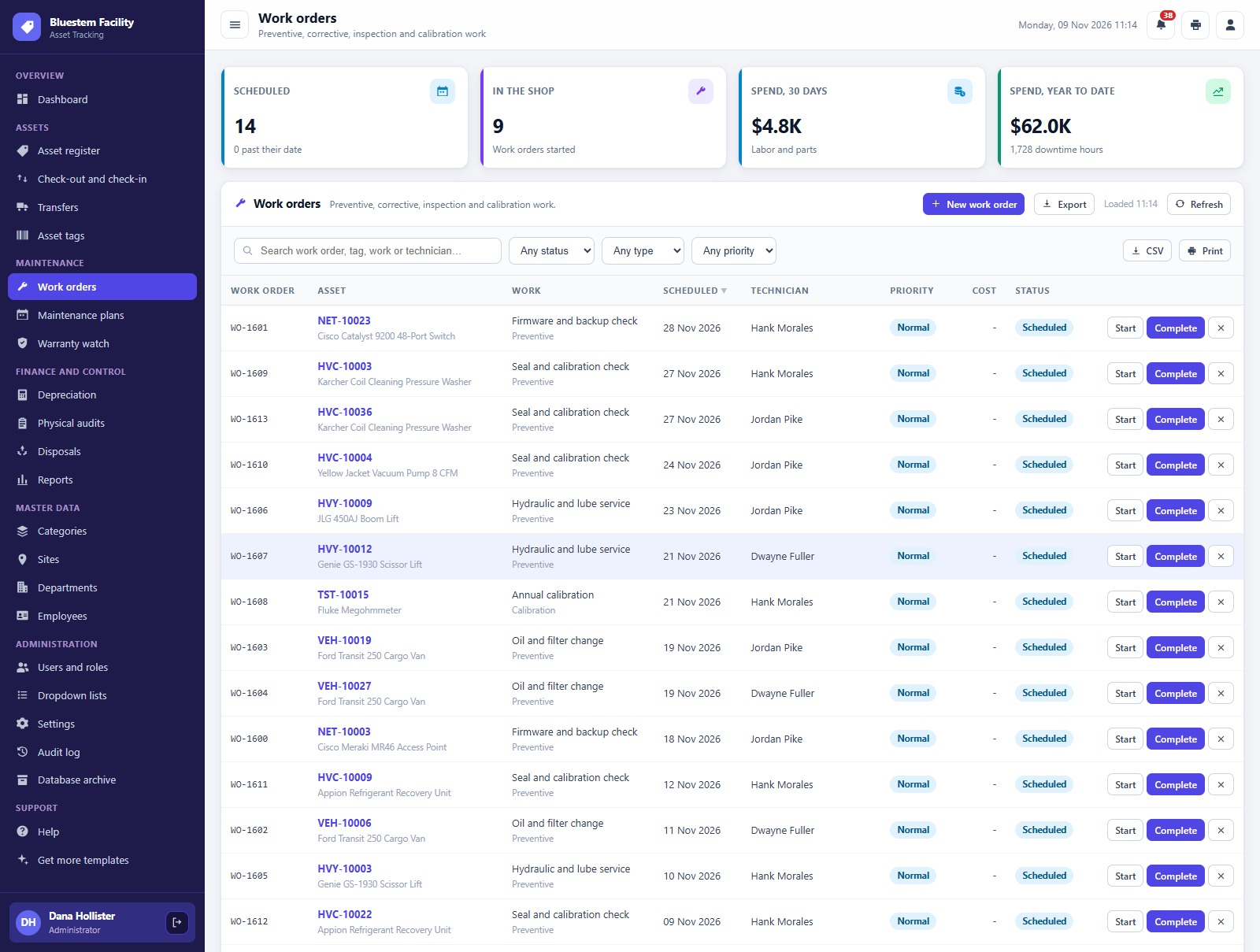
Work orders
Every work order with type, technician, labor cost, parts cost and downtime hours.
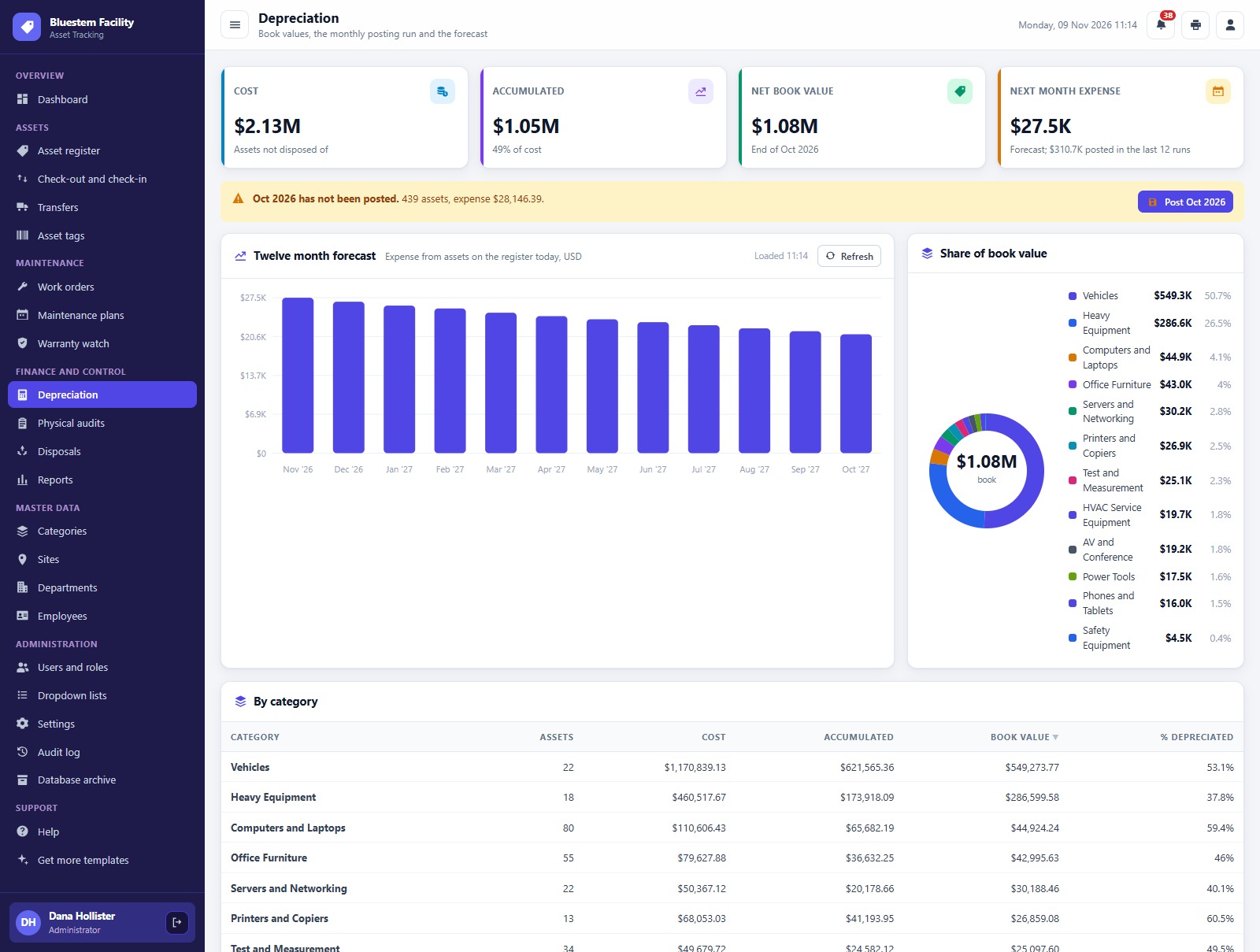
Depreciation
Accumulated depreciation, net book value, the twelve month forecast and the share of book value by category.
Physical audits
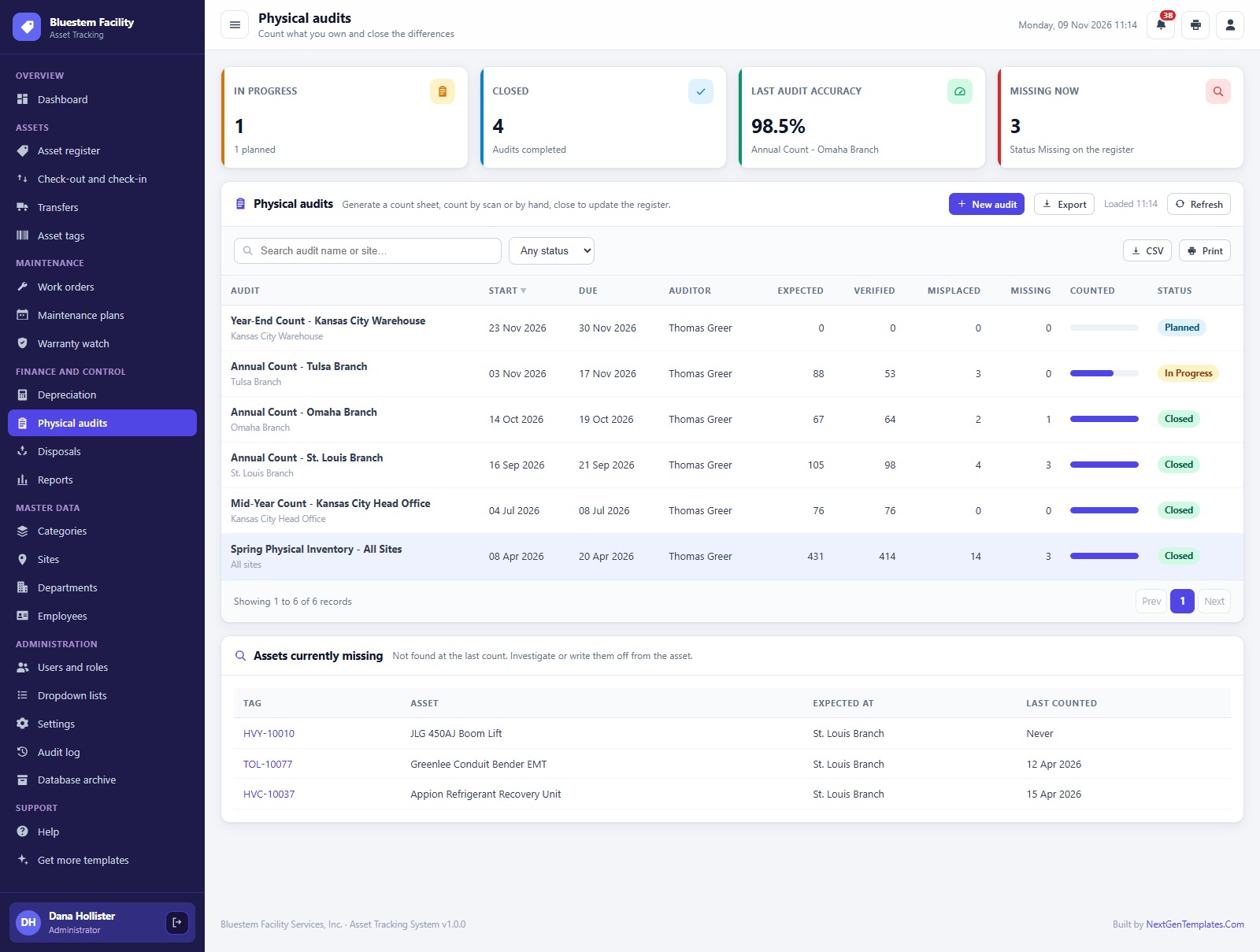
Audits by site with expected, counted, verified, wrong location and missing counts.
Reports
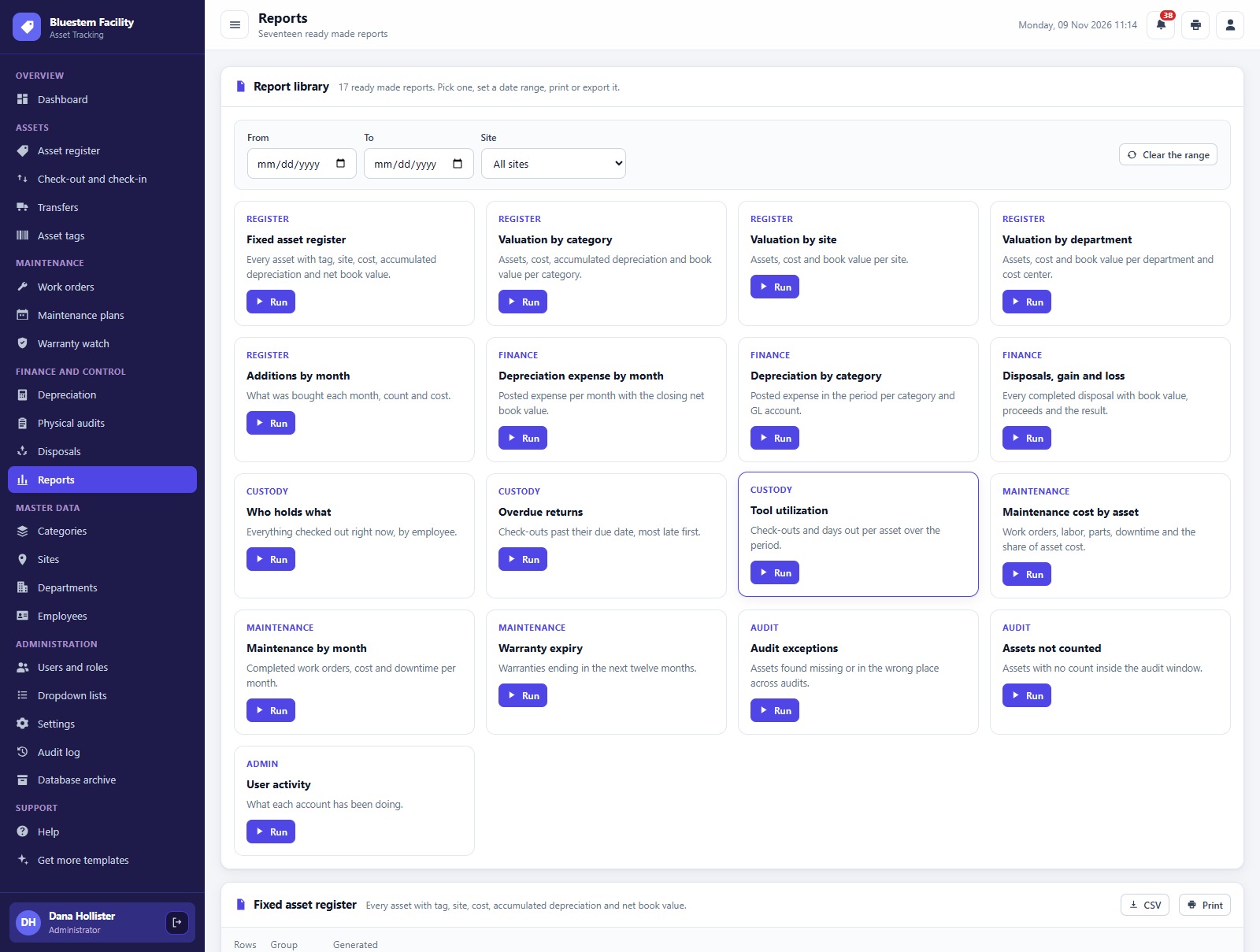
Seventeen ready-made reports across the register, valuation, custody, maintenance, audits and admin.
How the 7 Roles Divide the Asset Work
The Storeroom Clerk adds assets, checks tools out and in and prints tags. The Maintenance Technician works on work orders and maintenance plans. The Asset Manager runs the register and approves transfers and disposals. The Finance Accountant posts depreciation and approves disposals. The Auditor runs the physical audits. The Department Manager reads the register and requests transfers. The Administrator manages users, settings, the archive and backups. Roles that do not need money never see cost or book value, and the same permission map drives the menu and the server checks.
Depreciation and Physical Audits
Each category has a useful life, a method, a salvage value, a tag prefix and a GL account. The monthly posting run calculates depreciation for every asset in a category, using straight line or double declining balance with the full month convention, and records a journal reference. These are book figures for management reporting, and tax depreciation is a separate calculation. For audits, the Auditor generates a count sheet for a site, scans each tag or counts by hand, and closes the audit. Assets found are Verified, assets in the wrong place are marked Wrong Location and assets not found are marked Missing, and the register is updated.
📊 Asset Tracking System vs. Spreadsheet vs. Paid Asset Management Software
| Feature | Asset Tracking System Web App | Spreadsheet | Paid asset management software |
|---|---|---|---|
| Cost | ✅ One-time purchase | Free to low cost | Monthly or annual subscription |
| QR code tags | ✅ 3 inch, 4 inch or A4 | Manual | ✅ Yes |
| Check-out and receipts | ✅ Built in | Manual log | Varies by plan |
| Depreciation postings | ✅ Monthly run per category | Manual formulas | Often a higher tier |
| Your data stays in your Drive | ✅ A Google Sheet you own | ✅ Yes | No, vendor hosted |
| Source code you can change | ✅ Full Apps Script code | ✅ Yes | No |
👥 Who This Web App Is For, and Who It’s Not For
✅ Built for:
- Contractors, facility teams and equipment-heavy businesses that need to know where every tool, vehicle and device is
- Teams that want asset tracking software with QR tags, check-out and audits without a per-user subscription
- Finance teams that keep a fixed asset register and post monthly depreciation
❌ Not built for:
- Teams that need RFID readers or GPS tracking
- Companies that need tax depreciation schedules; it does not post to accounting software
- Teams that must work offline
⚙️ How to Set Up the Asset Tracking System
- Try the live demo first with the login details above.
- Create a new Google Apps Script project, paste Code.cs.txt into Code.gs, and add an HTML file named exactly
Indexcontaining Index.txt. - Deploy it as a web app (Execute as: Me) and accept the Google permission prompt.
- Open the web app URL and press Run setup now. Setup builds the database spreadsheet, the Drive folders and the starter data.
- Sign in as admin and change every seeded password.
- Enter your company details in Settings, then import your own assets, sites, departments and employees.
❓ Frequently Asked Questions
Can I try the Asset Tracking System before buying?
Yes. The live demo above runs the full system with fictional data. Sign in with any of the demo accounts to see each role’s screens and all 17 reports.
What do I need to run it?
A Google account. The web app creates its own Google Sheet database in your Drive, and your team signs in with the usernames you create.
Which depreciation methods does it use?
Straight line and double declining balance, with salvage value and the full month convention, as book figures for management reporting.
Can I print the QR code tags?
Yes. The Asset tags screen prints QR code labels at 3 inch, 4 inch or A4.
Related Posts and Templates
- IT Asset Management System Web App: purchases, assignments and renewals for IT equipment.
- Purchase Order and Vendor Management System Web App: requisitions, approvals, receiving and a three-way match.
- Work Order Management System Web App: requests, assignments and costs for maintenance jobs.
- Fixed Asset Register and Depreciation System in Excel VBA: the desktop version of a register with depreciation.
Conclusion
If you own tools, vehicles and equipment and want QR tags, check-out, maintenance plans, depreciation and physical audits without a per-user subscription, this asset tracking software gives you all of it on your own Google account. Start with the live demo above, sign in as two or three different roles, and then get the Asset Tracking System Web App from NextGenTemplates.
🛒 Get the Asset Tracking System Web App
👤 About the Author
Built by PK, Microsoft Certified Professional with 15+ years of Excel, Google Sheets, Apps Script and Power BI experience, founder of NextGenTemplates and the YouTube channels @PKAnExcelExpert, @NextGenTemplates and @NeoTechNavigators. Every template is hand-built and tested before release.