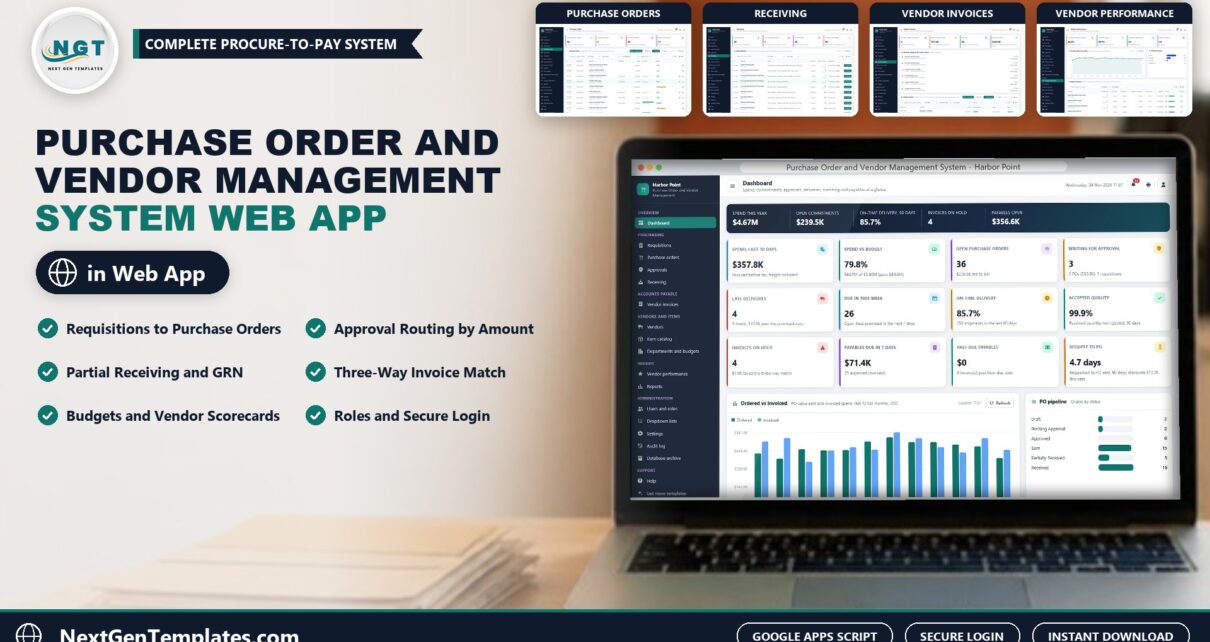
A purchase order management system should tell you, at any moment, what was ordered, what has arrived, what the vendor has billed and what you are about to pay. The Purchase Order and Vendor Management System Web App from NextGenTemplates does exactly that on Google Apps Script: requisitions, purchase orders with approval routing, receiving with partial deliveries, vendor invoices with an automatic three-way match, payments, department budgets and vendor scorecards, with 7 role-based logins and the data in a Google Sheet you own.
In this post you will see every main screen, the login details for the live demo, how the roles divide the work, how the three-way match decides what gets paid, and how it compares with spreadsheets and paid procurement software.
Watch the Purchase Order and Vendor Management System Web App walkthrough
🚀 Try the Live Demo: Login Details
Open the working Purchase Order and Vendor Management System in your browser right now: no download, no sign-up, nothing to install. Sign in as any role below and see exactly which screens that person can and cannot reach.
Demo sign-in details: all 7 roles
| Role | Username | Password | What this role can reach |
|---|---|---|---|
| Administrator | admin |
Admin@123 |
Everything, including users and roles, settings, the audit log, the database archive and backups |
| Purchasing Manager | purchasing |
Purchasing@123 |
Approves requisitions and level 1 purchase orders, plus purchase orders, receiving, vendors, items, budgets (view), vendor performance, reports, lists and the audit log |
| Buyer | buyer |
Buyer@123 |
Requisitions, purchase orders (create, submit, send, re-promise, close), vendors, items, budgets (view), vendor performance, reports, import and export |
| Buyer (second account) | buyer2 |
Buyer@123 |
The same Buyer role on a second login, so you can see two buyers working in the same database |
| Requester | requester |
Request@123 |
Raises requisitions for their own department only and follows them; can see purchase orders, receipts, vendors, items and budgets |
| Receiving Clerk | receiving |
Receiving@123 |
Open deliveries and the receiving log; receives goods, including part deliveries and rejects with a reason |
| AP Clerk | payables |
Payables@123 |
Vendor invoices, the three-way match, holds, disputes and payments |
| Finance Controller | controller |
Finance@123 |
Level 1 and level 2 approval, releases invoices on hold, payments, budgets (edit), reports and the audit log |
These credentials are public on purpose. The demo is a shared instance seeded with a fictional company (Harbor Point Fabrication, Inc., a metal fabrication manufacturer in Grand Rapids, Michigan) and it may be reset at any time. It is not anybody’s live purchasing data. Your own copy gets its own database, its own users and its own passwords, and the setup notes ask you to change every seeded password before anyone else signs in.
What Is the Purchase Order and Vendor Management System?
It is a complete procure-to-pay application for a business that buys from suppliers. A department raises a requisition, purchasing approves it, a buyer converts it into a purchase order, the order is approved by amount, sent to the vendor and received at the dock, and accounts payable enters the vendor invoice, which the system matches against the PO and the receipt before it is paid. It is vendor management software and purchase order software in one, built as a web app with its own sign-in, roles, audit log and reports rather than a single worksheet.
🔑 Key Features of the Purchase Order and Vendor Management System
📝 Requisitions to purchase orders. Approved requisitions convert into purchase orders, one per vendor when the lines name different vendors, at the last price paid.
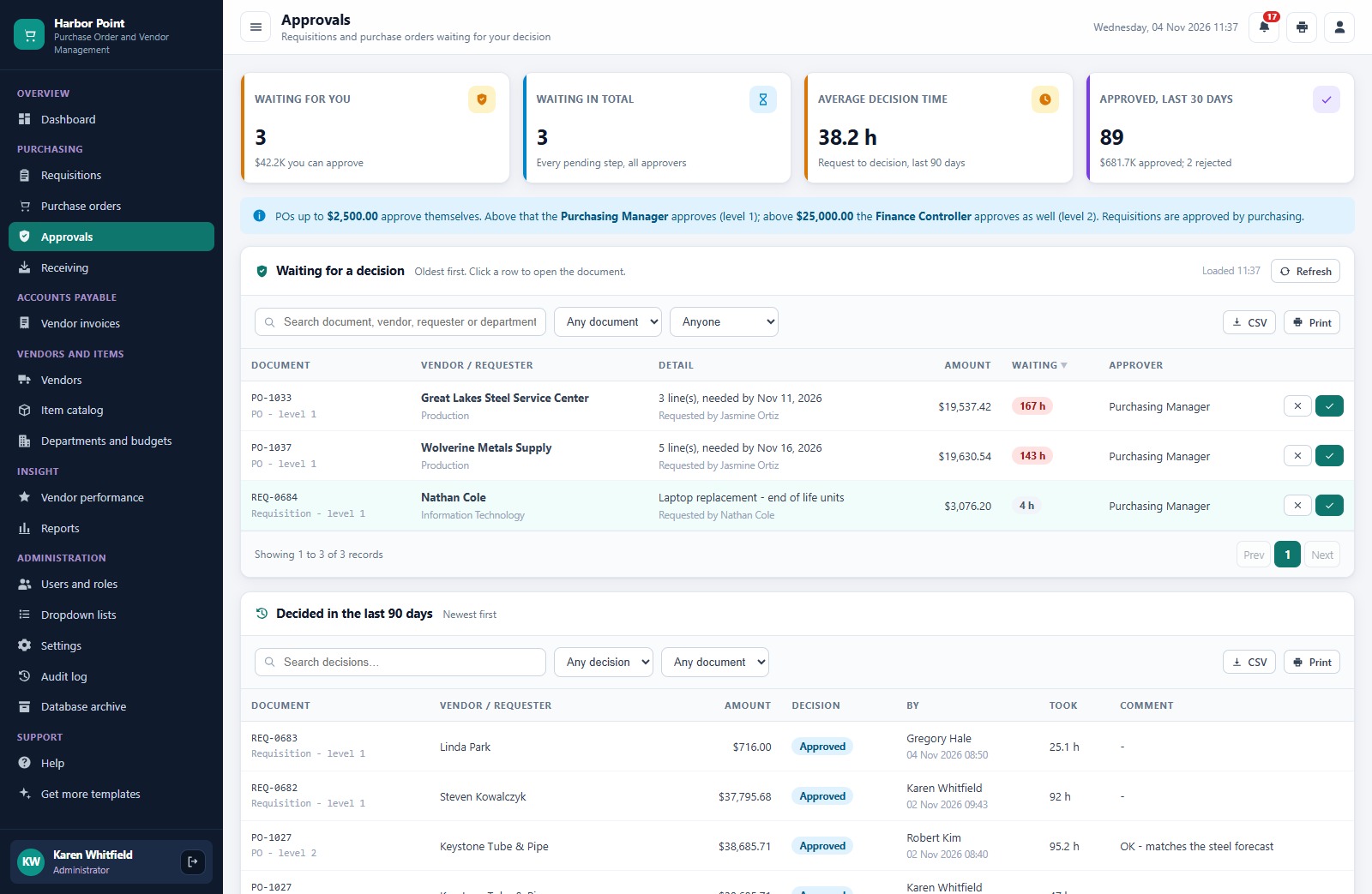
✅ Approval routing by amount. Orders up to $2,500 approve themselves, above that the Purchasing Manager approves at level 1, and above $25,000 the Finance Controller approves as well. Both limits are settings.
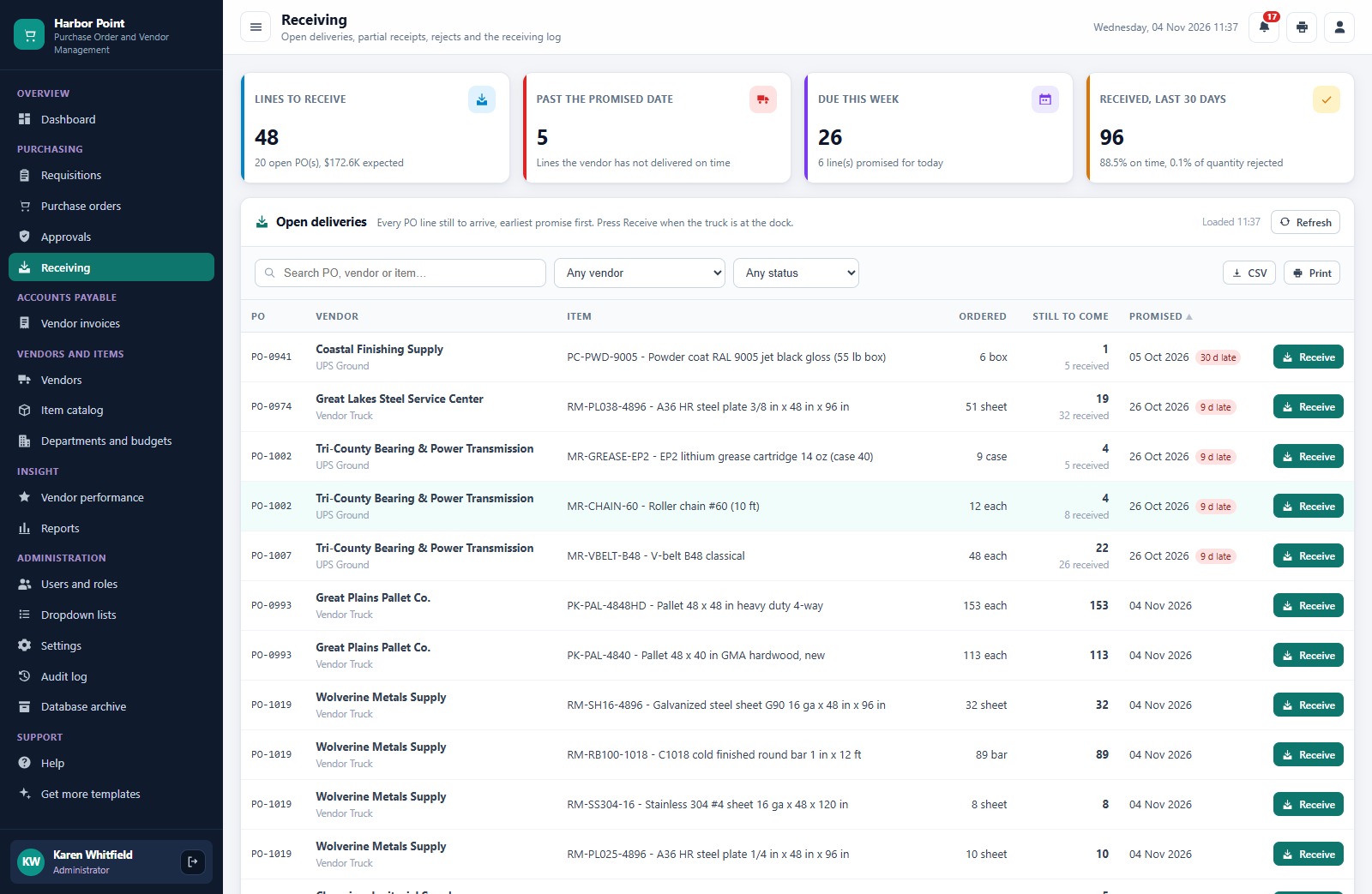
📦 Receiving with part deliveries. Record the packing slip, carrier, quantity received and any rejected quantity with a reason. Only accepted quantity goes into stock, and every receipt gets a GRN number and an on-time stamp.
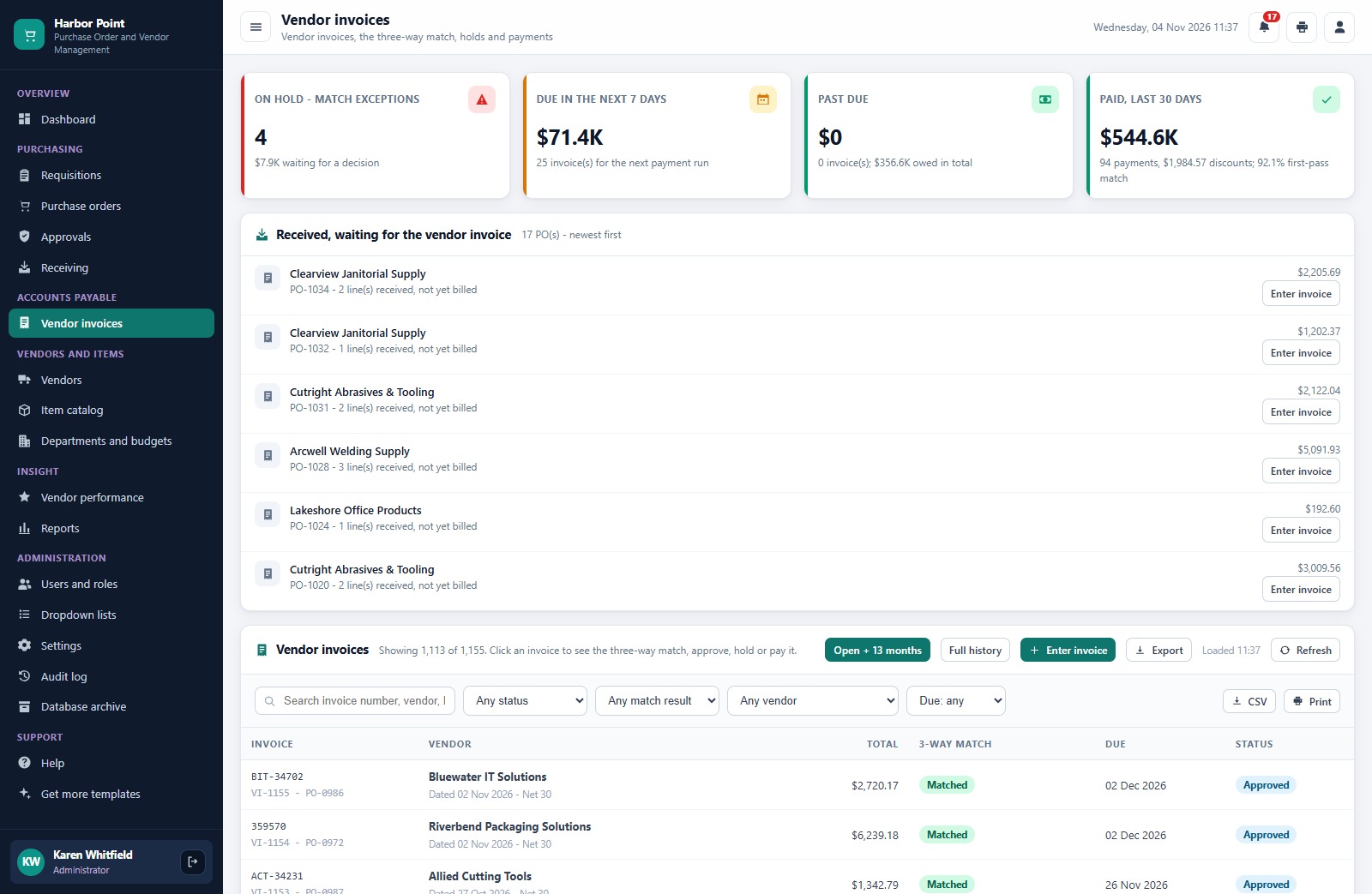
🔎 Three-way match. Billed quantity against received quantity and billed price against the PO price within a 2 percent tolerance. Matches are approved automatically, exceptions go on hold.
💵 Payments and early-pay discounts. ACH, check, credit card or wire, a reference, the 2/10 and 1/10 discount worked out inside the window and a printable remittance advice.
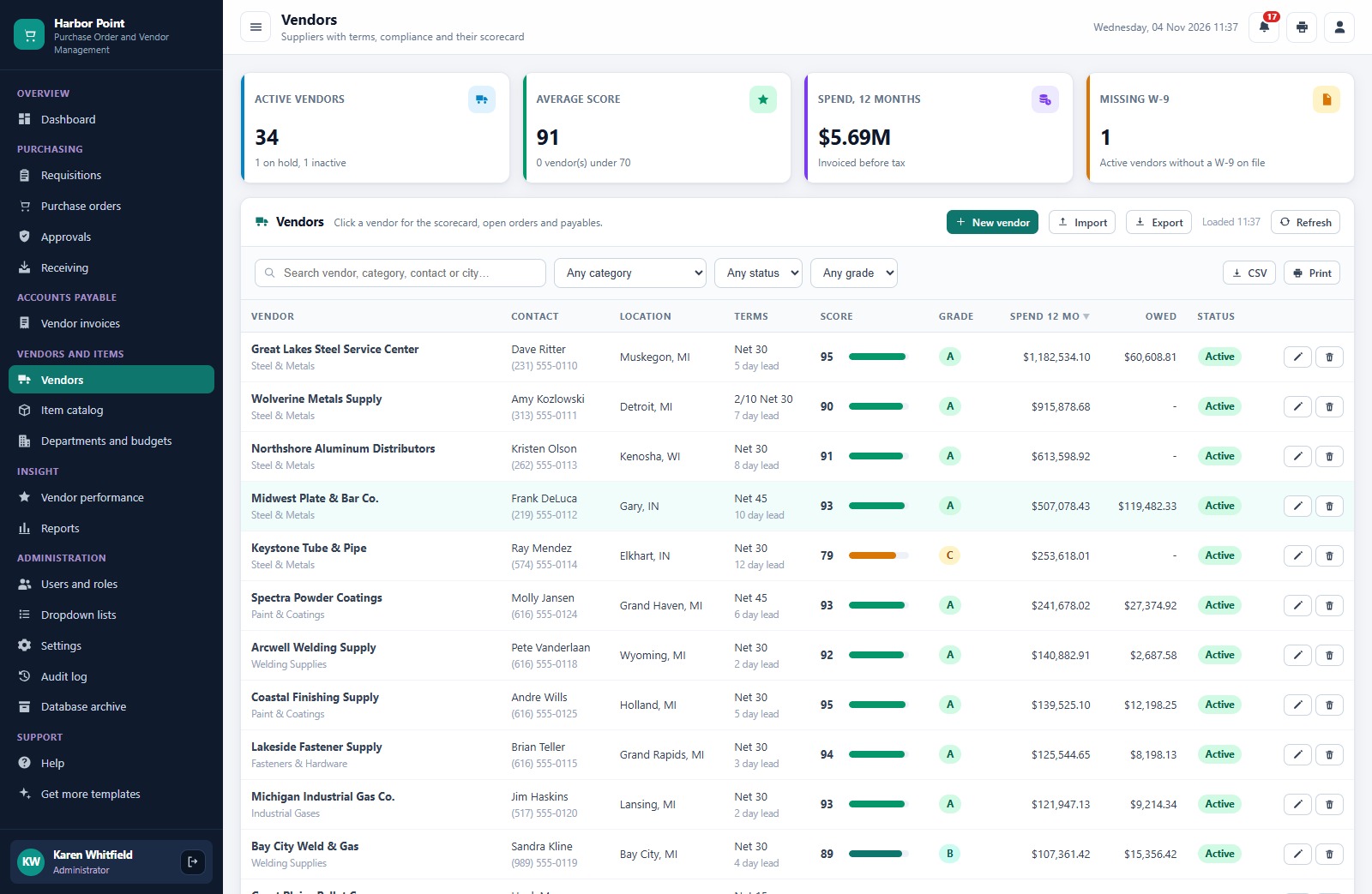
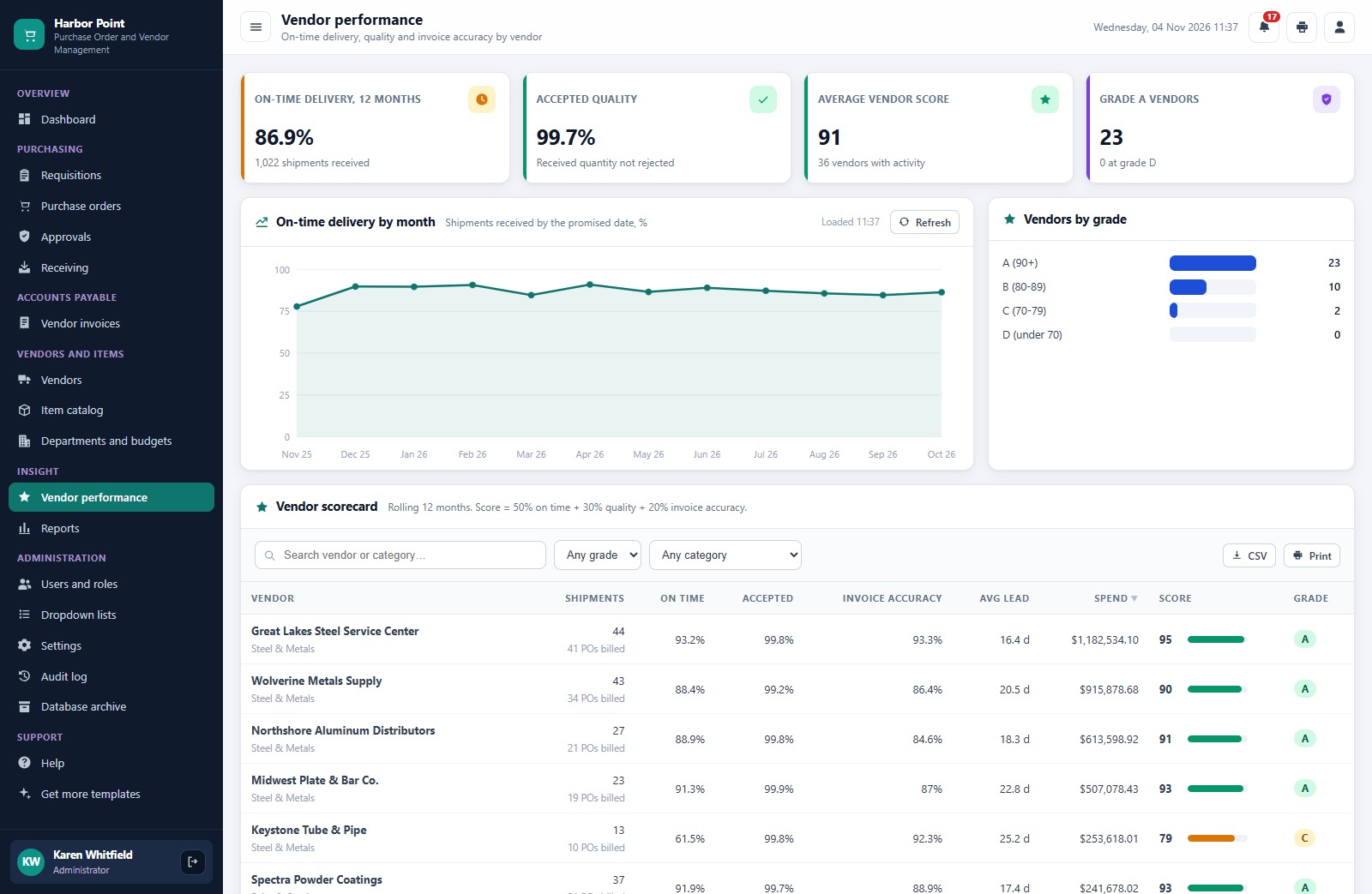
🏢 Budgets and vendor scorecards. Actual and committed spend against each department budget with a year-end forecast, and a 12-month vendor score from on-time delivery, quality and invoice accuracy with grades A to D.
📊 Dashboard and 14 reports. Spend, commitments, on-time delivery, invoices on hold and payables at a glance, plus 14 ready-made reports with print and CSV export.
The Main Screens, One by One
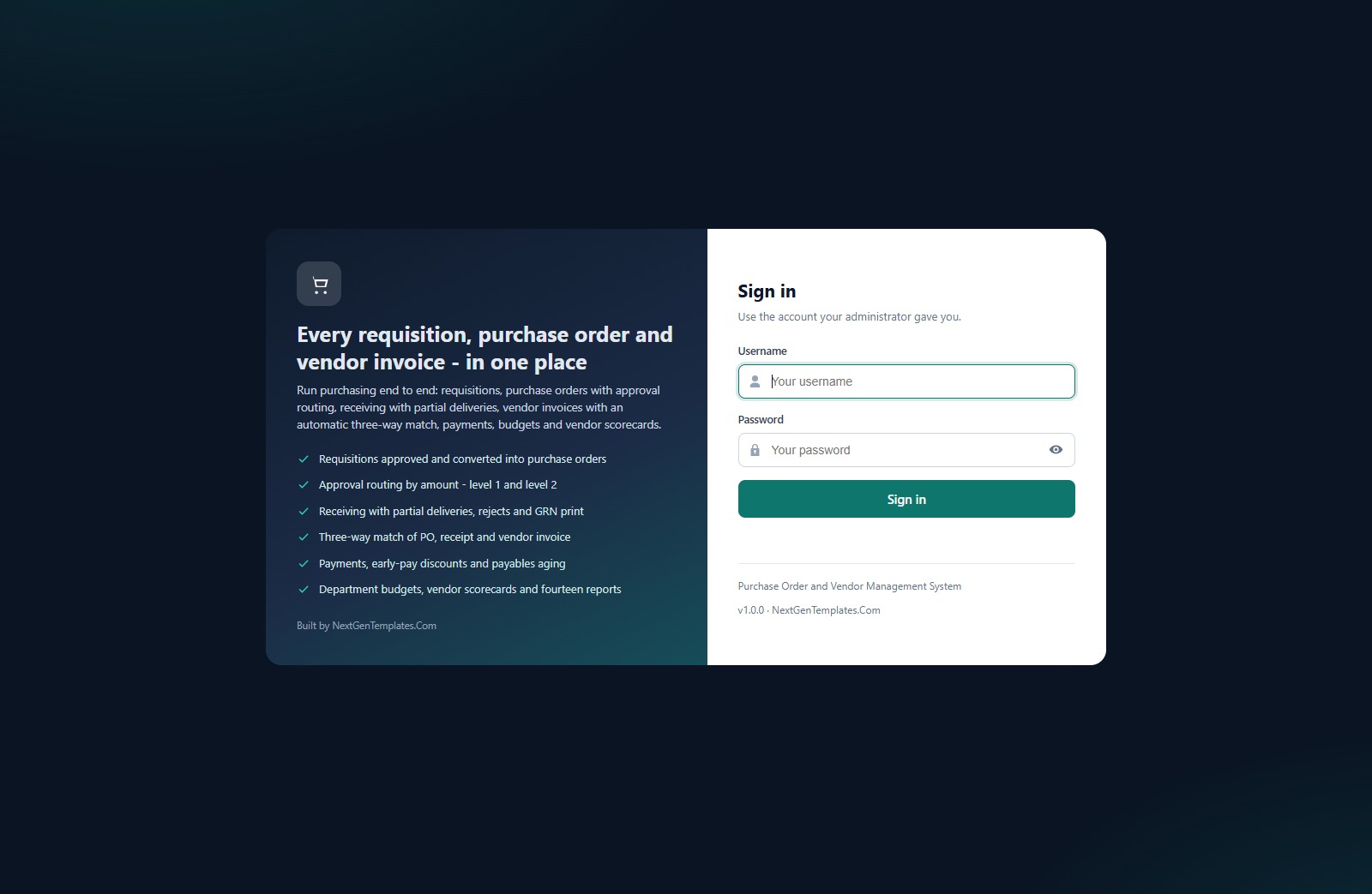
Sign-in page
Every user has their own login and a role. Default credentials are never printed on the sign-in screen.
Dashboard
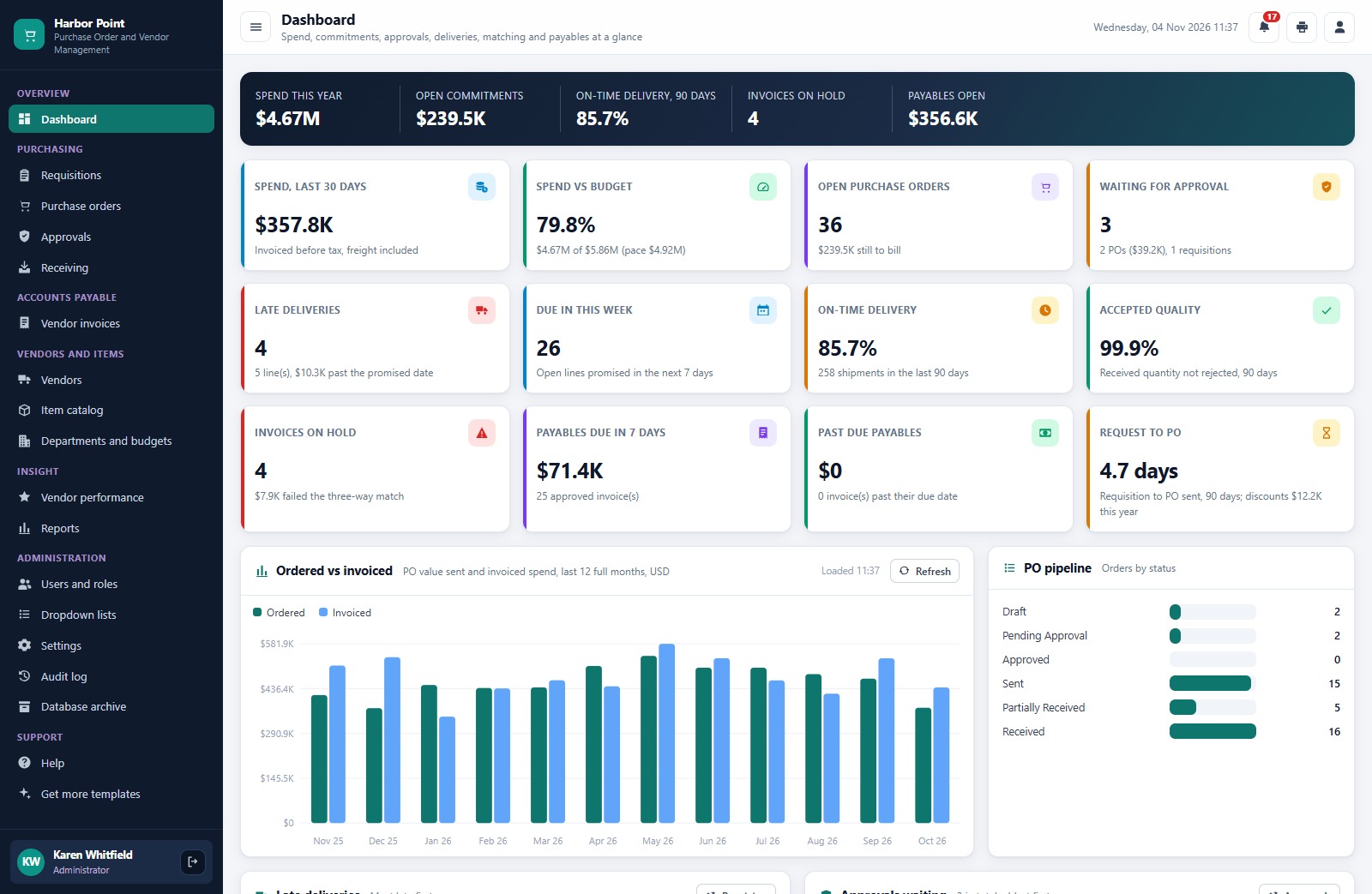
Spend this year, open commitments, on-time delivery, invoices on hold and payables open, then twelve KPI cards and the ordered versus invoiced chart for the last 12 months.
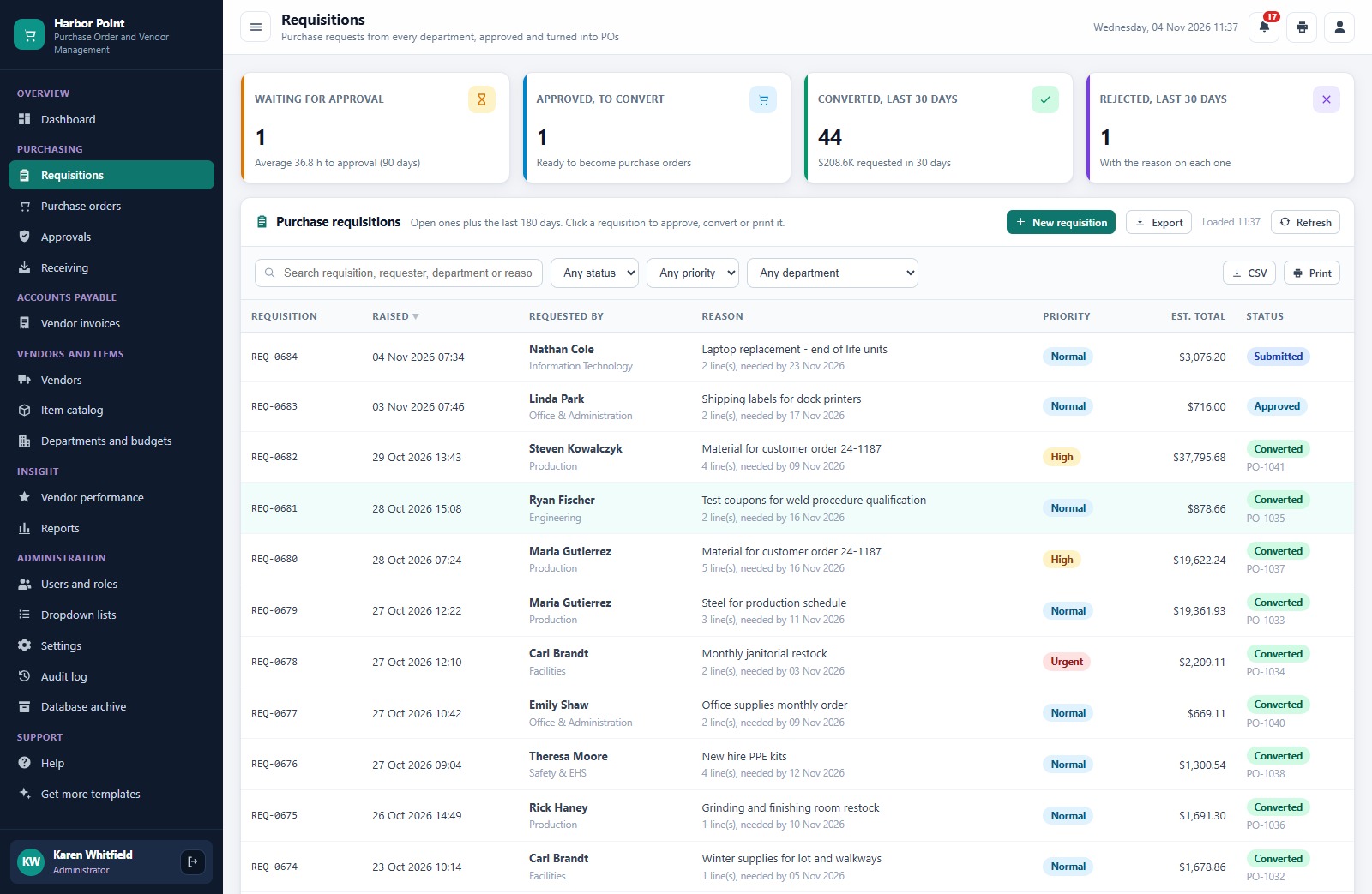
Requisitions
Every purchase request with its requester, department, priority, estimated total and status.
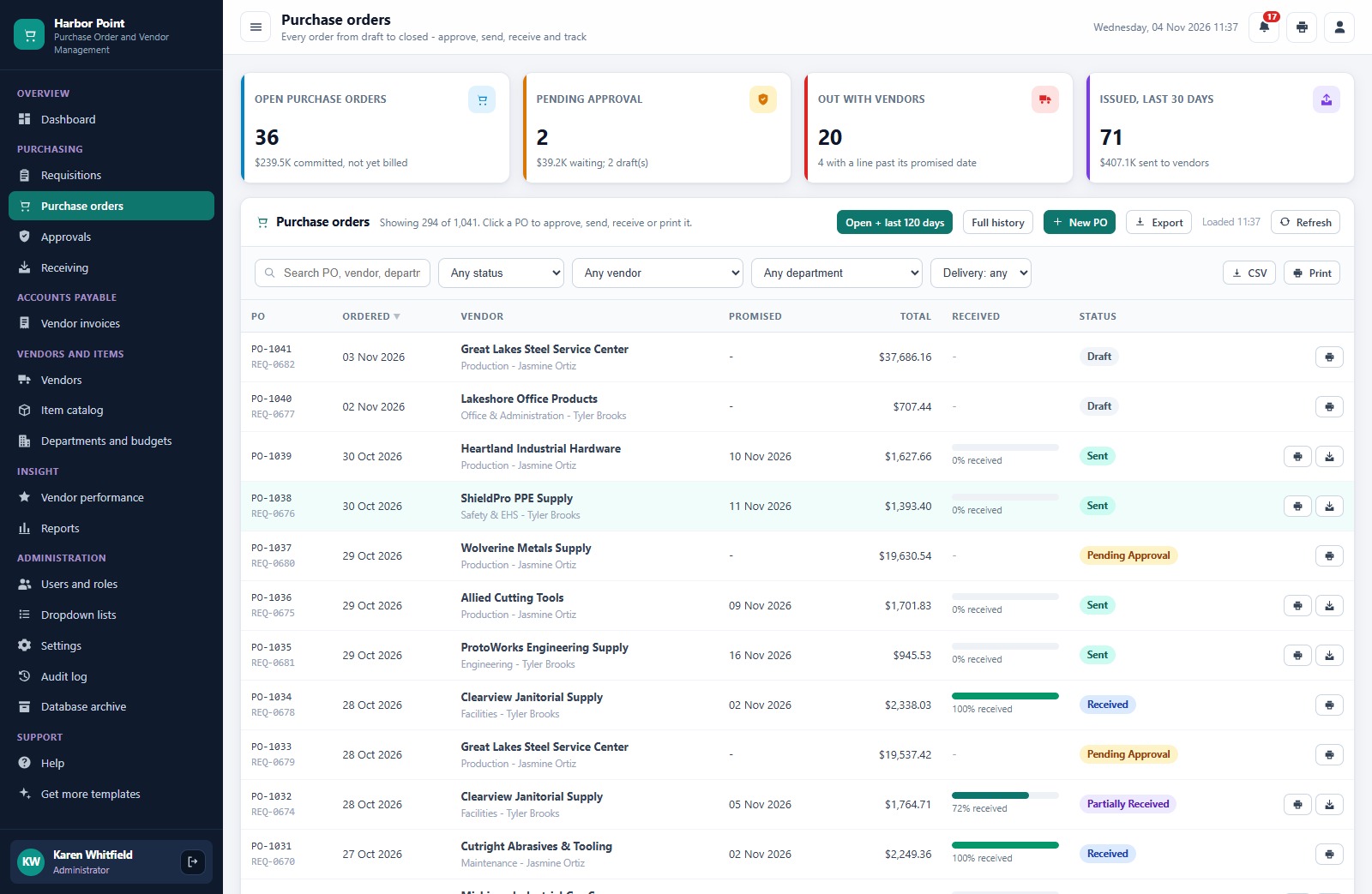
Purchase orders
Every order from draft to closed with vendor, promised date, total, percent received and status.
Approvals
The orders and requisitions waiting for your decision, with approve and reject buttons and the 90-day decision history.
Receiving
Open deliveries by promised date, with the days late and a Receive button for each line.
Vendor invoices
The purchase orders received but not billed, and every invoice with its three-way match result.
Vendors and vendor performance
Suppliers with terms, lead time, score and grade, and a performance screen with the on-time delivery trend.
Reports
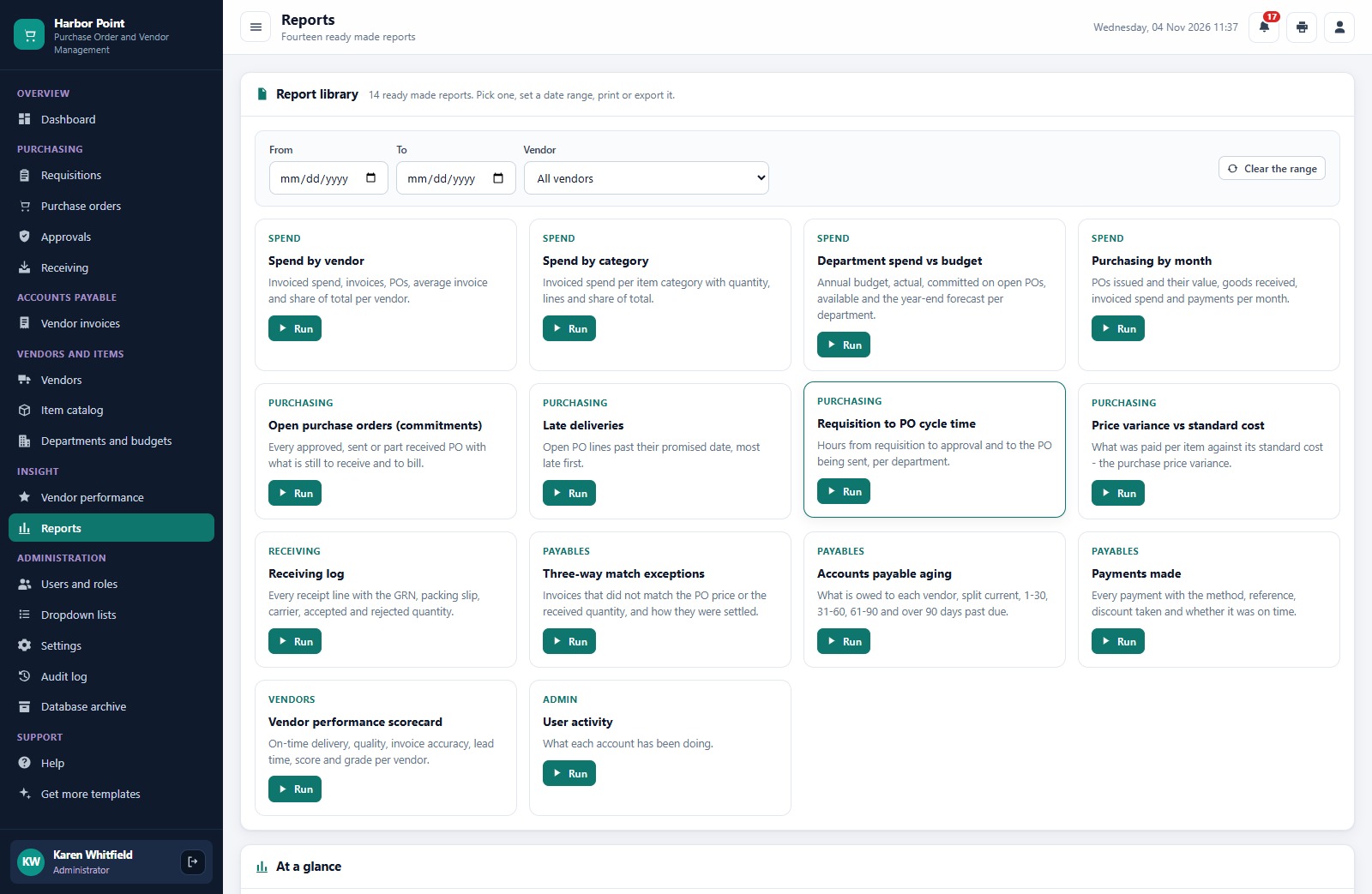
Fourteen ready-made reports: spend by vendor and category, department spend versus budget, open commitments, late deliveries, price variance, the receiving log, match exceptions, payables aging and payments made.
How the 7 Roles Divide the Purchasing Work
The Requester asks for goods and sees only their own department. The Purchasing Manager approves requisitions and level 1 orders. Buyers create, send and follow purchase orders. The Receiving Clerk books in deliveries. The AP Clerk enters invoices and payments. The Finance Controller approves large orders, releases held invoices and edits budgets. The Administrator manages users, settings, the archive and backups. The same permission map drives the menu and the server checks, so a hidden screen cannot be reached by calling the server directly.
The Three-Way Match: How an Invoice Gets Approved or Held
For each invoice line the app compares the billed quantity with what was received and not yet billed, and the billed price with the PO price. If the quantity is within tolerance and the price is within 2 percent, the line matches and the invoice is approved for payment automatically. A price variance, quantity variance, goods not received, or both, put the invoice on hold with the reason. The Finance Controller can accept it with a note, the AP Clerk can dispute it, and a void releases the quantities again. Duplicate invoice numbers for one vendor are refused.
📊 Purchase Order and Vendor Management System vs. Spreadsheet vs. Paid Procurement Software
| Feature | Purchase Order and Vendor Management System | Spreadsheet and email | Paid procurement software |
|---|---|---|---|
| Cost | ✅ One-time purchase | Free to low cost | Monthly or annual subscription |
| Approval routing by amount | ✅ Two levels with limits you set | Email chains | ✅ Yes |
| Three-way match | ✅ Automatic | Manual checking | Often a higher tier |
| Receiving with part deliveries | ✅ GRN and rejects | Manual | Varies by plan |
| Your data stays in your Drive | ✅ A Google Sheet you own | ✅ Yes | No, vendor hosted |
| Source code you can change | ✅ Full Apps Script code | ✅ Yes | No |
👥 Who This Web App Is For, and Who It’s Not For
✅ Built for:
- Manufacturers, fabricators and distributors that raise purchase orders against regular suppliers
- Buying teams that want vendor management software with approvals and a three-way match without a per-user subscription
- Accounts payable teams that want invoices checked before they pay
❌ Not built for:
- Teams that need supplier punch-out catalogs, EDI or e-invoicing networks
- Companies that need a general ledger; this tracks purchasing and payables, it does not post to accounting software or move money
- Teams that must work offline
⚙️ How to Set Up the Purchase Order and Vendor Management System
- Try the live demo first with the login details above.
- Create a new Google Apps Script project, paste Code.cs.txt into Code.gs, and add an HTML file named exactly
Indexcontaining Index.txt. - Deploy it as a web app (Execute as: Me) and accept the Google permission prompt.
- Open the web app URL and press Run setup now. Setup builds the database spreadsheet, the Drive folders and the starter data.
- Sign in as admin and change every seeded password.
- Enter your company details and approval limits in Settings, then import your own vendors, items and departments.
❓ Frequently Asked Questions
Can I try the Purchase Order and Vendor Management System before buying?
Yes. The live demo above runs the full system with fictional data. Sign in with any of the demo accounts to see each role’s screens and all 14 reports.
What do I need to run it?
A Google account. The web app creates its own Google Sheet database in your Drive during setup, and your team signs in with the usernames you create.
Can I change the approval limits and the match tolerance?
Yes. The auto-approve limit, the level 2 limit, the match tolerances and the default sales tax rate are settings.
Does it email purchase orders to vendors?
Yes. Sending a purchase order can email it to the vendor from your Google account, and it prints at 3 inch, 4 inch or A4.
Related Posts and Templates
- Food Bank Management System Web App: another Apps Script management system with roles and live demo logins.
- Warehouse Inventory Management System Web App: multi-warehouse stock by bin, batch and expiry.
- Purchase Order Tracker in Google Sheets: a one-page PO log with status and spend charts.
- Purchase Order Management Dashboard in Google Sheets: PO spend, vendor and delivery analysis on one dashboard.
Conclusion
If you buy from suppliers and want approvals by amount, part deliveries, a three-way match, budgets and vendor scorecards without a per-user subscription, this purchase order and vendor management software gives you all of it on your own Google account. Start with the live demo above, sign in as two or three different roles, and then get the Purchase Order and Vendor Management System Web App from NextGenTemplates.
🛒 Get the Purchase Order and Vendor Management System Web App
👤 About the Author
Built by PK, Microsoft Certified Professional with 15+ years of Excel, Google Sheets, Apps Script and Power BI experience, founder of NextGenTemplates and the YouTube channels @PKAnExcelExpert, @NextGenTemplates and @NeoTechNavigators. Every template is hand-built and tested before release.