Managing aerospace and defense programs requires precision, control, and real-time insight. However, many organizations still depend on complex spreadsheets and manual reports. As a result, leaders struggle to track revenue, budget, cost variance, compliance, and schedule performance in one place.Aerospace and Defense Dashboard in Google Sheets
Therefore, organizations need a centralized and interactive dashboard. More importantly, they need a ready-to-use solution that converts raw operational and financial data into actionable intelligence.Aerospace and Defense Dashboard in Google Sheets
That is exactly where the Aerospace and Defense Dashboard in Google Sheets becomes essential.
This ready-to-use dashboard helps defense contractors, aerospace manufacturers, program managers, and financial controllers monitor performance across programs, regions, facilities, and workstreams — all in one dynamic interface.
In this article, we will explainAerospace and Defense Dashboard in Google Sheets
What Is the Aerospace and Defense Dashboard in Google Sheets?
Click to Buy Aerospace and Defense Dashboard in Google Sheets
The Aerospace and Defense Dashboard in Google Sheets is a fully interactive reporting solution designed to monitor financial, operational, and compliance performance across aerospace and defense programs.
Instead of reviewing disconnected spreadsheets, users can:
- Track revenue and profit
- Monitor budget vs actual cost
- Evaluate regional and facility performance
- Analyze schedule variance
- Measure quality and defect rates
- Review compliance metrics
Because the dashboard operates in Google Sheets, teams collaborate in real time while maintaining structured data control.
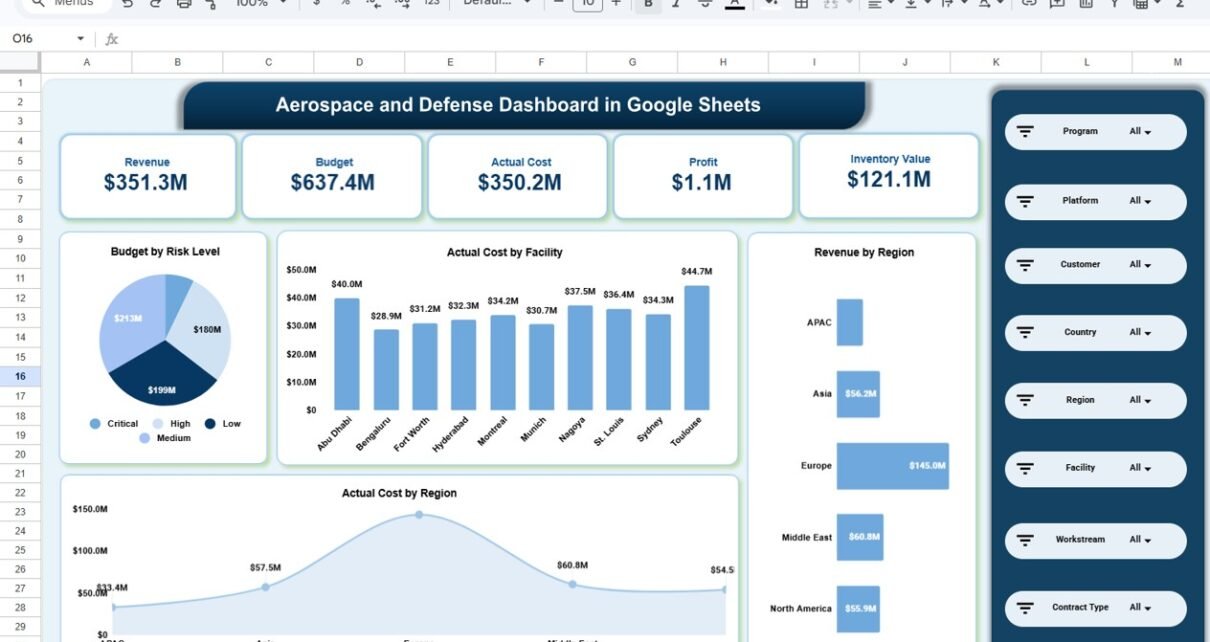
Overview Page
The Overview Page provides high-level visibility for leadership teams.
Top KPI Cards Display:
- Revenue
- Budget
- Actual Cost
- Profit
- Inventory Value
These KPIs give immediate clarity about overall financial health.
Key Visuals on Overview Page
- Budget by Risk Level (Critical, High, Medium, Low)
- Actual Cost by Facility
- Revenue by Region
- Actual Cost by Region

Click to Buy Aerospace and Defense Dashboard in Google Sheets
Program & Financial Analysis Page
This page focuses on program-level performance.
Included Reports:
- MTBF (Mean Time Between Failures) by Program
- Budget by Program
- Revenue by Program
- Profit by Region

Click to Buy Aerospace and Defense Dashboard in Google Sheets
Budget vs Cost Analysis Page
Controlling cost remains critical in aerospace and defense projects. Therefore, this page provides detailed variance analysis.
Available Charts:
- Budget vs Actual Cost by Platform
- Budget vs Actual Cost by Facility
- Budget vs Actual Cost by Country
- Budget vs Actual Cost by Workstream

Click to Buy Aerospace and Defense Dashboard in Google Sheets
Region Analysis Page
Regional performance directly impacts global operations.
Reports Included:
-
Cost Variance by Region
-
Profit by Region
-
Average Schedule Variance (Days) by Region
-
Defects by Region

Click to Buy Aerospace and Defense Dashboard in Google Sheets
Monthly Trends Page
The Monthly Trends page focuses on time-based performance tracking.
Monthly Metrics Included:
-
Average Schedule Variance by Month
-
Revenue by Month
-
Average Test Pass Rate % by Month
-
Cyber Compliance % by Month

Click to Buy Aerospace and Defense Dashboard in Google Sheets
Advantages of Aerospace and Defense Dashboard in Google Sheets
Implementing this dashboard delivers multiple benefits.
1. Centralized Program Monitoring
All financial and operational metrics appear in one structured interface.
2. Real-Time Visibility
Because Google Sheets updates dynamically, users see live performance insights.
3. Improved Cost Control
Budget vs actual analysis highlights financial risk early.
4. Enhanced Decision-Making
Clear visuals support faster strategic decisions.
5. Better Compliance Tracking
Cyber compliance and quality metrics improve regulatory alignment.
6. Multi-Dimensional Analysis
Users filter by program, platform, region, facility, and more.
Best Practices for Aerospace and Defense Dashboard in Google Sheets
Click to Buy Aerospace and Defense Dashboard in Google Sheets
To maximize value, follow these best practices.
Maintain Accurate Financial Data
Update revenue and cost data regularly. Because financial precision matters, small errors can distort insights.
Monitor Variance Weekly
Review budget and schedule variance consistently to prevent escalation.
Focus on High-Risk Programs
Use risk-level analysis to prioritize attention.
Track Compliance Monthly
Ensure cyber compliance and quality metrics remain stable.
Train Stakeholders
Provide training so users understand slicers and filters effectively.
Who Should Use This Dashboard?
Click to Buy Aerospace and Defense Dashboard in Google Sheets
This dashboard benefits:
- Defense Contractors
- Aerospace Manufacturers
- Program Managers
- Financial Controllers
- Compliance Officers
- Executive Leadership
Because aerospace and defense projects require structured oversight, this dashboard supports strategic and operational roles.
Conclusion
The Aerospace and Defense Dashboard in Google Sheets provides a powerful, interactive, and ready-to-use solution for program and financial monitoring.
Instead of relying on disconnected spreadsheets, organizations gain centralized visibility into:
- Revenue and profit
- Budget vs cost variance
- Program performance
- Regional insights
- Compliance metrics
- Monthly trends
Moreover, dynamic filters and structured reporting ensure better transparency and decision-making.
If your organization wants improved control, financial clarity, and strategic oversight, this dashboard delivers exactly what you need.
Frequently Asked Questions (FAQs)
Click to Buy Aerospace and Defense Dashboard in Google Sheets
What is the main purpose of this dashboard?
It centralizes aerospace and defense program performance, financial data, and compliance tracking in one interactive Google Sheets dashboard.
Can I customize KPIs?
Yes. You can modify metrics, add programs, or adjust financial fields based on organizational needs.
Does the dashboard support multi-region analysis?
Yes. It includes detailed regional and country-level performance views.
Is it suitable for government defense projects?
Yes. The dashboard supports structured program and financial reporting required for defense environments.
Do I need advanced Google Sheets knowledge?
No. Basic knowledge is enough to operate the dashboard efficiently.
Visit our YouTube channel to learn step-by-step video tutorials
Youtube.com/@NeotechNavigators
Watch the step-by-step video tutorial:
Click to Buy Aerospace and Defense Dashboard in Google Sheets