The aerospace industry demands precision, compliance, and operational excellence. Every delay affects contracts. Every defect impacts safety. Every missed target reduces profitability. Therefore, aerospace companies must track performance with clarity and discipline.
However, many organizations still depend on scattered spreadsheets. As a result, managers struggle to compare targets. Moreover, leadership teams fail to detect performance gaps quickly.
So, how can you track monthly KPIs, analyze MTD and YTD performance, and visualize results with traffic lights and trend arrows in one structured system?
You need an Aerospace KPI Scorecard in Google Sheets.
What Is an Aerospace KPI Scorecard in Google Sheets?
Click to Buy Aerospace KPI Scorecard in Google Sheets
An Aerospace KPI Scorecard in Google Sheets is a ready-to-use performance tracking template designed for aerospace manufacturing, aviation operations, and defense suppliers.
It allows you to:
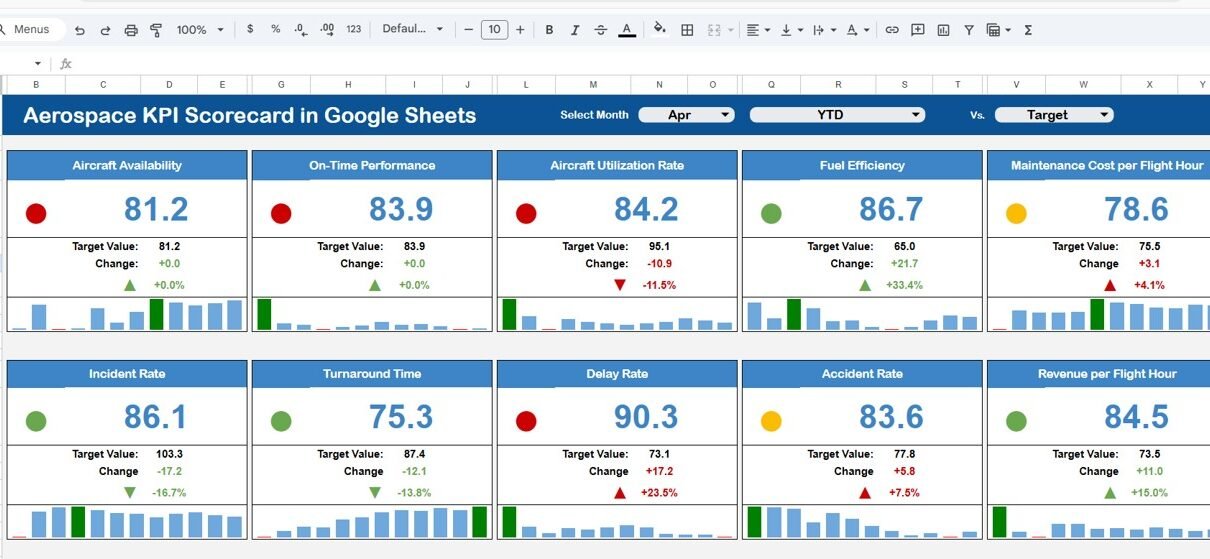
- Monitor 10 critical KPIs
- Select month from a drop-down
- Switch between MTD and YTD view
- Compare Actual vs Target
- Display traffic light indicators
- Show up/down percentage change arrows
Because Google Sheets works online, teams can collaborate in real time. Furthermore, decision-makers can access performance reports from anywhere.
Why Do Aerospace Companies Need a KPI Scorecard?
Aerospace operations involve:
- Strict regulatory compliance
- Complex supply chains
- High production costs
- Zero-tolerance safety standards
Therefore, companies must monitor KPIs carefully.
Without a structured scorecard:
- Teams miss delivery deadlines
- Quality issues escalate
- Costs exceed budgets
- Performance meetings lack clarity
However, when you implement a KPI scorecard:
- You improve accountability
- You track performance trends
- You align teams with goals
- You support audit readiness
Consequently, you strengthen operational control.
What Are the Worksheets in the Aerospace KPI Scorecard in Google Sheets?
This scorecard includes structured worksheets that simplify performance tracking.
Main Scorecard Sheet – How Does It Work?
This sheet acts as the core dashboard.
At the top, you get a Month Drop-down Selector. Once you select a month:
- All KPI numbers update automatically
- Traffic lights change color
- Up/down arrows show percentage change
You can click:
- MTD to view monthly performance
- YTD to view yearly performance
What Does the Scorecard Display?
- Actual Value
- Target Value
- Previous Year Value
- Target vs Actual (%)
- Previous Year vs Actual (%)
- Traffic light indicators
- Up/down arrows
Because conditional formatting updates instantly, managers can identify performance gaps quickly.

Click to Buy Aerospace KPI Scorecard in Google Sheets
KPI Trend Sheet Tab – How Can You Analyze KPI Trends?
In the Trend Sheet, you can select a KPI from cell C3.
Once selected, the sheet displays:
- KPI Group
- KPI Unit
- KPI Type (Lower the Better / Upper the Better)
- KPI Formula
- KPI Definition
Additionally, the sheet shows visual trend charts for MTD and YTD values.
Therefore, managers can see whether performance improves or declines over time.

Click to Buy Aerospace KPI Scorecard in Google Sheets
KPI Definition Sheet Tab – Why Is Documentation Important?
This sheet stores:
- KPI Name
- KPI Group
- Unit
- Formula
- KPI Definition
Clear documentation ensures transparency. Moreover, new team members understand KPIs easily.

Data Input Sheet Tab – Where Do You Enter Data?
In this sheet, you input actual performance numbers.
You enter:
- Monthly actual data
- Target data
- Previous year data
Because the scorecard links directly to this sheet, updates reflect automatically across the dashboard.

Click to Buy Aerospace KPI Scorecard in Google Sheets
Colour Settings Sheet – How Does It Control Traffic Lights?
The Colour Settings sheet manages:
- Traffic light thresholds
- KPI performance limits
- Conditional formatting logic
For example:
- Green = On target
- Yellow = Slight variance
- Red = Critical gap
Therefore, you can adjust performance standards easily.

Click to Buy Aerospace KPI Scorecard in Google Sheets
Advantages of Aerospace KPI Scorecard in Google Sheets
Real-Time Updates
Google Sheets updates data instantly.
Easy Month Selection
Users can switch months easily.
Traffic Light Indicators
Color coding simplifies decision-making.
Automatic MTD & YTD View
Users can toggle between monthly and yearly performance.
Simple Customization
You can modify KPIs and thresholds easily.
Cloud-Based Access
Teams can collaborate from anywhere.
Best Practices for Aerospace KPI Scorecard in Google Sheets
To maximize impact, follow these best practices:
1. Define Clear KPI Ownership
Assign responsibility for each KPI.
2. Update Data Monthly
Enter data consistently.
3. Review Scorecard in Meetings
Use it during monthly performance reviews.
4. Validate Data Accuracy
Check data before reporting.
5. Adjust Colour Thresholds Carefully
Align traffic lights with realistic targets.
6. Focus on Actionable KPIs
Track metrics that drive improvement.
How Does This Scorecard Improve Aerospace Operations?
Click to Buy Aerospace KPI Scorecard in Google Sheets
This scorecard:
- Reduces manual reporting time
- Improves performance transparency
- Strengthens quality control
- Enhances supplier monitoring
- Supports regulatory audits
Therefore, aerospace companies gain stronger operational control.
Conclusion
The aerospace industry operates under strict standards. Therefore, companies must track KPIs with clarity and precision. The Aerospace KPI Scorecard in Google Sheets provides a ready-to-use, dynamic, and structured system to monitor performance.
Because it includes month selection, MTD and YTD toggle, traffic lights, and trend charts, it simplifies complex reporting. Moreover, it enhances decision-making.
If you want to improve operational visibility, strengthen quality control, and drive performance growth, this KPI scorecard offers a practical and powerful solution.
Frequently Asked Questions with Answers
Click to Buy Aerospace KPI Scorecard in Google Sheets
1. Can I customize the 10 KPIs in this scorecard?
Yes, you can edit KPI names, formulas, and targets easily.
2. Does the scorecard update automatically?
Yes, once you update data in the input sheet, the scorecard updates instantly.
3. Can I use this template for aviation maintenance?
Yes, you can modify KPIs to match maintenance metrics.
4. Is Google Sheets better for collaboration?
Yes, Google Sheets allows real-time multi-user access.
5. How often should I update the scorecard?
You should update it monthly for accurate performance tracking.
Visit our YouTube channel to learn step-by-step video tutorials
Youtube.com/@NeotechNavigators
Watch the step-by-step video tutorial: