Power BI

Removing Blank or Duplicate Rows in Power Query

Data inconsistencies, such as blank or duplicate rows, can significantly affect the accuracy of your analysis in Power BI. Power Query in Power BI offers simple yet powerful tools for identifying and removing these unwanted rows. In this article, we’ll cover how to efficiently remove blank and duplicate rows, ensuring that your data is clean, […]

Power BI

Cleaning Data with Power Query in Power BI

Cleaning Data with Power Query in Power BI is one of the most critical tasks in any data analysis process. Before analyzing or visualizing data, it’s essential to ensure that the dataset is accurate, consistent, and ready for transformation. Power Query in Power BI provides a variety of tools to help clean and prepare your […]

Power BI

JSON Connectivity in Power BI

Power BI is a fantastic tool for analyzing and visualizing data, and it’s flexible enough to support various data formats. One of the most widely used formats is JSON (JavaScript Object Notation). JSON is a lightweight and human-readable data format commonly used by web services and APIs to exchange data. In this guide, we’ll walk […]

Power BI

Text/CSV Connectivity in Power BI

Power BI is a powerful tool that allows users to connect, analyze, and visualize data from various sources. Among these sources, Text/CSV files are common data formats used across industries for storing information. These formats are lightweight and easy to share, making them a popular choice for exporting data from various systems. This article provides […]

Google Sheets

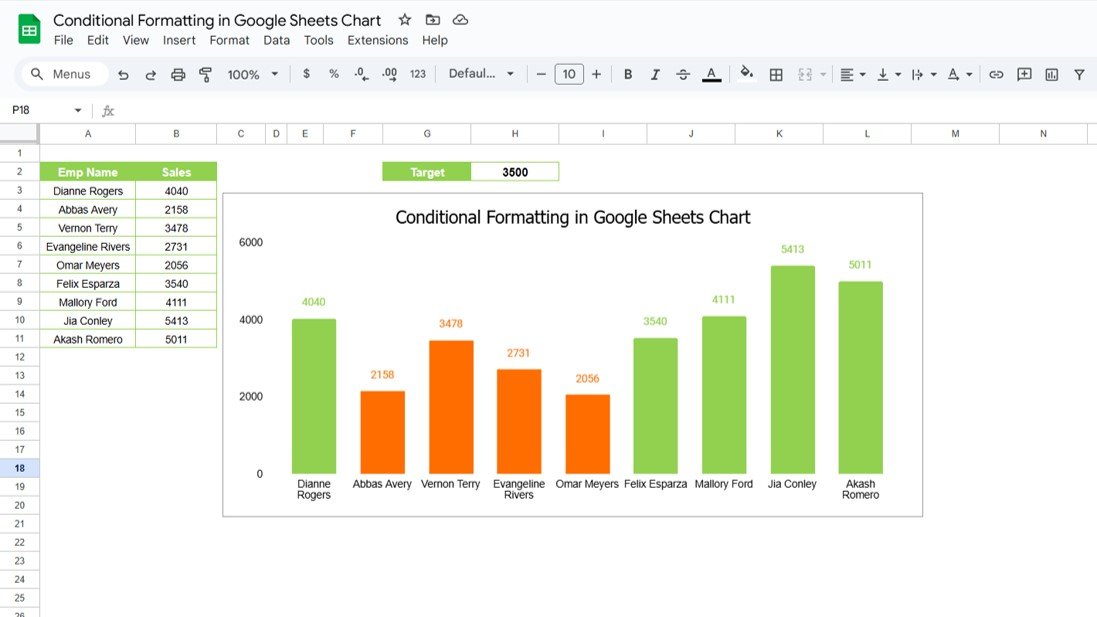
Conditional Formatting in Google Sheets Chart

Google Sheets offers a wide range of features to help you visualize and analyze data efficiently. One of the most powerful and visually appealing options is Conditional Formatting in Google Sheets Charts. By using conditional formatting, you can instantly highlight key data points, making it easier to interpret your data. In this article, we will […]

Power BI

Connecting Power BI with Excel

Power BI and Excel are two of the most popular tools for data analysis and visualization. While each has its strengths, combining them can unlock even more powerful insights. Connecting Power BI with Excel allows you to work with Excel data in Power BI and vice versa, making your data analysis workflow more efficient. In […]

Power BI

Power BI to Web Connectivity with Example

In today’s data-driven world, the ability to connect and visualize data from various sources is critical for making informed decisions. One such powerful feature is Power BI’s capability to connect to web data sources. Power BI to Web Connectivity By connecting Power BI to the web, users can access live data from websites, APIs, and […]

Google Sheets

How to Rename a Google Sheets Tab

Rename a Google Sheets Tab is an incredibly useful tool for managing data, collaborating with teams, and organizing projects effectively. One essential feature of Google Sheets is the ability to rename tabs. Although it may seem like a small detail, renaming tabs can make a huge difference in keeping your spreadsheet organized and easy to […]

Google Sheets

How to Freeze Rows and Columns

If you’ve ever scrolled through a large spreadsheet and lost track of your headers or important labels, you know how frustrating it can be. Fortunately, Google Sheets has a simple solution: freezing rows and columns. This feature keeps specific rows or columns visible no matter how far you scroll. In this guide, we’ll show you […]

Power BI

How to Install Power BI Desktop Application for Free

If you’ve been curious about exploring the powerful world of Power BI but are unsure about the cost, there’s some great news for you! You can download and use the Power BI Desktop application absolutely free. In this article, we’ll walk you through the straightforward steps to install Power BI Desktop directly from Microsoft’s official […]