Most bakeries do not lose money on the day a batch fails. They lose it slowly, in the gap between what the plan said and what actually came off the line: the tray that got over-proofed, the flour that ran out at 4am, the wholesale order that nobody baked for because it was still sitting in a draft, the cake that sells beautifully and earns almost nothing once you count the labour.
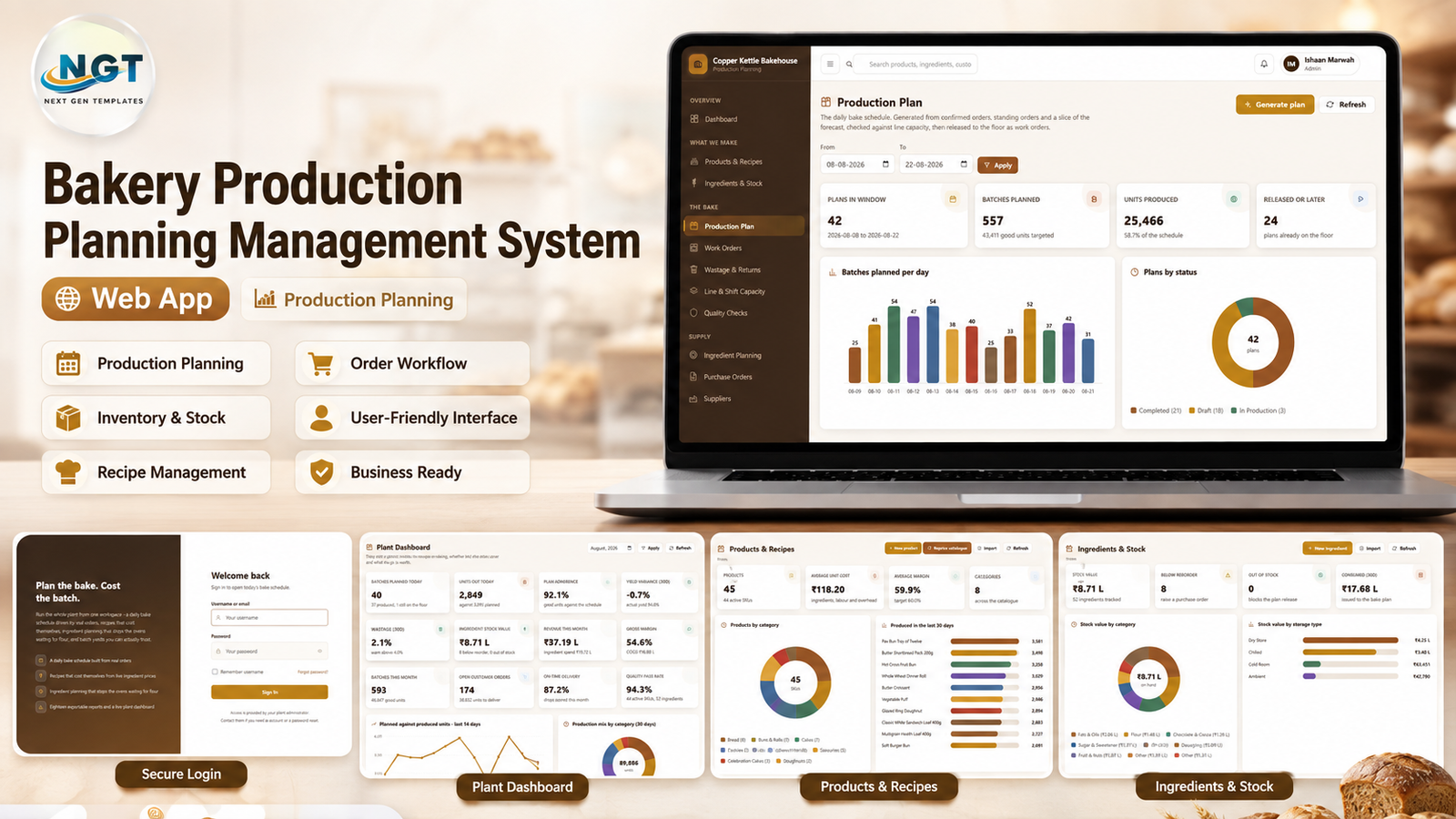
The Bakery Production Planning Management System Web App exists to close that gap. It is a complete Google Apps Script application that runs on your own Google account, stores every record in your own Google Sheet, and takes a bakery from a confirmed order all the way to a costed, dispatched batch. Bakery Production Planning Management System Web App
Get the Bakery Production Planning Management System Web App
Try the Live Demo — No Purchase Needed
The full system is deployed with seeded bakery data. Sign in as any of the six roles and the interface changes to match what that person is allowed to do — that role separation is the whole point, and you can see it in about ten seconds.
Demo sign-in details — all six roles
| Role | Username | Password | What that role sees |
|---|---|---|---|
| Admin | admin |
Admin@123 |
Every module, including User Management, List Management, Settings, the Database Archive and the Audit Log |
| Production Manager | manager |
Manager@123 |
Generates and releases the bake schedule, approves purchase orders, signs off costing. No user administration |
| Head Baker | baker |
Baker@123 |
Runs the floor shift by shift: releases batches, records actual yield, signs off quality. No costing, no purchasing, no deletes |
| Store Keeper | store |
Store@123 |
The store and goods receipt. Cannot approve a purchase order and never sees the sales side |
| Sales Coordinator | sales |
Sales@123 |
Customers, customer orders, standing orders, dispatch and routes |
| Quality Officer | quality |
Quality@123 |
Quality checks, wastage and returns, work orders and reports |
Please note: these credentials are public on purpose. They are the seeded logins of a shared demo instance that resets periodically — not a customer’s live system, and not what you are buying. When you deploy your own copy you set your own passwords on day one.
Before we go further: what this system is not
This matters more in food than in almost any other industry, so it goes near the top rather than buried at the bottom.
This is a production-planning and record-keeping tool. It is not a food-safety system.
- It does not make your bakery food-safety compliant, and gives no assurance of compliance with any standard, scheme or regulator.
- It is not a HACCP system. It does not build, validate or monitor a HACCP plan, hazard analysis or critical control points.
- It does not do allergen management, allergen declarations, ingredient labelling or nutrition panels, and it does not verify nutritional accuracy.
- It does not validate shelf life. Where you see a best-before date, it is a date somebody typed in; the system stores it, sorts it and reports on it, and that is all.
- It makes no claim of conformity with FDA, FSSAI, EU food law, BRCGS, SQF, ISO 22000 or anything similar, and it is not a regulatory traceability or product-recall system.
- The Quality Checks module logs the checks you define. It is a record of what an inspector measured, not a verification of safety, and it certifies nothing.
Food safety, labelling and regulatory compliance stay entirely with you, your qualified food-safety adviser and the rules of your own jurisdiction. What this system does well is the operational half: knowing what to bake, whether you have the ingredients, whether the plan held, and what it cost.
The problem it actually solves
A bakery running more than one oven across more than one shift is juggling four questions at once, and they all depend on each other:
- What are we baking tomorrow? Which is a function of confirmed orders, standing weekly commitments and a bit of judgement about counter demand.
- Can we? Which is a function of oven and bench capacity per shift.
- Do we have the ingredients? Which is a function of the plan exploded through every recipe, netted against what is in the store and what is already on order.
- Did it work, and what did it cost? Which is a function of actual yield against standard yield, wastage, and the real cost of ingredients, labour and overhead per batch.
Answer those in four separate spreadsheets and they drift apart within a week. This system answers them in one place, where each answer feeds the next.
A walk through the system
The Plant Dashboard
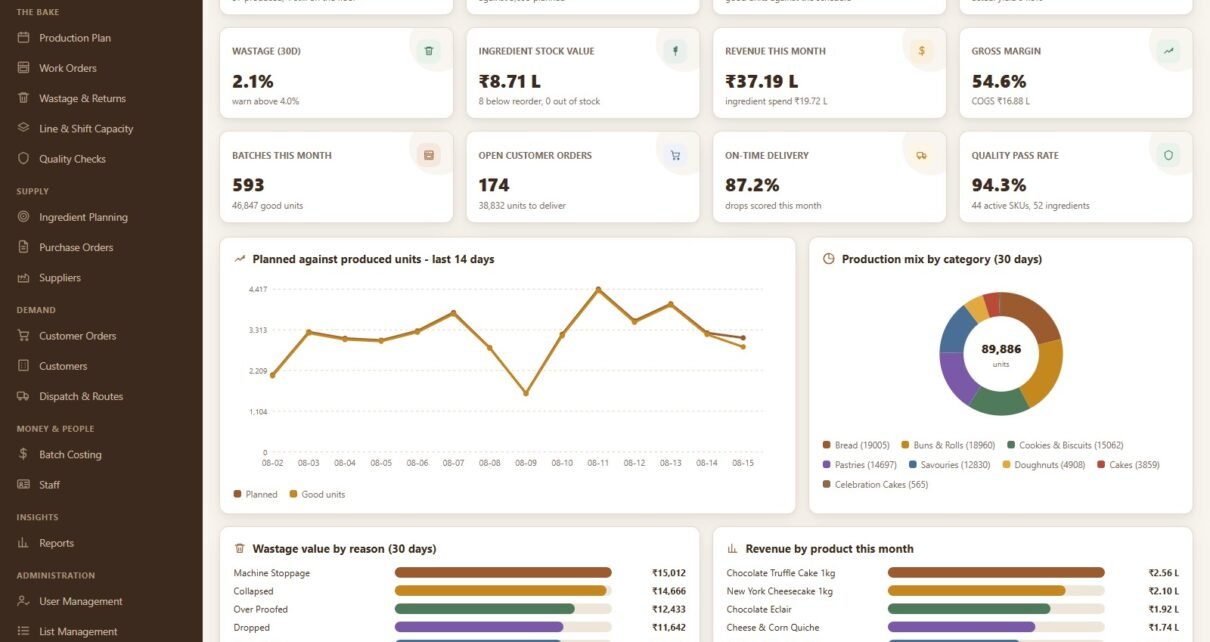
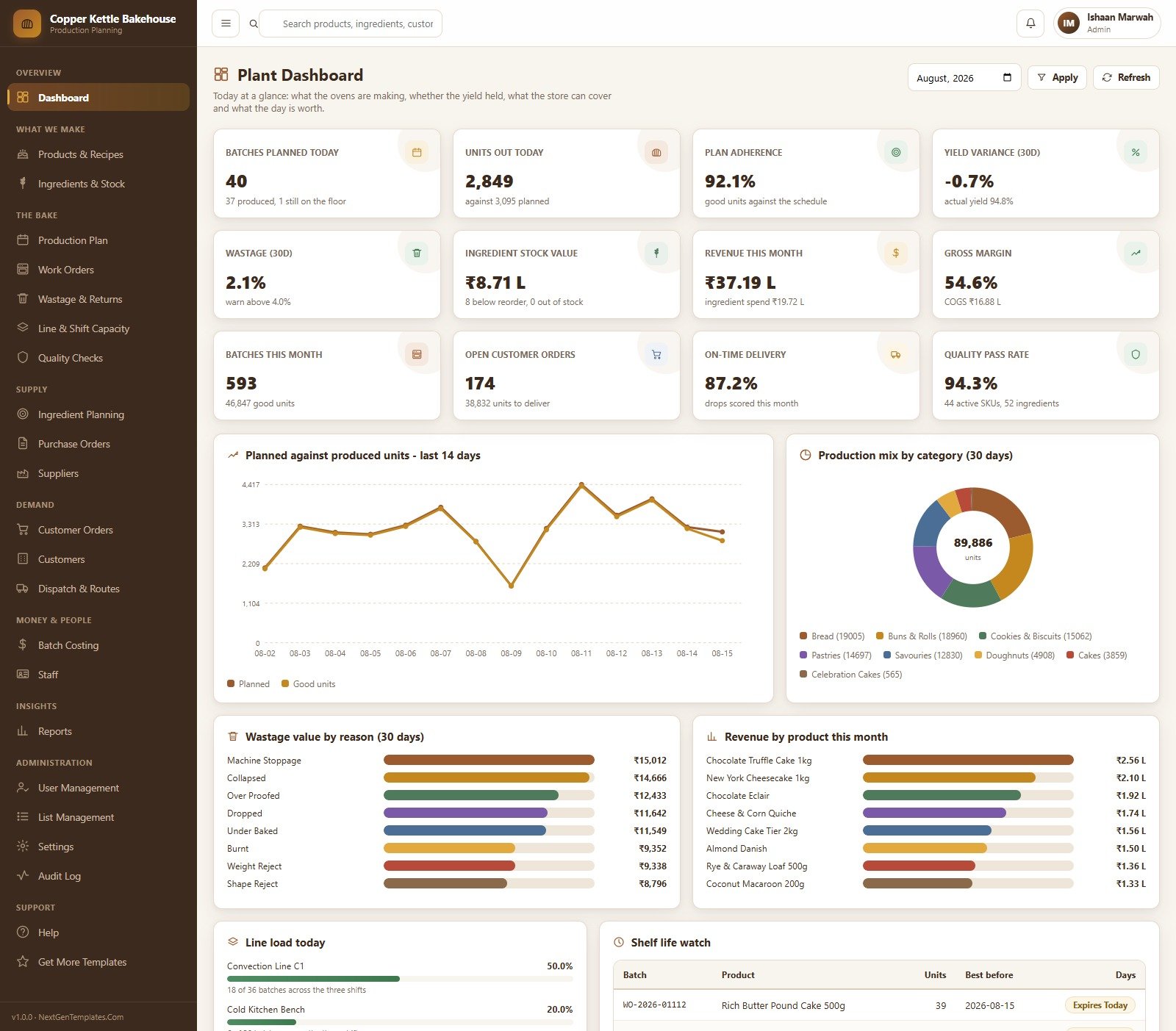
Twelve cards give the state of the plant on one screen: batches planned today and how many are still on the floor, units out today against units planned, plan adherence, 30-day yield variance, 30-day wastage, ingredient stock value with a count of lines below reorder, revenue and gross margin for the month, batches this month, open customer orders, on-time delivery and quality pass rate.
Beneath them sit a 14-day planned-against-produced trend, a production mix donut by category, wastage value ranked by reason, revenue by product for the month, today’s line load as a set of utilisation bars, and a shelf-life watch list assembled from the best-before dates recorded against produced batches.
Products & Recipes
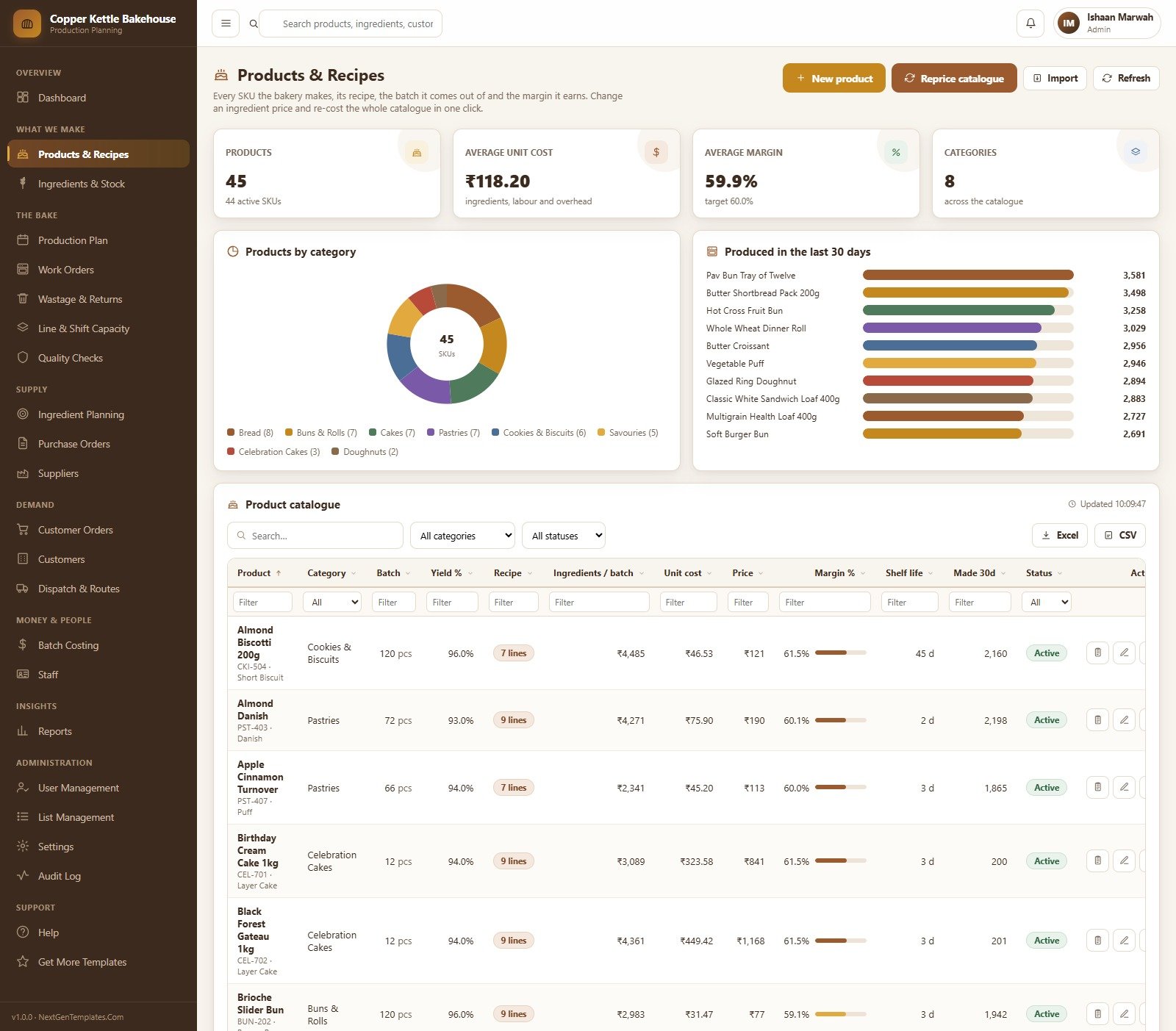
The catalogue is where the costing starts. Every SKU carries a category, a batch size, a standard yield percent, its recipe lines, its ingredient cost per batch, unit cost, selling price, margin percent, a shelf-life field and its 30-day production volume. Change an ingredient price and a single “Reprice catalogue” press re-costs everything downstream. Bakery Production Planning Management System Web App
Ingredients & Stock
The raw material store. Stock value, lines below reorder, lines out of stock and 30-day consumption sit at the top, with stock value split by ingredient category and by storage type — dry store, chilled, cold room and ambient. Every ingredient tracks unit of measure, quantity on hand, reorder point, days of cover, unit cost, value, supplier, storage location, 30-day usage and a state badge that flags what to watch. Out-of-stock lines block the plan release, which is the point.
Production Plan
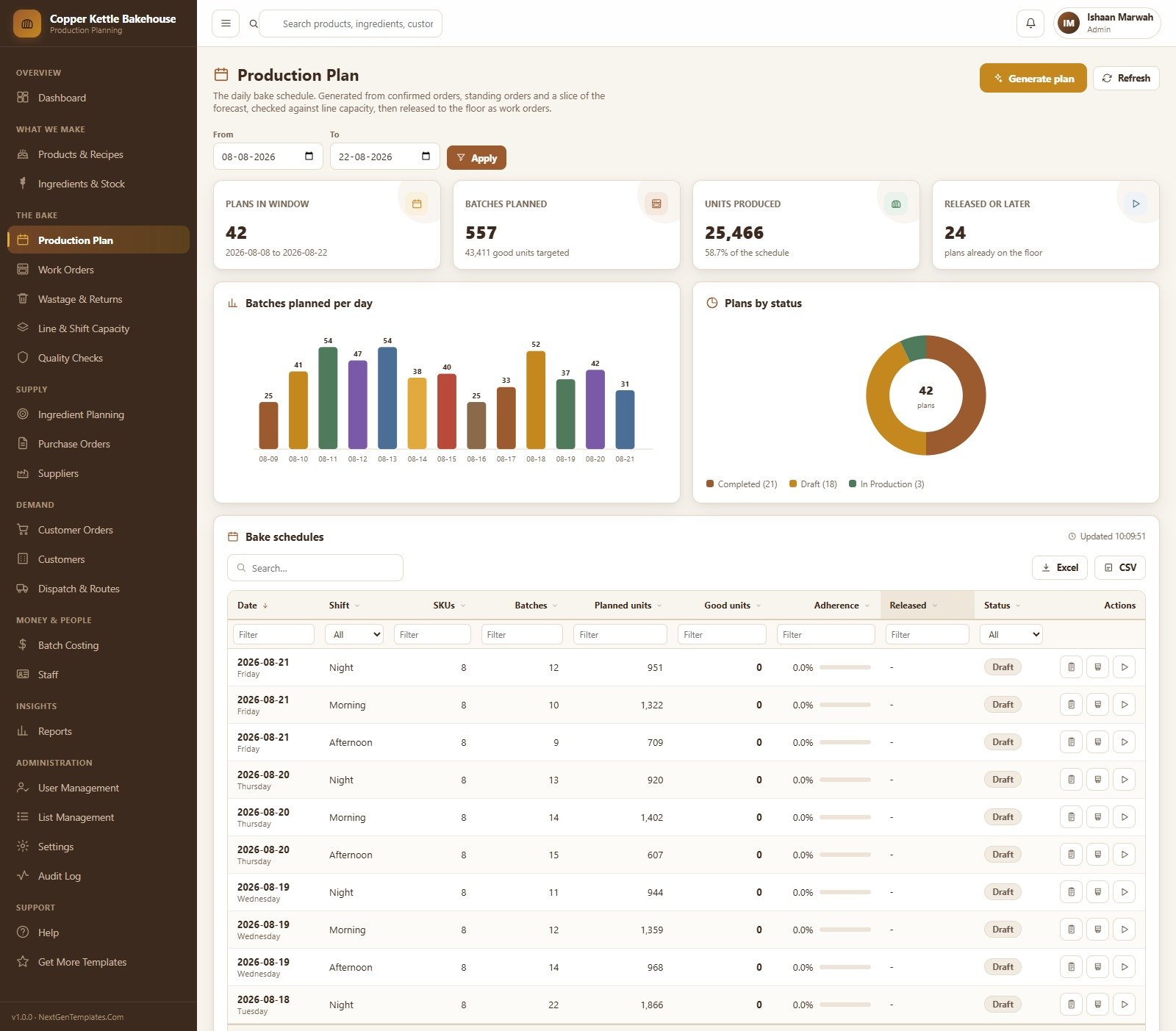
The daily bake schedule, generated rather than typed. Choose a date window and press Generate; the system pulls confirmed orders, standing orders and a slice of forecast demand, breaks them into batches per SKU per shift, and checks the result against line capacity. Cards show plans in the window, batches planned, units produced against the schedule and how many plans are already released, with a per-day batch bar chart and a plan-status donut splitting completed, draft and in-production. Nothing reaches the floor until you release it.
Work Orders
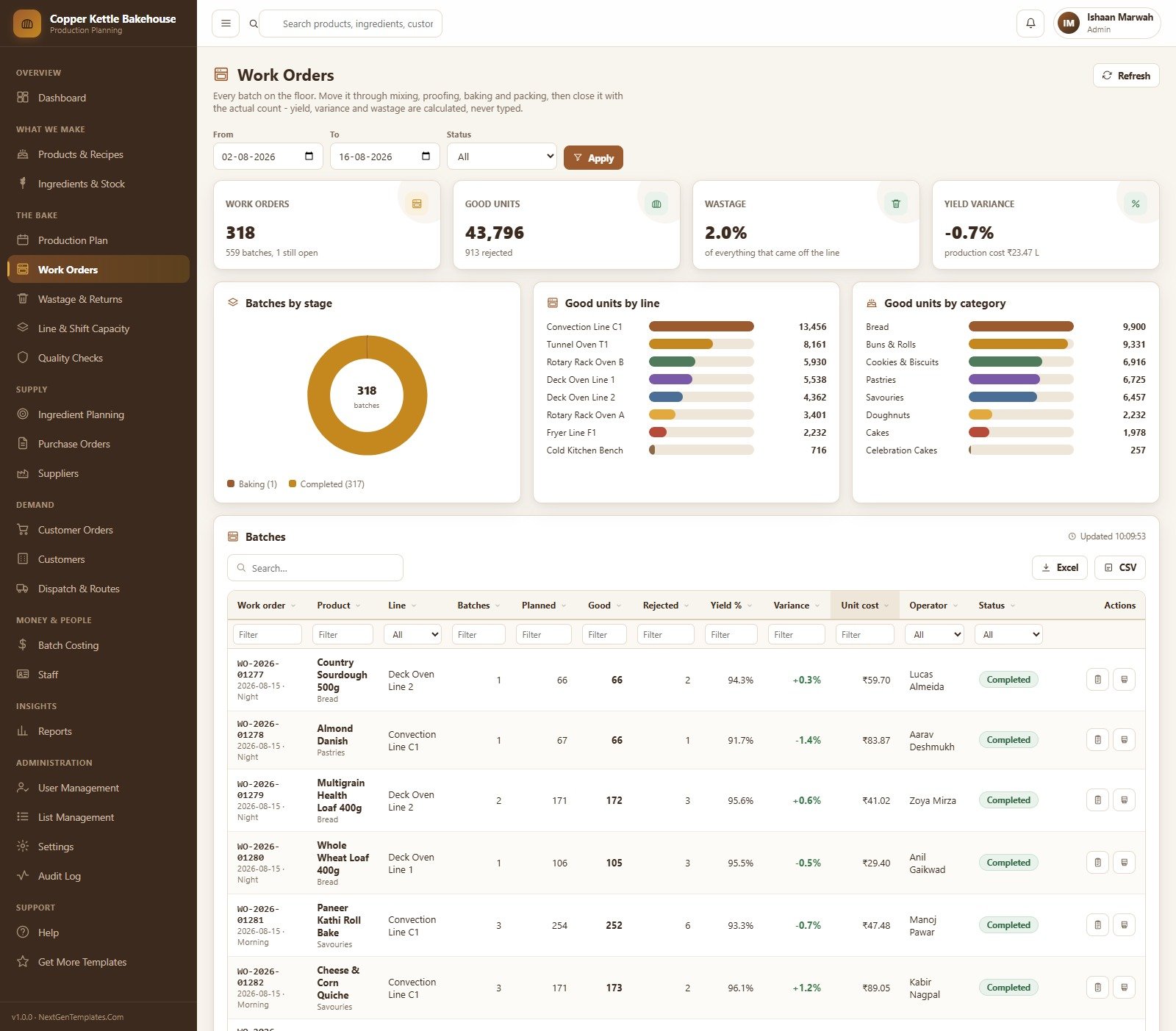
Once released, each planned batch becomes a work order that moves through mixing, proofing, baking and packing. Close it with the actual good count and reject count and the system derives yield percent, variance against the standard yield and the wastage figure — none of which anybody has to calculate by hand. The page breaks batches down by stage, good units by production line and good units by product category, and each row records the line, the operator, planned versus good units, rejects, yield, variance and unit cost.
Quality Checks
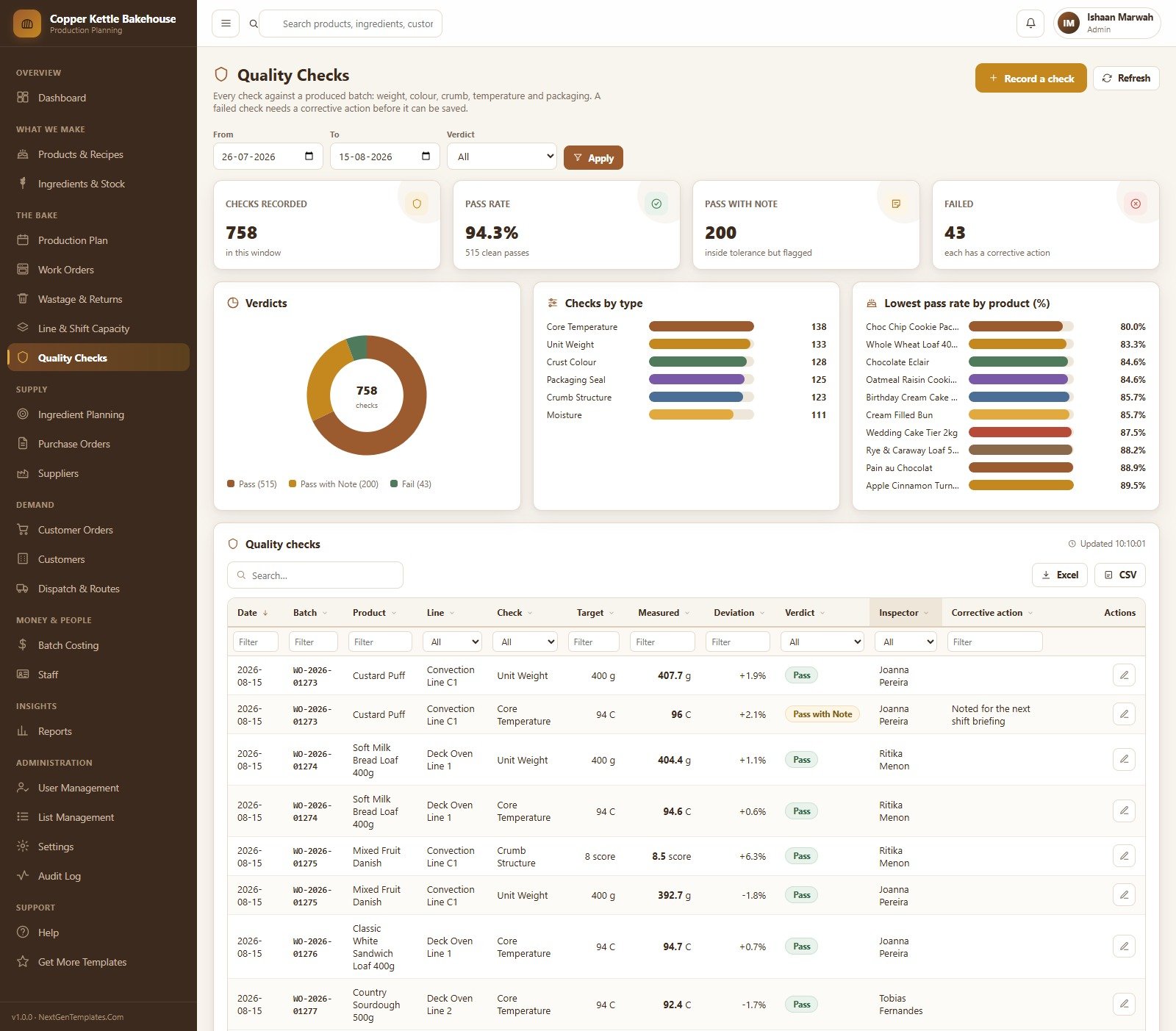
A structured log of the checks your bakery decides to run against each produced batch. The seeded configuration uses unit weight, core temperature, crust colour, crumb structure, packaging seal and moisture, but the check types live in List Management and are yours to change. Each record holds a target, the measured value, the deviation, a verdict of Pass, Pass with Note or Fail, and the inspector; a failed check cannot be saved without a corrective action. The summary shows pass rate, passes with a note, failures and the ten products with the lowest pass rate.
To be explicit again: this is a record. It documents what was measured and by whom. It does not verify food safety and does not certify anything.
Ingredient Planning
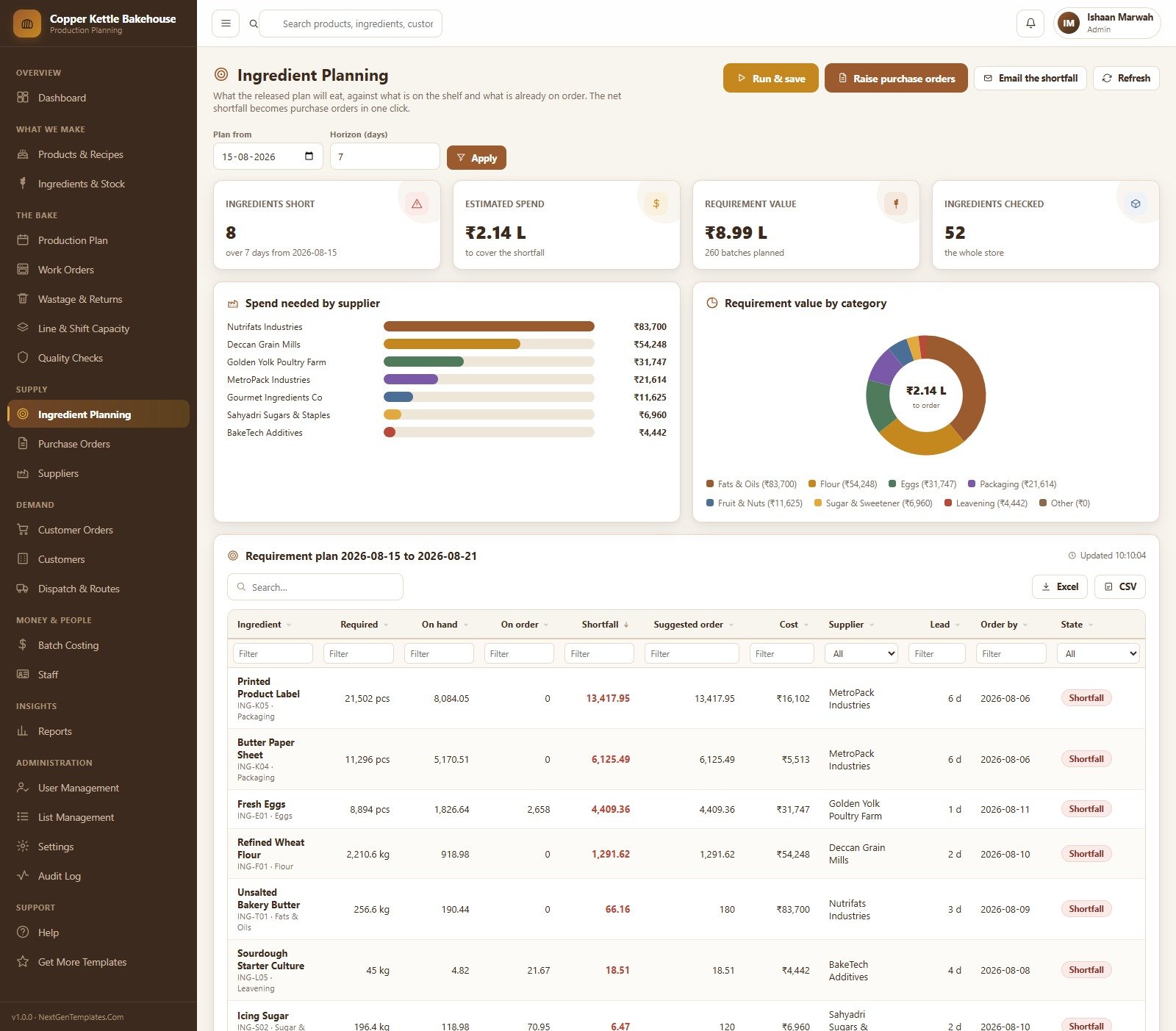
This is the module that stops the ovens waiting for flour. Set a plan-from date and a horizon in days, press Run, and the released plan is exploded through every recipe into an ingredient requirement, then netted against on-hand stock and quantities already on order. What is left is the shortfall.
The requirement table lists required quantity, on hand, on order, shortfall, a suggested order quantity, the cost of that order, the supplier, their lead time in days and the date by which the order has to be placed. Above it, spend needed by supplier and requirement value by ingredient category. A single press turns the whole shortfall into draft purchase orders, and there is an “Email the shortfall” action for the store keeper who would rather send it than print it.
Customer Orders
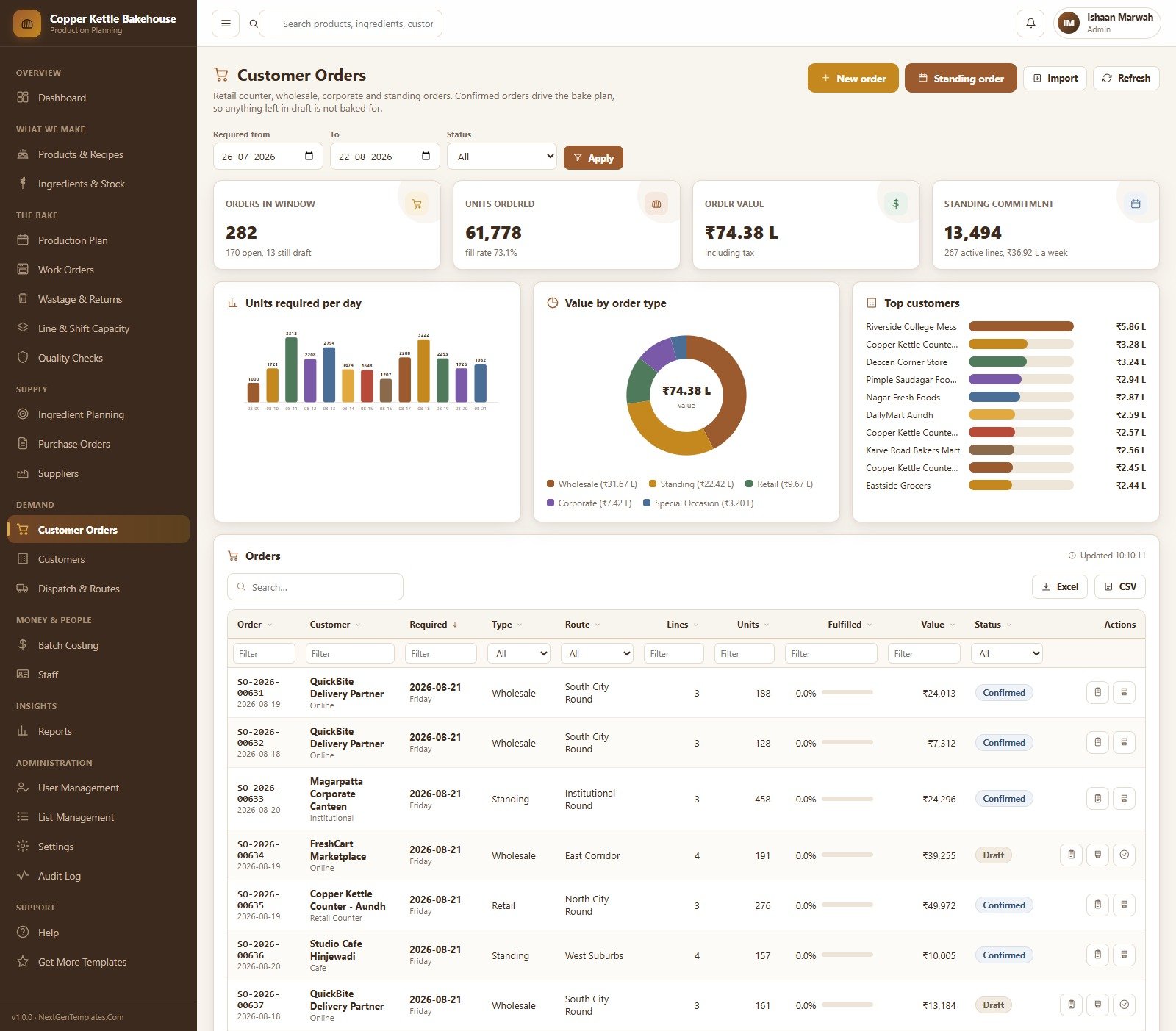
Retail counter, wholesale, corporate, special-occasion and standing orders live in one queue, each with a required-by date and a delivery route. Confirmed orders drive the bake plan, which means anything left in draft is deliberately not baked for — a small design decision that prevents a lot of arguments. Cards cover orders in the window, units ordered with a fill rate, order value including tax, and the weekly standing commitment, with units required per day, value by order type and a ranked top-customers list.
Batch Costing
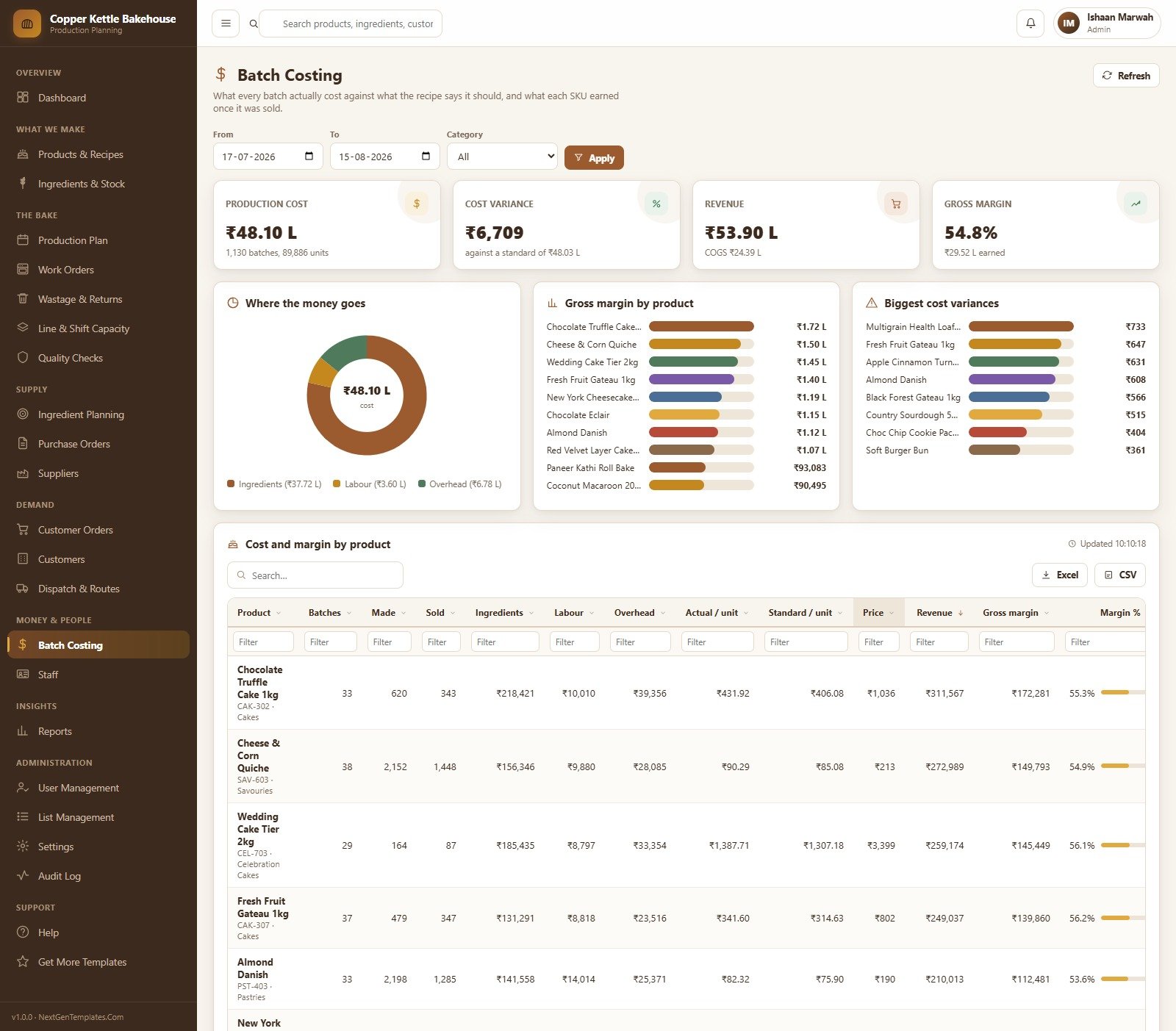
What every batch actually cost against what the recipe said it should, and what each SKU earned once it was sold. Production cost, cost variance against standard, revenue and gross margin sit across the top. Below them: where the money goes, split across ingredients, labour and overhead; gross margin ranked by product; the biggest cost variances, which is usually the most useful chart on the page; and a full per-product table of batches, units made and sold, ingredient, labour and overhead cost, actual versus standard unit cost, price, revenue, gross margin and margin percent.
This is where a bakery finds out that its best-selling line is not its best-earning line.
Reports
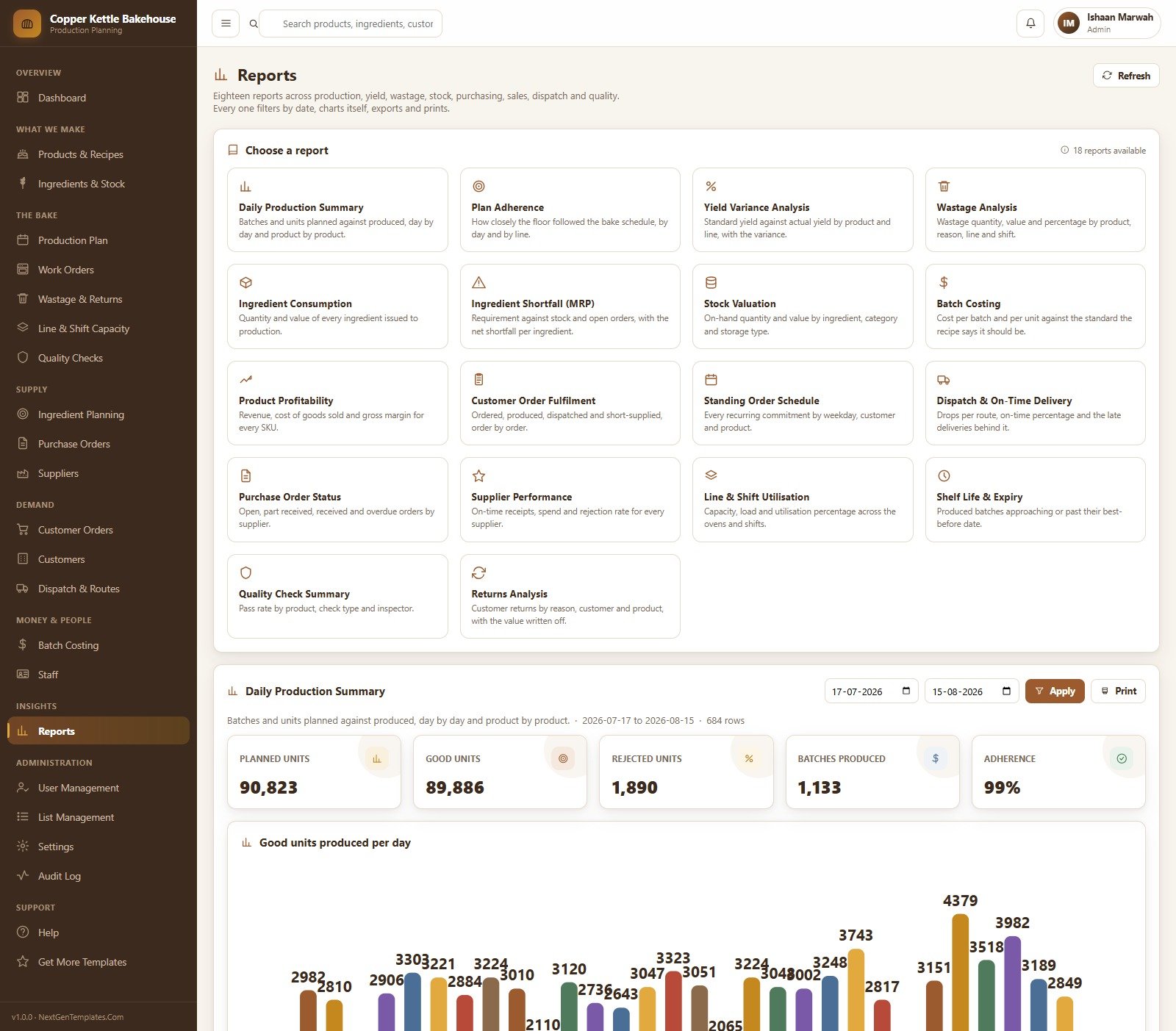
Eighteen reports, grouped across production, yield, wastage, stock, purchasing, sales, dispatch and quality:
- Daily Production Summary, Plan Adherence, Yield Variance Analysis, Wastage Analysis
- Ingredient Consumption, Ingredient Shortfall (MRP), Stock Valuation, Batch Costing
- Product Profitability, Customer Order Fulfilment, Standing Order Schedule, Dispatch & On-Time Delivery
- Purchase Order Status, Supplier Performance, Line & Shift Utilisation, Shelf Life & Expiry
- Quality Check Summary, Returns Analysis
Every one filters by date, draws its own charts, and exports to Excel or CSV or prints on a page that fits.
The rest of the system
Wastage & Returns records write-offs by reason, line and shift alongside customer returns and the value written off. Line & Shift Capacity holds the ovens, benches and fryers with their capacity per shift — the constraint the plan is checked against. Purchase Orders and Suppliers handle raising, approving and receiving orders, and score suppliers on on-time receipts, spend and rejection rate. Customers and Dispatch & Routes hold the account list and the drops that leave the plant each morning. Staff keeps the plant roster, which is what links a login to a real person so “my shift” works. User Management, List Management, Settings and the Audit Log sit under Administration, and Help plus Get More Templates stay visible to every role.
The six roles, and why they matter
Role separation is not decoration here. Each of the six accounts sees a genuinely different navigation rail:
- Admin — everything, plus user administration, settings, the database archive and the audit log.
- Production Manager — the whole operation. Generates and releases the schedule, approves purchase orders, signs off costing. No user administration.
- Head Baker — the floor. Releases batches, records actual yield, signs off quality. No costing, no purchasing, no deletes.
- Store Keeper — the store and goods receipt. Can receive but cannot approve a purchase order, and never sees the sales side.
- Sales Coordinator — takes the orders and gets them out of the door. Customers, orders, standing orders, dispatch and routes.
- Quality Officer — checks every batch against its standard and signs off the corrective action.
Permissions are editable per module at User Management. The Admin role itself is locked so a bakery can never accidentally lock itself out.
Getting it running
- Try the demo first. Sign in as the Store Keeper or the Head Baker — the restricted roles make the design obvious fastest.
- Create a new Google Sheet and open Extensions → Apps Script.
- Paste
Code.cs.txtinto the file namedCode.gs, andIndex.txtinto a new HTML file named exactlyIndex. - Deploy as a web app and open the URL.
- Press Set up the database on the first-run panel — or run
setupfrom the editor if you prefer. It builds every sheet, the seeded bakery and the six accounts. It is idempotent, so running it again only fills in what is missing. - Sign in as admin and change all six passwords before anyone else gets the link.
- Load your own ingredients, suppliers, products and recipes, lines and shifts, and customers, then delete the seeded demo records.
Ten minutes is a realistic figure for steps 2–6. Loading your own catalogue is the part that takes an afternoon.
Honest limitations
- The seeded demo data is denominated in Indian rupees. Currency is a setting, but you will want to change it before showing anyone.
- “Copper Kettle Bakehouse”, its 45 products, 52 ingredients, staff, customers and orders are generated demonstration data, not a real bakery.
- It needs a Google account and an internet connection. There is no offline mode.
- Google Apps Script has execution quotas. For a single-plant bakery this is not a practical constraint, but it is not a substitute for an enterprise ERP at multi-site scale.
- It is not accounting software, not payroll and not a point-of-sale till. If you need a counter till, the Bakery POS Web App is the companion product.
- And to repeat the important one: it is not a food-safety, HACCP, allergen or labelling system.
Planning to build your own production trackers? The NextGenTemplates Academy learning paths teach the underlying spreadsheet skills, with practice files to work through.
Get the Bakery Production Planning Management System Web App
Frequently asked questions
Does this make my bakery food-safety compliant?
No. It is a planning and record-keeping tool. It does not assess, certify or assure food safety, and it makes no HACCP, allergen, labelling, shelf-life validation or food-law claims of any kind. Compliance remains your responsibility.
Can I try it before buying?
Yes — the live demo above is the real system with all six roles. Nothing you do there affects your own copy later; the demo instance resets periodically.
Do I need to know how to code?
No. You paste two files into a Google Apps Script project and press Deploy. The PDF manual walks through it step by step. Everything after that happens in the browser.
Where does my data live?
In a Google Sheet inside your own Google account. Nothing is sent to a third-party server, and you can open the underlying sheet whenever you want.
How many users can I add?
As many as you like — you create the accounts yourself. Six roles ship with the system, and per-module permissions are editable.
Can I change the categories, lines, shifts and check types?
Yes. Every dropdown in the system — product categories, ingredient categories, production lines, shifts, wastage reasons, quality check types, order types, routes — is maintained at List Management.
Can I edit the source code?
Yes. You get the full, unobfuscated Apps Script source and may adapt it for your own bakery.
What happens as the sheet grows?
There is a Database Archive under Administration for closing off and moving out old periods, so the working sheet stays quick.
Where to get it
The complete system — both source files plus the step-by-step PDF user manual — is available here:
Bakery Production Planning Management System Web App on NextGenTemplates
If a bakery-specific system is not quite what you need, the same Apps Script foundation is used across the rest of the range — for example the Brewery Management System, the Cafeteria and Canteen Management System and the Bakery POS Web App. For reporting rather than operations, there are Bakery Business dashboards in Google Sheets, Excel and Power BI.
Start with the demo. Sign in as the Head Baker, look at the plan, then look at the yield variance on the work orders it produced. If that is the conversation your plant is already having every morning, this system is simply where it can happen in writing.