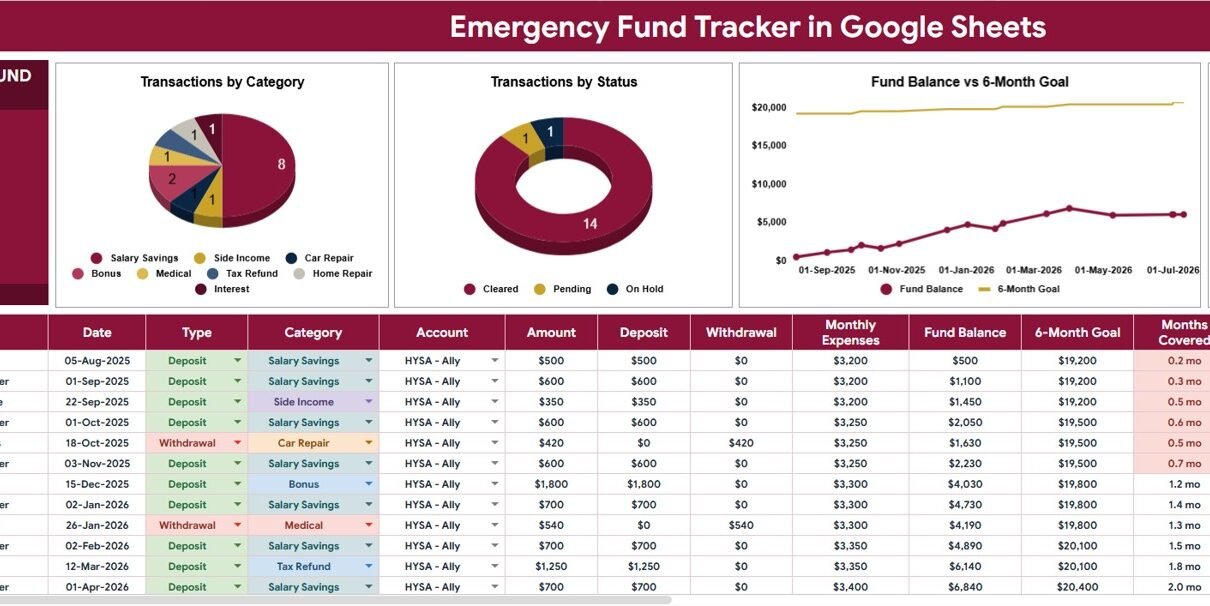
An emergency fund is easier to protect when you can see the balance, deposits, categories, and progress in one place. The Emergency Fund Savings Tracker in Google Sheets is built for that exact workflow: record every deposit or withdrawal, track emergency categories, monitor your 6-month savings goal, and review progress through a visual dashboard.
This matters because unexpected expenses are common. The Federal Reserve’s 2026 Economic Well-Being of U.S. Households report found that 59% of adults had at least one major unexpected expense in the prior year, while 63% said they could cover a $400 emergency expense using cash or its equivalent. A clear tracker helps turn emergency savings from a vague intention into a habit you can review and improve.
Get the Emergency Fund Savings Tracker in Google Sheets
Key Features of Emergency Fund Savings Tracker in Google Sheets
- Emergency fund overview: See your total emergency fund balance and how close you are to your target.Emergency Fund Savings Tracker in Google Sheets
- Deposit and withdrawal tracking: Log every emergency savings transaction with date, category, account, status, and notes.Emergency Fund Savings Tracker in Google Sheets
- 6-month goal monitoring: Compare actual fund balance against your 6-month savings goal over time.
- Category-based analysis: Review emergency categories so you understand what your savings activity is tied to.
- Status tracking: Separate planned, pending, cleared, and completed transactions for cleaner follow-up.Emergency Fund Savings Tracker in Google Sheets
- Interactive slicers: Filter the dashboard quickly by account, type, category, status, or date. You can also review Google’s official slicer guidance if you want to customize filters further.
- Editable lists tab: Manage dropdown options for transaction types, emergency categories, savings accounts, and workflow stages.
Dashboard Pages Explanation
Overview Page
The Overview Page is designed as the main command center for your emergency savings plan. At the top, the Total Emergency Fund Balance card shows the current high-level amount available, so you do not need to scan individual transactions just to understand your savings position.Emergency Fund Savings Tracker in Google Sheets
The dashboard also includes slicers that make the analysis faster. Instead of editing formulas or building separate reports, you can filter by key fields and review the dashboard instantly for the account, category, status, or date range that matters most.Emergency Fund Savings Tracker in Google Sheets
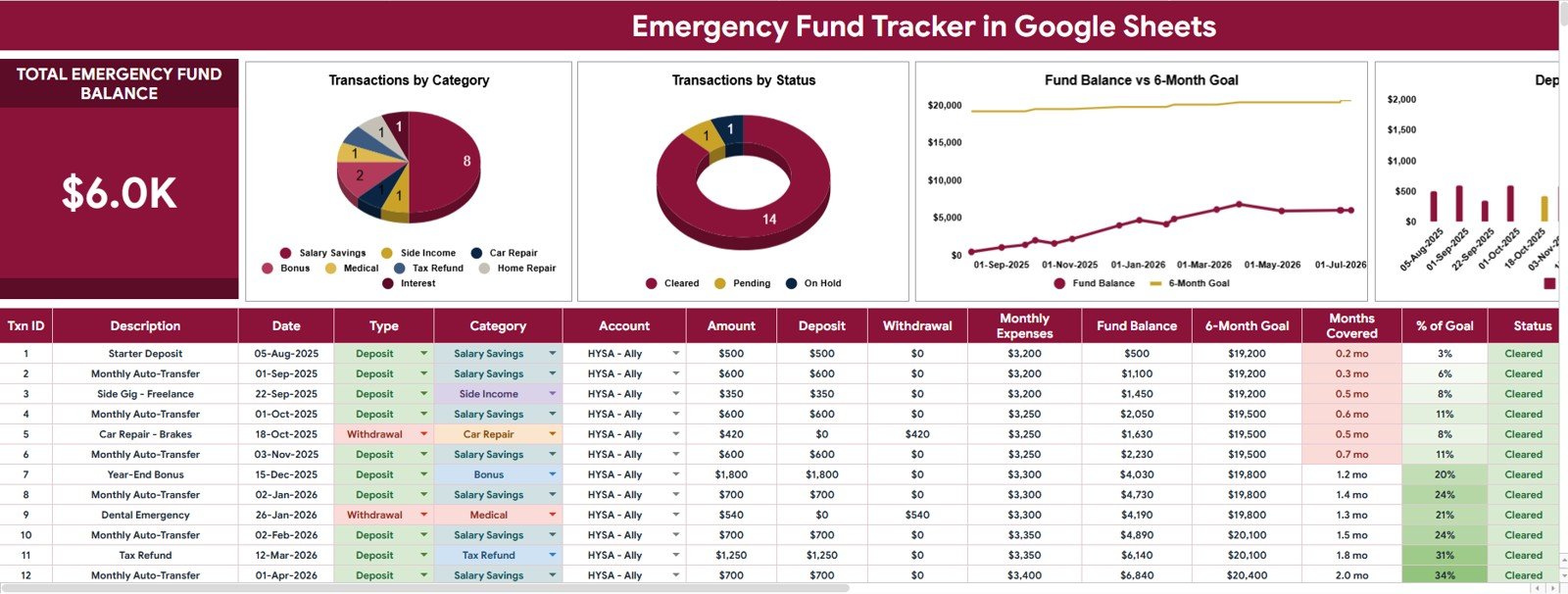
Transactions by Category: This chart shows how emergency fund activity is distributed across categories such as medical, car repair, home repair, income loss, or other custom categories. It helps you understand whether your savings plan is covering the types of emergencies that are most relevant to your household.Emergency Fund Savings Tracker in Google Sheets
Transactions by Status: This chart summarizes transactions by workflow stage, making it easier to separate completed deposits from pending or planned entries. It is useful for monthly reviews because you can quickly see what still needs attention.Emergency Fund Savings Tracker in Google Sheets
Fund Balance and 6-Month Goal by Date: This trend chart compares your actual fund balance against the target needed for your 6-month emergency goal. It helps you see whether you are moving toward the goal steadily or falling behind the pace you expected.Emergency Fund Savings Tracker in Google Sheets
Deposits by Date: This chart tracks deposits over time, so you can spot savings consistency, skipped months, or larger one-time contributions. It is especially helpful if you want to build a habit of adding money to your emergency fund on payday or at the end of each month.
Lists Tab
The Lists Tab supports the dropdown logic behind the tracker. Instead of hardcoding categories and statuses into every row, you can maintain the options in one place and keep your transaction entry sheet cleaner.
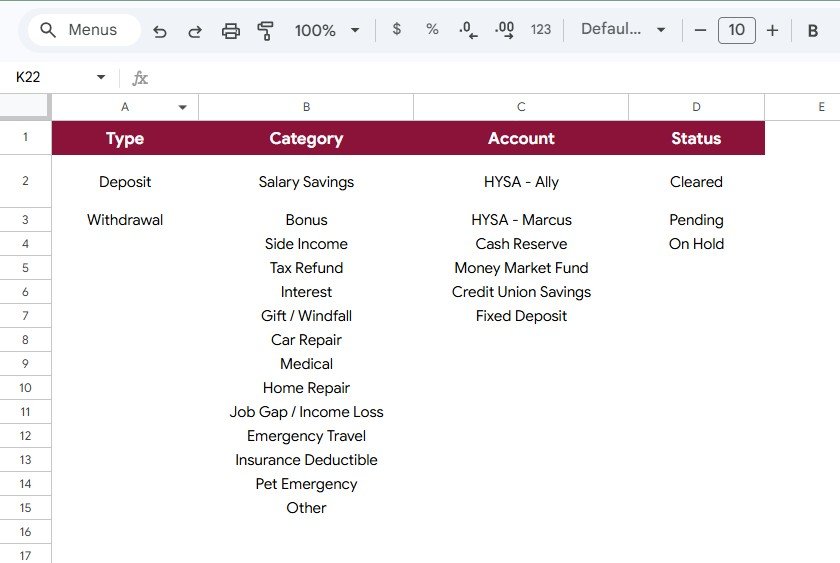
Transaction Type by Option: This list organizes the transaction types used in the tracker, such as deposit, withdrawal, transfer, or adjustment. It keeps your data consistent so charts can summarize activity correctly.
Emergency Category by Purpose: This list defines the emergency categories that appear in your transaction entries. You can use it to tailor the tracker to your real priorities, whether that means medical costs, job loss, insurance deductibles, travel emergencies, or home repairs.
Savings Account by Account Name: This list stores the accounts where emergency savings are kept. It is useful when your emergency fund is split across checking, savings, high-yield savings, or other cash accounts.
Transaction Status by Workflow Stage: This list manages workflow statuses for each transaction. It helps you distinguish between planned contributions, pending transfers, completed deposits, and reconciled entries.Emergency Fund Savings Tracker in Google Sheets
Emergency Fund Savings Tracker in Google Sheets vs. Microsoft Excel vs. Paid Budgeting SaaS – Feature Comparison
| Feature | Google Sheets Tracker | Microsoft Excel | Paid Budgeting SaaS |
|---|---|---|---|
| Access | Works in browser with Google account | Best with desktop or Microsoft 365 | Requires platform login |
| Cost | One-time template purchase | May require Microsoft subscription | Often monthly or annual subscription |
| Customization | Easy to edit lists, labels, formulas, and charts | Highly customizable but may need more spreadsheet knowledge | Customization depends on the software |
| Sharing | Simple sharing with household members or accountability partners | Sharing depends on file storage setup | Usually account-based sharing limits |
| Emergency fund focus | Purpose-built for emergency savings tracking | Requires setup or a separate template | Often broader budgeting rather than focused fund tracking |
| Data ownership | You control your spreadsheet copy | You control your workbook file | Data lives inside the provider’s platform |
Who Should Use This Template
This emergency fund tracker is useful for individuals, couples, freelancers, students, and families who want a simple way to monitor cash reserves. It is especially helpful if you already use Google Sheets for budgeting and want a dedicated template for emergency savings instead of burying the fund inside a general expense tracker.Emergency Fund Savings Tracker in Google Sheets
It can also work well for finance coaches, virtual assistants, and small advisory teams who help clients build better money habits. Because the lists and categories are editable, the template can be adjusted for different savings goals without rebuilding the dashboard from scratch.Emergency Fund Savings Tracker in Google Sheets
Real-World Use Cases
- Building a first emergency fund: Track deposits until you reach your first $500, $1,000, or one-month expense target.
- Planning for a 6-month reserve: Compare your current balance against a longer-term emergency fund goal.
- Managing multiple accounts: Track savings kept across checking, high-yield savings, and other cash accounts.
- Recovering after using the fund: Record withdrawals and rebuild your balance with new deposit goals.
- Household accountability: Share the sheet with a spouse, partner, or family member so everyone sees the same savings progress.
Advantages of Emergency Fund Savings Tracker in Google Sheets
The biggest advantage is clarity. Instead of guessing whether your emergency fund is healthy, the dashboard gives you a live view of balance, deposits, categories, statuses, and progress toward a 6-month goal.
Another advantage is flexibility. You can rename categories, add accounts, update status options, and adjust the goal to match your actual budget. Since it is built in Google Sheets, you can access it from a laptop, tablet, or phone without installing specialized budgeting software.
The tracker also supports better conversations. If you manage finances with another person, the visual dashboard makes it easier to discuss whether you should increase deposits, pause other spending, or rebuild the fund after an emergency withdrawal.
Opportunities for Improvement
This template is designed as a practical tracking system, not a bank connection tool. That means transactions are entered manually, which gives you control but also requires regular updates.
Users who want automated bank syncing, automated categorization, or app-based notifications may prefer a paid budgeting platform. However, many people still choose a spreadsheet because it is easier to customize, easier to audit, and less expensive over time.
Best Practices
- Update the tracker at least once per week so the dashboard reflects your real balance.
- Use consistent category names so charts stay clean and easy to interpret.
- Set a realistic 6-month goal based on essential expenses, not total lifestyle spending.
- Separate emergency fund deposits from everyday checking activity where possible.
- Review withdrawals after each emergency so you can rebuild the fund intentionally.
- Use slicers during monthly reviews to understand patterns by category, account, and status.
Explore Relevant Templates
If you are building a broader personal finance system, these related templates can pair well with this emergency fund tracker:
- Savings Goal Tracker in Google Sheets
- Sinking Funds Tracker in Google Sheets
- Bill Payment Tracker in Google Sheets
- Personal Finance Net Worth Tracker in Google Sheets
- Tracker Toolkit
Building a savings habit goes further with a bit of spreadsheet know-how. The NextGenTemplates Academy learning paths include practice files for tracker-style workbooks.
Get the Emergency Fund Savings Tracker in Google Sheets
Frequently Asked Questions
What is the Emergency Fund Savings Tracker in Google Sheets?
It is a Google Sheets template for tracking emergency fund deposits, withdrawals, account balances, categories, statuses, and savings progress toward a 6-month goal.
Do I need advanced spreadsheet skills to use it?
No. The template is designed for regular Google Sheets users. You can enter transactions, adjust lists, and review charts without building formulas from scratch.
Can I customize the emergency categories?
Yes. The Lists Tab lets you edit emergency categories, transaction types, savings accounts, and workflow statuses so the tracker fits your own financial setup.
Does this template connect to my bank automatically?
No. It is a manual tracking template. Manual entry keeps the system simple, private, and easy to customize, but you will need to update it regularly.
Can I use it with a partner or family member?
Yes. Because it is built in Google Sheets, you can share your copy with another person and manage emergency fund progress together.
About the Author
This template is created by NextGenTemplates, a template studio focused on practical Google Sheets, Excel, Notion, and productivity systems for business and personal finance workflows. The goal is to make everyday tracking easier, clearer, and faster to maintain.
Conclusion
The Emergency Fund Savings Tracker in Google Sheets gives you a focused way to monitor savings progress, emergency categories, deposits, statuses, and your 6-month goal. It is simple enough for weekly updates and detailed enough for a meaningful monthly review.