Corporate retreats allow organizations to build stronger teams, improve collaboration, and align employees with company goals. However, planning and managing registrations becomes difficult when HR teams handle everything manually. Emails, scattered spreadsheets, and long follow-up chains often lead to errors, delays, and missed information.Corporate Retreat Registration Tracker in Google Sheets
A Corporate Retreat Registration Tracker in Google Sheets solves all these problems. It centralizes participant details, tracks registration status, manages accommodation and transport choices, and offers clear insights through automated charts. As a result, HR teams save time, improve accuracy, and plan the event with confidence.Corporate Retreat Registration Tracker in Google Sheets
What Is a Corporate Retreat Registration Tracker in Google Sheets?
A Corporate Retreat Registration Tracker in Google Sheets is a smart, structured template built to capture all event registration details in one place. HR and event planners enter information only once. The dashboard then updates charts, counts, and metrics automatically.
It helps teams:
-
Track who has registered
-
Check completed and pending registrations
-
Manage accommodation and transport preferences
-
Capture meal preferences
-
Understand department-wise participation
-
Make event planning smoother
Because everything runs in Google Sheets, you do not need any additional software. It works online, updates in real time, and supports collaboration across departments.
Why Do Companies Need This Tracker?
Click to Buy Corporate Retreat Registration Tracker in Google Sheets
Companies run retreats to reconnect teams, recharge employees, and improve communication. Yet retreat planning becomes complex when registration data comes from many sources. This tracker removes confusion and creates a clean structure.
You get:
-
One version of accurate information
-
Instant charts for decision-making
-
Real-time collaboration
-
Easy filtering and search
-
Zero manual report creation
When the HR team uses this tracker, planning becomes fast and error-free.
Key Features of the Corporate Retreat Registration Tracker
This ready-made Google Sheets tracker comes with a professionally designed layout. You simply enter the registration data, and the charts update instantly.
Tracker Sheet Tab
This is the main working area of the template. It includes:
- Participant name
- Employee ID
- Department
- Designation
- Registration status
- Accommodation preference
- Transport requirement
- Meal preference
- Contact information
- Special notes
All charts and summaries pull their data from this sheet.
Charts Included in the Tracker
Click to Buy Corporate Retreat Registration Tracker in Google Sheets
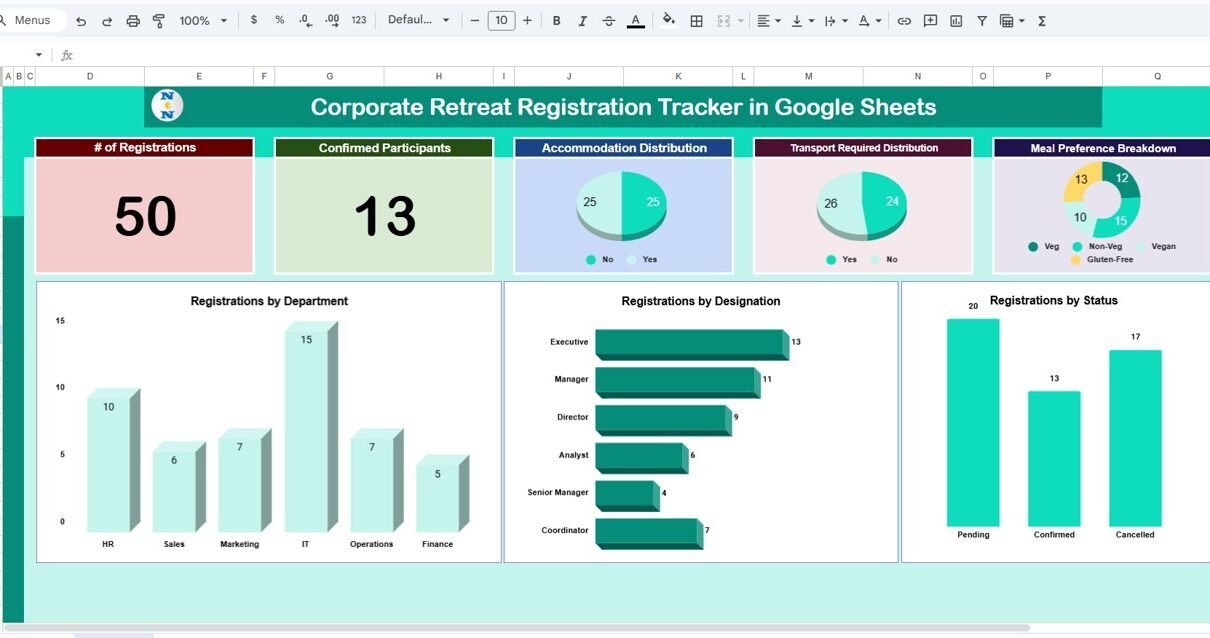
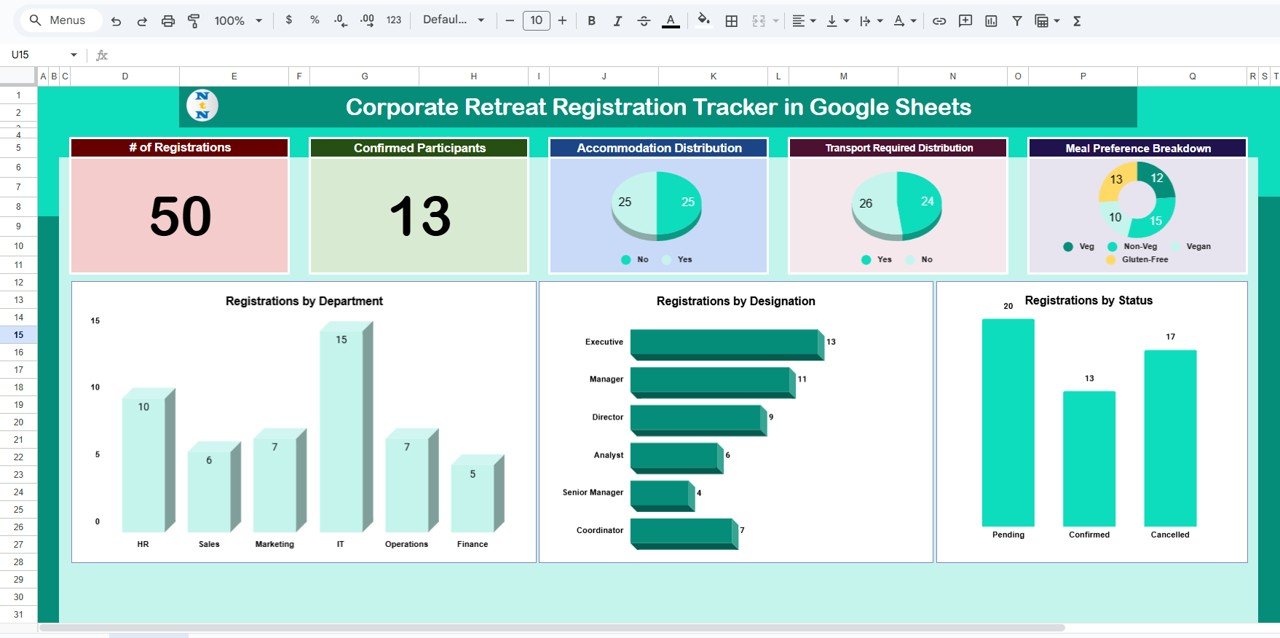
This template includes six powerful charts, designed to help HR managers understand participation patterns quickly.
1. Accommodation Distribution
This chart shows how many participants need:
- Single-room stay
- Double-sharing stay
- No accommodation
This helps event planners book the exact number of rooms.
2. Transport Required Distribution
This chart displays how many employees require company transport.
You can plan:
- Bus capacity
- Shuttle timings
- Pickup locations
It makes travel arrangements seamless.
3. Meal Preference Breakdown
Click to Buy Corporate Retreat Registration Tracker in Google Sheets
Every retreat requires proper meal planning. This chart highlights:
- Vegetarian
- Non-vegetarian
- Vegan
- Special dietary needs
This is useful for catering teams.
4. Registrations by Status
This chart shows:
- Completed registrations
- Pending registrations
- Cancelled registrations
You can follow up with the pending employees easily.
5. Registrations by Designation
This chart displays participation across hierarchy levels:
- Senior leaders
- Managers
- Executives
- Interns
It ensures proper representation from every leadership tier.
6. Registrations by Department
This highlights department-wise participation, such as:
- HR
- Finance
- Marketing
- Sales
- IT
- Operations
It helps HR plan breakout sessions effectively.
Click to Buy Corporate Retreat Registration Tracker in Google Sheets
Smart Search Feature
The tracker includes a Search Section, where you can filter data using:
-
Search Keyword
-
Field Name
You can instantly find:
-
A specific employee
-
All vegetarians
-
All pending registrations
-
Participants from a particular department
-
People requesting accommodation
This feature saves a lot of time while preparing reports.

Click to Buy Corporate Retreat Registration Tracker in Google Sheets
How Does the Tracker Help HR Teams?
- It reduces manual work
- It highlights missing or incomplete registrations
- It streamlines communication
- It builds confidence in planning
- It improves the retreat experience
HR teams get complete visibility over the entire registration process.
Best Practices for Using the Corporate Retreat Registration Tracker
Follow these best practices to get maximum value from the template:
- Update data regularly: Enter new registrations daily.
- Use clear naming conventions: Ensure consistency in department and designation names.
- Monitor charts frequently: Use insights to plan logistics early.
- Use filters and search wisely: Quickly find information without scrolling.
- Share access with only relevant users: Protect the integrity of the data.
- Back up the sheet before major updates: This avoids accidental loss.
Conclusion
Click to Buy Corporate Retreat Registration Tracker in Google Sheets
A Corporate Retreat Registration Tracker in Google Sheets gives HR teams a powerful, structured, and automated way to manage all retreat registrations. It removes the stress of manual documentation, enables accurate planning, and provides instant insights through visual charts. Because it is ready to use, you can start entering data immediately and experience a smoother retreat planning process.
This tracker ensures your corporate retreat becomes well-organized, well-attended, and successful.
Frequently Asked Questions (FAQ)
1. Who should use this Corporate Retreat Registration Tracker?
HR teams, event planners, team leaders, and operations managers can use this tracker to manage registrations smoothly.
2. Does the tracker update charts automatically?
Yes, all charts update instantly when you add or change data.
3. Can I customize the fields?
Yes, you can add, remove, or rename fields based on your organization’s requirements.
4. Is this tracker easy to use?
Yes. It has a clean and simple structure suitable for beginners and advanced users.
Visit our YouTube channel to learn step-by-step video tutorials
Youtube.com/@NeotechNavigators
Watch the step-by-step video tutorial:
Click to Buy Corporate Retreat Registration Tracker in Google Sheets