Cruise Booking Management System Web App is a deployable Google Apps Script solution for small cruise operators and implementation teams that want bookings, guests, cabins, sailings, payments, excursions, commissions, and reports in one source-controlled package. The seeded reference business contains about 13,879 rows across 31 tables, with 8 ships, 376 staterooms, 1,047 bookings, 2,078 passengers, 2,109 payment records, and 20 built-in reports.
Get the Cruise Booking Management System Web App

Real dashboard-led feature image with verified reservation modules
Try the Live Demo
Use any seeded role to inspect the workflow before buying.
Demo Credentials
| Role | Username | Password |
|---|---|---|
| Administrator | admin | Cruise@2026 |
| Reservations Manager | rmanager | Voyage@2026 |
| Reservations Manager | rmanager2 | Compass@2026 |
| Reservations Agent | agent1 | Harbour@2026 |
| Reservations Agent | agent2 | Anchor@2026 |
| Reservations Agent | agent3 | Seabird@2026 |
| Finance Officer | finance | Ledger@2026 |
| Port Operations | portops | Gangway@2026 |
| Port Operations | portops2 | Terminal@2026 |
| Read Only | viewer | Lookout@2026 |
Shared seeded demo: do not enter real guest, passport, payment, or business information. Demo data may be reset.
Key Features of the Cruise Booking Management System Web App
- Reservation records, guest manifests, cabin assignment, boarding, waitlists, cancellations, and refunds.
- Ships, decks, cabins, ports, itineraries, sailings, fares, shore excursions, and onboard packages.
- Payments, schedules, invoices, package sales, excursion sales, agents, commissions, and payouts.
- Six roles whose permissions shape both the navigation and server-side operations.
- Twenty reports plus printing for invoices, receipts, boarding cards, manifests, vouchers, and operational output.
- Audit-log and database-backup/archive tools for authorized administrators.
- Source code and deployment instructions for buyer-controlled customization.
Application Screens Explained
Operations Dashboard
The dashboard summarizes ships in service, guests at sea, average occupancy, active bookings, collected revenue, outstanding balances, average fare, ancillary revenue, agent commission liability, and waitlisted parties. It also shows revenue by month, near departures, channel mix, recent bookings, cabin-category mix, and instalments falling due.

Dashboard built from the seeded live dataset
Sign-in and Role Access
The sign-in page includes a first-run setup route. Ten seeded accounts represent six roles: Administrator, Reservations Manager, Reservations Agent, Finance Officer, Port Operations, and Read Only. The navigation changes by permission, and writes are checked on the server rather than merely hidden from the menu.

Sign-in and first-run database setup
Bookings
The reservation list brings together booking reference, sailing, lead guest, status, passenger count, fare, ancillaries, payments, and balance context. Managers and agents can work from filters and row actions rather than editing raw database sheets.

Searchable reservations list
Guest Manifest
The manifest supports passenger-oriented operational review. Real deployment can involve personal and travel-document information, so buyers must determine lawful collection, minimum fields, access, retention, deletion, and security. The template makes no privacy-compliance guarantee.

Guest manifest for sailing operations
Cabin Assignment
Allocate guests to available cabins and review assignments by sailing. The app’s availability is based on its own records; no connection to an external reservation exchange or cruise distribution network is included.

Cabin allocation and assignment status
Payments and Schedules
Finance users can record receipts, schedules, invoices, outstanding balances, cancellations, refunds, commissions, and payout status. This is transaction administration, not payment processing: there is no card gateway, bank feed, chargeback handling, or PCI solution.

Payment records and collection status
Sailings and Fleet
The seeded operator has 29 sailings across 8 ships, 52 decks, 376 cabins, 36 ports, and 18 itineraries. The sailing screen manages dates, capacity, booking activity, and status, while related modules define the fleet and product structure.

Sailing schedule and booking progress
Cabin Inventory
Cabins can be organized by ship, deck, category, type, berths, position, and operational status. The screen supports reference and assignment workflows; it does not connect to maintenance, safety-certification, or shipboard access-control systems.

Cabin inventory by ship and category
Reports
Twenty reports cover reservation, fleet, revenue, ancillary, commission, and passenger-oriented questions. Outputs can be printed or exported within the app’s implemented workflows, subject to Apps Script and Google-account limits.
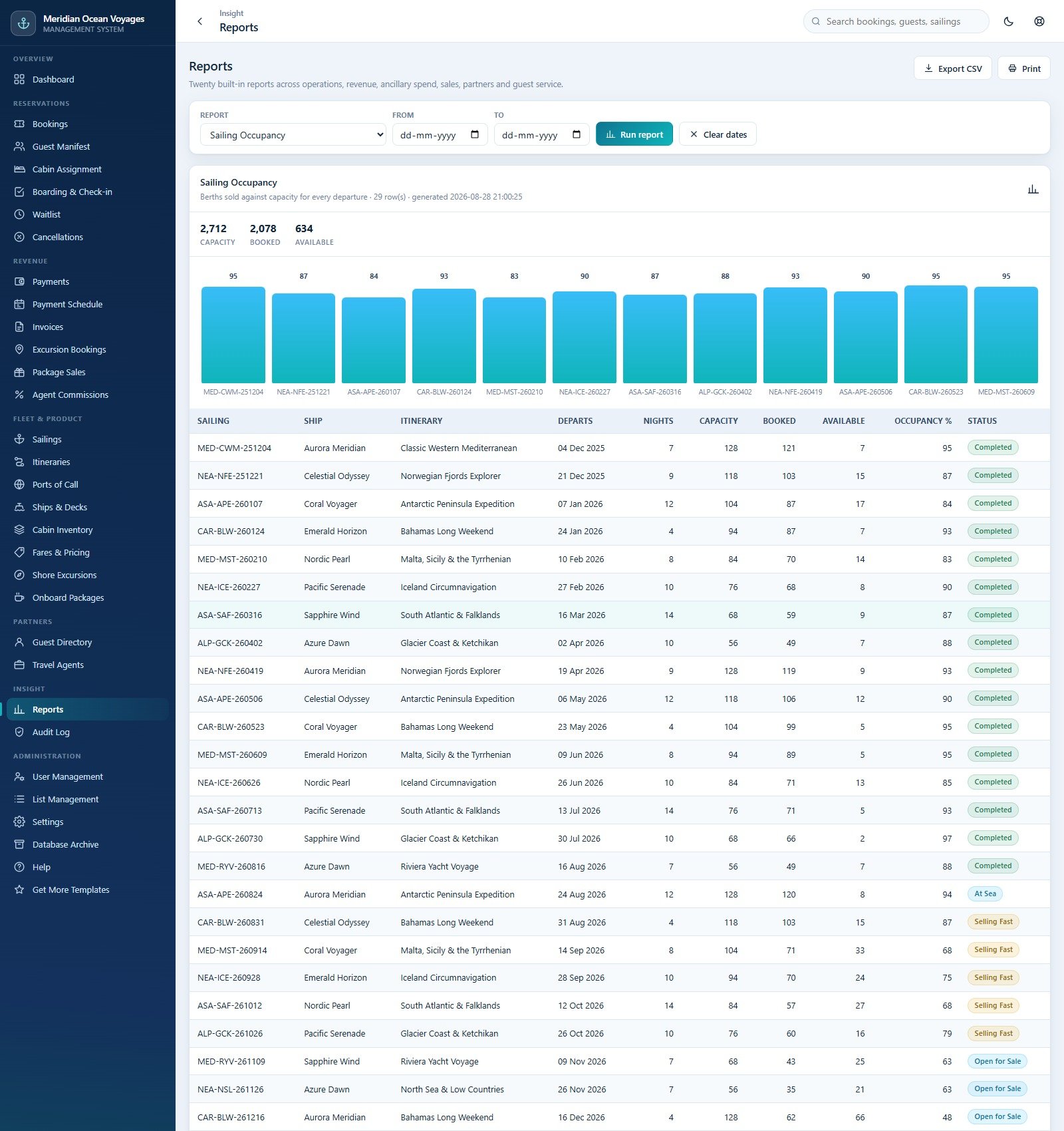
Reporting workspace with multiple operational reports
Settings
Administrators configure company details, currencies and money rules, cancellation bands, print sizes, email settings, and operational controls. Defaults are examples, not legal, tax, accounting, refund, or passenger-rights advice.

Administrator configuration and appearance
Web App vs. Spreadsheet vs. Paid Cruise Platform – Feature Comparison
| Feature | This Apps Script system | Shared spreadsheet | Paid cruise platform |
|---|---|---|---|
| Setup | Deploy source and build database | Copy a file | Vendor implementation |
| User roles | Six seeded roles | File permissions | Vendor-defined |
| Operational tables | 31 seeded tables | Usually fewer flat tables | Vendor database |
| Payment processing | Not included | Not included | May integrate |
| Distribution connectivity | Not included | Not included | May integrate |
| Source customization | Included | Workbook editing | Usually limited |
| Ongoing subscription | No product subscription; Google limits apply | No product subscription | Typically recurring |
Who Should Use This Template
A small cruise operator may use it as an implementation starting point. A reservations manager may prefer the role-focused interface to a large shared sheet. A developer or consultant may customize the source for an organization with clear requirements and a testing plan.
It is not a turnkey enterprise reservation network, maritime safety platform, accounting ledger, identity-verification service, legal-compliance product, payment gateway, passport-control system, or guarantee of uninterrupted availability. Apps Script quotas and Google-account policies still apply.
Real-World Use Cases
Reservation desk
Manage bookings, passengers, cabin allocation, waitlists, changes, and ancillaries within permitted modules.
Finance administration
Follow receipts, instalments, invoices, refunds, commissions, and balances while keeping fleet tables read-only.
Port operations
Prepare boarding and check-in work from sailing, cabin, manifest, ship, deck, port, and itinerary records.
Advantages of the Cruise Booking Management System
The system has substantially more structure than a flat spreadsheet while remaining readable and editable by an Apps Script developer. The seeded database demonstrates relationships across reservations, passengers, sailings, cabins, payments, ancillary sales, agents, and commissions. Role enforcement, a responsive interface, printable documents, email templates, audit history, and backups make it a useful foundation for controlled customization.
Data is created inside the deployment owner’s Google environment rather than in a subscription account operated by the template seller. That can simplify ownership for teams already working in Google Workspace, but it does not remove governance duties. The owner must understand which users can reach the web app and database, how Apps Script executions are authorized, where generated documents are saved, which emails may be sent, and how backups are protected. The included archive tool copies the database and can remove closed transactions older than a chosen cutoff; test that workflow on synthetic data and retain independent backups before using it operationally.
Opportunities for Improvement
A production implementation may need payment-gateway integration, accounting export, identity-document controls, customer self-service, real-time inventory feeds, tax and passenger-rights localization, monitoring, automated tests, security hardening, and independent privacy review. None of those is included unless expressly visible in the supplied source and screens. Treat them as separate projects, not implied features.
Best Practices
- Try the live demo with each relevant role before buying.
- Deploy into a dedicated organizational Google account, not a personal throwaway account.
- Change every seeded password and test every permission.
- Collect only the personal information your approved process requires.
- Configure retention, deletion, backups, incident response, and access reviews.
- Test money rules, cancellation settings, emails, documents, and reports with synthetic data.
- Publish a new Apps Script deployment version after every code change.
Use Google’s official Apps Script web-app deployment guide when reviewing deployment behavior and access settings.
Explore Relevant Templates
Compare the Co-working Space Booking Management System, Airport Transfer Management System, Hotel Booking Management System, and Adventure Sports Booking Management System. Purchase the Cruise Booking Management System Web App after testing the demo.
For the spreadsheet fundamentals behind systems like this, the NextGenTemplates Academy learning paths offer step-by-step lessons with practice files.
Get the Cruise Booking Management System Web App
Frequently Asked Questions
Can I try it before buying?
Yes. Use the live-demo block near the top. It is a shared seeded system, so do not enter real data.
What is included?
The ZIP includes Code.cs.txt, Index.txt, and the PDF user manual.
Does it process payments?
No. It records payments and balances but does not connect to a gateway or transfer money.
Does it connect to an external cruise inventory network?
No. Its bookings, sailings, fares, cabins, and availability live in its own Google Sheets database.
Is privacy or regulatory compliance guaranteed?
No. Buyers are responsible for lawful data collection, account configuration, agreements, access, retention, deletion, security, and jurisdiction-specific requirements.
Can I change the source?
Yes. The source is included. Changes need Apps Script and front-end skills, testing, and a new deployment version.
About the Author
Built by PK – Microsoft Certified Professional with 15+ years of Excel, Google Sheets, and Power BI experience. Founder of NextGenTemplates, reaching 300K+ subscribers across YouTube channels. Every template is hand-built and tested before release.
Conclusion
Cruise Booking Management System Web App provides a broad, editable reservation and operations foundation with real screens for bookings, guests, cabins, sailings, payments, excursions, commissions, reporting, user roles, and administration. Try the demo first, verify the limits, and deploy a private tested copy under your own controls.
Last updated: September 10, 2026.