Every business receives hundreds of customer data update requests every month. These include changes in addresses, phone numbers, email IDs, payment information, account details, KYC updates, profile corrections, and more. However, teams often struggle when they track these requests manually. Because there is no simple and centralized system, requests get delayed, lost, or mishandled. As a result, customers become frustrated, and business operations slow down.
A Customer Data Update Request Tracker in Google Sheets solves this problem instantly. It is a ready-to-use tool that organizes requests, tracks their status, monitors priority levels, and provides clear insights through dynamic charts. With this tracker, teams process requests faster, ensure compliance, and deliver better customer experience.Customer Data Update Request Tracker in Google Sheets
In this detailed article, we will explain how the tracker works, what each chart means, how the search system improves efficiency, and how organizations can use this tool to streamline data update workflows.Customer Data Update Request Tracker in Google Sheets
What Is a Customer Data Update Request Tracker in Google Sheets?
A Customer Data Update Request Tracker is a centralized system that stores and monitors all customer data update requests in real time. It captures all details such as:Customer Data Update Request Tracker in Google Sheets
- Customer Name
- Customer ID
- Request Type
- Request Channel
- Priority Level
- Assigned Agent
- Request Status
- Submission Date
- Resolution Date
- Comments
Key Features of the Customer Data Update Request Tracker
Click to Buy Customer Data Update Request Tracker in Google Sheets
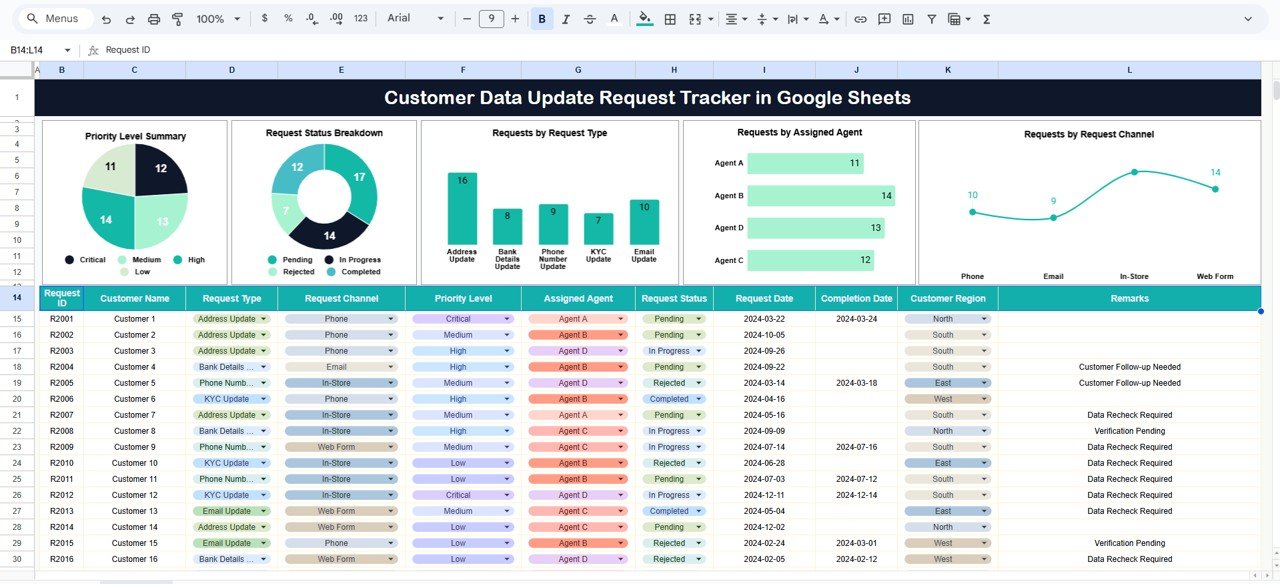
Tracker Sheet Tab
This is the heart of the entire system. You enter every customer data update request here. The sheet includes fields such as:
- Request ID
- Customer Name
- Customer ID
- Request Type (e.g., Address Change, Email Update, KYC Update)
- Request Channel (Phone, Email, Chat, Web Form, In-Branch)
- Priority Level (Low, Medium, High, Urgent)
- Assigned Agent
- Request Status (Open, In Progress, Completed, On Hold)
- Date Received
- Date Completed
- Comments
As soon as you enter or modify information, all charts and insights update automatically.
The tracker sheet brings structure, speed, and consistency to the entire data update workflow.
Charts Included in the Dashboard
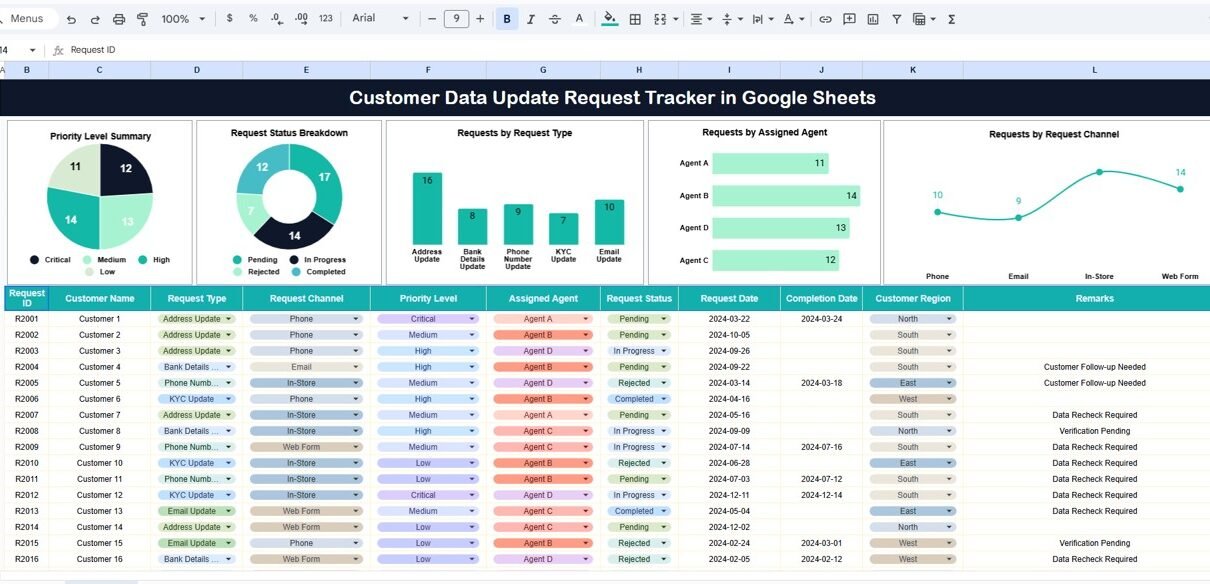
The dashboard contains five insightful charts, each designed to help teams understand workload, performance, and request distribution instantly.
Priority Level Summary
This chart shows the number of requests categorized by priority:
Request Status Breakdown
This chart displays the number of requests in each status category:
A large number of Open or On Hold requests signals the need for quicker action.
Requests by Request Type
Customers submit different types of data update requests.
This chart helps you understand the distribution of request types, such as:
When you know which request types occur frequently, you design better processes and faster resolution pathways.
Requests by Assigned Agent
This chart displays how many requests each agent handles.
It helps managers identify:
It becomes easier to assign requests fairly when you understand how workload is distributed.
Requests by Request Channel
This chart shows how customers submitted their requests:
It helps organizations understand customer behavior. For example:
This insight helps businesses improve customer experience.
Click to Buy Customer Data Update Request Tracker in Google Sheets
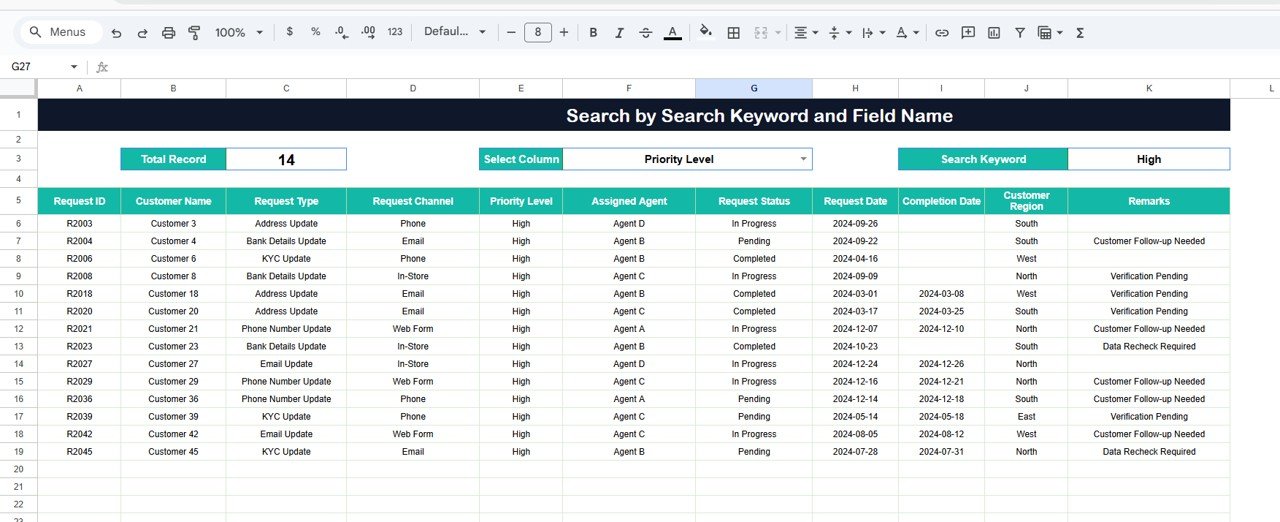
Search Functionality – Search by Keyword and Field Name
The tracker includes a smart Search Panel that allows users to find specific requests without scrolling or filtering manually.
You enter:
-
Search Keyword
-
Field Name (Customer Name, Agent Name, Request Type, Status, Channel)
The tracker instantly returns all matching records.
This feature helps teams:
Click to Buy Customer Data Update Request Tracker in Google Sheets
Advantages of the Customer Data Update Request Tracker
Faster Request Processing
Teams handle customer requests quickly because everything stays organized.
Improved Customer Satisfaction
Accurate and timely updates build trust and reduce frustration.
Real-Time Visibility
Managers see request count, priority, status, and delays instantly.
Better Resource Allocation
Workload charts help assign tasks fairly across agents.
Zero Software Cost
Google Sheets is free, easy to use, and cloud-based.
Audit-Ready Records
The tracker stores a complete history of every update.
Enhanced Decision Making
Charts highlight patterns that help improve internal processes.
Opportunities for Improvement in the Tracker
Click to Buy Customer Data Update Request Tracker in Google Sheets
Even though the tracker is powerful, there is always room for enhancement.
Teams can improve the tracker by adding:
- Automated Notifications: Send alerts when a request stays open too long.
- App Script Integrations; Automatically update status or assign tasks.
- Customer Communication Log; Track calls, emails, and chat notes in one place.
- SLA Monitoring: Measure how fast teams complete each request.
- Request Aging Analysis: Identify old pending requests that need escalation.
- Reason for Update Field: Understand why customers frequently update information.
These enhancements transform the tracker into an advanced customer service tool.
Best Practices for Using the Tracker
- Update requests daily: This keeps charts and reports accurate.
- Define status and priority rules; Clear guidelines reduce confusion.
- Train agents on data entry standards; Consistent data improves chart accuracy.
- Monitor pending requests every morning: This helps teams prevent delays.
- Use the search tool during customer interactions: It speeds up issue resolution.
- Analyze charts weekly: Teams identify trends and make informed decisions.
Conclusion
Click to Buy Customer Data Update Request Tracker in Google Sheets
A Customer Data Update Request Tracker in Google Sheets is a simple yet powerful tool that helps organizations manage customer data updates smoothy. It offers real-time visibility, structured workflows, and meaningful insights through dynamic charts. Because it is easy to use, flexible, and cloud-based, it becomes an essential tool for support teams, CRM teams, and operations managers.
With smart categorization, search functionality, and clean reporting, organizations improve accuracy, reduce delays, and create better customer experiences. This tracker ensures every request gets proper attention, every customer receives accurate service, and every team works efficiently.
Frequently Asked Questions (FAQs)
1. Who can use this tracker?
Customer service teams, CRM teams, operations teams, and data management units.
2. Can I customize request types?
Yes, you can add, remove, or rename any request type.
3. Does the tracker work for multiple branches or teams?
Yes, the sheet supports unlimited users and departments.
4. Is Google Sheets secure for customer data?
Yes, as long as access control is configured properly.
5. Can I add automation?
Yes, using Google Apps Script, you can automate assignments and notifications.
6. Can I track SLAs?
Yes, you can add SLA fields and formulas easily.
Visit our YouTube channel to learn step-by-step video tutorials
Youtube.com/@NeotechNavigators
Watch the step-by-step video tutorial:
Click to Buy Customer Data Update Request Tracker in Google Sheets