Introduction
Tracking performance is crucial for any successful e-commerce business. The E-commerce KPI Scorecard In Google Sheets offers a ready-to-use, customizable solution to monitor your key performance indicators seamlessly. Designed for ease and clarity, this scorecard allows you to visualize and analyze your business data effectively, ensuring you stay on top of your goals and boost decision-making.
Key Features of E-commerce KPI Scorecard In Google Sheets
- Four Specialized Worksheets: Organize your data and analysis with dedicated sheets.
- Dropdown Menus for Flexibility: Analyze KPIs monthly, MTD, or YTD for comprehensive insights.
- Comparison of Actual vs Target: Instantly know where you stand against your goals.
- Visual Indicators: Color-coded cues help you quickly spot trends and performance status.
- Comprehensive KPI Details: Understand each KPI with definitions, formulas, and context for better clarity.
Dashboard Pages Explanation
1. Scorecard Sheet
 E-commerce KPI Scorecard In Google Sheets
Click to Buy E-commerce KPI Scorecard In Google Sheets
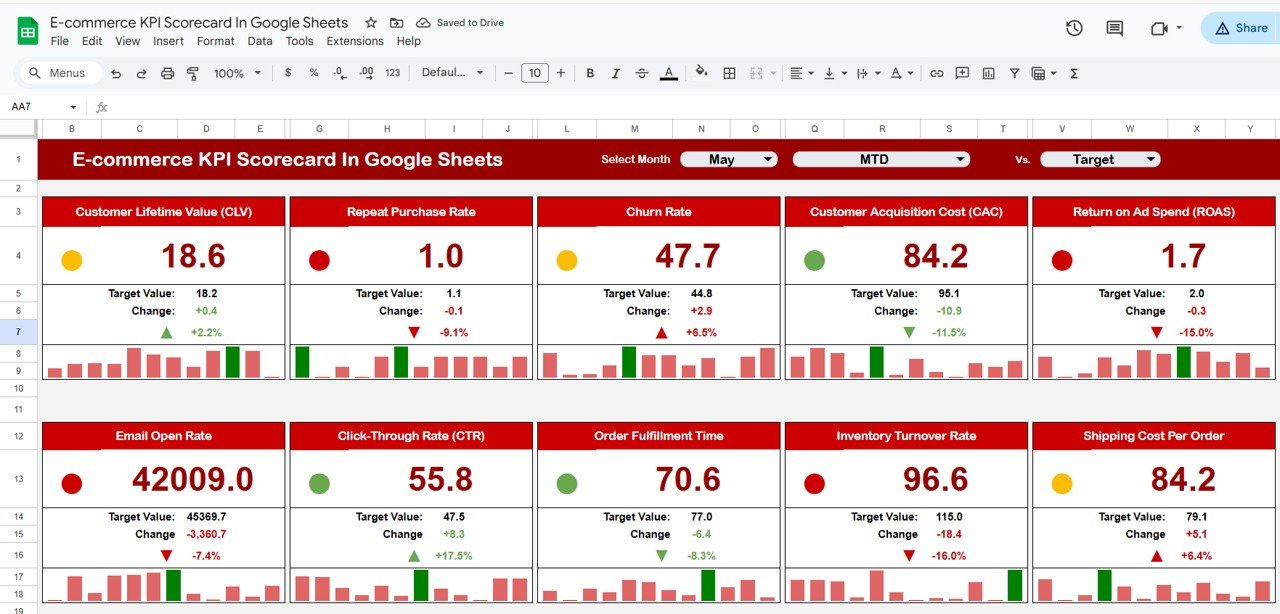
This is the main interface of the scorecard, providing a snapshot of your KPI performance at a glance.
- Dropdown Menus: Choose the month, Month-to-Date (MTD), or Year-to-Date (YTD) to adjust your performance view dynamically.
- Actual vs Target Values: Direct comparison helps you understand which metrics are meeting or missing the mark.
- Visual Indicators: Color-coded visuals or conditional formatting instantly signal when performance is good, average, or poor.
- Comprehensive KPI Overview: View all important KPIs together, with detailed data for both MTD and YTD performance.
2. KPI Trend Sheet
 KPI Trend Sheet
Click to Buy E-commerce KPI Scorecard In Google Sheets
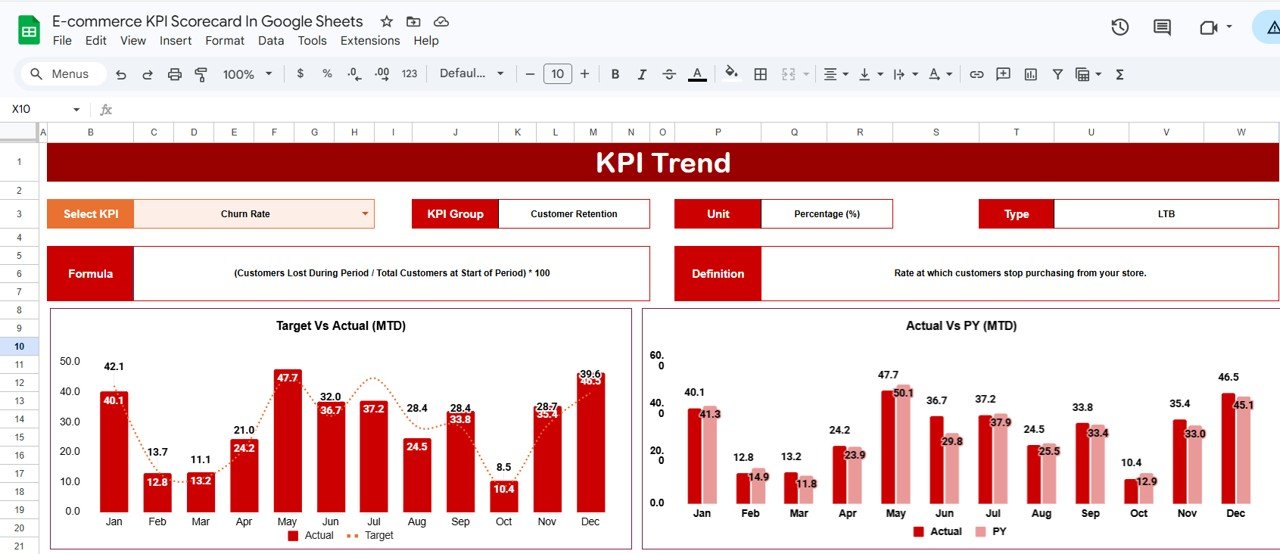
This sheet offers deep insights into individual KPI trends over time.
- KPI Selection: Use the dropdown in cell C3 to select the KPI you want to analyze.
- KPI Details: The sheet displays KPI Group, Unit, KPI type (Lower or Upper is better), formula, and its definition for full transparency.
- Trend Charts: Visualize Month-to-Date (MTD) and Year-to-Date (YTD) trends for Actual, Target, and Previous Year (PY) numbers, making performance comparisons straightforward.
3. Input Data Sheet
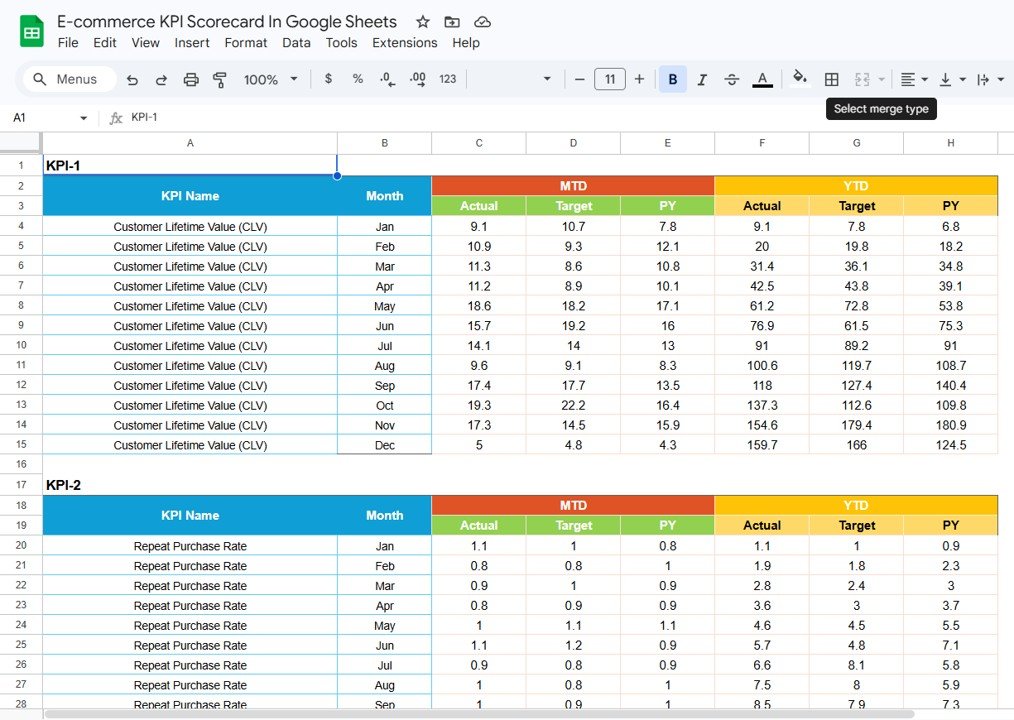 Input Data Sheet
Click to Buy E-commerce KPI Scorecard In Google Sheets
This sheet serves as your data hub where KPI data is entered and updated.
- Data Entry: Input actual values, targets, and supporting metrics here.
- Flexibility: Easily update your data as new results come in, keeping your scorecard responsive and accurate.
4. KPI Definition Sheet
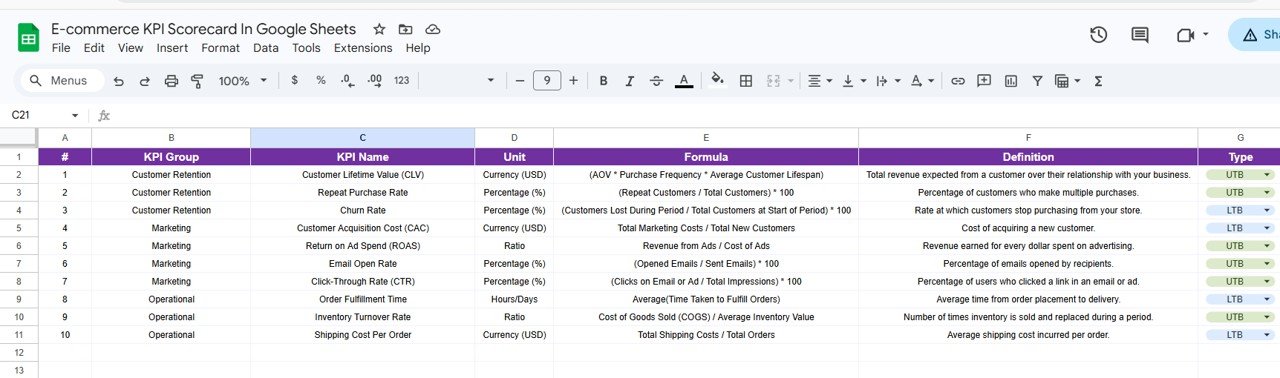 KPI Definition sheet tab
Click to Buy E-commerce KPI Scorecard In Google Sheets
This tab holds the backbone of your KPIs. Here you define each KPI by name, group, unit, formula, and detailed explanations. Maintaining this tab ensures clarity and consistency across your scorecard.
Advantages of E-commerce KPI Scorecard In Google Sheets
- User-Friendly Interface: Intuitive dropdowns and visuals require no complex technical skills.
- Real-Time Updates: Google Sheets syncs instantly, making remote collaboration easy.
- Customizable: Tailor KPIs and visuals based on your unique business needs.
- Cost-Effective: Use a powerful analytical tool without expensive software subscriptions.
- Data Transparency: Clear definitions and formulas make KPI tracking reliable and understandable.
Opportunities for Improvement
- Automated Data Integration: Integrate with APIs or e-commerce platforms for automatic data loading.
- Advanced Analytics: Incorporate predictive analytics or machine learning models.
- Mobile Optimization: Enhance usability on mobile devices with responsive formatting.
- Enhanced Reporting: Add exportable reports or email alerts based on KPI thresholds.
Best Practices
Click to Buy E-commerce KPI Scorecard In Google Sheets
- Regular Updates: Ensure timely data inputs to maintain relevant insights.
- Define Clear KPIs: Focus on manageable and impactful KPIs aligned with business goals.
- Use Visual Indicators: Leverage conditional formatting to speed up analysis.
- Review Trends: Regularly analyze KPI trend sheets to anticipate issues or opportunities.
- Collaborate: Share the Google Sheets file with stakeholders for transparency and collective insights.
FAQs
Can I customize the KPIs in this scorecard?
Yes, the KPI Definition sheet allows you to add, remove, or modify the KPIs based on your business needs.
Is prior knowledge of Google Sheets required?
Basic familiarity with Google Sheets is helpful, but the user-friendly dropdowns and clear layouts make it easy for beginners as well.
Can this scorecard be connected to my e-commerce platform?
Currently, data must be entered manually. However, you can enhance it with API connections or import features if you’re comfortable with advanced setup.
How can I share the scorecard with my team?
Simply use Google Sheets’ sharing settings to invite team members with view or edit access.
Click to Buy E-commerce KPI Scorecard In Google Sheets
Conclusion
The E-commerce KPI Scorecard In Google Sheets is an essential tool for businesses aiming to track and improve their ecommerce performance efficiently. By combining clear visuals, flexible data entry, and insightful trend analysis, it empowers you to make smarter decisions and stay aligned with your growth objectives.
Start using this ready-to-use Google Sheets scorecard today to transform your e-commerce data into actionable insights.
For more detailed guidance on managing and analyzing KPIs, visit Microsoft Excel Support.
Visit our YouTube channel to watch the demo.