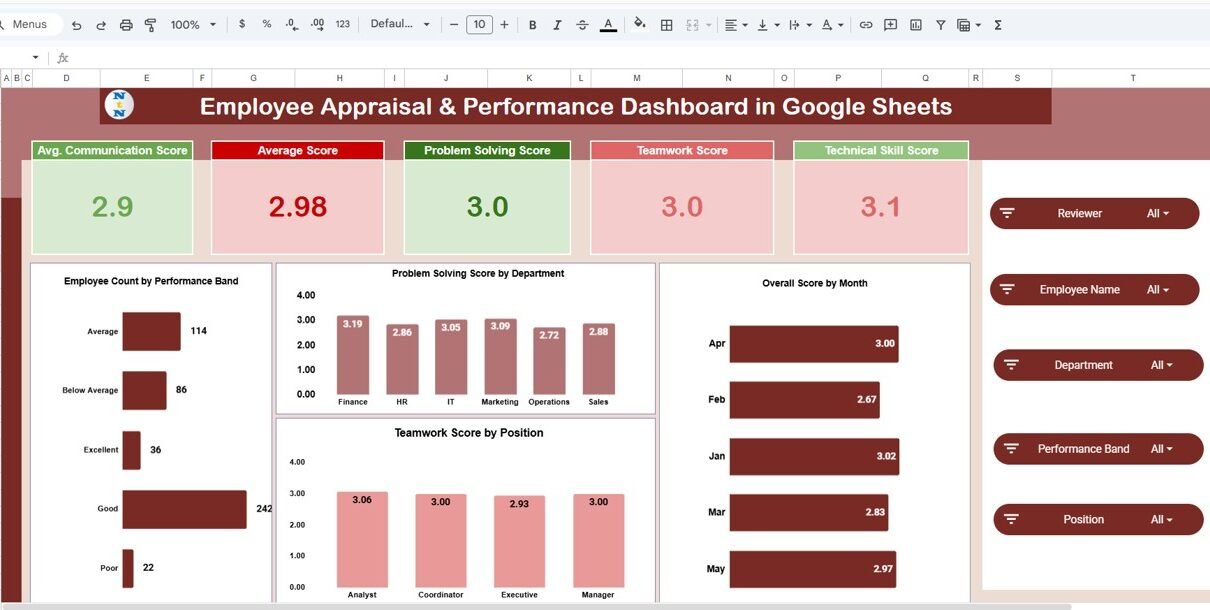
Employee performance management plays a crucial role in every organization. Companies constantly evaluate employee skills, productivity, teamwork, communication, and technical abilities. However, many organizations still rely on manual spreadsheets or disconnected reports to track employee performance.Employee Appraisal & Performance Dashboard in Google Sheets
As a result, HR managers often struggle to analyze performance trends, identify high-performing employees, and evaluate departmental productivity.Employee Appraisal & Performance Dashboard in Google Sheets
Therefore, organizations need a centralized and visual system that can convert raw employee data into meaningful insights.
This is exactly where the Employee Appraisal & Performance Dashboard in Google Sheets becomes extremely powerful.
The Employee Appraisal Dashboard in Google Sheets is a ready-to-use performance analytics tool designed to help HR teams monitor employee performance, analyze departmental productivity, evaluate reviewer assessments, and track monthly performance trends.
Because Google Sheets supports real-time collaboration, automated calculations, charts, and interactive filters, organizations can easily transform employee appraisal data into powerful visual dashboards.
In this comprehensive guide, we will explore the Employee Appraisal & Performance Dashboard in Google Sheets, including its features, dashboard pages, benefits, best practices, and how organizations can use it to improve their employee performance management system.Employee Appraisal & Performance Dashboard in Google Sheets
What is an Employee Appraisal & Performance Dashboard in Google Sheets?
Click to Buy Employee Appraisal & Performance Dashboard in Google Sheets
An Employee Appraisal & Performance Dashboard in Google Sheets is a data visualization and performance tracking system used to monitor employee evaluation metrics in a structured and interactive format.
Instead of reviewing long performance reports, managers can instantly view performance insights using visual charts and KPI cards.
The dashboard helps organizations monitor key performance metrics such as:
- Communication score
- Technical skill score
- Teamwork score
- Problem-solving score
- Monthly performance trends
- Department-level performance
- Reviewer insights
- Position-based performance analysis
Because the dashboard displays information visually, HR managers can quickly identify strengths, weaknesses, and improvement opportunities.
As a result, organizations can improve employee productivity and make data-driven HR decisions.
Why Do Organizations Need an Employee Appraisal & Performance Dashboard in Google Sheets?
Click to Buy Employee Appraisal & Performance Dashboard in Google Sheets
Employee performance management generates a large amount of data. HR teams must track multiple metrics, employee reviews, department performance, and monthly evaluation results.
Without a structured system, organizations often face several challenges.
Common Challenges in Employee Performance Management
- Difficulty tracking employee evaluation scores
- Lack of centralized performance data
- Time-consuming manual performance reports
- Limited insights into departmental productivity
- Difficulty comparing employee performance across positions
- No clear visibility into reviewer assessments
However, an Employee Appraisal Dashboard solves these problems by converting complex performance data into clear and interactive insights.
Therefore, HR teams can analyze employee performance faster and more accurately.
Key Features of the Employee Appraisal Dashboard in Google Sheets
The Employee Appraisal & Performance Dashboard includes multiple powerful features that make employee evaluation analysis easier.
Interactive Filters (Slicers)
The dashboard includes several interactive filters such as:
- Reviewer
- Employee Name
- Department
- Performance Band
- Position
- Review Date
These filters allow managers to instantly analyze specific employees, departments, or performance categories.
KPI Performance Cards
The dashboard displays important performance metrics using KPI cards such as:
- Average Communication Score
- Average Overall Score
- Problem Solving Score
- Teamwork Score
- Technical Skill Score
These KPI cards provide a quick summary of employee performance levels.
Visual Performance Charts
The dashboard also includes multiple charts that display performance insights across departments, positions, reviewers, and months.
These visualizations help HR teams identify trends and patterns quickly.
Dashboard Pages Included in the Google Sheets Dashboard
Click to Buy Employee Appraisal & Performance Dashboard in Google Sheets
The Employee Appraisal Dashboard includes several analytical pages, each focusing on a different aspect of employee performance.
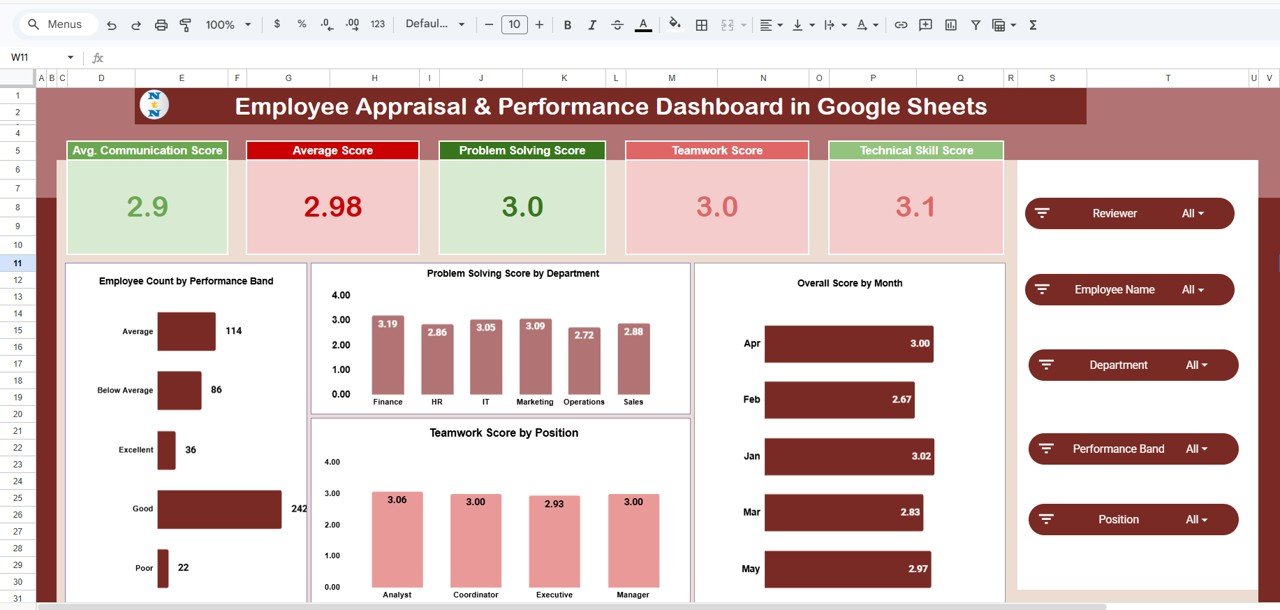
1. Overview Dashboard – Employee Performance Summary
The Overview Dashboard acts as the central performance monitoring page.
It provides a quick summary of overall employee performance metrics.
Key Metrics Displayed
- Average Communication Score
- Overall Average Score
- Problem Solving Score
- Teamwork Score
- Technical Skill Score
Charts Included
-
Employee Count by Performance Band
Shows how many employees fall into performance categories such as Excellent, Good, Average, and Poor. -
Problem Solving Score by Department
Displays how different departments perform in problem-solving skills. -
Teamwork Score by Position
Shows teamwork performance across different employee roles. -
Overall Score by Month
Tracks performance changes over time.
This page helps HR managers quickly understand the overall performance status of the organization.
Click to Buy Employee Appraisal & Performance Dashboard in Google Sheets
2. Departmental Performance Analysis
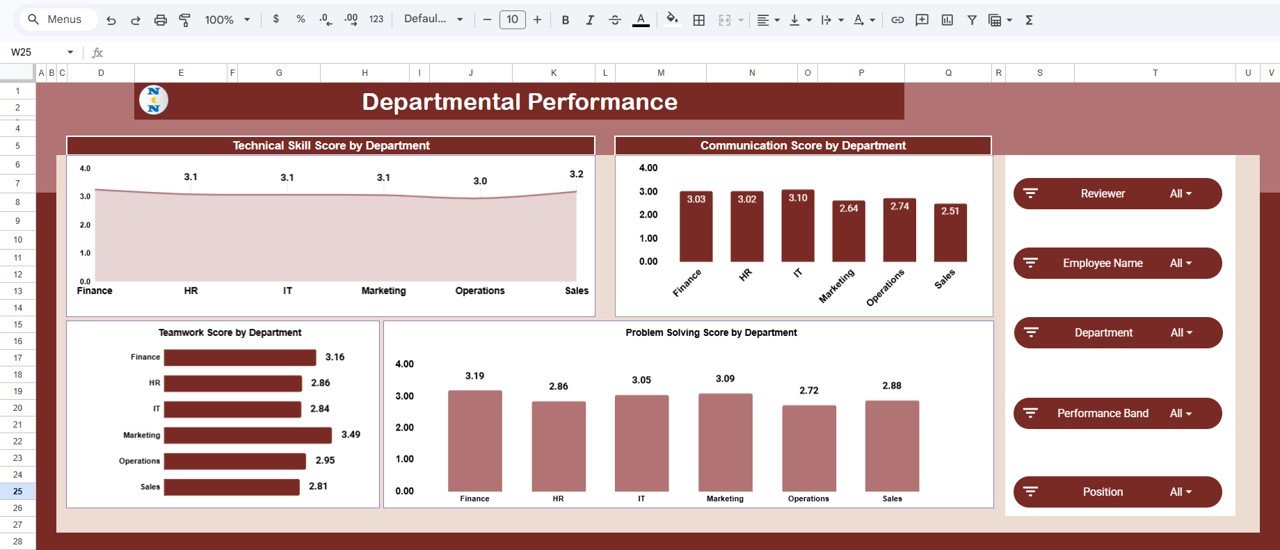
The Departmental Performance Page analyzes employee performance across different departments.
Departments such as Finance, HR, IT, Marketing, Operations, and Sales can be evaluated easily.
Charts Included
- Technical Skill Score by Department
- Communication Score by Department
- Teamwork Score by Department
- Problem Solving Score by Department
This analysis allows HR teams to identify:
- High-performing departments
- Departments needing training or support
- Skill gaps across teams
Therefore, organizations can improve department-level productivity.
Click to Buy Employee Appraisal & Performance Dashboard in Google Sheets
3. Position Analysis – How Do Different Job Roles Perform?
Employees perform different roles within an organization. Some employees work as analysts, coordinators, executives, or managers.
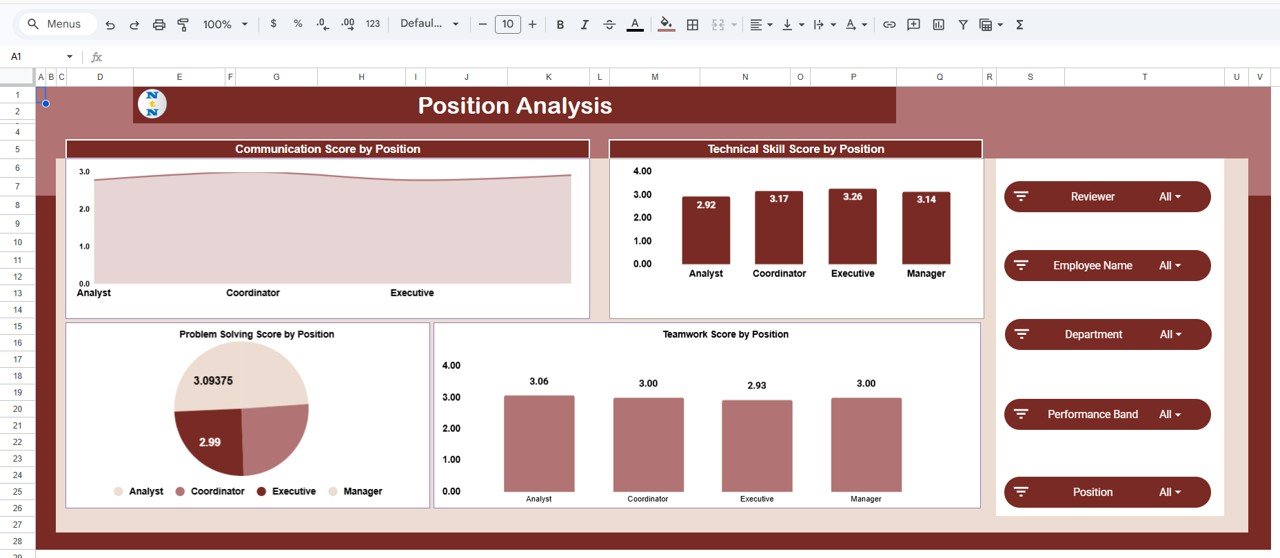
The Position Analysis Page helps HR managers compare performance across job roles.
Charts Included
- Communication Score by Position
- Technical Skill Score by Position
- Problem Solving Score by Position
- Teamwork Score by Position
This analysis helps organizations understand:
- Which job roles demonstrate strong technical skills
- Which positions need communication improvement
- How teamwork varies across positions
As a result, HR teams can design better training programs for specific roles.
Click to Buy Employee Appraisal & Performance Dashboard in Google Sheets
4. Reviewer Insights – Evaluating Review Consistency
Performance reviews often involve multiple reviewers such as managers, team leads, or department heads.
However, review patterns may vary from one reviewer to another.
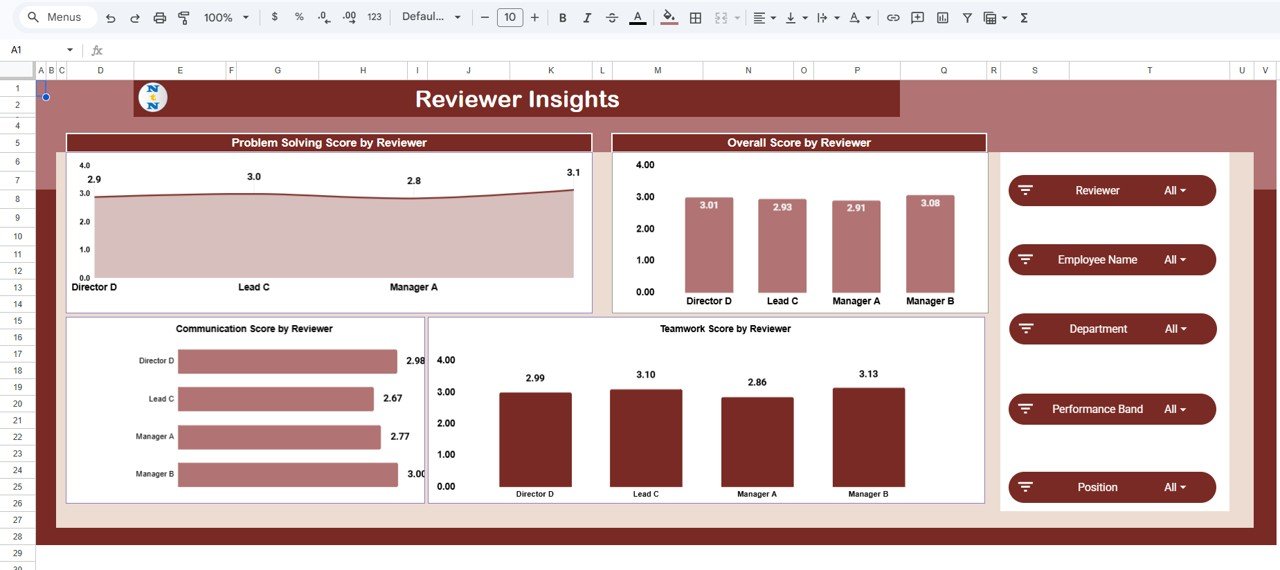
The Reviewer Insights Page analyzes reviewer evaluation behavior.
Charts Included
- Problem Solving Score by Reviewer
- Overall Score by Reviewer
- Communication Score by Reviewer
- Teamwork Score by Reviewer
This page helps HR managers identify:
- Reviewer scoring trends
- Potential bias in performance evaluations
- Differences in evaluation standards
Consequently, organizations can ensure fair and consistent employee appraisals.
Click to Buy Employee Appraisal & Performance Dashboard in Google Sheets
5. Monthly Trends – Tracking Performance Over Time
Employee performance changes over time due to training, experience, workload, and team collaboration.
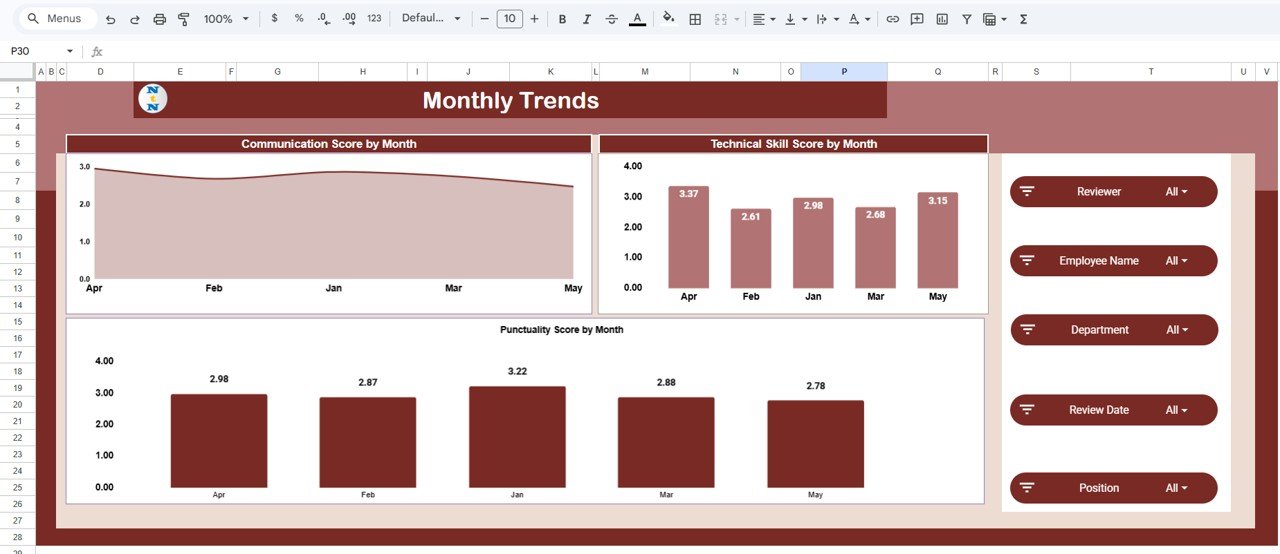
The Monthly Trends Page analyzes performance changes across months.
Charts Included
- Communication Score by Month
- Technical Skill Score by Month
- Punctuality Score by Month
This page allows organizations to identify:
- Performance improvements
- Seasonal productivity patterns
- Skill development trends
Therefore, managers can monitor employee growth and adjust development strategies accordingly.
Click to Buy Employee Appraisal & Performance Dashboard in Google Sheets
Data Sheet and Support Sheet
The dashboard uses backend sheets to manage calculations and store raw data.
Data Sheet
The Data Sheet contains employee appraisal data such as:
- Employee Name
- Department
- Position
- Reviewer
- Review Date
- Communication Score
- Technical Skill Score
- Teamwork Score
- Problem Solving Score
- Punctuality Score
- Performance Band
This sheet acts as the main data source for the dashboard.
Advantages of Employee Appraisal Dashboard in Google Sheets
The Employee Appraisal Dashboard offers many benefits for HR teams and organizations.
Centralized Performance Monitoring
Managers can view all employee performance data in one place.
Faster HR Decision-Making
Visual dashboards make performance insights easier to understand.
Improved Employee Development
Organizations can identify skill gaps and plan training programs.
Transparent Performance Evaluation
Managers can evaluate employee performance fairly and consistently.
Department-Level Performance Insights
HR teams can compare productivity across departments.
Better Workforce Planning
Organizations can identify high performers and leadership potential.
Best Practices for the Employee Appraisal Dashboard
Click to Buy Employee Appraisal & Performance Dashboard in Google Sheets
Organizations should follow these best practices to maximize the value of the dashboard.
Maintain Accurate Performance Data
Ensure that employee evaluation scores remain accurate and consistent.
Update Performance Reviews Regularly
Enter new appraisal data after each review cycle.
Use Standard Evaluation Criteria
Use consistent performance metrics for all employees.
Monitor Key Performance Indicators
Focus on metrics such as:
- Communication
- Technical Skills
- Teamwork
- Problem Solving
- Punctuality
Use Filters for Deeper Analysis
Apply slicers to analyze specific departments, employees, or review periods.
Review Trends Regularly
Track monthly performance trends to evaluate employee improvement.
Conclusion
Click to Buy Employee Appraisal & Performance Dashboard in Google Sheets
Employee performance evaluation plays a vital role in building successful organizations. However, manual reporting methods often slow down HR analysis and hide important insights.
The Employee Appraisal & Performance Dashboard in Google Sheets provides a powerful and interactive solution for managing employee performance data.
By combining KPI tracking, visual analytics, and interactive filters, this dashboard allows organizations to analyze employee performance across departments, positions, reviewers, and time periods.Employee Appraisal & Performance Dashboard in Google Sheets
As a result, HR teams can make smarter decisions, improve employee productivity, and create stronger performance management systems.
In today’s data-driven workplace, the Employee Appraisal Dashboard in Google Sheets becomes an essential tool for modern HR management.Employee Appraisal & Performance Dashboard in Google Sheets
Visit our YouTube channel to learn step-by-step video tutorials
Youtube.com/@NeotechNavigators
Watch the step-by-step video tutorial:
Click to Buy Employee Appraisal & Performance Dashboard in Google Sheets