Employee recognition plays a critical role in improving morale, engagement, and performance. However, managing award requests through emails, forms, or scattered spreadsheets often leads to delays, errors, and lack of visibility.
That is exactly why the Employee Recognition Award Request Tracker in Google Sheets is a powerful, ready-to-use solution for HR teams and managers.
This tracker helps you manage the entire award request lifecycle—from nomination to approval—using a single, interactive Google Sheets file with automated charts, filters, and a smart search feature.
What Is Employee Recognition Award Request Tracker in Google Sheets?
The Employee Recognition Award Request Tracker in Google Sheets is a centralized HR tracking tool designed to capture, monitor, and analyze employee award nominations. Instead of manually reviewing multiple requests, HR teams can instantly track approval status, award types, departments, and recognition reasons.
Because it is built in Google Sheets, the tracker is:
-
Easy to use
-
Cloud-based
-
Shareable with stakeholders
-
Fully customizable
Key Features of This Tracker
Click to Buy Employee Recognition Award Request Tracker in Google Sheets
-
Centralized award request register
-
Automatic charts & visual summaries
-
Advanced search by keyword and field
-
Approval, Pending, and Rejected status tracking
-
Monetary & Non-Monetary award classification
-
Department-wise and approver-wise analysis
Tracker Sheet Tab – Dashboard Overview
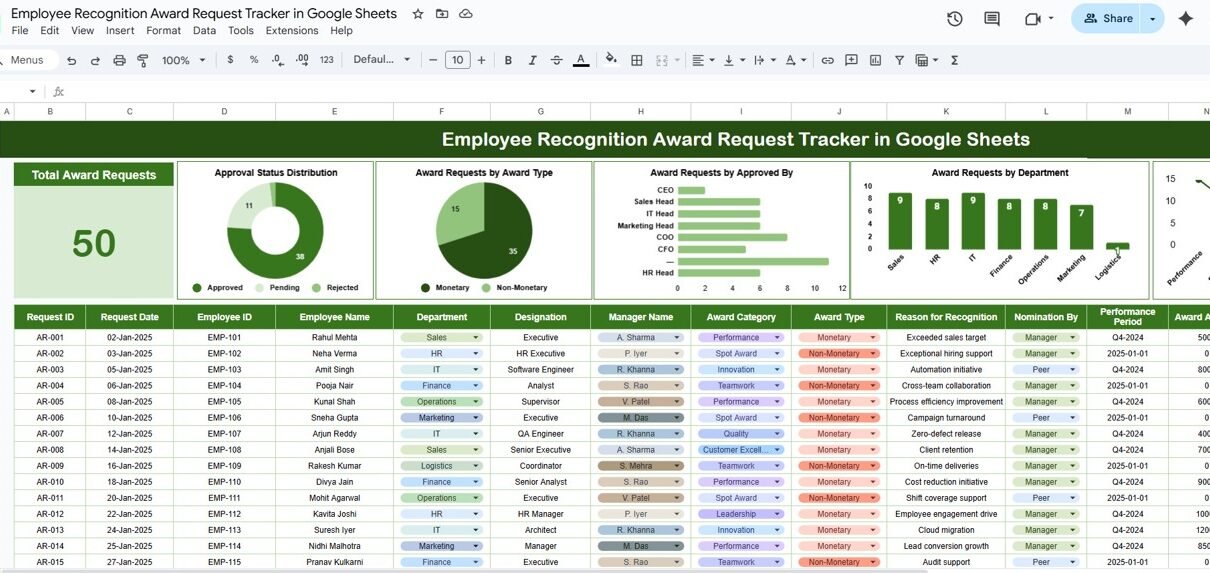
The Tracker Sheet is the main dashboard where all insights are displayed visually and in tabular form.
Key KPI Card
-
Total Award Requests
Displays the total number of award nominations submitted.
📈 Charts Included in the Tracker Sheet
Approval Status Distribution
- Approved
- Pending
- Rejected
Helps HR quickly understand approval bottlenecks.
Award Requests by Award Type
- Monetary
- Non-Monetary
Useful for budgeting and reward planning.
Award Requests by Approved By
Shows how many requests are approved by:
- CEO
- HR Head
- Sales Head
- Marketing Head
- IT Head
Award Requests by Department
Tracks recognition trends across departments such as:
- Sales
- HR
- IT
- Finance
- Operations
- Marketing

Detailed Data Table (Tracker Register)
Click to Buy Employee Recognition Award Request Tracker in Google Sheets
Each award request is captured with structured fields, making filtering and reporting effortless.
Key Columns Included:
- Request ID
- Request Date
- Employee ID
- Employee Name
- Department
- Designation
- Manager Name
- Award Category (Performance, Innovation, Leadership, etc.)
- Award Type (Monetary / Non-Monetary)
- Reason for Recognition
- Nomination By (Manager / Peer)
- Performance Period
- Award Amount
- Approval Status
- Approved By
- Approval Date
This structured layout ensures complete transparency and audit-readiness.
Search by Search Keyword and Field Name
Click to Buy Employee Recognition Award Request Tracker in Google Sheets
One of the most powerful features of this tracker is the dynamic search functionality.
How It Works:
-
Select a column name (e.g., Department, Employee Name, Manager Name).
-
Enter a search keyword (e.g., “HR”).
-
Instantly view filtered records below.
Benefits:
-
Quickly find employee-specific requests
-
Simplify audits and reviews
-
Save time during HR reporting

Click to Buy Employee Recognition Award Request Tracker in Google Sheets
Advantages of Using This Tracker
-
Eliminates manual tracking and follow-ups
-
Improves approval turnaround time
-
Enhances transparency across teams
-
Supports data-driven HR decisions
-
Reduces errors and duplication
Best Practices for Effective Use
Click to Buy Employee Recognition Award Request Tracker in Google Sheets
-
Standardize award categories and reasons
-
Update approval status regularly
-
Review dashboard weekly or monthly
-
Share read-only access with leadership
-
Archive closed periods for historical analysis
Who Can Use This Tracker?
-
HR & People Operations Teams
-
Department Managers
-
Corporate HR Heads
-
Talent & Engagement Teams
-
Mid-size to Large Organizations
Why Use Google Sheets for Award Tracking?
Click to Buy Employee Recognition Award Request Tracker in Google Sheets
Google Sheets offers:
-
Real-time collaboration
-
Automatic saving
-
Easy sharing
-
No additional software cost
-
High flexibility for customization
This makes it an ideal platform for HR tracking solutions.
Final Thoughts
The Employee Recognition Award Request Tracker in Google Sheets is a complete, practical, and professional solution for managing recognition programs. It simplifies award tracking, improves visibility, and ensures that employee contributions never go unnoticed.
Visit our YouTube channel to learn step-by-step video tutorials
Youtube.com/@NeotechNavigators
Watch the step-by-step video tutorial:
Click to Buy Employee Recognition Award Request Tracker in Google Sheets