The gaming console industry moves fast. Sales volumes change monthly, customer demand fluctuates, and performance targets must be monitored closely. When gaming KPI data is spread across multiple spreadsheets, it becomes difficult to track progress, compare targets, and identify trends. That is exactly why the Gaming Console KPI Dashboard in Google Sheets is a powerful and ready-to-use solution.
In this article, we explain how the Gaming Console KPI Dashboard in Google Sheets works, its sheet-wise structure, key features, advantages, opportunities for improvement, and best practices for effective KPI monitoring.
What Is a Gaming Console KPI Dashboard in Google Sheets?
A Gaming Console KPI Dashboard in Google Sheets is a structured performance management tool designed to track key business KPIs related to gaming console sales, revenue, operations, and efficiency. It provides a single, interactive dashboard to monitor performance across months and years.
Instead of manually reviewing multiple reports, this dashboard delivers:
-
MTD and YTD KPI tracking
-
Target vs Actual comparison
-
Previous Year vs Current Year analysis
-
Visual indicators for performance direction
Because it is built in Google Sheets, the dashboard is cloud-based, collaborative, and easy to customize.
Why Use Google Sheets for Gaming KPI Tracking?
Click to Buy Gaming Console KPI Dashboard in Google Sheets
Google Sheets is a preferred platform for KPI dashboards due to its flexibility and accessibility.
Key Benefits
-
Cloud-based access from anywhere
-
Easy sharing with sales and leadership teams
-
No additional BI software cost
-
Customizable KPIs and formulas
-
Automatic recalculation with dropdown controls
This dashboard uses these advantages to deliver a professional KPI scorecard for gaming console businesses.
Key Features of Gaming Console KPI Dashboard
This dashboard includes all KPIs with unit, aggregation formula, definition, and KPI type (Lower the Better or Upper the Better).
Core Highlights
-
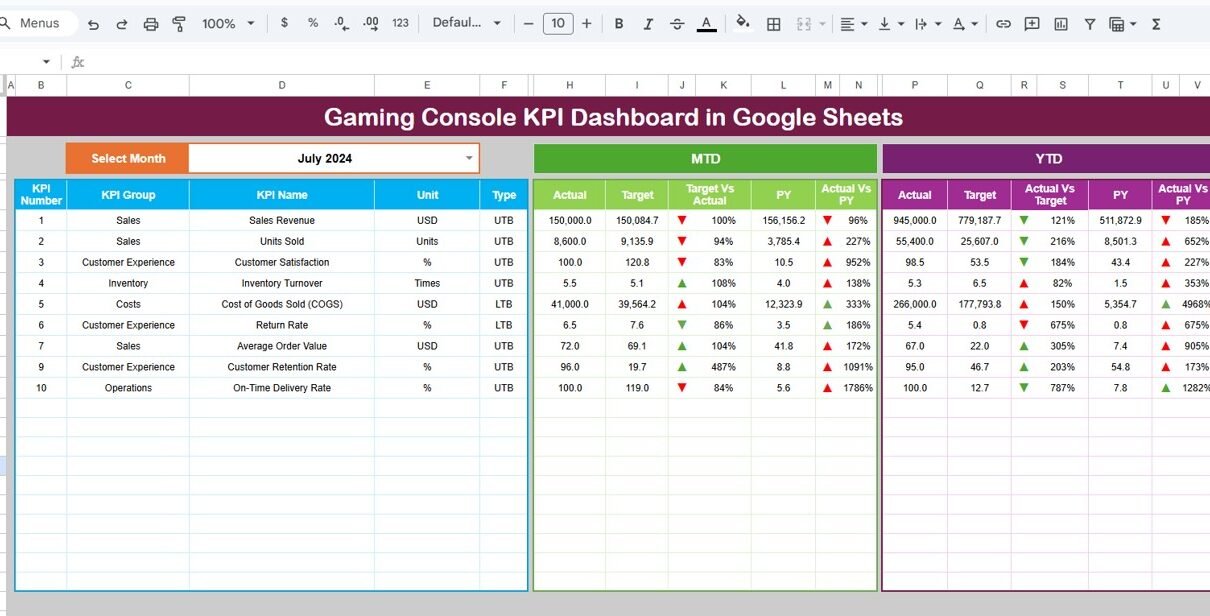
Month Selector (Cell D3) – Select any month to instantly refresh the dashboard
-
MTD & YTD Views – Monitor monthly and yearly performance
-
Target vs Actual Analysis – Identify gaps against goals
-
Previous Year Comparison – Track YoY growth or decline
-
Traffic Light Indicators – Red, Amber, Green KPI status
-
Up & Down Arrows – Show performance improvement or decline
Dashboard Sheet Tab (Main KPI View)
Click to Buy Gaming Console KPI Dashboard in Google Sheets
The Dashboard Sheet is the main performance view.
What This Sheet Displays
-
KPI Name
-
MTD Actual, Target, and Previous Year values
-
Target vs Actual variance (%)
-
Previous Year vs Actual variance (%)
-
YTD Actual, Target, and Previous Year values
-
Conditional formatting with arrows and traffic lights
This layout allows management to assess gaming console performance at a glance.

Click to Buy Gaming Console KPI Dashboard in Google Sheets
KPI Trend Sheet Tab
The KPI Trend Sheet provides deeper insights into individual KPIs.
How It Works
-
Select a KPI name from the dropdown available in Cell C3
-
Automatically displays:
-
KPI Group
-
KPI Unit
-
KPI Type (Lower the Better / Upper the Better)
-
KPI Formula
-
KPI Definition
-
Monthly KPI trend values
-
This sheet helps identify patterns and performance consistency over time.

Click to Buy Gaming Console KPI Dashboard in Google Sheets
Actual Number Sheet Tab
The Actual Number Sheet is used to enter real performance data.
Key Inputs
-
Enter MTD and YTD actual values for each KPI
-
Select the month using Cell E1
-
Define the first month of the year once in E1
All dashboards and trends update automatically after data entry.

Click to Buy Gaming Console KPI Dashboard in Google Sheets
Target Sheet Tab
The Target Sheet defines expected performance goals.
Purpose
-
Enter MTD target values
-
Enter YTD target values
-
Maintain consistent benchmarking
Targets drive all variance and performance calculations.

Click to Buy Gaming Console KPI Dashboard in Google Sheets
Previous Year Number Sheet Tab
This sheet stores previous year KPI values.
Why It Matters
-
Enables YoY performance comparison
-
Highlights growth trends and seasonal patterns
-
Supports strategic decision-making
Data entry mirrors the structure of the current year.

Click to Buy Gaming Console KPI Dashboard in Google Sheets
KPI Definition Sheet Tab
The KPI Definition Sheet ensures KPI clarity and consistency.
Information Included
-
KPI Name
-
KPI Group (Sales, Revenue, Operations, Customer, Inventory, etc.)
-
Unit (Units, %, Revenue, Count)
-
KPI Formula
-
KPI Definition
-
KPI Type (Lower / Upper the Better)
This sheet is critical for governance and standard reporting.

Click to Buy Gaming Console KPI Dashboard in Google Sheets
Advantages of Gaming Console KPI Dashboard
-
Centralized KPI tracking
-
Clear MTD and YTD performance visibility
-
Easy comparison with targets and previous year
-
Visual indicators for quick decisions
-
Fully customizable and scalable
-
No advanced technical skills required
Opportunities for Improvement in Gaming Console KPI Dashboard
-
Integrate Google Forms for automated sales data entry
-
Add game title or console model-level KPIs
-
Include region-wise or channel-wise analysis
-
Automate monthly reminders using Apps Script
Best Practices for Using Gaming Console KPI Dashboard
Click to Buy Gaming Console KPI Dashboard in Google Sheets
-
Finalize KPI definitions before rollout
-
Update actual values monthly without delay
-
Review red and amber KPIs in review meetings
-
Use YTD view for strategic planning
-
Maintain accurate previous year data
Who Should Use This Dashboard?
This dashboard is ideal for:
-
Gaming Console Manufacturers
-
Electronics Retailers
-
Sales & Operations Teams
-
Business Analysts
-
Product & Category Managers
-
Senior Management Teams
Any business involved in gaming console sales or distribution will benefit from this KPI framework.
Final Thoughts
Click to Buy Gaming Console KPI Dashboard in Google Sheets
The Gaming Console KPI Dashboard in Google Sheets transforms complex performance data into a clear, visual, and actionable scorecard. With dynamic month selection, MTD/YTD tracking, and built-in KPI definitions, it empowers teams to monitor performance, identify gaps, and drive growth.
Visit our YouTube channel to learn step-by-step video tutorials
Youtube.com/@NeotechNavigators
Watch the step-by-step video tutorial: