Gaming KPI Scorecard in Google Sheets is a ready-to-use performance tracking template built for the gaming industry. Whether you run a gaming studio, an esports organization, a game publishing company, or a gaming retail operation, tracking Key Performance Indicators consistently is the foundation of smart decision-making. This scorecard consolidates all your critical gaming KPIs into a single, interactive, cloud-based Google Sheets environment where you can monitor Month-to-Date and Year-to-Date performance, compare actuals against targets, and analyze year-over-year trends without switching between multiple reports or tools.Gaming KPI Scorecard in Google Sheets
The gaming industry is uniquely fast-paced. Revenue cycles fluctuate with every title launch, player engagement metrics shift with seasonal events and updates, and operational costs need constant oversight. Instead of relying on disconnected spreadsheets or expensive BI platforms, this Gaming KPI Scorecard in Google Sheets gives business owners, analysts, and managers a professional, centralized, and collaborative KPI tracking solution that works right out of the box.Gaming KPI Scorecard in Google Sheets
Key Features of Gaming KPI Scorecard in Google Sheets
This template is packed with features that make KPI tracking effortless and insightful for gaming businesses of all sizes:Gaming KPI Scorecard in Google Sheets
- All-in-One KPI Performance View – See every critical gaming metric on a single scorecard screen including MTD Actual, Target, Previous Year, YTD Actual, Target, Previous Year, and variance percentages.
- Dynamic Month Selector – A dropdown menu lets you switch between months instantly, and all KPI values, variances, and indicators refresh automatically.
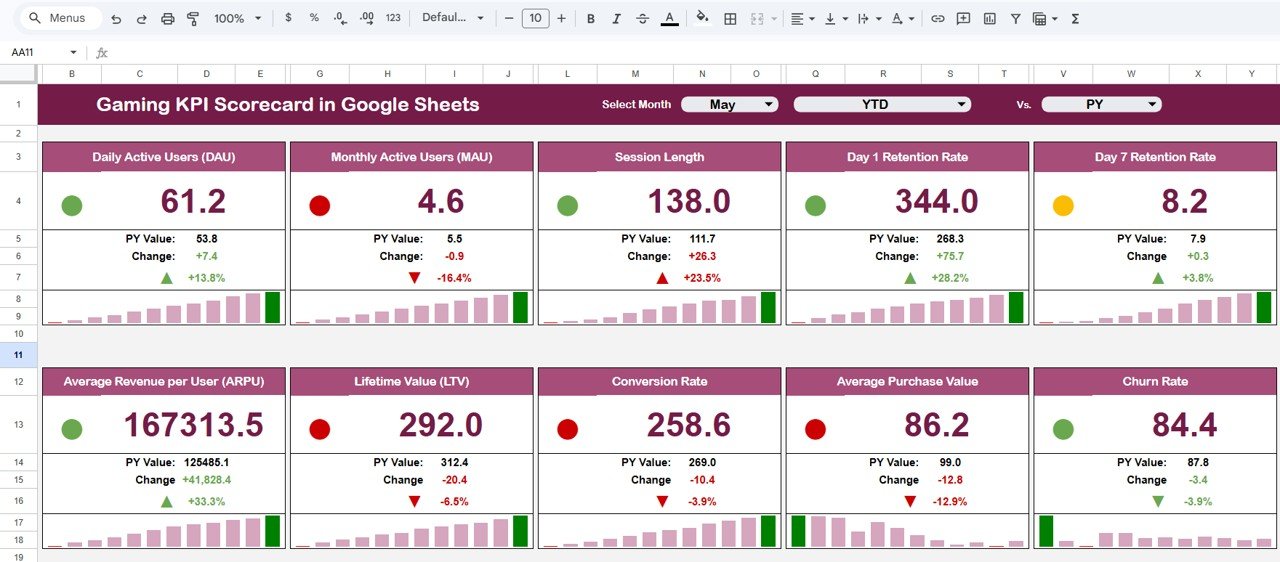
- Conditional Formatting with Traffic Lights – Red, amber, and green color codes highlight whether each KPI is underperforming, meeting expectations, or exceeding targets.
- Directional Trend Arrows – Up and down arrows indicate whether performance is improving or declining compared to targets and previous year values.
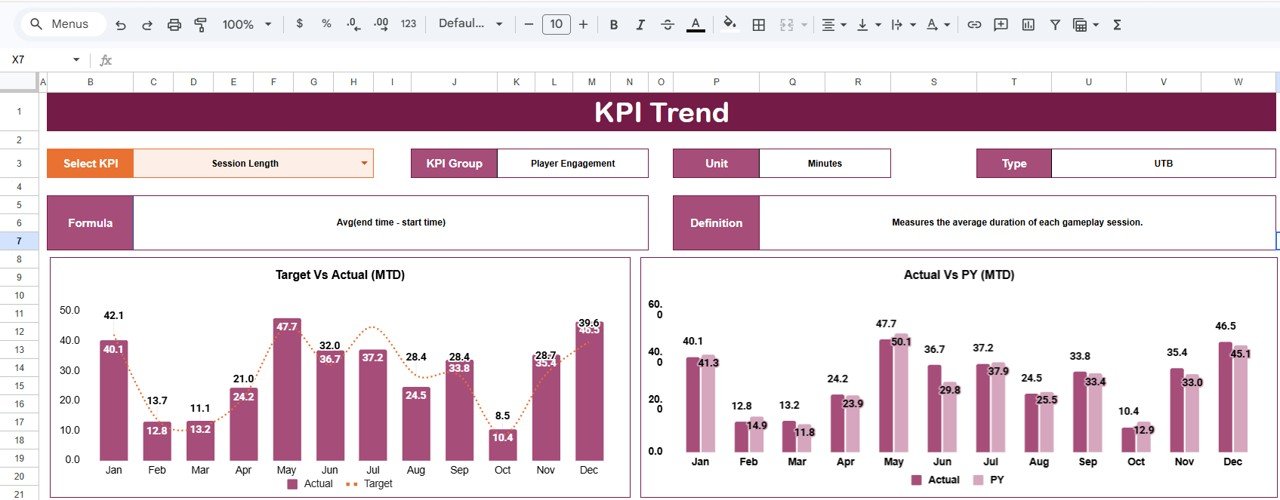
- KPI Trend Analysis – Select any KPI from a dropdown to view its monthly trend for MTD and YTD, comparing Actual, Target, and Previous Year with detailed charts.
- Actual vs Target Comparison – Percentage variance calculations for every KPI make it easy to spot gaps and prioritize corrective actions.
- Structured Data Entry – Organized input sheets for entering actuals, targets, and previous year data ensure consistency across reporting periods.
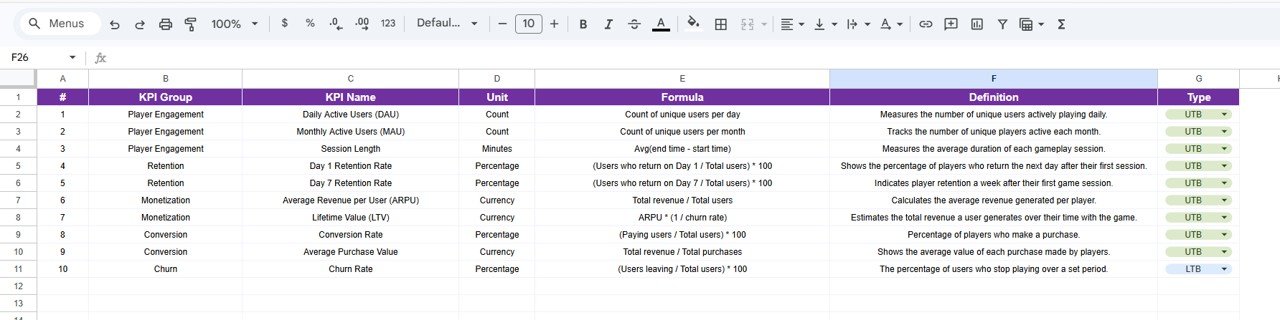
- KPI Governance with Definitions – A dedicated sheet documents each KPI name, group, unit, formula, and type for team alignment and audit readiness.
- Cloud-Based Collaboration – Built in Google Sheets, accessible from anywhere, with real-time multi-user collaboration and no software installation required.
Dashboard Pages Explanation
Click to Buy Gaming KPI Scorecard in Google Sheets
This Gaming KPI Scorecard includes five professionally structured worksheets that cover every aspect of KPI management:
1. Scorecard Sheet
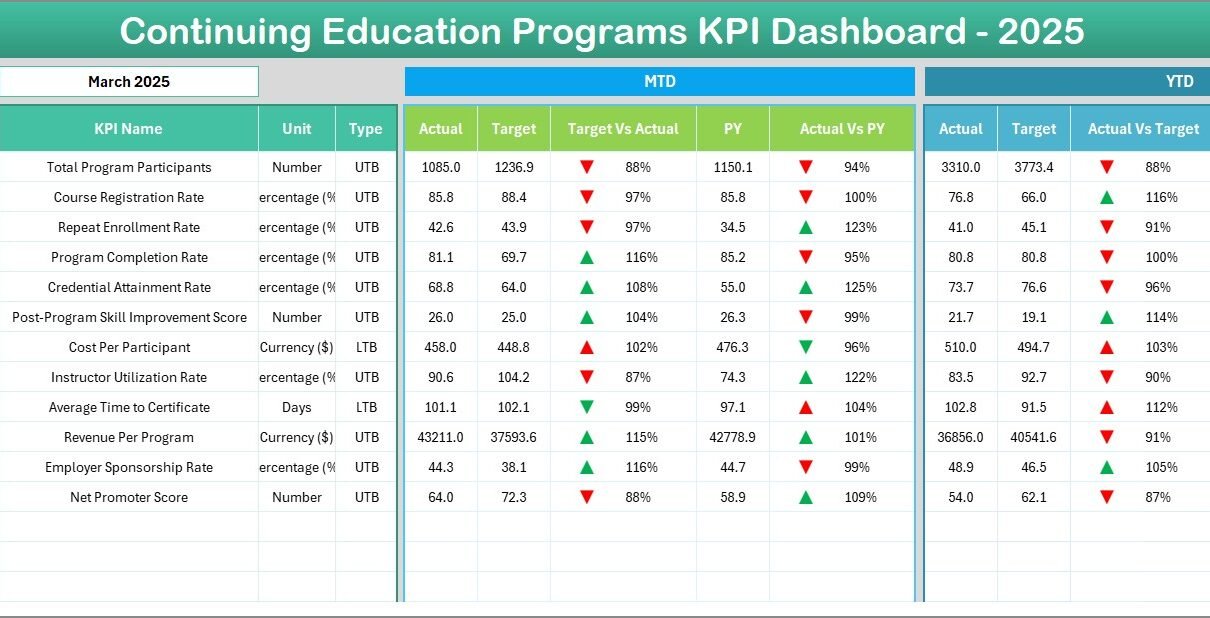
This is the main dashboard view of the template. On cell D3, you can select the reporting month from a dropdown. Once selected, all KPI values update automatically to display MTD Actual, Target, and Previous Year data alongside YTD Actual, Target, and Previous Year figures. Target vs Actual and PY vs Actual variance percentages are calculated instantly. Conditional formatting with traffic light colors (red, amber, green) and directional arrows (up/down) makes performance assessment intuitive and immediate. This is the sheet your team will use most frequently for monthly performance reviews and executive reporting.
Gaming KPI Scorecard in Google Sheets
2. KPI Trend Sheet
The KPI Trend Sheet allows you to deep dive into individual KPI performance over time. Select any KPI from the dropdown on cell C3, and the sheet automatically displays the KPI Group, Unit, Type (Lower the Better or Upper the Better), Formula, and Definition. Below the metadata, you will find MTD and YTD trend charts that compare Actual, Target, and Previous Year numbers across all months. This sheet is invaluable for strategy meetings, quarterly business reviews, forecasting sessions, and identifying seasonal patterns in your gaming business metrics.
KPI Trend Sheet
3. Input Data Sheet
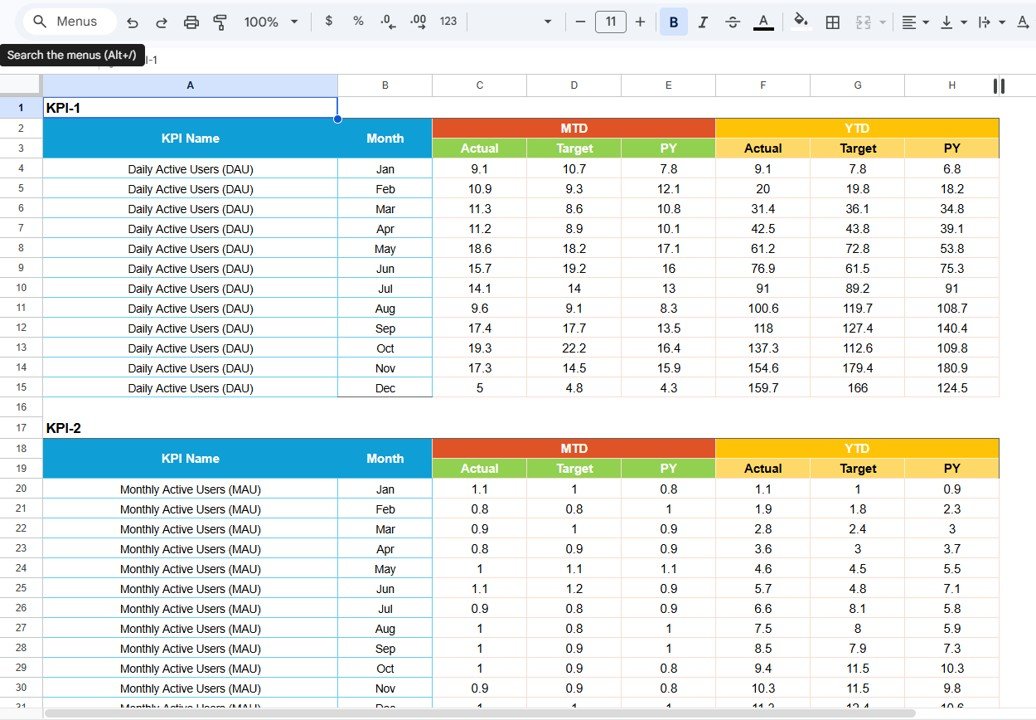
This sheet is where you enter your actual KPI numbers for both MTD and YTD, along with your target values for each reporting period. You can set the first month of the year on cell E1, and the entire scorecard adjusts dynamically. No complex formulas or manual recalculations are needed from the user side — everything is pre-built and fully automated. Simply paste or type your data, and the scorecard does the rest. This makes regular monthly updates fast, accurate, and hassle-free.
Input Data Sheet
4. KPI Definition Sheet
The KPI Definition Sheet serves as the master reference for all your gaming KPIs. Here you define each KPI by entering its Name, Group, Unit, Formula, and detailed Definition. In the last column, you specify the KPI type as LTB (Lower the Better) or UTB (Upper the Better) so that the scorecard applies the correct conditional formatting logic for performance evaluation. This sheet ensures transparency, consistency, and accountability across your organization. It is particularly valuable for onboarding new team members and for audit purposes.
KPI Definition Sheet
Advantages of Gaming KPI Scorecard in Google Sheets
- Eliminates Manual Reporting – All calculations, variances, and visual indicators are fully automated, saving hours of manual spreadsheet work every month.
- Centralized Performance Visibility – Every KPI lives in one place, so there is no need to chase data across multiple files, dashboards, or departments.
- Instant Decision-Making Support – Traffic light indicators and trend arrows let managers identify issues and opportunities at a glance without reading through raw numbers.
- Cost-Effective Alternative to BI Tools – Get professional-grade KPI tracking without investing in expensive software like Power BI, Tableau, or Looker.
- Real-Time Team Collaboration – Because it runs on Google Sheets, multiple team members can view, edit, and discuss performance data simultaneously from any location.
- Scalable for Any Gaming Business – Whether you track 10 KPIs or 50, this scorecard structure accommodates growing businesses without losing clarity or usability.
- Year-Over-Year Benchmarking – The Previous Year Data Sheet allows meaningful historical comparisons that reveal true growth trajectories and seasonal trends.
Opportunities for Improvement
Click to Buy Gaming KPI Scorecard in Google Sheets
- No Automated Data Integration – Data must be entered manually into the input sheets. Connecting to live data sources via Google Sheets API or Google Sheets IMPORTDATA function could automate data refresh for advanced users.
- Limited to Google Sheets Environment – Users who prefer Excel or Power BI may need to adapt to Google Sheets if they are not already using it.
- Static KPI List – Adding new KPIs requires updating multiple sheets (Input Data, Previous Year, Definitions). A more modular setup could simplify KPI additions.
- Single Dashboard View – The scorecard focuses on KPI values and trends. For users who need advanced visualizations like heatmaps, waterfall charts, or multi-dimensional analysis, a companion gaming dashboard template might complement this scorecard well.
Best Practices for Using the Gaming KPI Scorecard
- Update Data Monthly – Establish a regular cadence for entering actual KPI values at the end of each month to keep the scorecard current and useful for decision-making.
- Define KPIs Before Tracking – Start by filling out the KPI Definition Sheet first so every metric has a clear name, formula, and type before any data is entered.
- Use the Trend Sheet for Reviews – During monthly or quarterly business reviews, pull up the KPI Trend Sheet to visualize performance patterns and spark data-driven discussions.
- Share with Stakeholders – Use Google Sheets sharing permissions to give view-only access to leadership and edit access to data entry teams for controlled collaboration.
- Align KPIs with Business Goals – Ensure every KPI on the scorecard ties directly to a strategic business objective. Remove vanity metrics that do not drive actionable insights.
- Archive Previous Year Data – At the start of each year, move the current year data to the Previous Year sheet and reset the input sheets for the new fiscal year.
Explore Relevant Templates
Click to Buy Gaming KPI Scorecard in Google Sheets
If you found this Gaming KPI Scorecard useful, explore these related templates that can further enhance your gaming business analytics:
- Gaming Console KPI Dashboard in Google Sheets – A comprehensive multi-page KPI dashboard with interactive charts and slicers for gaming console businesses.
- Music Industry KPI Scorecard in Google Sheets – Similar scorecard structure tailored for the music and entertainment industry.
- Film Production KPI Scorecard in Google Sheets – Track film production KPIs with the same professional scorecard format.
- Broadcasting KPI Scorecard in Google Sheets – Designed for broadcasting and media companies to monitor performance metrics.
- Mass Media KPI Scorecard in Google Sheets – A KPI scorecard built for mass media organizations tracking audience, revenue, and content performance.
Frequently Asked Questions
Click to Buy Gaming KPI Scorecard in Google Sheets
What KPIs can I track with this Gaming KPI Scorecard?
You can track any gaming-related KPI such as revenue per title, player acquisition cost, monthly active users, average revenue per user, churn rate, in-app purchase conversion, customer satisfaction score, and more. The scorecard is fully customizable — just define your KPIs in the Definition Sheet and enter your data.
Do I need any technical skills to use this template?
No technical skills are required. The template is pre-built with all formulas, conditional formatting, and dropdown menus. You simply enter your data into the designated input sheets and the scorecard handles everything else automatically.
Can I share this scorecard with my team?
Absolutely. Since it is built in Google Sheets, you can share the file with anyone via email or link. You can also control access levels by giving view-only, comment, or edit permissions to different team members.
How often should I update the scorecard?
For best results, update the scorecard monthly. Enter your actual KPI values at the end of each month so the dashboard, trend charts, and variance calculations always reflect the latest performance data.
Can I add more KPIs to the scorecard?
Yes. You can add new KPIs by inserting rows in the Input Data Sheet, Previous Year Sheet, and KPI Definition Sheet. The scorecard will automatically include the new KPIs in its calculations and visualizations.
Is this template compatible with Excel?
This template is designed for Google Sheets. While you can download it as an Excel file, some features like dropdown validation and conditional formatting may behave differently in Excel. For the best experience, use it in Google Sheets.
Conclusion
Click to Buy Gaming KPI Scorecard in Google Sheets
The Gaming KPI Scorecard in Google Sheets is the ultimate performance tracking companion for any gaming business that wants to move from reactive reporting to proactive, data-driven strategy execution. With its automated calculations, traffic light indicators, trend analysis, and structured data management, this template saves hours of manual work every month while giving your team the clarity needed to make smarter decisions faster.
Whether you are a gaming studio tracking development milestones, an esports organization monitoring sponsorship ROI, or a gaming retailer evaluating sales performance, this scorecard adapts to your needs and scales with your business.
Click here to Purchase Gaming KPI Scorecard in Google Sheets
Visit our YouTube channel for step-by-step video tutorials on how to use this and other templates: