Healthcare organizations operate in a highly complex environment where quality of care, operational efficiency, and cost control must work together. However, tracking performance across departments, services, and time periods often becomes difficult when data is scattered across multiple files.
To solve this challenge, the Healthcare KPI Scorecard in Google Sheets provides a ready-to-use, centralized, and dynamic performance tracking solution. This scorecard allows hospitals, clinics, and healthcare administrators to monitor key metrics using MTD (Month-to-Date) and YTD (Year-to-Date) views with visual indicators such as traffic lights and trend arrows.
In this article, we will explain what this scorecard is, how it works, its structure, key KPIs, advantages, best practices, and frequently asked questions.
What Is a Healthcare KPI Scorecard in Google Sheets?
A Healthcare KPI Scorecard in Google Sheets is a structured performance management template designed to track and evaluate healthcare KPIs in one place. Instead of reviewing multiple reports, users can quickly assess performance through:
-
Monthly and yearly KPI values
-
Target vs actual comparison
-
Color-coded status indicators
-
Automatic performance trends
Moreover, since it is built in Google Sheets, the scorecard supports real-time collaboration, cloud access, and easy customization.
Why Healthcare Organizations Need a KPI Scorecard
Click to Buy Healthcare KPI Scorecard in Google Sheets
Healthcare leaders must make timely decisions based on accurate data. However, manual tracking increases the risk of errors and delays.
A KPI scorecard helps by:
-
Providing instant visibility into performance
-
Highlighting underperforming KPIs
-
Supporting data-driven decisions
-
Improving accountability across departments
As a result, healthcare organizations achieve better operational control and improved patient outcomes.
Key Features of the Healthcare KPI Scorecard
This Healthcare KPI Scorecard in Google Sheets is a ready-to-use template with powerful automation features.
Key Highlights
-
Month selection dropdown for dynamic reporting
-
Automatic MTD and YTD calculations
-
Traffic light indicators (Red / Amber / Green)
-
Up and down arrows for performance trends
-
Separate sheets for data input, trends, and definitions
Structure of the Healthcare KPI Scorecard
The scorecard is organized into multiple structured sheet tabs to ensure clarity and ease of use.
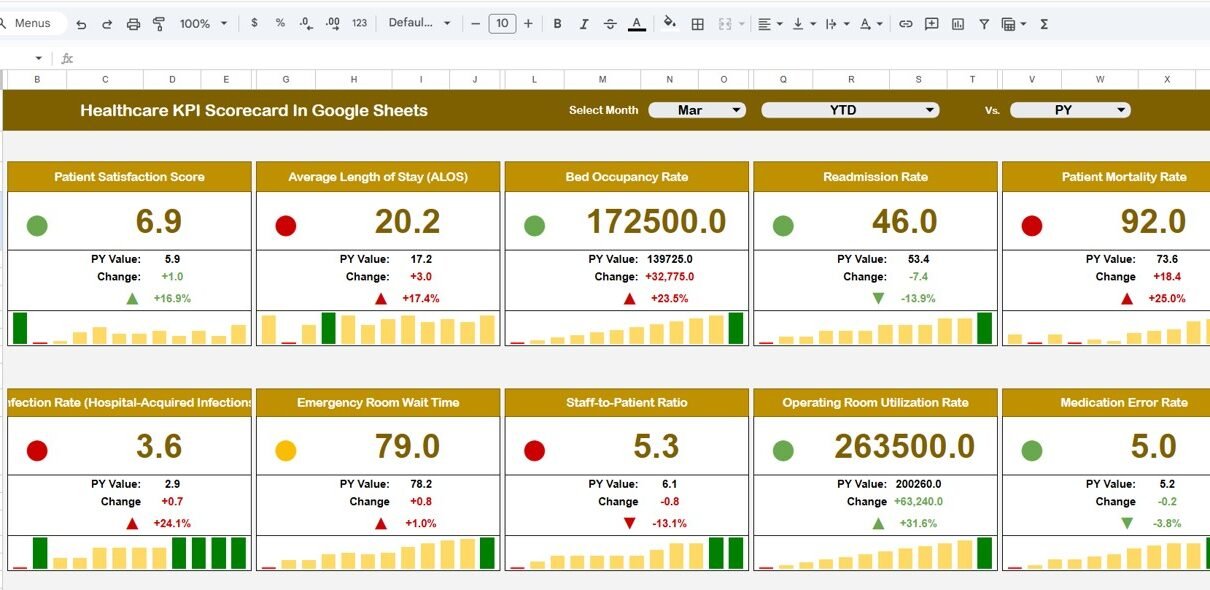
KPI Scorecard (Main Dashboard Sheet)
This is the primary performance view.
🔹 What You See on This Sheet
-
Month dropdown to switch reporting periods
-
10 predefined healthcare KPIs
-
MTD and YTD values
-
Target comparison
-
Performance change indicators
-
Traffic lights showing KPI health
You can quickly switch between monthly performance and yearly performance with a single click.

Click to Buy Healthcare KPI Scorecard in Google Sheets
KPI Trend Sheet
The KPI Trend sheet helps users analyze performance behavior over time.
🔹 Key Capabilities
-
Select KPI name from dropdown (Cell C3)
-
Display KPI Group
-
Show KPI Unit
-
Identify KPI Type
-
UTB – Upper the Better
-
LTB – Lower the Better
-
-
Show KPI Formula
-
Display clear KPI Definition
This sheet is ideal for management reviews and audit discussions.

Click to Buy Healthcare KPI Scorecard in Google Sheets
KPI Definition Sheet
This sheet acts as the KPI master reference.
🔹 Information Captured
-
KPI Name
-
KPI Group (Clinical, Financial, Operational, Quality)
-
Unit of Measurement
-
Formula
-
KPI Definition
-
KPI Type (LTB or UTB)
This ensures standardization and clarity across teams.

Data Input Sheet
This is where users enter actual KPI values.
🔹 How It Works
-
Enter monthly data once
-
MTD and YTD values update automatically
-
Scorecard and trends refresh instantly
No advanced formulas are required from the user side.

Click to Buy Healthcare KPI Scorecard in Google Sheets
Color Settings Sheet
This optional sheet controls the visual logic.
🔹 Purpose
-
Define thresholds for Red / Amber / Green
-
Maintain consistency across all KPIs
-
Adjust scoring rules without changing formulas
Common Healthcare KPIs Included
The scorecard supports KPIs such as:
- Patient Satisfaction Score (UTB)
- Average Length of Stay (LTB)
- Bed Occupancy Rate (UTB)
- Readmission Rate (LTB)
- Cost per Patient (LTB)
- Staff Utilization Rate (UTB)
- Treatment Turnaround Time (LTB)
- Revenue per Patient (UTB)
- Infection Rate (LTB)
- Claims Approval Rate (UTB)
Each KPI includes unit, formula, definition, and performance type.
Advantages of Using Healthcare KPI Scorecard in Google Sheets
Click to Buy Healthcare KPI Scorecard in Google Sheets
Centralized Performance Tracking
All KPIs are available in one structured file.
Real-Time Updates
Any data update reflects instantly across all sheets.
Visual Performance Indicators
Traffic lights and arrows simplify interpretation.
No Technical Skills Required
Designed for healthcare professionals, not developers.
Cloud-Based Collaboration
Multiple users can access and update data simultaneously.
Opportunities for Improvement
-
Integrate Google Forms for automated data entry
-
Connect with Google Data Studio for executive reporting
-
Add department-wise KPI breakdown
-
Include benchmarking against industry standards
Best Practices for Using the Scorecard
-
Define KPI targets clearly before implementation
-
Review MTD KPIs weekly for faster action
-
Use YTD view for strategic decision-making
-
Update KPI definitions whenever processes change
-
Limit KPIs to the most impactful metrics
Who Can Use This Healthcare KPI Scorecard?
-
Hospitals and multi-specialty clinics
-
Diagnostic centers
-
Healthcare administrators
-
Quality and compliance teams
-
Finance and operations managers
Conclusion
Click to Buy Healthcare KPI Scorecard in Google Sheets
The Healthcare KPI Scorecard in Google Sheets is a powerful yet simple solution for tracking healthcare performance. By combining MTD and YTD views, visual indicators, and structured KPI definitions, it helps healthcare organizations move from reactive reporting to proactive performance management.
If you want a ready-to-use, flexible, and scalable KPI tracking system, this scorecard is an excellent choice.
Frequently Asked Questions (FAQs)
Can I customize the KPIs?
Yes, all KPIs, formulas, and targets can be fully customized.
Is this suitable for small clinics?
Absolutely. The scorecard works for both small clinics and large hospitals.
Do I need advanced Excel or Google Sheets skills?
No. The template is user-friendly and easy to operate.
Can I track monthly and yearly performance together?
Yes. You can switch between MTD and YTD views instantly.
Does it support collaboration?
Yes. Google Sheets allows real-time multi-user collaboration.
Visit our YouTube channel to learn step-by-step video tutorials
Youtube.com/@NeotechNavigators
Watch the step-by-step video tutorial: