Managing healthcare marketing teams in a remote or hybrid environment is far more complex than traditional office-based operations. Marketing leaders must track campaigns, monitor costs and revenue, measure conversions, and evaluate performance across departments, channels, locations, and time periods—all while teams work remotely.
That is exactly where the Healthcare Marketing Remote Work Dashboard in Google Sheets becomes a powerful, ready-to-use solution.
This dashboard is designed to centralize all healthcare marketing performance data into one interactive Google Sheets file. It transforms raw campaign data into clear KPIs, visual insights, and actionable trends, helping marketing managers make faster and smarter decisions.
What Is a Healthcare Marketing Remote Work Dashboard in Google Sheets?
Click to Buy Healthcare Marketing Remote Work Dashboard in Google Sheets
A Healthcare Marketing Remote Work Dashboard in Google Sheets is a centralized reporting and analysis tool that tracks marketing campaigns, costs, revenue, conversions, and work status for remote healthcare marketing teams.
Instead of managing multiple spreadsheets, emails, and reports, this dashboard provides:
- A single source of truth for marketing performance
- Real-time KPI visibility
- Interactive filters for deep analysis
- Automated calculations and visualizations
Because it is built in Google Sheets, the dashboard is cloud-based, collaborative, cost-effective, and easy to customize.
Why Healthcare Marketing Teams Need This Dashboard
Healthcare marketing teams face unique challenges such as compliance, budget control, ROI tracking, and cross-functional collaboration. When teams work remotely, these challenges increase even further.
This dashboard helps you:
- Track campaign performance in real time
- Compare cost vs revenue across departments
- Monitor conversions by channel and campaign
- Identify underperforming or high-performing initiatives
- Improve accountability for remote teams
Key Features of the Healthcare Marketing Remote Work Dashboard
Click to Buy Healthcare Marketing Remote Work Dashboard in Google Sheets
1️⃣ Overview Page (Main Dashboard)
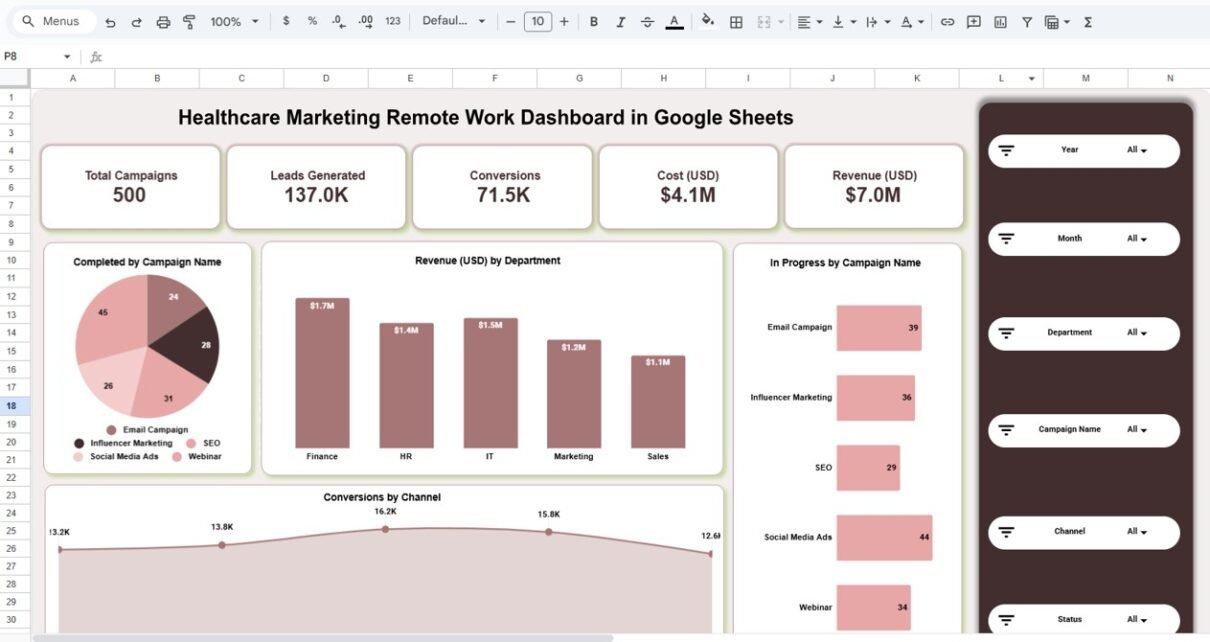
The Overview page gives you a high-level snapshot of overall marketing performance.
Key KPI Cards include:
- Total Campaigns
- Leads Generated
- Conversions
- Cost (USD)
- Revenue (USD)
These KPIs update automatically based on selected filters.
Interactive Filters & Slicers
The dashboard includes dynamic slicers that allow you to analyze data instantly by:
- Year
- Month
- Department
- Campaign Name
- Channel
-
Status (Completed / In Progress / Planned)
This makes the dashboard extremely flexible for management reviews and strategy discussions.

Click to Buy Healthcare Marketing Remote Work Dashboard in Google Sheets
Department Analysis Page
The Department Analysis sheet focuses on department-level performance.
You can analyze:
-
Revenue (USD) by Department
-
Conversions by Department
-
Campaign Status by Department (Completed / In Progress)
This helps identify which departments are driving results and which need optimization.

Click to Buy Healthcare Marketing Remote Work Dashboard in Google Sheets
Campaign Analysis Page
The Campaign Analysis sheet allows deep dives into individual marketing campaigns.
Insights include:
-
Revenue by Campaign
-
Conversions by Campaign
-
In-Progress vs Completed Campaigns
This page is ideal for campaign managers and performance reviews.

Click to Buy Healthcare Marketing Remote Work Dashboard in Google Sheets
Channel Analysis Page
The Channel Analysis sheet evaluates performance across marketing channels such as:
- Google Ads
- YouTube
You can monitor:
- Revenue by Channel
- Conversions by Channel
- Campaign Status by Channel
This helps allocate budget more effectively across channels.

Click to Buy Healthcare Marketing Remote Work Dashboard in Google Sheets
Monthly Trends Page
The Monthly Trends sheet shows how performance evolves over time.
It includes:
- Cost vs Budget by Month
- Revenue Trends by Month
- Conversions by Month
- Completed Campaigns by Month
Trend analysis is critical for forecasting, planning, and performance optimization.

Click to Buy Healthcare Marketing Remote Work Dashboard in Google Sheets
Data Input & Structure
All calculations and visuals are driven by a structured Data Input Table, which typically includes:
- Date
- Department
- Campaign Name
- Channel
- Leads Generated
- Conversions
- Cost (USD)
- Revenue (USD)
- Campaign Status
- Month
- Year
Once data is entered, the dashboard updates automatically.
Advantages of Healthcare Marketing Remote Work Dashboard in Google Sheets
-
Centralized view of all marketing KPIs
-
Cloud-based and accessible from anywhere
-
Real-time collaboration for remote teams
-
Automatic updates and calculations
-
Clear visual insights for faster decisions
-
Better control over marketing costs and ROI
Opportunities for Improvement
Click to Buy Healthcare Marketing Remote Work Dashboard in Google Sheets
-
Add advanced ROI or CPA calculations
-
Integrate Google Ads or CRM data
-
Automate data refresh using Google Apps Script
-
Add forecasting and trend projections
Best Practices for Using This Dashboard
-
Update campaign data regularly
-
Standardize campaign naming conventions
-
Review trends monthly, not just totals
-
Use department and channel filters during reviews
-
Share dashboard access with stakeholders
-
Archive old data annually for better performance
Who Should Use This Dashboard?
Click to Buy Healthcare Marketing Remote Work Dashboard in Google Sheets
This dashboard is ideal for:
-
Healthcare Marketing Managers
-
Digital Marketing Teams
-
Remote & Hybrid Marketing Teams
-
Marketing Analysts
-
Healthcare Organizations & Agencies
Final Thoughts
The Healthcare Marketing Remote Work Dashboard in Google Sheets is a powerful, ready-to-use solution for tracking, analyzing, and optimizing healthcare marketing performance in a remote environment.
By combining structured data, interactive filters, and clear visualizations, this dashboard helps teams stay aligned, accountable, and data-driven—no matter where they work from.
Watch the step-by-step video tutorial:
Visit our YouTube channel to learn step-by-step video tutorials
Youtube.com/@NeotechNavigators
Click to Buy Healthcare Marketing Remote Work Dashboard in Google Sheets