Every organization depends on software to run daily operations smoothly. Employees regularly request new software installations, license upgrades, reinstallations, or access to specialized tools. However, when IT teams manage these requests through emails, chats, or unstructured spreadsheets, delays increase, approvals get missed, and tracking becomes difficult. As a result, productivity drops and IT workloads grow.IT Software Installation Request Tracker in Google Sheets
This is where an IT Software Installation Request Tracker in Google Sheets becomes extremely valuable. It offers a centralized, structured, and easy-to-use system to log, track, prioritize, and analyze all software installation requests. Because the tracker is built in Google Sheets, it remains accessible, collaborative, and highly flexible for IT teams of any size.IT Software Installation Request Tracker in Google Sheets
In this article, we will explain how this ready-to-use tracker works, what charts it includes, how the search feature saves time, and why IT operations teams should adopt this solution.IT Software Installation Request Tracker in Google Sheets
What Is an IT Software Installation Request Tracker in Google Sheets?
Click to Buy IT Software Installation Request Tracker in Google Sheets
An IT Software Installation Request Tracker is a centralized request-management tool that helps IT departments record and monitor all software-related requests in one place. It captures key details such as:
- Request ID
- Employee Name
- Department
- Software Name
- License Type
- Priority Level
- Request Status
- Assigned IT Staff
- Request Date
- Completion Date
- Remarks
Because the tracker runs in Google Sheets, teams can update data in real time, collaborate easily, and review dashboards without installing any additional software.
This tracker supports:
- IT Helpdesk Teams
- System Administrators
- IT Managers
- Compliance Teams
- Operations Leaders
Key Features of the IT Software Installation Request Tracker
This tracker is a ready-to-use template that includes:
- A structured Tracker Sheet Tab
- Five dynamic analytical charts
- A smart search functionality
- Real-time updates across all visuals
Let’s explore each part in detail.
Tracker Sheet Tab
Click to Buy IT Software Installation Request Tracker in Google Sheets
The Tracker Sheet Tab acts as the foundation of the entire system. All software installation requests get recorded here.
Typical fields include:
- Request ID
- Employee Name
- Department
- Software Name
- Software Category
- License Type (Free, Paid, Trial, Enterprise)
- Priority Level (Low, Medium, High, Critical)
- Request Status (New, Approved, In Progress, Installed, Rejected)
- Assigned IT Technician
- Request Channel (Email, Portal, Manager Approval)
- Request Date
- Installation Date
- Comments
Once you enter or update data in this sheet, all charts refresh automatically. This eliminates manual reporting and reduces tracking errors.
Charts Included in the Dashboard
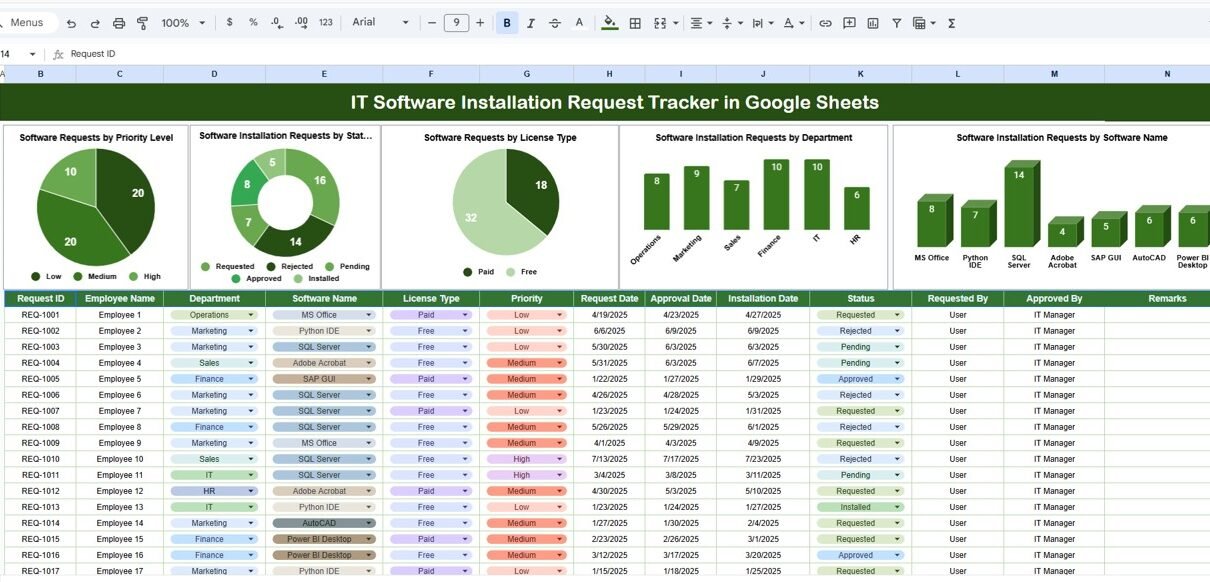
The tracker includes five powerful charts that give instant visibility into request patterns, workload, and performance.
1. Software Requests by Priority Level
This chart shows how many requests fall under each priority category:
- Low
- Medium
- High
- Critical
It helps IT teams quickly identify urgent installation requests and allocate resources accordingly. A rising number of high-priority requests may indicate business-critical software needs or system changes.
2. Software Installation Requests by Status
Click to Buy IT Software Installation Request Tracker in Google Sheets
This chart displays the distribution of requests across statuses such as:
- New
- Approved
- In Progress
- Installed
- Rejected
It gives managers a clear view of pending work, completed installations, and possible bottlenecks. Shows workload health at a glance.
3. Software Requests by License Type
This chart breaks down requests by license type:
- Free
- Paid
- Trial
- Enterprise
It helps organizations control licensing costs, plan procurement budgets, and ensure compliance with software usage policies.
4. Software Installation Requests by Department
This chart highlights how many requests come from each department. It helps IT leaders:
- Identify high-demand departments
- Understand technology dependency
- Plan department-specific support
- Forecast future software needs
5. Software Installation Requests by Software Name
This chart shows which software tools are requested most often. It helps organizations:
- Standardize commonly used tools
- Negotiate enterprise licenses
- Reduce duplicate software purchases
- Improve security control

Click to Buy IT Software Installation Request Tracker in Google Sheets
Search Functionality – Search by Keyword and Field Name
One of the most powerful features of this tracker is the search functionality.
You can search using:
-
Search Keyword (example: employee name, software name, department)
-
Field Name (Employee, Software, Department, Status, Priority)
The tracker instantly filters matching records. This helps IT teams:
-
Respond quickly to employee queries
-
Locate requests during audits
-
Track pending installations
-
Review software history
-
Save hours of manual searching

Click to Buy IT Software Installation Request Tracker in Google Sheets
Why IT Teams Need a Software Installation Request Tracker
Without a structured tracker, IT teams face:
-
Missed requests
-
Approval delays
-
License misuse
-
Poor visibility
-
Compliance risks
A Google Sheets-based tracker solves these challenges by offering transparency, accountability, and control.
Advantages of IT Software Installation Request Tracker in Google Sheets
Click to Buy IT Software Installation Request Tracker in Google Sheets
Centralized Request Management
All requests stay in one organized system.
Improved Response Time
Priority-based tracking ensures urgent requests get faster attention.
Better License Control
Visibility into license types prevents unnecessary spending.
Increased Transparency
Employees and managers see request progress clearly.
Easy Collaboration
Multiple IT team members work together in real time.
Zero Software Cost
Google Sheets eliminates the need for expensive ticketing tools.
Audit-Ready Records
Every request remains documented and traceable.
Opportunities for Improvement in the Tracker
Click to Buy IT Software Installation Request Tracker in Google Sheets
You can enhance this tracker further by adding:
-
SLA tracking (response time vs resolution time)
-
Automated email notifications using Google Apps Script
-
Approval workflow integration
-
Asset mapping (device ID, system name)
-
Cost tracking per software installation
-
Monthly or yearly trend analysis
These upgrades turn the tracker into a full IT service management solution.
Best Practices for Using the IT Software Installation Tracker
-
Define clear priority levels
-
Standardize request statuses
-
Update request status regularly
-
Assign clear ownership to each request
-
Review charts weekly
-
Restrict edit access for data security
-
Archive completed requests periodically
Following these practices keeps the tracker clean, reliable, and effective.
Conclusion
Click to Buy IT Software Installation Request Tracker in Google Sheets
An IT Software Installation Request Tracker in Google Sheets helps organizations manage software requests efficiently, transparently, and securely. It replaces chaotic email-based tracking with a structured system that improves response time, controls costs, and enhances employee satisfaction. Because the tracker is easy to use and fully customizable, it suits startups, mid-size companies, and large enterprises alike.
With clear charts, a powerful search feature, and real-time updates, this tracker becomes an essential tool for modern IT operations.
Frequently Asked Questions (FAQs)
Q1. Who should use this tracker?
IT helpdesk teams, system administrators, and IT managers.
Q2. Can I customize software names and license types?
Yes, the tracker is fully customizable.
Q3. Does it support multi-department usage?
Yes, it works across all departments.
Q4. Is Google Sheets secure for IT data?
Yes, with proper access control and permissions.
Q5. Can I automate approvals and notifications?
Yes, using Google Apps Script.
Q6. Does this replace ITSM tools?
It works as a lightweight alternative or supplement.
Visit our YouTube channel to learn step-by-step video tutorials
Youtube.com/@NeotechNavigators
Watch the step-by-step video tutorial:
Click to Buy IT Software Installation Request Tracker in Google Sheets