Managing meetings efficiently is essential for productivity and communication within any organization. The Meeting Management Tracker in Google Sheets provides a ready-to-use solution to plan, track, and analyze meetings — helping teams save time, stay organized, and improve accountability.
In this article, we’ll explore the features, advantages, and best practices of using this tracker to simplify your meeting management process.
Get the Meeting Management Tracker in Google Sheets
What Is a Meeting Management Tracker?
A Meeting Management Tracker is a tool designed to record, monitor, and analyze meeting details such as department, platform, duration, priority, and status. It ensures that all meetings are documented, objectives are clear, and follow-ups are tracked efficiently.
Built in Google Sheets, this tracker offers real-time collaboration, easy customization, and automated insights through interactive charts and search options.
Key Features of the Meeting Management Tracker
This tracker includes three main sheets, each serving a unique purpose:
1. Tracker Sheet Tab
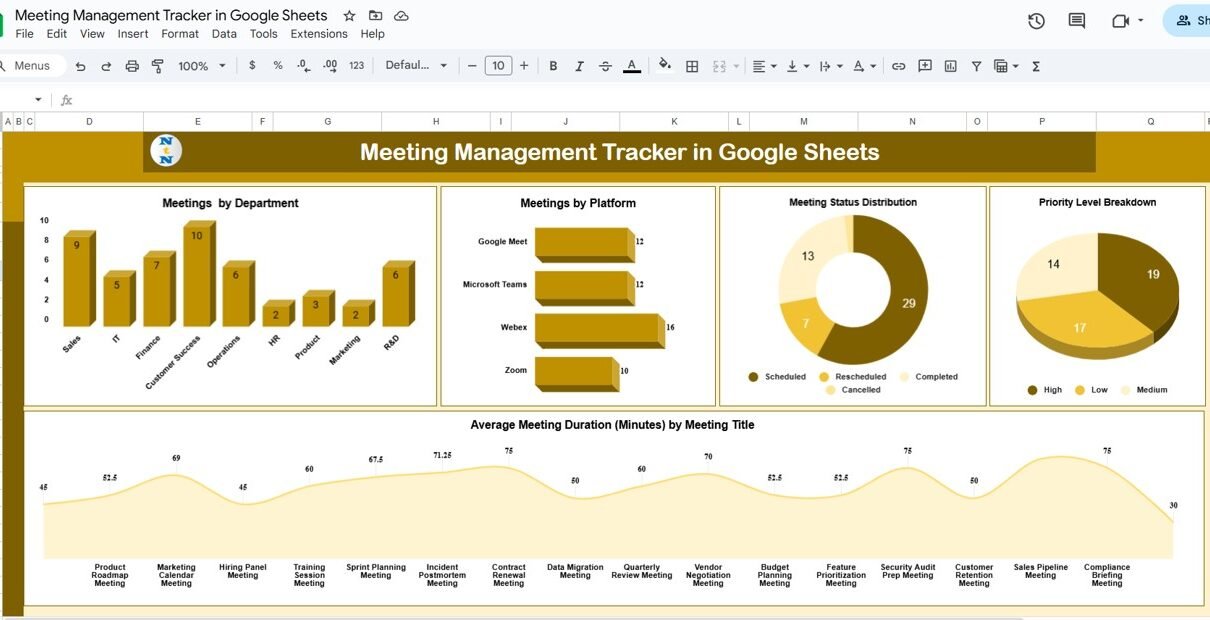
The Tracker sheet is the heart of this tool. It includes visual charts and data summaries to help you analyze meeting efficiency and distribution across departments and platforms.
Charts include:
-
Meetings by Department: Displays the number of meetings held by each department.
-
Meetings by Platform: Breaks down meetings by communication platform (e.g., Zoom, Google Meet, Teams).
-
Meeting Status Distribution: Shows meetings categorized by status — Scheduled, Completed, or Canceled.
-
Priority Level Breakdown: Highlights how meetings are prioritized (High, Medium, Low).
-
Average Meeting Duration (Minutes) by Meeting Title: Calculates and displays the average duration by meeting topic or project.
This sheet gives a comprehensive snapshot of how meetings are planned and executed across the organization.

2. Search Sheet Tab
The Search sheet allows users to find meetings quickly by applying search filters.
Features include:
-
Search by Keyword: Enter any keyword (such as project name or department) to find specific meetings.
-
Field Selection: Choose the field you want to search in, such as Meeting Title, Platform, or Status.
This feature simplifies locating meeting details without scrolling through large datasets — saving time and improving accessibility.

3. Data Sheet Tab
The Data sheet acts as the database of the tracker. It stores all meeting details in a structured format, such as:
-
Meeting Title
-
Department
-
Platform
-
Date and Time
-
Duration (Minutes)
-
Priority Level
-
Status
-
Remarks
Updating this sheet automatically refreshes the dashboard visuals in the Tracker sheet, making it easy to manage and analyze meeting data in real time.

Advantages of Using the Meeting Management Tracker
-
Centralized Data: Keep all meeting details in one shared document.
-
Real-Time Collaboration: Multiple team members can access and update data simultaneously.
-
Automated Insights: Visual charts update instantly when data changes.
-
Improved Accountability: Tracks meeting frequency, duration, and completion status.
-
Time Efficiency: Reduces manual reporting and enhances meeting organization.
-
Customizable: Easily modify fields or charts based on organizational needs.
Best Practices for Using the Tracker
-
Update After Each Meeting: Record meeting details immediately for accuracy.
-
Categorize Clearly: Use consistent naming for departments, platforms, and statuses.
-
Monitor Trends: Review monthly data to identify meeting overload or underutilization.
-
Analyze Duration: Track average meeting lengths to improve time management.
-
Filter by Department: Use the Search sheet to identify which teams hold the most or longest meetings.
How This Tracker Helps Teams
-
Improves Planning: Schedules and tracks meetings across platforms and departments.
-
Enhances Collaboration: Keeps all stakeholders informed in real time.
-
Optimizes Productivity: Identifies time-wasting patterns and repetitive meetings.
-
Supports Data-Driven Decisions: Visual analytics reveal opportunities to streamline communication.
-
Boosts Transparency: Creates a record of meeting frequency and performance.
If you are keen to build trackers like this from scratch, the NextGenTemplates Academy learning paths take you through the spreadsheet skills in a sensible order.
Get the Meeting Management Tracker in Google Sheets
Frequently Asked Questions (FAQs)
Q1: Can I track meeting attendance using this tracker?
Yes, you can add an “Attendees” column in the Data sheet to record participant names.
Q2: Is this tracker suitable for remote teams?
Absolutely. Since it’s built in Google Sheets, remote teams can collaborate and view updates in real time.
Q3: Can I track recurring meetings?
Yes, duplicate entries with updated dates and times can represent recurring meetings.
Q4: Can I filter meetings by priority or department?
Yes, the Tracker sheet includes charts by priority and department, and you can also use the Search sheet for filtering.
Q5: Can I export reports for presentations?
Yes, you can download the charts as images or export the data to Excel, PDF, or Google Slides.
Conclusion
The Meeting Management Tracker in Google Sheets is a powerful and easy-to-use tool for tracking meetings, analyzing communication patterns, and improving organizational efficiency. With dynamic charts, searchable records, and structured data management, this tracker empowers teams to make better decisions and enhance collaboration.