Modern marketing no longer depends on a single channel. Businesses now engage customers through email, social media, paid ads, websites, mobile apps, and offline campaigns. However, when data remains scattered across tools, teams struggle to understand what works and what does not. As a result, decision-making slows down and budgets get wasted.Multichannel Marketing KPI Dashboard in Google Sheets
A Multichannel Marketing KPI Dashboard in Google Sheets solves this challenge. It brings all marketing performance metrics into one centralized, interactive, and easy-to-use dashboard. With this dashboard, marketing teams can track results, compare channels, optimize budgets, and improve ROI without relying on complex BI tools.Multichannel Marketing KPI Dashboard in Google Sheets
In this article, you will learn what this dashboard is, how it works, its worksheet structure, the complete KPI list with formulas, its advantages, improvement opportunities, best practices, and frequently asked questions.Multichannel Marketing KPI Dashboard in Google Sheets
What Is a Multichannel Marketing KPI Dashboard in Google Sheets?
A Multichannel Marketing KPI Dashboard in Google Sheets is a ready-to-use analytics solution designed to measure marketing performance across multiple channels. It tracks KPIs related to awareness, engagement, conversions, cost efficiency, and revenue contribution.
Instead of reviewing separate reports from email tools, ad platforms, and social media dashboards, teams use one unified Google Sheets dashboard. Because the dashboard updates automatically when data changes, teams gain real-time visibility into marketing effectiveness.
This dashboard helps marketing managers, growth teams, CMOs, and business owners make faster and smarter decisions.
Key Features of the Multichannel Marketing KPI Dashboard
Click to Buy Multichannel Marketing KPI Dashboard in Google Sheets
This dashboard includes 6 structured worksheet tabs, each designed for a specific purpose.
1. Dashboard Sheet Tab (Main Dashboard)
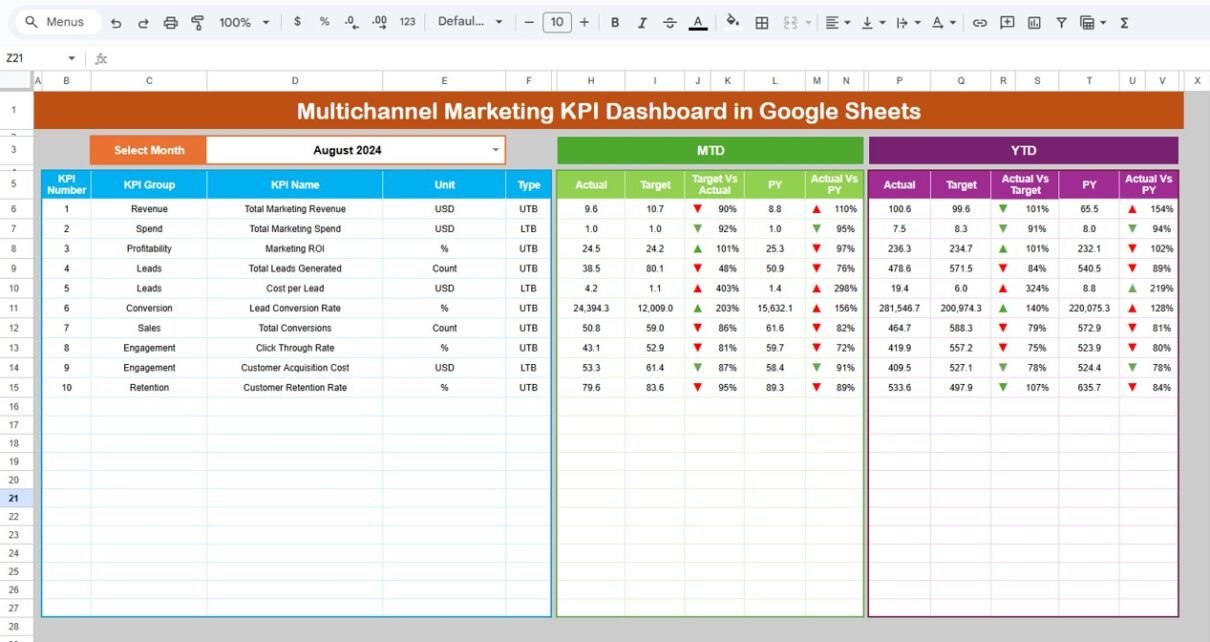
This is the central page of the dashboard. On cell D3, you select the month from a dropdown. Once selected, the entire dashboard updates automatically.
What the Dashboard Displays
MTD (Month-to-Date) Metrics
-
MTD Actual
-
MTD Target
-
MTD Previous Year
-
Target vs Actual
-
Previous Year vs Actual
YTD (Year-to-Date) Metrics
-
YTD Actual
-
YTD Target
-
YTD Previous Year
-
Target vs Actual
-
Previous Year vs Actual
The dashboard uses conditional formatting arrows:
-
🔼 Green arrow → Positive performance
-
🔽 Red arrow → Performance decline
This makes insights instantly visible during management reviews.

Click to Buy Multichannel Marketing KPI Dashboard in Google Sheets
2. KPI Trend Sheet Tab
This sheet focuses on one KPI at a time.
You select the KPI from the dropdown in cell C3.
The sheet displays:
-
KPI Group
-
KPI Unit
-
KPI Type (Upper the Better / Lower the Better)
-
KPI Formula
-
KPI Definition
A monthly trend chart helps you understand performance movement across the year.

Click to Buy Multichannel Marketing KPI Dashboard in Google Sheets
3. Actual Number Sheet Tab
This sheet stores actual MTD and YTD values for each KPI.
-
Select the first month of the year in cell E1
-
Enter actual monthly numbers
-
The dashboard updates automatically
This ensures accurate and consistent reporting.

4. Target Sheet Tab
This sheet stores target values for:
-
Monthly targets (MTD)
-
Annual targets (YTD)
Targets help teams measure performance expectations against actual outcomes

.Click to Buy Multichannel Marketing KPI Dashboard in Google Sheets
5. Previous Year Number Sheet Tab
This sheet stores last year’s KPI values.
It enables:
-
Year-over-Year comparisons
-
Growth analysis
-
Long-term performance tracking

Click to Buy Multichannel Marketing KPI Dashboard in Google Sheets
6. KPI Definition Sheet Tab
This sheet acts as the KPI reference library.
It includes:
-
KPI Name
-
KPI Group
-
Unit
-
Formula
-
Definition
-
KPI Type (UTB / LTB)
This ensures clarity and consistency across teams.

Click to Buy Multichannel Marketing KPI Dashboard in Google Sheets
Advantages of a Multichannel Marketing KPI Dashboard
1. Centralized Marketing Visibility
All channel data stays in one dashboard.
2. Faster Decision-Making
Teams identify winning and losing channels quickly.
3. Budget Optimization
Marketing spend aligns with performance.
4. Performance Transparency
Stakeholders view real-time KPIs easily.
5. No Expensive BI Tools
Google Sheets keeps costs low.
Opportunities for Improvement in Multichannel Marketing Tracking
Click to Buy Multichannel Marketing KPI Dashboard in Google Sheets
-
Integrate APIs from Google Ads, Meta, and CRM tools
-
Add channel-wise attribution modeling
-
Include customer lifetime value KPIs
-
Add forecast and predictive analysis
-
Automate alerts for KPI threshold breaches
Best Practices for Using This Dashboard
-
Update data monthly without delay
-
Set realistic and measurable targets
-
Review trends instead of single months
-
Use KPI definitions consistently
-
Compare performance year over year
Conclusion
Click to Buy Multichannel Marketing KPI Dashboard in Google Sheets
A Multichannel Marketing KPI Dashboard in Google Sheets gives marketing teams a powerful way to track, analyze, and optimize performance across all channels. It simplifies reporting, improves visibility, and enables data-driven decisions. Because it is flexible, affordable, and easy to use, this dashboard becomes an essential tool for modern marketing teams focused on growth and ROI.
Frequently Asked Questions (FAQs)
1. Who should use this dashboard?
Marketing managers, growth teams, CMOs, and business owners.
2. Can I customize KPIs?
Yes, you can easily add or remove KPIs.
3. Does it support MTD and YTD tracking?
Yes, both views are built in.
4. Is Google Sheets secure?
Yes, with proper access controls.
5. Can I integrate marketing tools?
Yes, using APIs or Google Apps Script.
Visit our YouTube channel to learn step-by-step video tutorials
Youtube.com/@NeotechNavigators
Watch the step-by-step video tutorial:
Click to Buy Multichannel Marketing KPI Dashboard in Google Sheets