Customer loyalty defines long-term business success. However, many organizations still struggle to track customer satisfaction clearly and consistently. They collect survey data, but they fail to convert it into meaningful insights. As a result, decision-making becomes slow, reactive, and incomplete.
That is exactly where an NPS Dashboard in Google Sheets creates real impact.
In this detailed blog post, you will learn what an NPS Dashboard in Google Sheets is, why it is important, how it works, its page-wise features, advantages, best practices, and frequently asked questions. By the end of this article, you will clearly understand how this ready-to-use Google Sheets dashboard helps teams improve customer experience using data-driven insights.
What Is an NPS Dashboard in Google Sheets?
Click to Buy NPS Dashboard in Google Sheets
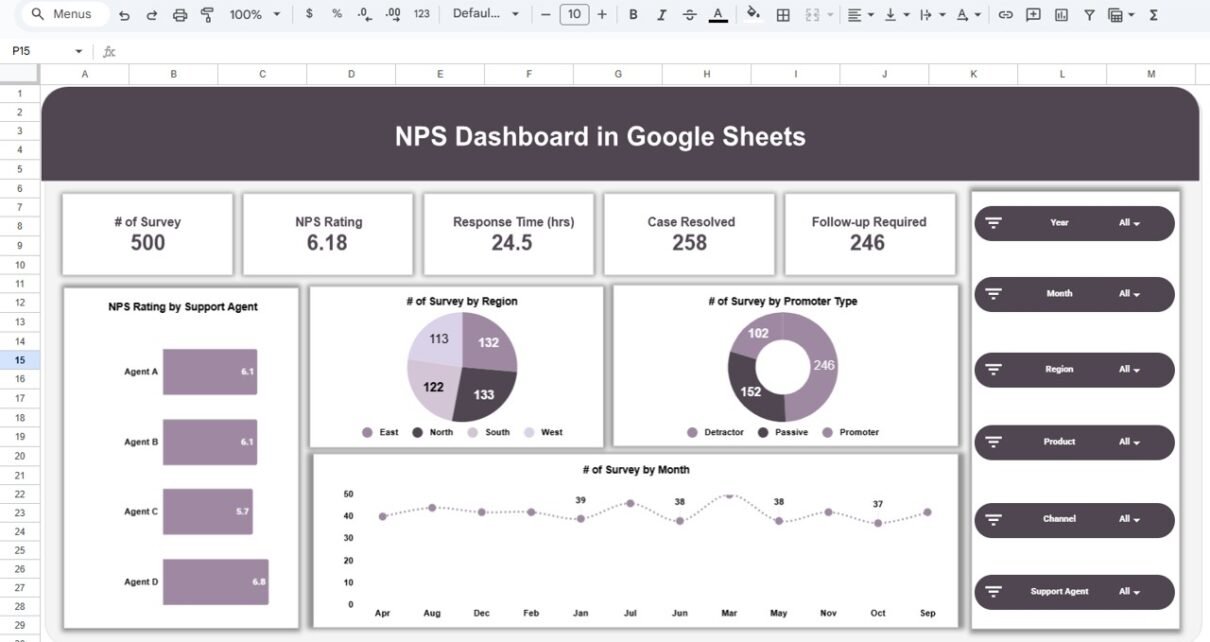
An NPS Dashboard in Google Sheets is an interactive reporting solution that tracks Net Promoter Score (NPS), customer feedback, response time, case resolution, and follow-ups in one centralized dashboard.
Instead of reviewing raw survey data or static reports, this dashboard visually presents customer satisfaction metrics using cards, charts, and filters. Moreover, because it runs on Google Sheets, teams can collaborate in real time without complex tools.
As a result, organizations gain a clear and continuous view of customer sentiment.
Why Is an NPS Dashboard Important for Businesses?
Customer experience directly affects retention, revenue, and brand reputation. Therefore, monitoring NPS consistently becomes essential.
Here is why an NPS Dashboard matters:
- It measures customer loyalty using a standard metric
- It highlights promoters, passives, and detractors clearly
- It tracks service response time and resolution efficiency
- It identifies problem areas by region, product, and channel
- It supports faster customer experience improvements
Because Google Sheets is cloud-based, all stakeholders access the same updated insights instantly.
How Does an NPS Dashboard in Google Sheets Work?
Click to Buy NPS Dashboard in Google Sheets
This dashboard works by combining structured survey data with interactive visualizations.
First, survey-level data sits in a Data Sheet, including NPS rating, promoter type, response time, comments, and support agent details. Then, formulas and pivot tables summarize that data. After that, charts and KPI cards display insights. Finally, slicers allow users to filter results by year, month, region, product, channel, or support agent.
Because of this design, users analyze customer feedback without manual calculations.
What Metrics Does an NPS Dashboard Track?
The NPS Dashboard in Google Sheets tracks multiple customer experience metrics.
Core Metrics Included
- Total Surveys Count
- Average NPS Rating
- Response Time (Hours)
- Cases Resolved
- Follow-ups Required
- Promoters, Passives, and Detractors
Together, these metrics provide a 360-degree view of customer satisfaction and service performance.
What Pages Are Included in the NPS Dashboard in Google Sheets?
Click to Buy NPS Dashboard in Google Sheets
This ready-to-use dashboard includes multiple analytical pages. Each page answers specific customer experience questions.
NPS Overview Page
The NPS Overview Page acts as the central command screen.
Key Insights on the Overview Page
-
Total number of surveys
-
Overall NPS rating
-
Average response time
-
Total cases resolved
-
Follow-ups required
Charts Available
-
NPS Rating by Support Agent
-
Survey Count by Region
-
Survey Count by Promoter Type
-
Survey Trend by Month
Because everything appears in one view, managers instantly understand customer satisfaction health.

Click to Buy NPS Dashboard in Google Sheets
Regional Summary Page
The Regional Summary Page focuses on location-based performance.
Key Insights
-
Response Time by Region
-
NPS Rating by Region
-
Case Resolved Count by Region
This page helps organizations identify regions with strong or weak customer experience and take targeted action.

Click to Buy NPS Dashboard in Google Sheets
Product Summary Page
The Product Summary Page highlights customer satisfaction across different products.
Key Insights
-
Response Time by Product
-
NPS Rating by Product
-
Case Resolved Count by Product
Because product experience varies, this page supports better product-level decisions.

Click to Buy NPS Dashboard in Google Sheets
Channel Summary Page
The Channel Summary Page evaluates customer experience across support channels.
Key Insights
-
Response Time by Channel (Email, In-App, Phone, SMS)
-
NPS Rating by Channel
-
Case Resolved Count by Channel
This page helps teams understand which support channels perform best and which need improvement.

Click to Buy NPS Dashboard in Google Sheets
Monthly Trends Page
The Monthly Trends Page tracks customer satisfaction over time.
Key Insights
-
Response Time by Month
-
NPS Rating by Month
-
Case Resolved Count by Month
Because trends matter, this page highlights seasonal patterns and service consistency issues early.

What Is the Role of the Detailed Data & Search Sheet?
The dashboard also includes a detailed data and search sheet.
Key Features
-
Search by keyword and selected column
-
Filter survey records instantly
-
View customer comments and support agent details
-
Track follow-up and resolution status
This sheet supports operational follow-ups and root cause analysis.
Advantages of NPS Dashboard in Google Sheets
Click to Buy NPS Dashboard in Google Sheets
Using this dashboard provides clear business benefits.
Key Advantages
-
Centralized NPS Reporting: All customer feedback in one place
-
Real-Time Collaboration: Teams work together live
-
Improved Visibility: Clear view of satisfaction drivers
-
Faster Decisions: No waiting for manual reports
-
Cost-Effective: No expensive BI tools required
-
Highly Customizable: Easy to extend with new metrics
Because of these advantages, teams move from guesswork to clarity.
Who Should Use an NPS Dashboard in Google Sheets?
Click to Buy NPS Dashboard in Google Sheets
This dashboard fits many roles and industries.
Ideal Users
- Customer experience teams
- Support managers
- Operations leaders
- Product managers
- Service quality teams
- Startups and growing businesses
If your role involves customer feedback or service performance, this dashboard adds immediate value.
How Does This Dashboard Improve Customer Experience?
This dashboard improves customer experience by:
- Identifying detractors quickly
- Highlighting slow response areas
- Tracking unresolved and follow-up cases
- Comparing performance across agents and channels
- Supporting proactive service improvements
As a result, organizations improve loyalty and retention.
Best Practices for the NPS Dashboard in Google Sheets
Click to Buy NPS Dashboard in Google Sheets
To maximize dashboard value, follow these best practices.
1. Standardize NPS Survey Questions
Use consistent questions to maintain reliable scores.
2. Update Data Regularly
Daily or weekly updates ensure accurate insights.
3. Use Filters Before Analysis
Always apply slicers before reviewing trends.
4. Protect Core Formulas
Lock calculation sheets to avoid accidental changes.
5. Review Detractor Feedback Weekly
Use comments to address issues quickly.
Following these practices keeps the dashboard effective and scalable.
How Is This Dashboard Better Than Manual NPS Reports?
Click to Buy NPS Dashboard in Google Sheets
Unlike manual reports, this dashboard:
-
Updates instantly with filters
-
Supports multi-dimensional analysis
-
Reduces reporting effort
-
Encourages continuous monitoring
Therefore, it transforms NPS reporting into a decision-support system.
Conclusion
An NPS Dashboard in Google Sheets is a powerful, flexible, and cost-effective way to measure customer loyalty and service performance. It combines NPS scores, response time, case resolution, and feedback analysis into one interactive view.
Moreover, because it runs on Google Sheets, it supports real-time collaboration and easy customization. By using this dashboard, organizations improve visibility, act faster on feedback, and deliver better customer experiences consistently.
Frequently Asked Questions (FAQs)
Click to Buy NPS Dashboard in Google Sheets
What is an NPS Dashboard in Google Sheets?
It is an interactive dashboard that tracks Net Promoter Score, customer feedback, response time, and service performance in Google Sheets.
Can multiple users access this dashboard?
Yes, Google Sheets allows real-time collaboration for multiple users.
Does this dashboard support agent-level analysis?
Yes, it tracks NPS and performance by support agent.
Can I analyze NPS by product and channel?
Yes, the dashboard includes product and channel-level analysis pages.
Is this dashboard suitable for small businesses?
Yes, it works perfectly for startups, SMBs, and growing teams.
Can this dashboard replace manual NPS reports?
Yes, it significantly reduces manual reporting and improves insight quality.
Visit our YouTube channel to learn step-by-step video tutorials
Youtube.com/@NeotechNavigators
Watch the step-by-step video tutorial: