A comfortable and positive office environment directly impacts employee satisfaction, productivity, and retention. Lighting, cleanliness, noise levels, seating, air quality, and overall workplace comfort all influence how employees feel at work. However, many organizations struggle to collect, organize, and analyze office environment feedback because responses remain scattered across emails, surveys, or informal conversations.Office Environment Feedback Tracker in Google Sheets
That is exactly why an Office Environment Feedback Tracker in Google Sheets becomes an essential workplace management tool.
This ready-to-use tracker helps HR teams, facility managers, and leadership collect structured feedback, analyze trends, and take data-driven actions to improve the office environment. It combines structured data entry, visual charts, and a powerful search feature—all within Google Sheets.Office Environment Feedback Tracker in Google Sheets
In this article, you will learn what this tracker is, how it works, what charts it includes, its advantages, opportunities for improvement, best practices, and answers to common questions.Office Environment Feedback Tracker in Google Sheets
What Is an Office Environment Feedback Tracker in Google Sheets?
Click to Buy Office Environment Feedback Tracker in Google Sheets
An Office Environment Feedback Tracker is a centralized system that captures employee feedback related to workplace conditions and facilities. It helps organizations understand how employees perceive their work environment and where improvements are needed.
Because this tracker is built in Google Sheets, it offers:
- Easy data entry and updates
- Real-time collaboration
- Automatic chart updates
- Secure sharing and access control
- No need for additional software
As a result, teams gain instant visibility into employee feedback without complex tools.
Key Features of the Office Environment Feedback Tracker
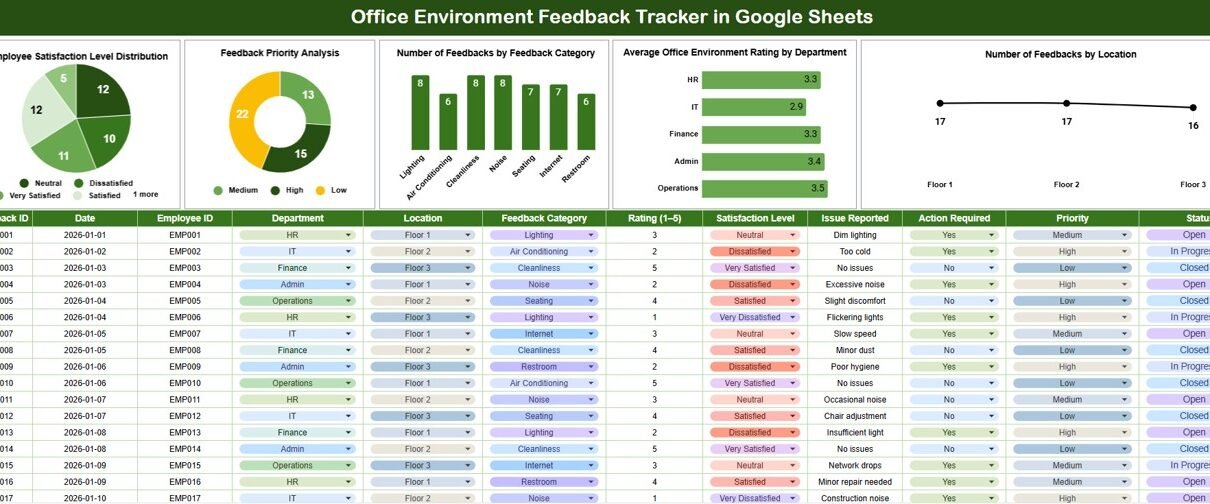
This tracker is designed as a single, powerful Tracker Sheet Tab supported by visual analytics and search functionality.
Core Features
- Centralized feedback data storage
- Pre-built charts for instant insights
- Department-wise and location-wise analysis
- Priority-based feedback tracking
- Smart search by keyword and field name
Tracker Sheet Tab
Click to Buy Office Environment Feedback Tracker in Google Sheets
The Tracker Sheet Tab is where all feedback records are stored and maintained.
Typical fields include:
- Feedback ID
- Feedback Date
- Employee Name (optional)
- Department
- Location
- Feedback Category (Cleanliness, Lighting, Noise, Seating, Air Quality, Safety, etc.)
- Feedback Priority (Low, Medium, High)
- Satisfaction Level / Rating
- Comments or Suggestions
As soon as data is added or updated, all charts refresh automatically.
Charts Included in the Tracker Dashboard
The tracker includes five insightful charts that help organizations quickly understand workplace sentiment.
1. Employee Satisfaction Level Distribution
This chart shows how employees rate their office environment, such as:
- Very Satisfied
- Satisfied
- Neutral
- Dissatisfied
- Very Dissatisfied
It provides an instant view of overall workplace satisfaction.
2. Feedback Priority Analysis
This chart categorizes feedback based on priority levels:
- Low
- Medium
- High
It helps facility and HR teams focus first on critical workplace issues that require immediate action.
3. Number of Feedbacks by Feedback Category
This chart breaks down feedback by category, such as:
- Cleanliness
- Lighting
- Noise
- Seating
- Temperature
- Safety
It highlights the most common issues affecting the office environment.
4. Average Office Environment Rating by Department
This chart shows how different departments rate the office environment.
It helps identify departments that may require targeted improvements or facility upgrades.
5. Number of Feedbacks by Location
For organizations with multiple offices or floors, this chart compares feedback volume by location.
It helps management prioritize improvements across sites.

Click to Buy Office Environment Feedback Tracker in Google Sheets
Search Functionality – Search by Keyword and Field Name
One of the most valuable features of this tracker is its Search functionality.
Users can search feedback records by:
-
Keyword (department name, location, category, or comment text)
-
Field name (Department, Location, Category, Priority, Satisfaction Level)
This feature allows users to:
-
Find specific feedback instantly
-
Prepare reports for audits or reviews
-
Track unresolved or recurring issues
-
Respond quickly to employee concerns

Click to Buy Office Environment Feedback Tracker in Google Sheets
Why Organizations Need an Office Environment Feedback Tracker
Without structured feedback tracking, workplace issues often go unnoticed or unresolved. This tracker helps organizations:
- Improve employee satisfaction
- Identify recurring workplace problems
- Prioritize facility improvements
- Support data-driven decision-making
- Strengthen employee engagement
- Create a healthier work environment
Advantages of Using This Tracker in Google Sheets
- Centralized feedback management
- Real-time collaboration
- Visual insights without manual reporting
- Easy to customize and scale
- No additional software costs
- Supports multiple departments and locations
Opportunities for Improvement
Click to Buy Office Environment Feedback Tracker in Google Sheets
Organizations can enhance the tracker further by:
-
Integrating Google Forms for feedback collection
-
Adding status tracking (Open, In Progress, Closed)
-
Setting SLA timelines for issue resolution
-
Automating notifications for high-priority feedback
-
Adding trend analysis over time
Best Practices for Using the Office Environment Feedback Tracker
-
Encourage employees to submit feedback regularly
-
Review charts weekly or monthly
-
Act quickly on high-priority issues
-
Communicate improvements back to employees
-
Maintain data confidentiality and access control
-
Use trends to plan long-term facility upgrades
Conclusion
Click to Buy Office Environment Feedback Tracker in Google Sheets
An Office Environment Feedback Tracker in Google Sheets provides a simple yet powerful way to capture employee voices and improve workplace conditions. It turns unstructured feedback into clear insights that help organizations create a safer, more comfortable, and more productive office environment.
Because the tracker is easy to use, collaborative, and visually rich, it becomes a long-term asset for HR and facility management teams focused on employee well-being.
Frequently Asked Questions (FAQs)
1. Who should use this tracker?
HR teams, facility managers, admin teams, and office leadership.
2. Can this tracker handle multiple office locations?
Yes, it supports location-wise analysis and comparison.
3. Is Google Sheets secure for employee feedback?
Yes, with proper sharing permissions and access controls.
4. Can feedback categories be customized?
Yes, categories and fields can be fully customized.
5. Does it support anonymous feedback?
Yes, employee names can remain optional.
Visit our YouTube channel to learn step-by-step video tutorials
Youtube.com/@NeotechNavigators
Watch the step-by-step video tutorial:
Click to Buy Office Environment Feedback Tracker in Google Sheets