Tracking employee travel expenses can be time-consuming without a structured system. The Employee Business Travel Expense Tracker in Google Sheets provides a simple, ready-to-use solution to record, monitor, and analyze travel-related costs effectively. Whether managing a small business or a large organization, this tracker helps you maintain financial transparency and accountability with ease.Employee Business Travel Expense Tracker in Google Sheets
Get the Employee Business Travel Expense Tracker in Google Sheets
What Is an Employee Business Travel Expense Tracker in Google Sheets?
An Employee Business Travel Expense Tracker is a digital tool that records and organizes all expenses related to employee business trips. Built in Google Sheets, it’s cloud-based, collaborative, and easy to customize. This tracker captures every cost category — from flights and hotels to meals and transportation — helping finance teams manage reimbursements and budgets more efficiently.Employee Business Travel Expense Tracker in Google Sheets
With automated formulas and charts, it provides real-time visibility into spending patterns, enabling better decision-making and cost control.Employee Business Travel Expense Tracker in Google Sheets
Key Features of the Employee Business Travel Expense Tracker in Google Sheets
This tracker includes three structured sheets designed for complete visibility and ease of use:
1. Tracker Sheet Tab
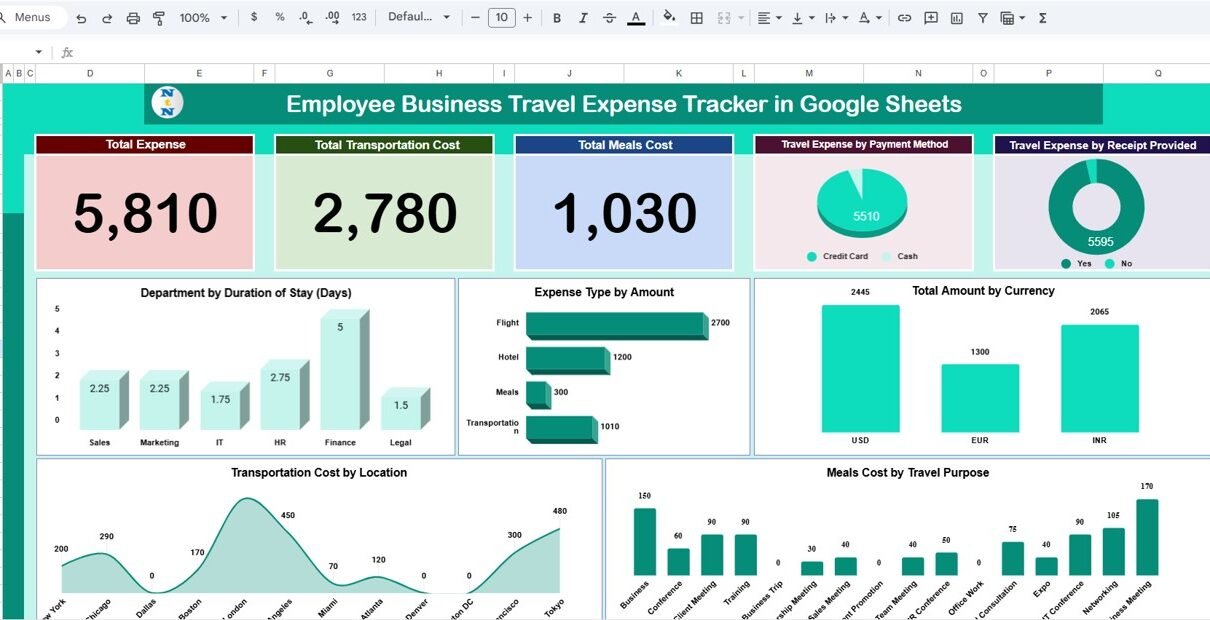
This is the main dashboard where all key insights are displayed.
Cards Section:
-
Total Expense: Displays total travel spending for the selected period.
-
Total Transportation Cost: Shows total cost spent on flights, taxis, trains, etc.
-
Total Meals Cost: Aggregates meal expenses across trips.
-
Travel Expense by Payment Method: Visualizes spending across cash, card, or corporate accounts.
-
Travel Expense by Receipt Provided: Displays the percentage of claims supported by receipts.
Charts Section:
-
Department by Duration of Stay (Days): Highlights travel days per department.
-
Expense Type by Amount: Visual breakdown of spending categories (transport, meals, accommodation).
-
Total Amount by Currency: Useful for organizations managing international travel.
-
Meals Cost by Travel Purpose: Shows meal costs against trip objectives (training, client meetings, etc.).
-
Transportation Cost by Location: Tracks travel-related costs per city or region.

2. Search Sheet Tab
The Search Sheet enables quick lookup of travel records.Employee Business Travel Expense Tracker in Google Sheets
-
Search by Keyword or Field Name (e.g., employee name, department, location).
-
Filter results dynamically to find specific trips or expense entries.
-
Saves time in audits or reimbursement reviews.

3. Data Sheet Tab
The Data Sheet is the foundation of this tracker where all raw data is entered. Each record captures:
-
Employee details
-
Trip date and location
-
Expense type (flight, hotel, meals, etc.)
-
Amount and currency
-
Payment method
-
Receipt status
-
Department and travel purpose
This data automatically feeds the dashboard, powering calculations and charts.

Benefits of Using the Travel Expense Tracker
Using this tracker brings multiple benefits to businesses and finance teams:
-
Centralized Expense Data: Keep all travel expenses in one Google Sheet.
-
Real-Time Updates: Data updates instantly across cards and charts.
-
Visual Insights: Easy-to-read charts for quick decision-making.
-
Transparency: Track receipts, payment modes, and employee-wise expenses.
-
Multi-Currency Support: Monitor travel costs in different currencies.
-
Collaboration: Multiple users can edit and review data simultaneously.
-
Time-Saving: Reduces manual reporting and simplifies reimbursements.
Best Practices for Using the Tracker
-
Update Data After Each Trip: Keep information current for accurate reporting.
-
Categorize Expenses Properly: Use consistent expense types for meaningful analysis.
-
Validate Receipts: Use the “Receipt Provided” field to ensure compliance.
-
Monitor Department Spending: Identify cost-intensive departments and plan budgets accordingly.
-
Review Monthly Trends: Compare spending patterns month-to-month to control costs.
-
Automate Approvals: Combine the tracker with Google Forms or Apps Script for digital approvals.
How This Tracker Helps Organizations
-
Improved Financial Visibility: Managers can see where and how money is spent.
-
Streamlined Reimbursements: Simplifies processing for finance and HR teams.
-
Enhanced Budget Control: Helps forecast future travel budgets more accurately.
-
Accountability: Encourages employees to submit valid claims with receipts.
-
Audit-Ready Reporting: Quickly filter and export data for internal or external reviews.
Example Use Cases
-
Sales Team Travel: Track regional client visits, hotel stays, and meal costs.
-
Training & Conferences: Manage travel costs for workshops or seminars.
-
Executive Business Trips: Monitor flight and accommodation expenses by location.
-
Multi-Office Operations: Compare expenses by department or region.
Spreadsheet trackers like this get easier once the basics are solid. The NextGenTemplates Academy learning paths take you from formulas to finished tools, with practice files at every step.
Get the Employee Business Travel Expense Tracker in Google Sheets
Frequently Asked Questions (FAQs)
Q1: Can I customize this tracker for my organization?
Yes, you can easily add columns or charts to match your company’s needs.
Q2: Does it support multiple currencies?
Yes, you can enter different currencies and use formulas for conversion.
Q3: How do I track receipt submissions?
Use the “Receipt Provided” column to mark each claim as Yes or No.
Q4: Can I use this tracker for multiple employees?
Yes, it’s ideal for tracking travel data for an entire workforce.
Q5: Is it compatible with Google Forms?
Absolutely! You can integrate it with a form for easy data entry.
Conclusion
The Employee Business Travel Expense Tracker in Google Sheets is a powerful, user-friendly tool that simplifies expense tracking for organizations. With real-time dashboards, detailed analytics, and customizable views, it helps teams manage travel budgets, reimbursements, and compliance effortlessly.Employee Business Travel Expense Tracker in Google Sheets