Managing project resources efficiently is one of the biggest challenges for growing organizations. Teams constantly request developers, designers, testers, analysts, and other specialists for different projects. However, when resource requests are handled through emails or unstructured spreadsheets, delays, confusion, and misallocation become common.
That is why a Project Resource Request Tracker in Google Sheets becomes an essential operational tool. It centralizes all resource requests, improves visibility, and helps managers make faster and better allocation decisions.
In this detailed guide, you will learn what a Project Resource Request Tracker in Google Sheets is, why it matters, how it works, its structure, key features, advantages, best practices, and frequently asked questions. Additionally, this article explains how a ready-to-use tracker can simplify resource planning across departments and projects.
What Is a Project Resource Request Tracker in Google Sheets?
Click to Buy Project Resource Request Tracker in Google Sheets
A Project Resource Request Tracker in Google Sheets is a structured and interactive system used to log, track, and analyze project-wise resource requests in one centralized file. Instead of manually reviewing emails or disconnected sheets, teams can monitor all requests through dashboards, charts, and searchable tables.
Moreover, this tracker captures complete request details such as project name, department, requested role, number of resources, allocation dates, estimated hours, approval status, and priority. As a result, project managers and leadership teams gain full transparency into resource demand and utilization.
In addition, Google Sheets makes the tracker cloud-based, collaborative, and easy to maintain without advanced technical skills.
Why Do Organizations Need a Resource Request Tracker?
Resource planning directly impacts project timelines, costs, and delivery quality. Without a structured tracking system, organizations face several challenges.
Here is why a Project Resource Request Tracker is critical:
- Resource requests get delayed due to unclear approval workflows
- Departments compete for the same resources without visibility
- Project managers lack data to justify new resource needs
- Leadership cannot see workload trends or bottlenecks
- Manual follow-ups consume valuable time
Therefore, a centralized tracker ensures transparency, accountability, and data-driven decision-making.
How the Project Resource Request Tracker in Google Sheets Works
This ready-to-use tracker follows a simple and logical workflow:
- Teams submit resource requests with project and role details
- Requests are logged automatically in the tracker sheet
- Approval status is updated as Approved, Rejected, In Progress, or Completed
- Dashboards and charts update in real time
- Users can search requests using keywords and selected fields
As a result, all stakeholders stay aligned, and resource allocation becomes more predictable and efficient.
Structure of the Project Resource Request Tracker in Google Sheets
Click to Buy Project Resource Request Tracker in Google Sheets
The tracker is designed with clarity and usability in mind. Below is a breakdown of its core components.
Tracker Sheet Tab (Main Sheet)
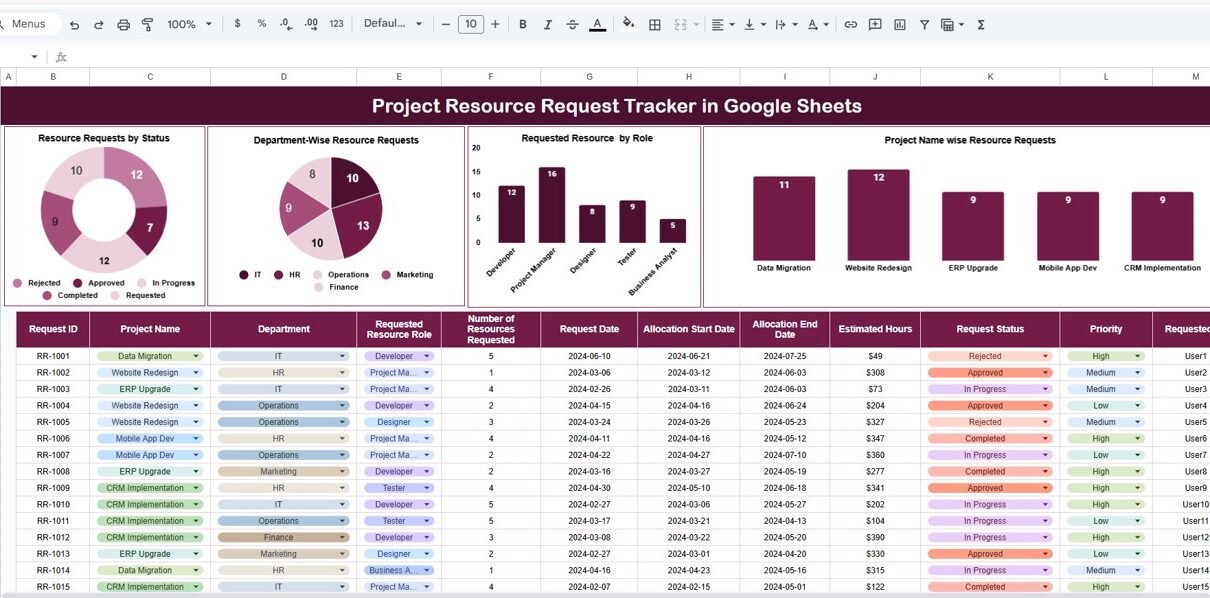
The Tracker sheet tab serves as the central data repository. It captures all project resource request details in a structured table.
Key Columns Include:
- Request ID
- Project Name
- Department
- Requested Resource Role
- Number of Resources Requested
- Request Date
- Allocation Start Date
- Allocation End Date
- Estimated Hours
- Request Status
- Priority
- Requested By
Because the data is standardized, it supports accurate reporting and analysis across multiple dimensions.
Dashboard & Charts Overview
The tracker includes multiple visual charts that transform raw data into actionable insights.
Resource Requests by Status
This chart shows how many requests are:
-
Approved
-
Rejected
-
In Progress
-
Completed
-
Requested
As a result, managers instantly understand the current approval pipeline.
Department-Wise Resource Requests
Click to Buy Project Resource Request Tracker in Google Sheets
This visual highlights how many resource requests come from each department, such as:
-
IT
-
HR
-
Operations
-
Finance
-
Marketing
Therefore, leadership can identify departments with higher demand and plan capacity accordingly.
Requested Resource by Role
This chart shows demand by role, such as:
-
Developer
-
Project Manager
-
Designer
-
Tester
-
Business Analyst
As a result, HR and PMOs can forecast hiring or upskilling needs more accurately.
Project Name-Wise Resource Requests
This chart displays how many resource requests are associated with each project, such as:
-
Data Migration
-
Website Redesign
-
ERP Upgrade
-
Mobile App Development
-
CRM Implementation
Consequently, project managers can justify resource allocation based on workload.

Click to Buy Project Resource Request Tracker in Google Sheets
Search by Search Keyword and Field Name
One of the most powerful features of this tracker is the Search functionality.
How Search Works:
-
Select a column name (e.g., Department, Project Name, Status)
-
Enter a search keyword
-
Instantly filter matching records
This feature saves time and makes audits, reviews, and follow-ups extremely easy.

Click to Buy Project Resource Request Tracker in Google Sheets
Key Advantages of a Project Resource Request Tracker in Google Sheets
Using this tracker delivers several operational and strategic benefits.
1. Centralized Resource Visibility
All project resource requests live in one place. As a result, there is no confusion or duplication.
2. Faster Approval Cycles
Clear status tracking reduces back-and-forth communication and speeds up decisions.
3. Better Resource Planning
By analyzing demand by role and department, organizations can plan hiring and allocation more effectively.
4. Improved Accountability
Each request has an owner, priority, and status. Therefore, accountability becomes built-in.
5. Data-Driven Decision-Making
Charts and summaries provide leadership with insights instead of assumptions.
Who Can Use This Tracker?
Click to Buy Project Resource Request Tracker in Google Sheets
This tracker is suitable for a wide range of teams and industries.
-
Project Managers
-
PMO Teams
-
HR & Workforce Planning Teams
-
IT & Engineering Departments
-
Consulting Firms
-
Corporate Operations Teams
Whether you manage small internal projects or large enterprise programs, this tracker scales easily.
Best Practices for Using a Project Resource Request Tracker
To get the maximum value from this tracker, follow these best practices:
-
Standardize resource roles across departments
-
Update request status regularly
-
Use priority levels consistently
-
Review dashboards weekly or monthly
-
Archive completed requests periodically
-
Restrict editing access where necessary
By following these practices, the tracker remains reliable and actionable.
Why Choose Google Sheets for Resource Tracking?
Click to Buy Project Resource Request Tracker in Google Sheets
Google Sheets offers several advantages over traditional tools:
-
Cloud-based and accessible anywhere
-
Real-time collaboration
-
No additional software cost
-
Easy customization
-
Integration with Google Workspace
As a result, teams can implement this tracker quickly without IT complexity.
Conclusion
A Project Resource Request Tracker in Google Sheets transforms the way organizations manage project staffing and resource allocation. Instead of relying on emails and scattered files, teams gain a centralized, transparent, and data-driven system.
With built-in dashboards, role-wise analysis, department insights, and powerful search functionality, this ready-to-use tracker helps organizations improve efficiency, reduce delays, and make smarter planning decisions.
If your organization handles multiple projects and frequent resource requests, this tracker is not just useful—it is essential.
Frequently Asked Questions (FAQs)
Click to Buy Project Resource Request Tracker in Google Sheets
1. Can this tracker handle multiple projects at the same time?
Yes. The tracker is designed to manage unlimited projects and requests in a single file.
2. Can I customize roles and departments?
Absolutely. You can edit role names, departments, and project lists easily.
3. Is this tracker suitable for small teams?
Yes. It works well for both small teams and large organizations.
4. Does the dashboard update automatically?
Yes. All charts and summaries update automatically based on tracker data.
5. Do I need advanced Google Sheets skills to use it?
No. The tracker is user-friendly and ready to use with minimal setup.
Visit our YouTube channel to learn step-by-step video tutorials
Youtube.com/@NeotechNavigators
Watch the step-by-step video tutorial:
Click to Buy Project Resource Request Tracker in Google Sheets