Google Sheets is a powerful tool for data management and calculations. One of the most helpful functions it offers is the EOMONTH Function in Google Sheets, which is used to return the date of the last day of a given month. Whether you’re working with financial data, project deadlines, or simply need to calculate the […]

Tag: Google Sheets
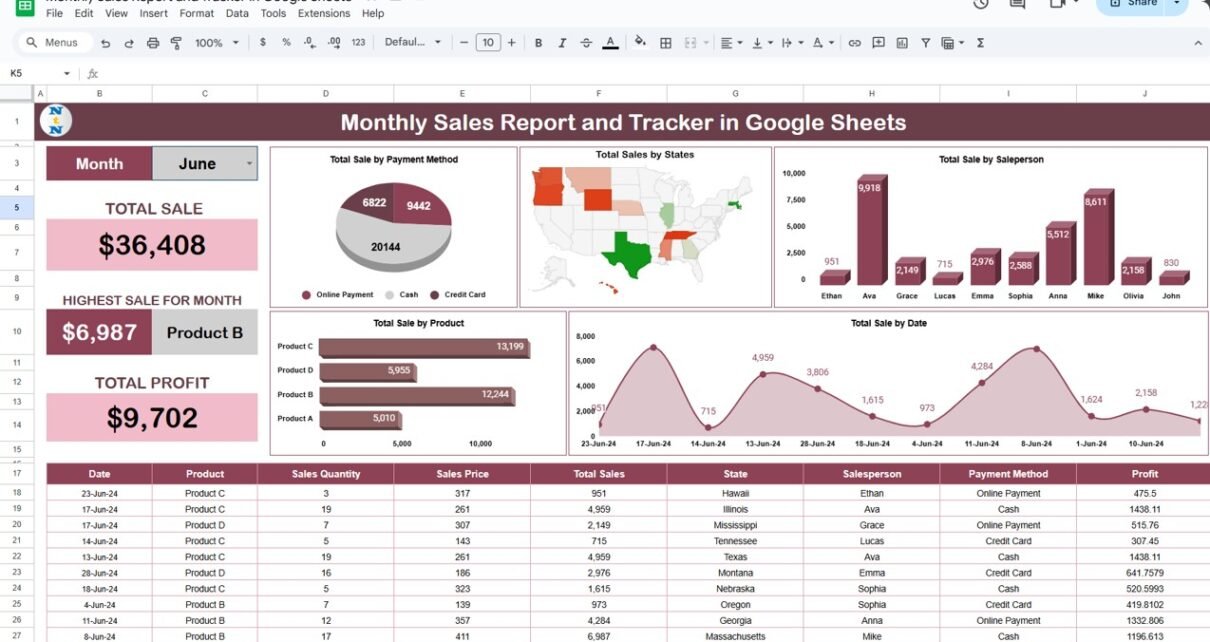
Monthly Sales Report and Tracker in Google Sheets
In today’s data-driven world, having a well-organized sales report and tracker is essential for businesses to understand performance and make informed decisions. Google Sheets provides an excellent platform to create monthly sales reports, thanks to its user-friendly features and cloud-based access. This guide will take you through the process of building a Monthly Sales Report […]
Track Real-Time Sales Performance in Google Sheets
Track Real-Time Sales Performance in Google Sheets in real time is crucial for any business. By having up-to-date information, companies can make informed decisions that improve profitability and efficiency. With Google Sheets, you can easily track sales, analyze trends, and visualize performance metrics. In this comprehensive tutorial, we’ll guide you through the process of setting […]
Mastering Google Sheets Text Functions
Google Sheets offers a variety of text functions that make working with data a breeze. Whether you’re managing names, addresses, or product lists, these functions allow you to manipulate, extract, and format text quickly. If you’re looking to save time and increase efficiency, you’re in the right place! In this guide, we’ll go over five […]
Calculate Date Differences in Google Sheets Using DATEDIF
Calculate Date Differences in Google Sheets between two dates is a common task in spreadsheets, whether you’re managing a project timeline, tracking an employee’s tenure, or calculating a customer’s subscription duration. Google Sheets provides the DATEDIF function, a powerful yet often underused tool, to perform these calculations seamlessly. Calculate Date Differences in Google Sheets In […]
Google Sheets Formulas to Clean Your Data in Seconds
Cleaning data in Google Sheets can seem overwhelming Google Sheets Formulas to Clean Your Data, but with the right formulas, it becomes a breeze. Whether you’re dealing with messy text, duplicates, or inconsistent formats, Google Sheets offers powerful tools to make your data spotless. This guide will walk you through the most effective formulas and […]
Dynamic Map in Google Sheets
Google Sheets is a powerful tool for managing data and creating visualizations. One of its advanced features is the ability to create dynamic maps. A dynamic map in Google Sheets allows you to visualize data in an interactive, map-based format that updates based on user input. This can be incredibly useful for tracking sales performance, […]
ROUND Function in Google Sheets for Precise Calculations
Google Sheets is a powerful tool for data analysis and manipulation, and one of the most commonly used functions is the ROUND Function in Google Sheets. This function allows users to round numbers to a specified number of decimal places, making it an invaluable tool for ensuring precision in calculations. Whether you’re working with financial […]
Master Google Sheets in Minutes with These Life-Changing Tips
Google Sheets has become one of the most widely used tools for organizing data, performing calculations, and collaborating with others. Whether you’re a beginner looking to get started or an advanced user aiming to refine your skills, these life-changing tips will help you master Google Sheets in no time. In this article, we will cover […]
Social Media Performance Dashboard in Google Sheets
In today’s digital world, measuring social media performance is critical for businesses and influencers alike. One of the most efficient ways to track and analyze your social media metrics is by using a Social Media Performance Dashboard in Google Sheets. This powerful tool helps you monitor the impact of your posts, track audience engagement, and […]