Telecommunications companies manage massive volumes of data every single day. Network performance, customer service, revenue metrics, and operational efficiency all depend on accurate tracking. However, when teams rely on scattered spreadsheets or static reports, visibility drops quickly. As a result, performance gaps stay hidden, and decision-making slows down.
That is exactly where a Telecommunications KPI Scorecard in Google Sheets becomes extremely valuable.
A Telecommunications KPI Scorecard in Google Sheets helps telecom teams track, measure, and evaluate performance using clearly defined KPIs. Moreover, it provides real-time visibility, automatic calculations, and visual indicators that make performance easy to understand at a glance.
In this detailed blog post, you will learn what a Telecommunications KPI Scorecard in Google Sheets is, how it works, its key features, advantages, best practices, and how telecom organizations can use it effectively to improve performance.
What Is a Telecommunications KPI Scorecard in Google Sheets?
Click to Buy Telecommunications KPI Scorecard in Google Sheets
A Telecommunications KPI Scorecard in Google Sheets is a ready-to-use performance tracking template designed specifically for telecom businesses. It allows teams to monitor key telecom KPIs on a monthly and yearly basis using Google Sheets.
Instead of building complex dashboards or investing in expensive BI tools, this scorecard provides a simple yet powerful way to measure performance. Because it runs on Google Sheets, teams can collaborate in real time, access data from anywhere, and update KPIs easily.
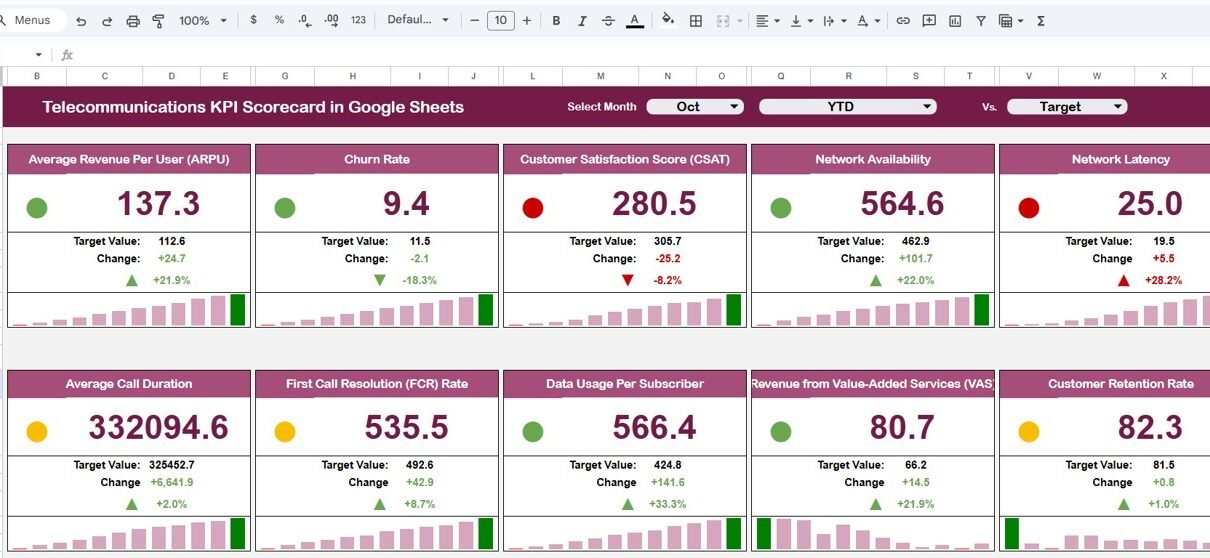
Moreover, the scorecard uses traffic lights, up-down arrows, and percentage changes to highlight performance trends clearly.
Why Do Telecommunications Companies Need a KPI Scorecard?
Telecom organizations operate in a highly competitive and regulated environment. Therefore, even small performance issues can impact customer satisfaction and revenue.
Without a KPI scorecard:
- Teams struggle to track performance consistently
- Monthly reviews take too much time
- KPI trends remain unclear
- Management decisions rely on assumptions
However, with a Telecommunications KPI Scorecard in Google Sheets:
- Performance becomes measurable
- Trends become visible
- Accountability improves
- Decisions become data-driven
As a result, telecom teams stay proactive instead of reactive.
How Does the Telecommunications KPI Scorecard in Google Sheets Work?
Click to Buy Telecommunications KPI Scorecard in Google Sheets
The scorecard works by combining structured data input sheets with automated calculations and dynamic visuals.
Here is how it functions step by step:
- Users enter KPI data in the data input sheet
- KPI definitions guide consistent interpretation
- The scorecard calculates MTD and YTD values automatically
- Traffic lights and arrows update instantly
- Users switch between months using a drop-down
Because everything updates automatically, teams save time and avoid manual errors.
What KPIs Are Tracked in This Telecommunications Scorecard?
This Telecommunications KPI Scorecard in Google Sheets tracks 10 different KPIs to measure telecom performance effectively.
These KPIs may include areas such as:
- Network availability
- Call drop rate
- Average resolution time
- Customer churn rate
- Revenue growth
- Service quality metrics
- Operational efficiency indicators
Since the template remains flexible, organizations can easily modify KPIs based on business needs.
What Are the Key Features of the Telecommunications KPI Scorecard in Google Sheets?
Click to Buy Telecommunications KPI Scorecard in Google Sheets
This scorecard includes multiple well-structured sheets, each serving a specific purpose. Let’s explore them in detail.
How Does the Monthly KPI Scorecard View Work?
At the top of the scorecard, a month drop-down allows users to select any month.
Once a month is selected:
-
All KPI values update automatically
-
Traffic light colors change instantly
-
Percentage change arrows adjust dynamically
As a result, users get a clear monthly performance scorecard without manual recalculation.
How Can You Switch Between MTD and YTD Performance?
Click to Buy Telecommunications KPI Scorecard in Google Sheets
The scorecard provides two simple options:
- Click MTD to view Month-to-Date performance
- Click YTD to view Year-to-Date performance
This feature helps users analyze short-term results while also keeping an eye on long-term trends.
How Do Traffic Lights and Arrows Improve KPI Visibility?
Visual indicators play a crucial role in performance tracking.
This scorecard uses:
- Green for good performance
- Yellow for moderate performance
- Red for poor performance
- Up arrows for improvement
- Down arrows for decline
Because of these visuals, users can instantly understand KPI health without reading numbers.

Click to Buy Telecommunications KPI Scorecard in Google Sheets
What Is the Trend Sheet and How Does It Help Analysis?
The Trend Sheet tab provides deeper KPI insights.
Key Features of the Trend Sheet:
-
KPI selection drop-down in cell C3
Displays:
- KPI Group
- KPI Unit
- KPI Type (Lower the Better / Upper the Better)
Trend Analysis Benefits:
- Tracks KPI movement over time
- Identifies improvement or decline patterns
- Supports data-driven decision-making
As a result, teams move beyond static reporting and focus on continuous improvement.

Click to Buy Telecommunications KPI Scorecard in Google Sheets
Why Is the KPI Definition Sheet Important?
The KPI Definition Sheet ensures clarity and consistency across teams.
Information Captured in This Sheet:
- KPI Name
- KPI Group
- Unit of Measurement
- KPI Formula
- KPI Definition
Because everyone refers to the same definitions, misunderstandings reduce significantly.

Click to Buy Telecommunications KPI Scorecard in Google Sheets
How Does the Data Input Sheet Simplify KPI Updates?
The Data Input Sheet serves as the main data entry point.
What Users Do in This Sheet:
- Enter KPI values regularly
- Update monthly performance data
- Maintain a clean and structured dataset
Since calculations remain automated, users only focus on data accuracy.

Click to Buy Telecommunications KPI Scorecard in Google Sheets
What Is the Role of Color Settings in the Scorecard?
The Color Settings section controls performance thresholds and visual indicators.
Benefits of Color Settings:
- Customize traffic light rules
- Align KPI evaluation with business standards
- Maintain consistent performance logic
This flexibility makes the scorecard suitable for different telecom environments.

Click to Buy Telecommunications KPI Scorecard in Google Sheets
Advantages of Telecommunications KPI Scorecard in Google Sheets
Using a Telecommunications KPI Scorecard in Google Sheets offers several advantages.
Key Advantages:
- Centralized KPI tracking
- Real-time performance updates
- Easy team collaboration
- Automatic MTD and YTD calculations
- Clear performance visibility
- No additional software required
- Access from anywhere
Most importantly, it keeps telecom teams aligned and focused on results.
How Does This Scorecard Improve Decision-Making?
Decision-makers need clarity, not complexity.
This scorecard helps by:
- Highlighting weak KPIs instantly
- Showing performance trends clearly
- Comparing monthly and yearly results
- Supporting quick corrective actions
As a result, leadership decisions become faster and more confident.
Best Practices for the Telecommunications KPI Scorecard in Google Sheets
Click to Buy Telecommunications KPI Scorecard in Google Sheets
To maximize value, organizations should follow proven best practices.
Recommended Best Practices:
- Define KPIs clearly before use
- Update data on a fixed schedule
- Review MTD and YTD performance regularly
- Use trend analysis, not just snapshots
- Align color thresholds with business goals
- Keep KPI definitions updated
- Train users on correct data entry
Following these practices ensures long-term reliability.
Who Should Use a Telecommunications KPI Scorecard in Google Sheets?
This scorecard works well for:
- Telecom operations teams
- Network performance managers
- Customer service leaders
- Finance and revenue teams
- Senior management
Because it uses Google Sheets, both technical and non-technical users can adopt it easily.
Can the Telecommunications KPI Scorecard Be Customized?
Click to Buy Telecommunications KPI Scorecard in Google Sheets
Yes, customization remains one of its biggest strengths.
Organizations can:
- Add or remove KPIs
- Change KPI formulas
- Modify traffic light rules
- Adjust layouts and colors
Therefore, the scorecard grows with your business needs.
Conclusion: Why Choose a Telecommunications KPI Scorecard in Google Sheets?
A Telecommunications KPI Scorecard in Google Sheets provides a practical, flexible, and powerful way to track telecom performance. It replaces scattered reports with a structured, visual, and interactive system.
By using this scorecard, telecom organizations gain clarity, improve accountability, and make smarter decisions without complex tools.
In short, it transforms performance tracking into a strategic advantage.
Frequently Asked Questions (FAQs)
Click to Buy Telecommunications KPI Scorecard in Google Sheets
What is a Telecommunications KPI Scorecard in Google Sheets?
It is a Google Sheets-based template used to track telecom KPIs using MTD, YTD, trends, and visual indicators.
How many KPIs can this scorecard track?
This template tracks 10 KPIs, and users can easily add more.
Does the scorecard support monthly and yearly analysis?
Yes, users can switch between MTD and YTD views instantly.
Can teams collaborate using this scorecard?
Yes, Google Sheets allows real-time collaboration and shared access.
Is this scorecard suitable for small and large telecom companies?
Yes, it works for both small teams and large telecom organizations.
Visit our YouTube channel to learn step-by-step video tutorials
Youtube.com/@NeotechNavigators
Watch the step-by-step video tutorial:
Click to Buy Telecommunications KPI Scorecard in Google Sheets