Organizations grow when their employees grow. However, many companies struggle to identify the right training needs at the right time. Often, training decisions rely on assumptions instead of real data. As a result, budgets get wasted, employees feel disengaged, and skill gaps remain unresolved.Corporate Training Needs Survey Tracker in Google Sheets
A Corporate Training Needs Survey Tracker in Google Sheets solves this challenge. It is a ready-to-use tracker that captures employee training requirements, analyzes them visually, and helps HR teams and management plan effective learning programs. Because it runs on Google Sheets, it remains simple, collaborative, and cost-effective.Corporate Training Needs Survey Tracker in Google Sheets
In this article, we will explain how this tracker works, what charts it includes, how the search feature helps, and why organizations should use it for smarter training planning.Corporate Training Needs Survey Tracker in Google Sheets
What Is a Corporate Training Needs Survey Tracker in Google Sheets?
A Corporate Training Needs Survey Tracker is a structured tool that collects and analyzes training needs submitted through surveys. It helps organizations understand:
- What type of training employees need
- Which departments require urgent skill development
- Priority level of training requests
- Preferred delivery modes
- Current status of training needs
Because the tracker uses Google Sheets, teams can update data in real time and collaborate easily across departments.
Why Do Organizations Need a Training Needs Survey Tracker?
Click to Buy Corporate Training Needs Survey Tracker in Google Sheets
Training programs succeed only when they align with real business and employee needs. Without proper tracking, organizations face problems such as:
-
Repetitive or irrelevant training programs
- Poor training participation
- Misaligned budgets
- Low skill impact
- Limited visibility into department needs
This tracker brings clarity, structure, and data-driven insights into the entire training planning process.
Key Features of the Corporate Training Needs Survey Tracker
This ready-to-use tracker includes:
- A centralized Tracker Sheet Tab
- Multiple insightful charts
- A fast search system
- Clean and structured data layout
Each feature helps HR teams make faster and better decisions.
Tracker Sheet Tab
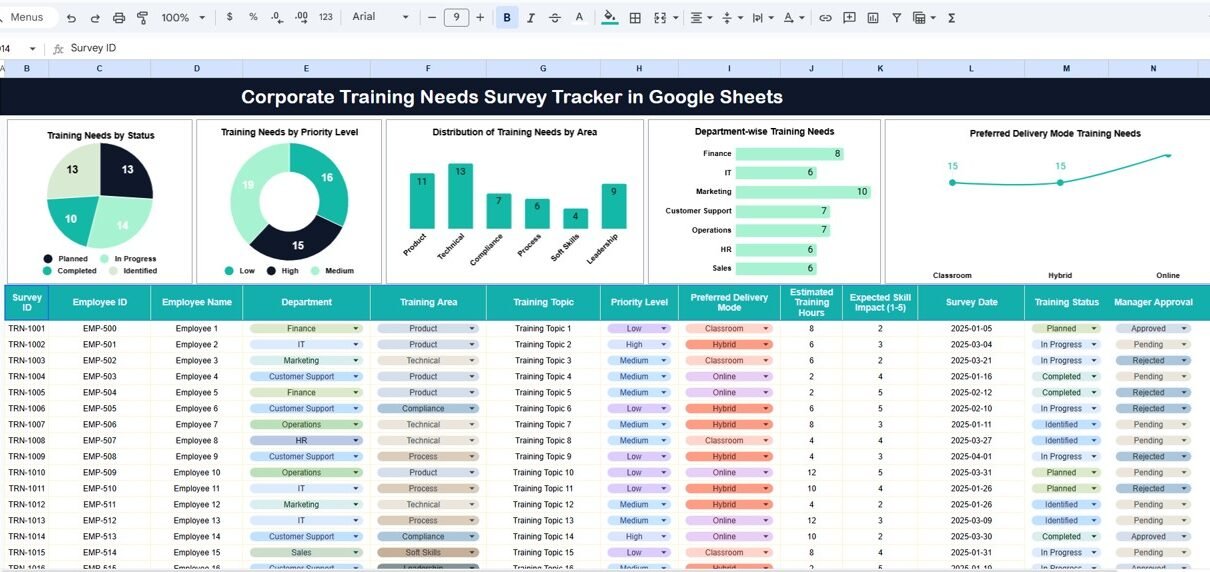
The Tracker Sheet Tab is the core of the system. This is where you store all survey responses and training request details.
Typical fields include:
- Employee Name
- Employee ID
- Department
- Training Area
- Training Priority (Low, Medium, High)
- Training Status (Open, Approved, Planned, Completed)
- Preferred Delivery Mode (Online, Classroom, Hybrid)
- Comments
Once you enter data in this sheet, all charts update automatically.
Charts Included in the Tracker
Click to Buy Corporate Training Needs Survey Tracker in Google Sheets
The dashboard provides multiple charts that convert raw survey data into actionable insights.
1. Training Needs by Status
This chart shows how many training requests fall under each status:
- Open
- Approved
- Planned
- Completed
It helps HR teams track progress and identify delays in training execution.
2. Training Needs by Priority Level
This chart highlights the urgency of training needs:
- High Priority
- Medium Priority
- Low Priority
It helps organizations focus on critical skill gaps first and allocate budgets wisely.
3. Distribution of Training Needs by Area
This chart shows which skill areas require the most training, such as:
- Technical Skills
- Soft Skills
- Leadership
- Compliance
- Process Improvement
This insight helps L&D teams design targeted learning programs.
4. Department-Wise Training Needs
This chart compares training demand across departments.
It helps management understand:
- Which departments need immediate attention
- Where skill gaps exist
- How training demand aligns with business goals
5. Preferred Delivery Mode Training Needs
This chart shows how employees prefer to learn:
- Online
- Classroom
- Hybrid
It helps HR teams design training programs that match employee preferences and improve participation rates.

Click to Buy Corporate Training Needs Survey Tracker in Google Sheets
Search Functionality – Search by Keyword and Field Name
The tracker includes a smart search feature that saves time and effort.
You simply enter:
-
Search Keyword (example: department name or training area)
-
Field Name (example: Department, Training Area, Status)
The tracker instantly filters matching records.
This feature helps HR teams quickly:
-
Find specific training requests
-
Answer management queries
-
Review department-specific needs
-
Prepare reports for leadership

Click to Buy Corporate Training Needs Survey Tracker in Google Sheets
Advantages of the Corporate Training Needs Survey Tracker
1. Data-Driven Training Decisions
The tracker replaces assumptions with real employee input.
2. Better Budget Planning
Clear visibility into priorities prevents overspending.
3. Improved Employee Engagement
Employees feel valued when organizations address their learning needs.
4. Time-Saving Automation
Charts and search reduce manual analysis.
5. Cross-Department Visibility
HR and management work from a single source of truth.
6. Easy Collaboration
Google Sheets allows real-time multi-user access.
Opportunities for Improvement in the Training Needs Tracker
Click to Buy Corporate Training Needs Survey Tracker in Google Sheets
Although the tracker is powerful, organizations can enhance it further:
- Add training cost estimates
- Track post-training feedback scores
- Measure training effectiveness over time
- Add automated email notifications
- Integrate with Learning Management Systems (LMS)
These improvements turn the tracker into a complete training intelligence system.
Best Practices for Using the Training Needs Survey Tracker
- Conduct surveys at least twice a year
- Standardize training areas and priority definitions
- Review charts monthly
- Align training needs with business goals
- Involve department managers in validation
- Use search during leadership meetings
Following these practices ensures accurate insights and better outcomes.
Who Can Use This Tracker?
Click to Buy Corporate Training Needs Survey Tracker in Google Sheets
This tracker is useful for:
- HR Teams
- Learning & Development Teams
- Department Managers
- Talent Development Leaders
- Corporate Training Consultants
It works for small businesses, mid-size companies, and large enterprises.
Conclusion
A Corporate Training Needs Survey Tracker in Google Sheets helps organizations design smarter, more effective training programs. It captures employee needs, visualizes trends, and supports data-driven decisions. Because it is easy to use, cloud-based, and ready to deploy, it becomes an essential tool for modern HR and L&D teams.
With clear charts, a powerful search feature, and structured data, this tracker ensures that training investments deliver real value.
Frequently Asked Questions (FAQs)
Click to Buy Corporate Training Needs Survey Tracker in Google Sheets
1. Is this tracker suitable for large organizations?
Yes, it supports unlimited records and departments.
2. Can I customize training areas and priorities?
Yes, the tracker is fully customizable.
3. Does it require technical skills?
No, basic Google Sheets knowledge is enough.
4. Can multiple users work on it simultaneously?
Yes, Google Sheets supports real-time collaboration.
5. Can I track completed trainings?
Yes, the status chart helps monitor completion.
6. Can this tracker replace manual survey analysis?
Yes, it automates analysis and visualization completely.
Visit our YouTube channel to learn step-by-step video tutorials
Youtube.com/@NeotechNavigators
Watch the step-by-step video tutorial:
Click to Buy Corporate Training Needs Survey Tracker in Google Sheets