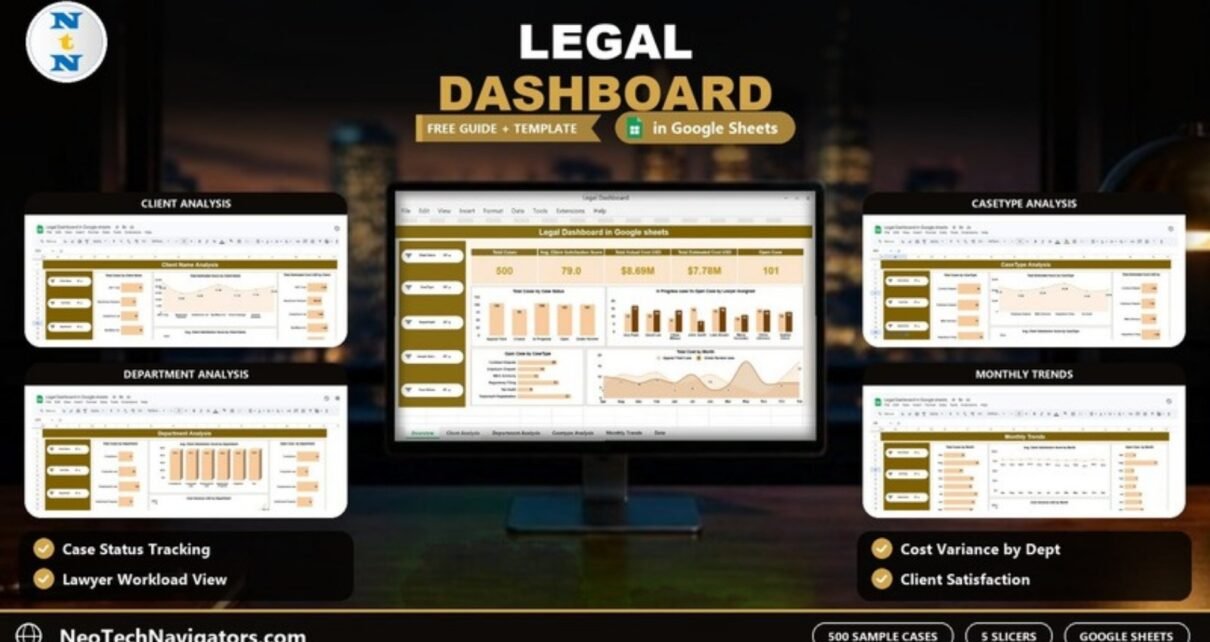
The Legal Dashboard in Google Sheets gives law firms and in-house legal teams one place to see case volume, case status, legal cost, cost variance and client satisfaction, broken down by client, department, case type, lawyer and month.
It is designed for managing partners, legal operations managers and heads of legal who already keep a case list in a spreadsheet and want a clear monthly picture without buying a full practice-management system. The file has five analysis pages (Overview, Client Name Analysis, Department Analysis, CaseType Analysis and Monthly Trends), a keyword search sheet and a data sheet. Every analysis page has the same five slicers.
This guide explains every page with the real numbers from the sample file, the KPIs and how they are calculated, and how to switch the dashboard to your own case data.
🎥 Watch the Video Tutorial
Get the Legal Dashboard in Google Sheets
Why Legal Teams Need a Dashboard
A legal team’s case list grows quickly: every matter has a client, a department, a case type, a lawyer, a status, estimated and actual hours, estimated and actual cost, and a satisfaction score. When that list reaches a few hundred rows, simple questions become slow to answer. How many cases are still open? Which lawyer carries the most in-progress work? Which department runs furthest over its cost estimate?
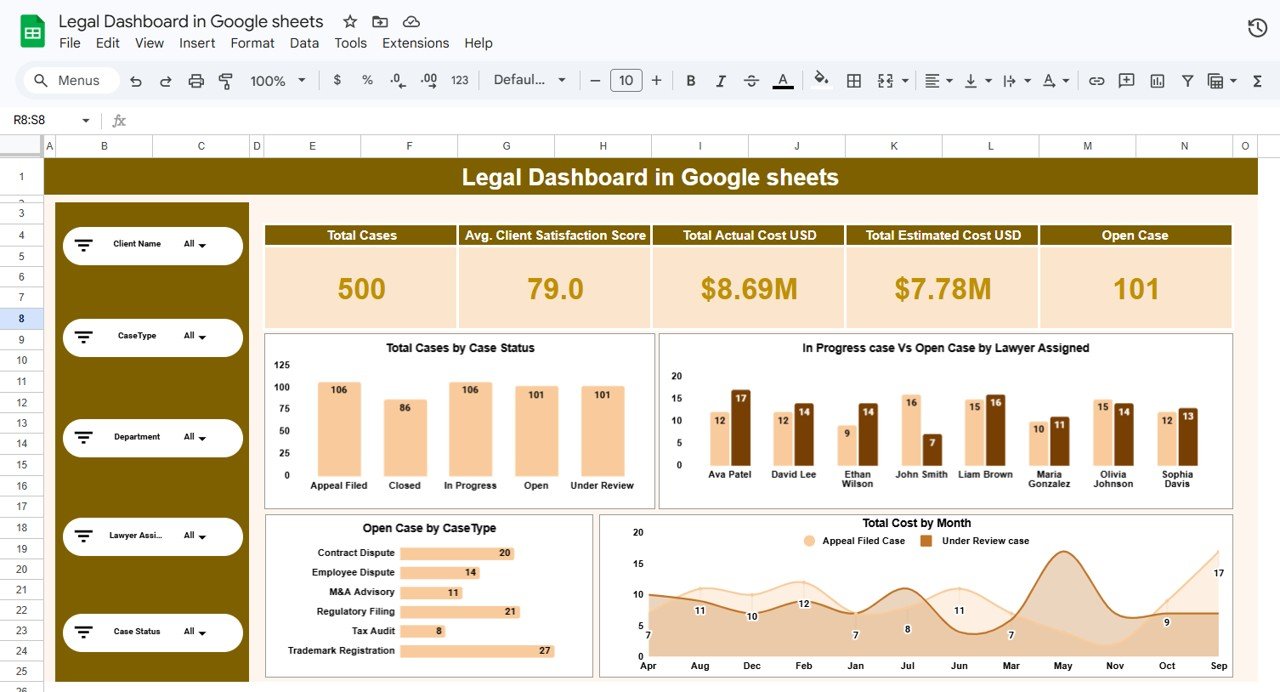
A dashboard answers those questions in seconds. The sample file summarises 500 cases, an average client satisfaction score of 79.0, $8.69M in actual cost against $7.78M estimated, and 101 open cases.
Slicers Used on Every Analysis Page
A slicer panel on the left of each analysis page lets you filter by:
- Client Name
- CaseType
- Department
- Lawyer Assigned
- Case Status
Overview Page: The Main Legal Dashboard
The Overview page combines five KPI cards with four charts.
KPI cards and how they are calculated
| KPI | What it measures | How it is calculated | Sample value | Better when |
|---|---|---|---|---|
| Total Cases | Number of matters in the current filter | Count of case rows | 500 | Context metric |
| Avg. Client Satisfaction Score | How satisfied clients are | Average of Client Satisfaction Score | 79.0 | Higher |
| Total Actual Cost USD | What the cases actually cost | Sum of Actual Cost USD | $8.69M | Lower, relative to the estimate |
| Total Estimated Cost USD | What the cases were expected to cost | Sum of Estimated Cost USD | $7.78M | Benchmark for actual cost |
| Open Case | Matters still open | Count of rows where Case Status is Open | 101 | Lower, as a share of total |
Charts on the Overview page
- Total Cases by Case Status: Appeal Filed 106, Closed 86, In Progress 106, Open 101 and Under Review 101 (together the 500 cases).
- In Progress case Vs Open Case by Lawyer Assigned: compares workload for the eight lawyers in the sample (Ava Patel, David Lee, Ethan Wilson, John Smith, Liam Brown, Maria Gonzalez, Olivia Johnson and Sophia Davis).
- Open Case by CaseType: Trademark Registration has the most open cases (27), followed by Regulatory Filing (21) and Contract Dispute (20).
- Total Cost by Month: a monthly area chart with two series, Appeal Filed Case and Under Review case. Despite the title, the plotted values (between 7 and 17) read as case counts per month for those two statuses rather than dollar amounts, so use the Monthly Trends page for cost.
Worked Example: Reading Cost Variance
Cost variance tells you how far actual legal cost moved away from the estimate. In this dashboard it is the difference between the two cost columns:
Cost Variance USD = Actual Cost USD − Estimated Cost USDUsing the Overview totals: $8.69M − $7.78M ≈ $0.91M over estimate. You can check this on the Department Analysis page: the six department variances ($75.1K, $201.0K, $128.7K, $80.1K, $146.4K and $281.7K) add up to roughly $913K, the same figure. A positive variance means cases cost more than planned; a negative value (which appears in some months) means they came in under estimate.
Client Name Analysis
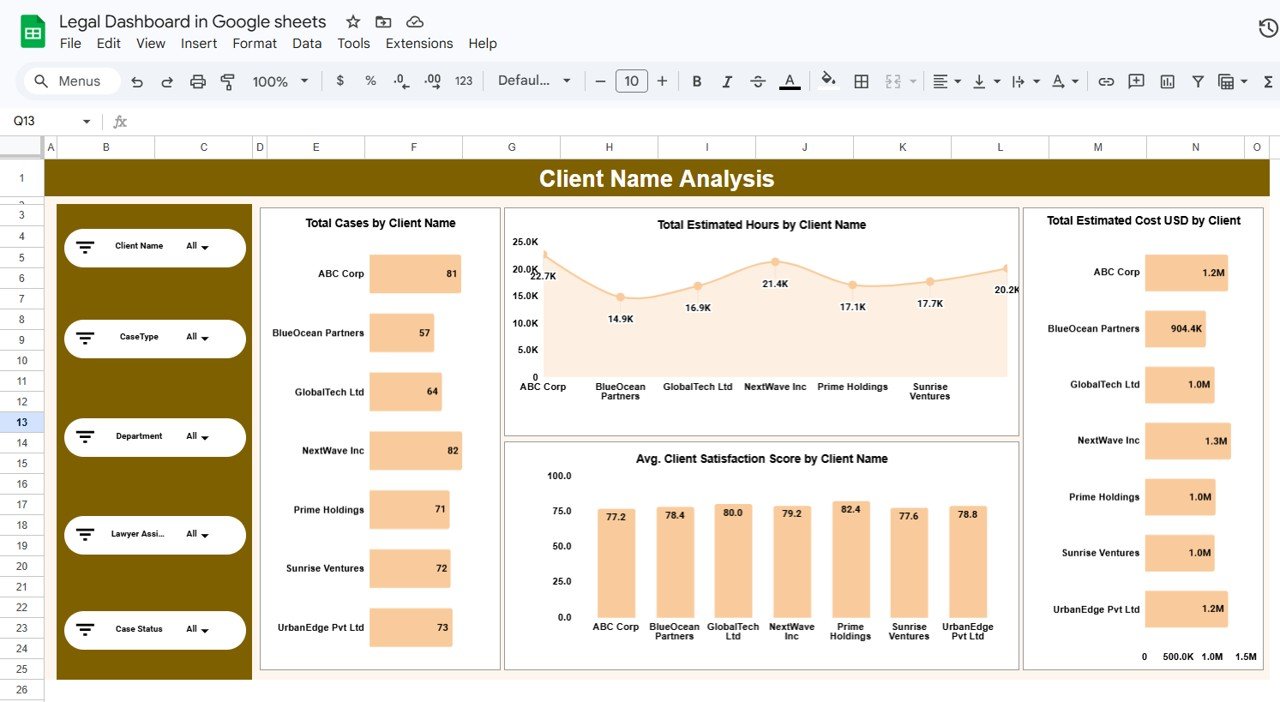
This page shows which clients drive your workload and cost. The seven sample clients are ABC Corp, BlueOcean Partners, GlobalTech Ltd, NextWave Inc, Prime Holdings, Sunrise Ventures and UrbanEdge Pvt Ltd.
- Total Cases by Client Name: NextWave Inc (82) and ABC Corp (81) have the most cases.
- Total Estimated Hours by Client Name: ABC Corp is highest at 22.7K hours.
- Avg. Client Satisfaction Score by Client Name: ranges from 77.2 (ABC Corp) to 82.4 (Prime Holdings).
- Total Estimated Cost USD by Client: NextWave Inc is highest at $1.3M.
Comparing these charts side by side is useful in account reviews: a client with many hours but a lower satisfaction score may need a service conversation, not just more capacity.
Department Analysis
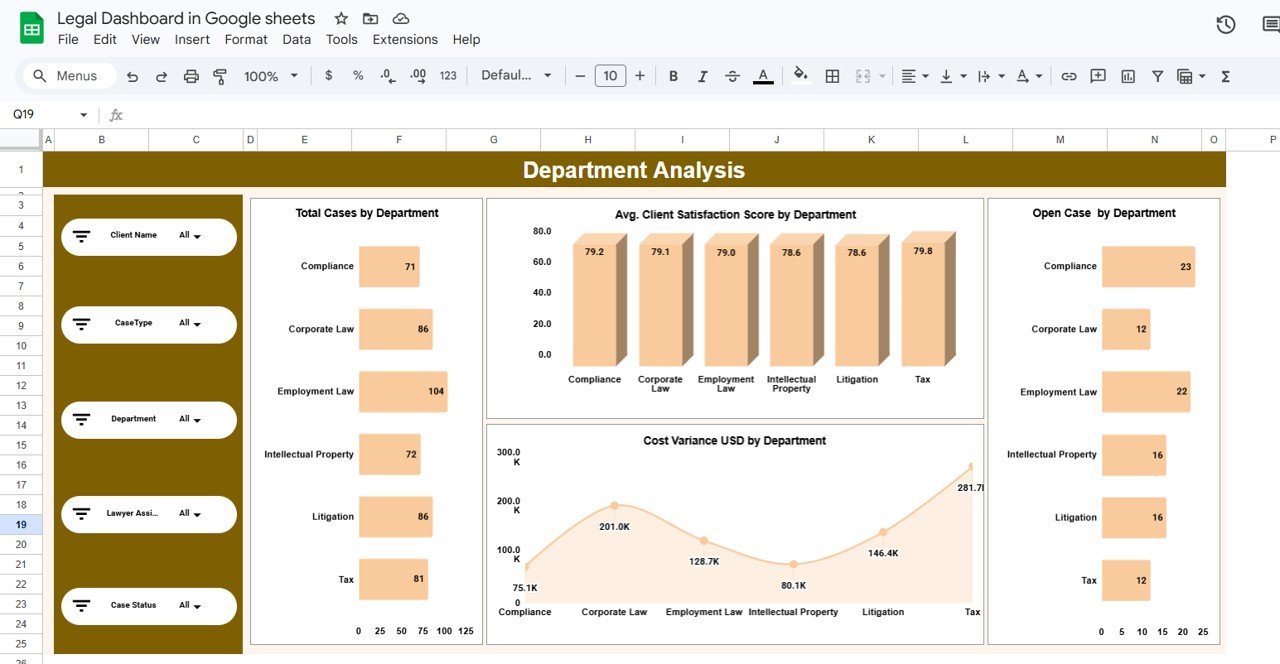
The sample uses six departments: Compliance, Corporate Law, Employment Law, Intellectual Property, Litigation and Tax.
- Total Cases by Department: Employment Law has the most (104).
- Avg. Client Satisfaction Score by Department: tightly grouped between 78.6 and 79.8.
- Open Case by Department: Compliance (23) and Employment Law (22) hold the most open cases.
- Cost Variance USD by Department: Tax shows the largest overrun ($281.7K), followed by Corporate Law ($201.0K).
CaseType Analysis
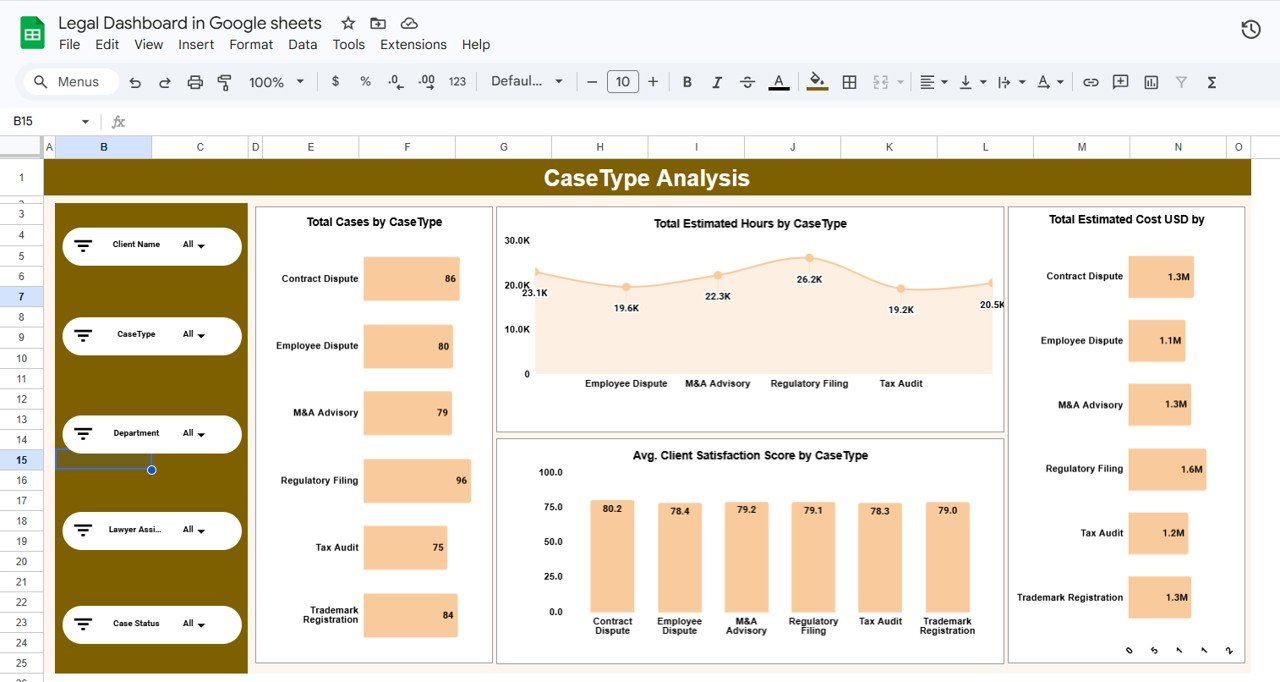
This page compares the six case types: Contract Dispute, Employee Dispute, M&A Advisory, Regulatory Filing, Tax Audit and Trademark Registration.
- Total Cases by CaseType: Regulatory Filing is the most common (96).
- Total Estimated Hours by CaseType: Regulatory Filing also needs the most hours (26.2K).
- Avg. Client Satisfaction Score by CaseType: Contract Dispute scores highest (80.2).
- Total Estimated Cost USD by CaseType: Regulatory Filing is highest at $1.6M.
Use this page when pricing new work or planning headcount: case types that consume the most estimated hours are where specialist capacity matters most.
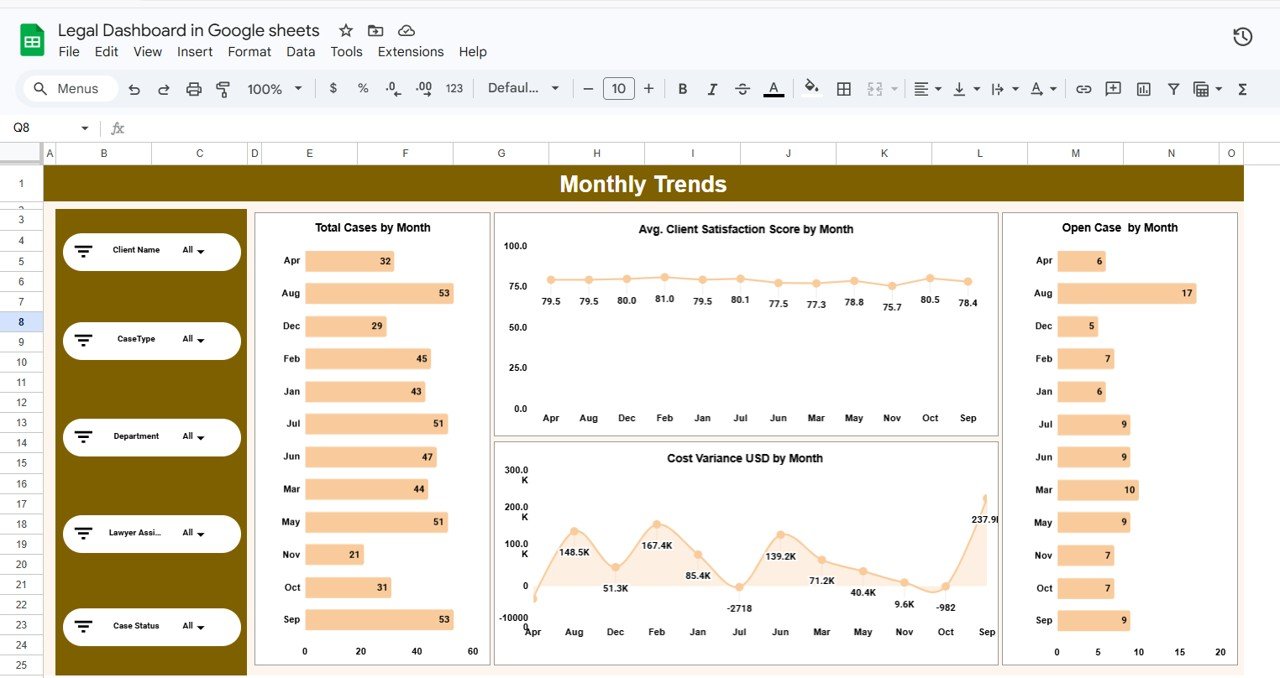
Monthly Trends
The Monthly Trends page shows how the practice changes through the year:
- Total Cases by Month: August and September are the busiest months (53 each).
- Avg. Client Satisfaction Score by Month: stays between 75.7 and 81.0.
- Open Case by Month: August has the most open cases (17).
- Cost Variance USD by Month: September shows the largest overrun ($237.9K), while July and October dip slightly below zero.
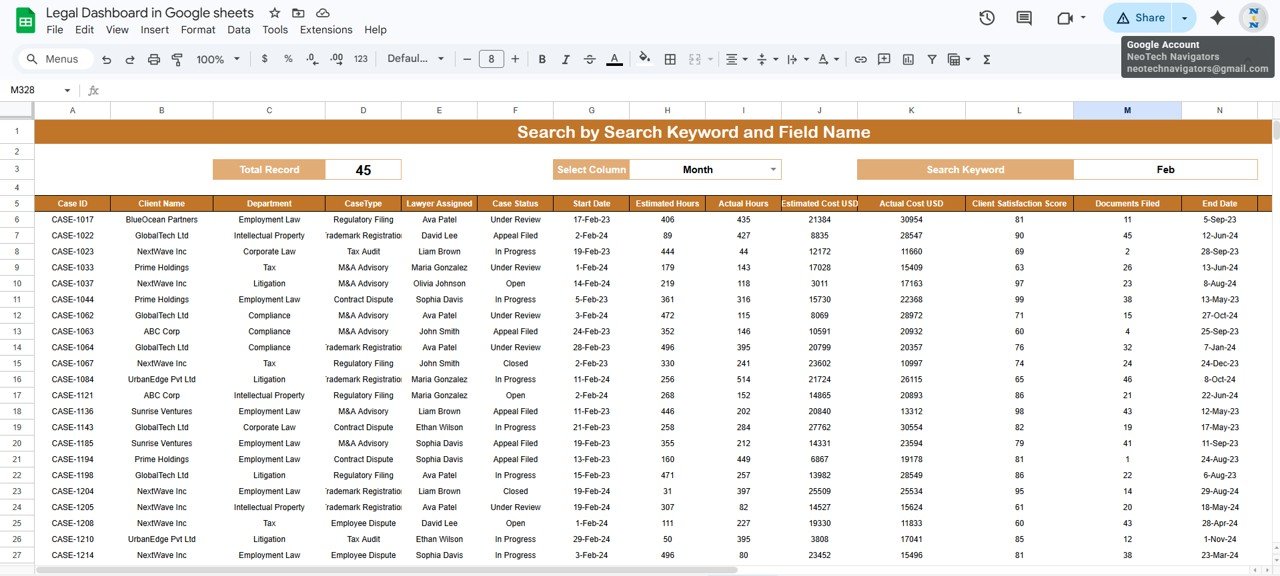
Search by Keyword and Field Name
The search sheet, titled Search by Search Keyword and Field Name, lets you pull matching records without filtering the raw data. Choose a field in Select Column, type a value in Search Keyword, and the sheet lists every matching case with a Total Record count. In the screenshot, Select Column = Month and Search Keyword = Feb returns 45 records, which matches the February bar on the Monthly Trends page.
Data Sheet Columns
Every page reads from one data table. The columns shown in the search results are:
| Column | Example from the sample |
|---|---|
| Case ID | CASE-1017 |
| Client Name | BlueOcean Partners |
| Department | Employment Law |
| CaseType | Regulatory Filing |
| Lawyer Assigned | Ava Patel |
| Case Status | Under Review |
| Start Date | 17-Feb-23 |
| Estimated Hours / Actual Hours | 406 / 435 |
| Estimated Cost USD / Actual Cost USD | 21384 / 30954 |
| Client Satisfaction Score | 81 |
| Documents Filed | 11 |
| End Date | 5-Sep-23 |
How to Use the Legal Dashboard in Google Sheets with Your Own Case Data
- Make your own copy of the Google Sheets file.
- Open the data sheet and keep the header row exactly as it is.
- Export or copy your matters from your case list, in the same column order as the table above.
- Use the same status labels (Open, In Progress, Under Review, Appeal Filed, Closed) or update every chart that depends on them.
- Make sure dates are real dates and hours, costs and scores are numbers, not text.
- Open the Overview page and confirm Total Cases equals the number of rows you pasted.
- Filter by Lawyer Assigned or Department to check the results look right before sharing.
If you would like to understand the pivot summaries behind pages like these, the Pivot Tables & Dashboards course on NextGenTemplates Academy covers them step by step.
Real-World Use Cases
Weekly workload balancing
A legal operations manager opens the Overview each Monday, checks the In Progress vs Open chart by lawyer, and reassigns new matters to whoever has the lightest load.
Quarterly client reviews
Filter by Client Name before a review meeting to see that client’s cases, hours, estimated cost and satisfaction score on one page.
Budget control for in-house legal
Heads of legal can use the Cost Variance by Department chart to explain overruns to finance and to set more realistic estimates for the next year.
Best Practices
- Update case status the same day it changes so Open Case stays accurate.
- Record estimated cost at intake and do not overwrite it later; otherwise the variance loses its meaning.
- Use drop-down lists for client, department, case type and lawyer to avoid spelling variants.
- Restrict edit access to the data sheet and share dashboards as view-only where possible, since case data is confidential.
Limitations: Who Should Not Use It
- It is a reporting dashboard, not a practice-management or billing system. It does not handle time entry, invoicing, document storage or court deadlines.
- Data is entered or pasted manually; there is no live connection to case management software.
- Large firms with thousands of active matters and strict access controls are better served by dedicated legal software.
- Avoid storing privileged details in the sheet; keep it to the fields the dashboard needs.
Related reading: the Legal KPI Dashboard in Google Sheets for target-based tracking, the Law Firm Performance Dashboard in Google Sheets, the Legal Compliance Dashboard in Google Sheets and the Legal Document Review Tracker in Google Sheets. If your team works in desktop Excel, there is also a Legal Dashboard in Excel.
Frequently Asked Questions
What does a legal dashboard track?
This one tracks total cases, open cases, client satisfaction, estimated and actual cost, and cost variance, split by client, department, case type, lawyer and month.
How is cost variance calculated?
Actual Cost USD minus Estimated Cost USD. In the sample, $8.69M − $7.78M gives about $0.91M over estimate.
Can I filter by lawyer or client?
Yes. The slicers cover Client Name, CaseType, Department, Lawyer Assigned and Case Status.
How does the search sheet work?
Pick a column in Select Column, type a keyword, and the sheet lists all matching cases with a Total Record count.
Can I rename departments or case types?
Yes. The charts read the values in your data, so your own departments and case types appear once you paste them.
Do I need Excel or any add-on?
No. It runs in Google Sheets in any browser. An Excel version is available separately if you prefer desktop Excel.
Wrapping Up
The Legal Dashboard in Google Sheets turns a case list into a clear view of workload, cost overruns and client satisfaction. Paste your matters into the data sheet, check that Total Cases matches, and review the Overview and Department pages every week.
Get the Legal Dashboard in Google Sheets
📅 Last updated: October 2026