Introduction
Managing and tracking performance in film production can be complex. To simplify this process, we have created a Film Production KPI Scorecard in Google Sheets. This ready-to-use template provides a seamless way to monitor key performance indicators (KPIs) in your film projects, ensuring timely insights and informed decision-making.Film Production KPI Scorecard in Google Sheets
Key Features of Film Production KPI Scorecard in Google Sheets
- Four Distinct Worksheets: Enables organized data input, KPI definitions, trend analysis, and a consolidated scorecard.
- Interactive Dropdown Menus: Easily select month, Month-to-Date (MTD), or Year-to-Date (YTD) views for dynamic performance tracking.
- Comparison of Actual vs Target: Quickly evaluate if your film project KPIs meet expectations.
- Visual Performance Indicators: Color-coded statuses for intuitive understanding of KPI results.
- Comprehensive KPI Overview: Dashboard with all relevant details including trends and definitions.
- Trend Visualization: Graphical representation of KPIs that highlight performance over selected periods.
Dashboard Pages Explanation
1. Scorecard Sheet
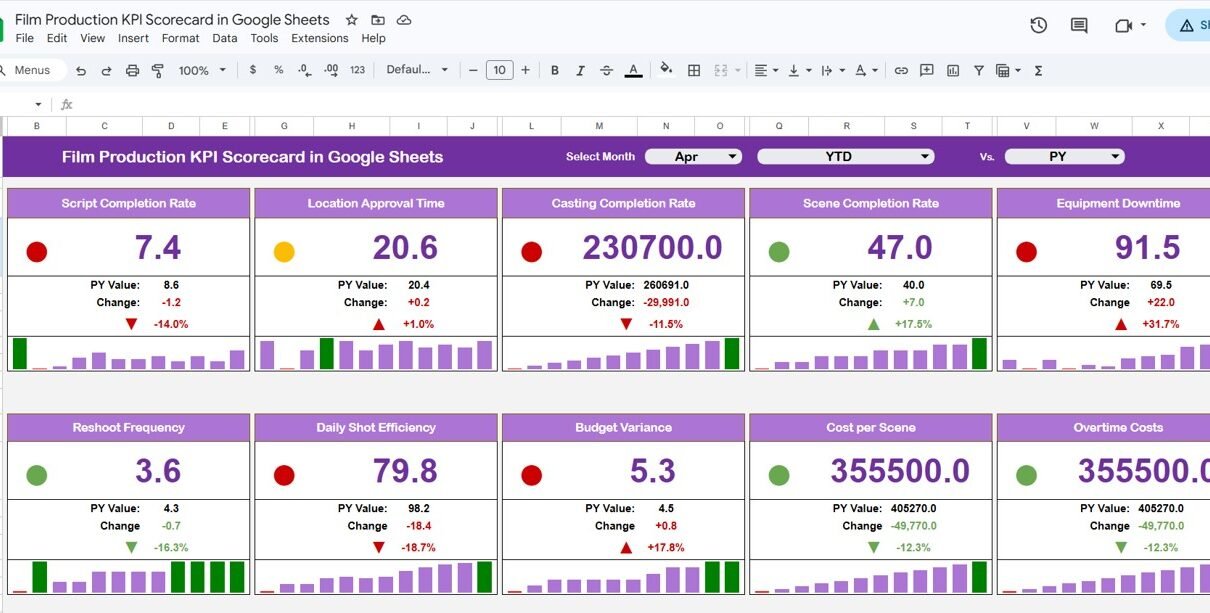
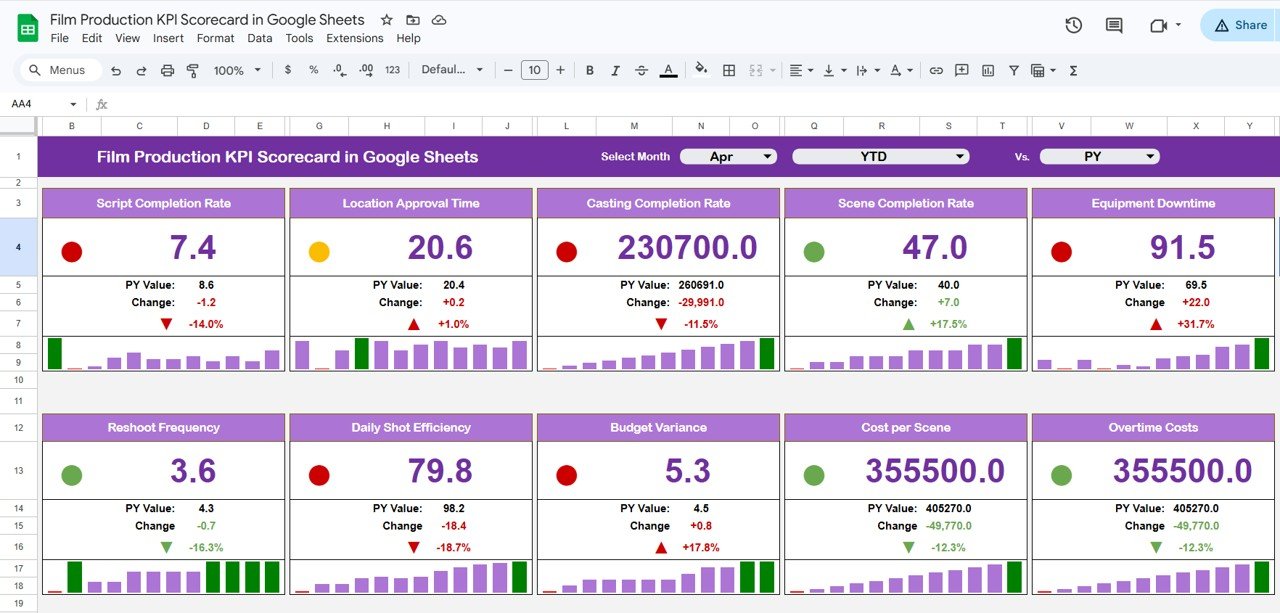
This is the primary interface where you track the overall KPI performance for your film production project. Key features include:
- Dropdown Menus: Filter data by selecting the month and view modes (MTD or YTD).
- Actual vs Target Values: Clearly compare results against set goals for each KPI.
- Visual Indicators: Color codes highlight performance-green for on target, red for underperformance.
- KPI Overview: Displays all necessary KPI data in an organized fashion.
 Film Production KPI Scorecard in Google Sheets
Click to Buy Film Production KPI Scorecard in Google Sheets
2. KPI Trend Sheet
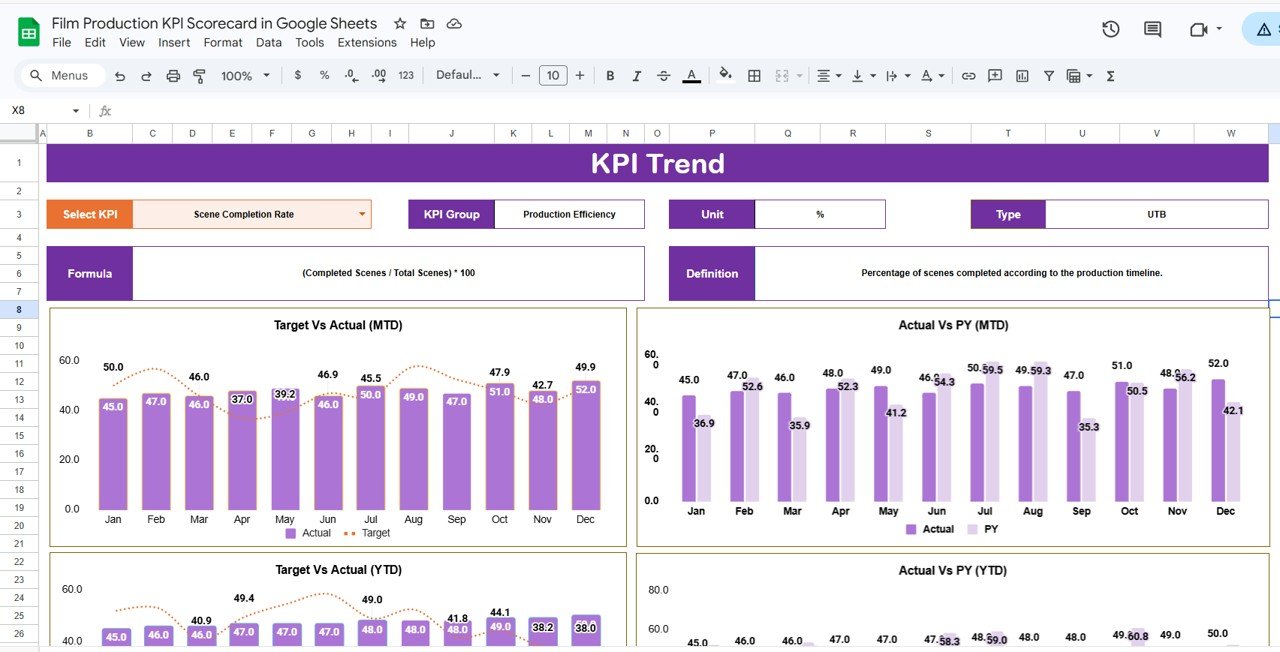
This tab allows you to select any KPI from the dropdown in cell C3 to visualize trends and details.
- KPI Details: Includes KPI Group, Unit, Type (whether lower values are better or higher), formula, and definitions.
- Trend Charts: Graphs showing monthly trends in Actual, Target, and Previous Year (PY) values with MTD and YTD context.
 KPI Trend Sheet
3. Input Data Sheet
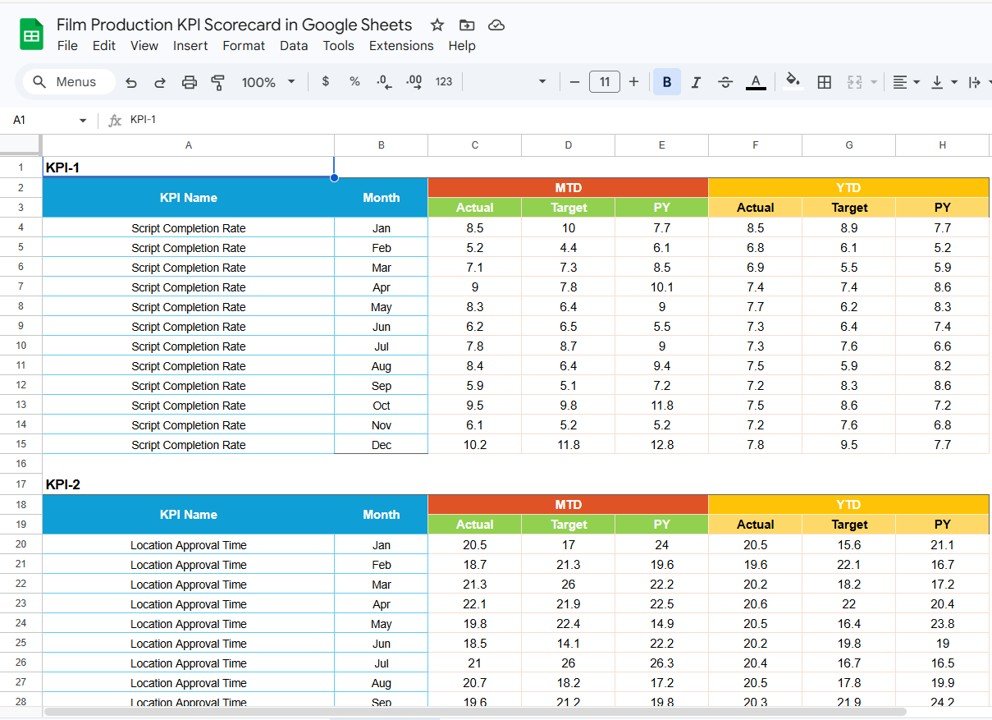
This sheet is where all KPI data is entered and updated regularly.
- Data Entry: Record actual performance, targets, and other relevant metrics for each KPI.
- Ease of Updates: Keep your scorecard current by adding new data as it becomes available.
 Input Data Sheet
Click to Buy Film Production KPI Scorecard in Google Sheets
4. KPI Definition Sheet
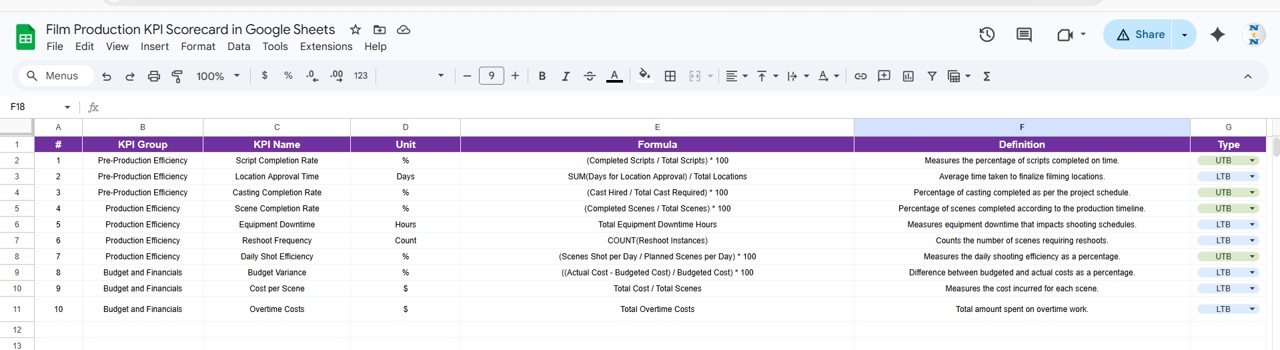
Use this tab to specify crucial information about each KPI, such as:
- KPI Name
- KPI Group
- Unit of Measure
- Formula Used
- Detailed KPI Definition
 KPI Definition sheet tab
Advantages of Film Production KPI Scorecard in Google Sheets
- User-Friendly Interface: Designed to be intuitive for production managers and teams.
- Real-Time Updates: Cloud-based Google Sheets allow simultaneous access and updates.
- Cost-Effective: Uses free Google Sheets platform, eliminating need for expensive software.
- Customizable: Easily tailor the scorecard to your unique film project KPIs.
- Enhanced Decision-Making: Centralized KPIs with visual data foster quick insights and prompt action.
Opportunities for Improvement
Click to Buy Film Production KPI Scorecard in Google Sheets
- Automation: Integrate with Google Forms or APIs to automate data input and reduce manual effort.
- Mobile Optimization: Enhance usability for on-the-go access through mobile devices.
- Integrated Alerts: Setup notifications based on KPI deviations to stay proactive.
- Expanded Reporting: Add exportable insight reports in PDF or slide deck formats.
Best Practices
- Regularly Update Data: Ensure accuracy by inputting data timely.
- Define Clear KPIs: Use the KPI Definition sheet to maintain uniformity and clarity.
- Use Visual Cues: Leverage conditional formatting for quick status evaluation.
- Engage Stakeholders: Share the scorecard with your production team for transparency.
- Review Trends Periodically: Use the KPI Trend sheet to spot patterns and adjust strategies accordingly.
FAQs
Click to Buy Film Production KPI Scorecard in Google Sheets
Can I customize the Film Production KPI Scorecard in Google Sheets?
Yes, the template is fully customizable allowing you to add or modify KPIs according to your project needs.
Is this KPI Scorecard suitable for all types of film productions?
While designed broadly, it is flexible and can be adapted to various film production scales and genres.
How can I share this dashboard with my team?
Since it’s built in Google Sheets, sharing is simple through Google Drive’s sharing options with view or edit permissions.
Does this template support automated data imports?
Currently, data entry is manual, but integrating automation via Google Apps Script or external APIs is possible with some customization.
Conclusion
Click to Buy Film Production KPI Scorecard in Google Sheets
The Film Production KPI Scorecard in Google Sheets is an essential tool for effective performance tracking and decision-making. Its intuitive design, combined with powerful features like trend visualization and data comparison, make it an invaluable asset for producers and managers striving for project excellence.
Start leveraging this ready-to-use template today to streamline your film production KPIs and drive success.
For more insights and demos, visit our YouTube channel.
Explore more on KPI management and tools at Microsoft’s official KPI resources.