Habit Tracker in Google Sheets is a powerful, cloud-based habit management template that helps you build, monitor, and sustain daily habits over 30-day and 90-day cycles. Whether you want to exercise regularly, read daily, meditate, practice gratitude, or develop any positive routine — this Google Sheets Tracker Template delivers everything you need to take full control of your daily habits and build lasting consistency.
This template includes 5 professionally designed pages — an Overview Dashboard, a 30-Day Tracker, a 90-Day Tracker, a Habit Setup configuration page, and an Analytics page. It is ideal for students, working professionals, fitness enthusiasts, and anyone looking to build positive daily routines using Google Sheets Templates.
Get the Habit Tracker in Google Sheets
Key Features of Habit Tracker in Google Sheets
The Habit Tracker in Google Sheets includes 5 interactive pages with 4 KPI cards, 3 analytical charts, slicer filters, and advanced analytics. Here is what makes this template stand out:
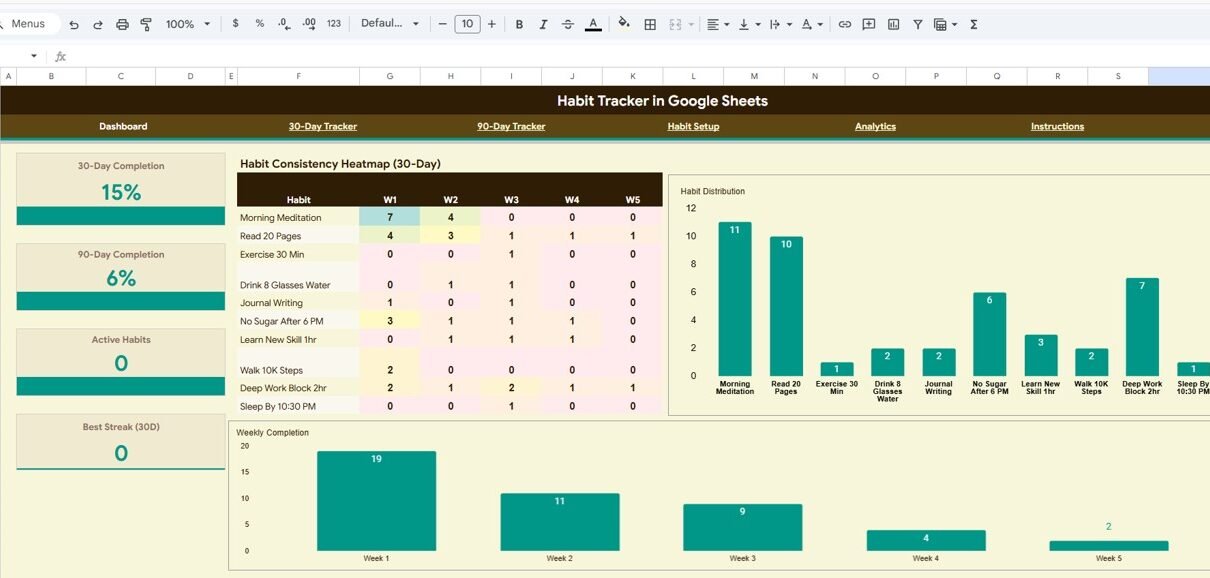
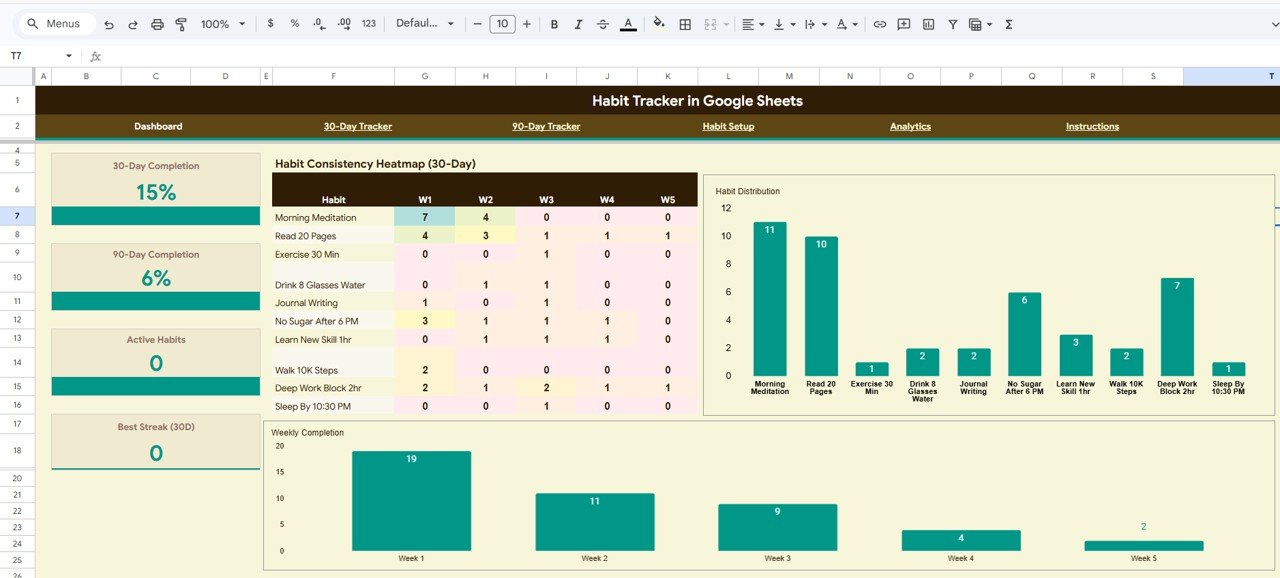
- Interactive Overview Dashboard – Features 4 KPI cards showing 30-Day Completion, 90-Day Completion, Active Habits, and Best Streak (30D) for instant performance awareness.
- 3 Dynamic Charts – Visualize your progress with Habit Consistency Heatmap by Week, Habit Distribution by Habit Name, and Weekly Completion by Week.
- Slicer Filters – Apply quick filters on the Overview dashboard to analyze data by habit, category, or time period instantly.
- 30-Day and 90-Day Tracking – Monitor habits across both short-term and long-term cycles with day-by-day completion tracking.
- Customizable Habit Setup – Configure habit names, categories, frequency, start dates, targets, status, and notes all in one centralized page.
- Advanced Analytics – Includes Habit Performance Ranking by Completion Rate, Completion by Category, and Day-of-Week Analysis to identify your strongest and weakest days.
- Fully Automated – All formulas, KPIs, and charts update automatically when you mark your daily completions.
Dashboard Pages Explanation
1. Overview Page
The Overview page serves as your habit command center. At the top, you will find 4 high-level KPI cards displaying 30-Day Completion, 90-Day Completion, Active Habits, and Best Streak (30D). Below the cards, the page features 3 interactive charts: a Habit Consistency Heatmap organized by Week that gives you a visual representation of which weeks you performed best, a Habit Distribution chart organized by Habit Name showing how your efforts are spread across different habits, and a Weekly Completion chart organized by Week that tracks your overall completion trend over time. Multiple slicers are provided to filter the entire dashboard by habit, category, or any other dimension.
Habit Tracker in Google Sheets2. 30-Day Tracker
The 30-Day Tracker page is designed for short-term habit monitoring. It displays Daily Habit Completion organized by Day (1-30) so you can mark each habit as complete or incomplete for every day of the month. The page also shows Done Count by Habit to see how many days each habit was completed, Completion Percentage by Habit for a quick percentage view of your discipline, and Total and Average by Day to understand which days of the month you tend to be most consistent.
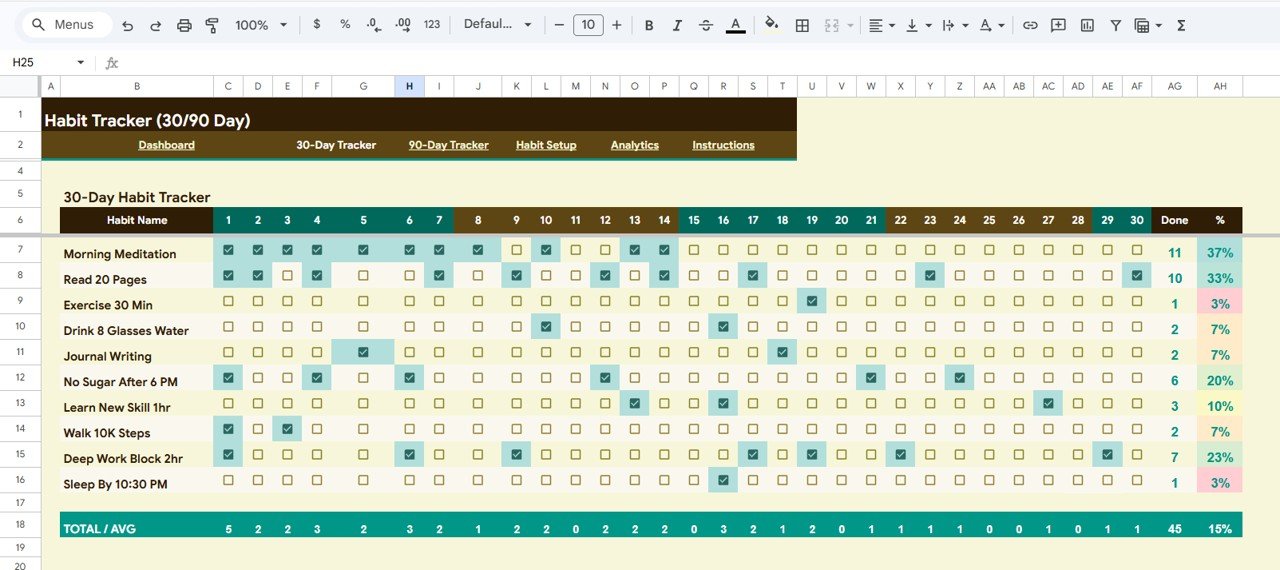 30-Day Tracker
3. 90-Day Tracker
The 90-Day Tracker extends your habit tracking over a full quarter. Research from the European Journal of Social Psychology suggests it takes an average of 66 days to form a lasting habit — making this 90-day cycle ideal for solidifying routines. This page tracks Daily Habit Completion organized by Day (1-90), Done Count by Habit, and Completion Percentage by Habit across the entire 90-day period.
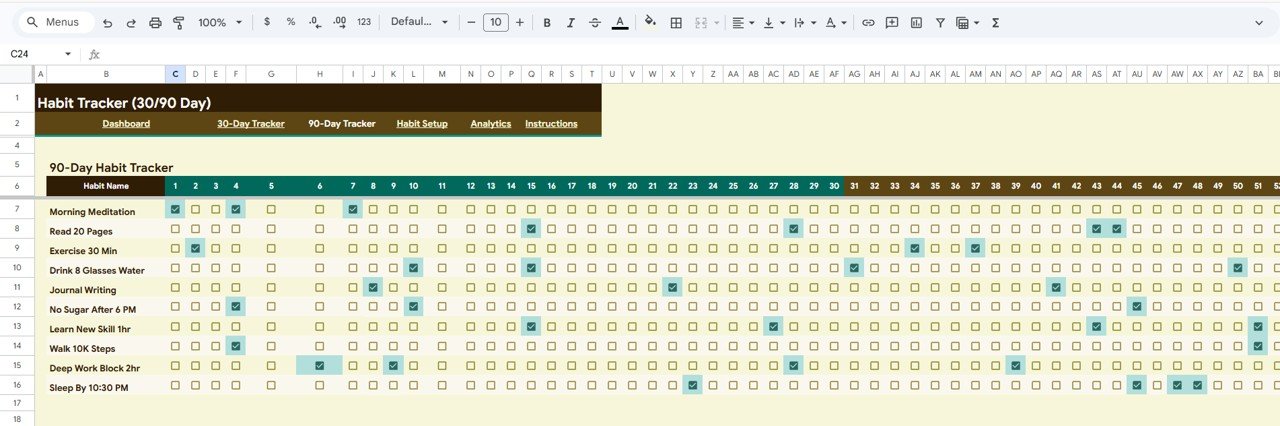 90-Day Tracker
4. Habit Setup
The Habit Setup page is your central configuration hub where you define all your habits before tracking begins. It includes Habit Configuration organized by Habit Name, Category organized by Habit for grouping habits into areas like Health, Productivity, Learning, and Wellness, Frequency organized by Habit for setting daily, weekly, or custom schedules, Start Date and Target organized by Habit for deadline-based goals, and Status and Notes organized by Habit for managing active versus paused habits and adding personal reminders.
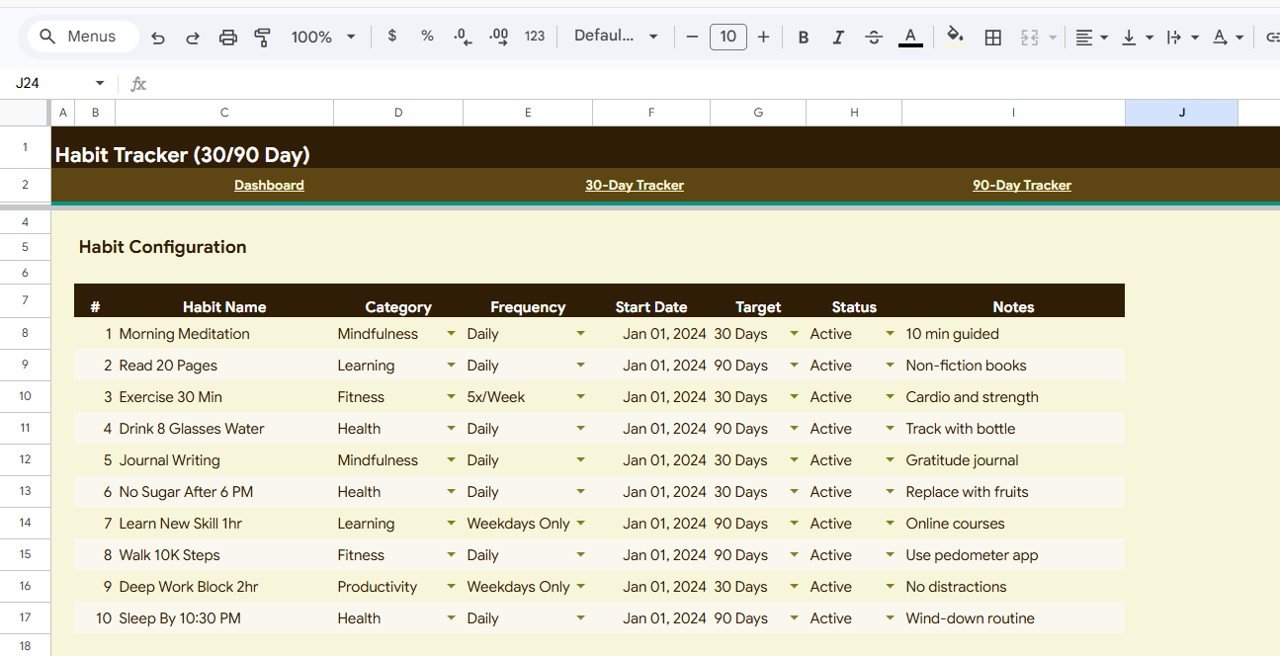 Habit Setup
5. Analytics
The Analytics page provides deep performance insights that go beyond simple completion tracking. It features Habit Performance Ranking organized by Completion Rate so you can see which habits you are most consistent with, Completion organized by Category to understand which areas of your life are getting the most attention, and Day-of-Week Analysis organized by Day to discover patterns like whether you tend to skip habits on weekends or Mondays.
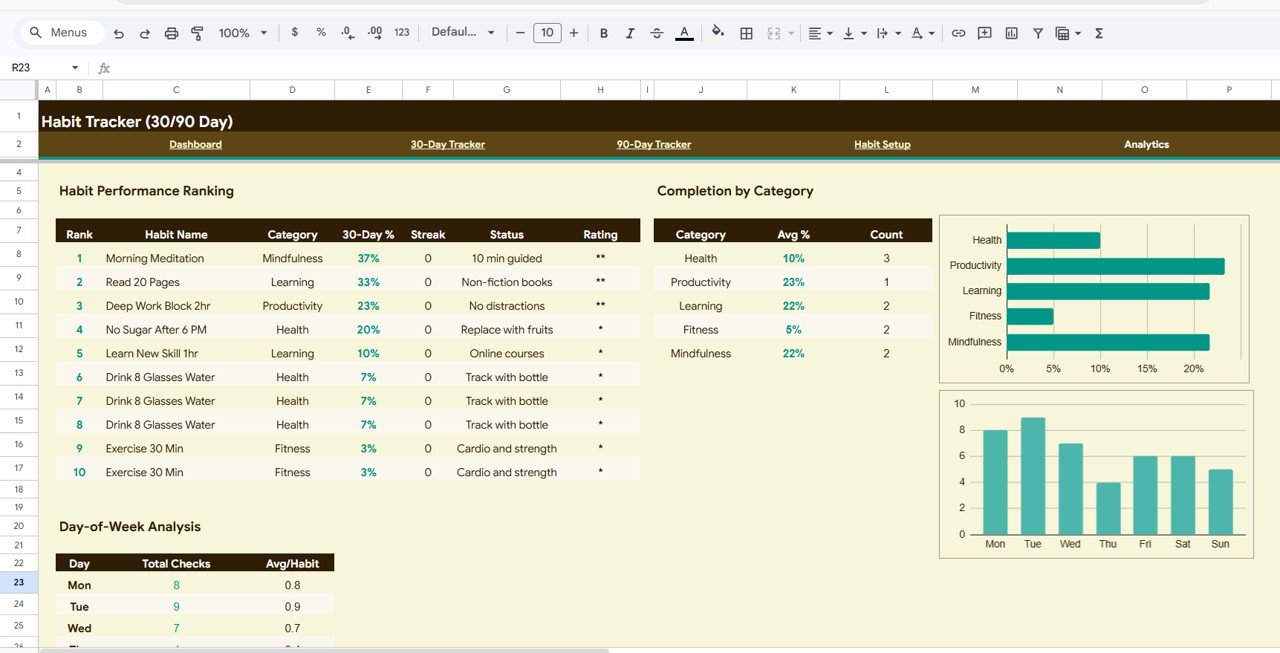 Analytics
Advantages of Habit Tracker in Google Sheets
- Complete Habit Management System – Unlike basic checklists, this template provides a full 5-page system covering setup, short-term tracking, long-term tracking, overview dashboards, and deep analytics.
- Visual Motivation – The heatmap, charts, and KPI cards provide constant visual feedback that keeps you motivated and accountable.
- Science-Backed 90-Day Cycle – The 90-day tracker aligns with habit formation research, giving you enough time to turn actions into automatic behaviors.
- Cloud-Based Accessibility – Access your tracker from any device using Google Sheets — phone, tablet, or computer.
- Zero Learning Curve – No formulas, no macros, no technical skills needed. Just define your habits and start marking completions.
Opportunities for Improvement
- Adding a monthly comparison view to track habit trends month-over-month could provide additional long-term insights.
- A habit streak counter with automatic reset functionality would add gamification elements to keep users engaged.
- Integration with Google Calendar reminders could help users stay on track with daily habit completions.
Best Practices
- Start with 3-5 habits maximum — adding too many habits at once can lead to overwhelm and low completion rates.
- Mark your habits at the same time every day to build the tracking habit itself into your routine.
- Review the Analytics page weekly to identify patterns and adjust your approach.
- Use the Habit Setup page to pause habits you are struggling with rather than deleting them entirely.
- Aim for consistency over perfection — an 80% completion rate is better than abandoning tracking altogether.
Explore Relevant Templates
If you found this Habit Tracker useful, explore these related templates on NextGenTemplates.com:
- Personal Expense Tracker in Google Sheets – Track daily expenses and analyze spending patterns with automated charts and KPIs.
- Savings Goal Planner in Google Sheets – Set and track multiple savings goals with visual progress indicators and milestone tracking.
- Weekly Reflection Action Plan Checklist in Google Sheets – Plan, track, and reflect on your weekly goals with automated progress tracking.
- Personal Finance Dashboard in Google Sheets – A comprehensive 6-page financial management dashboard for income, expenses, budgets, and investments.
If you enjoy building your own spreadsheet systems, the NextGenTemplates Academy learning paths lay out a step-by-step route with practice files.
Get the Habit Tracker in Google Sheets
Frequently Asked Questions
What is the best habit tracker template for Google Sheets?
The Habit Tracker in Google Sheets by NextGenTemplates is one of the best options available. It includes 5 dedicated pages covering an Overview Dashboard with 4 KPI cards and 3 charts, both 30-day and 90-day tracking cycles, a customizable Habit Setup page, and an advanced Analytics page with performance ranking and day-of-week analysis.
How do I track daily habits in Google Sheets?
With this template, you simply define your habits in the Habit Setup page, then mark your daily completions in either the 30-Day Tracker or 90-Day Tracker tabs. All KPIs, charts, and analytics update automatically based on your entries — no formulas or technical skills needed.
Can I track more than 10 habits at the same time?
Yes. The template supports tracking multiple habits simultaneously. Each habit has its own row with individual completion tracking, done count, and completion percentage across both the 30-day and 90-day cycles. However, we recommend starting with 3-5 habits for optimal consistency.
Is this habit tracker free to download?
The Habit Tracker in Google Sheets is available as a premium template at an affordable price of $4.99 (regular price $9.99). You can purchase and download it here.
Does this template work on mobile devices?
Yes. Since this is a Google Sheets template, you can access it from any device using the Google Sheets app or a web browser. Your data syncs automatically across all devices via Google Drive.
Conclusion
Building positive habits is one of the most impactful investments you can make in your personal and professional life. The Habit Tracker in Google Sheets gives you the structure, visual feedback, and analytics you need to stay consistent and motivated over both 30-day and 90-day cycles. With 5 interactive pages, 4 KPI cards, 3 analytical charts, and advanced day-of-week analysis, this template transforms habit tracking from a tedious chore into an engaging, data-driven practice.