The independent hospitality industry has a tooling problem. Major SaaS booking platforms like Cloudbeds and Little Hotelier charge between $80 and $300 per property per month, which works out to $960 to $3,600 per property every year for a small boutique hotel that may only have 10 to 30 rooms. At the same time, the Excel and Google Sheets templates floating around the internet stop short of what hotels actually need — a real multi-user login, role-based access, and a connected workflow from availability search to invoice.Hotel Booking Management System in Google Sheets
The Hotel Booking Management System in Google Sheets closes that gap. It is a complete Google Apps Script web app — packaged as a single Code.gs file plus Index.html — that runs inside your own Google account, supports four built-in user roles (Admin, Manager, Receptionist, Housekeeper), and ships with 21 interactive pages covering bookings, payments, housekeeping, maintenance, reports, and multi-property management. Setup takes under 15 minutes.Hotel Booking Management System in Google Sheets
Get the Hotel Booking Management System
Key Features of the Hotel Booking Management System
- Secure login with 4 roles built in. Admin1 gets full access to every module and setting; Manager1 covers operations and reports; User1 is the Receptionist / Front Desk role; Housekeeper1 only sees assigned rooms and tasks. Default password is
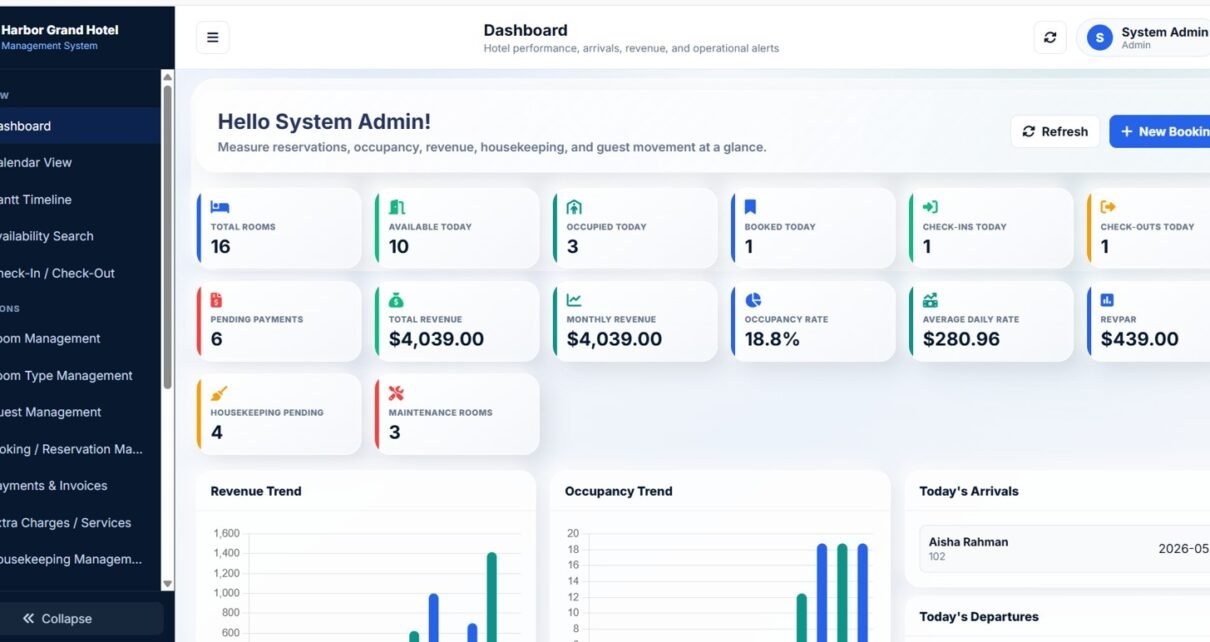
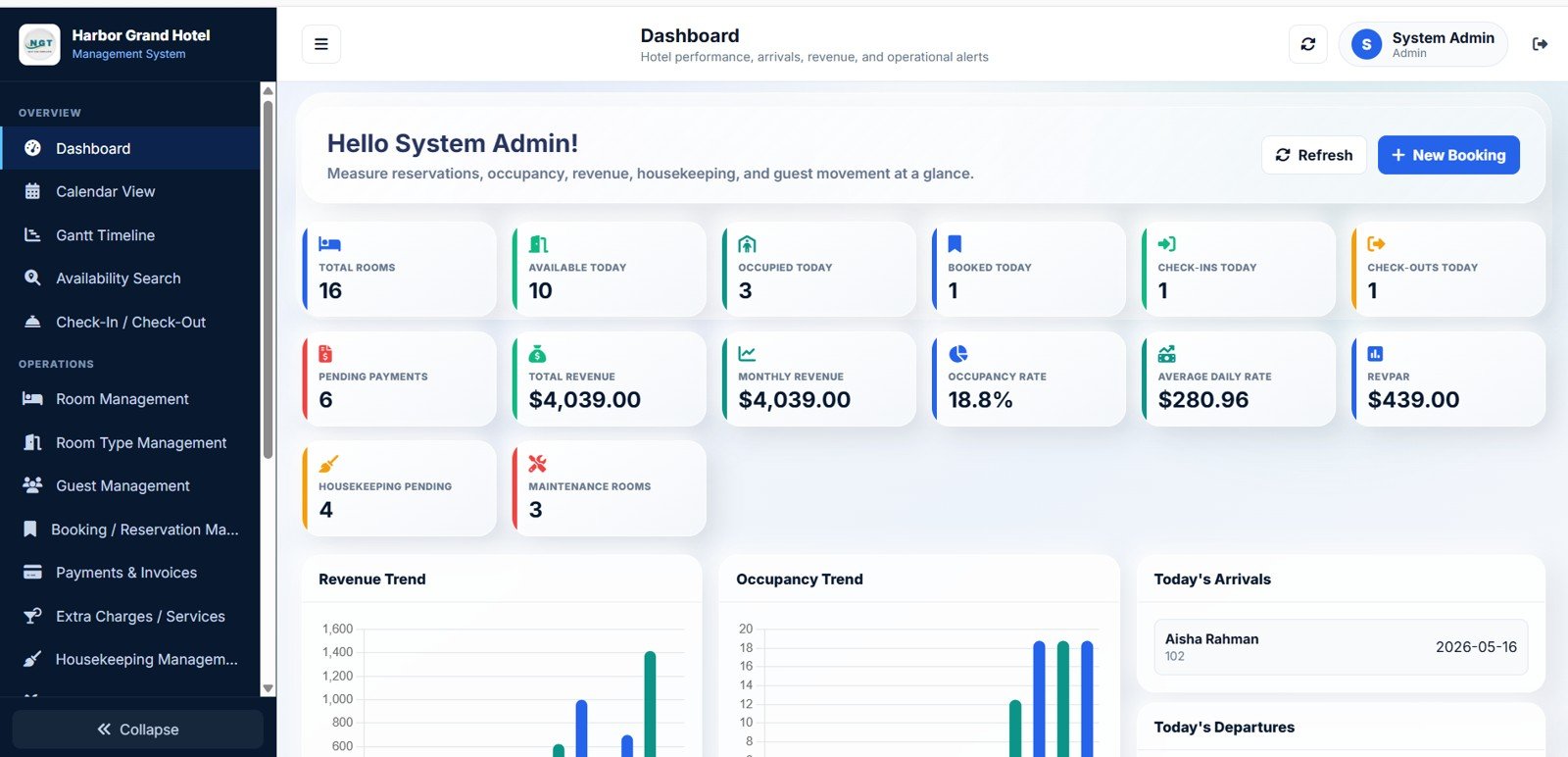
abcd— change it in Settings the moment you deploy. - 14 live KPI cards on the Dashboard Overview. Total Rooms, Available Today, Occupied Today, Booked Today, Check-Ins Today, Check-Outs Today, Pending Payments, Total Revenue, Monthly Revenue, Occupancy Rate, ADR, RevPAR, Housekeeping Pending, and Maintenance Rooms.
- Two visual scheduling views — Calendar and Gantt Timeline. The Calendar shows bookings in a date-grid for the receptionist; the Gantt view shows horizontal bars per room so the manager can spot back-to-back checkouts and gaps in seconds.
- Multi-property support. Run multiple hotels, branches, or boutique guesthouses from one Google Sheet. Filter every report by property, assign property managers, and price each location independently.
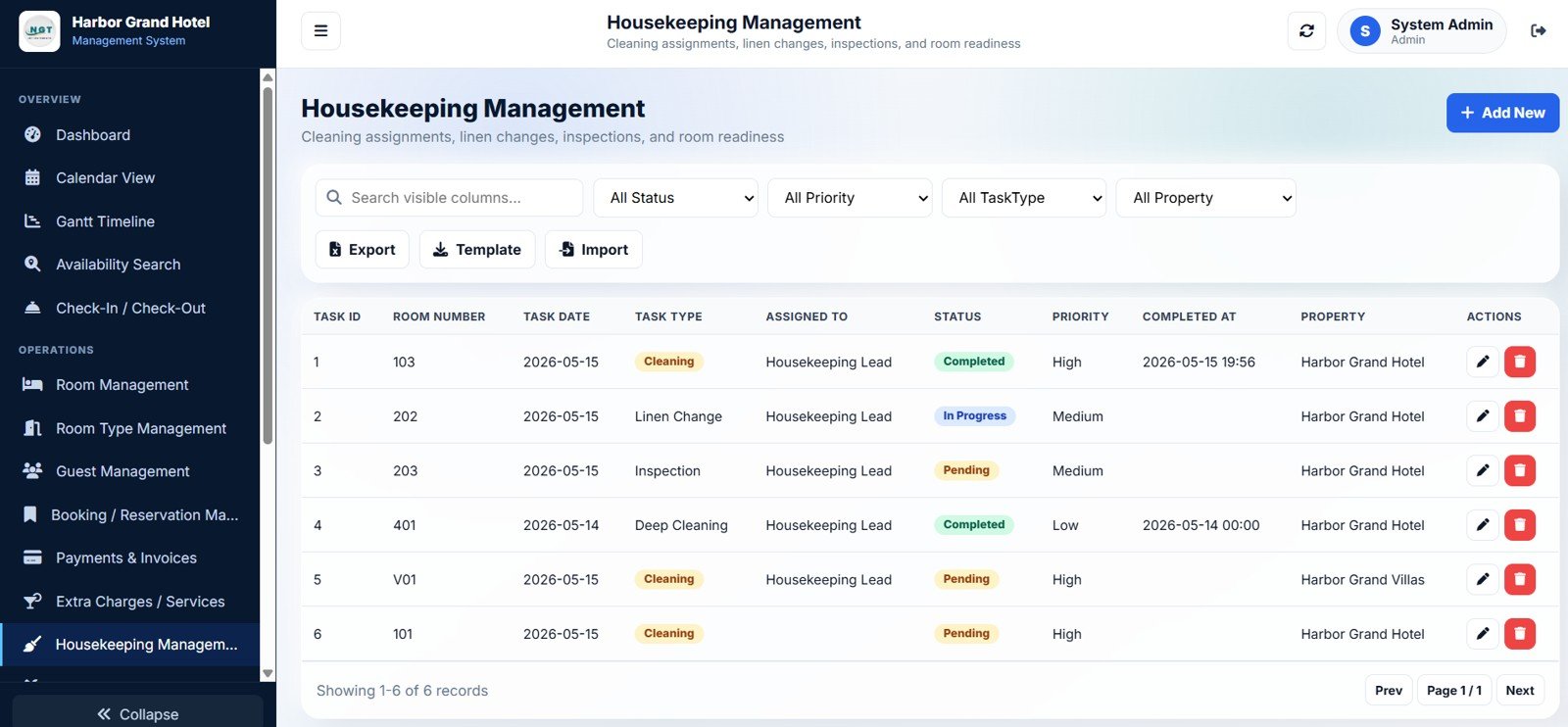
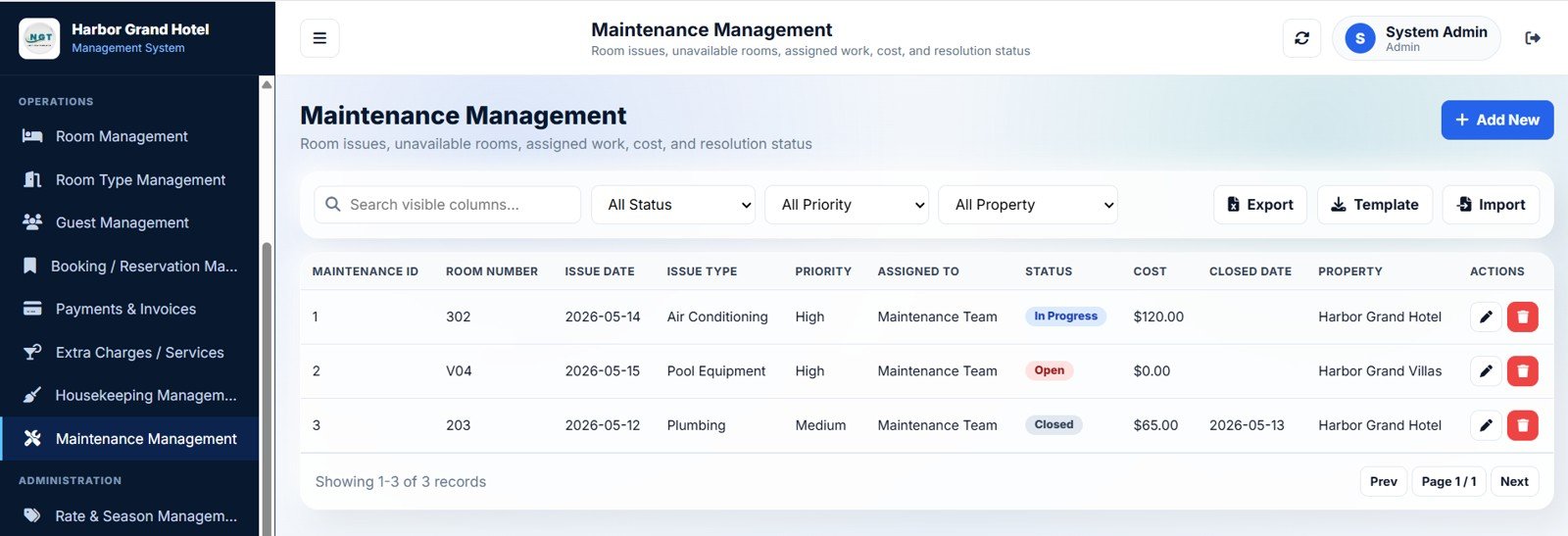
- Housekeeping & maintenance modules. Assign cleaning tasks to specific housekeepers, log maintenance issues with cost per property, and track tasks and issues by priority and status.
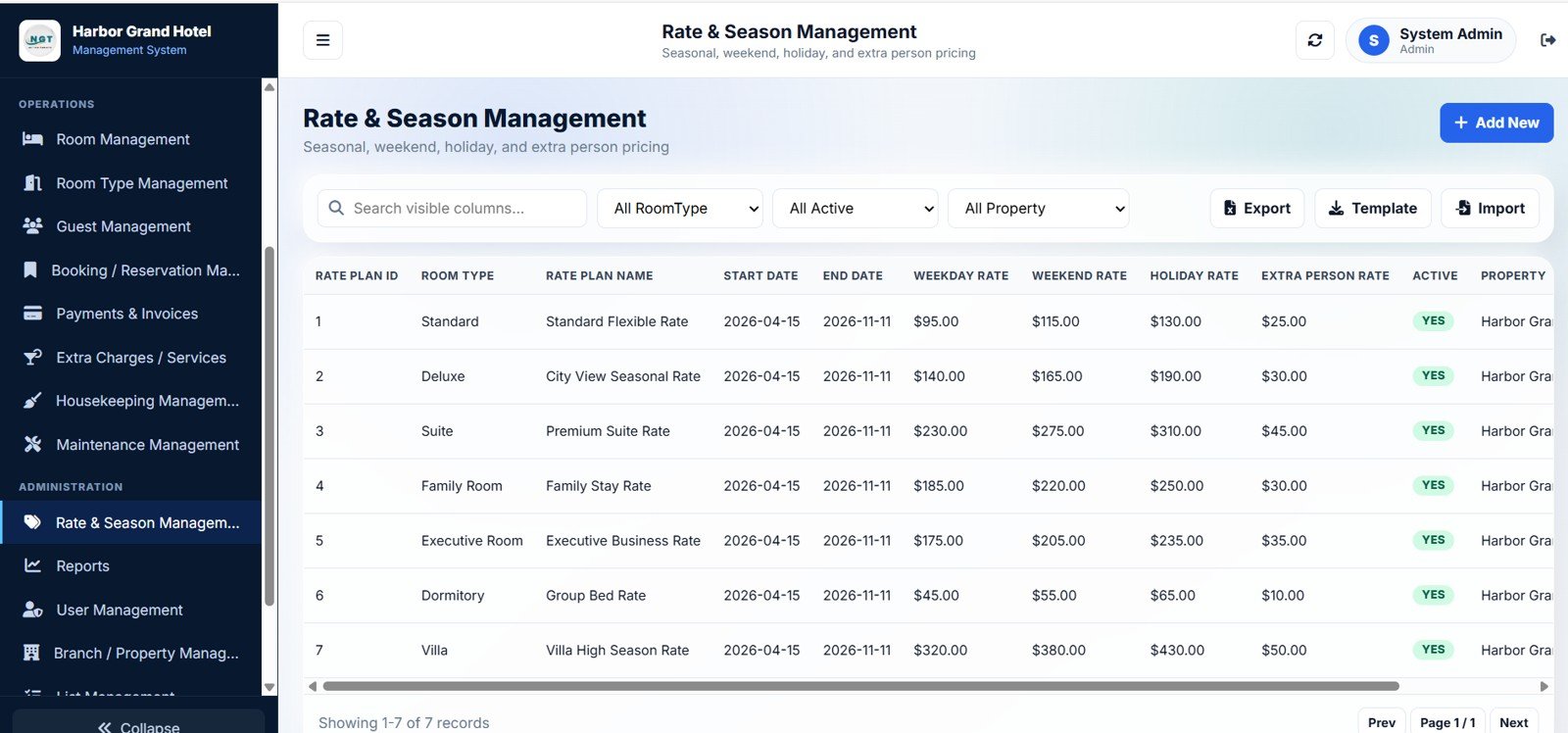
- Rate & season management. Different weekday, weekend, holiday, and extra-person rates per room type, with active date ranges so seasonal pricing actually works.
Inside the 21 Pages
1. Login Page
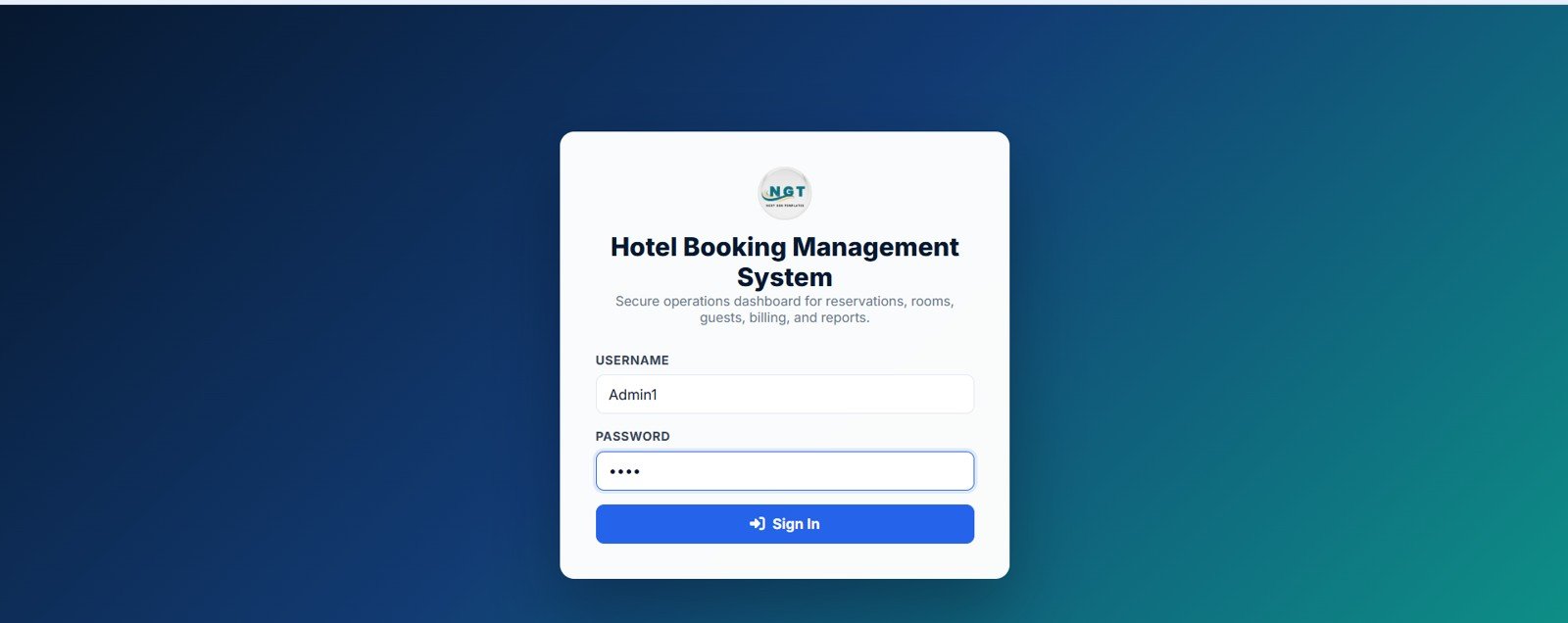
This page is the security gateway of the entire web app. The user enters a username and password, the script validates against the Users sheet, and the navigation is rebuilt to show only the screens the role is allowed to see. According to Google’s official Apps Script documentation, web apps deployed with “Execute as: Me” let you control access cleanly while users sign in with their own Google identity.
Try the Live Demo Before You Buy
We have deployed this web app in our own Google account so you can test every page and every role with real sample hotel booking data before purchasing. No signup, no email required.
Test Login Credentials
Sign in with any of the seeded roles below to review the system from administration, management, front desk, and housekeeping perspectives. All demo passwords are abcd.
What you get after purchase: The full source code (Code.gs + Index.html) plus a step-by-step deployment guide so you can deploy your own private instance in your own Google account in under 15 minutes.
2. Dashboard Overview
The Dashboard Overview shows 14 KPI cards (Total Rooms through Maintenance Rooms) plus three charts and panels — Revenue Trend by Month, Occupancy Trend by Month, and Today’s Arrivals by Guest. Quick-action buttons let staff jump straight into the most common workflows like creating a new booking or recording a payment.
3. Dashboard – Booking & Payment Analytics
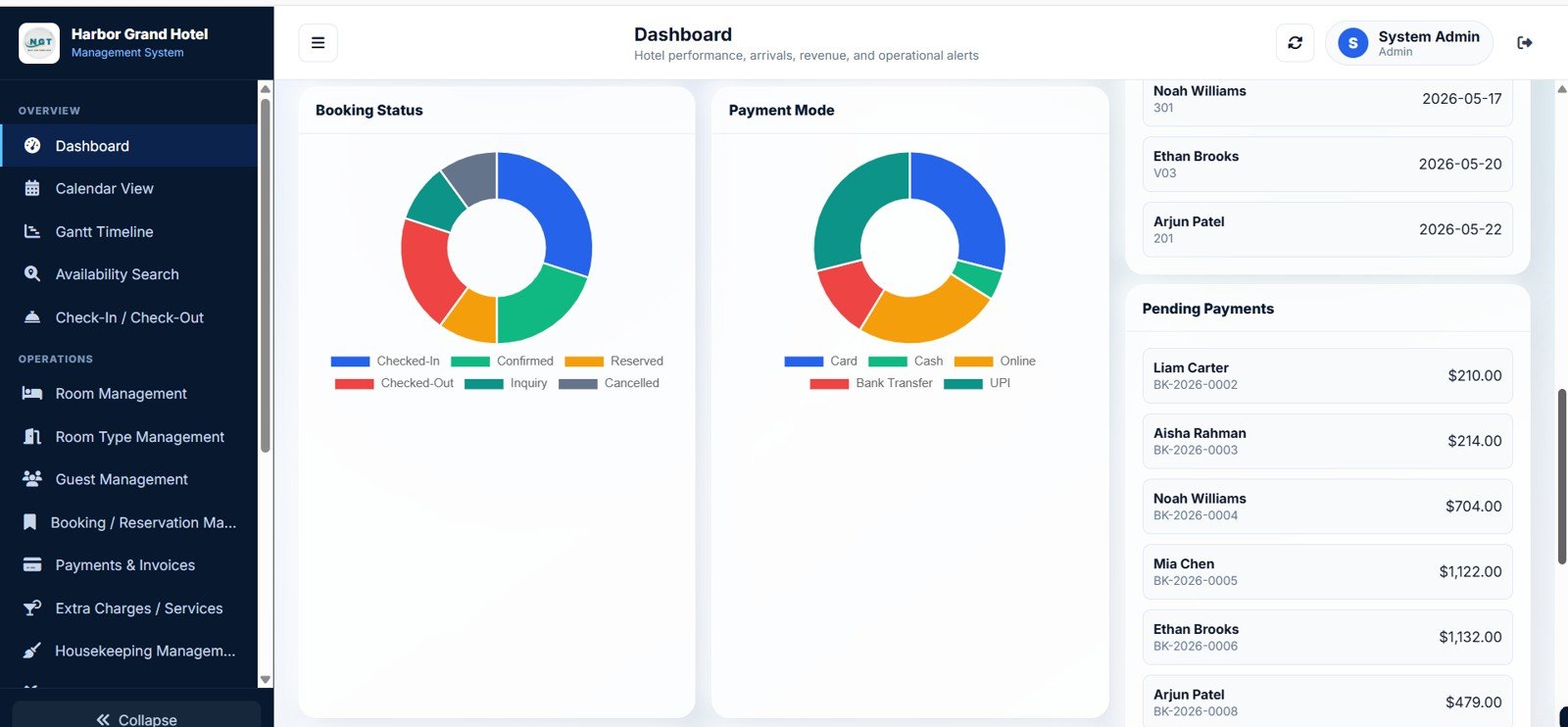
The second dashboard tab is purely analytics — Bookings by Status, Payments by Mode, Today’s Departures by Guest, and Pending Payments by Guest — so managers can chase outstanding amounts and same-day workload in one view.
4. Calendar View
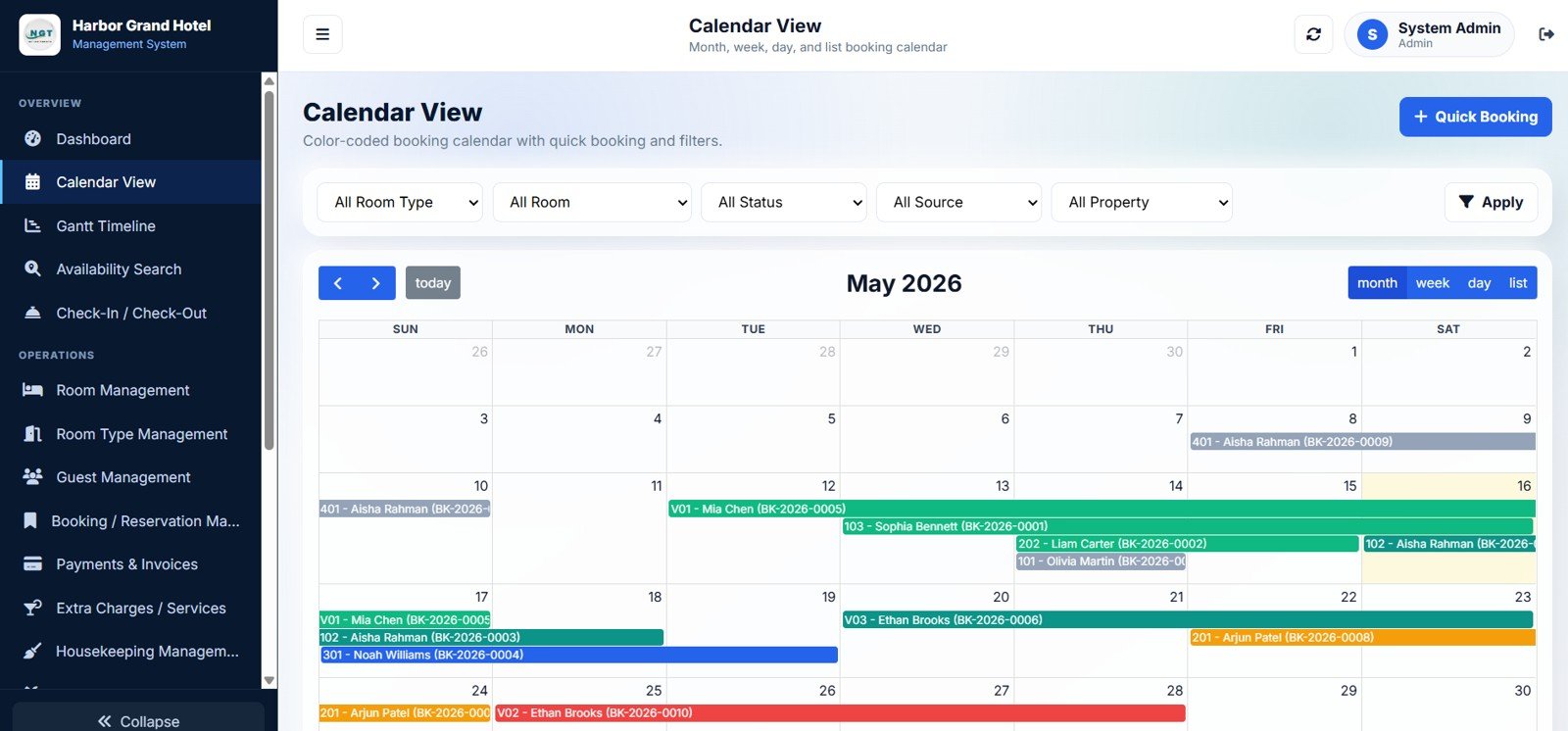
The Calendar shows Bookings by Date, Bookings by Room Type, Bookings by Room, Bookings by Status, Bookings by Source, and Bookings by Property. The front desk uses this view to take phone bookings and answer “do you have a room next Tuesday” enquiries in seconds.
5. Gantt Timeline
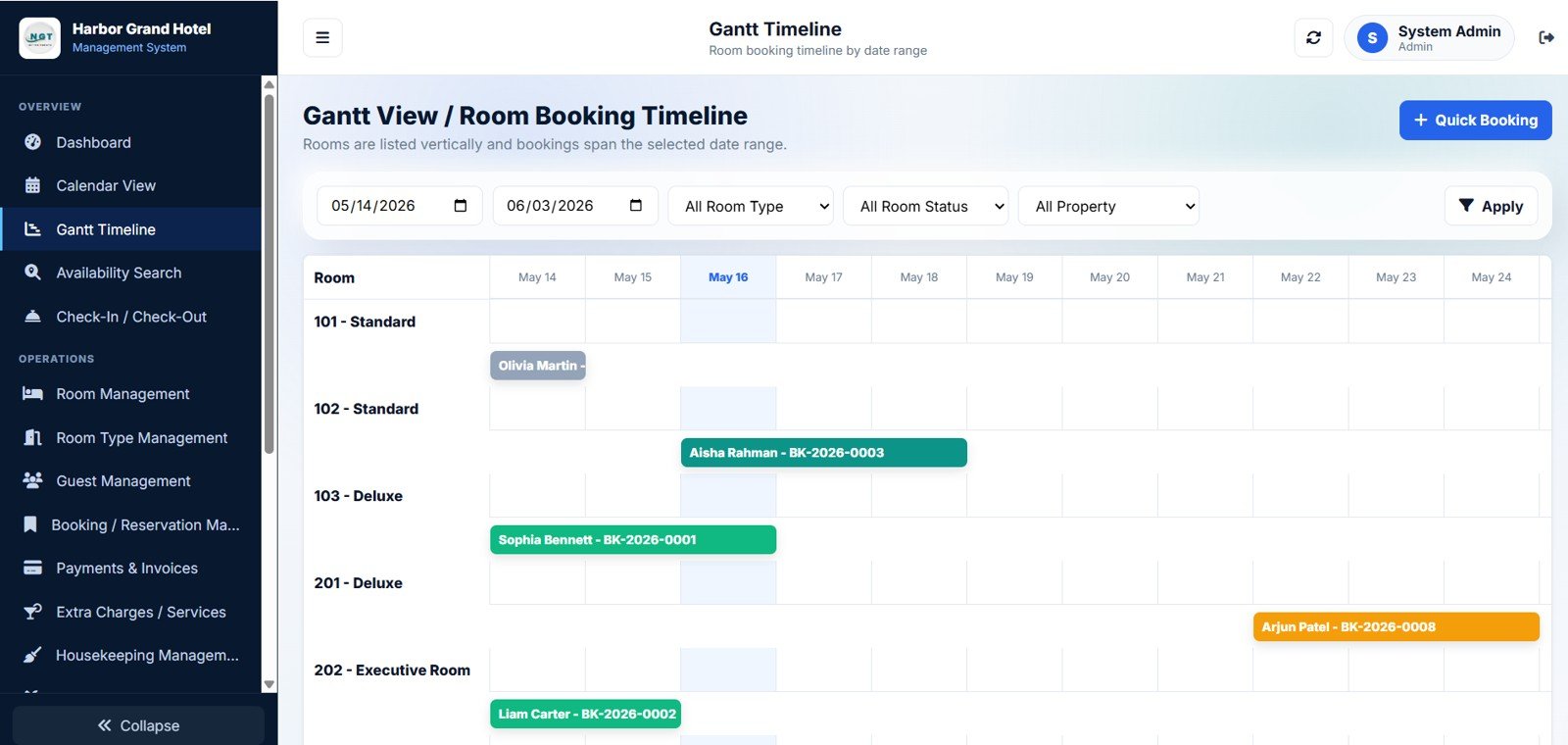
The Gantt view shows Bookings by Room, Bookings by Date Range, Bookings by Room Type, Bookings by Room Status, and Bookings by Property as horizontal bars across a date axis — the layout managers prefer for spotting back-to-back stays that need extra housekeeping time.
6. Availability Search
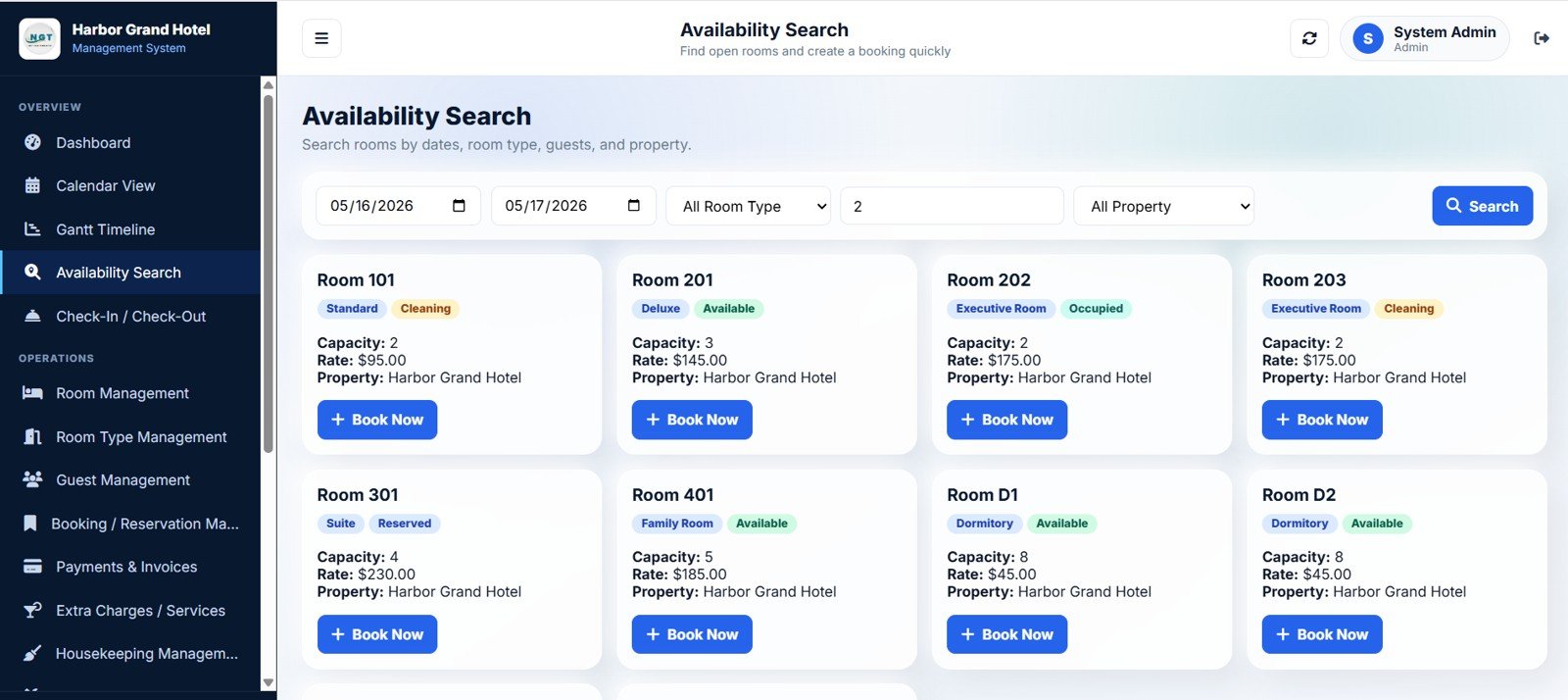
The Availability Search returns Room Availability by Date, Room Availability by Room Type, Room Availability by Guests, Room Availability by Property, Capacity by Room, and Rate by Room. It is the page receptionists open first when a guest calls looking for a room next weekend.
7. Check-In and Check-Out
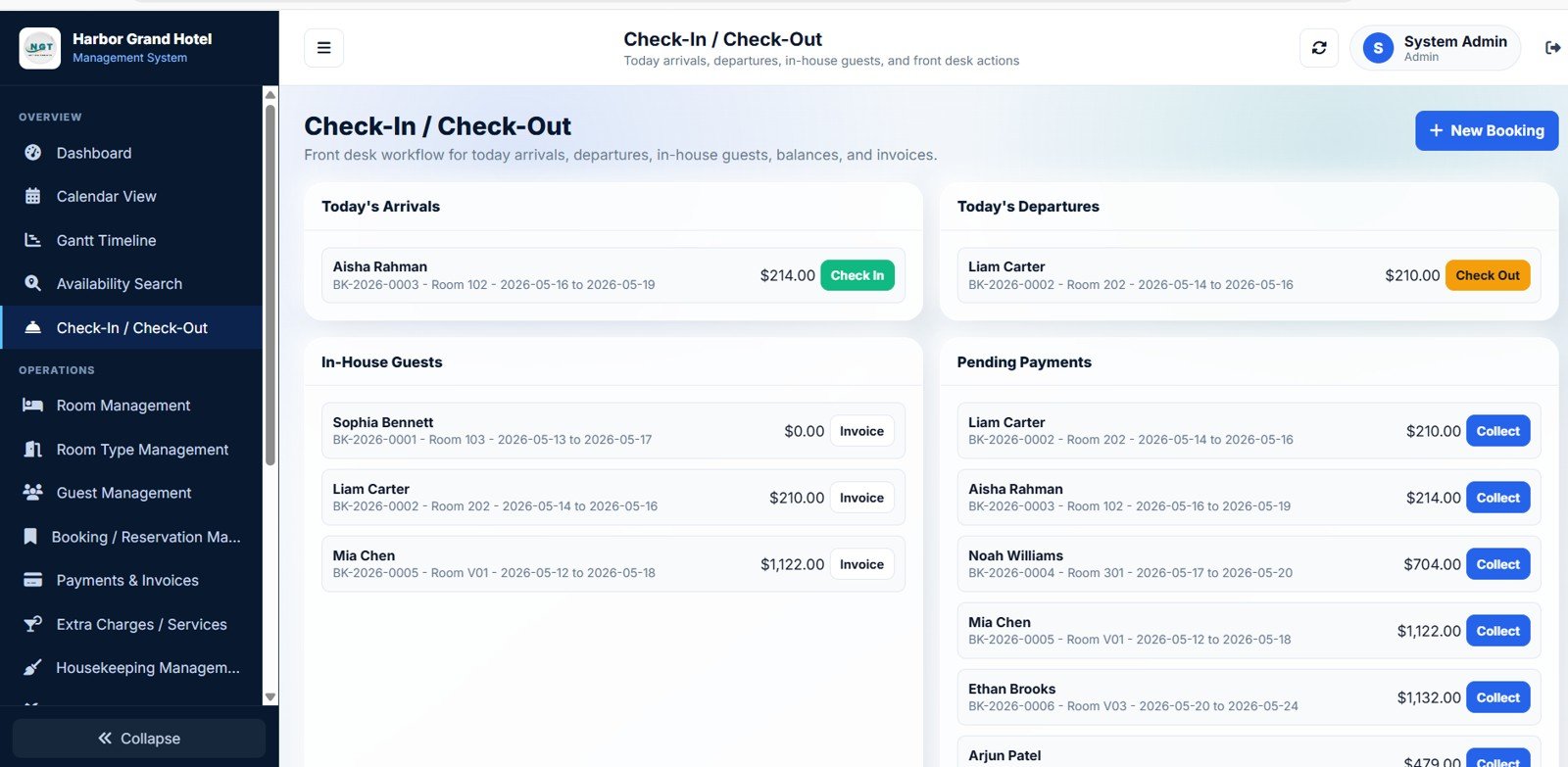
This page combines Today’s Arrivals by Guest, Today’s Departures by Guest, In-House Guests by Booking, Pending Payments by Guest, and Balance by Guest so the front desk processes arrivals, collects balances, and releases rooms in one workflow.
8. Room Management
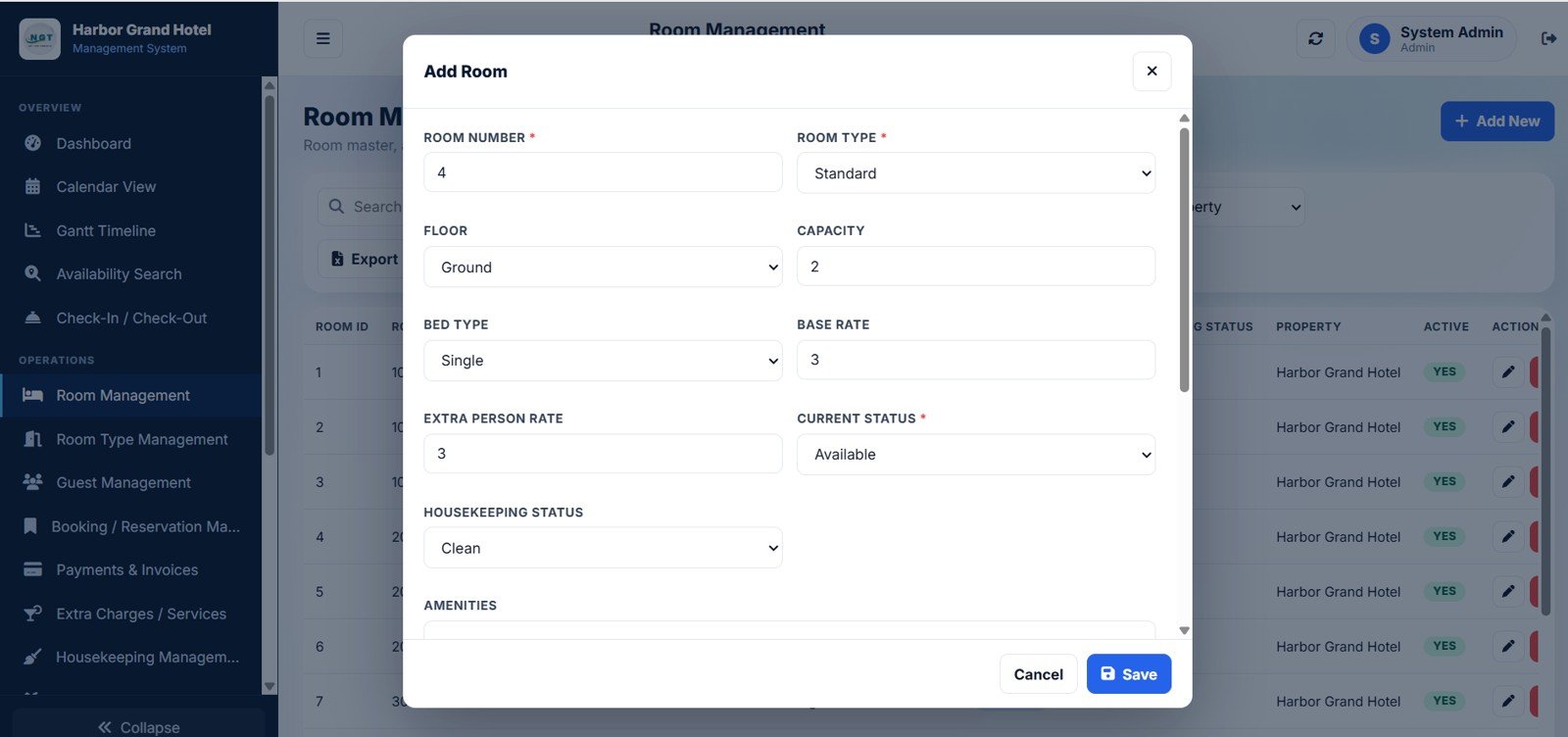
The Room Management screen tracks Room Number by Room Type, Capacity by Room, Base Rate by Room, Extra Person Rate by Room, Current Status by Room, Housekeeping Status by Room, and Amenities by Room. This is the inventory layer of the property — every physical room your hotel owns.
9. Room Type Management
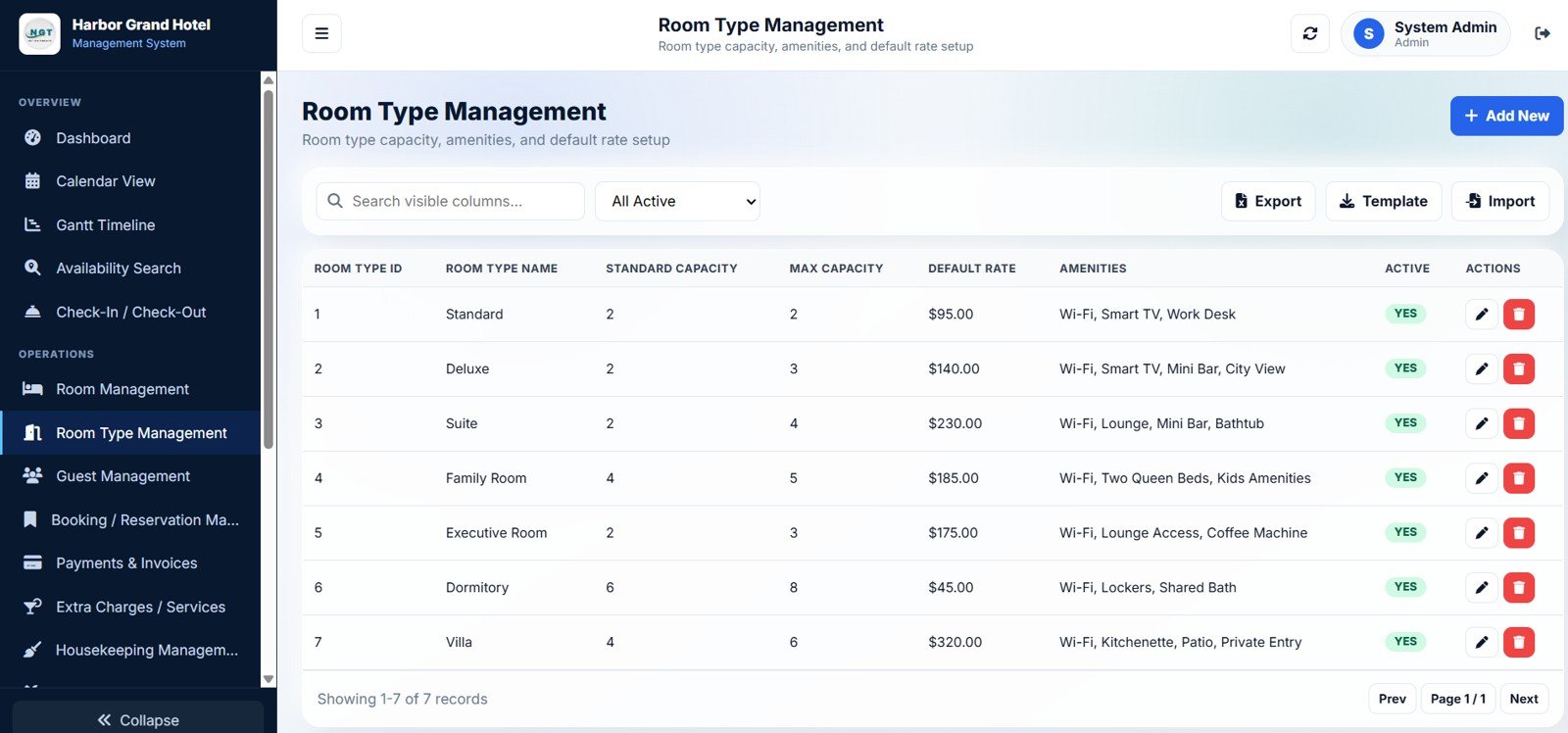
Where rooms are physical units, room types are the categories — Standard, Deluxe, Suite, Villa. This page tracks Standard Capacity, Max Capacity, Default Rate, Amenities, and Active Status by Room Type, so you define a Suite once and reuse it across many physical rooms.
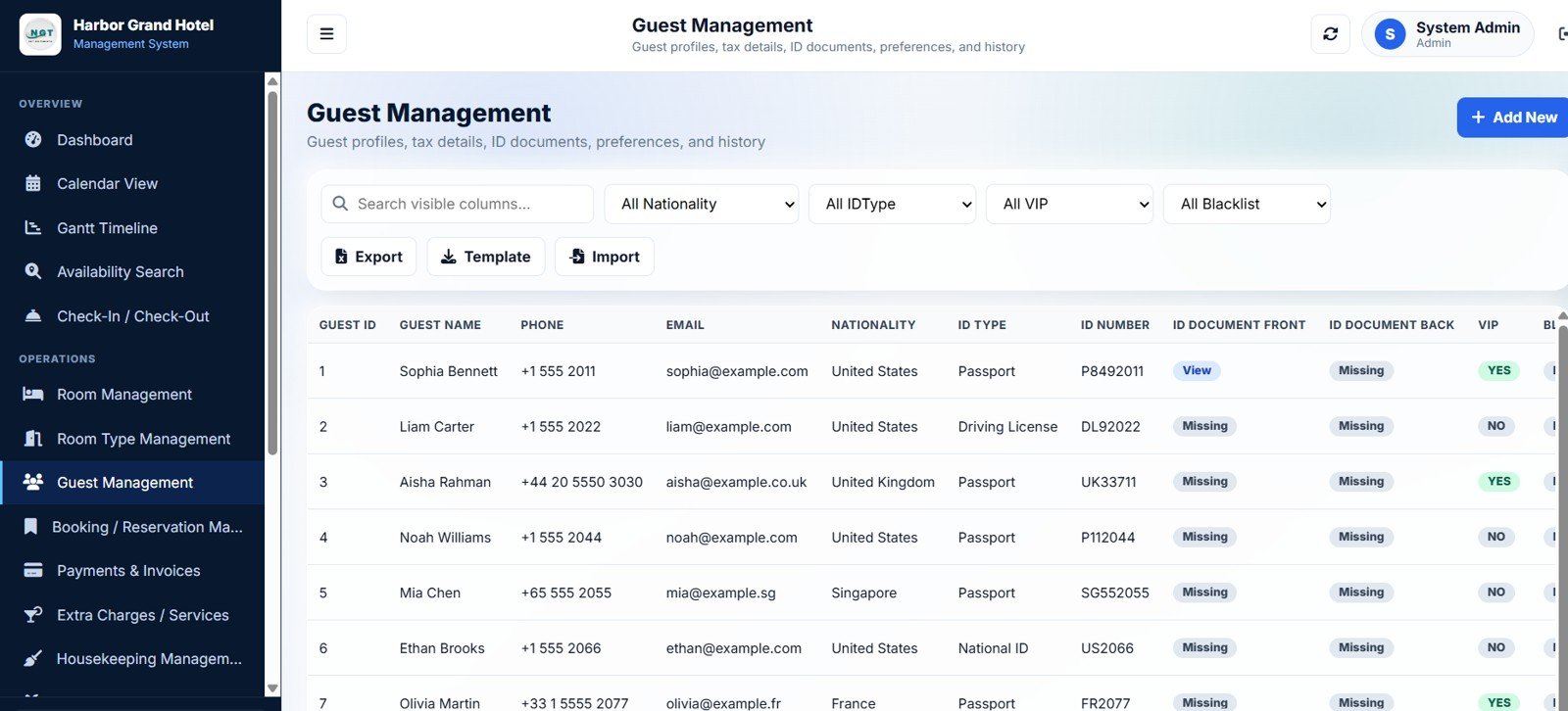
10. Guest Management
Guest Management captures Guests by Nationality, Guests by ID Type, Guests by VIP Status, Guests by Blacklist Status, Phone by Guest, and Email by Guest. Receptionists can upload guest ID documents (passport, Aadhaar, driver licence) directly from this page.
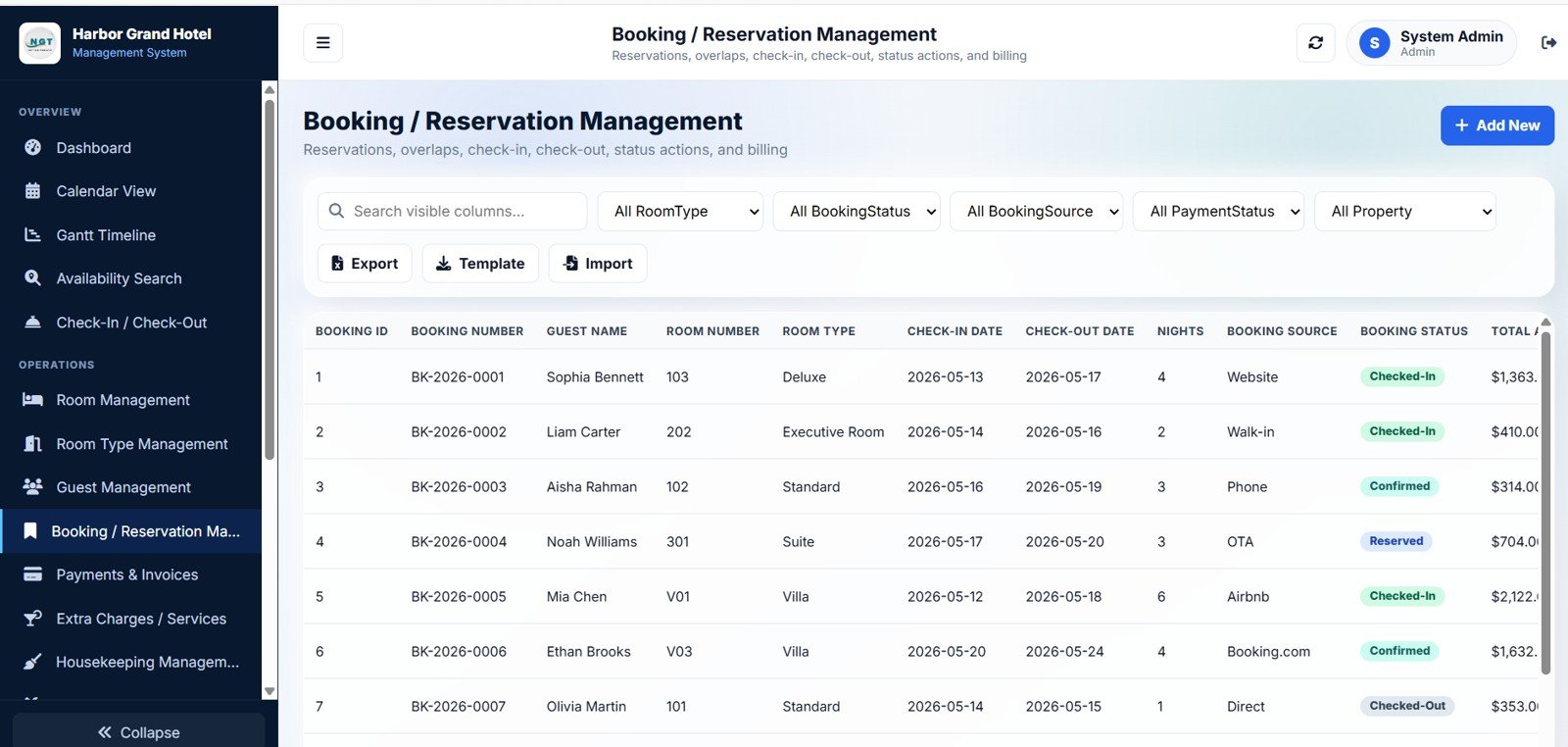
11. Booking and Reservation Management
The Booking and Reservation Management page is the operational heart of the system — Bookings by Room Type, Bookings by Booking Status, Bookings by Booking Source, Bookings by Payment Status, Bookings by Property, Total Amount by Booking, and Nights by Booking, all editable inline.
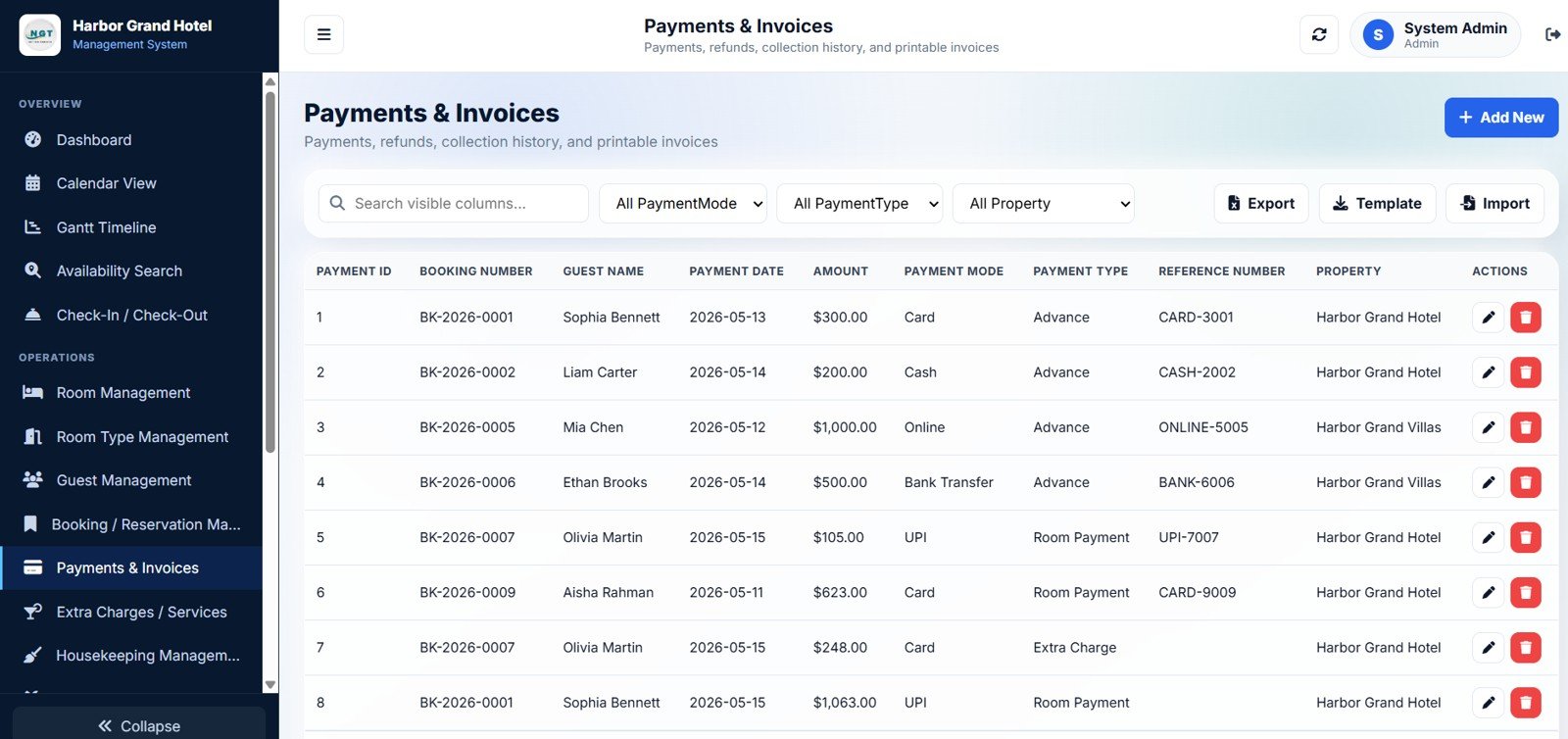
12. Payments and Invoices
Payments and Invoices tracks Payments by Payment Mode, Payments by Payment Type, Payments by Property, Amount by Payment Date, Amount by Guest, and Reference Number by Payment, with one-click invoice generation per booking.
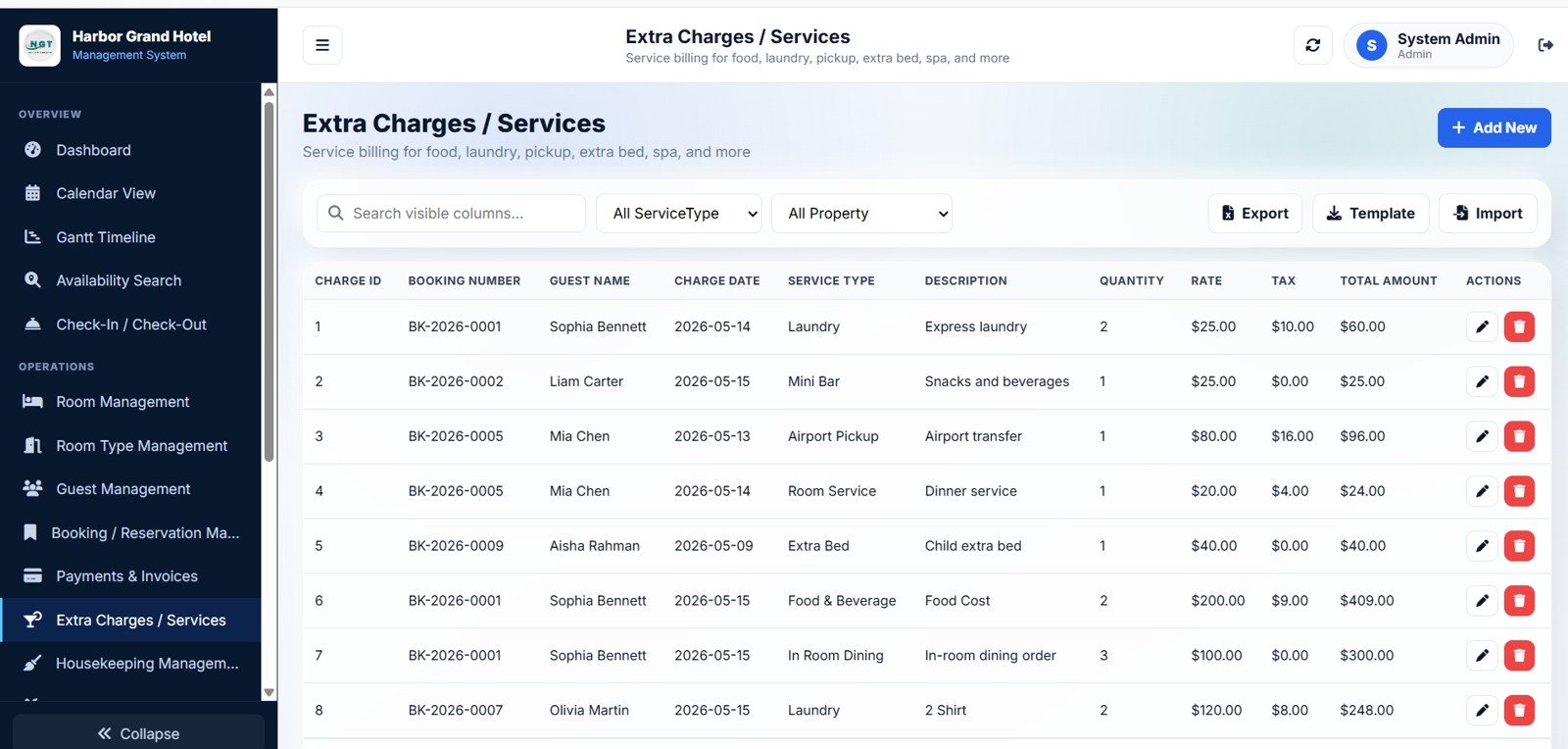
13. Extra Charges and Services
Extra Charges and Services covers Charges by Service Type, Charges by Property, Total Amount by Service Type, Quantity by Service Type, Rate by Service Type, and Tax by Service Type — for room service, laundry, mini-bar, airport pickup, and every other add-on revenue line.
14. Housekeeping Management
Housekeeping Management tracks Tasks by Status, Tasks by Priority, Tasks by Task Type, Tasks by Assigned To, Tasks by Property, and Tasks by Room. The Housekeeper role only sees their assigned rooms, which keeps the interface focused and fast on mobile.
15. Maintenance Management
Maintenance Management captures Issues by Status, Issues by Priority, Issues by Issue Type, Issues by Assigned To, Cost by Issue Type, and Cost by Property so engineering teams can prioritise leaking taps, AC repairs, and electrical work by urgency and spend.
16. Rate and Season Management
Rate and Season Management lets you define Weekday Rate by Room Type, Weekend Rate by Room Type, Holiday Rate by Room Type, Extra Person Rate by Room Type, Rate Plans by Property, and Active Plans by Date Range — so peak season, festival weekends, and shoulder pricing all live in one place.
17. Reports
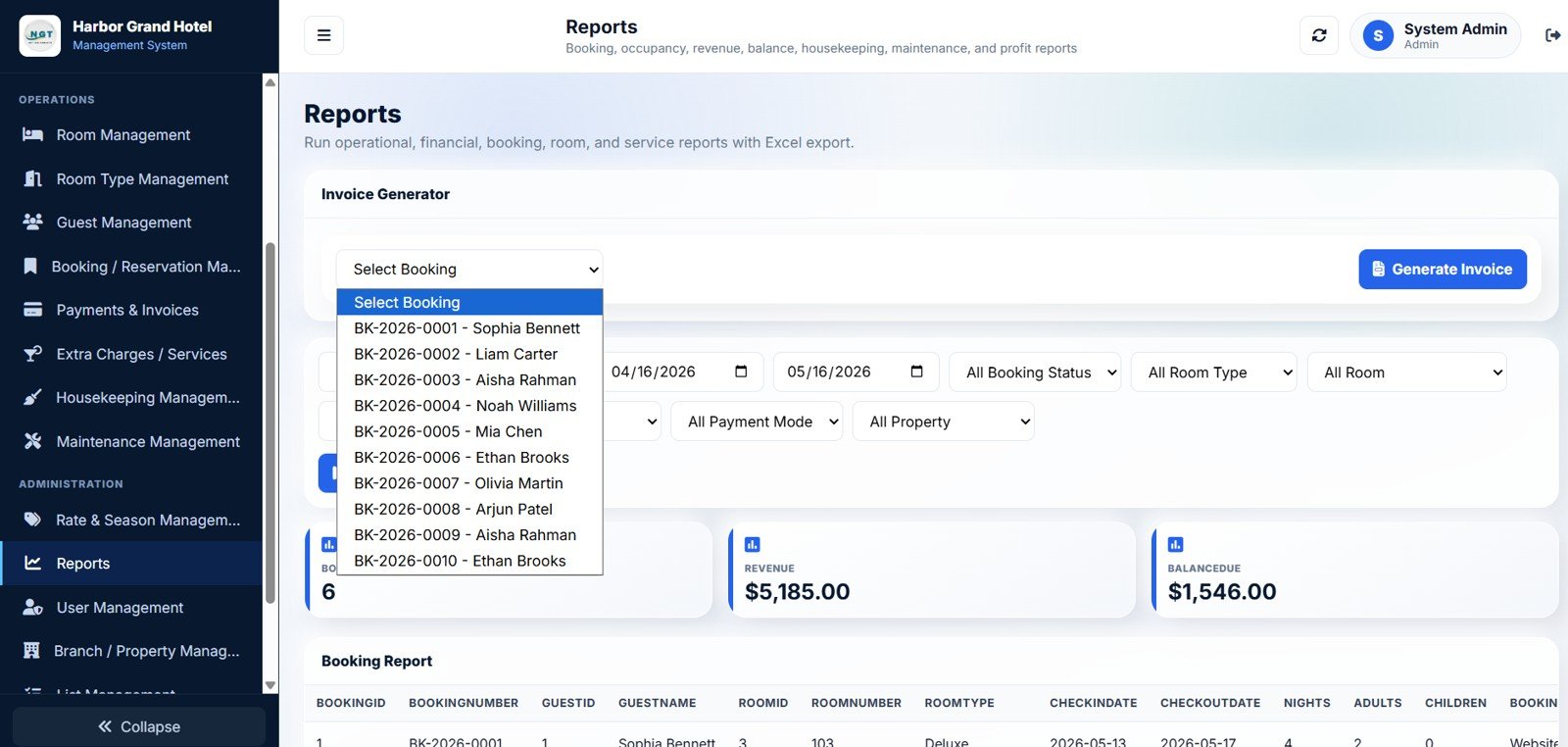
Reports covers Bookings by Date Range, Revenue by Date Range, Balance Due by Booking, Bookings by Property, Bookings by Room Type, and Invoice by Booking. Every report exports to Excel, which makes it trivial to share with your accountant or external auditor.
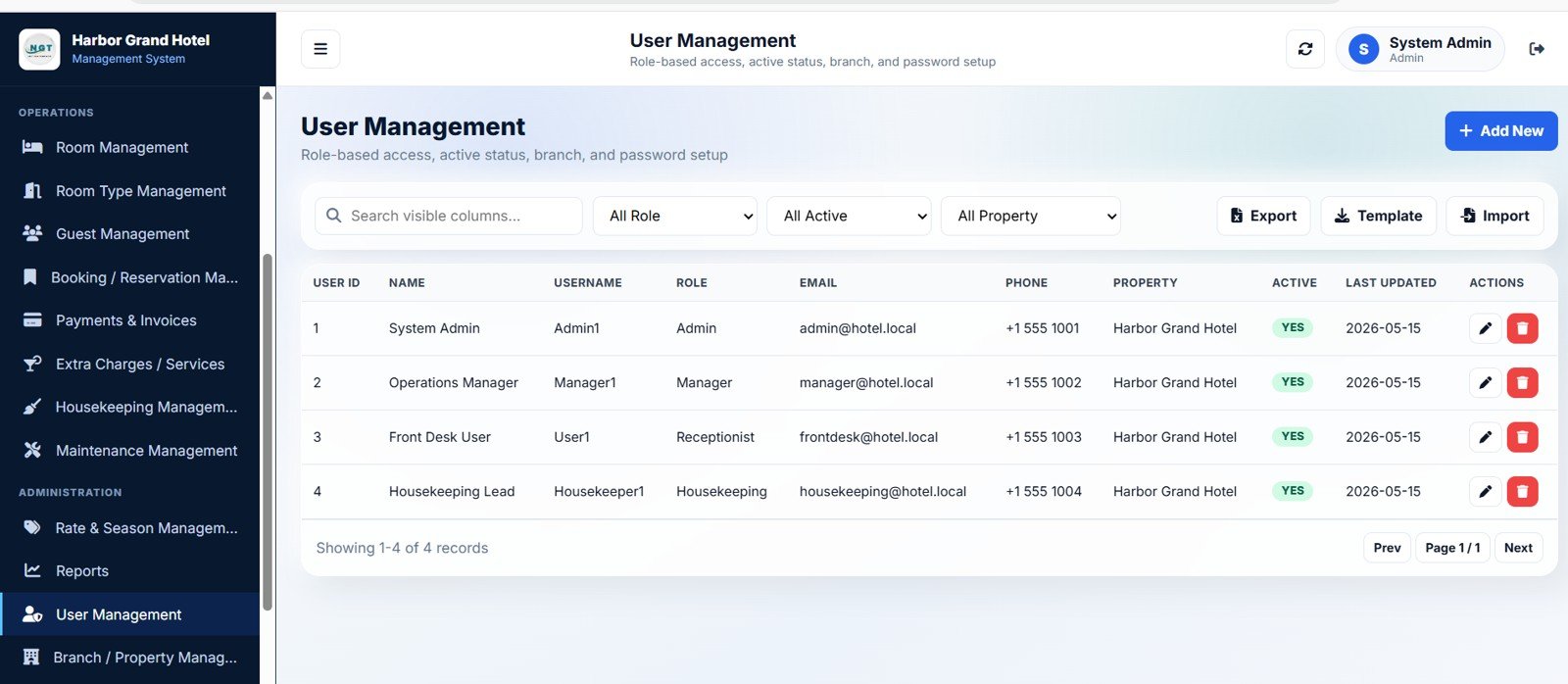
18. User Management
User Management shows Users by Role, Users by Active Status, Users by Property, Last Updated by User, Email by User, and Phone by User. The Admin role creates new accounts, assigns roles, deactivates departing staff, and resets passwords.
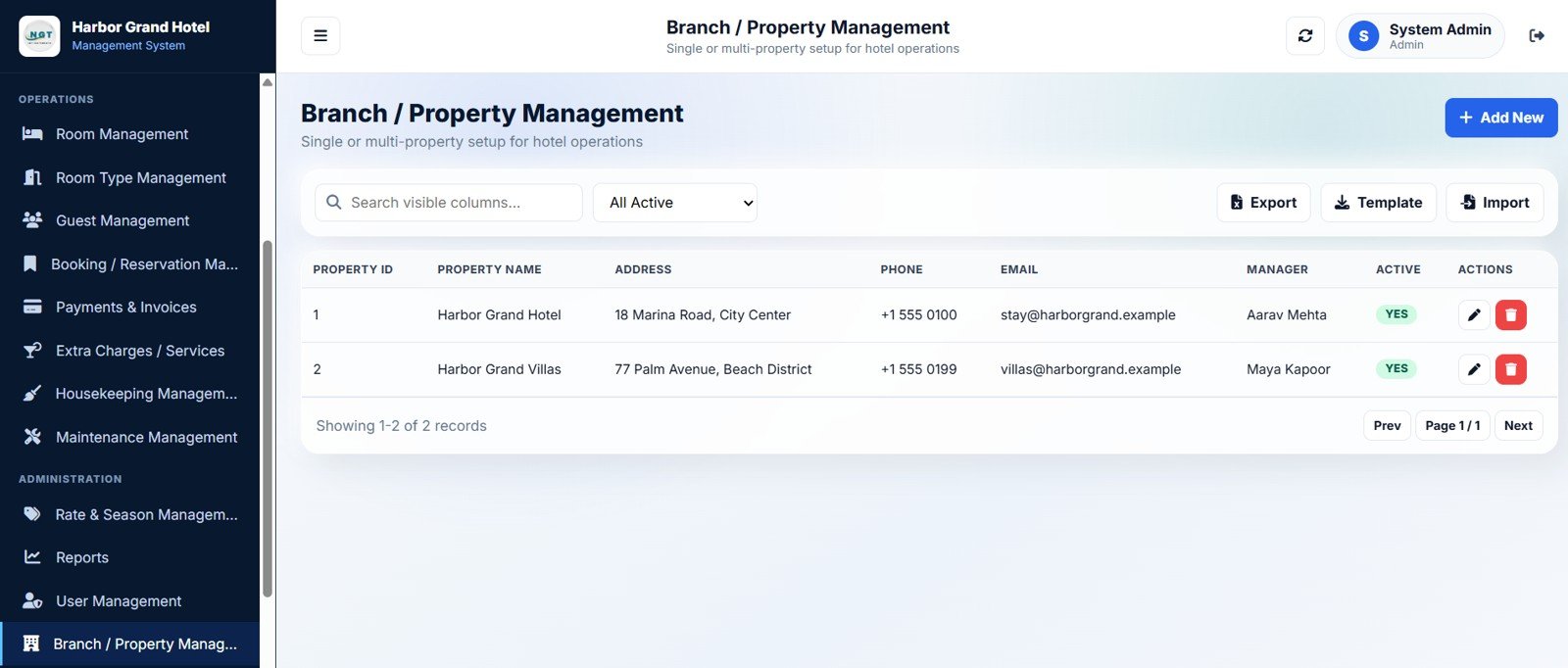
19. Branch and Property Management
Branch and Property Management is the multi-property anchor — Properties by Active Status, Address by Property, Manager by Property, Email by Property, and Phone by Property. Most independent hotel groups run 2 to 10 locations and this page makes them feel like one system.
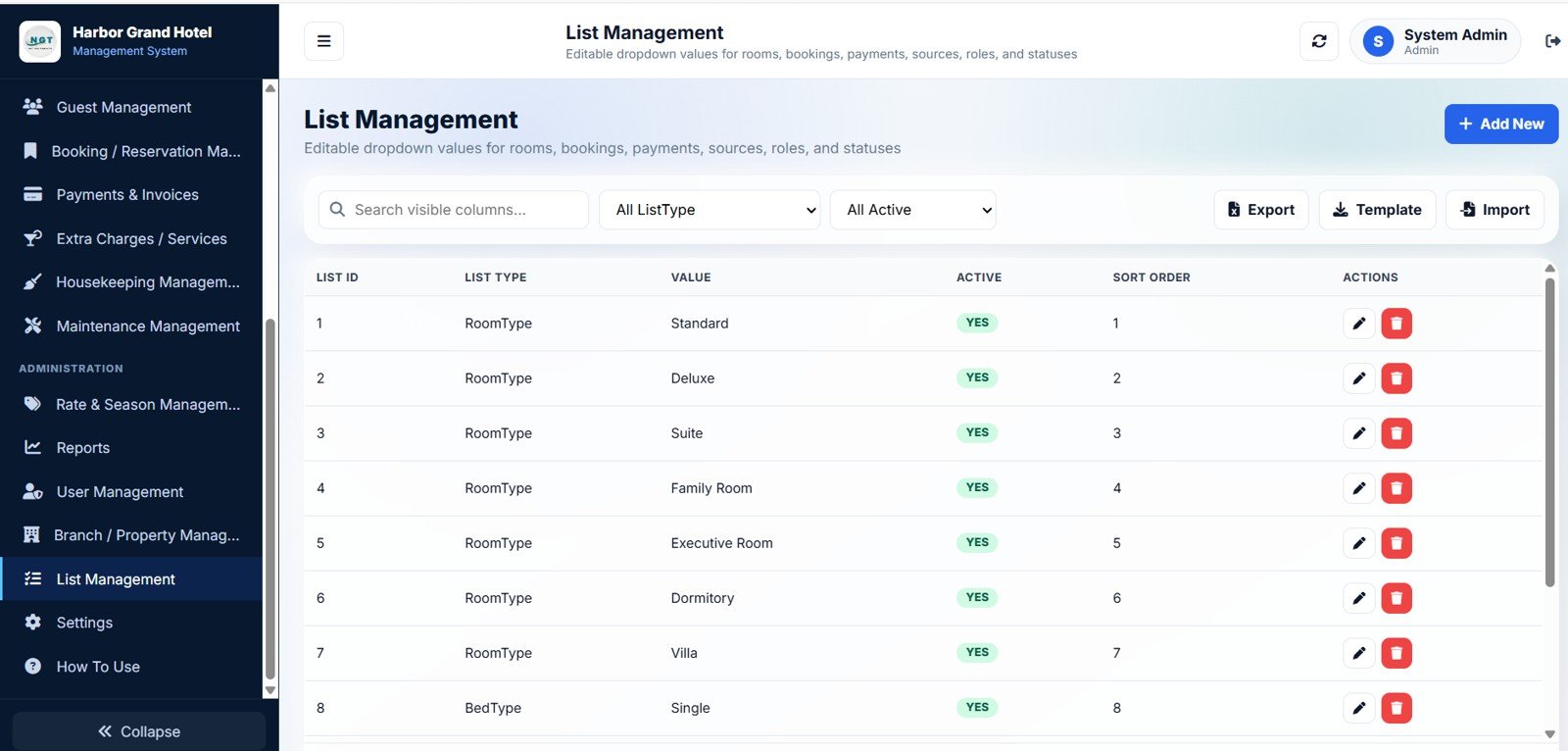
20. List Management
List Management is the admin’s friend — Values by List Type, Active Values by List Type, Sort Order by Value, and Active Status by Value. This lets non-technical admins control all dropdown values (booking sources, payment modes, service types, ID types) without touching Code.gs.
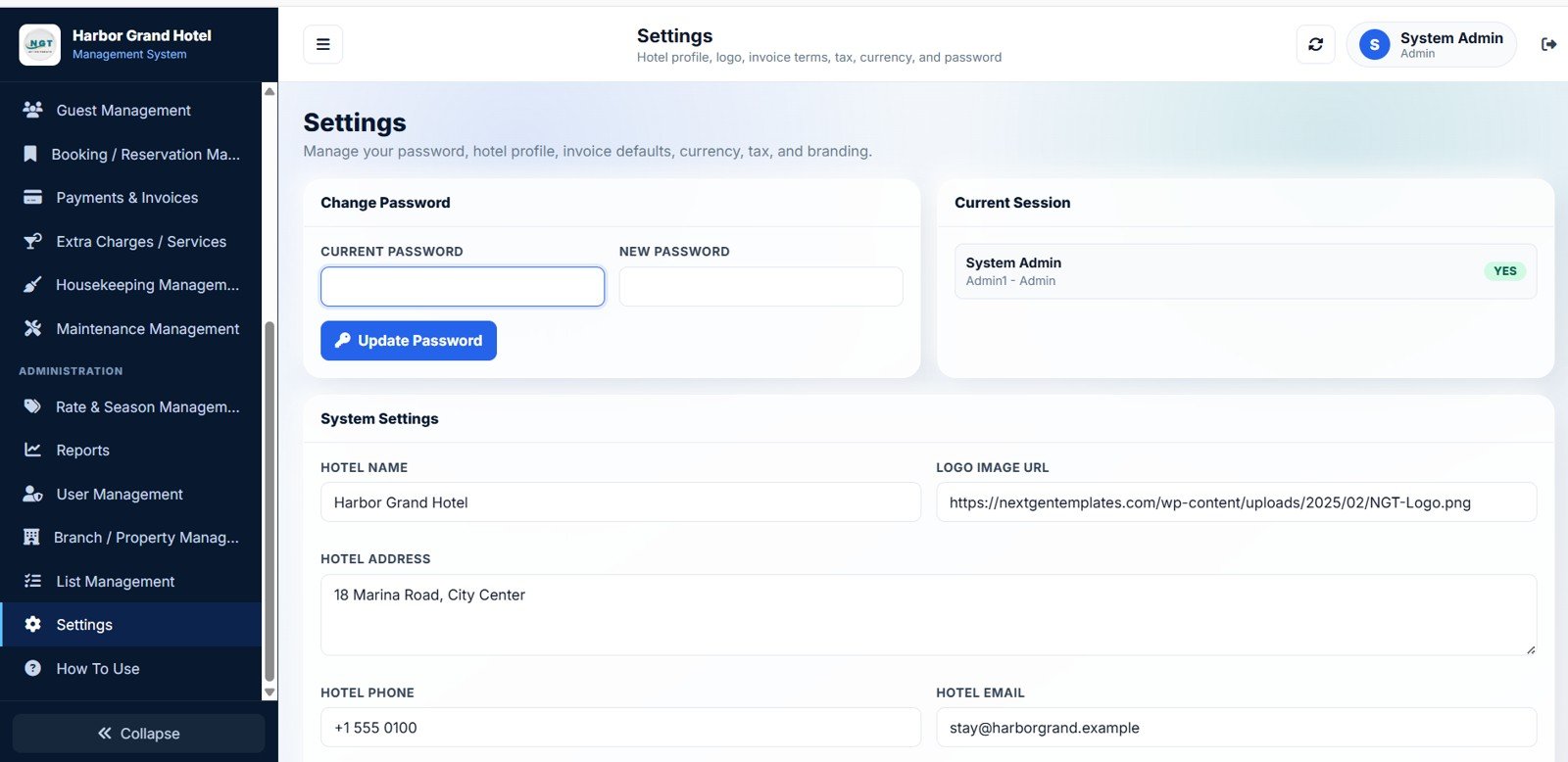
21. Settings
The Settings page lets the Admin update Change Password, Current Session, Hotel Name, Logo Image URL, Hotel Address, Hotel Phone, Hotel Email, Invoice Terms, and Tax and Currency. These values feed directly into the invoice template and every transactional notification.
Hotel Booking Management System vs. Excel PMS vs. Paid SaaS — Feature Comparison
| Feature | Hotel Booking Management System | Excel Hotel PMS Spreadsheet | Cloudbeds / Little Hotelier |
|---|---|---|---|
| Cost | $39.99 one-time | $0–$30 one-time | $80–$300 / property / month |
| Platform | Google Sheets web app | Microsoft Excel (desktop) | Cloud SaaS |
| Setup time | Under 15 minutes | 1–2 hours | 1–3 days onboarding |
| Real-time team collaboration | ✅ Yes | ❌ Single-user file | ✅ Yes |
| Role-based login | ✅ Built in (4 roles) | ❌ No | ✅ Yes (paid tiers) |
| Mobile access | ✅ Any browser | ❌ Limited | ✅ Yes |
| Multi-property | ✅ Yes | ❌ Separate files | ✅ Per-property pricing |
| Year-1 cost (4 users, 1 property) | $39.99 total | ~$30 total | $1,000–$3,600 |
| Data ownership | ✅ Your Google Sheet | ✅ File on disk | ❌ Vendor-hosted |
For independent hotels and boutique properties that want a real multi-user booking system without paying $100+ per month per property, the Hotel Booking Management System sits in the sweet spot — collaboration of a SaaS, ownership of a spreadsheet.
Who Should Use This Template
Perfect for:
- Boutique hotel owners with 5–60 rooms who need bookings, payments, and housekeeping in one system.
- B&Bs, guesthouses, and serviced-apartment operators with 2–4 front-desk and housekeeping staff.
- Independent hotel groups managing 2–10 properties from a single Google account.
- Property managers replacing manual diaries, WhatsApp groups, or $80+/month SaaS tools.
Not a fit if:
- You run 100+ rooms or a chain that needs a channel manager pushing inventory to Booking.com, Expedia, and Airbnb in real time.
- You require PCI-DSS-certified card processing inside the same tool.
- You need a public-facing online booking engine for your website (this system manages the back office, not the storefront).
- You need offline use — this is a web app and requires an internet connection.
Real-World Use Cases
Riya runs a 22-room boutique heritage hotel in Jaipur. She replaced a ₹6,500/month booking software subscription with this Google Sheets web app. Her receptionists take bookings on a Lenovo tablet at the front desk, her two housekeepers mark rooms cleaned from their phones during the morning shift, and she pulls the monthly P&L straight from the Reports page on the 1st of every month — exporting to Excel and emailing it to her accountant before her chai cools down.
Marco operates three B&Bs in Tuscany totalling 18 rooms. Each location has its own on-site manager with their own User1 login, but Marco logs in as Admin1 from his laptop in Florence and reviews ADR and RevPAR per property every Friday. The multi-property feature means all three sites live in one Google Sheet, so when his accountant asks for “all revenue across the three places for last quarter” it takes 30 seconds in the Reports page.
Anjali manages a 35-key serviced apartment block in Bangalore. Her killer feature is the Gantt Timeline — she spots back-to-back checkouts that need a deep clean turnaround, assigns the right housekeeper based on which rooms they already know, and tracks every AC repair and plumbing call in the Maintenance Management page with cost by property. Her quarterly owner report used to take a full day to compile in Excel. Now it takes 30 minutes.
Advantages of the Hotel Booking Management System
- Massive cost savings. One-time $39.99 vs $80–$300 per property per month for Cloudbeds or Little Hotelier — savings of roughly $960 to $3,600 per property in year one alone.
- Zero vendor lock-in. Your bookings, guests, payments, and reports live in a Google Sheet you own. Export everything to Excel at any time, share it with another tool, or hand it to a developer to extend.
- Built-in transparency for owners. Hotel owners with hands-off operators can log in as Admin and audit every booking, every cash payment, and every housekeeping task without depending on a printed daily report.
- Customisable without rewriting. List Management lets you change all dropdowns (booking sources, ID types, service types) without touching Apps Script — and Code.gs and Index.html are unlocked for deeper changes.
Opportunities for Improvement
To be balanced: this is a back-office property management system, not a channel manager. If your bookings come 80% from Booking.com and Airbnb, you still need a channel manager to keep inventory in sync — this template manages what happens after the booking arrives. Similarly, there is no built-in payment gateway, so credit card processing happens in your existing PoS or payment terminal, and the result is logged in the Payments and Invoices page manually. Finally, the web app requires internet — there is no offline mode — so a properly resilient front desk needs a 4G backup connection on the receptionist’s phone for power-cut situations.
Best Practices
- Change all four default passwords on Day 1. Admin1, Manager1, User1, and Housekeeper1 ship with the password
abcd— change them in the Settings page before any real bookings go in. - Use Branch and Property Management even for one hotel. Setting up at least one property in the system locks in the multi-property structure so when you open Hotel #2 in two years, the data model already supports it.
- Set up Room Types before Rooms. Define your Room Types (Standard, Deluxe, Suite) first; then add physical rooms and link them. Rates flow from room type to rooms, not the other way around.
- Use the Gantt view on Fridays for the weekend forecast. Two-night gaps, single-night islands, and back-to-back checkouts all show up visually — your weekend staffing decisions become 10x faster.
- Run the Revenue by Date Range report on the 1st of every month. Export to Excel and send to your accountant — it doubles as the GST/VAT input most jurisdictions need.
Explore Relevant Templates
- Web-based: Advanced Inventory Management System — same Google Sheets web app architecture for warehouse and stock teams.
- Hotel Hospitality Revenue Dashboard in Google Sheets — pure analytics companion focused on revenue trends.
- Hospitality & Guest Booking Performance Dashboard in Google Sheets — guest behaviour and booking source analysis.
- B&B Dashboard in Excel — analytics-only version for owners who prefer Excel.
- Airbnb Host Dashboard in HTML — single-property short-let analytics view.
If you want to strengthen the spreadsheet skills behind systems like this one, the NextGenTemplates Academy learning paths take you from the basics upward, with practice files along the way.
Get the Hotel Booking Management System
Frequently Asked Questions
What does the Hotel Booking Management System cost compared with Cloudbeds or Little Hotelier?
The Hotel Booking Management System is a one-time $39.99 purchase with zero monthly fees, while Cloudbeds and Little Hotelier typically charge $80 to $300 per property per month. Over a single year, you save roughly $960 to $3,600 per property compared with the cheapest paid SaaS tier — and the saving compounds every year you keep using it.
How long does it take to deploy this Google Sheets web app?
Setup takes under 15 minutes following the included PDF deployment guide. You create a Google Sheet, open Extensions → Apps Script, paste Code.gs into the script editor, add Index.html as a new HTML file, click Deploy → New deployment, and copy the resulting URL. No coding knowledge is required — the guide walks through every click with screenshots.
Can multiple staff members use the Hotel Booking Management System at the same time?
Yes — this is the entire reason it exists as a web app rather than a regular spreadsheet. The Hotel Booking Management System supports 4 built-in roles (Admin, Manager, Receptionist, Housekeeper) and you can create unlimited users from the User Management page. Each user gets their own login and sees only the screens their role allows.
Does the Hotel Booking Management System support multiple hotel properties?
Yes. The Branch and Property Management page lets you add multiple hotels, branches, or boutique properties. Every booking, room, payment, and report can be filtered by property. Property managers can be assigned per location, pricing can vary by property, and the Dashboard Overview shows totals across all properties or just one.
Where is my hotel data stored and is it secure?
All bookings, guests, payments, rooms, and settings are stored in your own Google Sheet, inside your Google Drive. NextGenTemplates never sees the data and there is no third-party server in the loop. Google’s infrastructure handles encryption-at-rest and access control. You can also export everything to Excel at any time.
Can I customise the Hotel Booking Management System for my hotel’s specific workflow?
Yes. Both the Apps Script (Code.gs) and the HTML interface (Index.html) are unlocked. You can change colours, add fields, modify reports, and tweak workflows directly. For non-coders, the List Management page lets you control all the dropdown values (booking sources, payment modes, service types, ID types) without touching code.
Does this system integrate with Booking.com, Expedia, or Airbnb?
The Hotel Booking Management System is a back-office property management system, not a channel manager. Bookings from OTAs are entered manually (or pasted in bulk). If your bookings come predominantly from OTAs, pair this template with a dedicated channel manager — but the back-office operations, payments, housekeeping, and reporting all still live here.
About the Author
Built by PK — Microsoft Certified Professional with 15+ years of Excel, Google Sheets, and Power BI experience. Founder of NextGenTemplates, reaching 300K+ subscribers across YouTube channels (@PK-AnExcelExpert, @NextGenTemplates, @NeoTechNavigators). Every template is hand-built and tested before release.
Conclusion
If you run an independent hotel, B&B, guesthouse, or serviced-apartment business and you’ve been paying $80 to $300 per property per month for booking software — or worse, juggling bookings in WhatsApp and a paper diary — the Hotel Booking Management System gives you a real multi-user web app for a one-time $39.99. Twenty-one connected pages, four built-in roles, multi-property support, full housekeeping and maintenance modules, and exportable reports. All running in your own Google account, with your data on your Drive.
✅ Instant download · One-time payment · No subscription · Lifetime access
Step by Step demo video:
Step by Step tutorial video to deploy this web app
📅 Last updated: May 2026