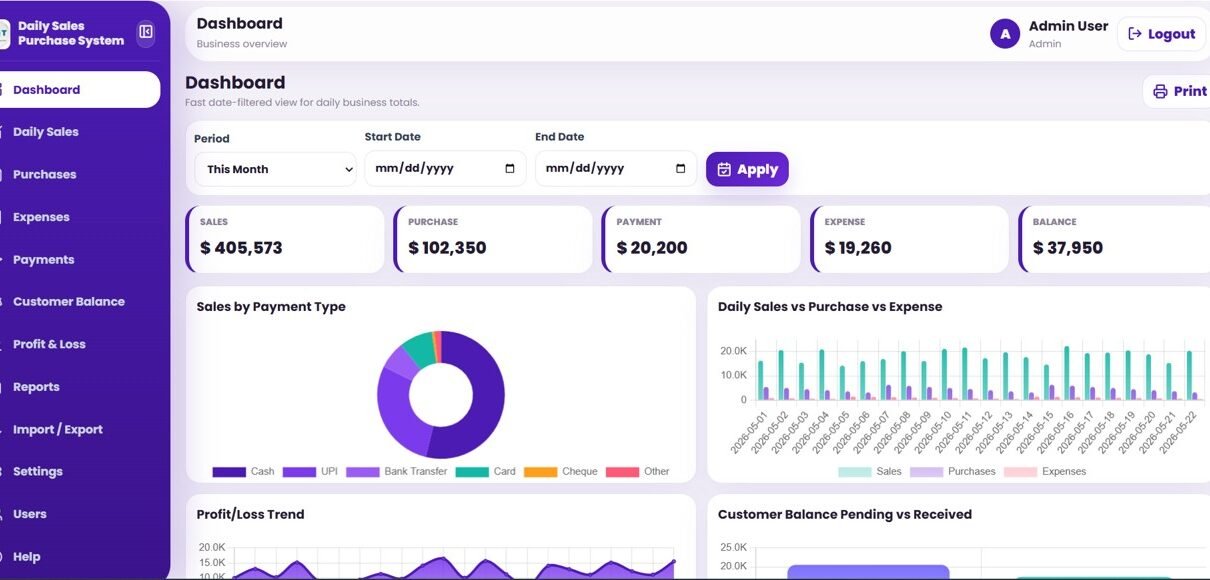
Most small businesses still juggle three or four files to answer one question: did we make money today? The Daily Sales Purchase System Web App replaces that mess with 13 connected modules in a single Google Sheets and Apps Script web app — a date-filtered dashboard with five KPI cards (Sales, Purchase, Payment, Expense, Balance), four analysis charts, an automatic Profit and Loss summary, and 8 ready-made reports. Setup takes under 10 minutes, and the whole system runs in any browser for a one-time $39.99 instead of $20–90 per user every month.
This guide walks through every page of the Daily Sales Purchase System Web App, shows how it compares to spreadsheets and paid accounting SaaS, and explains who should (and should not) use it. Whether you run a shop, a distribution business, or keep books for a few clients, you will see exactly how daily sales, purchases, expenses, payments, and customer balances come together in one place.
🚀 Try the Live Demo Before You Buy
We have deployed this web app in our own Google account so you can test every page, every role — with real sample data — before purchasing. No signup, no email required.
🔑 Test Login Credentials
Sign in as Admin1 to manage sales, purchases, users and view full reports, or as User1 to record daily transactions and view the dashboard.
💡 What you get after purchase: The full source code (Code.gs + Index.html) plus a step-by-step deployment guide so you can deploy your own private instance in your own Google account in under 15 minutes.
Key Features of the Daily Sales Purchase System Web App
Click here to purchase the Daily Sales Purchase System Web App
The Daily Sales Purchase System Web App records six payment types — Cash, UPI, Card, Bank Transfer, Cheque, and Other — across every module, so each transaction is captured once in a single connected database. Built on Google Sheets and Google Apps Script, it runs entirely in the browser and keeps your data in your own Google Drive.
- 📊 Date-filtered dashboard with five KPI cards and four charts (Sales by Payment Type, Daily Sales vs Purchase vs Expense, Profit and Loss Trend, Customer Balance Pending vs Received)
- 📑 Automatic Profit and Loss summary covering Gross Profit and Net Profit/Loss by period
- 🔐 Role-based login for Admin, Manager, and Staff with full user management
- 👥 Customer Balance module tracking pending versus received amounts per customer
- 📄 Eight ready-made reports plus CSV Import/Export for every module
Dashboard Pages Explanation
Login Page
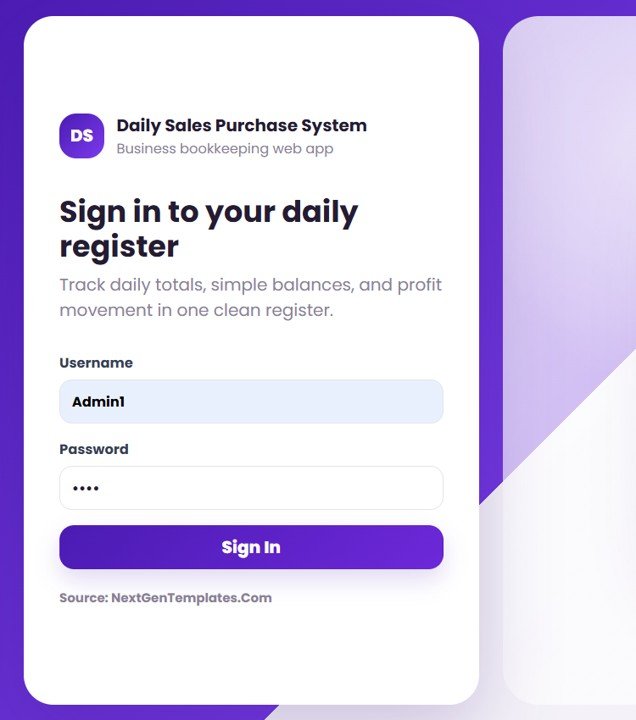
The secure entry screen where each user signs in with their own username and password before reaching the system.
Dashboard
Click here to purchase the Daily Sales Purchase System Web App
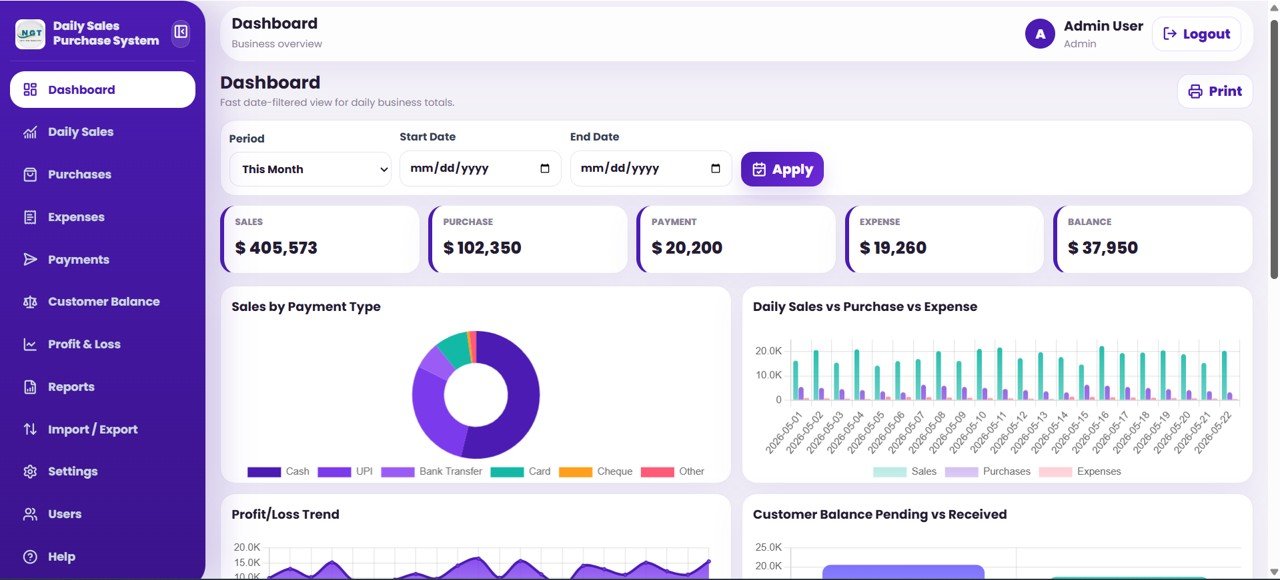
The main dashboard gives a fast, date-filtered view of daily totals with Sales, Purchase, Payment, Expense, and Balance cards, plus charts for Sales by Payment Type, Daily Sales vs Purchase vs Expense by Date, Profit and Loss Trend by Date, and Customer Balance Pending vs Received by Customer. Slicers let you filter the whole view in one click.
Dashboard Profit and Loss Summary
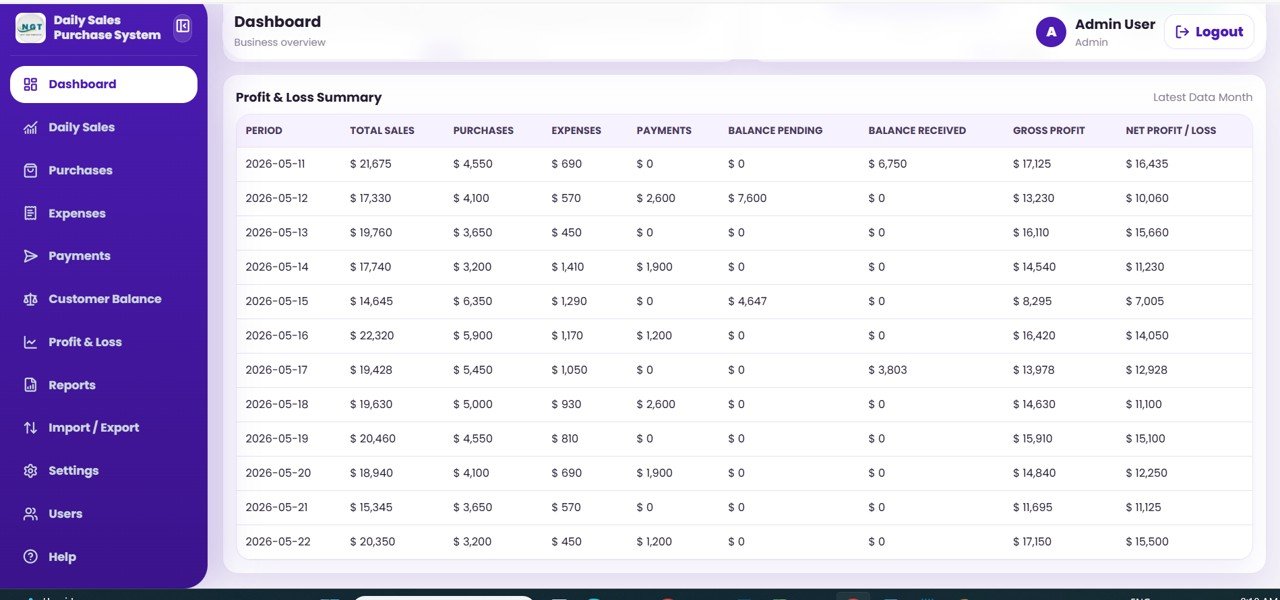
The lower dashboard section lays out each period with Total Sales, Purchases, Expenses, Payments, Balance Pending, Balance Received, Gross Profit, and Net Profit/Loss so you can read performance at a glance.
Daily Sales
Click here to purchase the Daily Sales Purchase System Web App
This page records date-wise sales totals by payment type, with Cash, UPI, Card, Bank Transfer, Cheque, and Other cards. The records table captures Sale ID, Sale Date, Payment Type, Amount, Reference Note, and Created By.

Purchases
Record purchase totals with the purchase party name. Cards show Total Amount and top vendors, while the table lists Purchase ID, Purchase Date, Purchase Party Name, Amount, Payment Status, Payment Type, and Notes.

Expenses
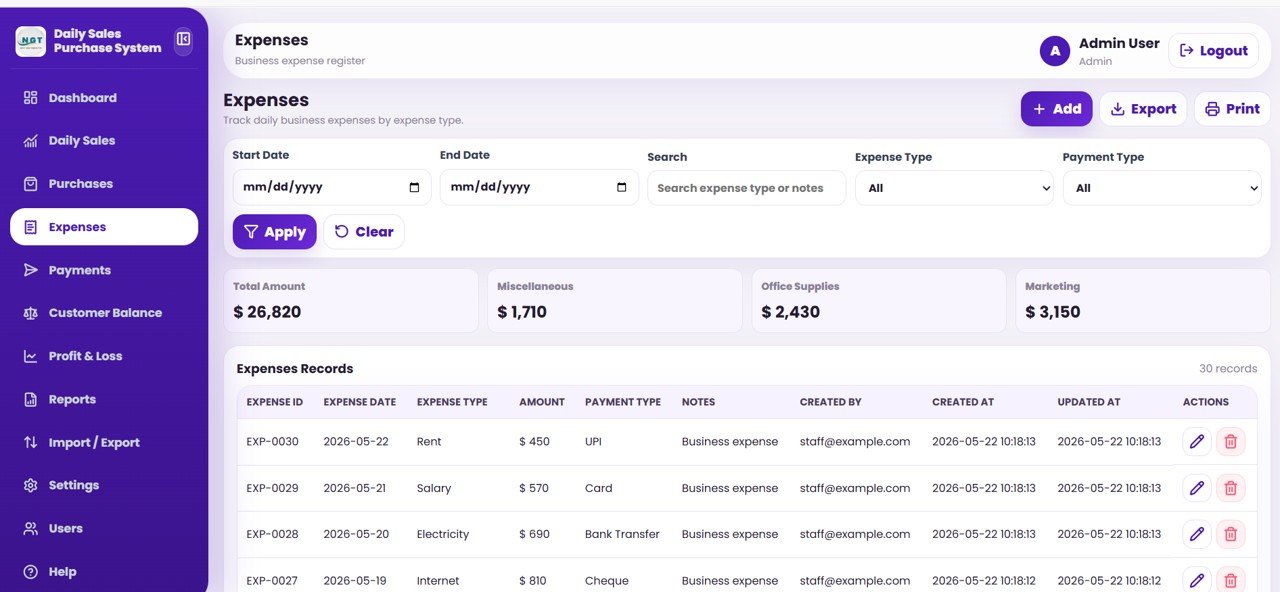
Track daily business expenses by type with Total Amount and category cards. The records table captures Expense ID, Expense Date, Expense Type, Amount, Payment Type, and Notes.
Payments
Click here to purchase the Daily Sales Purchase System Web App
Record outgoing payments made to any party. Cards summarise Total Amount and key parties, and the table lists Payment ID, Payment Date, Party Name, Payment Category, Amount, Payment Type, and Notes.

Customer Balance
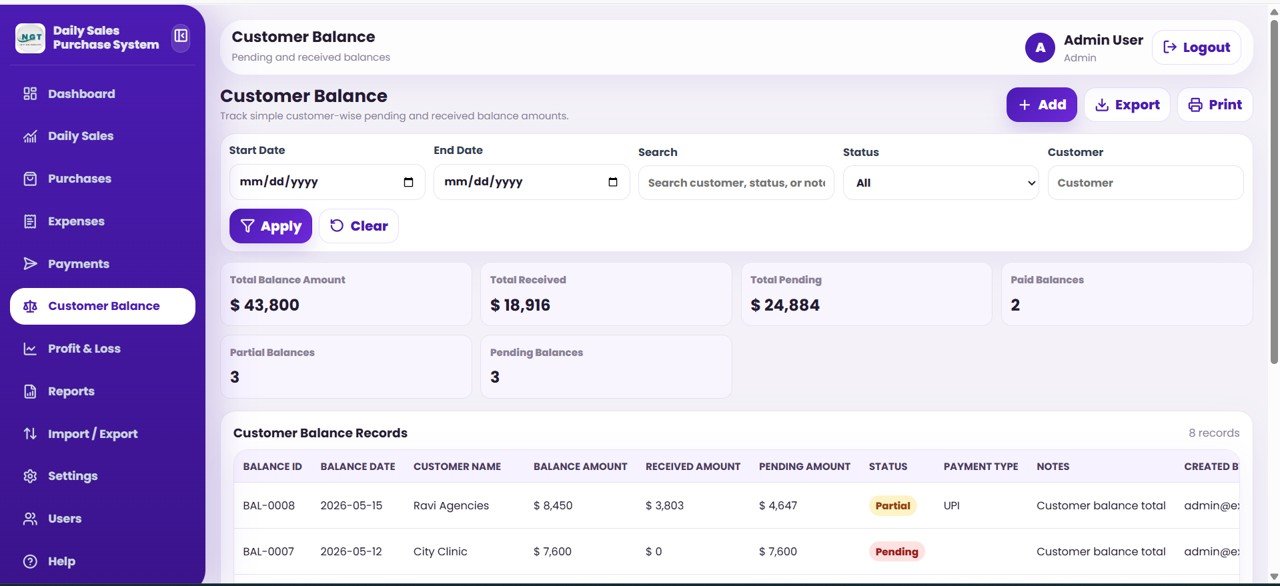
Track customer-wise pending and received balances with Total Balance, Total Received, Total Pending, and Paid/Partial/Pending cards. The table shows Balance ID, Balance Date, Customer Name, Balance Amount, Received Amount, Pending Amount, Status, and Payment Type.
Profit and Loss
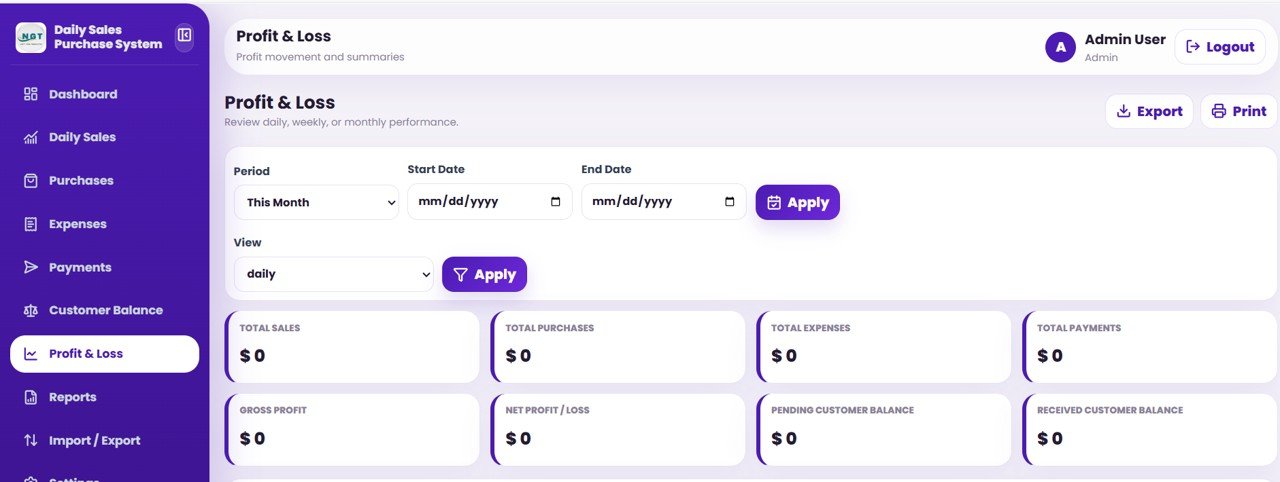
Review daily, weekly, or monthly performance. After choosing a period and a view, the page shows cards for Total Sales, Total Purchases, Total Expenses, Total Payments, Gross Profit, Net Profit/Loss, and Pending and Received Customer Balance.
Reports
Click here to purchase the Daily Sales Purchase System Web App
Choose from eight ready-made reports — Daily Business Summary, Sales by Payment Type, Purchase Party Summary, Expense Type Summary, Payment Party Summary, Customer Balance Pending, Customer Balance Received, and Profit and Loss — filter by date range, and then export or print.

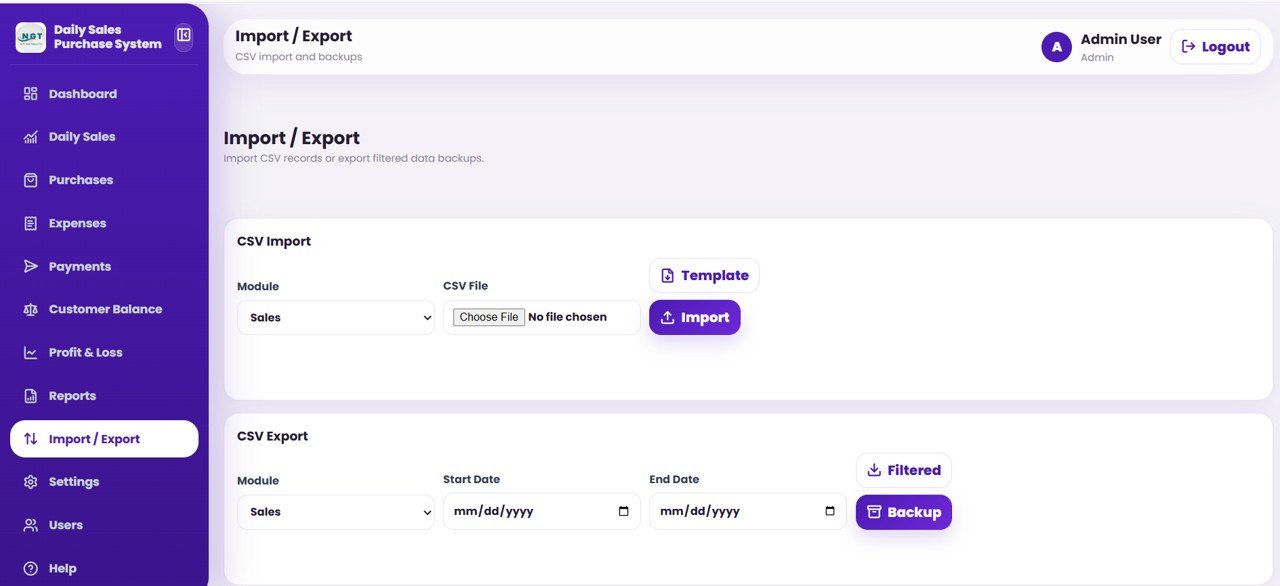
Import / Export
Import your records from a CSV file using the ready-made template, or export a filtered backup of any module for safe keeping.
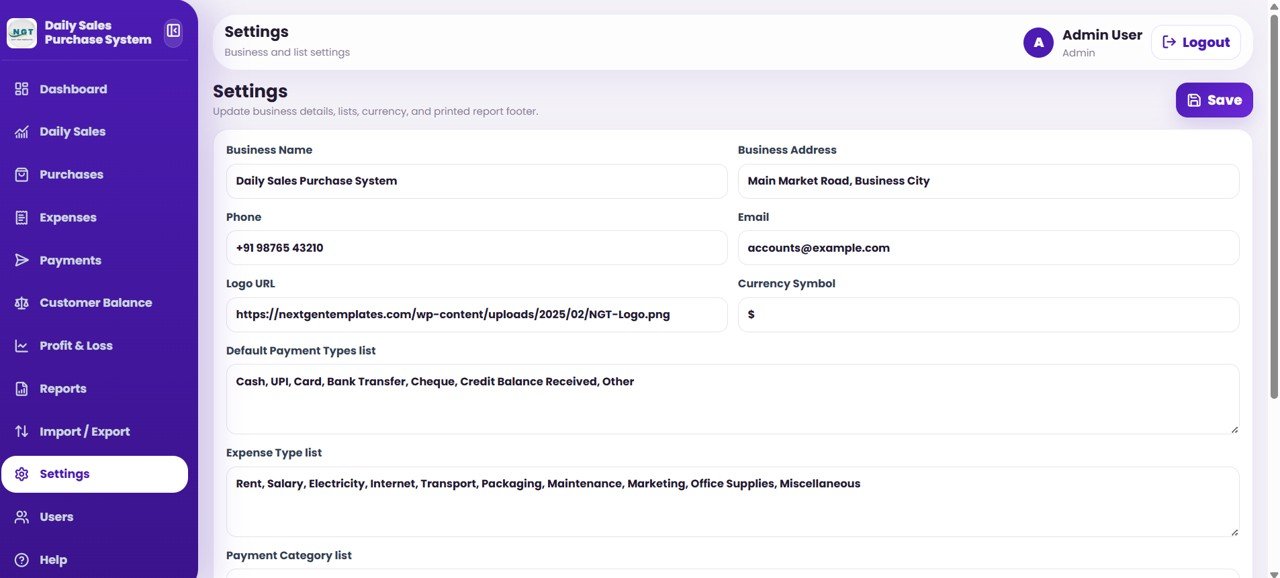
Settings
Update your business details and customise the lists used across the app, including Business Name, Address, Phone, Email, Logo URL, Currency Symbol, Default Payment Types, Expense Types, and Payment Categories.
Users
Click here to purchase the Daily Sales Purchase System Web App
The Admin manages roles and access here — add users, change roles, activate access, and reset passwords across the Admin, Manager, and Staff roles.

Daily Sales Purchase System Web App vs. Excel/Desktop vs. Paid SaaS — Feature Comparison
| Feature | Daily Sales Purchase System Web App | Excel / Desktop Spreadsheet | QuickBooks / Zoho Books (SaaS) |
|---|---|---|---|
| Cost | $39.99 one-time | $70–150 one-time license | $20–90 / user / month |
| Platform | Google Sheets + Apps Script (any browser) | Offline desktop file | Cloud SaaS |
| Setup time | Under 10 minutes | 1–2 hours | Hours to days |
| Multi-user login + roles | ✅ Admin / Manager / Staff built in | ❌ Single file, no roles | ✅ (paid seats) |
| Works on any device (browser) | ✅ | ❌ Desktop only | ✅ |
| Customisable fields & lists | ✅ Settings page | ✅ (manual) | Limited |
| Your data stays in your Google Drive | ✅ | ✅ (local file) | ❌ Vendor servers |
| Sales + Purchase + Expense + P&L in one place | ✅ | Partial | ✅ |
| Year-1 cost at 5 users | ✅ $39.99 flat | ~$350–750 | $1,200–5,400+ |
For small businesses that want full sales, purchase, expense, and profit tracking with team logins — without paying per user every month — the Daily Sales Purchase System Web App sits in the sweet spot.
Who Should Use This Template
Perfect for:
- Shop owners, distributors, and small traders recording daily sales and purchases by payment type
- Small business owners who want sales, purchase, expense, payment, and customer-balance tracking in one place with team logins
- Accountants and bookkeepers who need a quick Profit and Loss view without a monthly subscription
Not a fit if:
- You need audited, multi-entity accounting with GST/VAT e-filing and bank reconciliation
- You require offline desktop software with no Google account
- You need automated inventory valuation or payroll — this focuses on daily cash, sales, and purchase flow
Real-World Use Cases
Click here to purchase the Daily Sales Purchase System Web App
Ravi runs a wholesale distribution shop. He records every sale by payment type and logs purchases against vendors like Sunrise Vendors and Prime Distributors, then opens the dashboard each evening to see the day’s Sales, Purchase, Expense, and Balance at a glance — no more end-of-month surprises.
Meera manages a small retail store with two staff. Each staff member gets a Staff login to enter daily sales, while Meera keeps Admin access for Settings, Users, and the Profit and Loss page — replacing a $40-per-month bookkeeping tool with a one-time purchase.
Anil is a part-time accountant for three local businesses. He uses the Customer Balance and Reports pages to track pending versus received amounts and export a clean Profit and Loss report for each client every month.
Advantages of the Daily Sales Purchase System Web App
The biggest advantage is consolidation: sales, purchases, expenses, payments, customer balances, and Profit and Loss live in one connected system instead of five spreadsheets. Because it runs on Google Sheets and Apps Script, there is nothing to install, it works on any device with a browser, and your data stays in your Google Drive. The one-time $39.99 price means no per-user fees as your team grows, and role-based login keeps staff entries separate from Admin controls.
Opportunities for Improvement
The Daily Sales Purchase System Web App is built for daily cash, sales, and purchase tracking rather than full accounting. It does not file GST or VAT returns, reconcile bank statements, or value inventory automatically, so businesses with statutory audit needs may still need dedicated accounting software. It also depends on a Google account, which makes it less suitable for teams that require a fully offline tool.
Best Practices
- Set up your Settings page first — business details, currency symbol, payment types, expense types, and categories — so every record is consistent from day one.
- Give each team member their own login and the lowest role they need; reserve Admin for one or two people.
- Enter sales and purchases daily so the dashboard and Profit and Loss stay accurate.
- Use the Import/Export page weekly to back up each module.
Explore Relevant Templates
Click here to purchase the Daily Sales Purchase System Web App
If you also raise invoices, pair this with the GST Billing System Web App. Teams handling tickets and tasks can add the Advanced Task Management System Web App or the Complaint Management System Web App. You can also log issues with the Incident Tracker and Report Web App or run a service business with the Restaurant Management System Web App. Browse more Web App templates on NextGenTemplates.
Frequently Asked Questions
What does the Daily Sales Purchase System Web App track?
The Daily Sales Purchase System Web App tracks daily sales, purchases, expenses, payments, and customer balances across six payment types, with an automatic Profit and Loss summary. All five dashboard KPI cards update when you filter by date.
What platform does it run on?
It is built on Google Sheets and Google Apps Script, so the Daily Sales Purchase System Web App runs in any web browser. Your data stays in your own Google Drive and there is no monthly fee.
How long does setup take?
Setup takes under 10 minutes. Make your own copy from the included guide, deploy the web app, add your users, and start recording sales and purchases the same day.
Can multiple people use it with different access levels?
Yes. The Users page supports three roles — Admin, Manager, and Staff — so you control who can add records, manage users, and reset passwords in the Daily Sales Purchase System Web App.
How does it compare to QuickBooks or Zoho Books?
The Daily Sales Purchase System Web App is a one-time $39.99 purchase with no per-user fees, versus $20–90 per user per month for QuickBooks or Zoho Books, while still covering sales, purchase, expense, payment, and Profit and Loss tracking.
Can I import existing data and export backups?
Yes. The Import/Export page loads records from a CSV using the ready-made template and exports a filtered backup of any module for safe keeping.
About the Author
Built by PK — Microsoft Certified Professional with 15+ years of Excel, Google Sheets, and Power BI experience. Founder of NextGenTemplates, reaching 300K+ subscribers across YouTube channels. Every template is hand-built and tested before release.
Conclusion
The Daily Sales Purchase System Web App turns scattered spreadsheets into one connected system for daily sales, purchases, expenses, payments, customer balances, and Profit and Loss — with team logins and 8 ready-made reports, all in the browser. Click here to purchase the Daily Sales Purchase System Web App and start tracking today.
Instant download · One-time payment · No subscription. For step-by-step video tutorials, visit YouTube.com/@NeoTechNavigators.
Last updated: June 2026
🚀 Try the Live Demo Before You Buy
We have deployed this web app in our own Google account so you can test every page, every role — with real sample data — before purchasing. No signup, no email required.
🔑 Test Login Credentials
Sign in as Admin1 to manage sales, purchases, users and view full reports, or as User1 to record daily transactions and view the dashboard.
💡 What you get after purchase: The full source code (Code.gs + Index.html) plus a step-by-step deployment guide so you can deploy your own private instance in your own Google account in under 15 minutes.