
Fuel tracking looks simple until the monthly review starts. A missing odometer reading, one inconsistent fuel type label, or a few unreviewed driver entries can hide real fleet cost problems. ATRI’s 2025 operational cost update reported average motor-carrier costs of $2.26 per mile in 2024, with fuel costs at 48.1 cents per mile. The U.S. Department of Energy also publishes federal fleet fuel consumption datasets in gasoline gallon equivalents, showing how seriously fleet fuel measurement is treated at scale.
The Fleet Fuel and Mileage Tracker in Google Sheets gives small and mid-size fleet teams a practical way to track fuel cost, fill-ups, mileage, fuel type, driver names, vehicle type, status lists, and km/L efficiency without buying a monthly fleet SaaS tool. It is built as a two-page Google Sheets tracker: an Overview Page for analysis and a List Sheet for clean dropdown options.
Click here to purchase the Fleet Fuel and Mileage Tracker in Google Sheets
Key Features of Fleet Fuel and Mileage Tracker in Google Sheets
- Total Fuel Cost card: Review the headline fuel spend directly on the Overview Page.
- Fill-ups by Vehicle Type: Compare refueling activity across cars, vans, trucks, buses, bikes, SUVs, or custom categories.Fleet Fuel and Mileage Tracker in Google Sheets
- Logs by Fuel Type: Separate diesel, petrol, CNG, EV charging, hybrid, or other custom fuel labels.Fleet Fuel and Mileage Tracker in Google Sheets
- Fuel Cost by Entry: Identify unusually expensive fill-ups before they distort monthly reporting.Fleet Fuel and Mileage Tracker in Google Sheets
- Efficiency (km/L) by Vehicle: Compare mileage performance across vehicles and flag low-efficiency units.Fleet Fuel and Mileage Tracker in Google Sheets
- Multiple slicers: Filter the dashboard quickly by vehicle, driver, fuel type, status, or other fields.
- List Sheet controls: Manage vehicle type options, driver names, fuel type options, and status values in one place.
- Google Sheets collaboration: Share the copied file with finance, drivers, admin staff, and operations managers using Drive permissions.
Dashboard Pages Explanation
1 – Overview Page
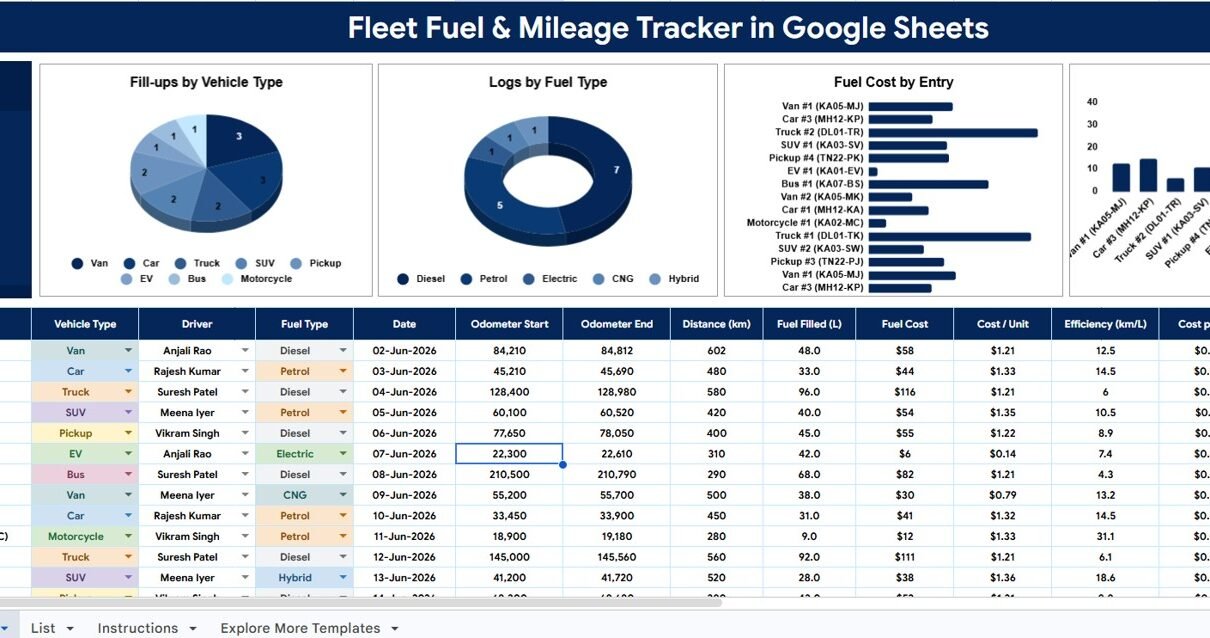
The Overview Page is the main reporting area of the tracker. At the top, the Total Fuel Cost card shows high-level fuel spend so managers can understand the current cost position before drilling into charts.
The page also uses slicers so users can filter the dashboard quickly. This matters when a fleet manager wants to isolate one vehicle type, one fuel type, one driver, or one status without rebuilding formulas.
Fill-ups by Vehicle Type: This chart shows how many fill-up records are connected to each vehicle type. It helps managers see whether vans, trucks, bikes, or other vehicle categories are generating most refueling activity.
If one vehicle type has unusually high fill-up volume, the team can review route assignments, vehicle allocation, and driver behavior. The chart is especially useful for comparing mixed fleets.
Logs by Fuel Type: This chart groups logs by fuel type such as diesel, petrol, CNG, EV charging, hybrid, or custom labels. It keeps mixed-fuel fleets readable and helps finance teams understand the split of fuel activity.Fleet Fuel and Mileage Tracker in Google Sheets
Clean fuel type tracking also supports better reporting. When fuel names are consistent, slicers and summaries remain reliable across every review period.Fleet Fuel and Mileage Tracker in Google Sheets
Fuel Cost by Entry: This chart displays fuel cost at the entry level. Instead of scanning all records manually, managers can quickly spot fill-ups that appear unusually high.Fleet Fuel and Mileage Tracker in Google Sheets
Those entries may be valid, but they deserve review. High-cost entries can indicate larger tanks, long routes, missed previous logs, incorrect quantities, or data-entry mistakes.
Efficiency (km/L) by Vehicle: This chart compares mileage efficiency by vehicle. Low km/L values can point to maintenance issues, heavy loads, idling, poor routing, driving behavior, or odometer errors.
Because the chart is vehicle-specific, managers can identify which units need attention rather than treating the entire fleet as one average number.
Fleet Fuel and Mileage Tracker in Google Sheets
2 – List Sheet
The List Sheet is the setup tab that supports clean data entry. It prevents inconsistent labels from damaging the analysis, because every dropdown list can be maintained in one place.
Vehicle Type Options by List Tab: This setup section lets users standardize vehicle type names. You can use default options or replace them with categories that match your own fleet.
Driver Names by List Tab: This list keeps driver names consistent across records. It is helpful when finance or operations needs to review fuel entries by responsible person.
Fuel Type Options by List Tab: This section controls fuel type dropdowns. Clear fuel labels make the Logs by Fuel Type chart and fuel filters much easier to trust.Fleet Fuel and Mileage Tracker in Google Sheets
Status Options by List Tab: Status labels can support internal workflow, such as pending, reviewed, flagged, approved, reimbursed, or closed. This makes the tracker useful for both operations and accounting review.Fleet Fuel and Mileage Tracker in Google Sheets

List Sheet
Fleet Fuel and Mileage Tracker in Google Sheets vs. Excel Tracker vs. Paid Fleet SaaS – Feature Comparison
| Feature | This Google Sheets Tracker | Microsoft Excel Tracker | Paid Fleet SaaS |
|---|---|---|---|
| Cost | $6.99 one-time sale price | Template cost or internal build time | Usually recurring per vehicle or per user |
| Platform | Google Sheets in Drive | Excel desktop or Excel Online | Vendor-hosted web application |
| Setup time | Copy template, update lists, enter logs | Open workbook or build formulas | Account setup, data import, training |
| Real-time team collaboration | Native Google Sheets sharing | Depends on Microsoft 365 setup | Usually available by plan |
| Mobile access | Google Sheets app or browser | Excel app or browser | Vendor mobile app or web app |
| Customizable fields | Edit lists, labels, and columns | Editable if workbook is unlocked | Often limited by vendor structure |
| Share with link | Yes, with Drive permissions | Yes, with OneDrive permissions | Usually account-based access |
| Year-1 cost at 5 users | $6.99 before any Google Workspace costs | Template plus Microsoft licensing | Can become recurring per user or vehicle |
| Fuel cost by entry | Included | Requires formula or chart setup | Usually included but less spreadsheet-editable |
| Efficiency in km/L by vehicle | Included | Requires customization | Usually included with subscription |
Who Should Use This Template
This template is useful for delivery companies, school transport offices, logistics teams, service fleets, field sales teams, construction vehicle coordinators, NGOs, facilities teams, and small businesses that want better control over fuel spend.Fleet Fuel and Mileage Tracker in Google Sheets
It works best when the team is comfortable entering or pasting fuel logs into Google Sheets. It is also a good fit when managers want flexible analysis without asking a SaaS vendor to change fields or reports.Fleet Fuel and Mileage Tracker in Google Sheets
It is not the right tool for fleets that need GPS tracking, live fuel-card integration, telematics, automatic route optimization, or enterprise compliance controls. In those cases, this tracker can still be used as a lightweight export review sheet, but it should not replace a specialist system.
Real-World Use Cases
Ravi, a delivery fleet coordinator: reviews Fuel Cost by Entry every Friday to find unusually expensive fill-ups before closing the weekly fuel report.Fleet Fuel and Mileage Tracker in Google Sheets
Meera, an office admin: uses the List Sheet to maintain driver names and vehicle types so monthly reimbursement records stay clean for finance.Fleet Fuel and Mileage Tracker in Google Sheets
Daniel, a school transport manager: checks Efficiency (km/L) by Vehicle each month and schedules inspection for buses that show lower mileage than expected.
Advantages of Fleet Fuel and Mileage Tracker in Google Sheets
- Lower software cost: One-time template pricing avoids recurring fleet SaaS fees.
- Fast implementation: Copy the Google Sheet, update lists, and begin logging fuel data.
- Shared visibility: Managers and finance users can review the same file with controlled Drive access.
- Consistent dropdowns: List Sheet values reduce spelling variations that break dashboards.
- Vehicle-level insight: km/L by vehicle helps identify possible maintenance or behavior issues.
- Audit-friendly records: Fuel logs, statuses, drivers, and vehicle types stay in one structured file.
Opportunities for Improvement
Like any spreadsheet tracker, the template depends on accurate and timely data entry. Teams should define who logs fill-ups, who reviews flagged entries, and how often the Overview Page is checked.
Advanced teams may add optional columns for fuel station, payment method, receipt URL, trip purpose, route, or cost center. Larger fleets may also connect form submissions or Apps Script automation later, but the base template stays intentionally simple for day-to-day use.
Best Practices
- Update the tracker after every fill-up instead of waiting until month end.
- Use one standard unit for quantity and one standard unit for distance.
- Review low km/L vehicles before assuming the driver or vehicle is the problem.
- Keep the List Sheet controlled by one owner so dropdown values remain clean.
- Use status labels such as Pending, Reviewed, and Flagged to manage review workflow.
- Protect formula areas and dashboard ranges so accidental edits do not break analysis.
Explore Relevant Templates
For broader fleet analytics, explore the Fleet Management Dashboard in Google Sheets. For KPI target tracking, use the Fleet Utilization KPI Dashboard in Google Sheets.
If your team also manages trip bookings, the Vehicle Reservation Tracker in Google Sheets is a good companion. For a full browser-based fleet workflow, review the Vehicle Movement Register Management System Web App.
Click here to purchase the Fleet Fuel and Mileage Tracker in Google Sheets
Frequently Asked Questions
Does this tracker work in Google Sheets?
Yes. The template is built for Google Sheets and is intended to be copied into your own Google Drive account.
What pages are included?
The template includes an Overview Page and a List Sheet. The Overview Page contains the fuel dashboard, while the List Sheet controls dropdown options.
Which charts are included?
The Overview Page includes Fill-ups by Vehicle Type, Logs by Fuel Type, Fuel Cost by Entry, and Efficiency (km/L) by Vehicle.
Can I customize the vehicle type and fuel type lists?
Yes. The List Sheet lets you edit vehicle type options, driver names, fuel type options, and status options.
Does this replace fleet management software?
No. It is a spreadsheet tracker for fuel and mileage analysis. It does not include GPS, telematics, automatic fuel-card imports, or route optimization.
Can multiple people use the tracker?
Yes. Since it is a Google Sheets template, you can share the copied file with other users through Google Drive permissions.
About the Author
Built by PK – Microsoft Certified Professional with 15+ years of Excel, Google Sheets, and Power BI experience. Founder of NextGenTemplates, reaching 300K+ subscribers across YouTube channels. Every template is hand-built and tested before release.
Conclusion
The Fleet Fuel and Mileage Tracker in Google Sheets is a practical tool for teams that want clean fuel logs, mileage visibility, vehicle-level km/L comparison, and better fuel cost review without a recurring fleet SaaS subscription.
With an Overview Page for analysis and a List Sheet for controlled dropdowns, it keeps the workflow simple: enter fuel records, filter with slicers, review the charts, and act on unusual cost or efficiency patterns.
Visit our YouTube channel to learn step-by-step tutorials.