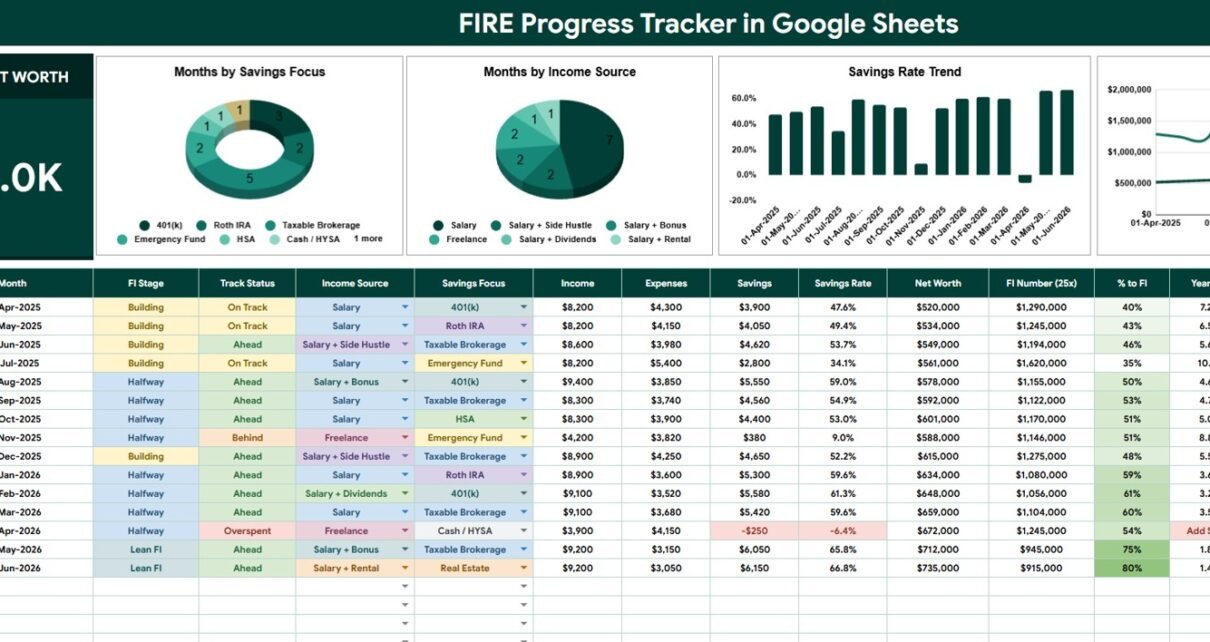
FIRE Progress Tracker in Google Sheets is a ready-to-use financial independence tracker with 2 main sheet tabs, 10 headline FIRE cards, 4 overview charts, and 2 list-analysis sections. Instead of tracking net worth, savings rate, FI Number, income sources, and runway in scattered notes, users can review the whole FIRE picture inside one Google Sheets workbook.
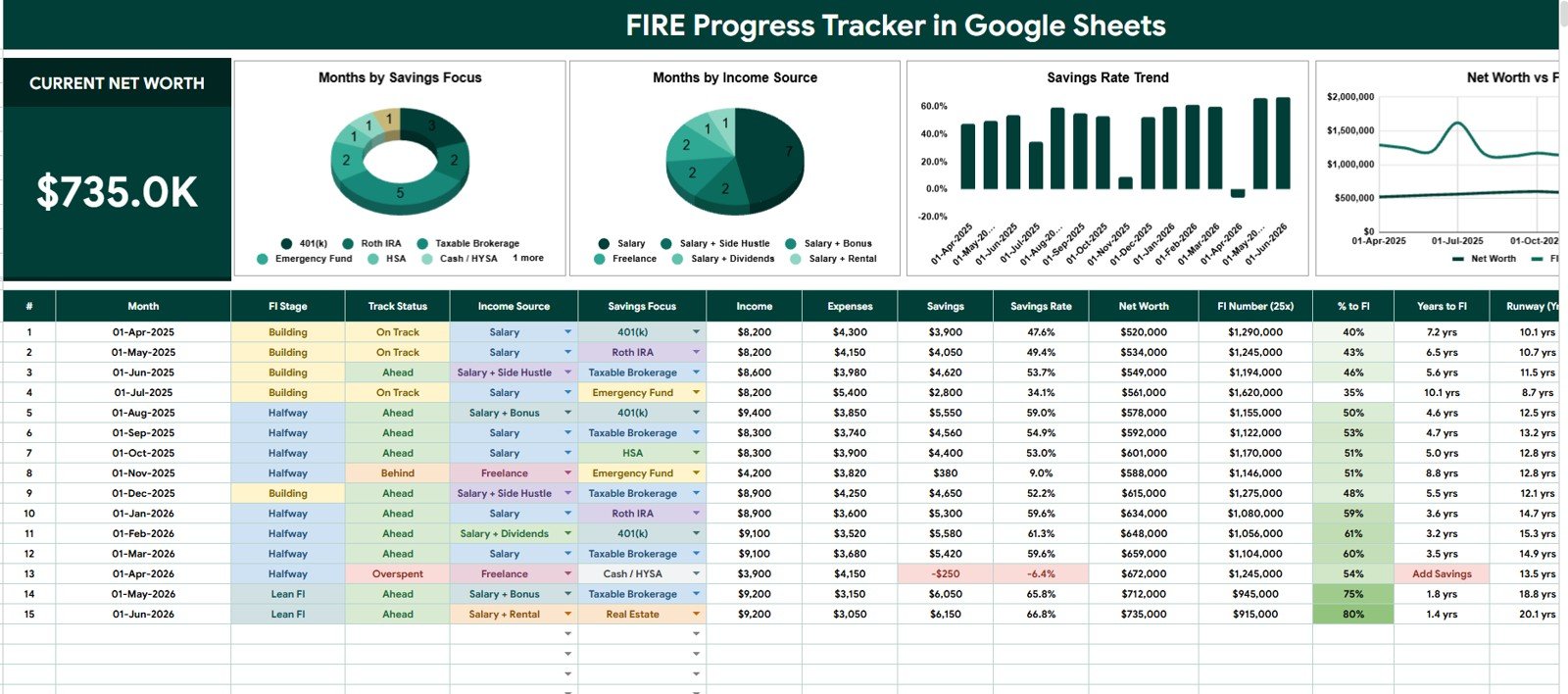
The template is built around practical FIRE math. It shows Current Net Worth, Income, Expenses, Savings, Savings Rate, Net Worth, FI Number (25x), % to FI, Years to FI, and Runway (Years). That means the user can see both the current financial position and the distance to the target in the same view.
Because this is a Google Sheets template, users can also share the copied file with a spouse, partner, planner, or accountability teammate. Google’s official Drive sharing help explains how file owners can share files and control access. That makes this format useful for personal finance collaboration without moving into a recurring paid finance app.
Click here to purchase the FIRE Progress Tracker in Google Sheets
FIRE Progress Tracker in Google Sheets
Key Features of FIRE Progress Tracker in Google Sheets
- 10 FIRE summary cards: Track Current Net Worth, Income, Expenses, Savings, Savings Rate, Net Worth, FI Number (25x), % to FI, Years to FI, and Runway (Years).
- Overview Page: View the most important FIRE metrics and charts in one dashboard-style sheet.
- Multiple slicers: Filter the dashboard quickly by available fields without rebuilding the analysis.
- Months by Savings Focus: Understand which saving priorities are most common across tracked months.
- Months by Income Source: See whether FIRE progress depends on salary, side income, business income, dividends, rentals, or custom labels.
- Savings Rate by Month: Review the monthly savings trend and identify periods where expenses are absorbing income growth.
- Net Worth and FI Number by Month: Compare actual net worth against the target FI Number over time.
- List sheet controls: Maintain Income Source and Savings Focus options so dropdowns and charts stay clean.
- Google Sheets workflow: Copy the template into Google Drive and keep an editable version for your own household or planning system.
Dashboard Pages Explanation
1 – Overview Page
The Overview Page is the main reporting area of the tracker. At the top, the sheet displays Current Net Worth, Income, Expenses, Savings, Savings Rate, Net Worth, FI Number (25x), % to FI, Years to FI, and Runway (Years), giving users a quick FIRE status check before they analyze monthly patterns.
The page also includes multiple slicers for quick filtering. This is useful when users want to isolate one income source, one savings focus, or a specific review period without changing the underlying data.
Months by Savings Focus: This chart groups months by the selected savings focus. It helps show whether the user is prioritizing emergency savings, debt payoff, investing, retirement accounts, cash buffer, real estate, or another custom focus.
If one focus appears too often, the user can decide whether that is intentional or whether the plan needs balance. For example, a long emergency-fund phase may be correct for one household but too conservative for another.
Months by Income Source: This chart groups the months by income source. It helps separate regular salary months from side income, business income, dividend income, rental income, consulting income, or other labels.
When a user is trying to reach FIRE faster, this chart shows whether the plan relies mostly on one income stream or whether multiple streams are supporting the goal. That makes income diversification easier to discuss during monthly reviews.
Savings Rate by Month: This chart displays the savings rate across each month. It helps users identify strong months, weak months, and repeating spending patterns that affect the FIRE timeline.
Savings rate is one of the most important FIRE behavior metrics because it connects income, expenses, and actual savings. If income rises but savings rate stays flat, expenses may be growing at the same time.
Net Worth and FI Number by Month: This chart compares the actual net worth line against the FI Number line. It shows whether the user is getting closer to the target or whether the target is moving away because expenses increased.
This view is helpful because net worth alone can be misleading. A household can increase net worth and still see the FI Number rise if lifestyle costs rise faster.
FIRE Progress Tracker in Google Sheets
2 – Income Source and Savings Focus Lists
The second sheet tab supports the dropdown values used in the tracker. It keeps the reporting clean because income source and savings focus names can be maintained in one controlled location.
Income Source by List Option: This analysis shows the available income source options that can be used in the tracker. Clean source names help prevent chart issues caused by spelling variations or duplicate labels.
Savings Focus by List Option: This analysis shows the available savings focus options. Users can rename or expand the list based on their strategy, such as emergency fund, index investing, debt payoff, retirement account, mortgage payoff, side business, or cash reserve.
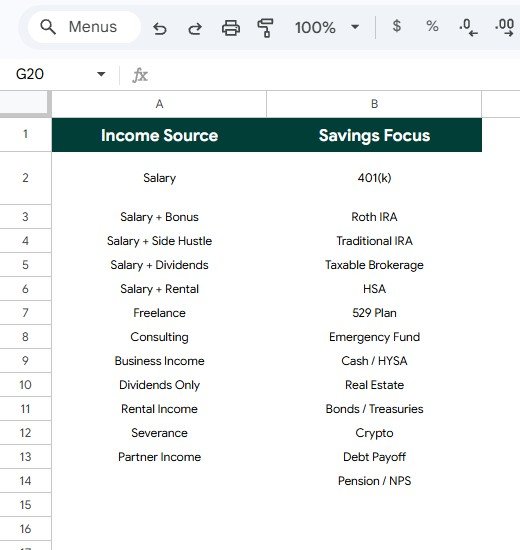
Income Source and Savings Focus Lists
FIRE Progress Tracker in Google Sheets vs. Excel Tracker vs. Paid Finance SaaS – Feature Comparison
| Feature | This Google Sheets Tracker | Excel Tracker | Paid Finance SaaS |
|---|---|---|---|
| Cost | $6.99 one-time sale price | Template cost or internal build time | Usually monthly or annual subscription |
| Platform | Google Sheets in Google Drive | Excel desktop, OneDrive, or Excel Online | Vendor-hosted web or mobile app |
| Setup time | Copy the Sheet, update lists, enter monthly data | Open the workbook and adjust formulas | Account setup, bank connections, and rules |
| Real-time team collaboration | Built into Google Drive sharing | Depends on Microsoft 365 setup | Usually included by plan |
| Mobile access | Google Sheets app or browser | Excel app or browser | Usually included |
| Customizable fields | Editable lists, labels, and sheet structure | Editable if workbook is unlocked | Limited by vendor settings |
| Share with link | Yes, with Drive permissions | Yes, with OneDrive or SharePoint | Usually login based |
| Year-1 cost at 5 users | $6.99 before any Google Workspace costs | Template plus Microsoft access | Can become recurring per user or household |
| FI Number and runway cards | Included | Must be built or customized | Depends on the app |
| Savings focus analysis | Included through list options and charts | Requires setup | Often less customizable |
Who Should Use This Template
This template is a good fit for FIRE beginners, personal finance planners, couples, spreadsheet users, budget coaches, side-income builders, and anyone who wants a simple monthly review process for financial independence progress.
It works especially well when users want to see the relationship between income, expenses, savings rate, net worth, and FI target in one place. It is also useful for people who prefer owning an editable spreadsheet instead of connecting accounts to a finance app.
It is not the right tool for users who need automatic bank imports, brokerage synchronization, regulated financial planning advice, tax modeling, Monte Carlo simulations, or retirement account recommendations. This is a tracker, not a substitute for professional advice.
Real-World Use Cases
Ananya, a FIRE beginner, updates the tracker every month to see whether her savings rate is improving after reducing discretionary spending.
Mark and Julia, a couple planning early retirement, use the FI Number and Runway cards before their monthly money meeting. They review whether the target is moving down or rising because expenses changed.
Dev, a freelancer, uses Months by Income Source to understand whether consulting income is becoming reliable enough to support the FIRE plan.
Advantages of FIRE Progress Tracker in Google Sheets
- Low one-time cost: The template avoids recurring finance software fees.
- Clear FIRE metrics: FI Number, % to FI, Years to FI, and Runway are visible as headline cards.
- Behavior-focused savings view: Savings Rate by Month makes monthly habits easier to review.
- Editable list options: Income Source and Savings Focus can match the user’s real financial situation.
- Shared planning: Google Sheets makes it easy to share the file with another reviewer using Drive permissions.
- No account-linking requirement: Users can enter numbers manually and keep control of what data goes into the file.
Opportunities for Improvement
Like any spreadsheet tracker, the template depends on consistent data entry. Users should define how net worth is calculated, what counts as income, and whether expenses include taxes, housing, debt payments, or only spending categories.
Advanced users may add extra fields for investment accounts, debt balances, real estate equity, tax-advantaged accounts, brokerage accounts, or annual bonus tracking. Some users may also protect formula ranges to avoid accidental edits.
The template does not automatically import bank or brokerage data. That is a limitation for users who want automation, but it is also useful for users who prefer a simple, controlled monthly update process.
Best Practices
- Update the tracker on the same day each month so comparisons stay consistent.
- Use one standard definition of net worth across all months.
- Keep Income Source and Savings Focus labels clean and avoid duplicate spellings.
- Review savings rate and expenses together, not as separate numbers.
- Watch the FI Number line when expenses change because lifestyle inflation can move the target upward.
- Use slicers during monthly review meetings instead of editing formulas.
- Protect formula cells after customizing the tracker.
Explore Relevant Templates
For a broader retirement planning view, explore the Retirement Savings Tracker in Google Sheets. If cash flow is the main issue, the Personal Cash Flow Tracker in Google Sheets is a useful companion.
For investing-focused tracking, review the Mutual Fund and SIP Tracker in Google Sheets, Dividend Income Tracker in Google Sheets, and Stock Portfolio Tracker in Google Sheets.
Click here to purchase the FIRE Progress Tracker in Google Sheets
Frequently Asked Questions
What is included in the FIRE Progress Tracker in Google Sheets?
The tracker includes an Overview Page, an Income Source and Savings Focus Lists tab, 10 FIRE summary cards, 4 overview charts, slicers, and list option analysis.
Does the tracker calculate FI Number?
Yes. The Overview Page includes FI Number (25x), which gives users a common financial independence target based on annual expenses.
Can I customize income sources?
Yes. The list sheet lets users update the income source options so labels match salary, side income, dividends, rentals, business income, or other categories.
Can I customize savings focus options?
Yes. Users can edit savings focus labels such as emergency fund, investing, debt payoff, retirement contributions, cash buffer, or any custom plan.
Can couples use this tracker together?
Yes. Since the file is copied into Google Sheets, the owner can share it with another editor or viewer through Google Drive permissions.
Does this replace a financial advisor?
No. It is a tracking spreadsheet. It does not provide tax, legal, investment, retirement, or financial advice.
About the Author
Built by PK – Microsoft Certified Professional with 15+ years of Excel, Google Sheets, and Power BI experience. Founder of NextGenTemplates, reaching 300K+ subscribers across YouTube channels. Every template is hand-built and tested before release.
Conclusion
The FIRE Progress Tracker in Google Sheets gives users a simple way to review net worth, savings rate, FI Number, runway, income source, and savings focus from one editable spreadsheet. It is built for people who want FIRE visibility without a complicated SaaS setup or recurring app fee.
With 10 headline cards, 4 overview charts, slicers, and a list setup sheet, the template supports a practical monthly FIRE review workflow. Enter the data consistently, review the charts, and use the FI Number and runway cards to keep the long-term goal visible.
Visit our YouTube channel to learn step-by-step tutorials.