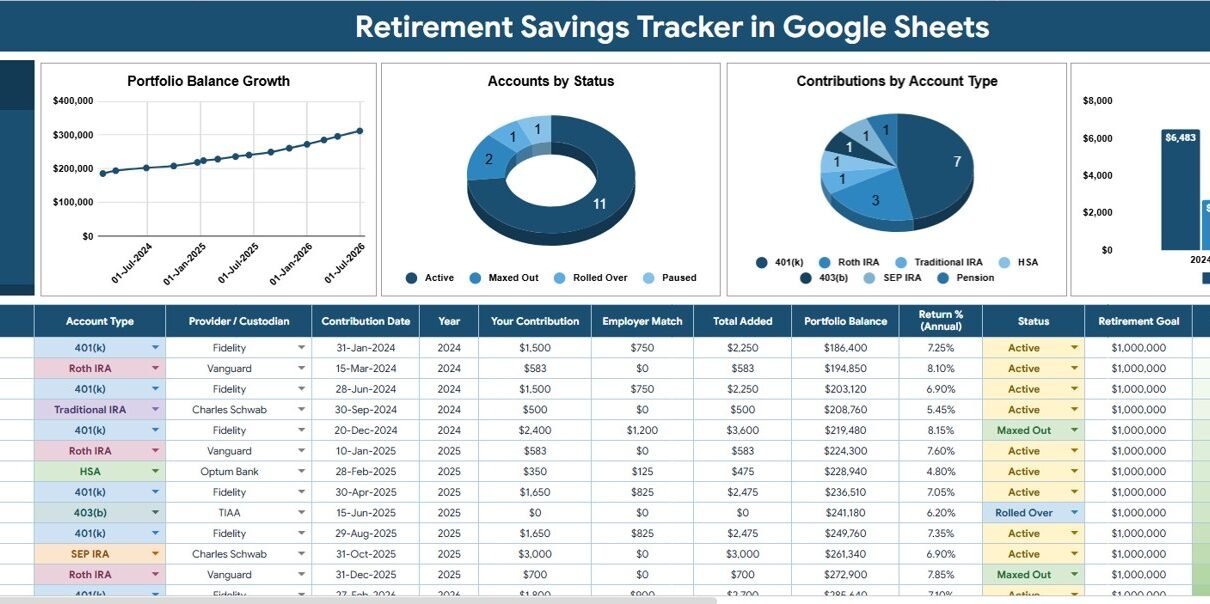
Retirement Savings Tracker in Google Sheets is built for retirement savers, household finance planners, advisors, and spreadsheet-first investors who want one editable place to monitor retirement account balances, yearly contributions, account types, providers, custodians, and status. The planning need is real: Fidelity’s Q1 2026 retirement analysis reported an average 401(k) balance of $141,000 and a record 14.4% total 401(k) savings rate. Vanguard also notes that retirement savers should generally aim for a 12% to 15% annual savings rate, including employer contributions, in its retirement savings guidance.
This template does not connect to brokerage accounts or give financial advice. Instead, it gives you a clean Google Sheets structure for records you enter or paste yourself. The value is in repeatable review: update your rows, use slicers, check the Portfolio Balance card, and see whether balances, contributions, account statuses, and providers are moving in the right direction.
Get the Retirement Savings Tracker in Google Sheets
Key Features of Retirement Savings Tracker in Google Sheets
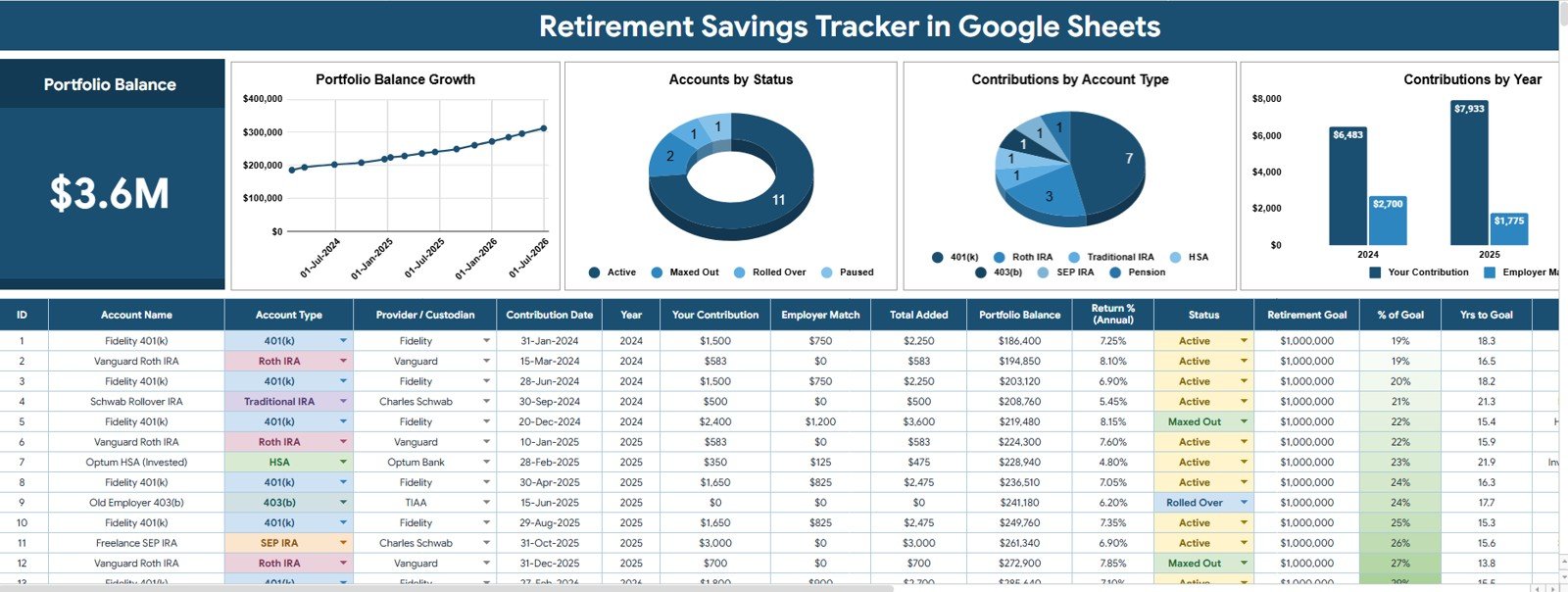
- Portfolio Balance card: See the high-level retirement savings balance at the top of the Overview Page.
- Overview Page: Review portfolio balance, account status, contribution mix, and yearly contribution behavior in one dashboard-style sheet.
- Multiple slicers: Filter the dashboard quickly by fields such as account type, status, provider, custodian, date, or year.
- Portfolio Balance by Date: Track how total retirement savings changes across time.
- Accounts by Status: Separate active, inactive, closed, rollover, or watchlist accounts for cleaner review.
- Contributions by Account Type: Compare how retirement contributions are distributed across 401(k), IRA, Roth IRA, brokerage, pension, HSA, or custom categories.
- Contributions by Year: Review whether annual savings behavior is improving, declining, or staying steady.
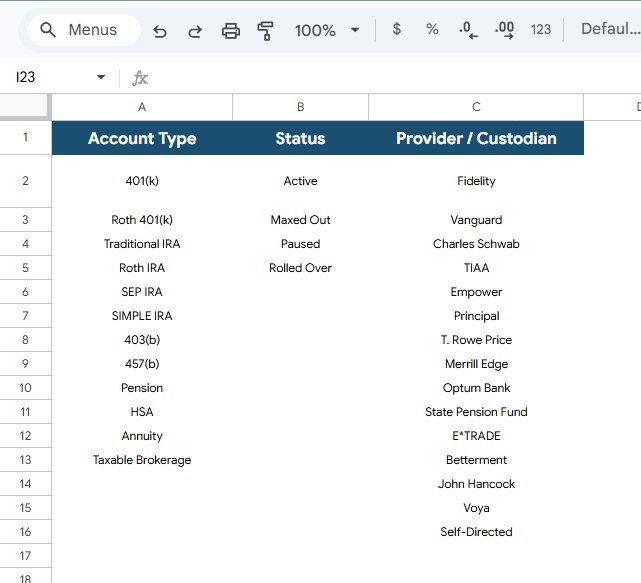
- Reference Lists sheet: Standardize account type, status, provider, and custodian values before entering large data volumes.
Dashboard Pages Explanation
1 – Overview Page
The Overview Page is the main review screen. At the top, the Portfolio Balance card shows the selected retirement savings value, while slicers let you filter the dashboard without rebuilding formulas or charts.
Portfolio Balance by Date: This chart shows the portfolio balance over time. It helps users see long-term growth, contribution impact, flat periods, or possible drawdowns after market movement.
Use this view during monthly or quarterly reviews. When balances change sharply, it gives you a visual starting point before checking individual accounts.
Accounts by Status: This chart counts or groups retirement accounts by their current status. It helps separate active, inactive, closed, rollover, or watchlist accounts so old records do not confuse current analysis.
Clean status tracking matters when a household has old employer plans, rollover accounts, or accounts held with multiple providers. It keeps the dashboard easier to explain.
Contributions by Account Type: This chart compares contributions by account type. It helps users understand where new retirement savings are going, such as 401(k), IRA, Roth IRA, pension, brokerage, or HSA-style categories.
This is useful for checking contribution concentration. If one account type is getting all the attention, the chart makes that pattern visible.
Contributions by Year: This chart summarizes contribution totals by year. It helps users see whether savings behavior is becoming more consistent over time.
Yearly contribution analysis is helpful before tax season, annual planning, or advisor conversations. It can also reveal years where contributions slowed because of life events or competing priorities.
2 – Reference Lists
The Reference Lists sheet controls dropdown values used by the tracker. This sheet matters because inconsistent spelling of account types, status labels, or provider names can split chart results and make slicers less useful.
Account Type by Reference List: Use this list to standardize account categories. Examples can include 401(k), IRA, Roth IRA, brokerage, pension, HSA, rollover, or any custom account group you use.
Status by Reference List: Use this list to keep account status values consistent. Active, closed, inactive, rollover, watchlist, paused, or review statuses can be managed from one place.
Provider / Custodian by Reference List: Use this list to standardize financial institution names. It helps users compare balances and contributions by the provider or custodian holding the account.
Retirement Savings Tracker in Google Sheets vs. Microsoft Excel Tracker vs. Paid Retirement SaaS – Feature Comparison
| Feature | This Google Sheets tracker | Microsoft Excel tracker | Paid retirement SaaS |
|---|---|---|---|
| Cost | $6.99 one-time template price | Template cost plus possible Microsoft license | Usually monthly or annual subscription |
| Platform | Google Sheets in Drive | Excel desktop or web | Vendor-hosted web app |
| Setup time | Copy file, edit lists, enter records | Open workbook and customize | Create account, import data, configure accounts |
| Real-time team collaboration | Included through Google Drive sharing | Requires OneDrive or SharePoint workflow | Depends on vendor plan |
| Mobile access | Google Sheets mobile app or browser | Excel mobile app or browser | Usually included |
| Customizable fields | Editable lists, labels, formulas, charts, and slicers | Editable if workbook is unlocked | Often limited by app settings |
| Share with link | Yes, using Google Drive permissions | Yes, through Microsoft sharing | Usually account based |
| Year-1 cost at 5 users | $6.99 before any Google Workspace costs | Template cost plus license cost | Can become recurring by household, advisor, or seat |
| Reference list control | Account type, status, provider, and custodian lists included | Must be built or customized | Usually hidden in settings |
| Brokerage login required | No | No | Often encouraged for automation |
Who Should Use This Template
This template is useful for individual retirement savers, couples reviewing long-term savings, household finance planners, finance coaches, spreadsheet-first advisors, and anyone who wants a manual record of retirement account balances and contributions.
It also fits people who prefer not to connect financial accounts to third-party apps. Because the tracker runs in Google Sheets, you can keep a private copy in your own Drive and share it only with trusted collaborators.
Real-World Use Cases
Maya, household planner: reviews IRA, Roth IRA, and employer retirement balances every quarter. The Portfolio Balance by Date chart helps her see whether the household is moving in the right direction.
Daniel, independent advisor: standardizes provider and custodian names before a client meeting. The Reference Lists sheet keeps old plan names and rollover accounts from becoming messy.
Priya, self-directed investor: checks Contributions by Year before annual planning. She uses the chart to spot years where savings slowed and decide what needs review.
Advantages of Retirement Savings Tracker in Google Sheets
The main advantage is clarity. Instead of keeping retirement records across notes, exports, old statements, and separate spreadsheets, you can use one structured tracker for account balance, account type, status, provider, custodian, contribution date, and year.
The slicers are useful during review conversations because they let you focus on a provider, account type, or status quickly. The Reference Lists sheet also protects the quality of the dashboard by keeping key dropdown values consistent.
Opportunities for Improvement
This template is intentionally manual. It does not connect to brokerages, pull live balances, update market prices, calculate tax projections, or recommend investments. Users who need account aggregation, retirement income modeling, tax-loss harvesting, or regulated advisory workflows should pair this tracker with specialist tools and professional advice.
A future version could add goal tracking, contribution limit checks, age-based views, retirement date scenarios, or a dedicated notes section for rollover decisions. The current version stays focused on clean tracking and easy review.
Best Practices
- Update reference lists first: Clean account types, statuses, providers, and custodians before entering many rows.
- Use consistent account names: Small spelling differences can split chart and slicer results.
- Review at a fixed rhythm: Monthly or quarterly updates work better than occasional catch-up sessions.
- Keep official statements: Use the tracker for review, but verify numbers against provider records.
- Share carefully: Follow Google Drive sharing guidance before giving access to sensitive finance files.
Explore Relevant Templates
You can get the Retirement Savings Tracker in Google Sheets from NextGenTemplates. Related options include Investment Management Dashboard in Google Sheets, Stock Portfolio Tracker in Google Sheets, Dividend Income Tracker in Google Sheets, Investment Tracker in Google Sheets, and Personal Finance Net Worth Tracker in Google Sheets.
If you would like to learn the spreadsheet habits behind a tracker like this, the NextGenTemplates Academy learning paths walk through them with practice files.
Get the Retirement Savings Tracker in Google Sheets
Frequently Asked Questions
What does the Retirement Savings Tracker in Google Sheets track?
It tracks portfolio balance, retirement account types, account status, contributions, contribution year, providers, custodians, and dashboard views based on the records entered in the file.
Can I customize the account types?
Yes. The Reference Lists sheet lets you edit account type values so the tracker can match your own retirement account structure.
Can I customize provider or custodian names?
Yes. Provider and custodian names can be managed from the Reference Lists sheet, which helps keep dashboard filters and charts cleaner.
Does this connect to live retirement accounts?
No. This is a manual Google Sheets tracker. That keeps the workflow simple and avoids requiring bank, brokerage, or retirement provider login credentials.
Can I share the tracker with a spouse or advisor?
Yes. After copying the tracker into your own Google Drive, you can share it with view or edit permissions using Google Drive settings.
Is this template investment or retirement advice?
No. It is a tracking and reporting spreadsheet. Retirement, tax, and investment decisions should be reviewed with qualified professionals and official account records.
About the Author
Built by PK – Microsoft Certified Professional with 15+ years of Excel, Google Sheets, and Power BI experience. Founder of NextGenTemplates, reaching 300K+ subscribers across YouTube channels. Every template is hand-built and tested before release.
Conclusion
The Retirement Savings Tracker in Google Sheets is a practical middle ground between fragile notes and expensive retirement software. It gives you a structured file for portfolio balance, contributions, account types, account status, providers, custodians, charts, slicers, and reference lists.
Last updated: July 25, 2026.