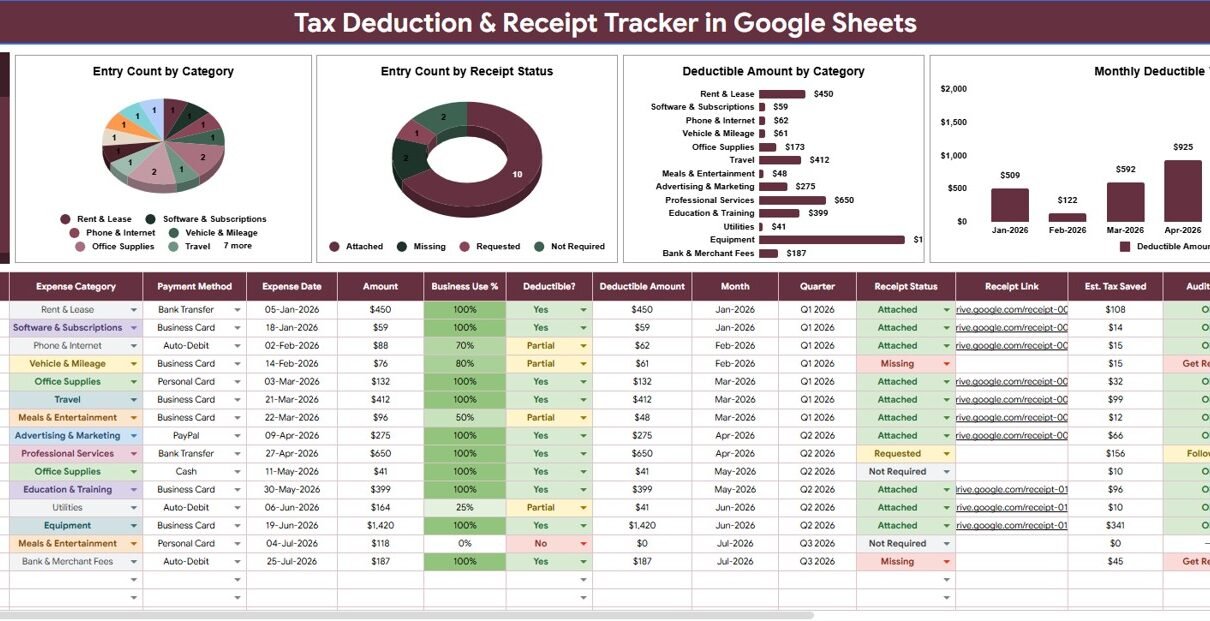
Tax preparation becomes much harder when deductible expenses and receipts are scattered across cards, inboxes, folders, and chat messages. The Tax Deduction and Receipt Tracker in Google Sheets brings that workflow into 2 sheet tabs, 1 high-level Total Deductible card, 4 dashboard charts, multiple slicers, and 5 editable setup areas. The IRS recordkeeping guidance highlights the importance of supporting documents for amounts reported on tax returns, while Google Sheets sharing makes it practical to collaborate with a bookkeeper, assistant, or accountant.Tax Deduction and Receipt Tracker in Google Sheets.
This template is not a tax filing system and it does not replace professional tax advice. It is a clean spreadsheet tracker for organizing deduction records, receipt status, categories, payment methods, and monthly deductible trends before tax review.
Get the Tax Deduction and Receipt Tracker
Key Features of Tax Deduction and Receipt Tracker in Google Sheets
- Overview dashboard: Review deductible totals, charts, and slicers from one sheet tab.
- Total Deductible card: See the deductible amount across all entries before filtering deeper.
- Receipt status analysis: Quickly identify records that need receipts attached or followed up.
- Category analysis: Understand which expense categories create the most deduction records and value.
- Monthly trend: Review how deductible amounts move over time.
- Settings tab: Control expense categories, deductible options, payment methods, receipt statuses, and marginal tax rate assumptions.
- Google Sheets collaboration: Share the copied file with the right people through Google Drive permissions.
Dashboard Pages Explanation
1 – Overview Page
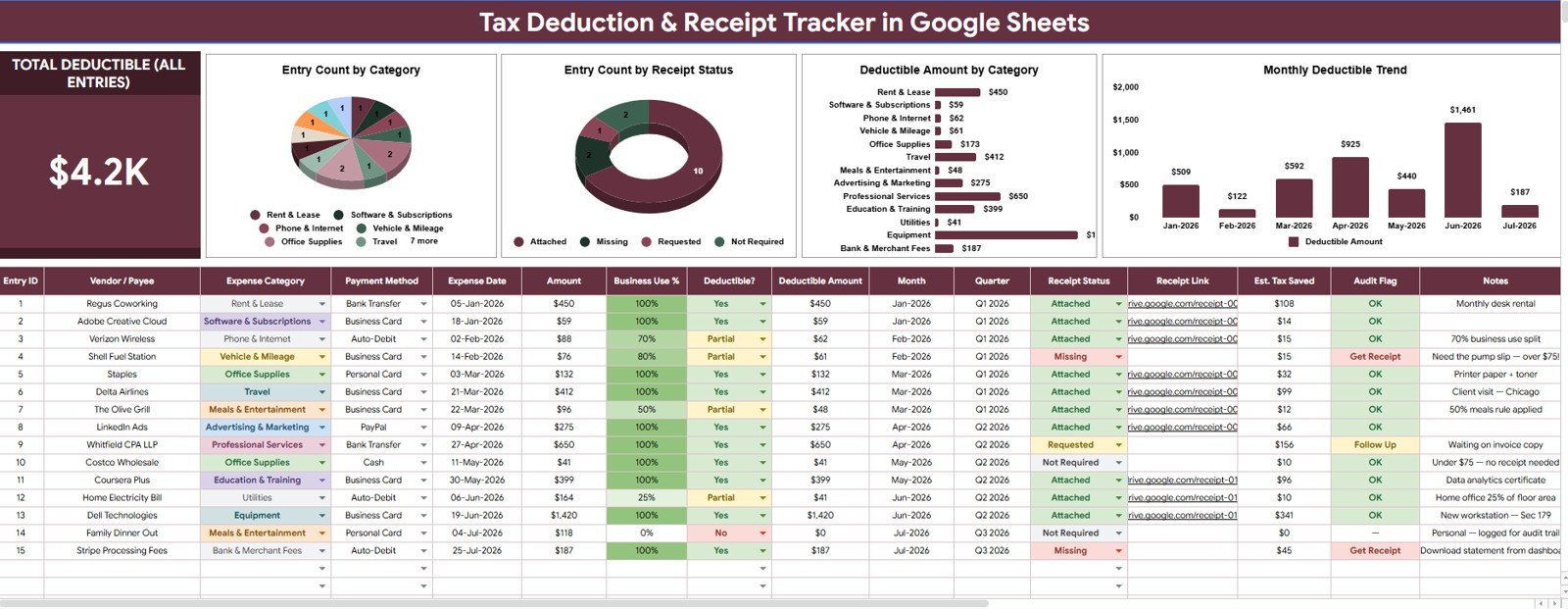
The Overview Page is the main reporting sheet. At the top, the dashboard shows the Total Deductible All Entries card so users can see the high-level deductible value before reviewing individual categories or receipts.
The page also includes slicers for quick filtering. This helps users narrow the dashboard by category, deductible status, receipt status, payment method, or date without rebuilding formulas.
Entry Count by Category: This chart shows how many deduction records sit in each expense category. It helps users identify the categories that create the most recordkeeping activity and may need tighter review.
Entry Count by Receipt Status: This chart counts records by receipt status, such as available, missing, requested, pending, or custom labels. It helps prioritize follow-up before tax time because missing receipts become visible immediately.
Deductible Amount by Category: This chart totals deductible value by expense category. It helps users see which categories contribute the largest share of tracked deductions.
Monthly Deductible Trend: This chart shows deductible amounts across months. It helps users spot seasonal spikes, low-activity months, and periods that may need additional receipt cleanup.
2 – Settings Tab
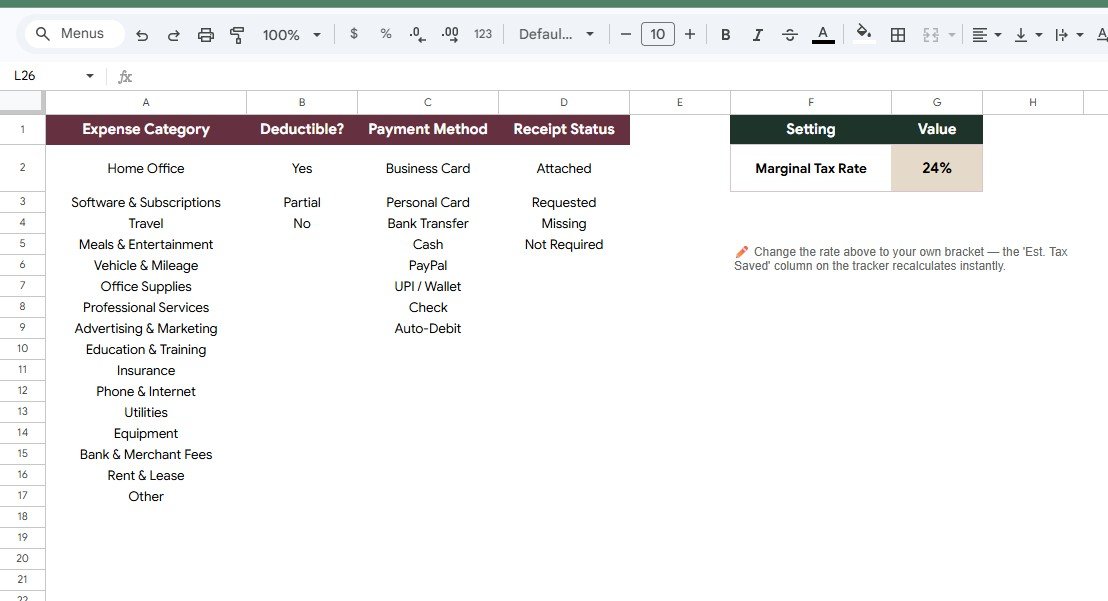
The Settings tab stores the setup items that keep the tracker consistent. Instead of typing different versions of the same category or receipt label, users can maintain controlled dropdown values in one place.
Expense Category list: Customize categories such as software, travel, supplies, education, repairs, donations, subscriptions, utilities, or client expenses.
Deductible option list: Standardize whether each record is deductible, non-deductible, partially deductible, or pending review.
Payment Method list: Track how expenses were paid, including card, cash, check, bank transfer, wallet, or custom methods.
Receipt Status list: Maintain receipt labels such as attached, missing, requested, physical copy, digital copy, or pending.
Marginal Tax Rate setting: Store a planning assumption that can be reviewed with a qualified tax professional. It should not be treated as tax advice by itself.
Tax Deduction and Receipt Tracker in Google Sheets vs. Microsoft Excel vs. Paid Tax/Accounting SaaS – Feature Comparison
| Feature | This Google Sheets tracker | Microsoft Excel tracker | Paid tax or accounting SaaS |
|---|---|---|---|
| Cost | $6.99 one-time template price | Template cost plus any Microsoft license | Often monthly, annual, or per-user |
| Platform | Google Sheets in Drive | Excel desktop or web | Vendor-hosted app |
| Setup time | Copy, edit lists, enter expenses | Download and customize workbook | Create account, configure categories, invite users |
| Real-time team collaboration | Native Google Sheets sharing | Depends on OneDrive or SharePoint | Depends on plan |
| Mobile access | Google Sheets app or browser | Excel app or browser | Usually included |
| Customizable fields | Editable lists, labels, and records | Editable if workbook is unlocked | Limited by app settings |
| Share with link | Yes, through Drive permissions | Yes, through Microsoft sharing | Usually account-based |
| Year-1 cost at 5 users | $6.99 before any Google Workspace cost | Template plus licensing costs | Can rise with paid seats |
| Receipt status dashboard | Included | Must be built or customized | Depends on tier |
| Marginal rate setting | Editable assumption field | Must be added manually | Depends on product design |
Who Should Use This Template
This tracker is a good fit for freelancers, consultants, creators, small business owners, property owners, nonprofit admins, office managers, and household finance users who want a simple way to organize deductible expense records in Google Sheets.
It also works well for users who already collect receipts manually and need a repeatable review file. Because it lives in Google Drive, a user can share a copy with a bookkeeper, assistant, spouse, partner, or accountant with controlled permissions.
It is not the best choice if you need automatic receipt OCR, bank feeds, integrated invoicing, payroll, audit workflow approvals, or tax return filing. For those workflows, use accounting or tax software alongside this tracker.
Real-World Use Cases
Tax Deduction and Receipt Tracker in Google Sheets.
Maya, freelance designer
Maya records software subscriptions, equipment purchases, internet costs, training courses, and client travel. The receipt status chart helps her see which records need supporting documents before year-end.
Daniel, rental property owner
Daniel tracks repairs, supplies, maintenance payments, mileage notes, and contractor invoices. The category chart helps him review where property-related deductions are concentrated.
Priya, nonprofit treasurer
Priya uses payment method and receipt status fields to organize reimbursement records before monthly board review. Slicers let her focus on missing receipts or selected categories quickly.
Advantages of Tax Deduction and Receipt Tracker in Google Sheets
The main advantage is clarity. A simple list of expenses is useful, but the dashboard turns those records into category, receipt, and monthly views that are easier to review.
The second advantage is collaboration. Google Sheets allows the file owner to choose who can view, comment, or edit, which is helpful when multiple people are involved in tax preparation.
The third advantage is flexibility. The Settings tab lets users adjust categories, deductible options, payment methods, receipt statuses, and tax rate assumptions without rebuilding the tracker from scratch.
Opportunities for Improvement
The tracker is intentionally manual, so users still need a regular habit for entering expenses and checking receipts. If entries are not updated, the dashboard will not reflect the full recordkeeping picture.
The file also does not decide whether an expense is legally deductible. Users should treat deductible status as a tracking label and confirm tax treatment with a qualified tax professional.
Users with high transaction volume may eventually want bank import, OCR, or bookkeeping software. This template works best as a focused recordkeeping companion, not as a full accounting system.
Best Practices
Tax Deduction and Receipt Tracker in Google Sheets.
- Update monthly: Add expenses and receipts before the volume becomes overwhelming.
- Use consistent categories: Edit the Settings tab first so entries stay clean.
- Review missing receipts: Filter by receipt status during each cleanup session.
- Separate personal and business records: Keep records clear before tax review.
- Reconcile with source documents: Check bank statements, invoices, and receipts before filing decisions.
- Ask a tax professional: Confirm deductible treatment and marginal tax rate assumptions.
Explore Relevant Templates
You can get the product draft here after publishing: Tax Deduction and Receipt Tracker in Google Sheets.
- FP&A Financial Planning & Analysis Pack for a broader finance template bundle.
- Personal Cash Flow Tracker in Google Sheets for cash in, cash out, and net cash flow.
- Personal Finance Net Worth Tracker in Google Sheets for assets and liabilities.
- Expense Reimbursement Tracker in Google Sheets for employee or team expense claims.
- Shared Expense Splitter Tracker in Google Sheets for group expense balances.
If you would like to get better at keeping organized records in a spreadsheet, the NextGenTemplates Academy learning paths walk through tracker-building skills with practice files.
Get the Tax Deduction and Receipt Tracker
Frequently Asked Questions
What does the Total Deductible card show?
It shows the total deductible amount across all tracker entries, adjusted by filters where applicable.
Can I customize the expense category list?
Yes. The Settings tab lets you edit categories so the tracker matches your real expense structure.
Can I track missing receipts?
Yes. Receipt status is included as a setup list and dashboard chart.
Does this template file my taxes?
No. It organizes deduction and receipt records. Use tax software or a qualified tax professional for filing decisions.
Can I share it with my accountant?
Yes. After copying the template to Google Drive, you can share the file with view, comment, or edit permissions.
Does it include bank feeds?
No. It is a manual Google Sheets tracker designed for direct entry or pasted records.
About the Author
Built by PK – Microsoft Certified Professional with 15+ years of Excel, Google Sheets, and Power BI experience. Founder of NextGenTemplates, reaching 300K+ subscribers across YouTube channels. Every template is hand-built and tested before release.
Conclusion
The Tax Deduction and Receipt Tracker in Google Sheets is useful when you want a simple recordkeeping dashboard without turning tax preparation into a messy document hunt. With 1 deductible total card, 4 charts, slicers, and editable settings, it gives freelancers, small business owners, property owners, and finance admins a cleaner way to prepare records for review.Tax Deduction and Receipt Tracker in Google Sheets
Tax Deduction and Receipt Tracker in Google Sheets.