Blood banks do not only need more donors. They need clear visibility into which units are available, which units are expiring, which hospital requests are still pending, and which donor groups can be contacted next. The American Red Cross reports that someone needs blood or platelets every 2 seconds in the U.S., with about 29,000 red blood cell units needed every day. That kind of demand makes organized tracking essential.Blood Bank Management System Tracker in Google Sheets
The Blood Bank Management System Tracker in Google Sheets is built for teams that want one editable, browser-based place to review donors, donation stock, hospital requests, camp performance, expiry risk, and management reports. It is not a replacement for a certified clinical or laboratory system, but it is a useful operational tracker for planning, analysis, and internal reporting.
Key Features
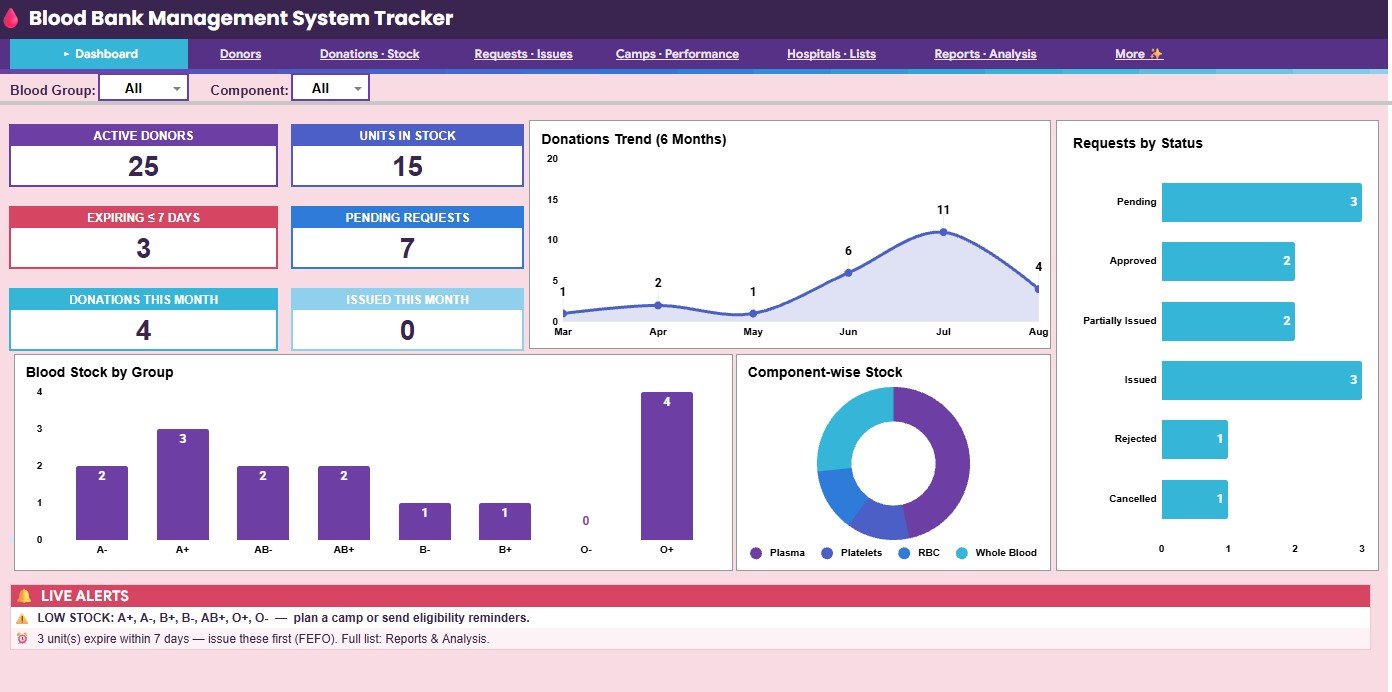
- Overview KPI cards: Active Donors, Units in Stock, Expiring <= 7 Days, Pending Requests, Donations This Month, and Issued This Month.Blood Bank Management System Tracker in Google Sheets
- Seven organized pages: Overview, Donors, Donations – Stock, Requests – Issues, Camps – Performance, Hospitals – Lists and Settings, and Reports and Analysis.
- Blood inventory tracking: Review stock by blood group, component, expiry date, days left, stock status, and issued hospital.Blood Bank Management System Tracker in Google Sheets
- Donor management: Track donor ID, gender, age, blood group, city, last donation, total donations, eligibility, level, status, and thanked status.
- Hospital request workflow: Monitor requester, patient group, component, units needed, units issued, priority, status, progress, and delivery status.
- Camp performance reporting: Compare target units, collected units, passed units, achievement percentage, budget, and cost per unit.
- Settings and lookup lists: Maintain hospitals, requester types, component shelf life, compatible donor logic, reorder levels, and donation gap rules.
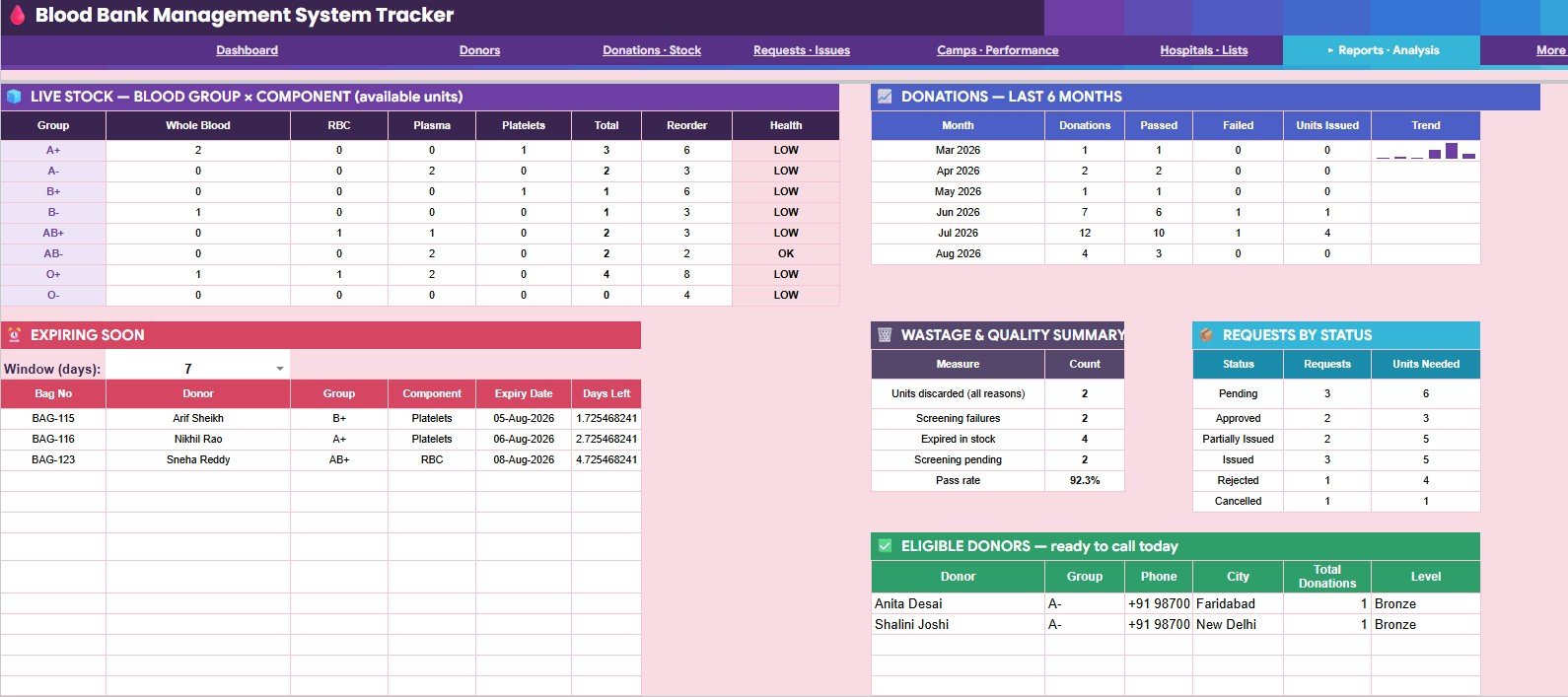
- Reports and analysis: Summarize available stock, stock health, donation trends, issued units, wastage, request status, and eligible donors.
Dashboard Pages Explained
1. Overview Page
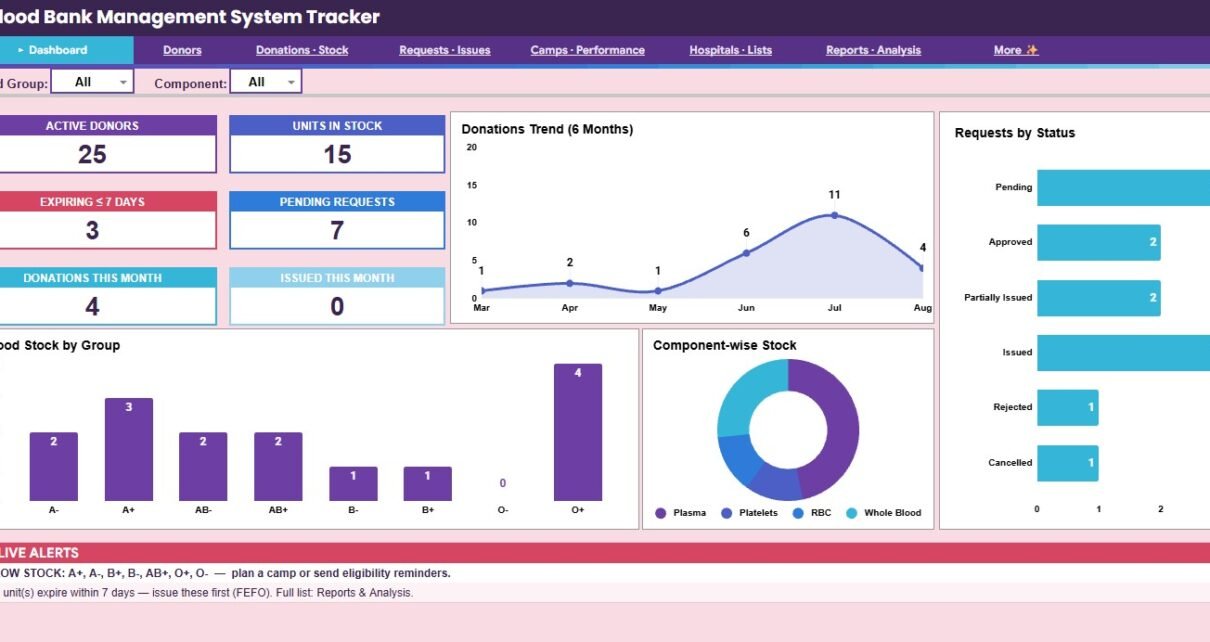
The Overview page gives supervisors a quick management view of current activity. It includes KPI cards for active donors, total units in stock, units expiring within 7 days, pending requests, donations this month, and issued units this month. The dashboard also includes charts for Donations by Month, Requests by Status, Available Stock by Blood Group, Available Stock by Component, Low Stock Alerts by Blood Group, and Expiring Units by Expiry Window.
2. Donors
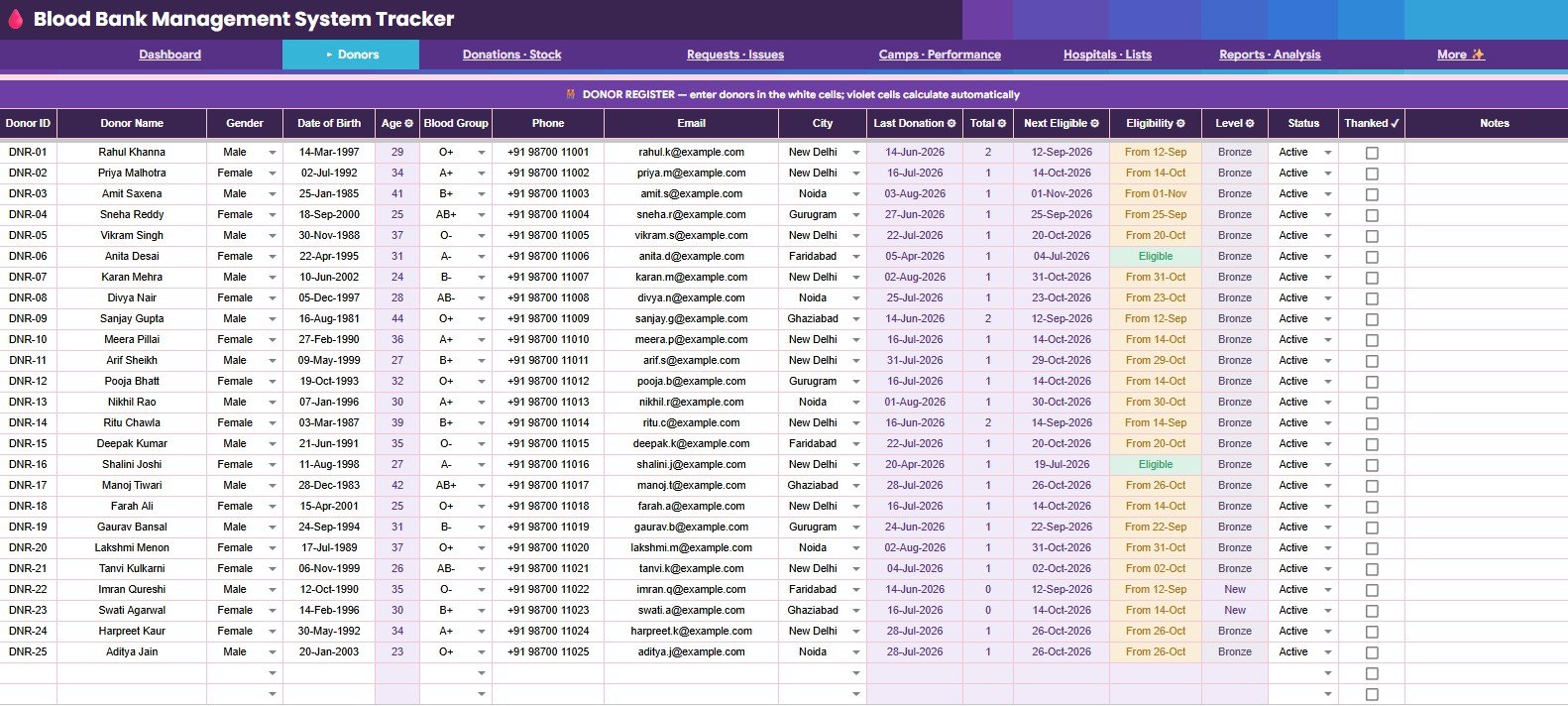
The Donors page organizes donor details by Donor ID. Teams can review gender, age, blood group, city, last donation date, total donations, next eligible date, eligibility, donor level, active status, and thanked status. This makes it easier to prepare follow-up lists before campaigns or urgent stock replenishment.Blood Bank Management System Tracker in Google Sheets
3. Donations – Stock
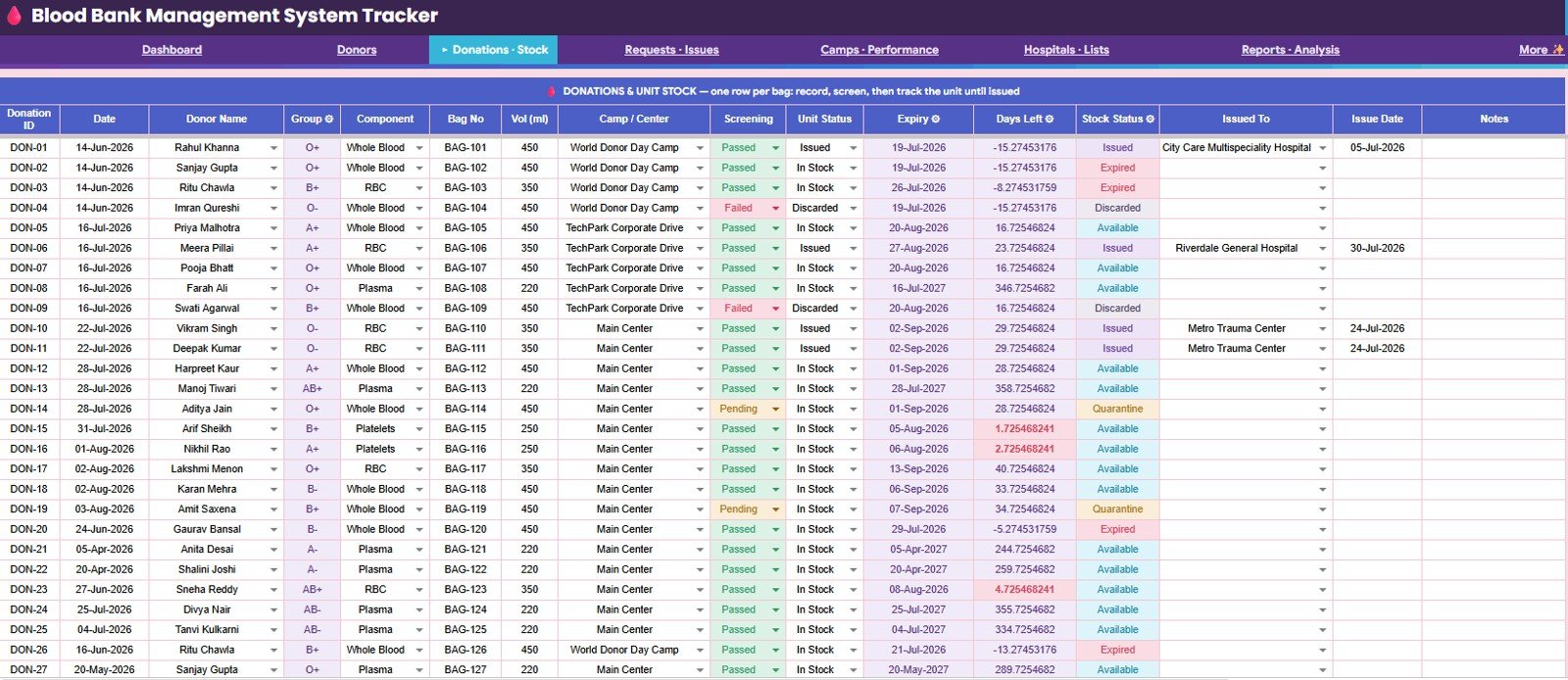
The Donations – Stock page connects donation records with inventory visibility. It tracks donation details by Donation ID, blood group, component, bag volume, camp or center, screening result, unit status, expiry date, days left, stock status, issued hospital, and issue date.Blood Bank Management System Tracker in Google Sheets
4. Requests – Issues
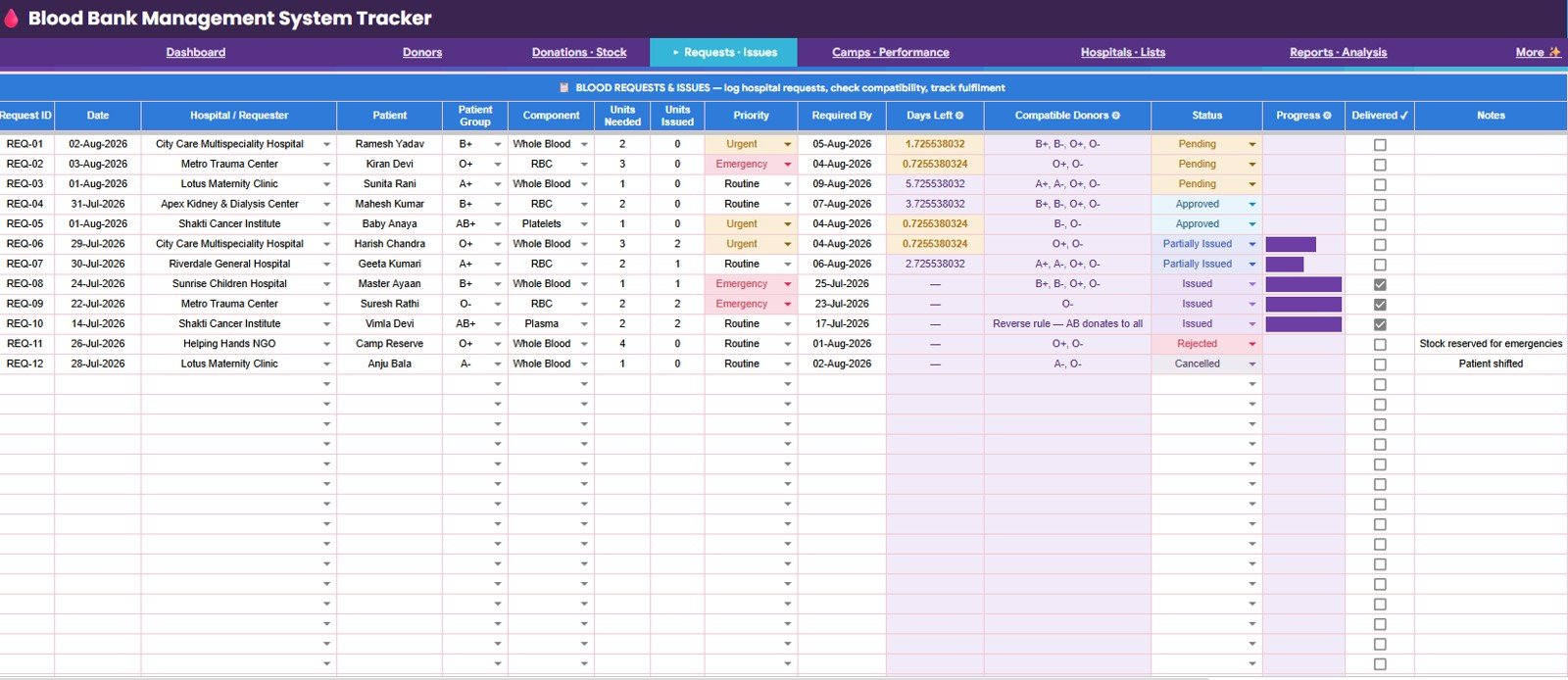
The Requests – Issues page helps teams follow the full request cycle. It covers Request ID, hospital requester, patient group, component, units needed, units issued, priority, required date, days left, compatible donors, request status, progress, and delivery status.
5. Camps – Performance
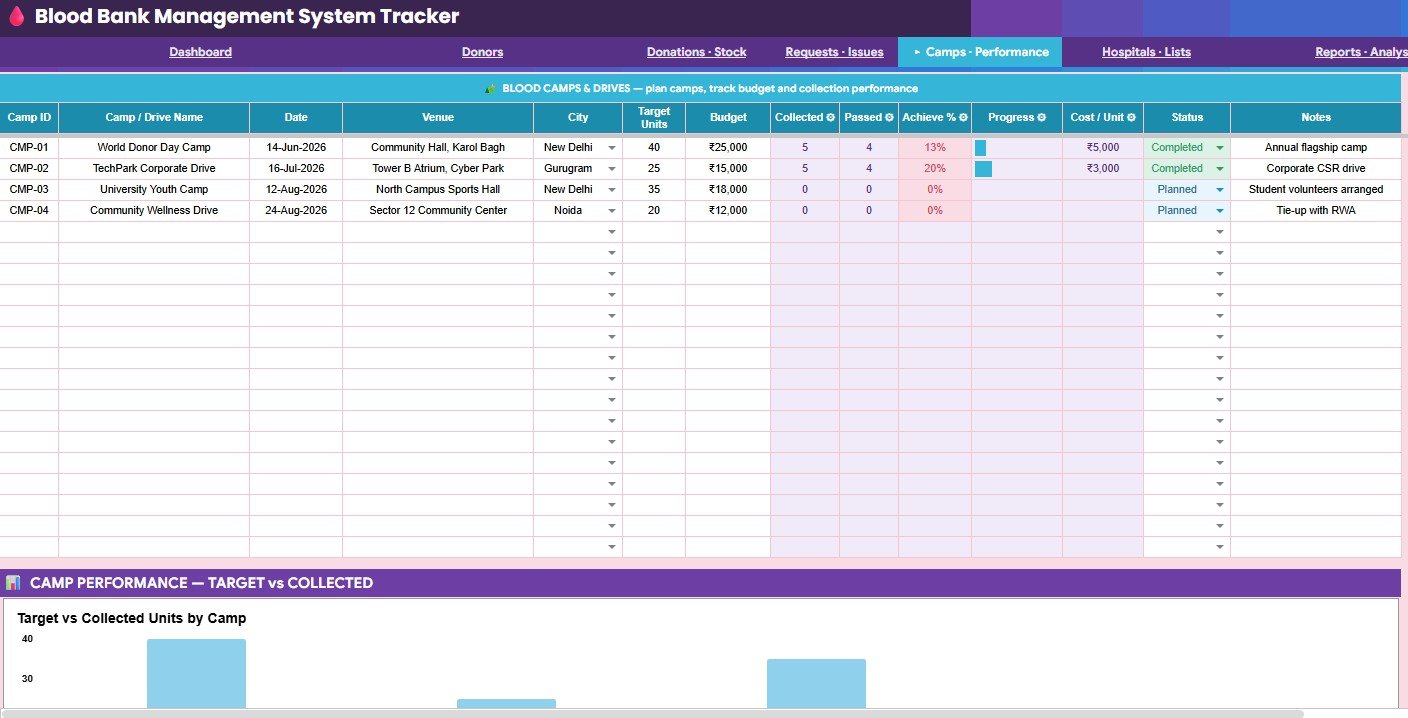
The Camps – Performance page is designed for campaign review. It compares camp ID, target units, budget, collected units, passed units, achievement percentage, progress, cost per unit, status, and target versus collected units by camp.Blood Bank Management System Tracker in Google Sheets
6. Hospitals – Lists and Settings
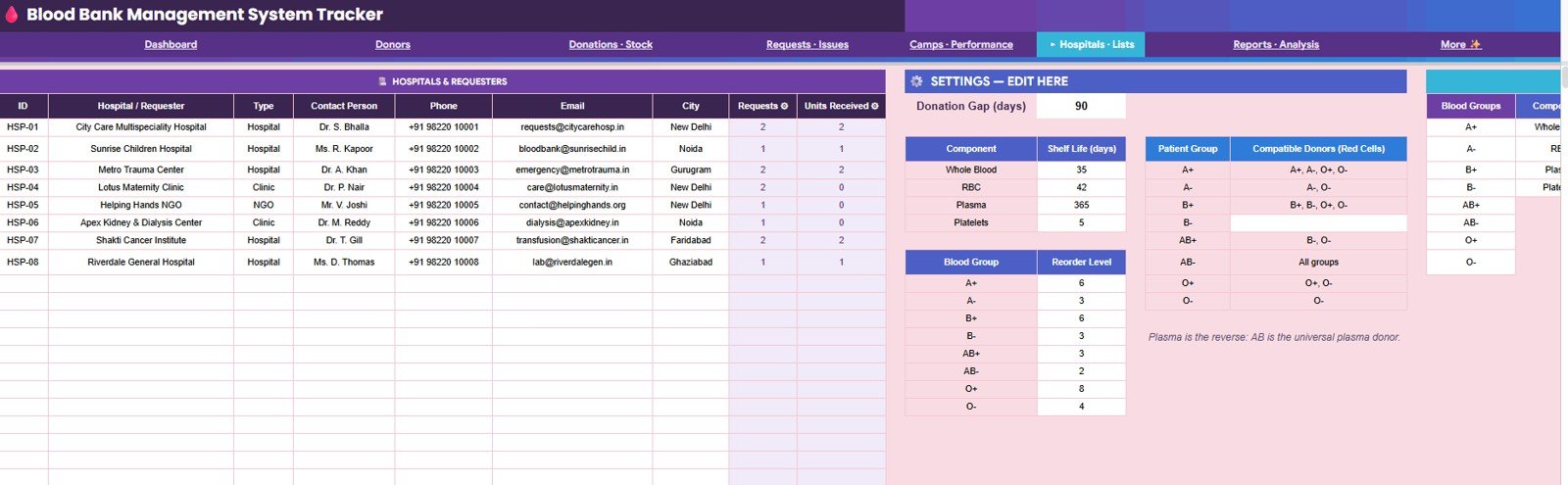
The Hospitals – Lists and Settings page stores hospital records, requester type, contact details, request counts, units received, component shelf life, compatible donors by patient group, reorder level by blood group, and donation gap settings. Keeping these lists in one page reduces confusion across the operating sheets.
7. Reports and Analysis
The Reports and Analysis page brings together available units by blood group and component, total units by blood group, health status by blood group, donation trends, passed and failed donations, units issued by month, expiring units by bag, wastage and quality measures, request status, units needed by status, eligible donors by blood group, and total donations by donor.Blood Bank Management System Tracker in Google Sheets
Comparison: Google Sheets Tracker vs. Excel vs. Paid Software
| Area | Google Sheets tracker | Excel workbook | Paid blood bank or hospital software |
|---|---|---|---|
| Cost | One-time template purchase | Workbook plus Microsoft licensing | Monthly or annual subscription |
| Setup | Copy the Sheet and replace sample data | Open file, adjust ranges, refresh reports | Vendor onboarding and configuration |
| Collaboration | Built into Google Drive sharing | Best with OneDrive or SharePoint | Usually account and role based |
| Customization | Edit sheets, lists, formulas, and charts | Edit workbook structure if unlocked | Limited by vendor configuration |
| Inventory view | Blood group, component, expiry, and stock status | Possible with custom setup | Often advanced and integrated |
| Best use | Operational tracking, reporting, and lightweight dashboards | Offline spreadsheet workflows | Validated clinical workflows and system integrations |
Who Should Use This Template
- Blood bank supervisors who need a quick view of active stock, expiry risk, and hospital requests.
- Donor coordinators who manage eligible donors, follow-ups, and donor status by blood group or city.
- Hospital administrators who want a spreadsheet-based reporting layer for blood issue requests.
- NGO and camp teams that track target units, collected units, passed units, and cost per unit.
- Healthcare analysts who prepare monthly stock, donation, request, and wastage reports.
- Training teams that need a realistic Google Sheets example for healthcare dashboard learning.Blood Bank Management System Tracker in Google Sheets
Real-World Use Cases
Daily stock review: A supervisor filters by component and blood group to check which units are available and which units are expiring soon.
Emergency request follow-up: A request manager reviews units needed, units issued, priority, compatible donors, and delivery status before updating the hospital team.
Donor outreach: A coordinator filters donors by eligibility, blood group, city, thanked status, and active status before building the next call list.Blood Bank Management System Tracker in Google Sheets
Camp performance review: A program manager compares target units, collected units, passed units, budget, and cost per unit across recent camps.Blood Bank Management System Tracker in Google Sheets
Monthly reporting: An analyst reviews donations by month, issued units, passed donations, failed donations, wastage, eligible donors, and request status.
Advantages
- Fast to start: Create a copy in Google Drive and replace sample records with your own records.
- Easy to share: Teams can collaborate in a browser without emailing files back and forth.
- Transparent logic: Spreadsheet formulas, lists, and charts can be reviewed and adjusted by the owner.
- Useful dashboard views: KPI cards and charts help managers scan stock, requests, donors, camps, and reports quickly.
- Low cost: A one-time template is easier to test than a large software rollout.Blood Bank Management System Tracker in Google Sheets
Opportunities for Improvement
- This is not a certified blood bank information system, laboratory system, EHR, medical device, or regulatory validation service.
- Barcode scanning, automated instrument integration, role-based audit trails, and clinical interfaces are not included.
- Google Drive permissions should be configured carefully before storing operational or sensitive data.
- Teams should validate formulas, lookup settings, component shelf life, and workflow rules against their own SOPs before operational use.
- High-volume facilities may eventually need a database-backed system or dedicated healthcare software.
Best Practices
- Keep one master copy and restrict edit access to trained team members.
- Use anonymized sample records for demos, training, or screenshots.
- Review expiring units and low-stock alerts at the start of each day.
- Update hospital request status as soon as units are issued, partially issued, or closed.
- Review donor eligibility and thanked status before every donor outreach campaign.
- Archive monthly reports before making major formula or structure changes.
- Use the settings page to keep reorder levels, component shelf life, and donation gap rules consistent.
Explore Relevant Templates
- Blood Bank Management System Tracker in Google Sheets – The featured Google Sheets tracker for donors, stock, requests, camps, and reports.
- Blood Bank Management System Web App – A deeper app-style blood bank workflow.
- Healthcare and Hospital Management Bundle – A broader pack for healthcare operations and reporting.
- Healthcare Management Dashboard in Google Sheets – A healthcare performance dashboard for Google Sheets.
- Hospital Patient Flow Dashboard in Google Sheets – A dashboard for patient flow and hospital operations.
- Google Sheets Templates – Browse more spreadsheet templates.
Frequently Asked Questions
What does the Blood Bank Management System Tracker include?
It includes seven pages: Overview, Donors, Donations – Stock, Requests – Issues, Camps – Performance, Hospitals – Lists and Settings, and Reports and Analysis.
Is this built for Google Sheets?
Yes. The tracker is designed for Google Sheets, so users can create a copy in Google Drive and work from a browser.
Can I track blood expiry dates?
Yes. The template includes expiry date, days left, stock status, expiring units, and an Expiring <= 7 Days KPI card.
Can it track donor eligibility?
Yes. The donor page includes last donation, next eligible date, eligibility, donor level, active status, and thanked status.
Does it handle hospital requests?
Yes. The Requests – Issues page tracks requester details, units needed, units issued, priority, required date, compatible donors, progress, status, and delivery status.Blood Bank Management System Tracker in Google Sheets
Is it suitable for regulated clinical use?
Use it as an editable tracking and reporting template. It is not a certified clinical system, and each organization should validate it against internal procedures and compliance requirements before using real operational data.
About the Author
This template was built by PK, a Microsoft Certified Professional with 15+ years of Excel, Google Sheets, and Power BI experience. PK is the founder of NextGenTemplates and teaches spreadsheet and dashboard workflows to a 300K+ subscriber audience. For more automation and dashboard tutorials, visit the NeoTechNavigators YouTube channel.Blood Bank Management System Tracker in Google Sheets
Conclusion
The Blood Bank Management System Tracker in Google Sheets gives blood bank teams a practical way to organize donor records, donation stock, hospital requests, camp performance, expiry risk, and reports in one shared spreadsheet. If your team needs a low-cost starting point before moving into heavier software, this tracker is a strong operational planning option.Blood Bank Management System Tracker in Google SheetsBlood Bank Management System Tracker in Google Sheets
Get the template here: Blood Bank Management System Tracker in Google Sheets.