Buffet Restaurant Management System Tracker in Google Sheets is built for buffet restaurants that need faster daily review without moving every small operation into paid restaurant software. This template gives owners and managers 7 working tabs, 9 high-level overview cards, 6 overview charts, and dedicated analysis for bills, reservations, buffet counters, dish refills, expenses, and monthly P&L review. At a one-time $9.99 sale price, it is a practical control sheet for restaurants that want structure, shared access, and clear reporting without a long setup cycle.
Key Features of Buffet Restaurant Management System Tracker in Google Sheets
- 7 connected tabs: Overview, Daily Sales, Reservations, Buffet Planner, Expenses, Setup & Lists, and Reports.
- 9 headline cards: Guests Today, Revenue Today (Paid), Revenue – Filtered, Guests – Filtered, Avg Revenue / Guest, Expenses – Month Filter, Net, Pending Payments, and Alerts.
- Sales and payment review: Analyze bills by date, buffet amount, add-ons, payment mode, payment status, and guests by session.
- Reservation management: Track reservation date, session, guest count, advance amount, status, days until visit, table preference, and notes.
- Buffet planner: Review dish preparation, dish counter, veg and non-veg mix, live status, and refill count.
- Expense tracking: Monitor expenses by month, date, category, payment mode, and description.
- Reports page: Review P&L, payment mode totals, upcoming reservations, expense categories, session performance, pending bills, and revenue vs expenses.
- Google Sheets collaboration: Share the file through Google Drive with normal viewer, commenter, or editor permissions.
Dashboard Pages Explanation
Click here to Buy Buffet Restaurant Management System Tracker in Google Sheets
1. Overview Page
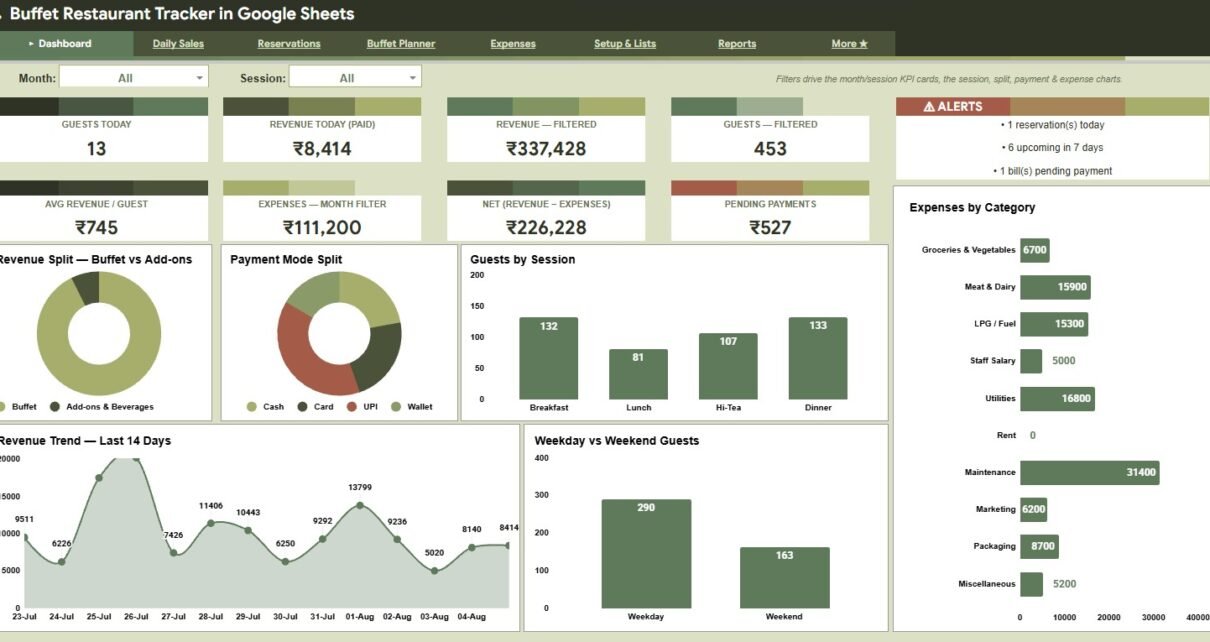
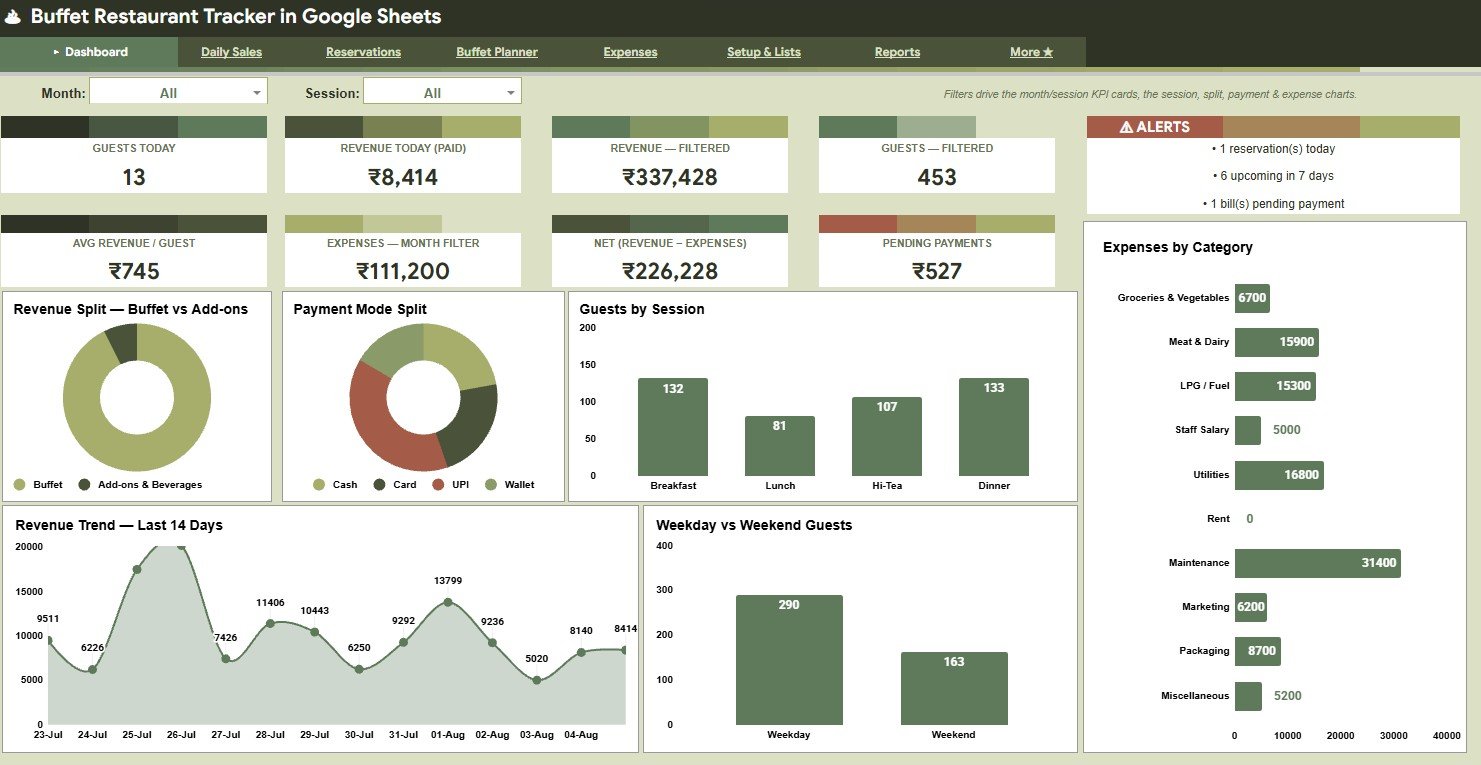
The Overview Page gives owners a daily operating snapshot. The top cards show Guests Today, Revenue Today (Paid), Revenue – Filtered, Guests – Filtered, Avg Revenue / Guest, Expenses – Month Filter, Net (Revenue – Expenses), Pending Payments, and Alerts so the team can spot sales, guest flow, cost pressure, and collection issues quickly.
Revenue Split by Buffet vs Add-ons: This chart separates core buffet package sales from add-on sales. It helps managers see whether add-ons are lifting average bill value or whether most revenue depends on the buffet package.
Payment Mode Split by Payment Mode: This chart shows how revenue is collected across cash, card, UPI, wallet, or other payment modes. It supports closing-time reconciliation and helps spot payment-mode trends.
Guests by Session: This chart compares guest count across breakfast, lunch, dinner, or custom sessions. It helps the restaurant adjust staffing, buffet quantity, and table readiness by session demand.
Expenses by Category: This chart groups recorded expenses by category. It helps owners see where food, supplies, utilities, staff, or other costs are affecting net performance.
Revenue Trend by Date: This chart tracks revenue movement by date. It helps users identify slow days, strong dates, weekend impact, and promotion results.
Weekday vs Weekend Guests: This chart compares guest count between weekday and weekend activity. It helps restaurants plan prep levels, counter coverage, and staffing around predictable demand changes.
2. Daily Sales
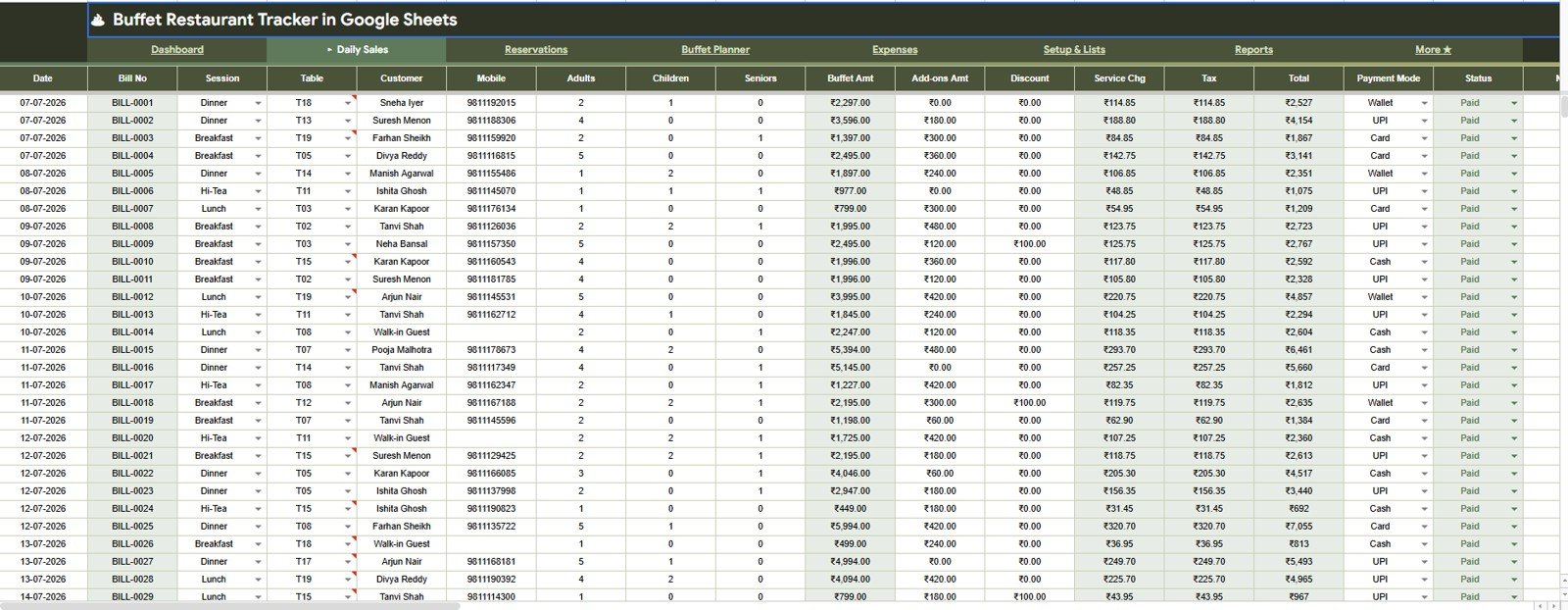
The Daily Sales tab is built for bill-level review. It includes Bills by Date, Buffet Amount by Bill No, Add-ons Amount by Bill No, Total by Payment Mode, Payment Status by Bill No, and Guests by Session, giving managers a clearer view of what happened during service.
Click here to Buy Buffet Restaurant Management System Tracker in Google Sheets
3. Reservations
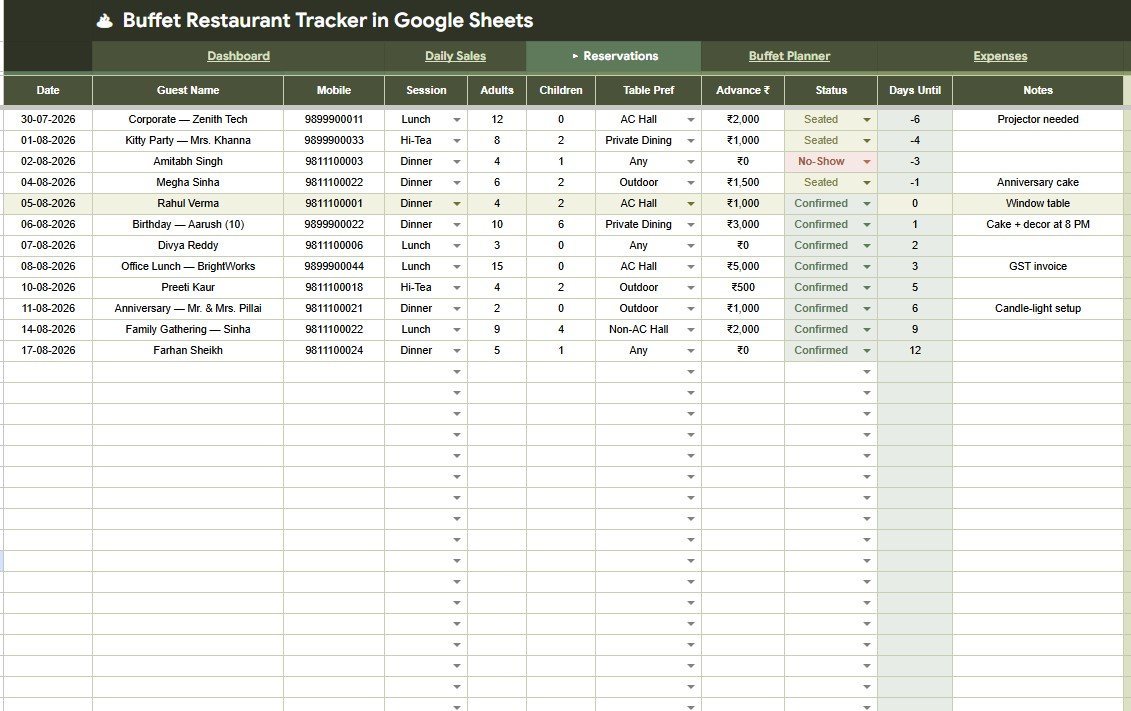
The Reservations tab helps restaurants prepare for upcoming guests before they arrive. It shows Reservations by Date, Guest Count by Session, Advance Amount by Guest, Reservation Status by Days Until, Table Preference by Guest, and Reservation Notes by Guest.
Click here to Buy Buffet Restaurant Management System Tracker in Google Sheets
4. Buffet Planner
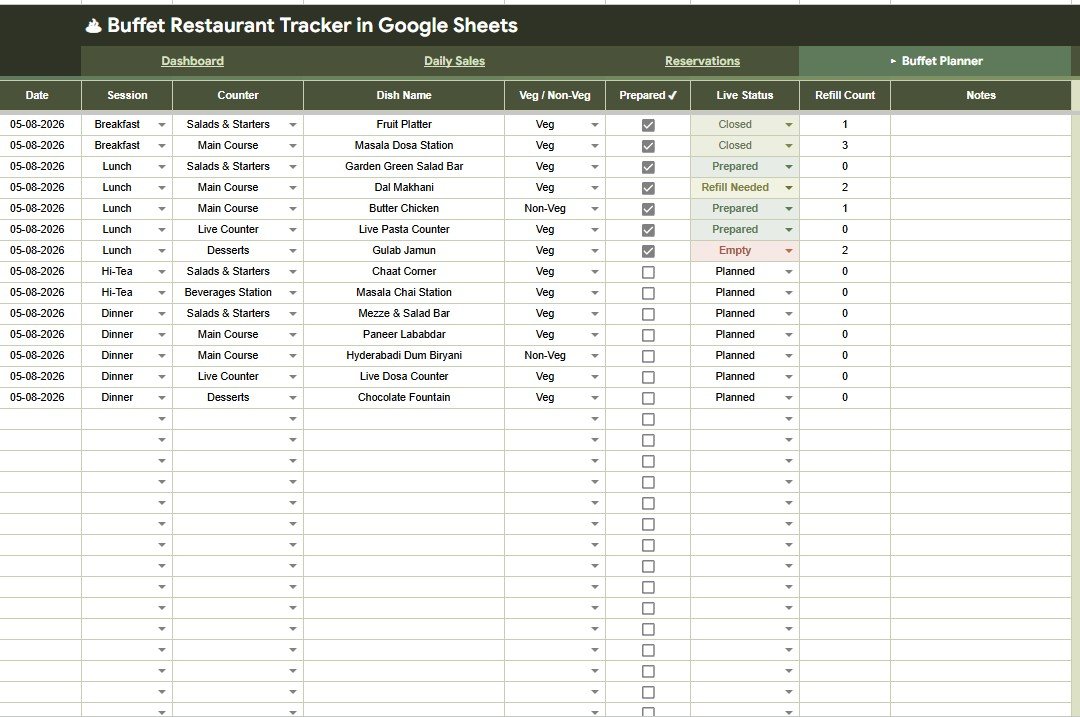
The Buffet Planner tab supports the kitchen and counter team. It analyzes Dish Preparation by Session, Dish Name by Counter, Veg and Non-Veg Items by Counter, Live Status by Dish Name, and Refill Count by Dish Name so buffet readiness can be reviewed during active service.Buffet Restaurant Management System Tracker in Google Sheets
Click here to Buy Buffet Restaurant Management System Tracker in Google Sheets
5. Expenses
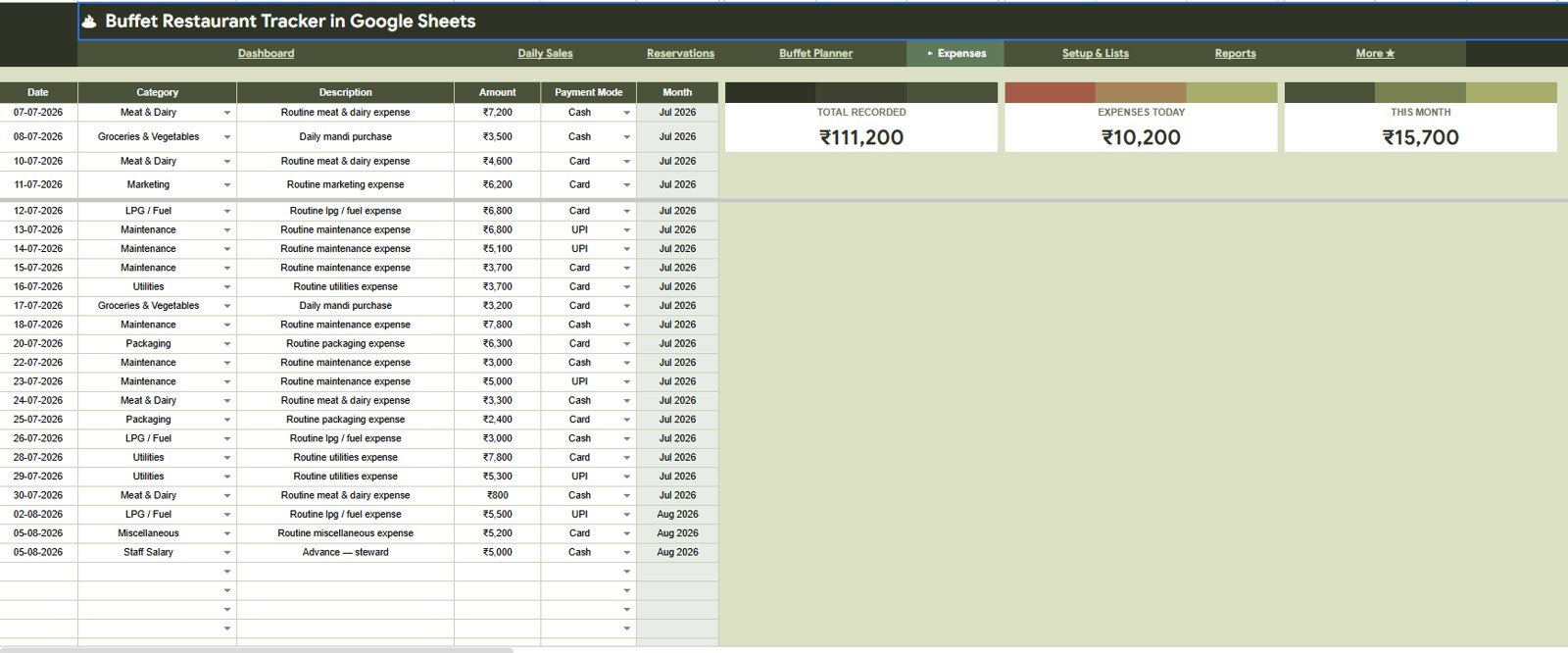
The Expenses tab keeps restaurant spending visible beside sales. It includes Total Recorded by Month, Expenses Today by Date, This Month Expenses by Month, Expense Amount by Category, Expense Amount by Payment Mode, and Expense Description by Date.Buffet Restaurant Management System Tracker in Google Sheets
6. Setup & Lists Tab
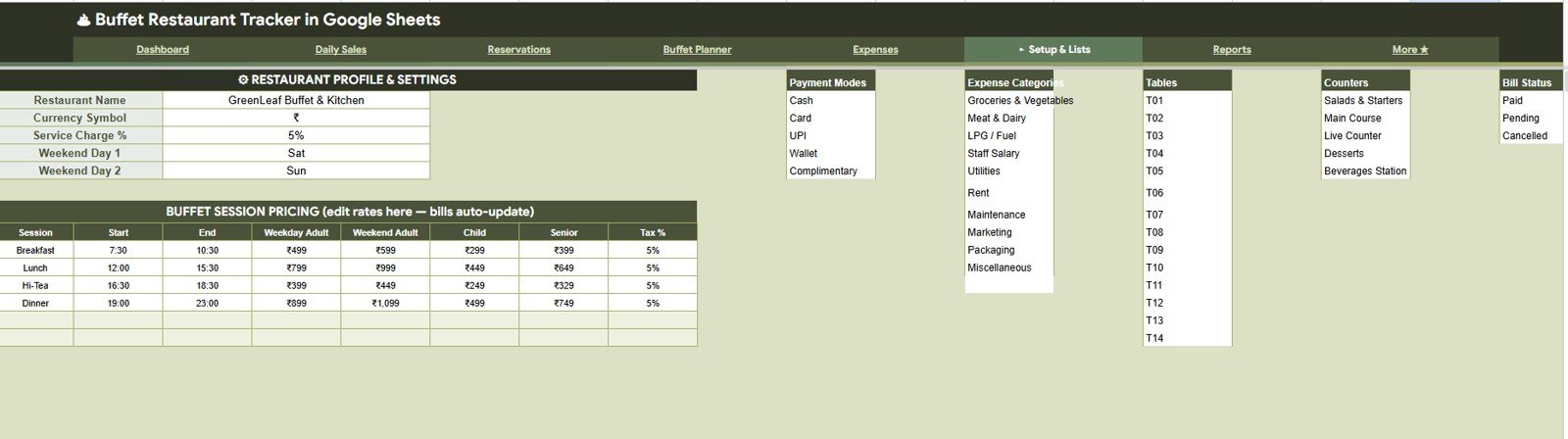
The Setup & Lists tab stores the values that power the rest of the workbook. Users can manage restaurant settings, buffet session pricing, payment modes, expense categories, tables, counters, and bill status lists without editing every report manually.Buffet Restaurant Management System Tracker in Google Sheets
Click here to Buy Buffet Restaurant Management System Tracker in Google Sheets
7. Reports
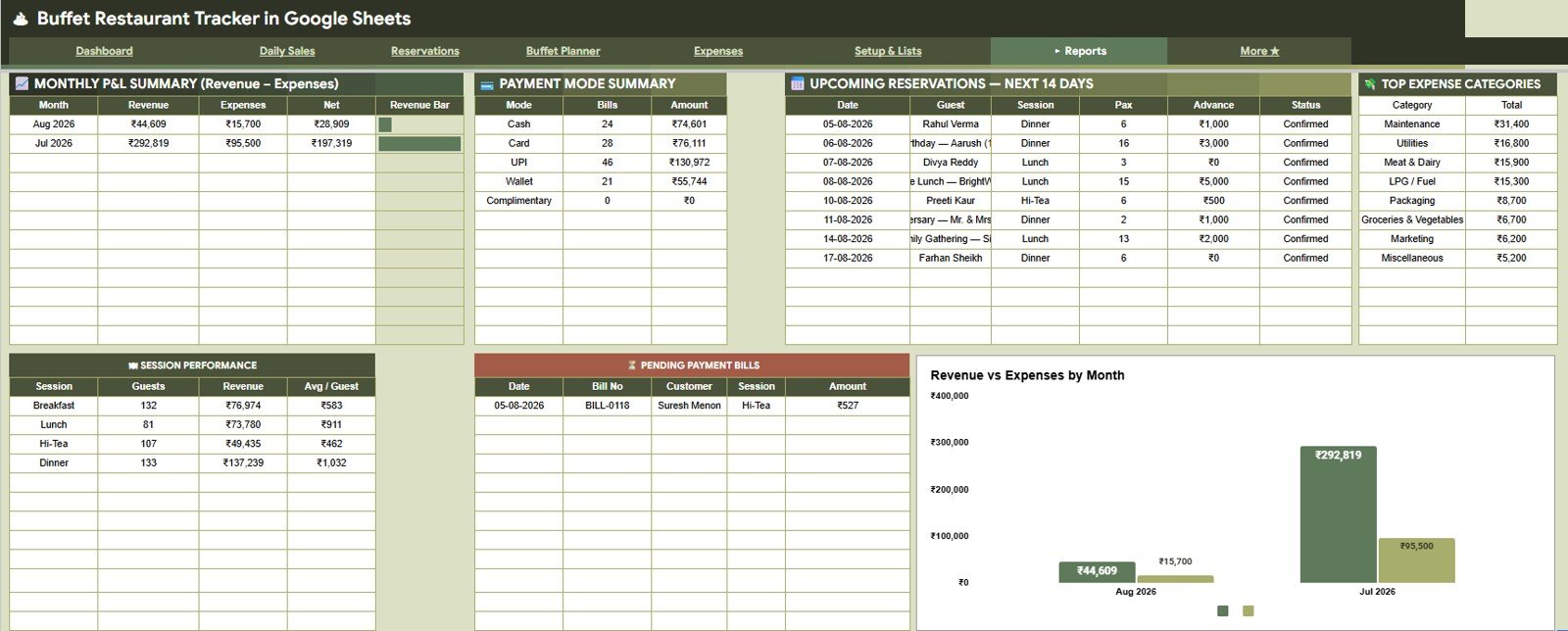
The Reports tab supports owner review and month-end analysis. It includes Monthly P&L Summary by Month, Payment Amount by Payment Mode, Upcoming Reservations by Date, Top Expense Categories by Category, Session Performance by Session, Pending Payment Bills by Bill No, and Revenue vs Expenses by Month.
Click here to Buy Buffet Restaurant Management System Tracker in Google Sheets
Buffet Restaurant Management System Tracker in Google Sheets vs. Microsoft Excel vs. Paid CRM/SaaS – Feature Comparison
| Feature | This Google Sheets template | Microsoft Excel tracker | Paid restaurant SaaS |
|---|---|---|---|
| Cost | $9.99 sale price | Template cost plus Excel access | Monthly or annual subscription |
| Platform | Google Sheets in browser or app | Excel desktop, web, or mobile | Vendor-hosted app |
| Setup time | Copy file, update lists, start entering records | Download workbook and configure fields | Account setup, roles, imports, and training |
| Real-time team collaboration | Native Google Drive sharing | Best with OneDrive or SharePoint | Usually included by plan |
| Mobile access | Google Sheets mobile app or browser | Excel mobile app | Usually included |
| Customizable fields | Editable sheets, lists, formulas, and charts | Editable workbook structure | Limited by vendor configuration |
| Share with link | Yes, with Drive permissions | Yes, with Microsoft sharing | Usually account based |
| Year-1 cost at 5 users | $9.99 template before optional Workspace cost | Template plus license costs | Often much higher |
| Buffet-specific flow | Sales, reservations, buffet counters, refills, expenses, and P&L | Requires custom setup | May be deeper but less flexible |
Who Should Use This Template
This template is a good fit for buffet restaurant owners, F&B managers, outlet supervisors, kitchen leads, front-desk teams, accounts assistants, and small hospitality consultants. It is especially useful when the team already uses Google Sheets or wants a low-cost way to bring daily sales, reservations, buffet readiness, expenses, and reports into one place.Buffet Restaurant Management System Tracker in Google Sheets
It is not built to replace a POS terminal, payment processor, inventory barcode system, staff payroll platform, or online reservation engine. For those needs, restaurants should use dedicated tools and keep this sheet as a reporting and management layer.
Real-World Use Cases
Riya, buffet restaurant owner: Riya checks the Overview Page after lunch service to review guests, paid revenue, pending payments, expenses, and alerts before planning the dinner shift.
Aman, kitchen supervisor: Aman uses the Buffet Planner to check which dishes are live, which counters need refills, and whether veg and non-veg items are balanced across service areas.
Neha, accounts assistant: Neha reviews payment modes, pending bills, expenses by category, and monthly P&L before preparing the weekly owner summary.
Advantages of Buffet Restaurant Management System Tracker in Google Sheets
Click here to Buy Buffet Restaurant Management System Tracker in Google Sheets
- Shared workflow: Google Sheets makes it easy to give owners, managers, or accounts staff access to the same file.
- Clear daily close: Cards and charts make it easier to review guests, paid revenue, pending payments, and expense pressure.
- Better buffet visibility: Dish status, counter assignment, veg/non-veg mix, and refill count are tracked in a dedicated planner tab.
- Practical reporting: The reports page combines P&L, session performance, upcoming reservations, and revenue vs expenses.
- Editable setup: Payment modes, sessions, tables, counters, categories, and status lists can be changed for each restaurant.Buffet Restaurant Management System Tracker in Google Sheets
Opportunities for Improvement
This tracker is intentionally spreadsheet-based, so it does not include automatic POS import, payment gateway integration, QR ordering, inventory deduction, or kitchen display screens. A growing restaurant may later connect it with Apps Script, Looker Studio, or a dedicated restaurant management system. For many small buffet outlets, though, the spreadsheet format is easier to audit and customize than a locked SaaS workflow.
Best Practices
- Update Setup & Lists first so payment modes, counters, sessions, tables, and categories stay consistent.
- Record bill details daily instead of waiting for the end of the week.
- Review pending payments before closing each day.
- Use the Buffet Planner during service, not only after service, so refill data remains useful.
- Protect formula-heavy ranges before sharing editor access with a larger team.
- Use Google Drive permissions carefully when sharing the workbook. Google’s official file sharing guide is available here: Share files from Google Drive.
Explore Relevant Templates
- Buffet Restaurant Management System Tracker in Google Sheets
- Hospitality & Restaurant Bundle
- Banquet Hall Tracker in Google Sheets
- Catering Services Dashboard in Excel
- Restaurant Order Data Entry System in Excel
- Google Sheets templates
- Google Sheets tracker templates
Frequently Asked Questions
Click here to Buy Buffet Restaurant Management System Tracker in Google Sheets
What does the Buffet Restaurant Management System Tracker in Google Sheets include?
It includes Overview, Daily Sales, Reservations, Buffet Planner, Expenses, Setup & Lists, and Reports tabs.
Can I change buffet sessions and pricing?
Yes. The Setup & Lists tab includes buffet session pricing and supporting lists for payment modes, expense categories, tables, counters, and bill statuses.
Does it separate buffet revenue from add-on revenue?
Yes. The overview includes a Revenue Split by Buffet vs Add-ons chart, and the Daily Sales tab includes add-ons amount by bill number.
Can I use it for reservations?
Yes. The Reservations tab tracks reservation dates, guest count by session, advance amount, status, days until visit, table preference, and guest notes.
Does it process payments or print bills?
No. It tracks payment modes, payment status, pending payments, and bill-level analysis, but it does not process payments or print POS bills.
Can multiple people work in the file?
Yes. Google Sheets can be shared through Google Drive, and you can control whether each person can view, comment, or edit.Buffet Restaurant Management System Tracker in Google Sheets
About the Author
Built by PK – Microsoft Certified Professional with 15+ years of Excel, Google Sheets, and Power BI experience. Founder of NextGenTemplates, reaching 300K+ subscribers across YouTube channels. Every template is hand-built and tested before release.
Conclusion
The Buffet Restaurant Management System Tracker in Google Sheets gives buffet teams a practical way to connect sales, reservations, buffet planning, expenses, and reporting in one editable workbook. It is best for teams that want visibility before they invest in larger restaurant software, or for owners who simply prefer a shared spreadsheet that can be reviewed daily.Buffet Restaurant Management System Tracker in Google Sheets
Click here to Buy Buffet Restaurant Management System Tracker in Google Sheets
For more Google Sheets and automation tutorials, visit YouTube.com/@NeoTechNavigators.