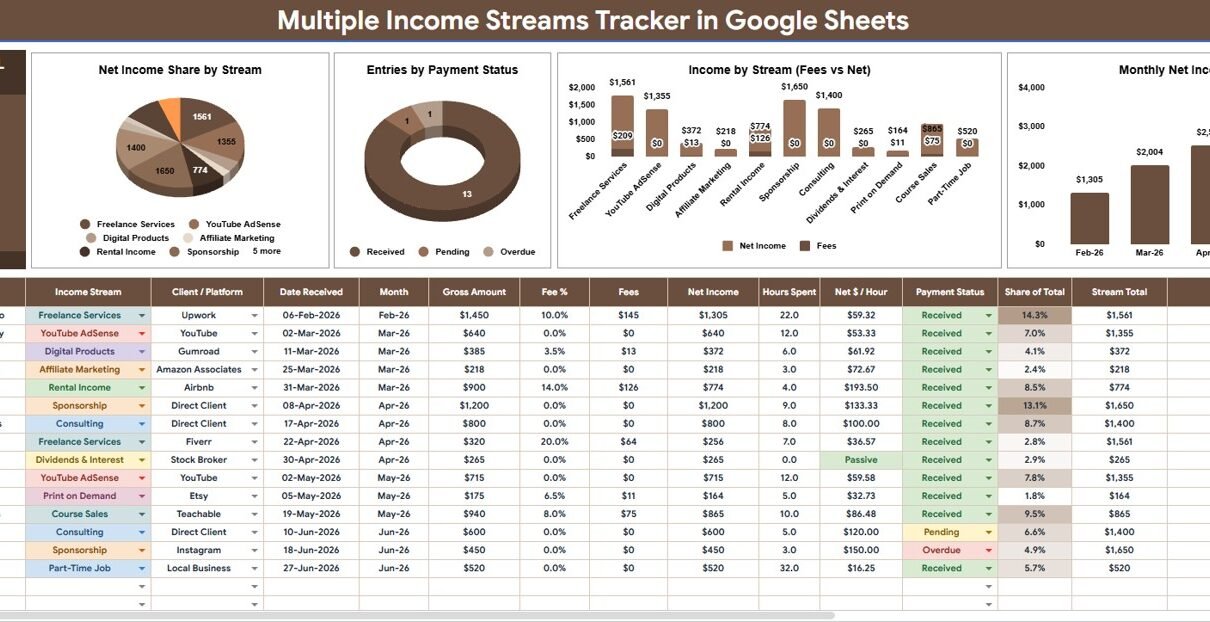
Multiple Income Streams Tracker in Google Sheets is a ready-to-use tracker for freelancers, creators, consultants, side-hustle operators, investors, and household planners who earn from more than one source. In June 2026, FRED/BLS data showed multiple jobholders at 5.3% of employed people, and the Federal Reserve’s 2025 household report noted that many adults earned outside traditional jobs through selling items or short-term tasks. When income arrives through several channels, a single spreadsheet can make the picture easier to read.Multiple Income Streams Tracker in Google SheetsMultiple Income Streams Tracker in Google Sheets
This Google Sheets tracker brings net income, fees, payment status, income stream, client platform, and monthly movement into one clean workbook. Because it runs in Google Sheets, users can also share a copied file with a spouse, assistant, bookkeeper, or accountant using standard Google Drive sharing permissions.
Get the Multiple Income Streams Tracker
Key Features of Multiple Income Streams Tracker in Google Sheets
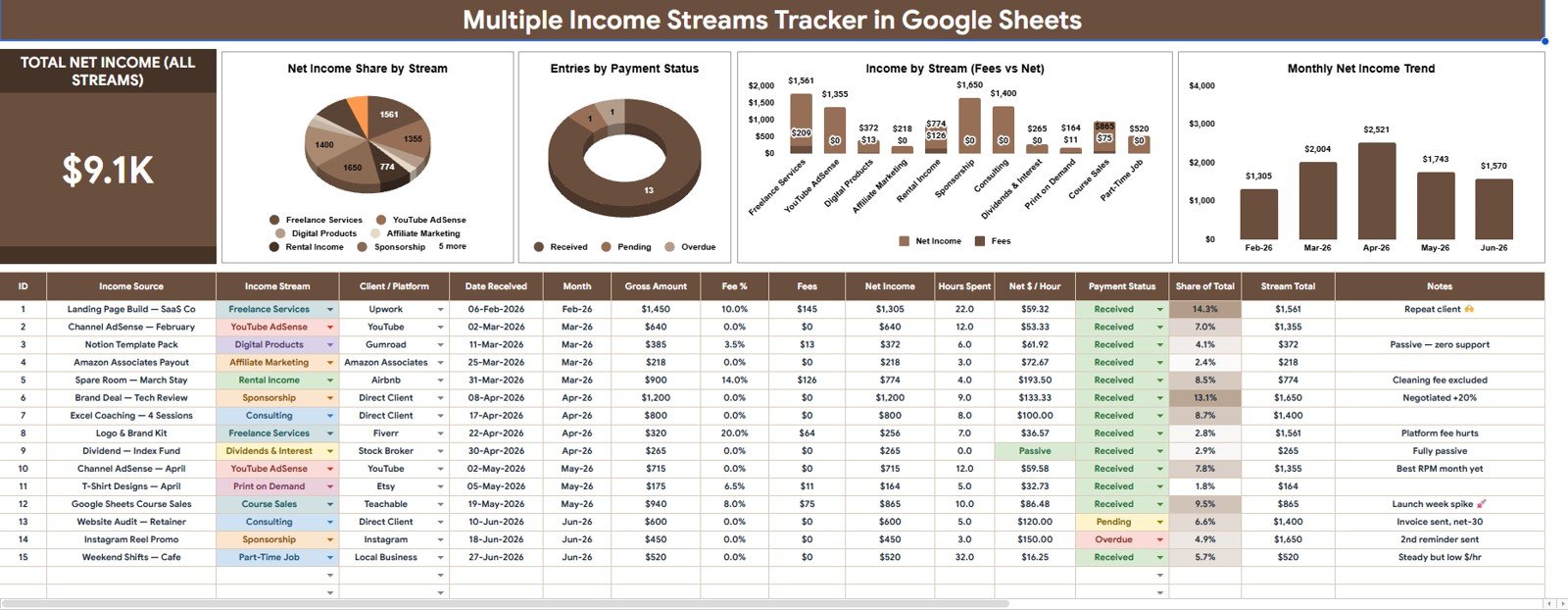
- Total Net Income card: See the headline net income value across all income streams before reviewing deeper analysis.Multiple Income Streams Tracker in Google Sheets
- Net Income Share by Stream: Understand how total net income is distributed across each stream.Multiple Income Streams Tracker in Google Sheets
- Entries by Payment Status: Monitor paid, pending, overdue, partial, or custom payment states.Multiple Income Streams Tracker in Google Sheets
- Income by Stream: Compare gross income across services, products, platforms, investments, rentals, or custom sources.
- Fees by Stream: Track deductions, platform fees, transaction costs, commissions, or other stream-level fees.
- Monthly Net Income by Month: Review income consistency, seasonality, slow months, and growth months.
- Multiple slicers: Filter the Overview Page quickly by stream, payment status, platform, or period.
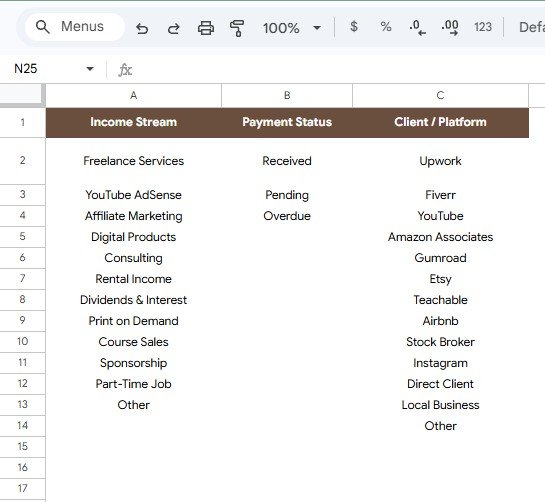
- Setup Lists sheet: Keep income stream, payment status, and client platform dropdowns consistent.
- Google Sheets workflow: Copy to Drive, customize options, and share with trusted collaborators.Multiple Income Streams Tracker in Google Sheets
Dashboard Pages Explanation
1 – Overview Page
The Overview Page is the main reporting view. At the top, the tracker displays the Total Net Income card so users can see the combined net income across every stream before checking the charts.
The sheet also includes slicers for fast filtering. This is helpful when users want to focus on one stream, one payment status, one client platform, or one reporting period without editing formulas.
Net Income Share by Stream: This chart shows how net income is split across each income stream. It helps users identify whether one stream is carrying the plan or whether income is spread across several sources.
If one stream has a very large share, the user can decide whether that concentration is acceptable or whether another stream should be developed.
Entries by Payment Status: This chart counts income entries by status. It makes paid, pending, overdue, partial, disputed, or custom payment states easier to review.
For freelancers and consultants, this chart is useful because earned income is not always collected income.Multiple Income Streams Tracker in Google Sheets
Income by Stream: This chart compares gross income across the streams in the tracker. It helps users see which sources generate activity before fees are deducted.Multiple Income Streams Tracker in Google Sheets
Use it with slicers to review a single month, one client platform, or one payment status at a time.
Fees by Stream: This chart shows which streams carry the highest costs or deductions. It is useful when a channel looks strong in gross income but loses too much to platform fees or commissions.
That insight can support pricing changes, payment method changes, or decisions about which platforms deserve more time.
Monthly Net Income by Month: This chart displays net income by month. It helps users spot seasonal patterns, weak months, growth months, and cash-flow volatility.
For people with irregular income, this monthly trend can be the most useful planning view in the file.
2 – Setup Lists Sheet
The Setup Lists sheet is the control area for dropdown values. It keeps labels consistent so the Overview Page does not split the same stream, platform, or payment state into several misspelled versions.
Available Options by Income Stream: This section stores stream names such as salary, freelancing, consulting, affiliate income, product sales, dividends, rentals, or custom sources.
Keeping these names controlled helps dashboard charts stay clean when users add new income records.
Available Options by Payment Status: This section stores status names such as paid, pending, overdue, partial, disputed, or custom workflow labels.
It supports faster follow-up because users can filter the Overview Page by status and review open items.
Available Options by Client Platform: This section stores platform or client source labels such as Upwork, Fiverr, direct client, Etsy, YouTube, Gumroad, Stripe, PayPal, or any custom source.
Platform-level options make it easier to see whether income and fees are connected to specific channels.
Multiple Income Streams Tracker in Google Sheets vs. Microsoft Excel vs. Paid CRM/SaaS – Feature Comparison
| Feature | This Google Sheets Tracker | Microsoft Excel Tracker | Paid Finance or CRM SaaS |
|---|---|---|---|
| Cost | $6.99 one-time sale price | Template cost plus any Excel access | Usually recurring monthly or annual cost |
| Platform | Google Sheets in Google Drive | Excel desktop, OneDrive, or Excel Online | Vendor-hosted web app |
| Setup time | Copy the file, update setup lists, enter records | Open workbook and customize fields | Create account, set rules, import data, assign access |
| Real-time team collaboration | Native Google sharing | Depends on Microsoft 365 setup | Usually role or seat based |
| Mobile access | Google Sheets app or browser | Excel app or browser | Usually included |
| Customizable fields | Edit streams, statuses, platforms, labels, and lists | Editable if workbook is unlocked | Often limited by app settings |
| Share with link | Yes, through Drive permissions | Yes, through Microsoft sharing | Usually login based |
| Year-1 cost at 5 users | $6.99 before any Google Workspace costs | Template plus licensing if needed | Can become hundreds per year |
| Payment status view | Included as a chart and slicer-friendly field | Must be built or customized | Depends on workflow setup |
| Fee analysis by stream | Included | Usually manual | May require app-specific categories |
Who Should Use This Template
This template is useful for freelancers, creators, consultants, side-hustle builders, contractors, small business owners, investors, and households that manage more than one income source. It works especially well when income arrives through a mix of client work, platforms, sales, affiliate earnings, dividends, rentals, or other custom categories.
It is also helpful for people who need a simple monthly review before tax prep, cash-flow planning, or client follow-ups. The file does not replace accounting software, but it can make the income picture clearer before numbers go to a bookkeeper or accountant.
Real-World Use Cases
Maya, freelance designer: Maya earns from direct clients, Upwork, template sales, and affiliate income. She uses the Fees by Stream chart to see that one platform produces high gross income but lower net income after fees.
Daniel, content creator: Daniel tracks sponsorships, ad revenue, consulting, product sales, and affiliate payments. Monthly Net Income by Month helps him see which months are stronger and which income streams stabilize slow periods.
Priya, household planner: Priya and her spouse track salary, dividends, rental income, and side projects in the same file. The payment status chart helps them avoid counting pending income as money already received.
Advantages of Multiple Income Streams Tracker in Google Sheets
- It focuses on net income: Gross revenue alone can hide platform fees, transaction costs, and commissions.
- It keeps dropdowns clean: The Setup Lists sheet reduces messy labels and duplicate categories.
- It supports collaboration: Google Sheets makes it easy to share the copied file with trusted reviewers.
- It avoids another subscription: The tracker is a one-time spreadsheet template rather than a monthly app.
- It supports quick filtering: Slicers help users isolate one stream, status, platform, or period.
Opportunities for Improvement
The tracker is intentionally simple and spreadsheet-based, so it does not connect automatically to PayPal, Stripe, bank feeds, brokerage accounts, or tax systems. Users who want automation may still need exports, imports, or dedicated accounting software.
Advanced users may add columns for tax category, invoice number, currency, client name, or payout date. Before adding formulas or new tabs, it is smart to duplicate the file and test changes on a backup copy.
Best Practices
- Update income records on a consistent schedule, such as weekly or monthly.
- Keep income stream, payment status, and client platform labels standardized.
- Review net income and fees together, not as separate decisions.
- Use slicers during monthly planning instead of editing formulas.
- Do not count pending or overdue entries as collected cash.
- Back up the file before making structural changes.
- Share view-only access when someone only needs to review the dashboard.
Explore Relevant Templates
If you want a broader cash-flow view, review the Personal Cash Flow Tracker in Google Sheets. For investing-focused income, the Dividend Income Tracker in Google Sheets is a strong companion.
You may also like the FIRE Progress Tracker in Google Sheets, Income and Expenses Monthly and Yearly View in Google Sheets, and Content Creator Revenue Dashboard in Google Sheets.
If tracking income this way appeals to you, the NextGenTemplates Academy learning paths show how to build and customize spreadsheet trackers step by step, with practice files included.
Get the Multiple Income Streams Tracker
Frequently Asked Questions
What is included in the Multiple Income Streams Tracker in Google Sheets?
It includes an Overview Page with a Total Net Income card, five charts, slicers, and a Setup Lists sheet for income stream, payment status, and client platform options.
Can I customize the income streams?
Yes. The Setup Lists sheet lets you edit the income stream options so the tracker can match freelancing, consulting, salary, product sales, affiliate income, dividends, rentals, or custom sources.
Does it track fees?
Yes. The Fees by Stream chart helps users see which income streams have the highest deductions, commissions, platform fees, or transaction costs.
Can I use this for client follow-up?
Yes. Entries by Payment Status helps users track paid, pending, overdue, partial, disputed, or custom payment labels.
Does the tracker import bank or platform data automatically?
No. It is a manual Google Sheets tracker. Users enter or paste records, which keeps the workflow simple and editable.
Can I share this tracker with an accountant?
Yes. After copying the template into Google Drive, users can share the file through Drive permissions. It can support review, but it does not replace tax or bookkeeping software.
About the Author
Built by PK – Microsoft Certified Professional with 15+ years of Excel, Google Sheets, and Power BI experience. Founder of NextGenTemplates, reaching 300K+ subscribers across YouTube channels. Every template is hand-built and tested before release.
Conclusion
The Multiple Income Streams Tracker in Google Sheets gives users a practical way to review net income, stream share, payment status, gross income, fees, platform options, and monthly performance from one editable spreadsheet. It is a good fit for people who want clarity across several income sources without buying a large finance platform.
Last updated: August 5, 2026.