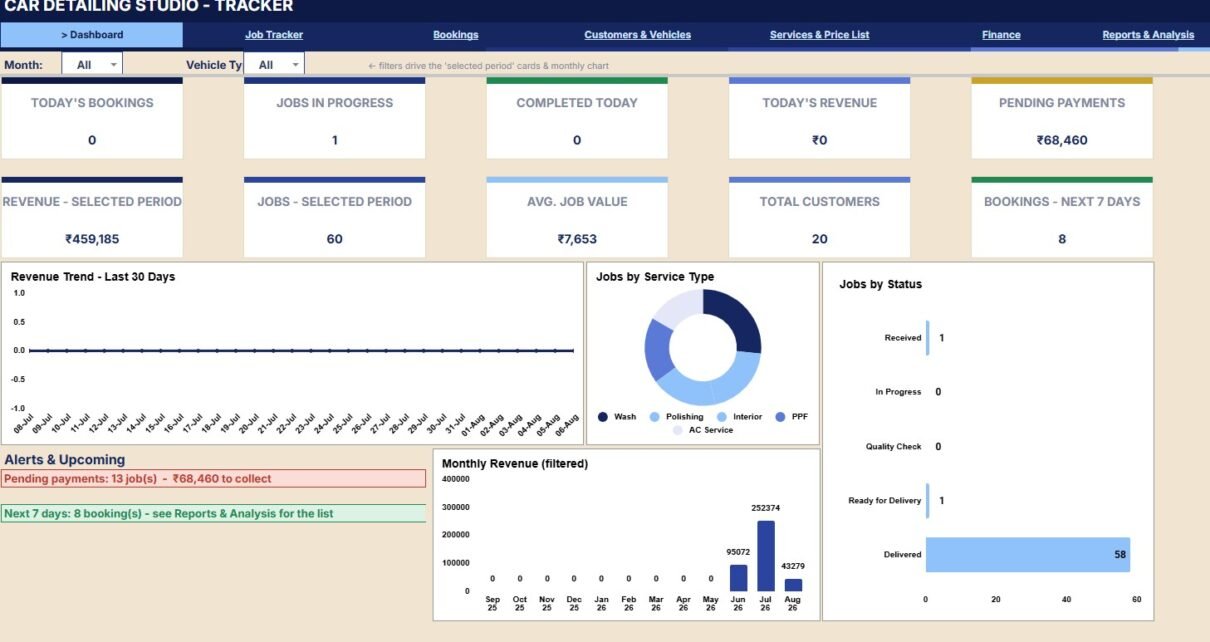
A car detailing studio can lose margin when bookings, jobs, service prices, customer vehicles, payments, and expenses sit in separate places. The Car Detailing Studio Tracker in Google Sheets brings 7 working pages, 10 overview cards, 6 chart groups, and 23 analysis views into one editable spreadsheet. It is built for owners, front desk teams, and operations leads who want to monitor daily work, revenue, pending collections, customer history, vehicle details, and service performance without moving straight into a recurring SaaS platform.Get the Car Detailing Studio Tracker in Google Sheets
Key Features of Car Detailing Studio Tracker in Google Sheets
The template is designed around practical studio questions: how many cars are booked today, which jobs are still open, what service categories are selling, how much cash has been collected, and which customers or vehicles need attention.Get the Car Detailing Studio Tracker in Google Sheets
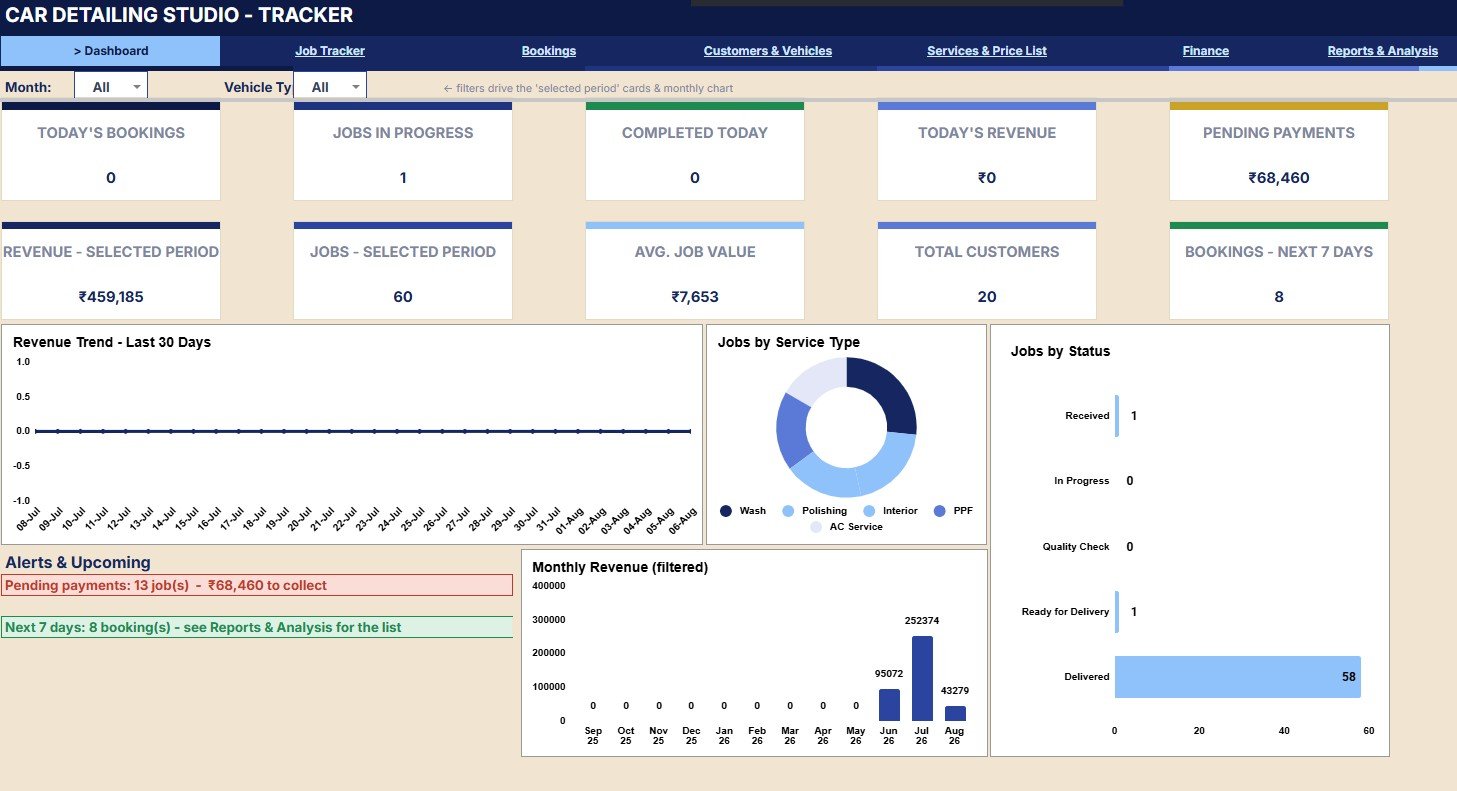
- Overview cards: Today’s bookings, jobs in progress, completed today, today’s revenue, pending payments, selected-period revenue, selected-period jobs, average job value, total customers, and next 7-day bookings.
- Job tracking: Jobs by customer, vehicle type, service category, total amount, amount paid, balance by payment status, and job status by job.
- Booking control: Booking status, time slot by date, service by customer, bay assignment, advance amount, days left, and upcoming customer schedule.
- Customer and vehicle analysis: Total spend, last visit, customer tag, vehicle type, owner, vehicle make, color, and registration number.
- Service price list: Price by vehicle type, duration by service, jobs done, revenue by service, active status, and service category.Car Detailing Studio Tracker in Google Sheets
- Finance view: Revenue collected, expense categories, net profit, pending collections, paid-to analysis, revenue vs. expenses, and profit by month.Car Detailing Studio Tracker in Google Sheets
- Reports: Service category revenue, vehicle-type revenue, top services, job status, upcoming bookings, pending payments, and top customers.Car Detailing Studio Tracker in Google Sheets
Dashboard Pages Explanation
Download the Car Detailing Studio Tracker in Google Sheets from NextGenTemplates after reviewing the page structure below.
1. Overview Page
The Overview Page gives the highest-level view of the studio. Cards show today’s bookings, jobs in progress, completed today, today’s revenue, pending payments, revenue for the selected period, jobs for the selected period, average job value, total customers, and bookings for the next 7 days.
Revenue by Day: This chart shows how revenue changes across the selected date range. It helps the owner compare busy days, slow days, and the timing of higher-value jobs.
Jobs by Service Type: This chart compares demand across wash, detailing, coating, interior, and related service types. It helps identify which services bring the most operational load.
Jobs by Status: This chart separates booked, in-progress, completed, cancelled, and other job states. It is useful for spotting backlog and open work before the day closes.
Monthly Revenue by Month: This chart shows revenue movement by month. It supports seasonal planning, target review, and monthly sales discussion.
Pending Payments by Job: This chart highlights jobs with open balances. It gives the billing desk a focused list for payment follow-up.
Upcoming Bookings by Date: This chart shows future booking volume by date. It helps the team prepare bays, staff, and service slots in advance.
2. Job Tracker
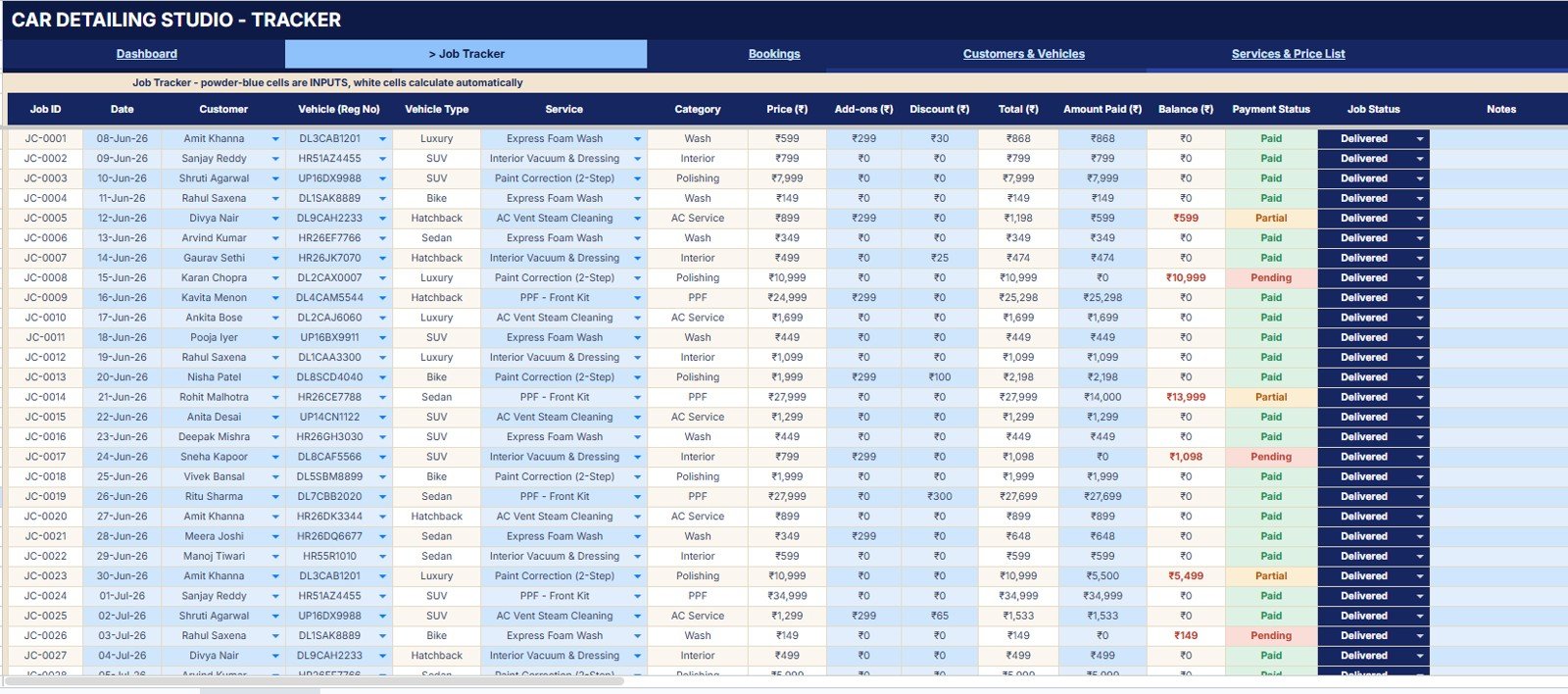
The Job Tracker page is where operational records become useful analysis. It shows jobs by customer, jobs by vehicle type, service category by service, total amount by job, amount paid by job, balance by payment status, and job status by job.
For an owner, this page answers which customers are active, which vehicle types are common, which services are being performed, and which jobs still carry open balances. For a front desk team, it gives a quick way to check payment and status before updating a customer.
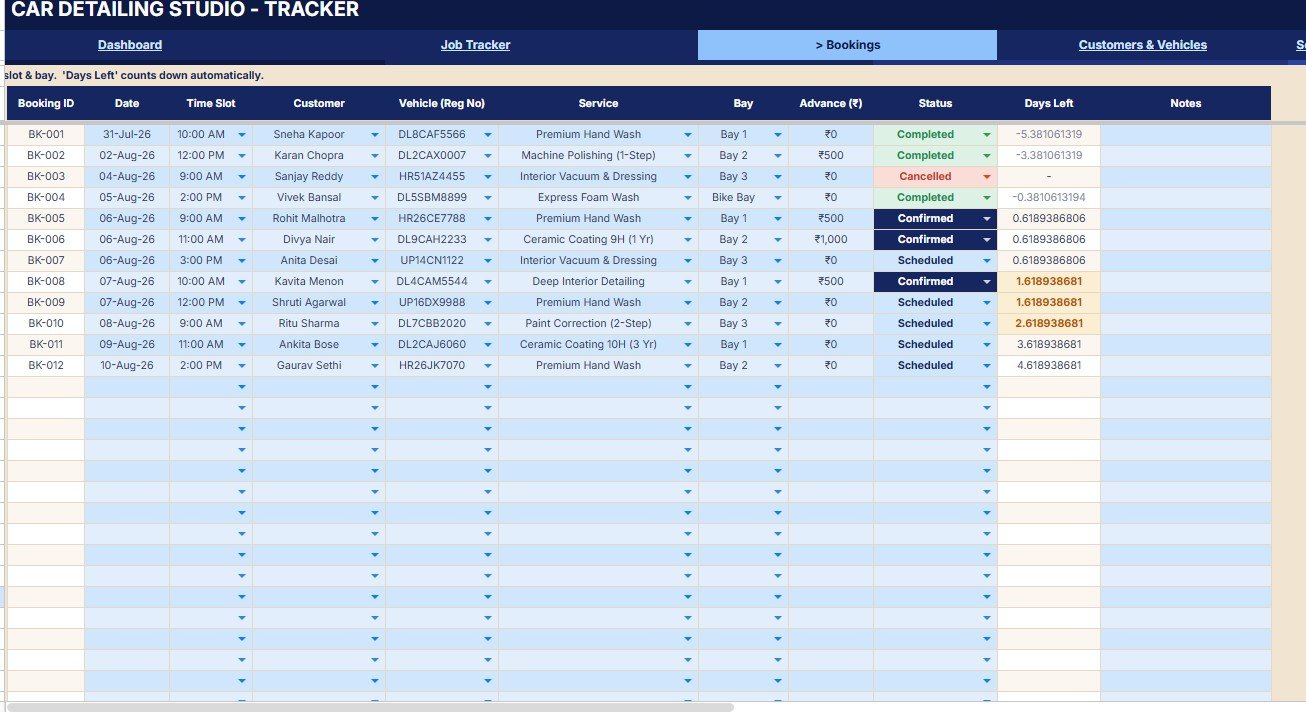
3. Bookings
The Bookings page focuses on appointments before they become completed work. It analyzes booking status by booking, time slot by date, service by customer, bay assignment by booking, advance amount by booking, days left by booking, and upcoming schedule by customer.
This helps the team prepare for tomorrow and the next week. When a detailing studio has limited bays, this page makes capacity visible before a new customer is promised a slot.
4. Customers and Vehicles
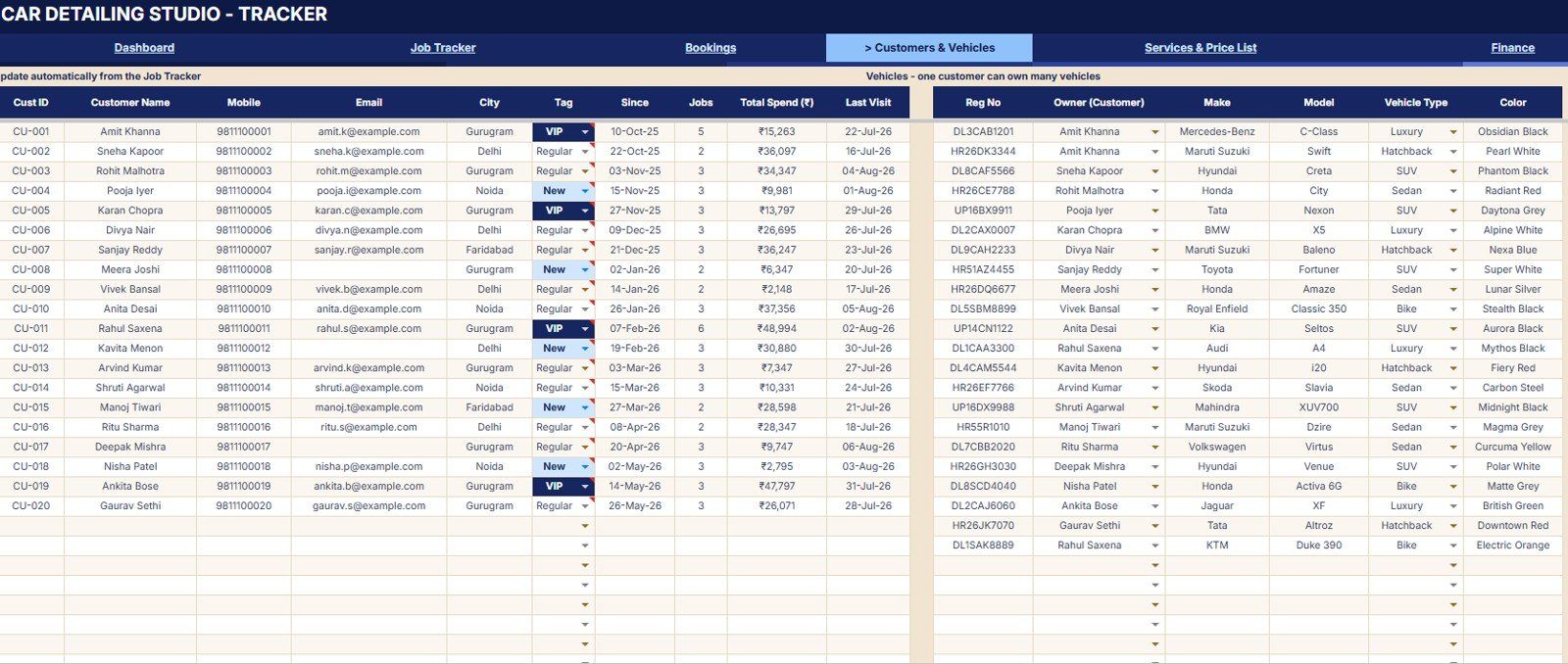
The Customers and Vehicles page connects customer value with vehicle records. It includes jobs by customer, total spend by customer, last visit by customer, customer tag by customer, vehicle type by owner, vehicle make by vehicle, and vehicle color by registration number.
Detailing teams often work with repeat customers and multiple vehicles. This page keeps spend, visit history, tags, vehicle make, vehicle type, color, and registration details visible from the same tracker.
5. Services and Price List
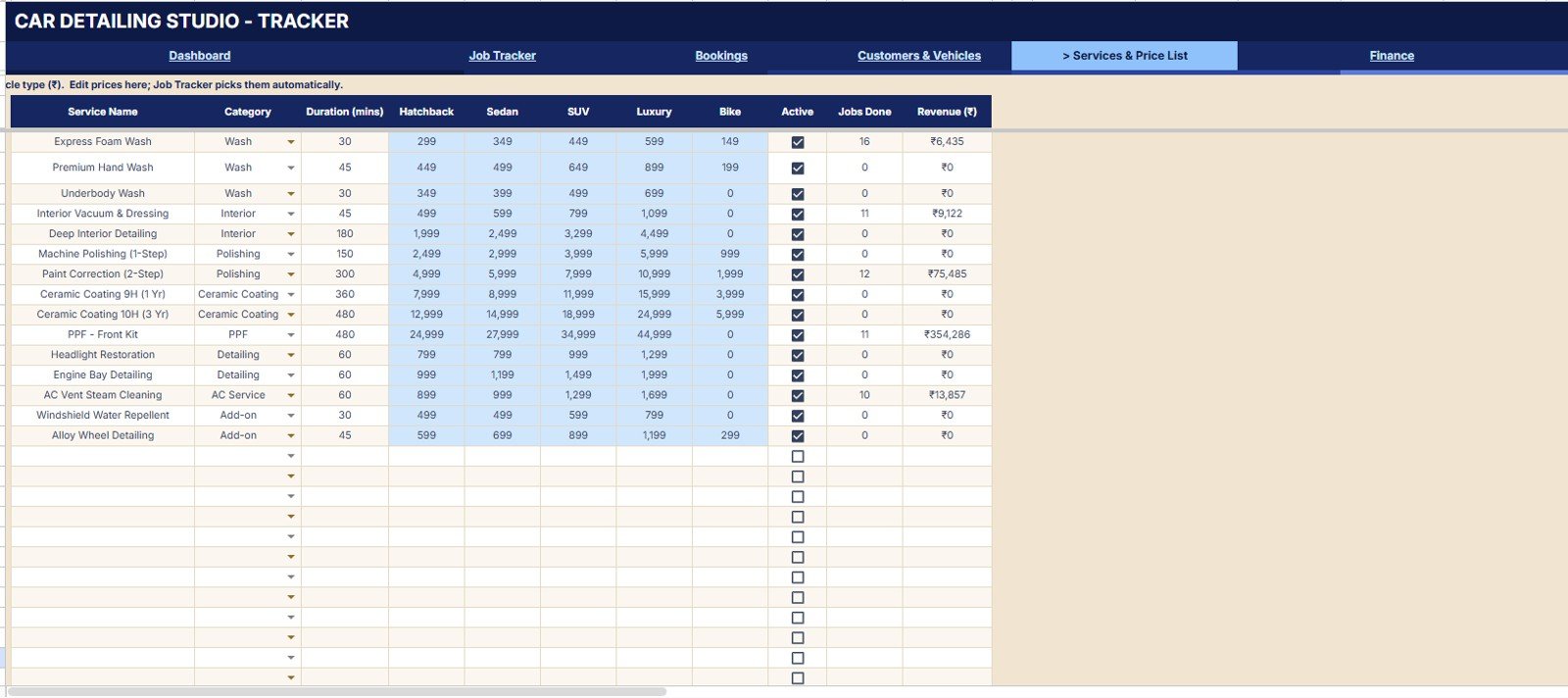
The Services and Price List page is the rate-card control page. It shows price by vehicle type, duration by service, jobs done by service, revenue by service, active status by service, and service category by service.
This page is useful when reviewing packages, add-ons, premium detailing services, or different prices for hatchbacks, SUVs, bikes, and luxury vehicles. It also helps identify services that take time but do not bring enough revenue.
6. Finance
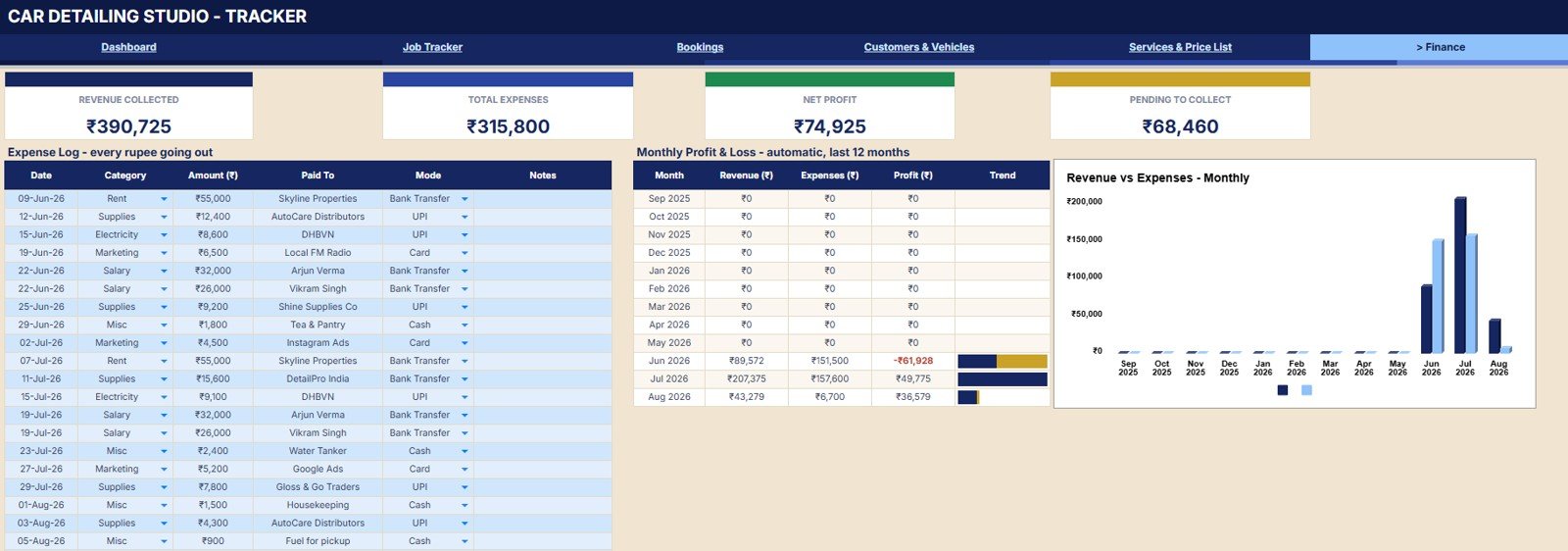
The Finance page brings money movement into the same workbook. It tracks revenue collected by period, total expenses by category, net profit by month, pending collections by job, expense amount by paid to, revenue vs. expenses by month, and profit by month.
For small studios, this page can reduce the gap between operations and finance. The team can see whether strong booking volume is also turning into collected revenue and profit.
7. Reports and Analysis
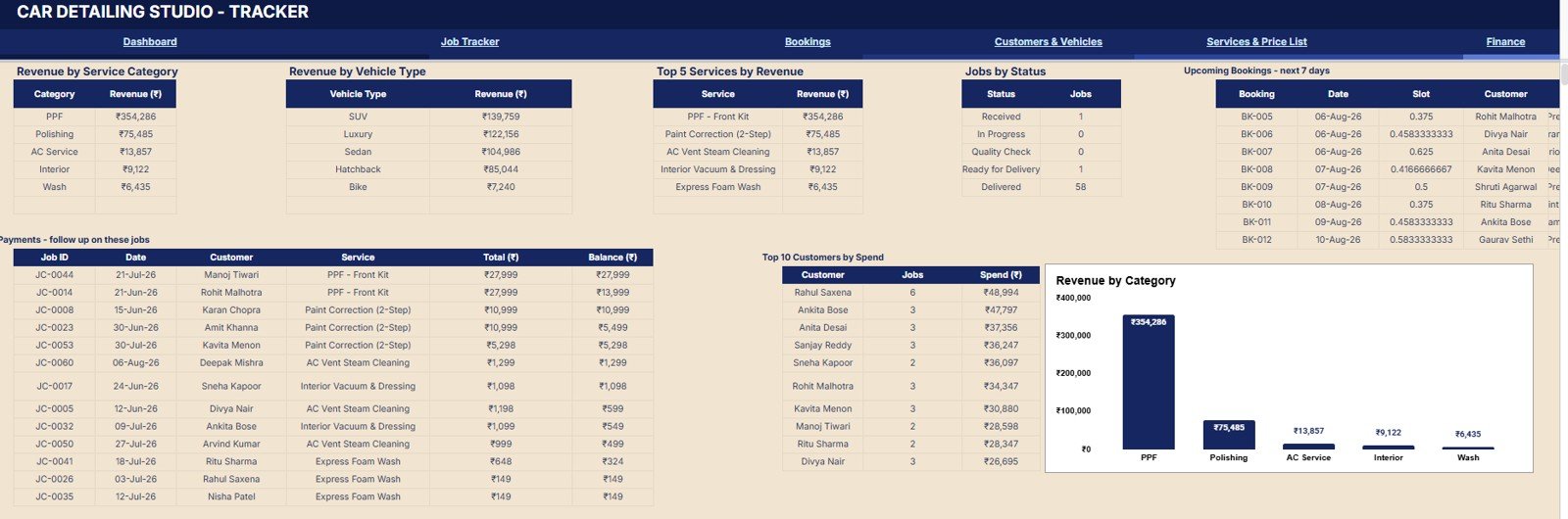
The Reports and Analysis page gives the owner a broader business review. It includes revenue by service category, revenue by vehicle type, top services by revenue, jobs by status, upcoming bookings by date, pending payments by customer, and top customers by spend.
This is the page to review before changing price, promoting a service, following up on balances, or deciding which customer segments deserve extra attention.
Get the Car Detailing Studio Tracker in Google Sheets
Car Detailing Studio Tracker in Google Sheets vs. Microsoft Excel Tracker vs. Paid CRM/SaaS – Feature Comparison
| Feature | This Google Sheets tracker | Microsoft Excel tracker | Paid CRM/SaaS |
|---|---|---|---|
| Cost | One-time $9.99 sale price | Template cost plus file-sharing setup | Recurring monthly plan |
| Platform | Google Sheets | Excel workbook | Hosted vendor system |
| Setup time | Copy the file and replace sample data | Open file and configure sharing | Account setup and onboarding |
| Real-time team collaboration | Native Google Sheets collaboration | Depends on OneDrive or local file habits | Usually included by plan |
| Mobile access | Available through Sheets mobile and browser | Depends on workbook layout | Usually available |
| Customizable fields | Editable services, jobs, customers, finance records, and reports | Editable, but formula changes can create errors | Depends on vendor plan |
| Share with link | Yes, through Google Drive permissions | Yes, if stored in the cloud | Yes, by user invitation |
| Year-1 cost at 5 users | Template price plus any Google Workspace plan already used | Template price plus Microsoft licensing if needed | Can rise quickly as users and features are added |
| Service price tracking | Included in the Services and Price List page | Possible with custom setup | Usually included in service software |
| Finance analysis | Revenue, expenses, pending collections, and profit pages included | Possible with extra design work | Often tied to plan and integrations |
Who Should Use This Template
This template fits single-location detailing studios, mobile detailing teams, premium auto spas, ceramic coating shops, and owner-led car wash businesses that want a shared Google Sheets tracker. It is especially useful when a team currently uses WhatsApp messages, paper notes, or separate spreadsheets for bookings, jobs, payments, and expenses.
It is not meant for enterprise franchises that need branch-level permissions, built-in SMS, online payment gateways, inventory barcode scanning, or a native customer portal.
Real-World Use Cases
Owner managing daily bays
Ravi runs a two-bay detailing studio. Each morning he checks today’s bookings, active jobs, and upcoming bookings, then assigns staff based on expected workload.
Front desk handling customers and vehicles
Meera handles calls and walk-ins. She uses Customers and Vehicles to check last visits, vehicle details, total spend, and customer tags before creating the next booking.
Manager reviewing finance and service mix
Daniel manages pricing and cash follow-up. He reviews the Finance and Reports pages to compare service revenue, pending collections, expenses, and monthly profit.
Advantages of Car Detailing Studio Tracker in Google Sheets
Get the Car Detailing Studio Tracker in Google Sheets
- It keeps bookings, jobs, customers, vehicles, services, payments, expenses, and reports in one spreadsheet.
- It uses Google Sheets sharing, so a small team can work from the same file.
- It gives both daily cards and deeper analysis pages.
- It includes payment and pending-collection views, which are often missed in simple appointment trackers.
- It is easier to adapt than a locked vendor system when the business process changes.
Opportunities for Improvement
A spreadsheet tracker is still a spreadsheet. It should be reviewed carefully before major formula edits, and the owner should control who can edit the core sheets. Teams that need automatic payment links, SMS reminders, staff mobile apps, stock barcode scanning, or branch-wise security may need a custom app or paid service software.
Best Practices
- Standardize service categories and vehicle types before loading real data.
- Review pending payments daily so balances do not pile up.
- Update booking status and job status as soon as work changes.
- Keep service prices and durations current before running revenue analysis.
- Use Google Drive permissions carefully so only trusted users can edit formulas.
- Review the official Google Sheets training and help page when onboarding team members to shared spreadsheet work.
Explore Relevant Templates
- Car Detailing Studio Tracker in Google Sheets
- Car Detailing Studio Management System Web App
- Car Wash Management System Web App
- Service Center and Repair Shop Management System Web App
- Browse Google Sheets Trackers
Frequently Asked Questions
Get the Car Detailing Studio Tracker in Google Sheets
What is the Car Detailing Studio Tracker in Google Sheets?
It is a Google Sheets template for tracking detailing studio bookings, jobs, customers, vehicles, services, revenue, expenses, pending payments, and reports.
How many pages are included?
The screenshots show 7 working pages: Overview, Job Tracker, Bookings, Customers and Vehicles, Services and Price List, Finance, and Reports and Analysis.
Can I track today’s bookings and jobs in progress?
Yes. The Overview Page includes cards for today’s bookings, jobs in progress, completed today, today’s revenue, and pending payments.
Does it support vehicle details?
Yes. The Customers and Vehicles page includes vehicle type, owner, vehicle make, vehicle color, and registration number analysis.
Can I use it for mobile detailing?
Yes, if your mobile detailing workflow can be tracked through bookings, jobs, customers, vehicles, services, and payments in Google Sheets.
Does it replace paid detailing software?
It can replace a manual spreadsheet for many small teams, but it does not include automated SMS, native payment gateways, branch security, or customer portal features.
Do I need a Google Workspace account?
A standard Google account can open Google Sheets files. A business may still prefer Google Workspace for team control, storage, and administration.
About the Author
Built by PK – Microsoft Certified Professional with 15+ years of Excel, Google Sheets, and Power BI experience. Founder of NextGenTemplates, reaching 300K+ subscribers across YouTube channels. Every template is hand-built and tested before release.
Conclusion
The Car Detailing Studio Tracker in Google Sheets is a practical middle ground between a loose appointment list and a recurring service platform. Its value is the connected view: bookings become jobs, jobs connect to customers and vehicles, service prices connect to revenue, and payments connect to finance. Get the Car Detailing Studio Tracker in Google Sheets when you want one editable file for daily control and weekly review.
For tutorials on Google Sheets, Apps Script, and business tools, visit YouTube.com/@NeoTechNavigators.