The Medical Appointment Calendar in Google Sheets gives clinics a practical appointment planning system with 5 linked worksheet tabs, 4 navigation buttons, 3 schedule views, and a 7-field Events database. Instead of building a calendar from a blank spreadsheet, a front desk team can copy the file, update sample appointments, and start reviewing annual, monthly, and daily schedules in under 10 minutes.Medical Appointment Calendar in Google Sheets
This template is built for simple operational visibility: who is scheduled, on what date, at what time, where the appointment happens, and what the visit is for. It does not try to replace an EHR, patient portal, or full practice-management system. It gives small clinics, consultants, and healthcare admins a clean Google Sheets calendar they can edit, share, and control.
Get the Medical Appointment Calendar in Google Sheets
Key Features of Medical Appointment Calendar in Google Sheets
- 5 connected sheets: Home, Annual View, Monthly View, Daily View, and Events.
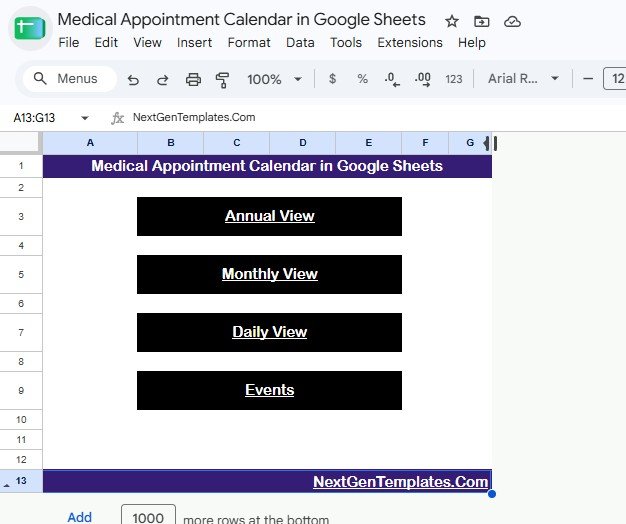
- 4 navigation buttons: jump from the Home sheet to the exact view you need.
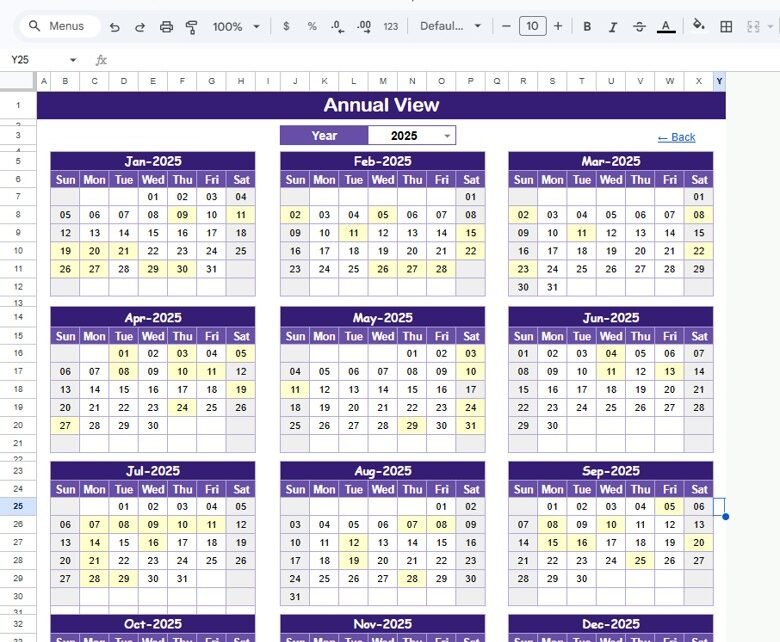
- Annual View: see all 12 months of the selected year on one planning page.
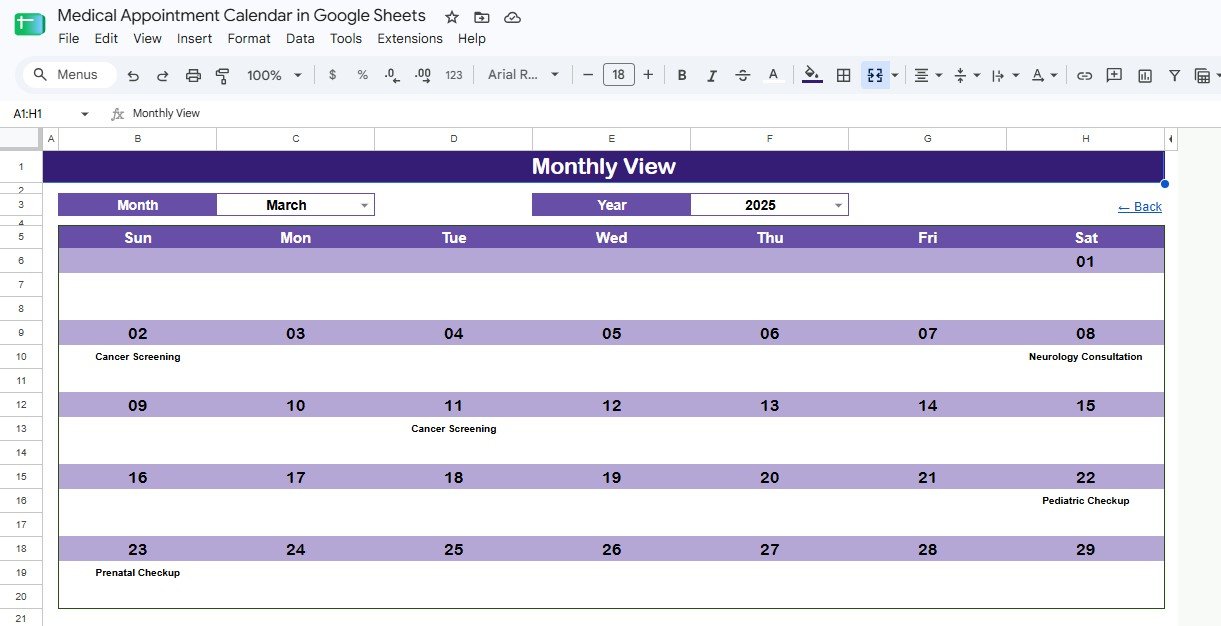
- Monthly View: select a month and year to see appointment names placed on calendar dates.Medical Appointment Calendar in Google Sheets
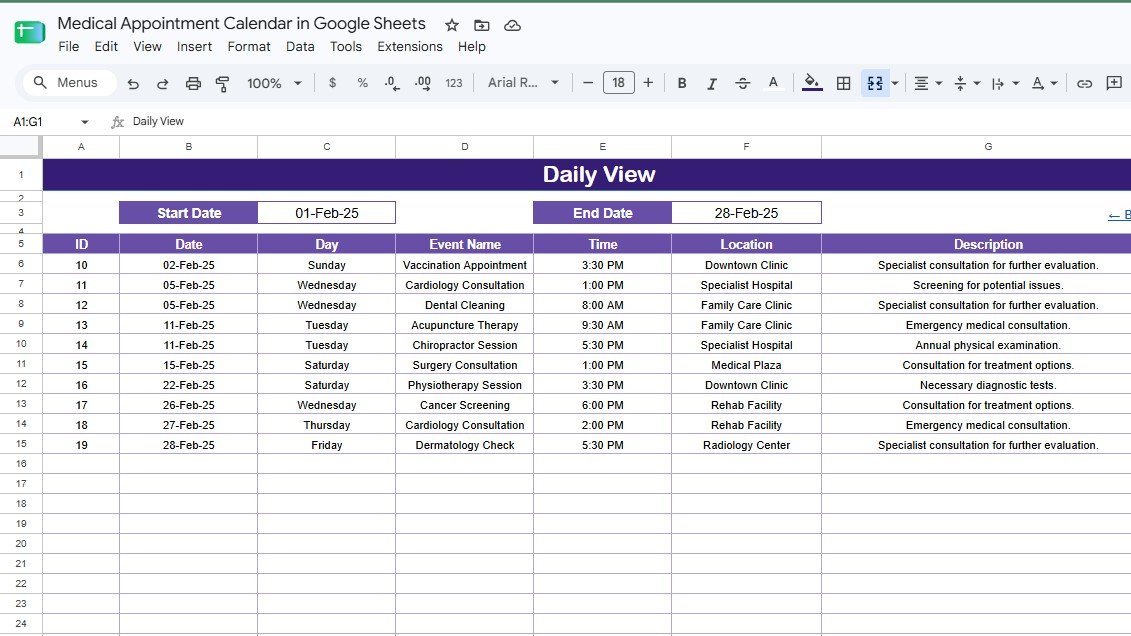
- Daily View: filter appointments between a start date and end date.
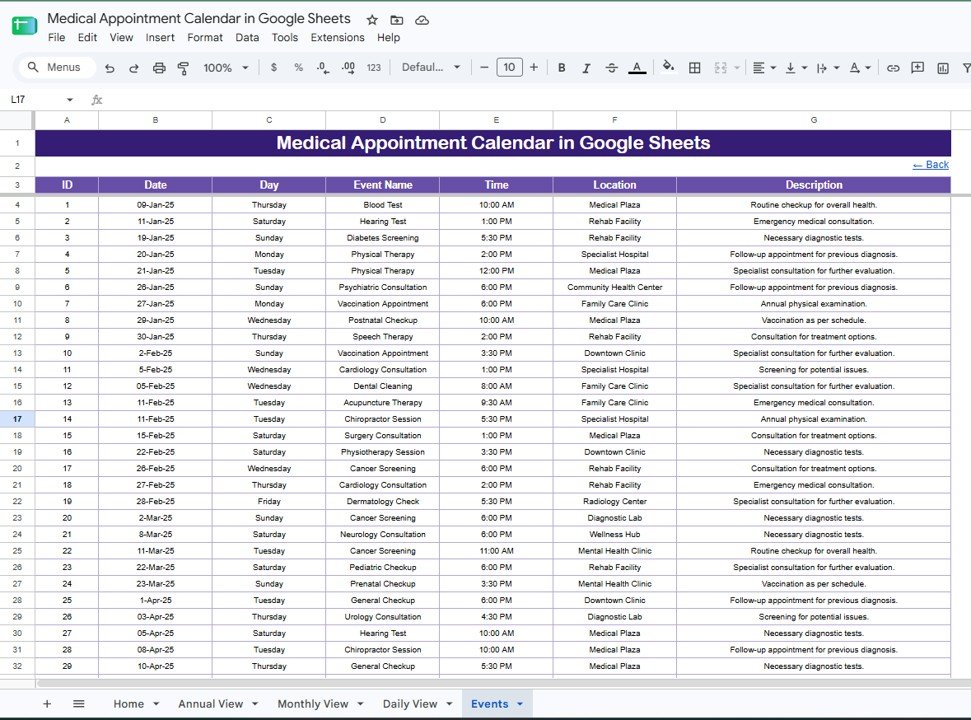
- Events database: maintain ID, Date, Day, Event Name, Time, Location, and Description in one table.Medical Appointment Calendar in Google Sheets
- Healthcare sample entries: vaccination appointments, cardiology consultations, cancer screenings, prenatal checkups, pediatric checkups, dental cleanings, and therapy sessions.Medical Appointment Calendar in Google Sheets
- Google Sheets sharing: collaborate with front desk staff, clinic managers, and providers using Google Drive permissions.
Calendar Sheets Explanation
Home Sheet
The Home sheet works as the index page. It includes four simple buttons for Annual View, Monthly View, Daily View, and Events. This is useful when a non-technical clinic user wants to move through the file without hunting for sheet tabs.
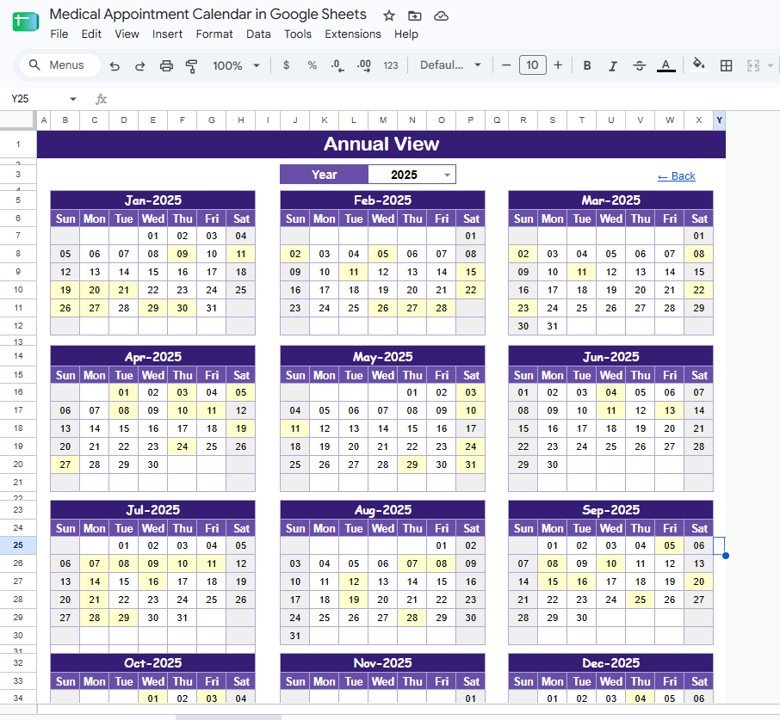
Annual View Sheet
The Annual View shows all 12 months of the selected year. A practice manager can use it to see heavy appointment periods, screening windows, annual physical cycles, vaccination months, provider vacations, and other clinic-wide planning needs before zooming into a single month.
Monthly View Sheet
The Monthly View is the day-to-day calendar screen. Select the month and year from the dropdown controls, and the sheet displays matching appointment names inside the right date cells. In the screenshot, March 2025 includes items such as Cancer Screening, Neurology Consultation, Pediatric Checkup, and Prenatal Checkup.
Daily View Sheet
The Daily View is a date-range appointment list. Enter a start date and end date, and the template returns every matching appointment with full details. This is helpful for printing tomorrow’s schedule, reviewing a provider’s upcoming load, or giving the front desk a list for the week.
Events Sheet
The Events sheet is the database. Each row stores the appointment ID, date, day, event name, time, location, and description. Users can directly edit this table, add new events, change locations, or update appointment descriptions. Every view reads from this centralized data structure.
Medical Appointment Calendar in Google Sheets vs. Microsoft Excel Calendar vs. Paid Clinic Scheduling SaaS – Feature Comparison
| Feature | Medical Appointment Calendar in Google Sheets | Microsoft Excel Calendar | Paid Clinic Scheduling SaaS |
|---|---|---|---|
| Cost | $4.99 one-time | Template cost plus Office license | Monthly subscription, often by user or provider |
| Platform | Google Sheets in a browser | Excel desktop, web, or mobile | Vendor-hosted web app |
| Setup time | Under 10 minutes | Usually under 15 minutes | Often requires onboarding and configuration |
| Real-time team collaboration | Native Google Sheets collaboration | Requires OneDrive or SharePoint | Usually included with paid seats |
| Mobile access | Google Sheets app or browser | Excel app or browser | Vendor app or browser |
| Customizable fields | Fully editable spreadsheet | Fully editable spreadsheet | Limited to vendor settings |
| Share with link | Yes, through Google Drive | Only through cloud sharing | Role-based invitations |
| Year-1 cost at 5 users | $4.99 total | Template cost plus software licenses | Often hundreds or thousands per year |
| Appointment visibility | Annual, monthly, and date-range daily views | Depends on the workbook design | Usually strong, with reminders and patient records |
| Best fit | Small clinics needing a shared planning calendar | Single-user desktop workflows | Clinics needing EHR, billing, reminders, and portal features |
Who Should Use This Template
This template is a good fit for small medical practices, diagnostic centers, therapy clinics, dental offices, consultants, solo practitioners, and front desk teams that need a shared appointment list without adopting a full SaaS system.
It is also useful for healthcare consultants who create planning files for clients. They can duplicate the Google Sheet, rename appointment types, adjust clinic locations, and hand over a familiar calendar structure without writing custom formulas.
It is not the right fit for hospitals or practices that need patient portals, automated text reminders, insurance claims, regulated medical records, or direct EHR integration.
Real-World Use Cases
Small Family Clinic
Dr. Priya’s clinic uses the Monthly View to coordinate vaccinations, prenatal visits, pediatric checkups, and general consultations. The front desk edits the Events sheet, while the doctor reviews the daily list each morning.
Diagnostic Center
Asha manages a diagnostic center with screening appointments across several rooms. She uses the Daily View to print the next day’s schedule with time, location, and appointment description.
Healthcare Operations Consultant
Marcus sets up the file for clinics that are not ready for paid scheduling software. He customizes appointment names, cleans sample data, and trains staff to update the Events sheet consistently.
Advantages of Medical Appointment Calendar in Google Sheets
- Low cost: one-time purchase instead of another recurring software bill.
- Fast setup: replace the sample rows and start using the calendar immediately.
- Shared access: Google Sheets supports team collaboration through Google Drive.
- Simple structure: users only need to understand one database sheet and three calendar views.
- Editable design: rename appointment types, adjust descriptions, and add more rows as needed.
- Good planning visibility: Annual View, Monthly View, and Daily View serve different scheduling decisions.
Opportunities for Improvement
The template is intentionally lightweight. It does not send automated SMS or email reminders, sync with Google Calendar, manage patient intake forms, process payments, store clinical records, or handle HIPAA compliance by itself. If you store patient-identifiable information, your Google Workspace plan, access permissions, business associate agreements, and internal policies matter.
For clinics that later need reminders, patient portals, billing, claim submission, or EHR integrations, this calendar can still work as a planning layer or transition tool before moving to a dedicated practice-management system.
Best Practices
- Keep patient names or sensitive details out of the calendar unless your organization has approved Google Workspace controls.
- Use short appointment names in the Monthly View so the calendar stays readable.
- Standardize event names such as Vaccination Appointment, Dental Cleaning, Cancer Screening, and Pediatric Checkup.
- Review the Events sheet weekly to remove duplicates and fix inconsistent locations.
- Give edit access only to users who should change appointments; use viewer access for read-only staff.
- Use Google’s official file-sharing guidance when setting Drive permissions: Share files from Google Drive.
Explore Relevant Templates
- Medical Appointment Calendar in Google Sheets – the product page for this calendar template.
- Medical Practice Dashboard in Google Sheets – track revenue, visits, doctors, and patients.
- Healthcare & Hospital Management Bundle – a broader healthcare template collection.
- Dental Clinic Management System – clinic operations web app template.
- Telehealth Dashboard in Excel – analyze virtual care performance.
- Google Sheets Calendar Templates – browse more date-based planning tools.
Want to build planners and calendars like this yourself? The NextGenTemplates Academy learning paths take you through the spreadsheet skills step by step, with practice files.
Get the Medical Appointment Calendar in Google Sheets
Frequently Asked Questions
What is included in the Medical Appointment Calendar in Google Sheets?
It includes 5 sheets: Home, Annual View, Monthly View, Daily View, and Events. The Events sheet stores appointment data, while the three calendar views make that data easier to read.
Can multiple staff members use the calendar?
Yes. Since it runs in Google Sheets, you can share it through Google Drive and assign viewer or editor permissions to staff members.
Can I customize the appointment types?
Yes. You can replace the sample appointment names with your own clinic services, such as consultation, follow-up, lab test, screening, therapy session, or procedure review.
Does this template send automatic reminders?
No. This is a manual appointment calendar. It does not send SMS reminders, email reminders, or calendar invites.
Is this a replacement for EHR software?
No. The template is a scheduling and planning spreadsheet. It is not a certified EHR, patient portal, billing system, or medical record platform.
Does it work on phones and tablets?
Yes, it can open in the Google Sheets mobile app or browser. For editing large monthly or annual views, a desktop or tablet screen is more comfortable.
What happens if I need more rows?
You can add more appointment rows in the Events sheet. Keep the same column structure so the calendar views continue to read the data properly.
About the Author
Built by PK – Microsoft Certified Professional with 15+ years of Excel, Google Sheets, and Power BI experience. Founder of NextGenTemplates, reaching 300K+ subscribers across YouTube channels. Every template is hand-built and tested before release.
Conclusion
The Medical Appointment Calendar in Google Sheets is a practical template for clinics that want appointment visibility without another monthly system. It gives your team a Home sheet, Annual View, Monthly View, Daily View, and Events database so scheduling work stays organized and easy to review.
Last updated: August 2026