Ask a small credit union what its loan book is worth and you will usually get three answers. The register says one thing, the teller’s day book says another, and the accountant’s spreadsheet says a third. The reconciliation is the job, and it eats a week a month.
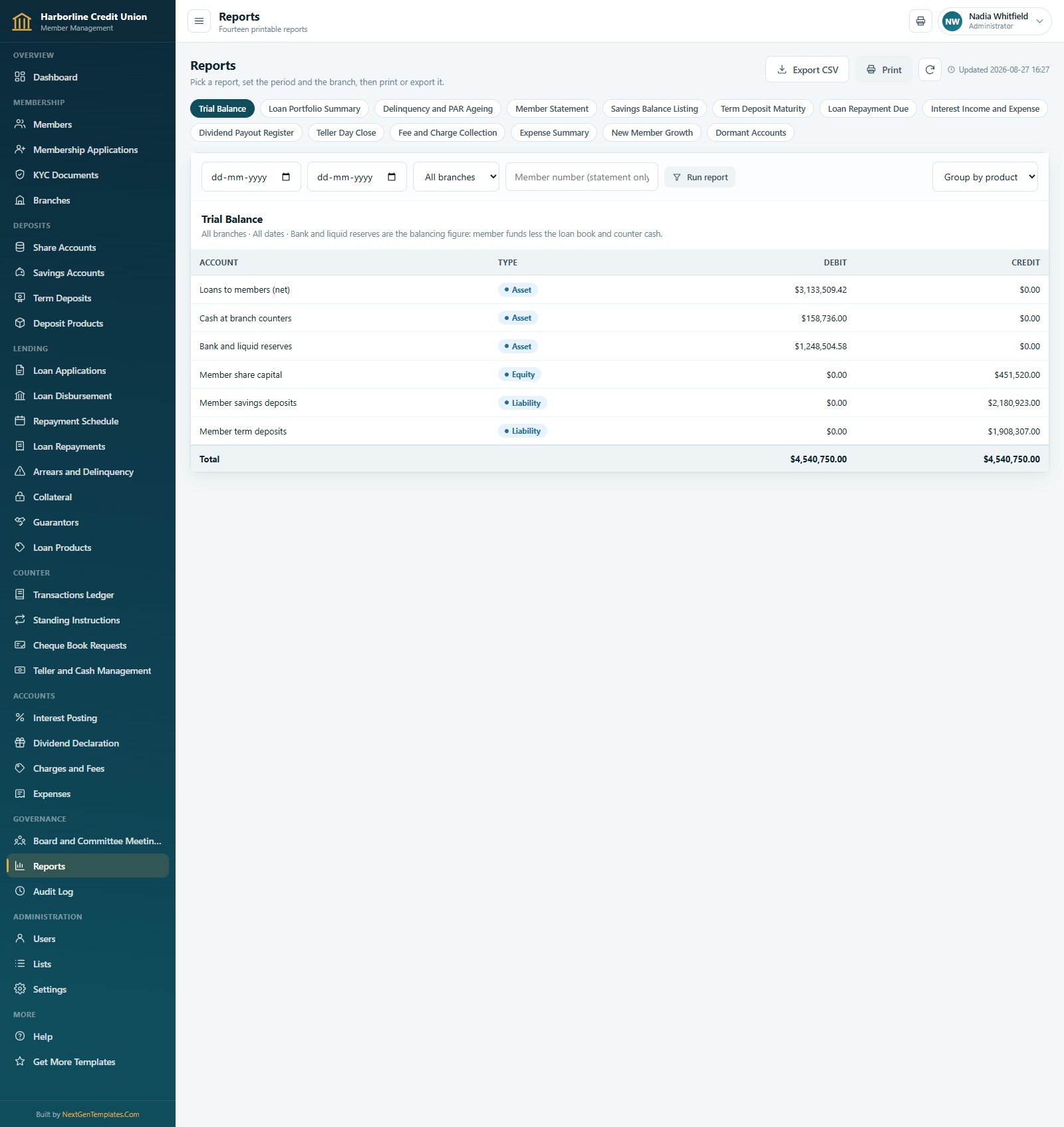
The Credit Union Member Management System Web App puts the whole book in one place, built on Google Apps Script with a Google Sheet behind it as the database. It arrives with a complete society already loaded: 420 members, 480 savings accounts, 150 share certificates, 190 loans, 7,566 amortisation rows and 4,172 ledger movements across 34 tabs and 18,980 seeded rows. Sign in and the trial balance already foots – $4,540,750.00 of assets against $4,540,750.00 of member funds, with no manual adjustment. Six roles, eight seeded sign-ins, thirty pages, fourteen printable reports, and a live demo you can open right now.
Try the Live Demo
The demo is a shared instance that resets on a schedule. Open it, sign in as any of the eight accounts below, and see for yourself what a teller can reach that an auditor cannot – the role separation is the product.
Demo sign-in details
| Role | Username | Password | What this sign-in can reach |
|---|---|---|---|
| Administrator | admin | Harborline@2024 | Everything, including Users, Lists, Settings and the database archive. All six branches. |
| Branch Manager | dcole | Downtown@2024 | One branch end to end – members, KYC, savings, certificates, loan approval, counter work, charges, expenses, meetings and reports. Downtown data only. |
| Branch Manager | mreyes | Northgate@2024 | The same module set scoped to Northgate, so you can prove the branch filter really filters. |
| Loan Officer | kobrien | Lending@2024 | Origination and servicing – applications, disbursement, repayments, arrears follow-up, collateral, guarantors, reports. No cash posting, no settings. |
| Loan Officer | tnguyen | Lending@2025 | The same lending set at Riverside, useful for comparing two officers’ pipelines. |
| Teller | lgrant | Counter@2024 | Counter only – member lookup, savings, deposits, withdrawals, transfers, cheque books, charges and the cash drawer. No loan approval. |
| Accountant | pashford | Ledger@2024 | The books – ledger, interest posting, dividends, charges, expenses, reports, settings and the audit log, across all branches. |
| Auditor | rmalik | Review@2024 | Read-only across the entire system, audit trail included. Nothing can be changed from this sign-in. |
These credentials are public on purpose. They are the seeded logins of a shared demo instance that resets, not of anybody’s live society. Your own deployment builds its own database inside your own Google Drive, and you change all eight passwords on first run.
Key Features of the Credit Union Member Management System Web App
One reconciling ledger under every balance. Each savings and share balance is the signed sum of that account’s rows in the Transactions Ledger, and each loan outstanding is the amount disbursed less the principal actually repaid in the schedule. A reconcileLedger() routine proves it and names any account that disagrees, which is a very different promise from “the spreadsheet says so”.
Six roles driven by a single permission map. The same PERMS map builds the sidebar the user sees and guards every server call, so a page hidden from a role cannot be reached by typing a route. Roles without the money permission have the money columns stripped on the server before the payload is sent to the browser – not hidden with CSS, removed.
A complete lending life cycle. Application, committee recommendation, approval or decline, disbursement, a 7,566-row amortisation schedule, receipts split into principal, interest and penalty, and arrears bucketed 1-30 / 31-60 / 61-90 / 90+ with an officer and a follow-up trail on every row.
A real rate card on both sides of the balance sheet. Twelve deposit products from Regular Share Savings at 2.10% to a 60-month Share Certificate at 5.25%, each with its own minimum opening balance, minimum balance, tenure and interest-paid frequency; and fourteen loan products from a 6.75% Member Mortgage over 240 months to a 14.00% Emergency Loan, each with its own penal rate, limits, fee percentage and security requirement.
Counter control that surfaces variance. One teller session per teller per business day, with opening float, receipts, payments, an expected figure and a counted close. In the seeded book, 252 sessions produced a net variance of $83.00 – and you can see exactly which two sessions caused it.
Governance and audit as first-class modules. Board, credit committee, supervisory and general meetings with invited, present and quorum recorded; and a 465-row audit log showing who did what, in which module, against which record, at which branch.
Page by Page: What Each Module Does
Overview
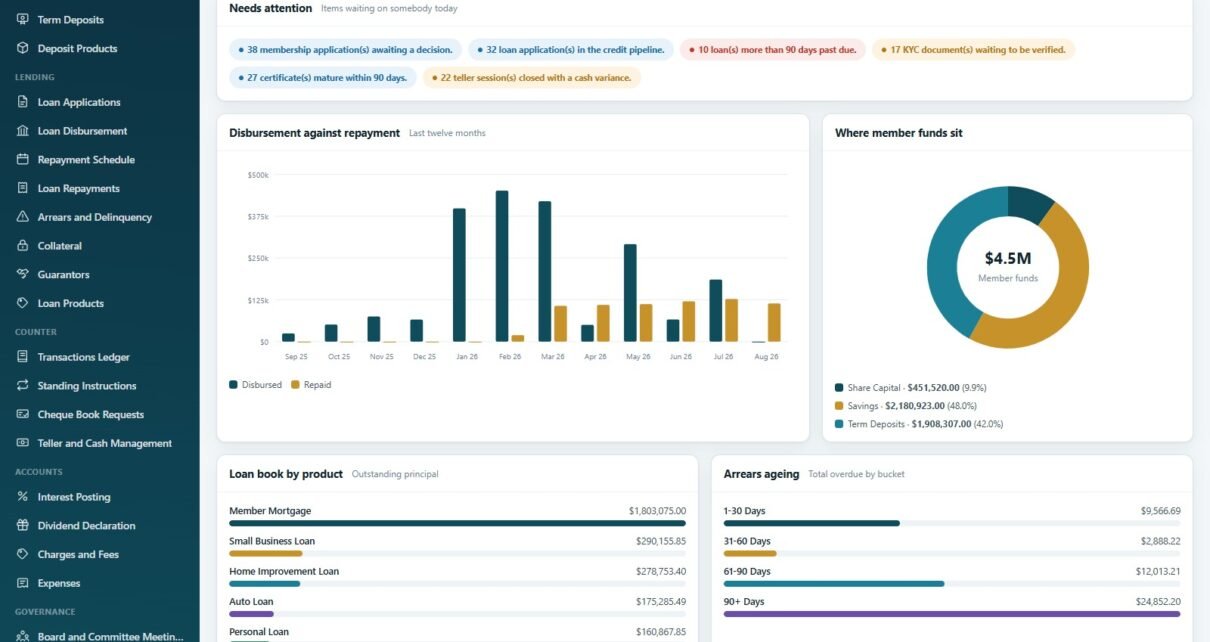
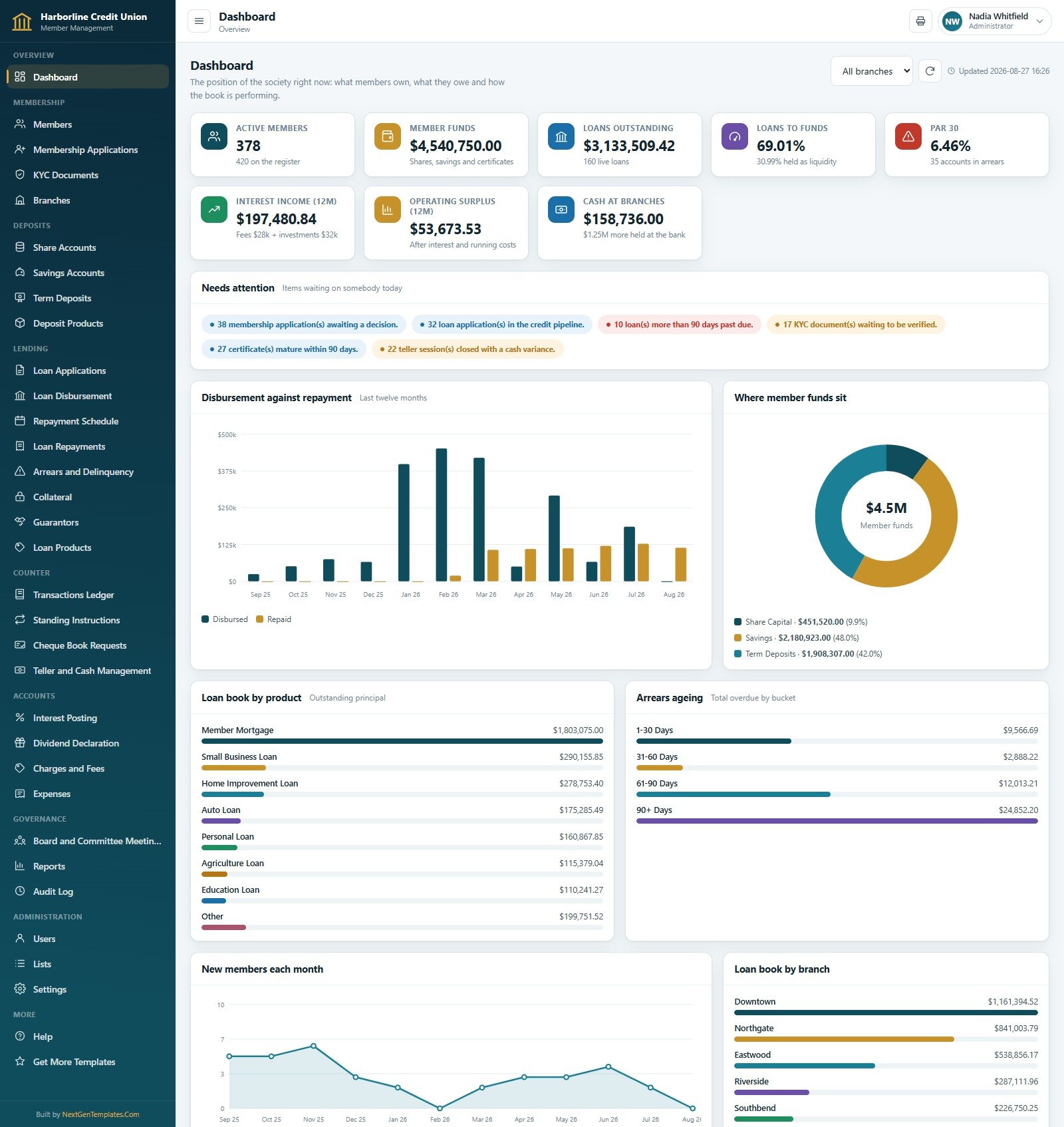
The Dashboard opens on nine KPI cards – active members, member funds, loans outstanding, loans-to-funds, PAR 30, twelve-month interest income, operating surplus and cash at branches – over a “Needs attention” strip that names the work waiting today: 38 membership applications awaiting a decision, 32 loan applications in the credit pipeline, 10 loans more than 90 days past due, 17 KYC documents to verify, 27 certificates maturing within 90 days and 22 teller sessions closed with a variance. Below that sit disbursement against repayment over twelve months, a member-funds doughnut splitting share capital, savings and term deposits, loan book by product and by branch, arrears ageing and new members each month.
Membership
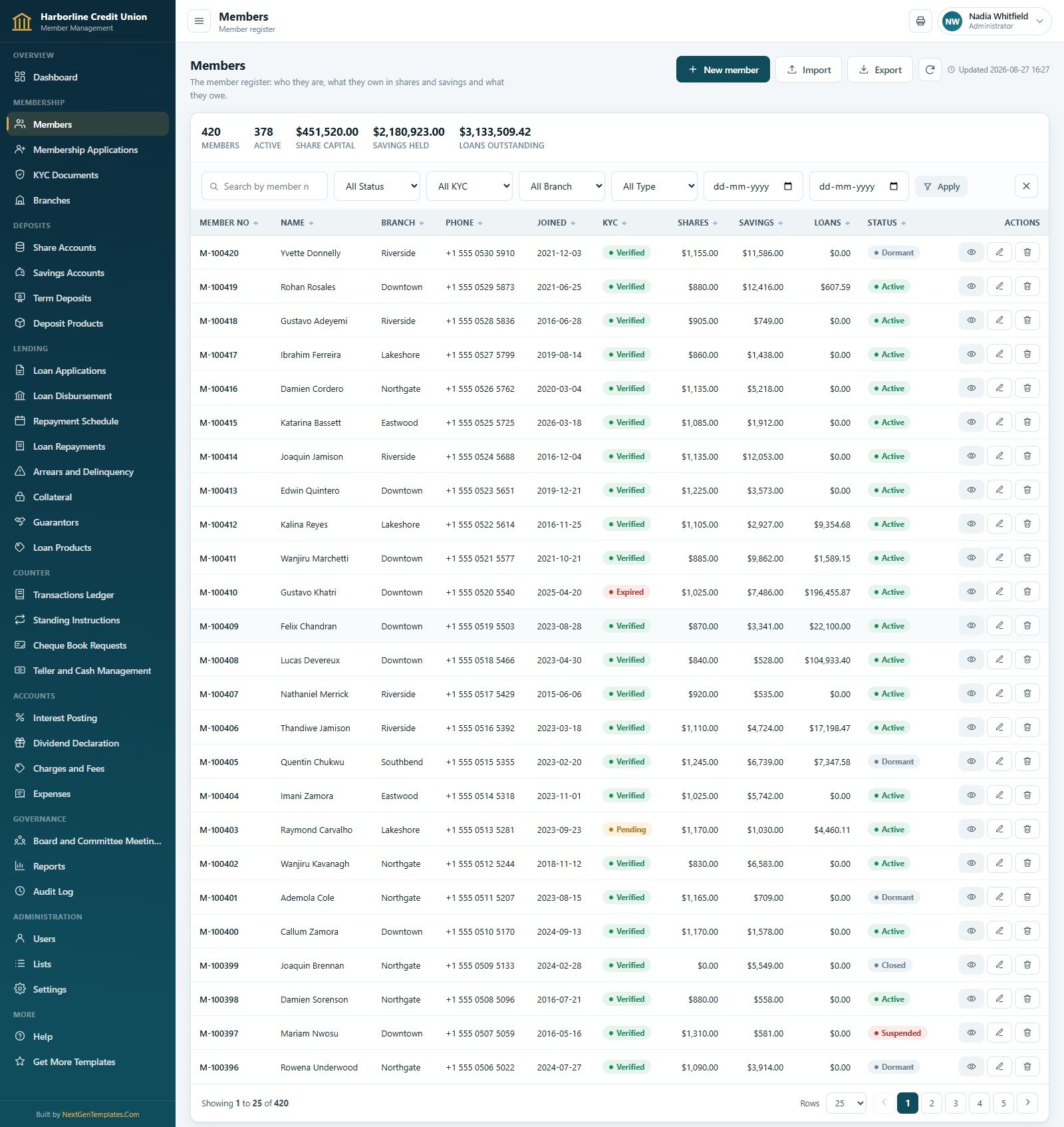
Members is the register: 420 records with shares, savings, loans, KYC state, branch and status, and a member card behind every row. Membership Applications is the joining pipeline – approving one creates the member, opens a share account and posts the subscription in a single step. KYC Documents holds 260 identity, address and signature documents with the verifier and the expiry date. Branches carries the six service points with their manager, opening date and counter float.
Deposits
Share Accounts tracks share capital per member and dividend eligibility. Savings Accounts holds 480 everyday and recurring accounts whose balance is read straight from the ledger. Term Deposits holds 150 certificates with principal, rate, months, maturity date and maturity value – $1,908,307.00 of principal maturing to $2,055,101.48. Deposit Products is the rate card behind all three.
Lending
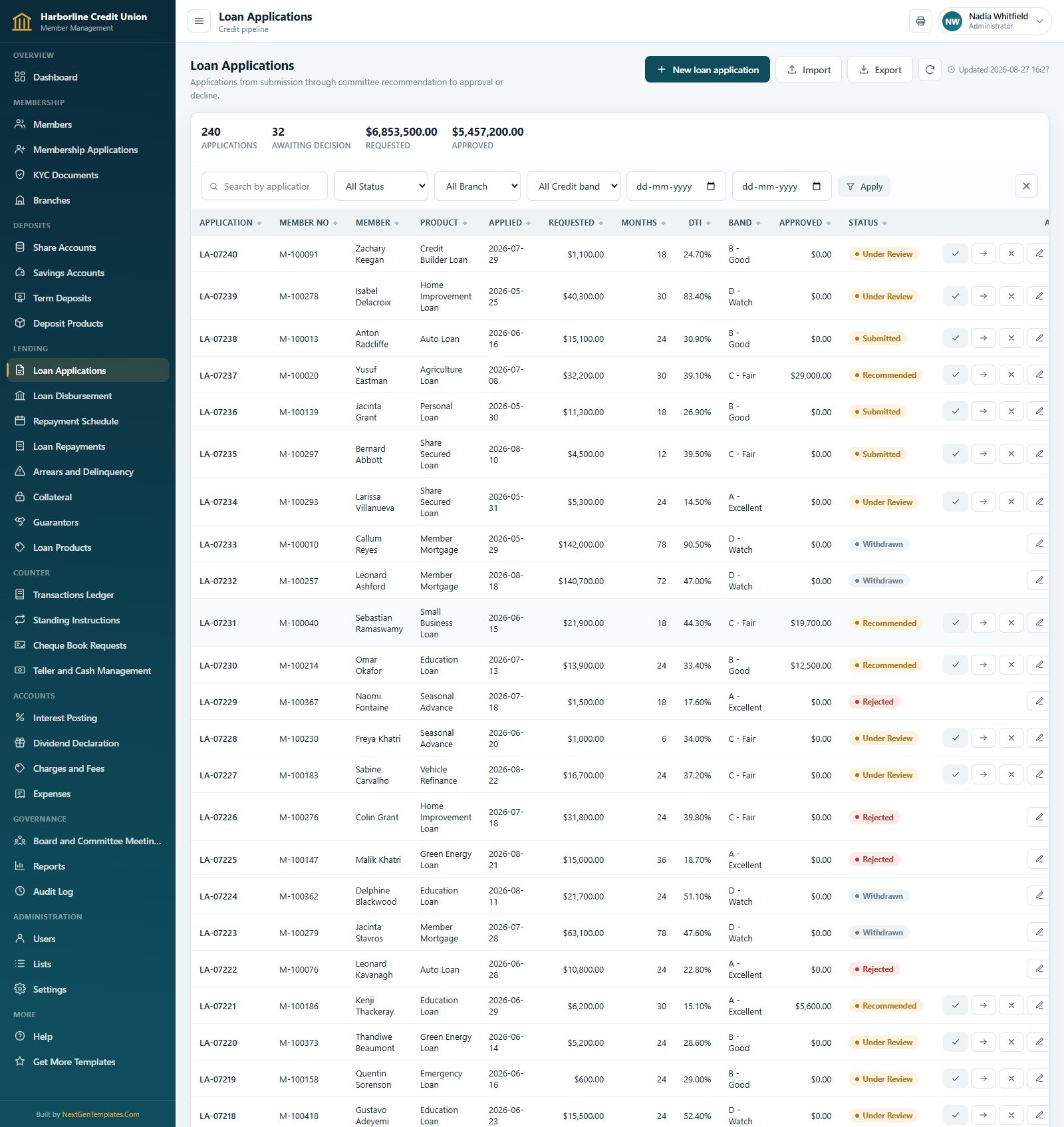
Loan Applications shows requested amount, months, debt-to-income, credit band and approved amount through submission, recommendation and decision. Loan Disbursement lists the 190 drawn-down loans with instalment, outstanding principal, days past due and risk grade. Repayment Schedule is the instalment-level amortisation with opening, principal, interest, instalment and closing on every row. Loan Repayments records 900 receipts split three ways with the mode and the officer. Arrears and Delinquency, Collateral (114 items, $5,985,106.05 valued) and Guarantors (250 personal guarantees) complete the picture.
Counter, Accounts and Governance
Transactions Ledger is the single source of truth – 4,172 movements with voucher, book, account, narration, amount, running balance, mode and teller. Standing Instructions runs 165 recurring sweeps. Cheque Book Requests tracks leaf series and the fee. Teller and Cash Management owns the drawer. On the accounts side, Interest Posting has run 81 quarterly postings crediting $253,383.89, Dividend Declaration covers five financial years and $54,313.85 paid out, and Charges and Fees and Expenses handle fee income and running costs. Reports, Board and Committee Meetings and the Audit Log close it out.
Credit Union Member Management System vs. a Spreadsheet Book vs. Paid Core Banking SaaS – Feature Comparison
| This web app | A shared spreadsheet book | Paid core banking SaaS | |
|---|---|---|---|
| Cost | One payment | Free, plus the time to build it | Typically four to five figures a year |
| Platform | Apps Script web app on your own Google account | Google Sheets or Excel | Vendor-hosted |
| Setup time | Paste two files, run setup, deploy – under an hour | Weeks of formula work | Weeks of onboarding plus migration |
| Real-time collaboration | Yes, with server-side guards | Yes, but anyone can overwrite anything | Yes |
| Mobile access | Yes – a responsive web page | Painful on a phone | Yes, usually a dedicated app |
| Customisable fields | Yes – Lists and Settings are user-editable, and you own the source | Yes | Only what the vendor exposes |
| Share with a link | Yes – one deployed /exec URL | Yes, but sharing the file shares the data | Login only |
| Role-based data scoping | Yes – branch-scoped rows, money columns stripped server-side | No | Yes |
| Year-1 cost at 5 users | One payment | $0 plus your build time | Commonly several thousand dollars |
| Regulatory certification | None – record keeping only | None | Often certified in the vendor’s markets |
Who Should Use This Template
It suits a small or mid-sized co-operative credit union, SACCO, thrift society or staff credit society that has outgrown a shared workbook: a handful of branches, up to a few thousand members, share capital plus savings plus certificates plus a loan book, and a committee that wants a trial balance and a PAR ageing without anyone rebuilding a pivot table first.
It does not suit a society that needs licensed, certified core banking software; anyone expecting payment rails, a card switch, cheque clearing or a credit-bureau feed; a society that needs IFRS 9 or CECL provisioning models; or a team that will not change the eight seeded passwords before real member money touches it.
Real-World Use Cases
The branch manager. Darren signs in and sees only Downtown – the applications waiting on his decision, the KYC documents his staff still have to verify, and his branch’s loan book. Approving an application creates the member, opens the share account and posts the subscription in one action instead of three tabs and a copy-paste.
The accountant. Priya lives in the Accounts group. Each quarter she runs the interest posting per deposit product, reviews the drafts before releasing them, then declares the dividend on paid-up share capital and lets the credit run pay it. At month end she prints the Trial Balance and it foots.
The supervisory committee. Rahim has a read-only sign-in across all branches. He pulls the Delinquency and PAR Ageing report, opens the audit log to see who reset which password, and checks the teller day-close variances – with no way for his session to change a figure.
Advantages of the Credit Union Member Management System Web App
- The book proves itself. Balances are derived from the ledger rather than typed alongside it, and there is a routine that checks every account against its rows.
- Data stays yours. The database is a Google Sheets file created in your own Drive. Passwords are stored as a salted SHA-256 digest with a per-user random salt; the plain text is never written to the spreadsheet.
- Nothing to install. Two source files, one Apps Script project, one deployed URL. No add-on, no server, no per-seat licence.
- Printing is designed for a counter. Default print size is switchable between 3 inch, 4 inch and A4, with a configurable footer on every document.
- Archiving is safe by construction. The archive routine copies the whole database first, registers the copy with its URL and row summary, then removes only closed transactions older than the cutoff. Members, accounts, loans and every open item stay live.
- You own the source. Both files are plain text; change a module, add a report, rebrand it.
Opportunities for Improvement
Three things are worth knowing before you quote a figure to a committee. All three are visible in the screenshots above, and none of them is a calculation error – they are scoping choices that differ between pages.
The Arrears page counts every arrears record ever raised, not just the live ones. Its summary cards read 99 accounts in arrears and $141,012.28 total overdue, while every row on the first screen is marked “Cleared”. The Dashboard’s arrears ageing and the Loan Disbursement page’s overdue figure ($49,193.52) show only the live position. Both are correct for what they measure; just be explicit about which one a report is quoting.
Share Accounts and the Trial Balance count share capital differently. The Share Accounts page reports $454,360.00 of paid-up capital across all 420 accounts, including the closed ones. The Dashboard, the Members page and the Trial Balance all report $451,520.00 – the active book. Filtering the Share Accounts page by status reconciles the two.
The Savings Accounts list opens on its least useful page. It sorts newest account first, and in the seeded book the newest 25 happen to be the closed ones, so the first screen reads as though every account is closed with a zero balance. The header card is right there saying 443 of 480 are active with $2,180,923.00 held; sorting by balance or filtering by status fixes the view immediately.
A fourth, smaller wish: the Dashboard’s “35 accounts in arrears” caption and the Arrears register’s “99” would be easier to trust side by side if each card named its own scope.
Best Practices
- Change all eight passwords before a single real record goes in. Use the Users page, or the key button on a row to force a reset at next sign-in.
- Set Settings before you import. Society name, registration number, currency code and symbol, financial year, share par value, minimum shares to join, dormancy window, maximum debt-to-income, credit committee quorum, grace days and write-off window all shape how imported data behaves.
- Run
reconcileLedger()after every bulk import and read the list of accounts it flags before you trust a balance. - Give the Auditor role to anyone who needs to look but not touch. It is a read-only sign-in and it costs nothing to hand out.
- Deactivate leavers rather than deleting them, so the audit trail keeps its references.
- Take a backup copy before any archive run or bulk import. The Settings panel does this in one click.
- Close the drawer daily. A variance found on the day is a conversation; a variance found at year end is an investigation.
If you are new to deploying an Apps Script project, Google’s own web apps guide covers the Deploy step and the execution and access settings in detail.
Explore Relevant Templates
- Credit Union Member Management System Web App – the system this article covers.
- Credit Union Dashboard in Google Sheets – the analytics companion for a book you already keep elsewhere.
- Chit Fund Management System Web App – the same architecture for chit groups, auctions and prize money.
- Auditing Firm Management System Web App – engagements, working papers and review sign-off.
- Every Web App in the catalogue.
Want to build skills like this step by step? The NextGenTemplates Academy learning paths take you from spreadsheet basics to full tracking systems, with practice files along the way.
Frequently Asked Questions
Does this make my credit union licensed, registered or compliant?
No – to all three. It is record-keeping software. It does not charter, license, register or audit a credit union, SACCO or co-operative society; it is not certified core banking software; it provides no deposit or share insurance and no prudential capital or liquidity compliance; it performs no AML, sanctions, PEP or watchlist screening (the KYC module stores documents your own staff verify); it connects to no credit bureau and computes no credit score; it moves no money over any payment rail – no ACH, SEPA, UPI, NEFT, wire, card or cheque clearing; and it is not accounting software certified for statutory filing. It offers no financial, legal or tax advice and guarantees no return.
Can I try it before buying?
Yes. The demo link above accepts all eight seeded sign-ins. Sign in as the Teller and then as the Administrator; the difference is the product.
What is in the download?
A ZIP with Code.cs.txt (the Apps Script backend), Index.txt (the whole interface) and a user manual PDF covering every module, the roles, first run and troubleshooting.
Where does the data live?
In a Google Sheets file the setup routine creates inside your own Google Drive. Nobody else has access unless you grant it.
Can I change the currency?
Yes. The seeded society is in USD; Settings > Finance holds the currency code, symbol and number format, and every screen and printout follows them.
How large a society can it hold?
The seed runs 420 members, 480 savings accounts and 4,172 ledger rows comfortably. Google Sheets and Apps Script quotas are the real ceiling – a few thousand members is fine, tens of thousands is not what this is built for.
What if setup stops partway through?
That is expected. The seed is large, so setup saves its place and schedules itself to continue, and the sign-in card reports progress like “Step 7 of 17 finished”. Press the button again, or run setup again from the editor – every stage skips a table that already holds rows, so re-running is always safe.
About the Author
Built by PK – Microsoft Certified Professional with 15+ years of Excel, Google Sheets, and Power BI experience. Founder of NextGenTemplates, reaching 300K+ subscribers across YouTube channels. Every template is hand-built and tested before release.
Conclusion
A credit union does not need software that is clever. It needs a book that agrees with itself, a sign-in that only shows a teller what a teller should see, and a trial balance that foots without a fudge. The Credit Union Member Management System Web App does those three things on infrastructure you already own, for one payment, with the whole source in your hands.
Open the live demo and sign in as the Auditor first – read-only, all branches, nothing to break. If what you see is the book your society has been trying to keep in a spreadsheet, you can get the system here.