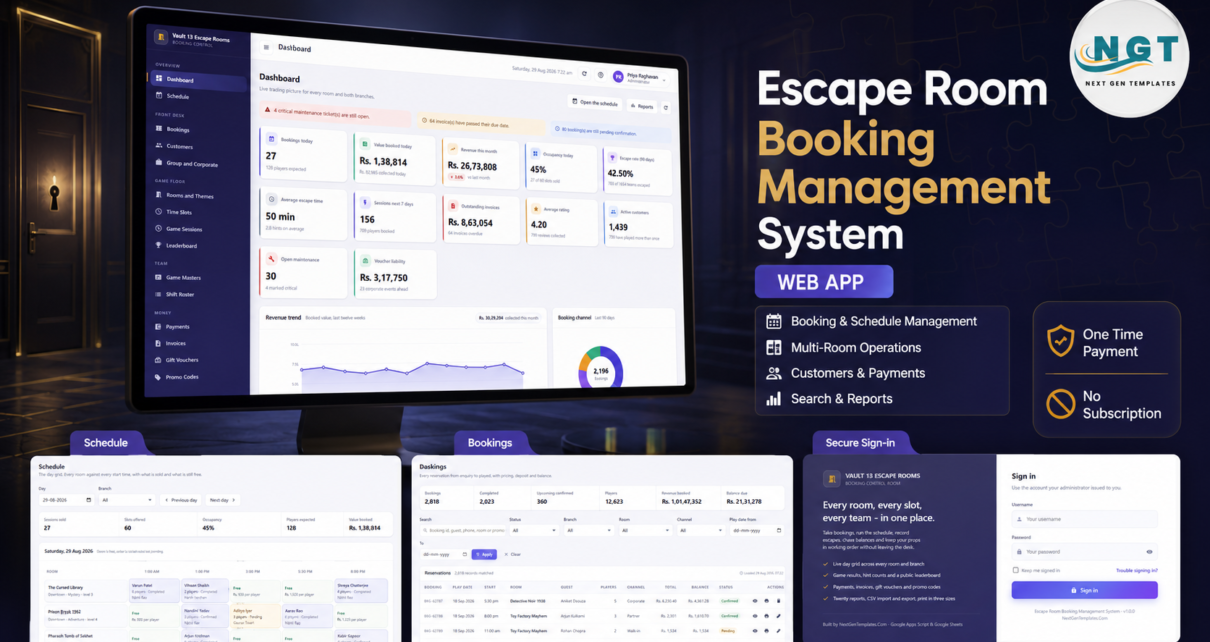
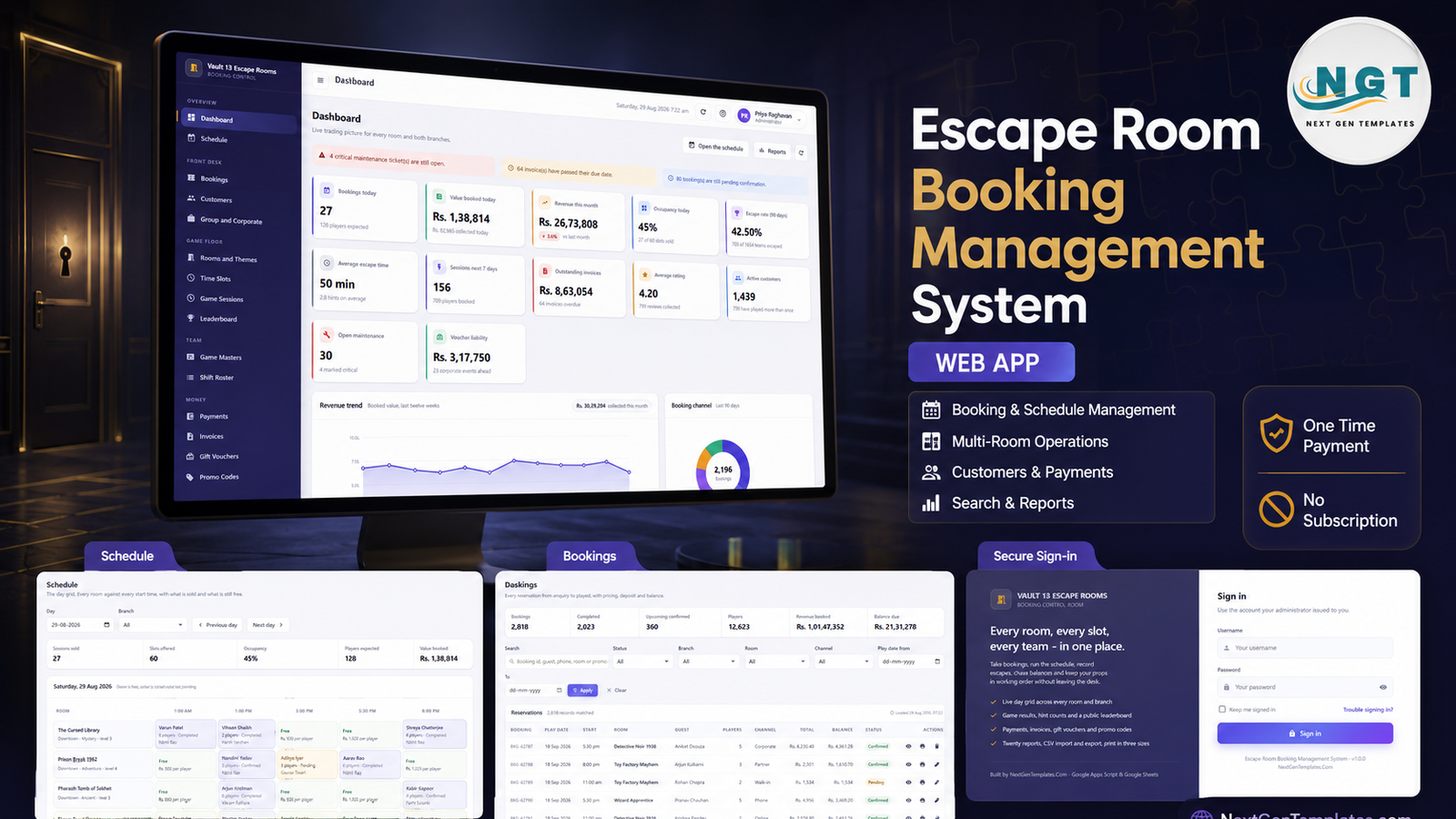
Most escape room venues outgrow their booking spreadsheet somewhere around the fourth room. Two branches, five start times a day, a promo code that only runs midweek, deposits half-taken, and a game master who needs to know whether the 3:00 pm slot in Zombie Quarantine is actually free – none of that survives a shared calendar for long. The Escape Room Booking Management System is a finished Google Apps Script web app built for exactly that stage: 21 database sheets, 27 screens, 8 role-based accounts, 20 exportable reports and around 13,950 rows of seeded demo data so nothing is empty on the first sign-in. It installs into your own Google account in about fifteen minutes, costs one payment rather than a monthly seat fee, and there is a live demo below you can sign into right now.
Get the Escape Room Booking Management System Web App
Try the Live Demo Before You Buy
We have deployed this web app in our own Google account so you can test every screen, every role and every report – with real sample data – before purchasing. No signup, no email required.
Test Login Credentials
Sign in as admin to see the whole system – Users, Settings, Audit Log, Archive – then sign back in as viewer and watch the sidebar shrink. Permissions are checked on the server as well as in the menu, so a Booking Agent genuinely cannot reach Settings. Ten minutes in the demo tells you more than any feature list.
These credentials are public on purpose – they belong to a shared demo instance that is periodically reset, not to anyone’s live venue. After purchase you get the full source (Code.gs + Index.html) and a deployment guide, and you install your own private copy with your own logins.
Key Features of the Escape Room Booking Management System
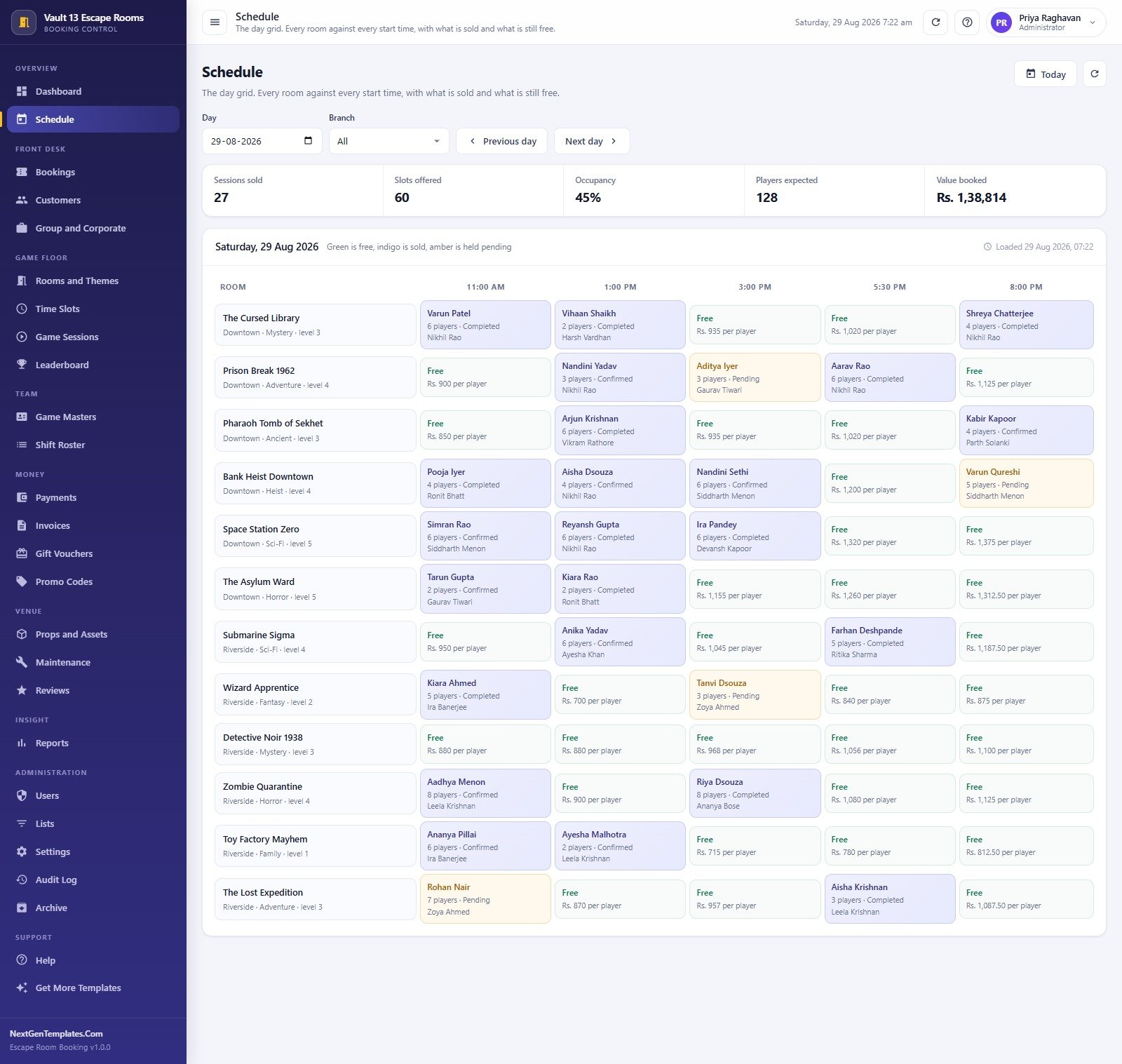
- A real day grid. The Schedule puts every room down the side and every start time across the top. Green cells are free and carry the price per player, indigo cells are sold, amber cells are held pending, and a hatched cell means that room does not run at that time on that day.
- Slot-factor pricing. Each time slot carries a price factor – x1 on an 11:00 am weekday, x1.1 mid-afternoon, x1.25 on the Friday-to-Sunday 8:00 pm slot. The booking total is price per player x factor x head count, calculated for you.
- Booking lifecycle with money attached. Pending, Confirmed, Completed, Cancelled and No Show, each row carrying channel, players, total and balance due.
- Game results that feed analytics. Escaped or failed, minutes taken, hints used and the game master who ran it – the three numbers behind escape rate, average escape time and the Hints Used Analysis report.
- A public leaderboard. Fastest escapes per room with the record-holding team, alongside escape rate, games played and average time for each of the twelve rooms.
- Money handled properly. Payments by method and reference, Invoices with issued, due and outstanding, and Gift Vouchers tracking face value against remaining balance – an open liability most venues never quantify.
- Promo codes with a real window. Percent or flat, with start and end dates, a usage limit and a redemption count, applied automatically when the agent picks the code.
- A group and corporate pipeline. Birthday bashes, school trips, team builders and private buyouts tracked from Enquiry through Quoted to Confirmed, with rooms, guests and quoted value.
- The venue itself. Props and Assets holds every physical item with its cost, condition and last check; Maintenance is a ticket queue with priority, owner and repair cost.
- Eight roles, server-enforced. Administrator, Manager, Booking Agent, Game Master, Accounts and Viewer, with two of the roles seeded twice so you can see a second-branch manager and a second agent side by side.
- Twenty reports. Grouped by Operations, Revenue, Game Play, Customers, Marketing, Finance, Events, Assets and Team – each with a date range, an optional branch filter, a chart, CSV export and print.
- Print at three sizes. 3 inch thermal receipt, 4 inch booking pass or A4 for invoices, quotes and reports – one setting, applied everywhere.
Every Screen, Explained
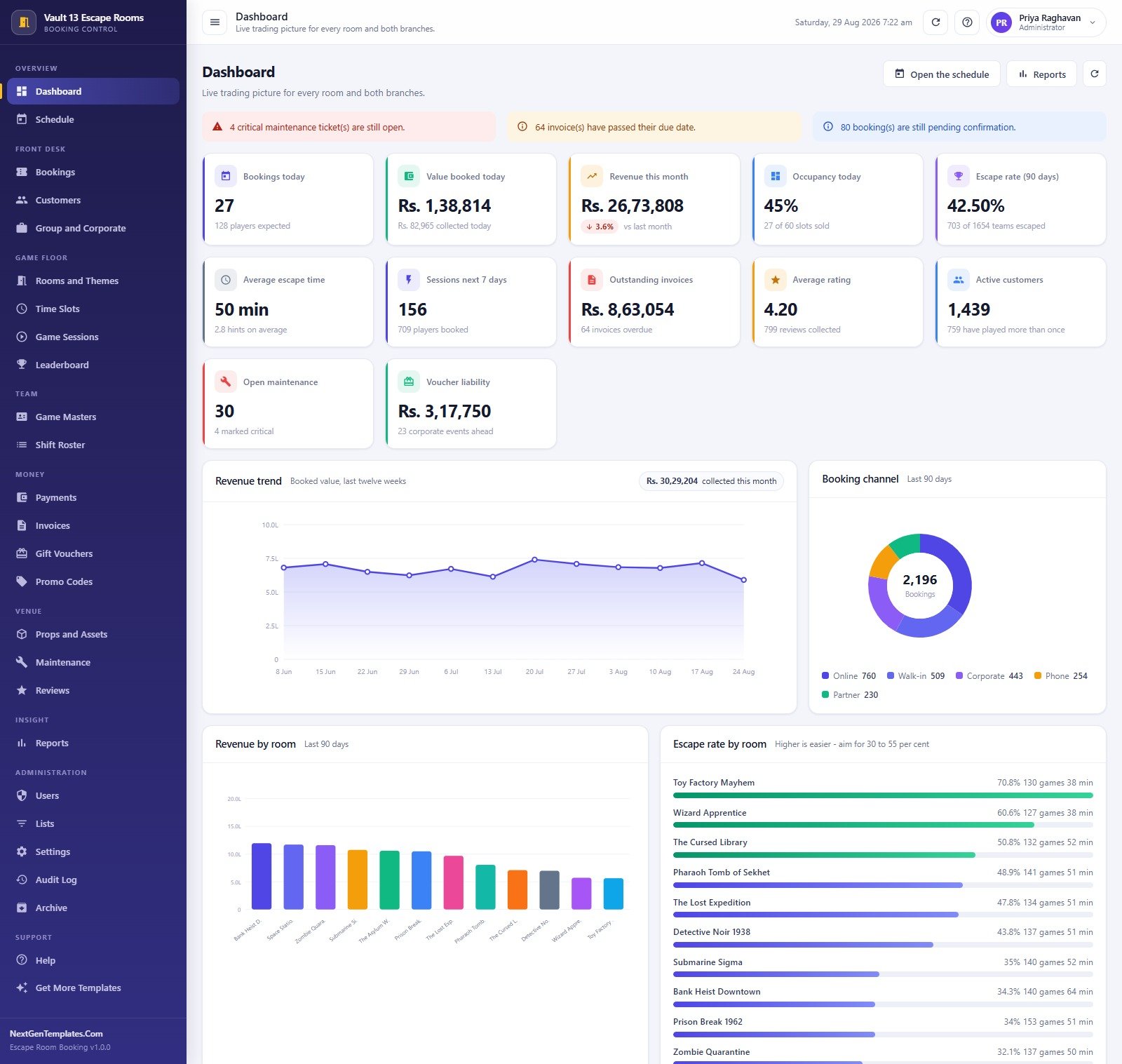
Dashboard. Twelve KPI cards – bookings today, value booked today, revenue this month, occupancy today, 90-day escape rate, average escape time, sessions next seven days, outstanding invoices, average rating, active customers, open maintenance and voucher liability. Below them sit a twelve-week revenue trend, a booking-channel doughnut, revenue by room and an escape-rate-by-room bar list. Three alert strips across the top surface critical maintenance tickets, overdue invoices and bookings still pending confirmation.
Schedule. The day grid, with a date picker, a branch filter and previous/next day buttons, topped by sessions sold, slots offered, occupancy, players expected and value booked for the chosen day.
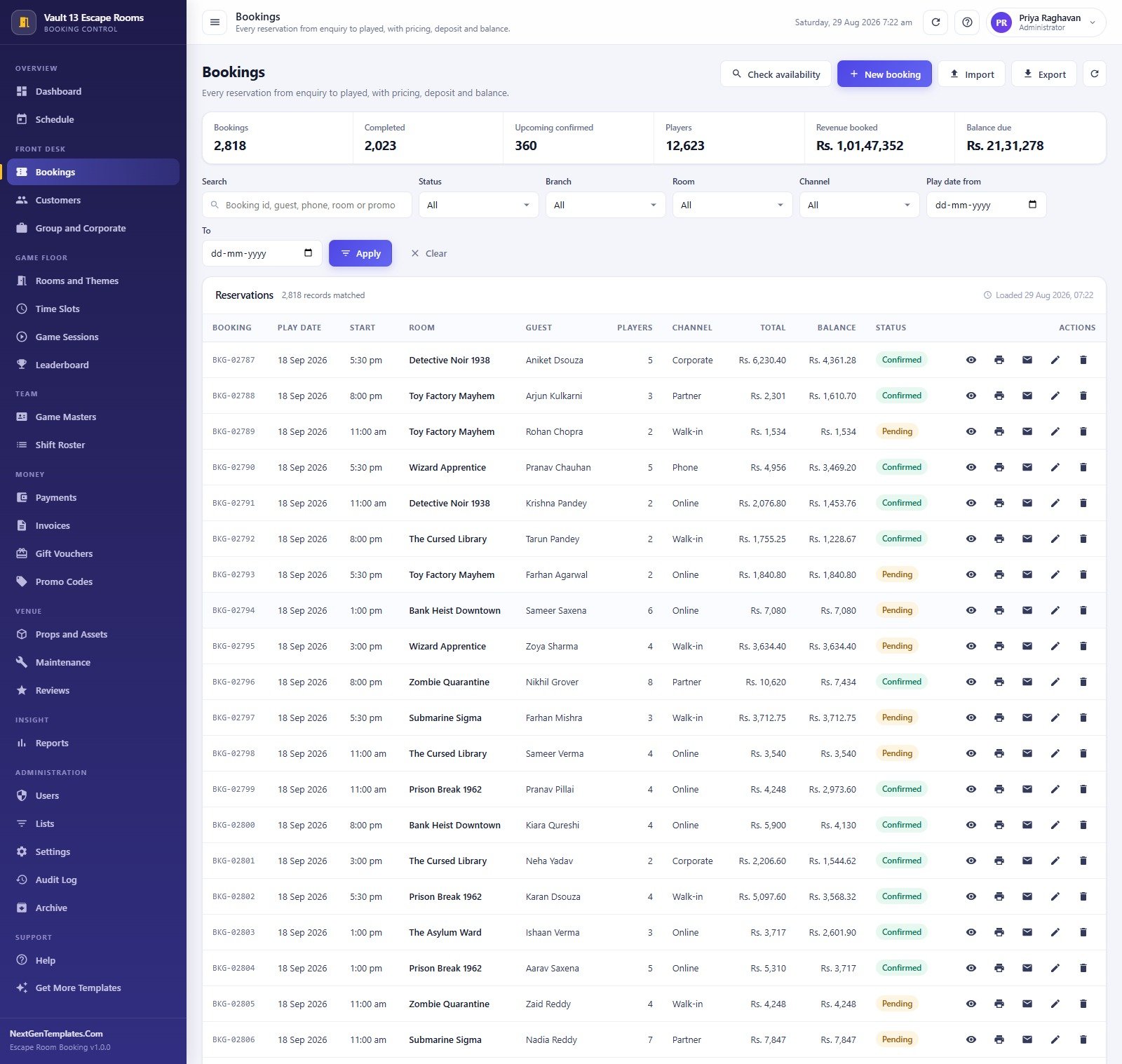
Bookings. Every reservation from enquiry to played. Filters for status, branch, room, channel and a play-date range, with per-row actions to view, print a pass, email the confirmation, edit or delete. Import and Export sit in the header.
Customers. A customer book of 2,000 records with bookings count, lifetime spend, loyalty points and type – Individual, Corporate, Student, Birthday or Tourist. Group and Corporate handles the larger events pipeline separately.
Rooms and Themes. The room catalogue – theme, branch, difficulty dots, player range, duration in minutes, price per player and a target escape rate. Time Slots holds the 60 slot templates behind the grid, each with the days it runs on, its start and end time, its price factor and its capacity.
Game Sessions and Leaderboard cover what actually happened in the room. Game Masters and Shift Roster cover the team – 26 staff with hourly rates and branch, and 786 rostered shifts totalling 3,406 hours.
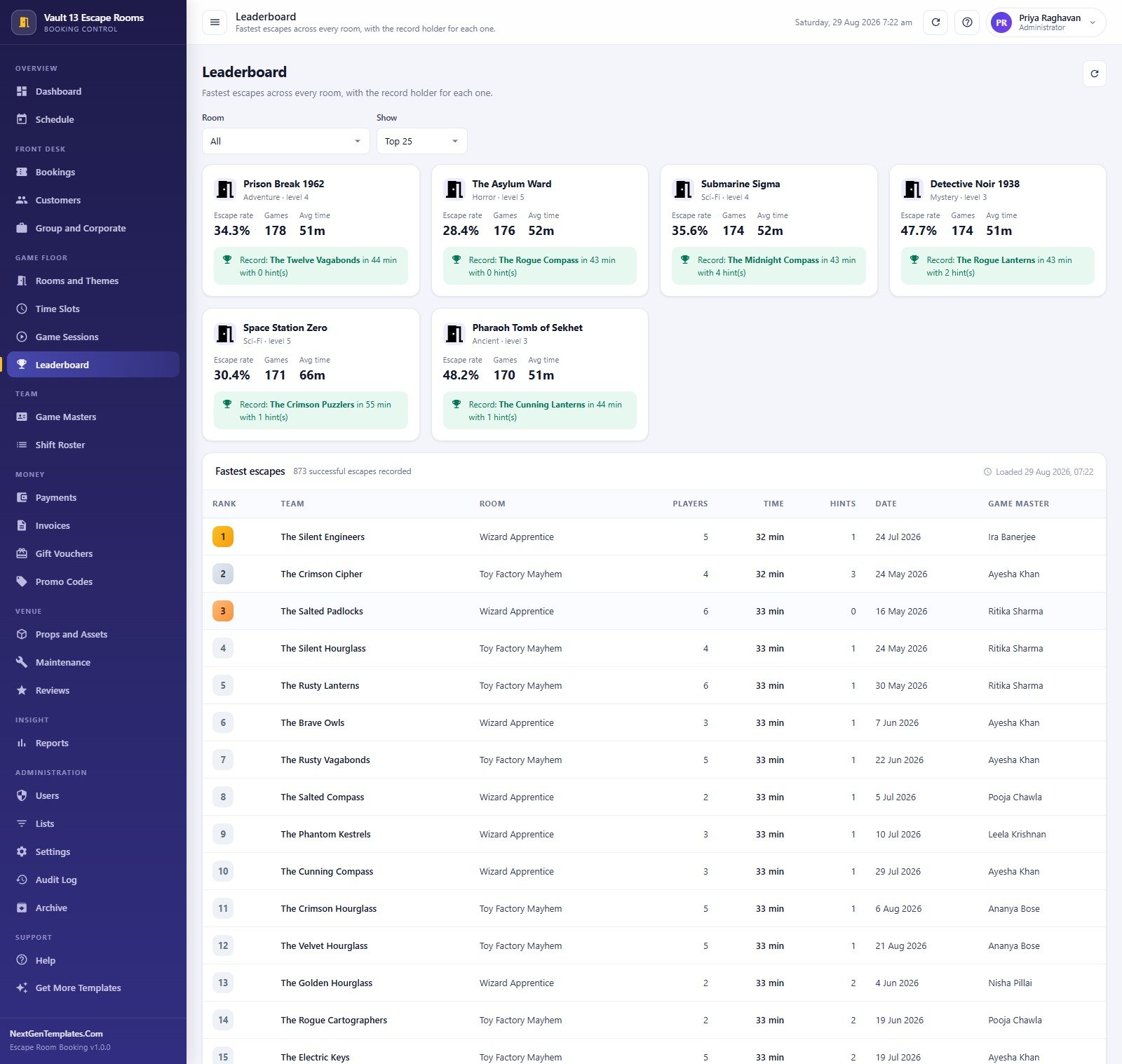
Payments, Invoices, Gift Vouchers and Promo Codes make up the Money block. Props and Assets, Maintenance and Reviews make up the Venue block – 240 props, 260 tickets and 799 player reviews with a published/unpublished flag.
Reports is a single screen with a report picker, a date range and a branch filter that renders a chart plus a table and exports either.
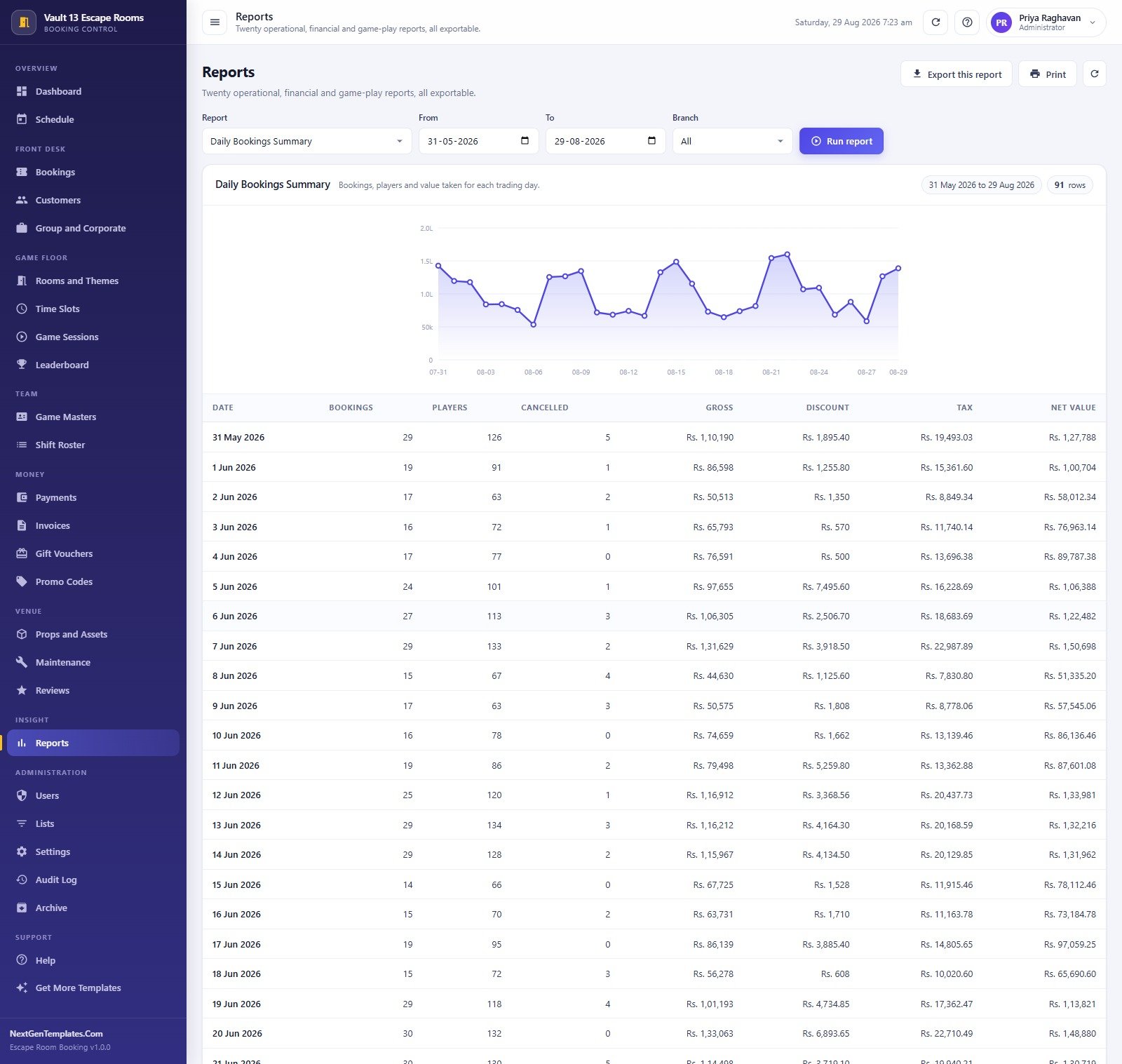
Administration holds Users, Lists (138 dropdown values), Settings (46 values across eight tabs), the Audit Log (302 dated entries of who changed what) and Archive, which writes a dated copy of the database to Drive before moving closed transactions out of the active sheets.
Escape Room Booking Management System vs. a Shared Spreadsheet vs. Paid Booking SaaS – Feature Comparison
| This web app | Shared Google Sheet / calendar | Paid booking SaaS | |
|---|---|---|---|
| Cost | One payment, no renewal | Free | Roughly $40-$130 per month, often plus a per-booking fee |
| Platform | Google Apps Script web app on Google Sheets | Google Sheets | Vendor-hosted SaaS |
| Setup time | About 15 minutes, staged and resumable | Hours of manual building | Days of onboarding |
| Real-time team collaboration | Yes – concurrent sign-ins, each limited to its role | Yes, but everyone sees everything | Yes |
| Mobile access | Yes – responsive in any browser | Yes, awkwardly | Yes |
| Customizable fields | Yes – you own the source and the Lists screen | Yes | Only what the vendor exposes |
| Share with link | Yes – one /exec URL for the whole team | Yes | Yes |
| Year-1 cost at 5 users | The purchase price, once | Free, plus your own build time | Roughly $480-$1,560 |
| Escape-rate and hint analytics | Built in, per room and per game master | You build it yourself | Usually a higher tier |
| Who owns the data | You – it sits in your own Google Drive | You | The vendor |
Who Should Use This Template
It suits independent escape room venues running 4 to 15 rooms, operators managing two branches from one front desk, franchise owners who want one install per site without a per-seat bill, and teams already living inside Google Workspace who would rather their booking data stayed in their own Drive than on somebody else’s server.
It is a poor fit if you need customers to self-book and pay on your public website – this is a back-of-house system, not a storefront widget. It records payments but does not process cards. It does not integrate with magnetic locks, room timers, hint tablets or CCTV. And a single-room pop-up doing four games a week does not need 21 database sheets.
Real-World Use Cases
The two-branch owner. Priya opens the Dashboard each morning and reads the day off three alert strips and twelve cards. Occupancy at 45% against 60 slots offered tells her the afternoon needs a push; the 90-day escape rate at 42.5% tells her the room mix is roughly right. She switches the Schedule branch filter to compare Downtown against Riverside without opening a spreadsheet.
The front-desk agent. Farah works almost entirely from the grid. A walk-in group of six asks what is free at 3:00 pm; the green cells answer instantly with the per-player price. She books it, applies TEAM15, takes a deposit, prints a 4 inch booking pass and emails the confirmation. Settings, Users and the Audit Log are not in her sidebar and are not reachable if she guesses the URL.
The game master. Kabir records each result – escaped or failed, minutes, hints. That is how the team spotted a room drifting to a 71% escape rate and knew to harden the final puzzle. It is also how the Leaderboard stays honest.
The accountant. Meera pulls the Payments Collection Summary and Outstanding Balances at month end, chases the 64 overdue invoices from the Invoices screen, and keeps an eye on voucher liability – real money owed in experiences, sitting on the books.
Advantages of the Escape Room Booking Management System
- Nothing is empty on day one. Roughly 13,950 seeded rows mean every chart, report and leaderboard is populated the first time you sign in, so you can evaluate it properly instead of imagining it.
- Permissions that actually hold. Roles are checked server-side, not merely hidden in the sidebar – the difference between a tidy menu and real access control.
- You own the data and the code. The database is a Google Sheet in your Drive; the app is Apps Script you can read and edit. Nothing phones home.
- One payment. Five people on the front desk cost the same as one. There is no seat licence and no per-booking fee.
- Staged, resumable setup. Because Apps Script enforces a six-minute execution limit, the installer runs in stages and picks up where it stopped – the usual reason big Apps Script installs fail.
- Housekeeping built in. Backup to Drive, a health check that scans for orphaned rows and double-booked slots, and an Archive that trims closed transactions without touching master data.
Opportunities for Improvement
Being honest about the edges: there is no customer-facing booking page, so online sales still arrive through whatever channel you already use and get entered here. There is no payment gateway – payments are recorded, not processed. No hardware integration exists for locks, timers or hint systems. Email goes out through your own Google account via MailApp, which means Google’s daily quota applies. And Google Sheets is the database, so a venue pushing well past a few hundred thousand transaction rows will want to lean on the Archive screen rather than let the active sheets grow forever.
Best Practices
- Change all eight passwords on day one and delete the seeded accounts you will not use. The starter passwords are published in the manual, which is exactly why they must not survive your first hour.
- Get Lists right before you get busy. Branches, booking channels, customer types, packages and prop categories all flow from that one screen; fixing them later means editing history.
- Set the price factors deliberately. The slot factor is your yield-management lever – a 1.25x Friday evening and a 1x Tuesday morning will do more for revenue than any promo code.
- Record every game session. Skip the hint count and the Hints Used Analysis report becomes decoration; keep it honest and it tells you which puzzle is misfiring.
- Clear the demo transactions before your first real sale so your reports are not averaging your numbers with ours.
- Run the health check monthly and take a backup before any bulk import. Both are one click from Settings.
- Redeploy after every code change. An Apps Script web app serves the last published version – Deploy > Manage deployments > New version, or your edits stay invisible. The official Google Apps Script web apps documentation covers this in detail.
Explore Relevant Templates
- Escape Room Booking Management System Web App – the system described in this post.
- Adventure Sports Booking Management System Web App – the same booking engine for guided activities and equipment hire.
- Amusement Park Ticketing Management System Web App – gate ticketing, ride capacity and season passes.
- Bowling Alley Management System Web App – lane scheduling, leagues and food and beverage.
- Concert & Ticketing Management System Web App – event-led rather than slot-led ticketing.
- DJ & Sound Equipment Booking System Web App – useful alongside private buyouts and party packages.
- Every Web App management system from NextGenTemplates.
More on this blog: Web App Based: Hotel Booking Management System, Adventure Sports Booking Management System Web App and Resource Booking Management Tracker in Google Sheets.
Curious how systems like this are put together? The NextGenTemplates Academy learning paths build up the spreadsheet skills behind them, with practice files along the way.
Get the Escape Room Booking Management System Web App
Frequently Asked Questions
Can I try it before buying?
Yes. The green box above links a fully seeded live demo of this exact system with all eight roles open. Create a booking, record a game result, run a report, export a CSV. Nothing is held back behind the purchase.
Do I need to know how to code?
No. You paste two text files into a new Apps Script project, press Deploy, then press one button on the sign-in card. The user manual in the download walks every step.
Where does the data live?
In a Google Sheets database the app creates inside your own Google Drive. There is no vendor server, and you can open the raw spreadsheet any time from Settings > Database.
Does it take card payments from customers?
No. It records payments your team has already taken – cash, UPI, card machine, bank transfer or voucher – with the method and reference. There is no gateway.
How many staff can use it?
As many as you like. Eight accounts ship seeded and you add more on the Users screen. There is no per-seat licence.
Can it handle two branches?
Yes. Branch is a list value applied to rooms, staff, bookings and shifts, and the Schedule, Reports and most list screens carry a branch filter. The demo runs Downtown and Riverside together.
What happens when the sheets get heavy?
Archive backs up the whole database to Drive, then moves closed transactions older than your cutoff out of the active sheets. Rooms, customers, staff and props are never touched.
About the Author
Built by PK – Microsoft Certified Professional with 15+ years of Excel, Google Sheets, and Power BI experience. Founder of NextGenTemplates, reaching 300K+ subscribers across YouTube channels. Every template is hand-built and tested before release.
Conclusion
An escape room is an operations business wearing a theatre costume. The margin is in occupancy, slot pricing, prop uptime and how quickly a pending booking becomes a confirmed one – and none of those are visible in a shared calendar. The Escape Room Booking Management System Web App puts the schedule, the money, the game floor and the team on one screen, enforces who can see what, and leaves the data in your own Google Drive for a single payment.
Start with the live demo – sign in as admin, then as viewer, and see whether the role split matches how your desk actually runs. When it does, get the Escape Room Booking Management System Web App and deploy your own copy this afternoon.