Most savings plans do not fail on the amount. They fail on the pace. You choose a $60,000 house deposit, set aside $1,200 a month, pick a target date three years out, and never do the division that says the date needs $1,650. The Financial Goals & Milestones Tracker in Google Sheets does that division on every row automatically: 16 columns per goal, 6 of them calculated, 4 live charts, one Total Saved So Far card and a List tab that feeds every dropdown.Financial Goals & Milestones Tracker in Google Sheets
It is a one-page tracker rather than a personal finance platform, and that is deliberate. Everything – the card, the charts and the full goal table – sits on a single sheet you can read in one screen. Google’s own documentation explains how charts read directly from a data range in Google Sheets, which is exactly the mechanism this tracker uses: no pivot tables, no hidden helper columns, and new goals appear in the charts on their own.Financial Goals & Milestones Tracker in Google Sheets
Get the Financial Goals & Milestones Tracker in Google Sheets
Key Features of the Financial Goals & Milestones Tracker in Google Sheets
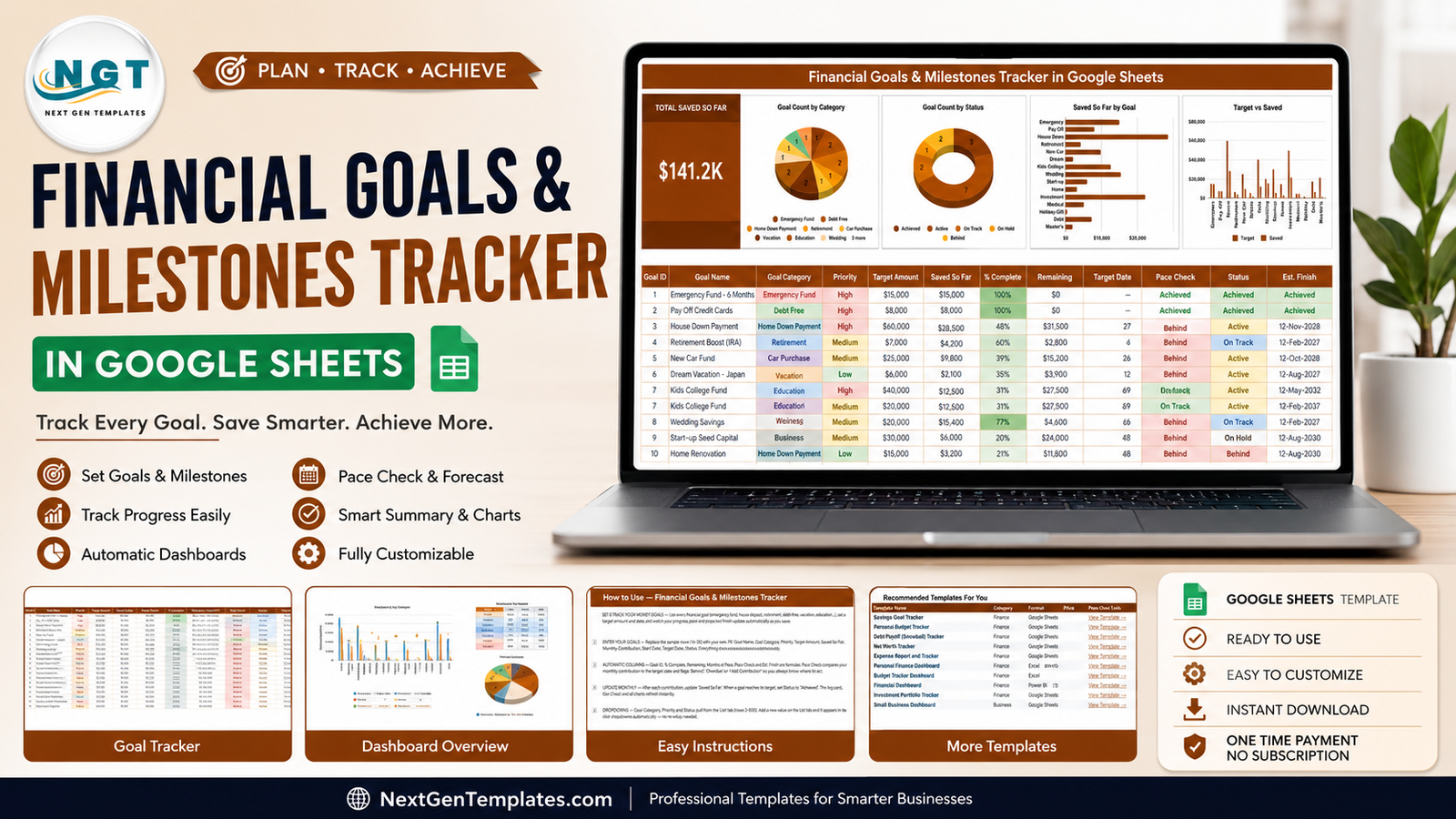
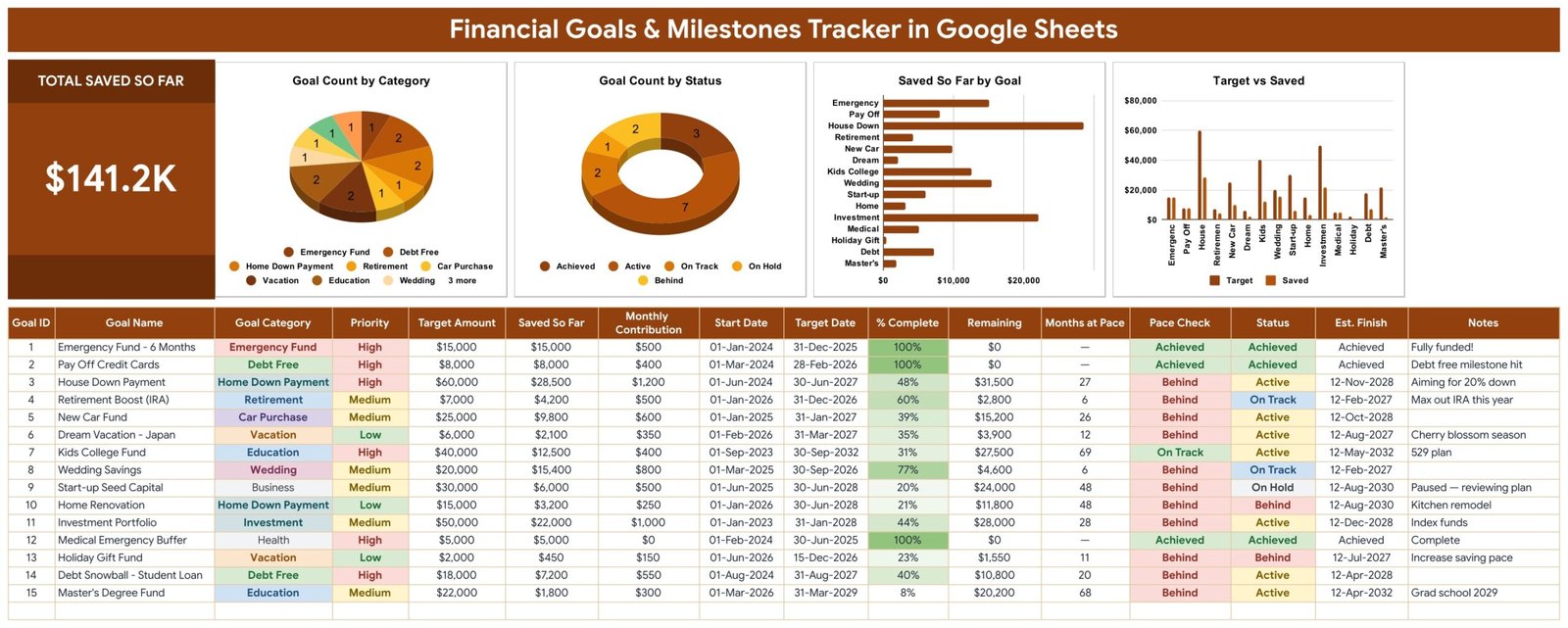
- Total Saved So Far card: one large KPI carrying everything you have put away across every goal. The sample file reads $141.2K and the number moves the moment a single row changes.Financial Goals & Milestones Tracker in Google Sheets
- Pace Check column: compares your monthly contribution against the months left to the target date and returns Achieved, On Track, Behind, Overdue or Add Contribution. This is the column that turns a wish list into a plan.Financial Goals & Milestones Tracker in Google Sheets
- Est. Finish: a projected completion date per goal at your current saving rate, so you can see the gap between the date you chose and the date the money supports.
- Months at Pace: how many further contributions the remaining balance needs. A 48 here against a 24-month deadline is a decision waiting to be made.
- Goal Count by Category: a pie chart across Emergency Fund, Debt Free, Home Down Payment, Retirement, Car Purchase, Vacation, Education, Wedding, Business, Investment, Health and more.
- Goal Count by Status: a doughnut splitting Achieved, Active, On Track, On Hold and Behind, so you can see at a glance how much of the plan is genuinely moving.
- Saved So Far by Goal: a horizontal bar chart ranking goals by accumulated savings, which shows where the money has actually gone rather than where you intended it to go.
- Target vs Saved: paired columns per goal, making the remaining gap on each target visible without reading a single number.Financial Goals & Milestones Tracker in Google Sheets
- Six automatic columns: Goal ID, % Complete, Remaining, Months at Pace, Pace Check and Est. Finish all calculate from what you type.Financial Goals & Milestones Tracker in Google Sheets
- List tab dropdowns: Goal Category, Priority and Status pull from rows 2-500 on the List tab, so you extend the options without touching a formula.
Dashboard Pages Explanation
1 – The Tracker Page
The banner runs across the top, then the Total Saved So Far card sits on the left with the four charts beside it on a single row. Below that is the goal table with sixteen columns: Goal ID, Goal Name, Goal Category, Priority, Target Amount, Saved So Far, Monthly Contribution, Start Date, Target Date, % Complete, Remaining, Months at Pace, Pace Check, Status, Est. Finish and Notes.Financial Goals & Milestones Tracker in Google Sheets
Goal Count by Category tells you whether your goals are spread across life or all pointed at one thing. Goal Count by Status shows the mix of Achieved, Active, On Track, On Hold and Behind. Saved So Far by Goal ranks goals by the money actually accumulated. Target vs Saved puts the target beside the balance for every goal, which is where a $60,000 deposit sitting at $28,500 stops being an abstraction.Financial Goals & Milestones Tracker in Google Sheets
Fifteen realistic sample goals ship with the file – a fully funded six-month emergency fund, credit cards paid off, a house down payment at 48%, an IRA boost, a new car fund, a Japan trip, a kids college fund, wedding savings, start-up seed capital on hold, a kitchen renovation, an index-fund portfolio, a medical buffer, a holiday gift fund, a student-loan snowball and a master’s degree fund. The % Complete and Pace Check cells are colour-shaded, so a finished row reads as finished and an 8% row does not hide in the middle of the table.Financial Goals & Milestones Tracker in Google Sheets
2 – How to Use Page
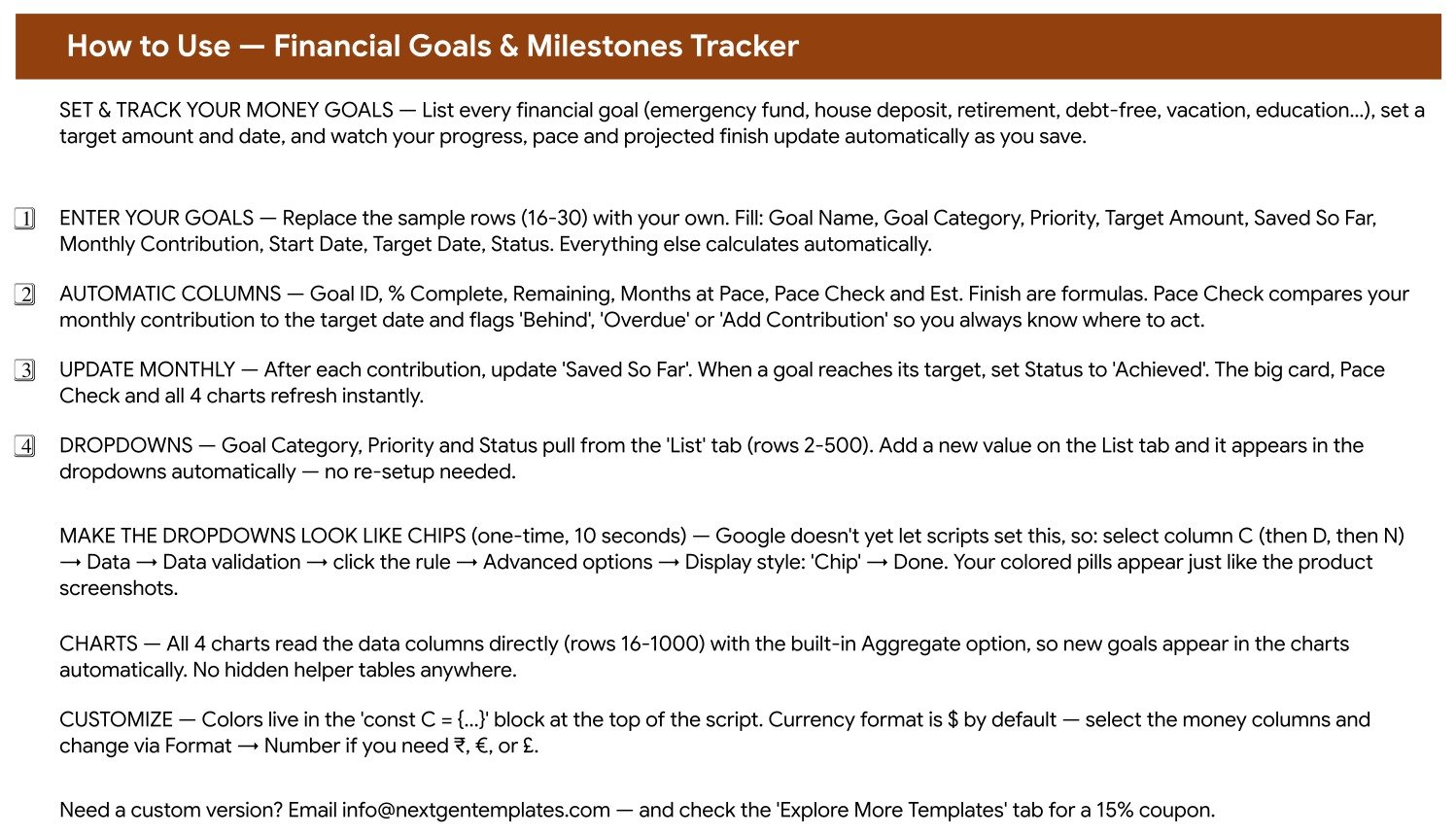
A plain-language page covering which columns you fill and which calculate, how the Pace Check flags Behind, Overdue and Add Contribution, how the dropdowns are wired to the List tab, and how to switch the currency format from dollars to rupees, euros or pounds. It also contains the ten-second, one-time trick that turns the data-validation dropdowns into the coloured chips you see in the screenshots – Google does not let a script set that display style, so it has to be done from the Data validation menu.Financial Goals & Milestones Tracker in Google Sheets
3 – The List Tab
Goal Category, Priority and Status all read from rows 2-500 here. Add a category once – Pet Fund, Sabbatical, Home Office – and it appears in the dropdown on every row and in the Goal Count by Category chart automatically. Because all four charts read the data columns directly with the built-in Aggregate option, nothing needs re-ranging when your list grows.
4 – Explore More Templates
A closing tab with related NextGenTemplates products, popular category links and a discount code for your next purchase.Financial Goals & Milestones Tracker in Google Sheets
Financial Goals & Milestones Tracker in Google Sheets vs. Microsoft Excel vs. Paid Finance App – Feature Comparison
| Feature | This Google Sheets tracker | Microsoft Excel alternative | Paid finance app (YNAB, Monarch) |
|---|---|---|---|
| Cost | $6.99 sale price, one time | Free if you build it, hours of work | $9 to $15 per month |
| Platform | Google Sheets in any browser | Excel desktop or web | Vendor-hosted app plus mobile |
| Setup time | Under 10 minutes: copy, edit the List tab, enter goals | 3 to 5 hours for the charts and pace formulas | An evening, plus linking accounts |
| Real-time collaboration | Native Google Sheets sharing | Through OneDrive or SharePoint | Often a higher plan tier |
| Mobile access | Free Google Sheets app | Excel mobile app | Yes, that is its strength |
| Customizable fields | Edit the List tab and column labels | Editable if the workbook is unlocked | Limited to what the app allows |
| Share with link | Yes, view or edit, per person | Yes, with Microsoft sharing | Household invite only |
| Pace check and projected finish date | Calculated on every goal | Build it yourself | Varies by app |
| Automatic bank sync | No, you update Saved So Far | No | Yes |
| Year-1 cost at 5 users | $6.99 total | $0 plus a weekend of building | $108 to $180 |
Who Should Use This Template
This tracker suits anyone running several money goals at once and losing track of which one is slipping. Couples get the most out of it: one shared copy ends the recurring argument about whether the deposit, the car fund and the holiday are on track, because all three sit on the same screen with the same maths applied to each.Financial Goals & Milestones Tracker in Google Sheets
It also works well for a parent balancing a college fund against retirement, for someone paying down debt while still saving, and for anyone who has picked a target date without ever checking whether the monthly amount reaches it. Finance coaches can duplicate the file per client and use the Pace Check column as the agenda for a review call.
It is less suited to day-to-day expense tracking or to portfolio valuation with live market prices. Those are different jobs and deserve different sheets.
Real-World Use Cases
Nine goals, six of them behind. A list that looked healthy turned out to be Behind on six rows once the monthly contributions were entered honestly. Moving $250 from two low-priority goals into the house deposit pulled its Est. Finish date back inside the target year.
Saving as a couple. One shared copy with edit access. The Target vs Saved chart showed wedding savings at 77%, the emergency fund at 100% and the car fund at 39%. Seeing all three at once turned a vague disagreement into a short conversation about one goal.
College fund against retirement. With both goals on one page, Months at Pace made the trade-off explicit – 69 months on the college fund against 6 on the IRA boost – and raising the college contribution moved the finish date forward by nearly a year.
Debt and savings side by side. A student-loan snowball and a credit-card payoff sit in the same table as the savings goals, using the Debt Free category, so the whole financial picture is one list rather than two competing ones.
Advantages of the Financial Goals & Milestones Tracker
The first advantage is the projection. Most goal trackers store a target and a balance; this one tells you the date. Comparing Est. Finish against Target Date on ten goals takes about ninety seconds and usually reorders your priorities.
The second is that everything is on one page. No tab switching, no drill-through, no dashboard that hides the data. The card, the four charts and every goal are visible together, which is what makes a monthly review a two-minute job.
The third is ownership. It is a spreadsheet in your own Drive. You can add a column, change a formula, rename the categories or share it with a partner, and it keeps working after any subscription would have lapsed.
Opportunities for Improvement
The tracker does not connect to bank accounts. You enter Saved So Far yourself, which takes about two minutes a month but does mean the dashboard is only as current as your last update. If automatic transaction syncing matters more than the projection, a paid finance app is the better tool.
It also assumes a steady monthly contribution when it projects the finish date. Irregular saving – a bonus in March, nothing in July – will make Est. Finish approximate rather than exact. Treat it as a direction of travel, not a promise.
Best Practices
- Set up the List tab with your own categories before you enter a single goal.
- Enter the contribution that actually leaves your account, not the one you intend to make.
- Update Saved So Far on a fixed day each month, right after contributions clear.
- Read the Pace Check column first; every Behind row needs a decision, not a note.
- Mark funded goals as Achieved so they stop competing for attention with live ones.
- Sort by Priority when money is tight – pausing two low-priority goals beats under-funding all nine.
- Keep goal names short so the Saved So Far by Goal chart stays readable.
Explore Relevant Templates
If you want to build out the rest of your personal finance setup, these pair well with this tracker:
- FIRE Milestone Tracker in Google Sheets for one long-horizon independence number.
- Annual Family Budget Tracker in Google Sheets for the yearly plan your contributions come out of.
- College Savings Goal Tracker in Google Sheets when the education goal deserves its own sheet.
- Vacation & Trip Budget Tracker in Google Sheets for costing the trip your Vacation goal is funding.
- Personal Cash Flow Tracker in Google Sheets for the money coming in and going out each month.
- Google Sheets tracker templates and Google Sheets financial tools for the wider catalogue.
If you would rather learn to build trackers like this yourself, the NextGenTemplates Academy learning paths teach the spreadsheet skills step by step, with practice files.
Get the Financial Goals & Milestones Tracker in Google Sheets
Frequently Asked Questions
What is included in the Financial Goals & Milestones Tracker in Google Sheets?
A one-page tracker with a Total Saved So Far card, four live charts, a sixteen-column goal table with fifteen sample goals, a How to Use page, an Explore More Templates page and a List tab that drives the dropdowns.Financial Goals & Milestones Tracker in Google Sheets
How does the Pace Check work?
It divides the Remaining amount by your Monthly Contribution to get Months at Pace, then compares that with the months left to your Target Date. Short of the date it returns Behind, a zero contribution returns Add Contribution, and a passed date returns Overdue.Financial Goals & Milestones Tracker in Google Sheets
Do I need Microsoft Excel?
No. The template is built for Google Sheets and a free personal Google account is enough. There are no macros and no add-ons to install.Financial Goals & Milestones Tracker in Google Sheets
Can I add my own goal categories?
Yes. Add them on the List tab and they appear in the dropdowns across the whole table immediately. The category chart picks them up automatically because it reads the data column directly.
Does it connect to my bank?
No. You update Saved So Far manually, which keeps the file free of permissions, add-ons and anything that breaks when a bank changes its API.Financial Goals & Milestones Tracker in Google Sheets
Can my partner and I both use it?
Yes, at the same time. Share your copy the normal Google Sheets way, with edit access for a partner or view-only for anyone who just needs to follow the progress.Financial Goals & Milestones Tracker in Google Sheets
How many goals can it hold?
The formulas and charts run to row 1000, so roughly 985 goals. In practice a list beyond about twenty stops being a plan.Financial Goals & Milestones Tracker in Google Sheets
Can I use a currency other than dollars?
Yes. Select the money columns and change the format through Format, then Number. The dollar amounts in the sample data are placeholders.
About the Author
Built by PK – Microsoft Certified Professional with 15+ years of Excel, Google Sheets, and Power BI experience. Founder of NextGenTemplates, reaching 300K+ subscribers across YouTube channels. Every template is hand-built and tested before release.Financial Goals & Milestones Tracker in Google Sheets
Conclusion
The Financial Goals & Milestones Tracker in Google Sheets exists to answer one question that most savings spreadsheets dodge: on your current contribution, when does this goal actually finish? With a Total Saved So Far card, four charts, six calculated columns and an honest Pace Check on every row, it turns a list of intentions into a set of dates you can plan around.Financial Goals & Milestones Tracker in Google Sheets
Download the Financial Goals & Milestones Tracker in Google Sheets from NextGenTemplates and put your five biggest goals in tonight.
For Google Sheets tutorials and template walkthroughs, visit the NeoTechNavigators YouTube channel.Financial Goals & Milestones Tracker in Google Sheets